
What is Cyberdog?
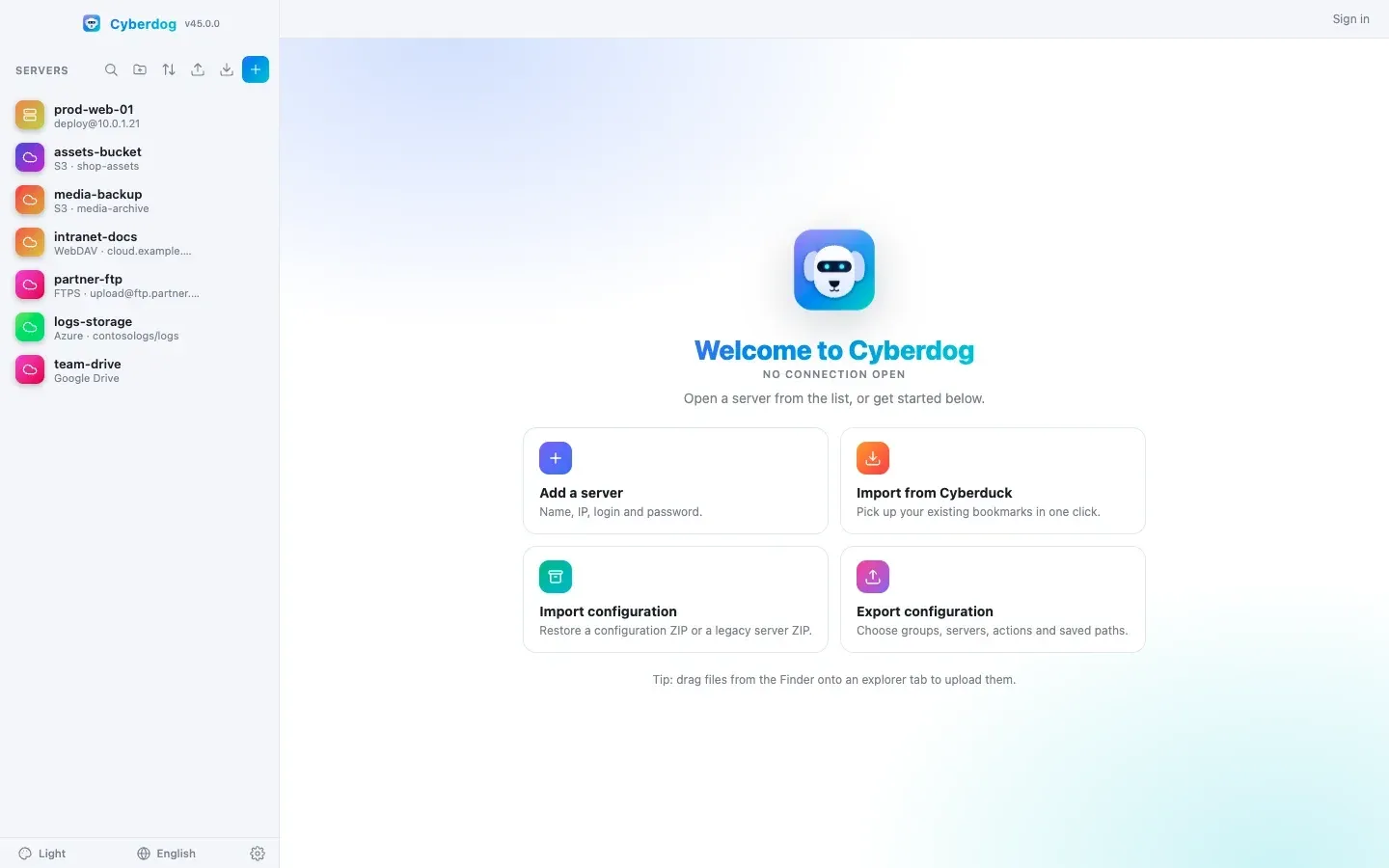
Cyberdog is a free, MIT-licensed desktop application for managing SSH servers and remote storage from one window. It combines an SFTP file explorer, an SSH terminal that opens under the explorer in the current folder, a server health dashboard, systemd service and log views, Docker container management and saved bash scripts called quick actions. Beyond SSH, the same explorer opens FTP and FTPS, Amazon S3 and S3-compatible storage, Azure Blob Storage and Azure Files, WebDAV, SMB shares, Dropbox, OneDrive and Google Drive. The project README describes it as an alternative to Cyberduck, WinSCP and Termius.
The project is young: the GitHub repository was created in October 2026 and has moved quickly through releases 1.3 to 1.10 since then. The official website on GitHub Pages presents screenshots, download links and comparison pages, and the interface is available in 14 languages, including Arabic with a right-to-left layout. The project does not take payments; version 1.8.0 made every feature free and removed an earlier Premium preview and its licensing.
Builds are published on GitHub Releases with a SHA256SUMS.txt file: DMG images for Apple Silicon and Intel Macs, a Windows 10 and 11 x64 installer and a portable executable, and, since version 1.9.0, a Linux x64 AppImage and a .deb package. macOS users can also install it from the project Homebrew tap. According to the README, macOS builds are signed with an Apple Developer ID certificate and notarized from 1.10.1 onward, while Windows builds are not code-signed yet, so SmartScreen can show an unrecognized publisher warning. Windows standard installs and macOS can download updates from inside the app.
The current release is Cyberdog 1.10.1, published on November 15, 2026. It adds the signed and notarized macOS builds, the Homebrew cask and a fix for the bastion route test, which had stopped at its first step since 1.8.0. Version 1.10.0 added ten interface languages, resizable explorer columns, e-mail verification at sign-up with a code at each sign-in, and account deletion. Version 1.9.0 added the Linux packages, and 1.7.0 introduced most of the non-SSH protocols, proxy support, a local pane, resumable transfers and server-to-server copy.
Cyberdog is built with Electron, the ssh2 library for SFTP, shell and exec channels, and xterm.js, with plain HTML, CSS and JavaScript and no front-end framework. It connects directly from the computer to each server, stores configuration locally and encrypts saved passwords with the operating system keychain. An optional account backed by Supabase adds teams and shared configuration. The project secret vault documentation states that the vault connector implementations and the team and history management live in a private repository, with only the integration points in the public repository.
Key capabilities
- SFTP file explorer The explorer lists folders first with sortable columns for name, size, date, owner, group, permissions, type and extension, and supports multi-selection, drag and drop to and from the desktop and a context menu with download, rename, delete, copy path and new file or folder actions. Columns are resizable since 1.10.0. Any number of servers can be open in tabs.
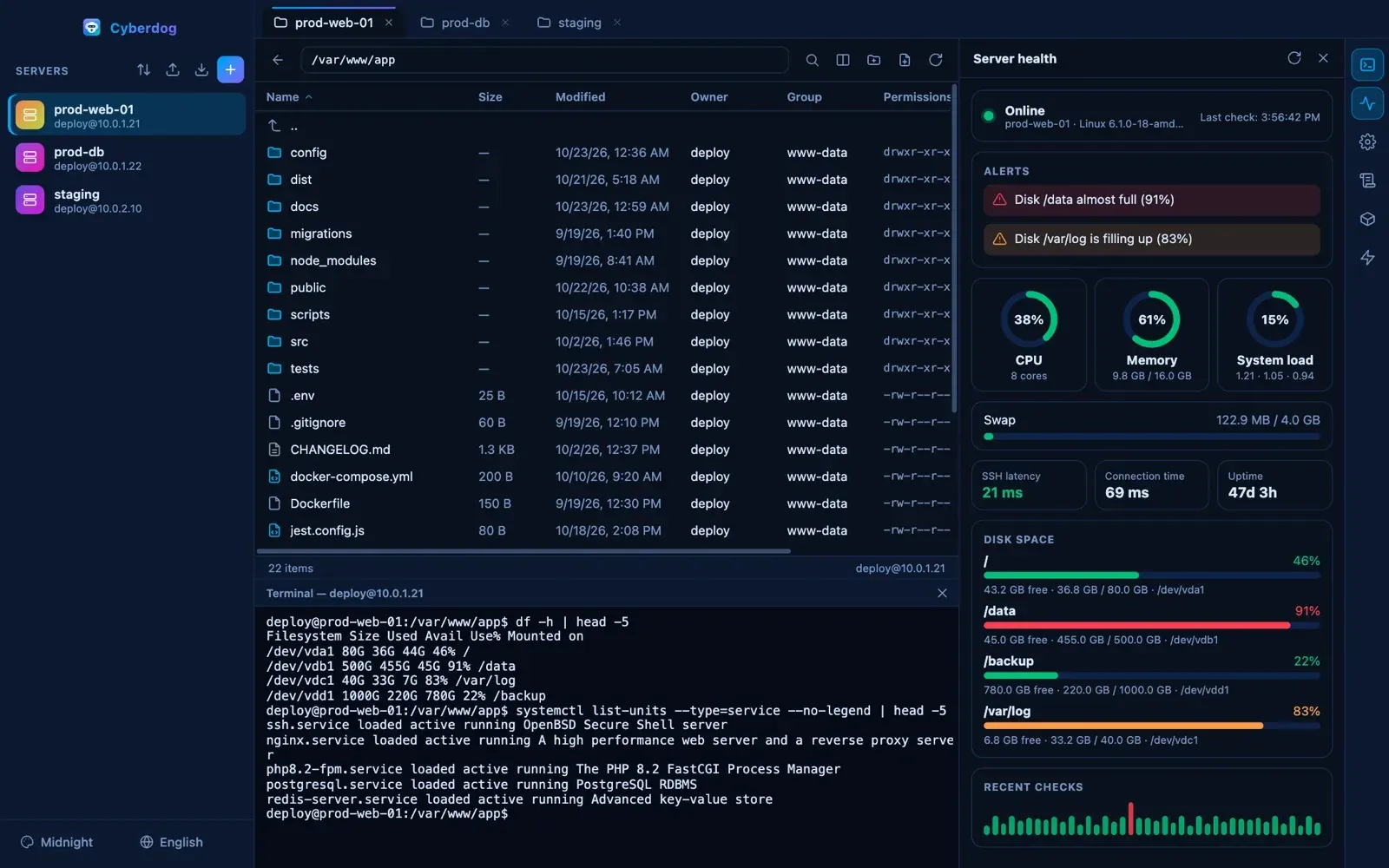
- Built-in SSH terminal A terminal based on xterm.js opens below the explorer, already in the folder being browsed, and stays open while other panels are used. The splitter between explorer and terminal can be dragged, and sizes are remembered. Terminal colors follow the selected theme.
- Remote search, split view and archive extraction A search box (Cmd or Ctrl+F) suggests matches in the current folder or across the whole server and jumps to the file. Split view creates two independent explorers with their own path, history and selection, and files can be dragged between them. Archives such as
.zip,.tar.gz,.7zand.rarare extracted on the server without downloading them. - Edit with a local editor Edit with downloads a remote file, opens it in an installed editor such as VS Code, Cursor, Sublime Text, Notepad++ or TextEdit, and uploads it again every time the file is saved. Double-clicking a file uses the default editor chosen in Settings.
- Permissions and ownership A Permissions dialog shows the owner, lets the user pick another account from the server and keeps the octal mode in sync with read, write and execute checkboxes for owner, group and others, including setuid, setgid and sticky bits. Changes run with the SSH account permissions, and denied or partial changes are reported.
- Server health dashboard Every 10 seconds the dashboard shows online status, CPU, memory, swap, system load, disk space per volume with warnings at 80% and critical alerts at 90%, uptime, SSH latency and connection time, plus a history of recent checks. Monitoring runs only while the app is open.
- Process Explorer An agentless process view over SSH refreshes every 5 seconds and groups Linux processes by program, parent tree, user, systemd service or container. It keeps CPU and memory trends for up to 5 minutes, flags spikes, memory growth, zombies and I/O waits, and can send SIGTERM or SIGKILL after confirmation. It requires Linux
/procandprocps, withssfor ports. - Services, live logs and Docker The services panel lists
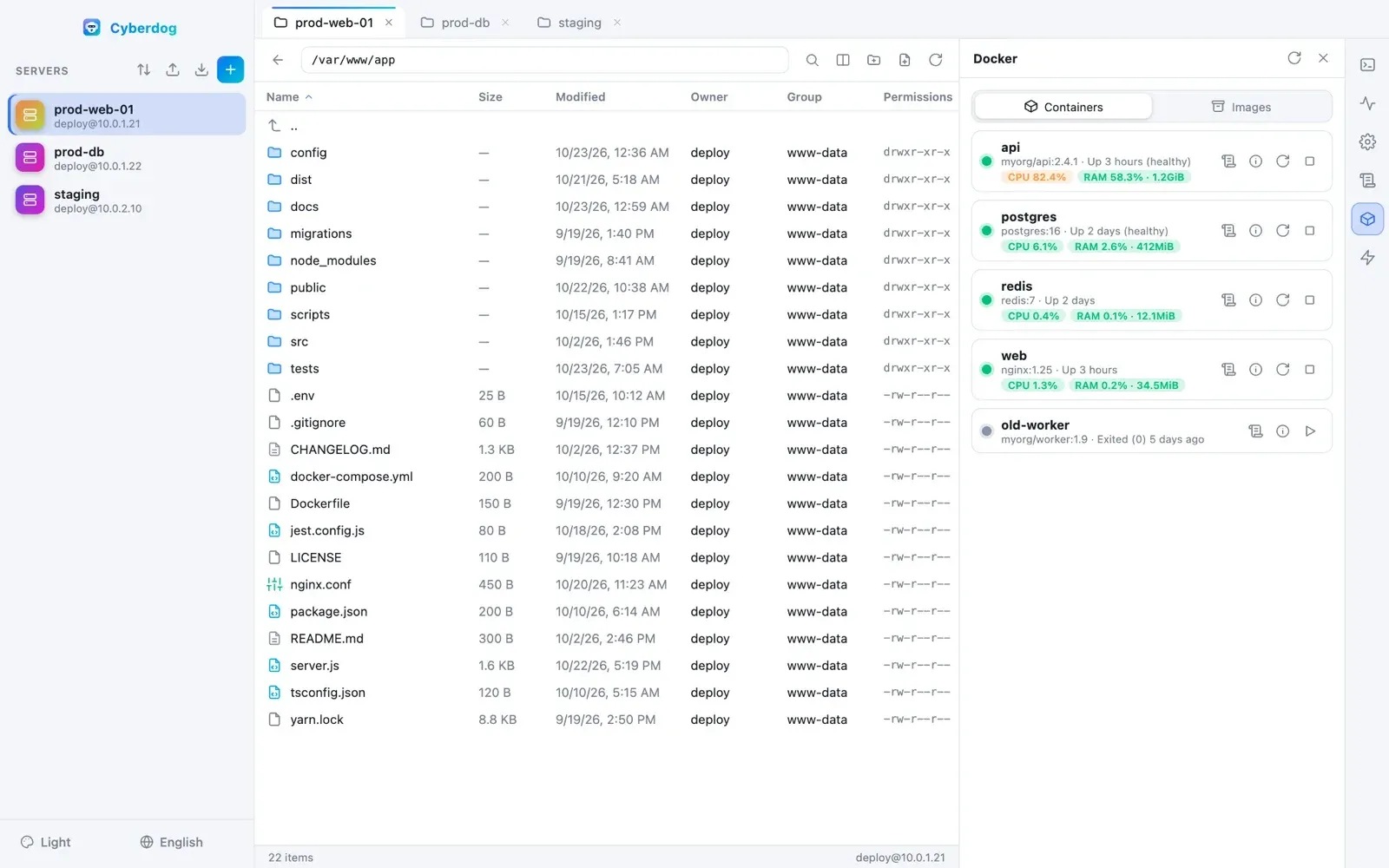
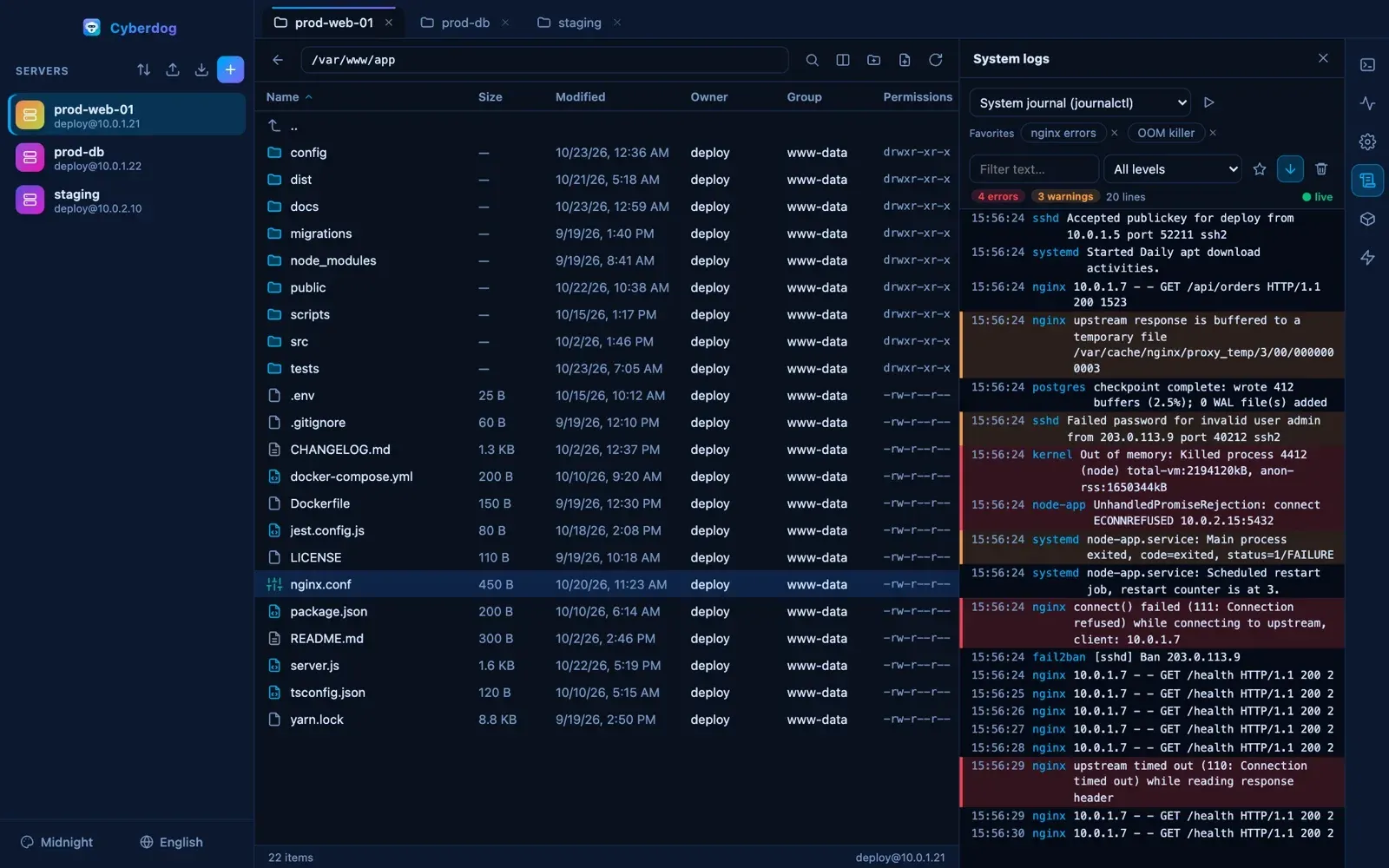
systemctlunits with filters and can start, stop or restart them, handlingsudowhen the account is not root. The log panel follows the systemd journal, a single unit, Nginx logs,syslog,auth.logor any file, with level filters, error highlighting and saved searches. The Docker panel lists containers with live CPU and RAM, controls them, tails their logs and inspects containers and images. - Quick actions Bash snippets are saved once and run on the current server or on every open server at the same time, with each output shown in the panel. Actions can be stored locally, in a personal workspace or in a team, and exported to a ZIP file. Shared scripts require a full preview and are revalidated before they run.
- Many storage protocols Besides SFTP, the explorer supports FTP and FTPS with explicit or implicit TLS, S3 with AWS profiles, IAM Identity Center and presets for Google Cloud Storage, Backblaze B2, Wasabi, DigitalOcean Spaces and Scaleway, Azure Blob and Azure Files with account keys, SAS tokens or Microsoft Entra ID, WebDAV with Basic, Digest or Bearer authentication, SMB through the system client on macOS and Windows, and Dropbox, OneDrive and Google Drive through OAuth. Non-SSH protocols can go through an HTTP CONNECT or SOCKS5 proxy. The protocol table lists the options per type.
- Transfers between servers and resumable transfers A transfer manager in the explorer footer shows concurrent transfers with progress, speed, remaining time and cancellation. Files can be copied from one server to another without staging them on disk, interrupted transfers can be resumed where both ends allow it, and an optional local pane shows the computer files beside the server.
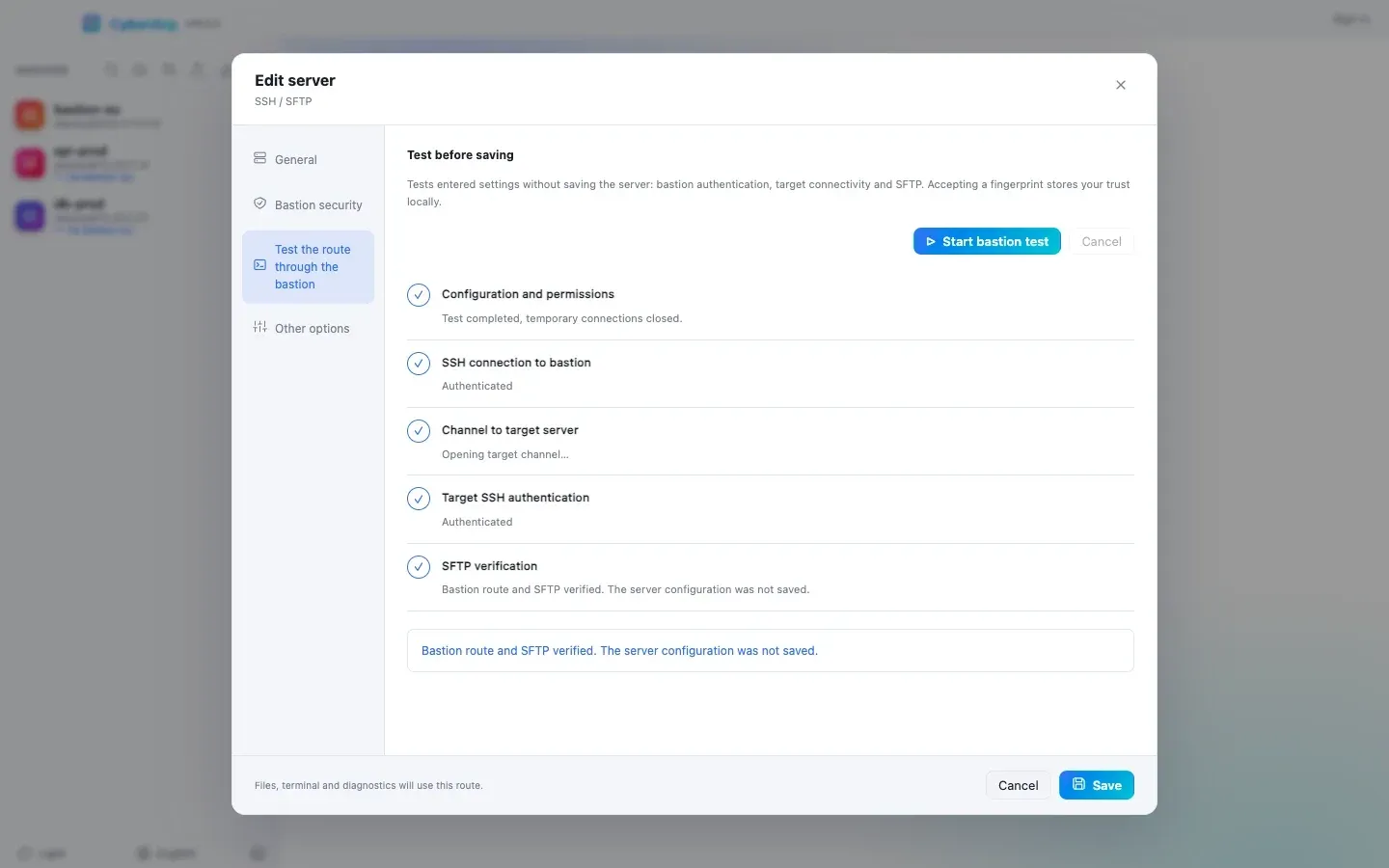
- Bastions and jump hosts A server can be reached through another saved server acting as bastion. Cyberdog opens a channel through the bastion and runs a second SSH session from the computer, so the target private key never reaches the bastion; the bastion must allow TCP forwarding and only one hop is supported. A route test checks each step without saving, and changed host fingerprints block the connection.
- SSL certificates and SSH keys The certificate view scans Let's Encrypt, nginx, Apache and system certificate directories over SSH with OpenSSL, shows domains, issuers, fingerprints and validity, and raises expiry alerts at 7 to 90 days. Certbot renewal is offered for certificates under
/etc/letsencrypt/live. The SSH key manager generates Ed25519 or RSA 4096 keys locally, installs public keys inauthorized_keysand lists keys already authorized on the server. - Secret vault connectors Ten connectors read passwords and SSH keys at connection time from 1Password, Bitwarden or Vaultwarden, HashiCorp Vault KV v2, AWS Secrets Manager, Azure Key Vault, TeamPass 3.2, Keeper Secrets Manager, ManageEngine Password Manager Pro, Devolutions Server and Windows Remote Desktop Manager. Connectors stay local and are excluded from exports and from Supabase. Requirements per vault are listed in the vault guide.
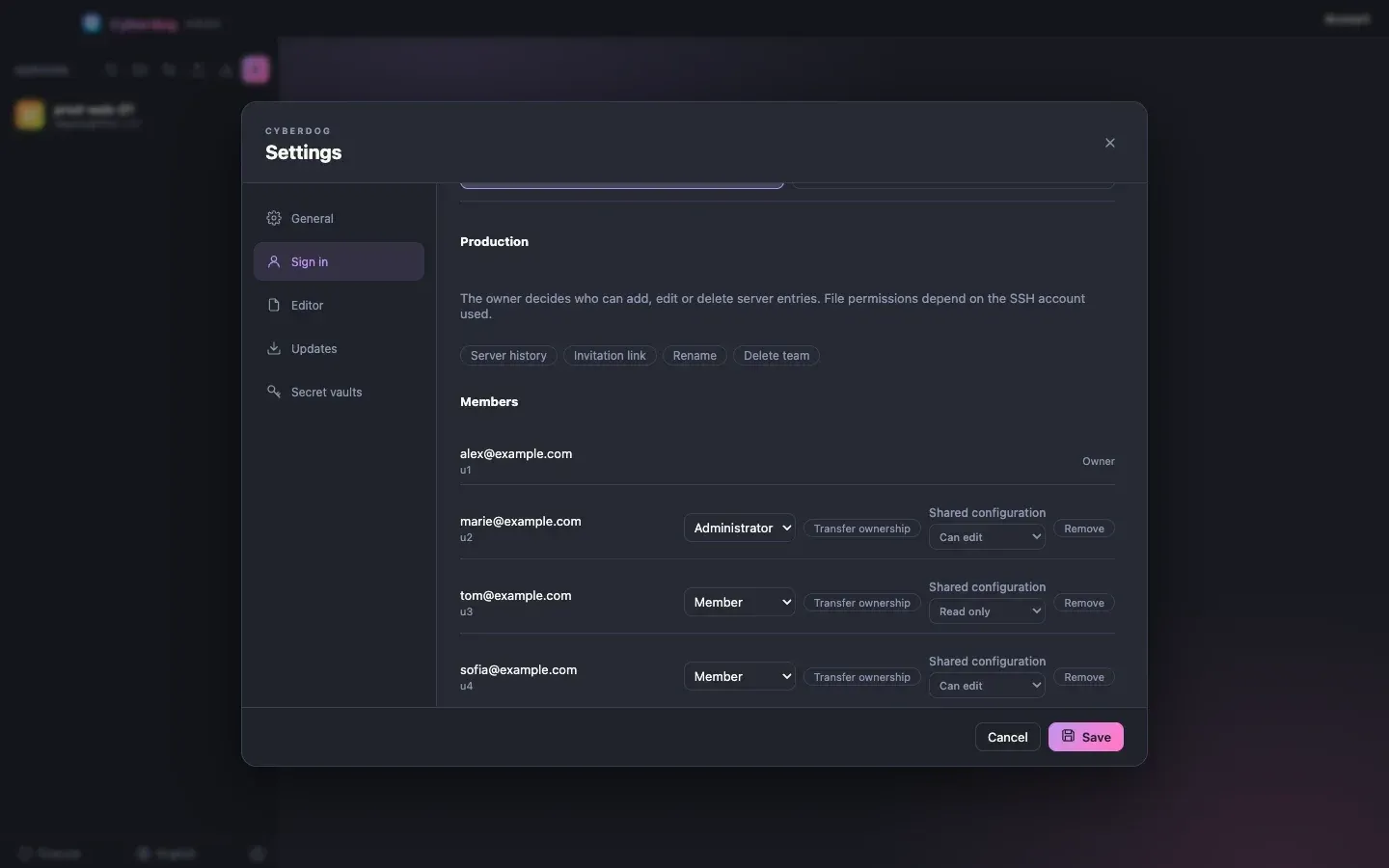
- Optional free teams A free account created with an e-mail address adds a personal space and teams with owner, administrator and member roles, read-only or edit rights on shared configuration, invitation links valid for 7 days and a server history that can restore earlier versions. History snapshots hold name, host, port, SSH username and group, never credentials. Other members' changes appear on the next launch.
- Import and export The import menu reads Cyberduck bookmarks, FileZilla
sitemanager.xmlor XML exports, WinSCP INI files and Cyberdog configuration ZIPs; third-party passwords are not imported, and Transmit and SolarWinds formats are not supported yet. Exports let the user choose groups, servers, quick actions and saved paths, and never include server passwords, host fingerprints or private key files. - Desktop packages for three systems Release 1.10.1 ships macOS DMGs for arm64 and x64, a Windows x64 installer and portable executable, and a Linux x64 AppImage and Debian package. macOS installs are also available through
brew install --cask pickywawa/cyberdog/cyberdog. Building from source needs Node.js 22 or later, and each platform installer is built on its own operating system. Download links are on the latest release page. - Themes and languages Seven themes are available: System, Light, Dark, Midnight, Dracula, Forest and Sunset. The interface supports 14 languages: English, French, German, Italian, Spanish, Portuguese, Chinese, Arabic, Hindi, Russian, Japanese, Korean, Turkish and Indonesian. Window size and position are restored at launch, and an optional setting reopens the server tabs left open, without replaying terminal commands.
Where Cyberdog fits
Daily file work on Linux servers
An administrator opens a server from the list, browses its folders in the explorer, uploads files by drag and drop and edits configuration files in a local editor, with each save uploaded back. The terminal below the explorer starts in the same folder for commands that need a shell. Saved paths per server, or shared across servers, jump to frequent folders.
Watching server health, services and logs
The health dashboard reports CPU, memory, load, disks and SSH latency every 10 seconds and highlights volumes above 80% and 90%. From the same window, the services panel restarts a failed systemd unit and the log panel follows its journal output with error highlighting. The Process Explorer adds a per-process view with grouping by service or container.
Managing Docker hosts
On servers that run containers, the Docker panel lists running and stopped containers with live CPU and RAM usage, starts, stops and restarts them, follows container logs and inspects ports, mounts, environment variables and image layers, without a separate agent on the server.
Running the same script on several servers
Routine commands such as restarting a stack or producing a disk report are saved as quick actions. One click runs a quick action on the current server or on every open server, and each server output is shown in the panel. Team members can share actions through a team space, with a preview before execution.
Moving files between cloud storage and servers
The same explorer opens S3 buckets, Azure storage, WebDAV, FTP and cloud drives next to SSH servers. Files can be copied from one connection to another without staging them on disk, interrupted transfers resume, and S3 and Azure objects can be shared through presigned or SAS links valid for up to 7 days. A comparable browser-based approach is the self-hosted Filestash.
Reaching private servers and keeping credentials in a vault
Servers that are only reachable from a jump host are configured with a bastion, tested step by step and then used by the explorer, terminal and dashboards. Credentials can stay in an existing password manager such as Bitwarden or TeamPass and are read at connection time. Centralized access control with session audit is the domain of PAM products such as JumpServer, which works differently.
Install
brew install --cask pickywawa/cyberdog/cyberdogReviews of Cyberdog
Be the first to share your experience with Cyberdog.
Write a review
Loading review form…
Found Cyberdog useful? Upvote it todayYour vote helps other IT teams find it in the daily ranking.