

What is JumpServer?
JumpServer is an open-source Privileged Access Management (PAM) platform, also described as a bastion host, for DevOps and IT teams. It gives users one workspace for reaching SSH, RDP, VNC, Kubernetes, database, website, RemoteApp and VirtualApp assets, while administrators control who may connect to what, store and rotate the privileged accounts, and keep recordings and audit logs of the sessions. The project began as an open-source bastion host in 2014, according to the v5.0.0 release notes, and is maintained by FIT2CLOUD under the jumpserver/jumpserver repository and the website jumpserver.com. It is self-hosted: the vendor states that session recordings, credentials and audit logs stay on your own infrastructure.
Distribution depends on the edition. The Community Edition is installed with a one-line script that downloads the images and starts the services, and needs a clean 64-bit Linux server with at least 4 CPU cores and 8 GB of memory. The Enterprise Edition is a separate commercial product installed from an offline package supplied by the vendor's delivery team, intended for restricted or air-gapped networks, with a 14-day trial offered. JumpServer Client is a cross-platform desktop application for Windows, macOS and Linux, and Docker images are published under the jumpserver namespace on Docker Hub. The repository README lists the components: the core Django-based platform, Lina (web interface), Luna (web terminal), KoKo (protocol connector and proxy), Chen (web database connector) and Kael (AI component), plus Enterprise protocol proxies and connectors.
The current GitHub release is v5.1.1, published on October 20, 2026. It tightened access-token format validation, reduced stored background task arguments, hardened database and Redis write protection in high-availability deployments and fixed Windows applet host deployment. Release 5.1.0 on October 15, 2026 revamped the KoKo text interface with an asset tree, search, mouse controls and multi-session management, added Windows PowerShell over WinRM, made DBX the default remote database application in place of DBeaver, added AI-assisted command filter drafting, CIDR-based zones and batch download of session recordings, and made OpenBao use HTTPS by default. Version 5.0.0 on September 17, 2026 introduced the refreshed native client and AI-assisted command recommendations, real-time risk alerts and automated audit reports. Several 5.1 items are tagged as Enterprise Edition in the notes, including approval exemption periods, OAuth2 group synchronization and Dameng database proxy support.
Support policy matters for planning. According to the README and SECURITY.md, 5.x is actively maintained, 4.10.x is an LTS series and 3.10.x receives critical fixes only; the V3 Community Edition reaches end of life on December 31, 2026 and the Enterprise Edition on December 31, 2028. The code is licensed under GPL-3.0. JumpServer is a PAM and access-gateway product, not a general identity provider, a VPN, or an endpoint management tool.
JumpServer screenshots
Explore the interface. Open a screenshot to view it at full size.
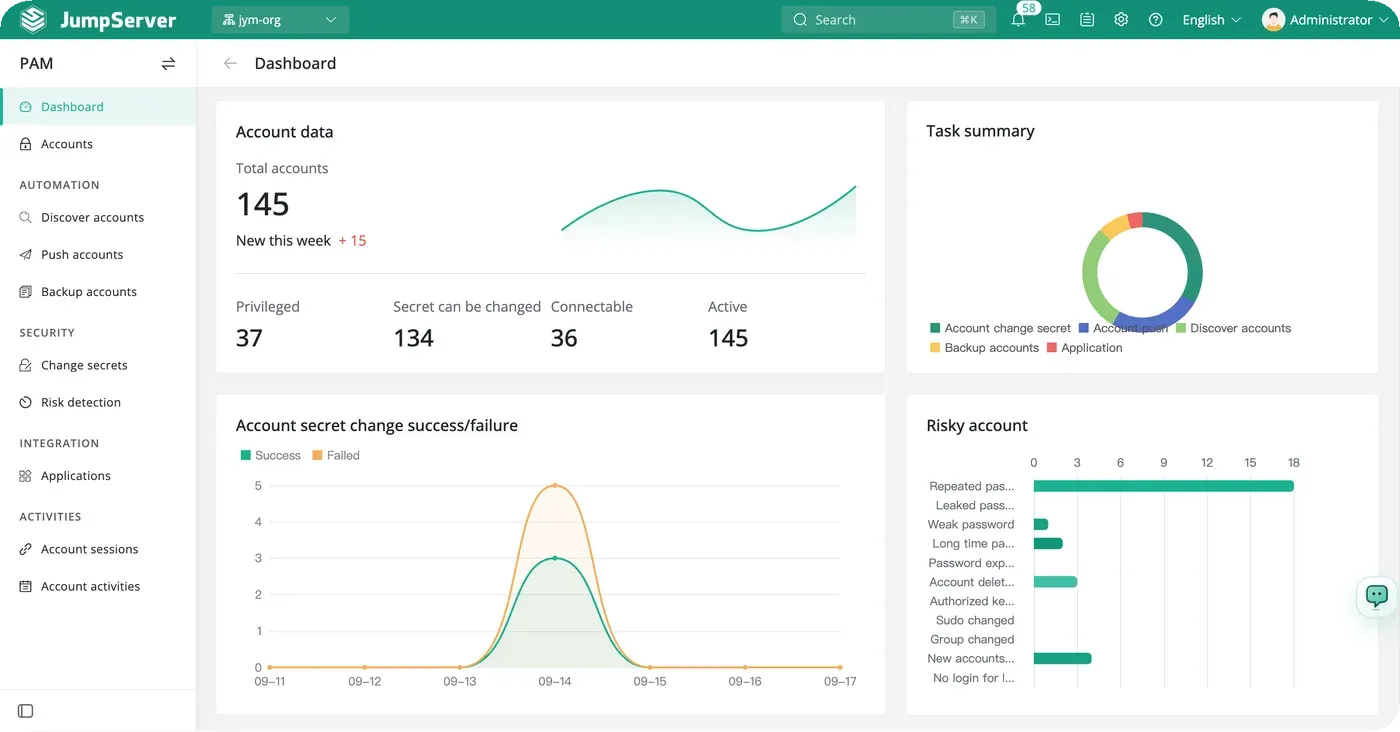
Official README screenshot of the PAM dashboard with sample data.
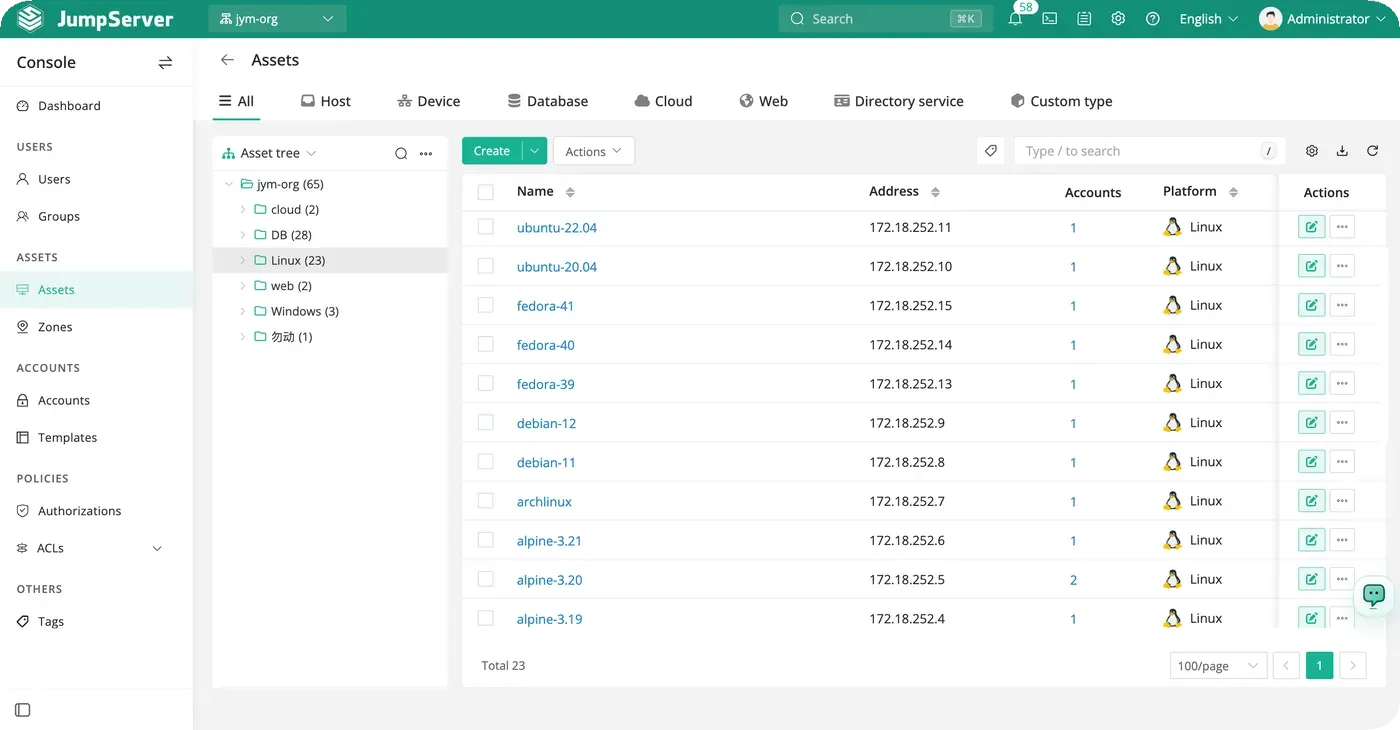
Official README screenshot of asset management in the Console.
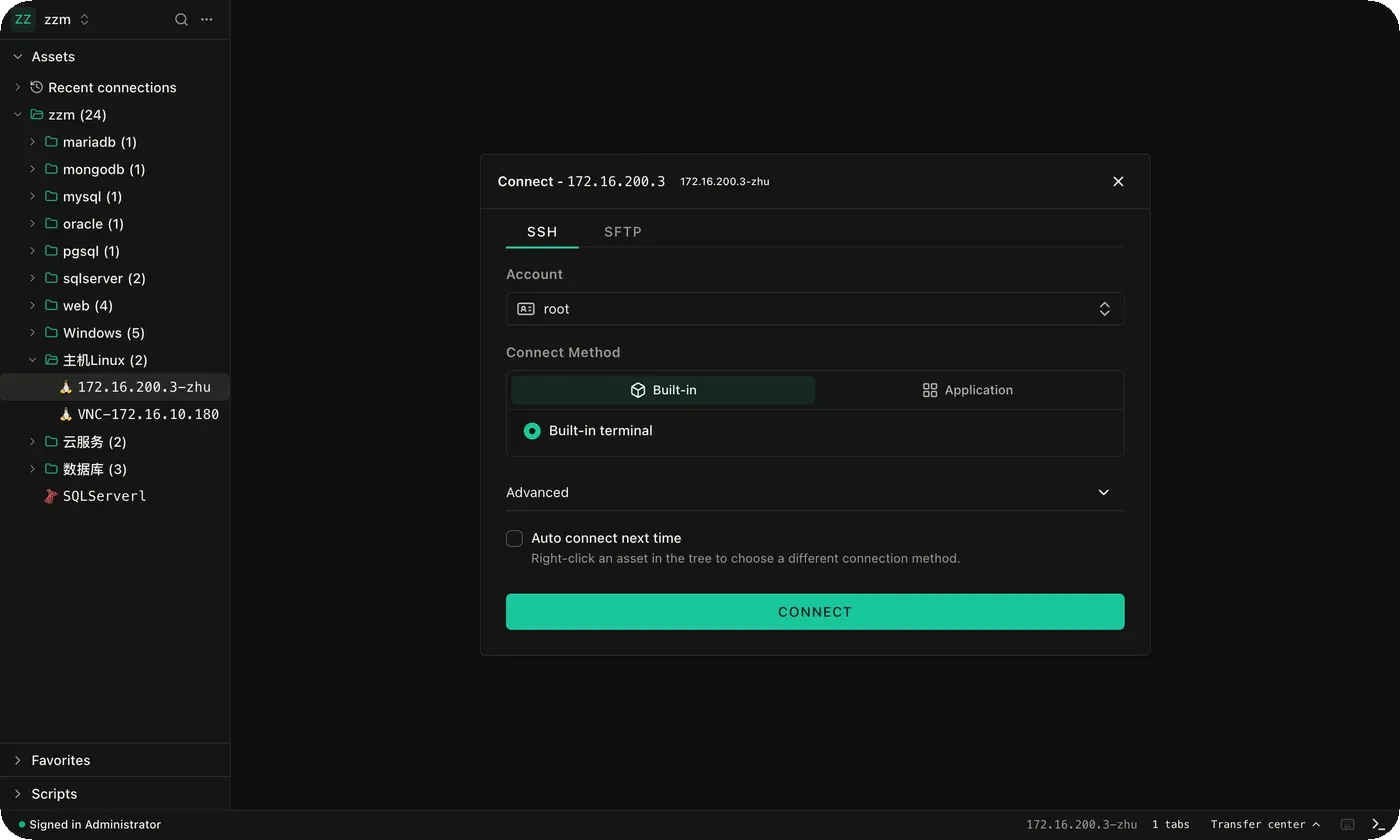
Official README screenshot of the SSH connection dialog.
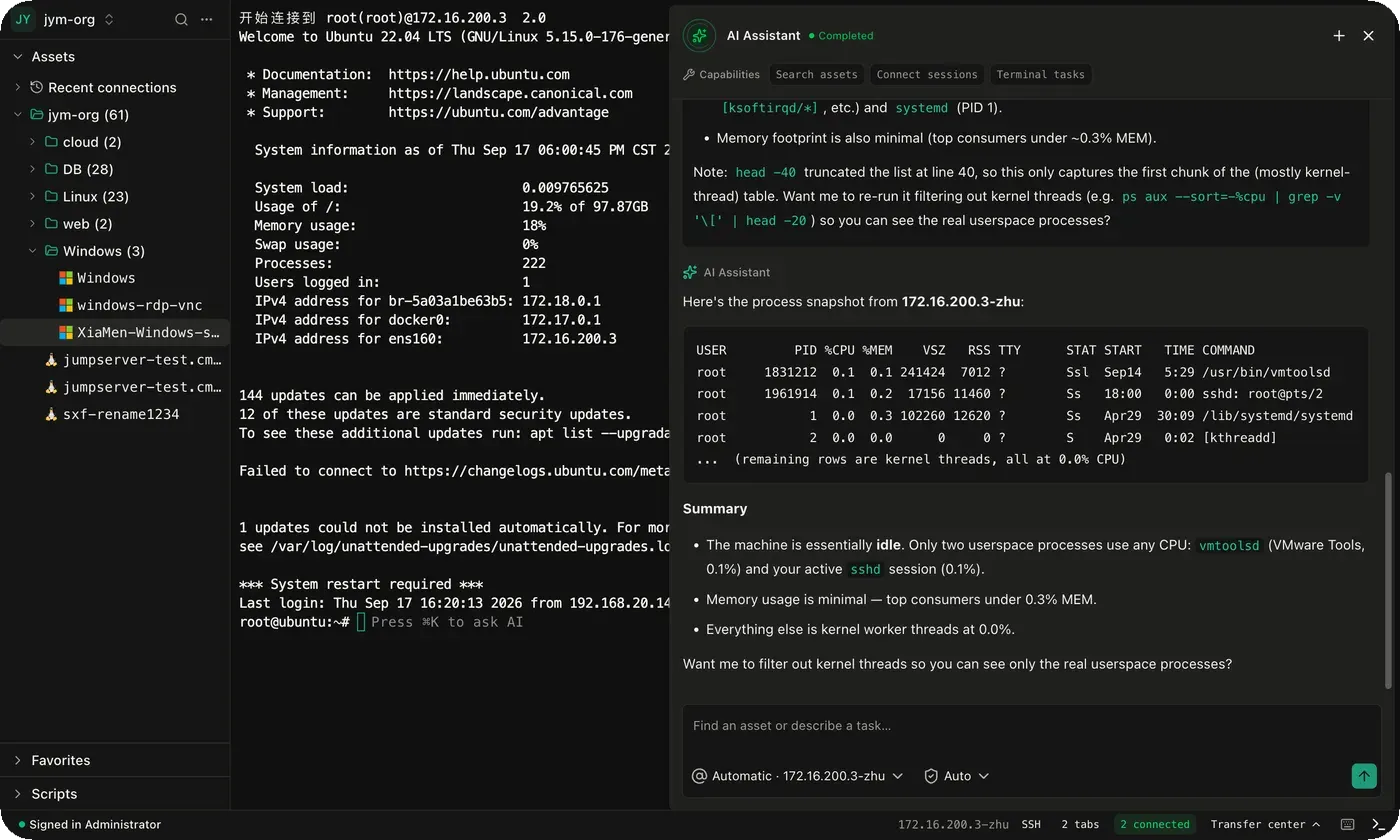
Official README screenshot of the AI assistant next to a terminal session.
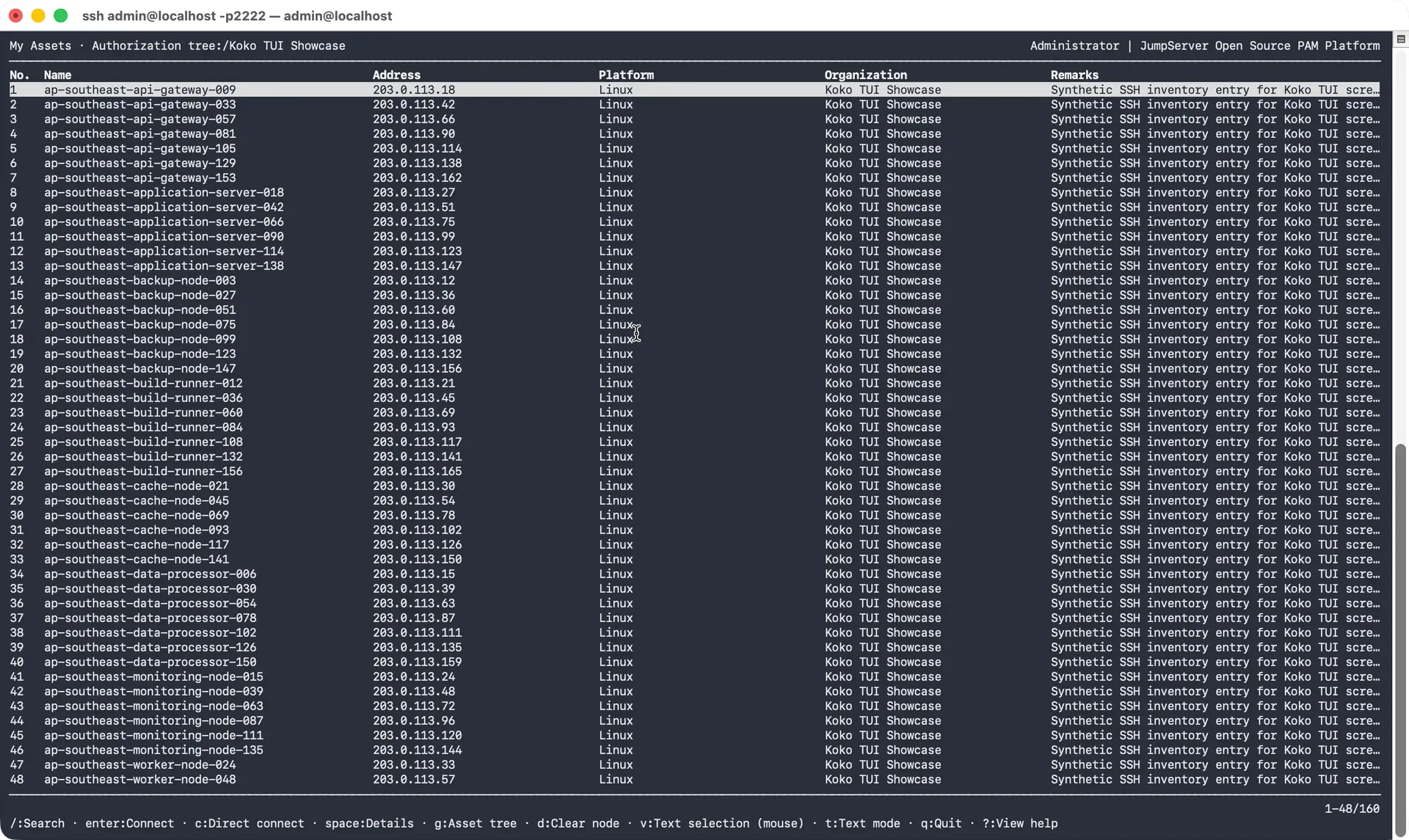
Official README screenshot of the KoKo TUI asset browser.
Source: official JumpServer project page.
Key capabilities
- One-line Community Edition install On a clean 64-bit Linux host with at least 4 CPU cores and 8 GB of RAM, run
curl -sSL https://github.com/jumpserver/jumpserver/releases/latest/download/quick_start.sh | bash, then open the host in a browser and sign in with the initial admin account, which the README documents and the installer asks you to change. Do not reuse a server that already runs conflicting web or database services. The installation guide and upgrade guide cover both editions. - Enterprise Edition offline package Enterprise Edition is deployed from an offline package and license obtained from the delivery team, which suits air-gapped networks. The pricing page describes four Enterprise tiers that share the same features and differ in the maximum number of assets (50, 500, 5,000 or unlimited) and in deployment topology, from standalone to active-standby and full high-availability clusters.
- Asset inventory and platforms Assets are organized in nodes and zones, with platforms defining protocols and options. The Community Edition is documented as free for production use with up to 5,000 assets. Asset types include Linux, Windows, network devices, databases, Kubernetes clusters, websites and remote applications, and cloud hosts and database instances can be imported through Cloud Sync.
- Zones and gateways Zones define network segments and gateways so JumpServer can reach assets that are not directly accessible. Release 5.1.0 added CIDR configuration so assets are assigned to zones automatically based on their addresses.
- Accounts and account templates Each asset holds privileged or ordinary accounts with stored secrets. Templates create identical credentials on many assets, and users connect with an account without ever seeing its password. Account discovery collects existing accounts from assets, and push-account tasks create or update accounts and set their secrets.
- Authorizations and ACLs Authorizations grant users and groups access to assets or nodes, limited by account, protocol and action, with expiration reminders added in 5.1.0. ACLs cover user login control by IP and time, asset connect control, connect-method limits, clipboard and file transfer size limits, data masking of sensitive database columns, and command filtering.
- Command filter Command filters match commands typed in a session against command groups, either literal commands or regular expressions, and apply an action; the default is to reject. Filters have a priority from 1 to 100 and can target all users, specific users or attributes, and particular assets and accounts. Release 5.1.0 added AI-assisted drafting. See the command filter page.
- Web terminal The browser-based Luna terminal opens SSH, SFTP, RDP, VNC, Kubernetes, database, RemoteApp and VirtualApp sessions without a local client. The Community Edition comparison lists web-based access methods and desktop connection methods side by side, and some advanced options are Enterprise-only.
- JumpServer Client The desktop client for Windows, macOS and Linux provides a unified asset list, split views, a file workspace, a script library and SFTP Server connections, added in 5.0.0. Database sessions launch a local client after you configure its path, and web assets open in a built-in browser that is available only in the desktop client. See the client overview.
- KoKo text interface Users can reach authorized assets by connecting with an SSH client to KoKo. Version 5.1.0 provides a TUI with an asset tree, search and filtering, mouse support and a multi-session manager, and also restores the plain-text mode with connection shortcuts.
- AI assistant The assistant opens beside a Web Terminal session or in the Client. It can query authorized assets, explain session output and help prepare commands, SQL or scripts, and it only sees assets and actions the signed-in account may use. Terminal AI offers command recommendations, and v5.0.0 added real-time risk alerts and automated audit reports. The AI assistant page describes the entry points; model and component configuration is server-side.
- Session recording and audit Online and historical asset sessions can be monitored, terminated, replayed and exported, with command audit, file transfer records, login logs, password change logs, operation logs and job audits. Recordings can be stored on object storage, and 5.1.0 added batch download. The client includes tools to play downloaded recordings and transcode archives to MP4.
- Tickets and approvals Access requests, login approvals and command approvals can run through ticket flows with configurable approval levels, handlers and CC users. Release 5.1.0 added approval exemption periods for repeated connections to the same asset with the same account, tagged as Enterprise Edition, and ticket audit export by creation time.
- Change secrets, backup and risk detection PAM automation rotates account passwords and SSH keys on schedule or on demand, backs up account secrets by email or SFTP in encrypted form, and scans credentials for weak, repeated and leaked passwords. Change Secrets requires the Enterprise Edition according to the documentation, so check which PAM automation features your edition includes.
- Authentication and MFA Sign-in supports local accounts, directory services, single sign-on protocols, social identity providers and passkeys, plus MFA policy that can be enforced system-wide. The Enterprise Edition adds more options, such as OAuth2 group synchronization added in 5.1.0. The authentication page lists the methods.
- REST API and integrations The REST API uses access keys or tokens, organization context and pagination, and PAM integration applications publish account secrets to external systems through a scoped, IP-restricted API application. Notification channels and Syslog are documented integration surfaces. See the REST API guide.
- Organizations and role separation Multiple organizations isolate users, assets and policies within one deployment, which suits managed service providers and separate business units. Custom role-based access control and multi-tenant organizations are listed as Enterprise Edition capabilities on the pricing and comparison pages.
Where JumpServer fits
Replacing direct SSH and RDP access with a bastion
Install the Community Edition on a dedicated host, import the asset inventory, create accounts with templates and grant access through authorizations rather than sharing passwords. Close direct administrative ports on the targets to everything except the JumpServer hosts, then verify that a user can connect through the web terminal and the client and cannot reach the target directly.
Auditing privileged sessions
Enable session recording and command storage, choose where recordings are retained and replay a test session after each connection method. Review the login, command and file transfer audits, and decide in advance who may replay sessions and how long recordings are kept.
Controlling dangerous commands
Create command groups for destructive commands, bind them to production assets with a command filter, and test the reject and confirm actions with a non-privileged account. The AI-assisted drafting added in 5.1.0 can propose rules, but a person should review the regular expressions before they are applied.
Rotating privileged credentials
Use account discovery to find existing accounts, mark each account as eligible for secret changes, and run a scheduled change-secret task with the connection check enabled. This requires a working privileged account on each asset and, according to the documentation, the Enterprise Edition. Keep encrypted backups and test restore procedures.
Providing access to external contractors
Give a contractor a time-limited authorization for a single asset and account, require MFA, and attach an approval ticket if the policy requires it. Confirm that clipboard, file transfer and connect-method limits behave as intended and that the authorization expires without manual action.
Planning high availability and upgrades
Choose the edition and topology early, since active-standby and cluster deployments are tied to Enterprise tiers. Follow the version maintenance policy, use the latest patch of an actively maintained series, back up the database before upgrading and test the upgrade on a copy first.
Install
curl -sSL https://github.com/jumpserver/jumpserver/releases/latest/download/quick_start.sh | bashReviews of JumpServer
Be the first to share your experience with JumpServer.
Write a review
Loading review form…
Alternatives to JumpServer
 TeleportTeleport provides connectivity, authentication, access controls and audit for servers, Kubernetes, databases, Windows desktops and web apps.
 StrongDMStrongDM provides just-in-time, zero standing privilege access to cloud infrastructure, databases, containers and CI/CD pipelines, and is now part of Delinea.
 Idira (formerly CyberArk)Idira, formerly CyberArk and now part of Palo Alto Networks, combines privileged access management with machine and agentic identity security.