

What is Teampass?
Teampass is a collaborative password manager that an organisation installs on its own servers. It is a PHP application with a MySQL or MariaDB database that stores credentials as items in a folder tree, controls access per folder through roles, gives every user an individual encryption key pair and keeps an audit trail. According to the project's about page, it started in 2009 as a way to stop a team sharing credentials through documents and email. It was created by Nils Laumaillé, who still writes most of the code and handles the security reports, with contributions from users through pull requests, bug reports and translations.
The latest release is 3.2.4.2, published on November 8, 2026. It is a security release on the 3.2.4 line that fixes six advisories. Four concern managers and HR managers acting beyond the accounts and folders they administer: folders granted to an account, the root-folder creation right, the folder-rights view of any account, and the Users list, which plain users could also read. The other two are a folder path returned for any folder id and ten administration actions that did not check the session key. The release also makes generic OpenID Connect providers such as authentik and Keycloak work, lets OAuth2 users generate new keys again, fixes an HTTP 500 at the first login of an LDAP account without a key pair, and makes the command-line upgrade reconnect to the database after a long backup verification. It is code only, with no schema change, so installations on 3.2.4.0 or 3.2.4.1 are not sent through the upgrade wizard.
The previous release, 3.2.4.1 of November 3, 2026, fixed six other advisories about per-item restrictions (item history, one-time codes, attachment previews, item details, exports and item creation), sessions that survived a password change and a key-generation request. The 3.2 line as a whole, summarised on the what's new page, replaced AES-CBC with AES-256-GCM, added passkeys, agentless Linux password rotation, a security posture dashboard, access recertification, leaver risk detection, data classification and Secure Send links. On upgrades from 3.1 or earlier the new features are seeded disabled and the hardened encryption format stays off until an administrator turns it on.
Teampass is distributed as source code on GitHub and SourceForge and as Docker images on Docker Hub (teampass/teampass) and the GitHub Container Registry (ghcr.io/nilsteampassnet/teampass). The README describes installation directly on a PHP and MySQL server as the recommended option for production. Requirements are PHP 8.2 or newer and MySQL 5.7+ or MariaDB 10.7+, plus the PHP ldap extension for directory sign-in.
The server is released under the GNU General Public License v3.0, which the README summarises as free to use, study, modify and redistribute, including commercially, provided derivative works remain under the same license. The pricing page states that the server has no user limit and no feature gate. The browser extension is the commercial product that funds the project, alongside GitHub Sponsors and paid services such as feature development and deployment assistance. Other password managers listed on iThub include Vaultwarden, KeePassXC and Cryptex Vault; OpenBao covers secrets management for applications.
Teampass screenshots
Explore the interface. Open a screenshot to view it at full size.
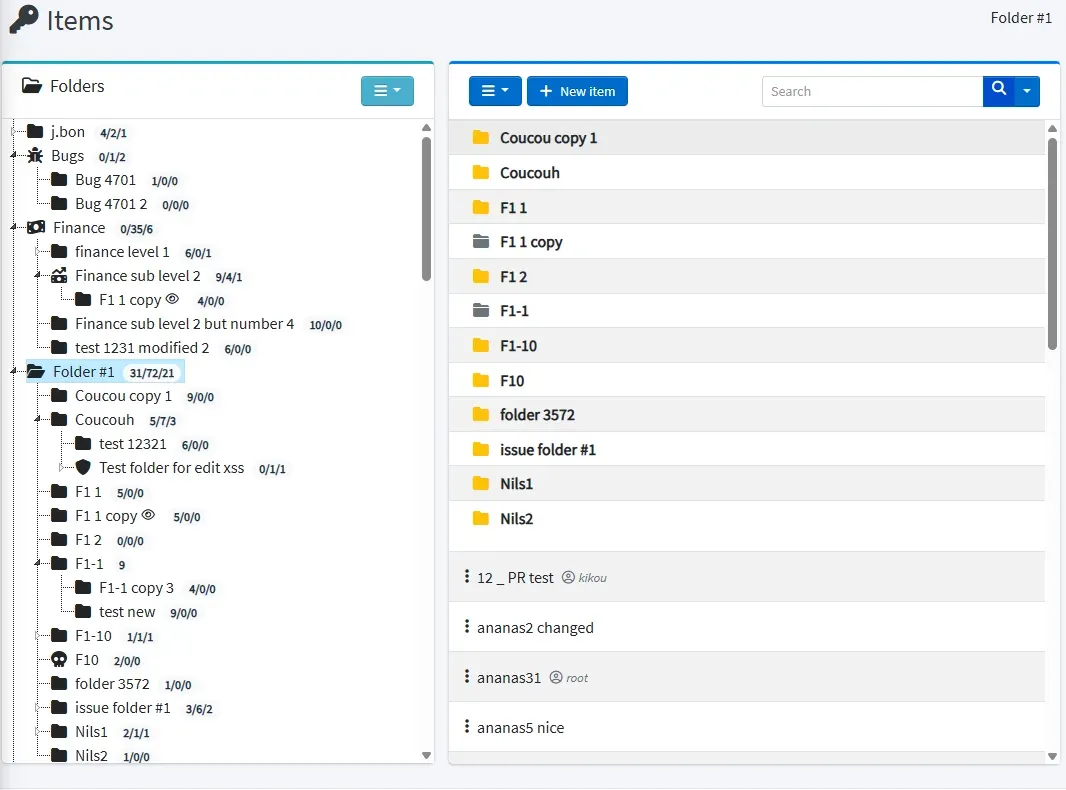
Official documentation screenshot of the Items page with a nested folder tree. The data is test content.
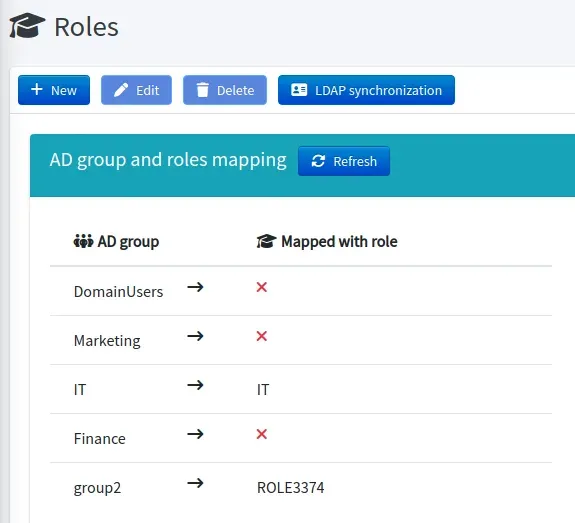
Official documentation screenshot of the LDAP synchronization view, which maps Active Directory groups to Teampass roles.
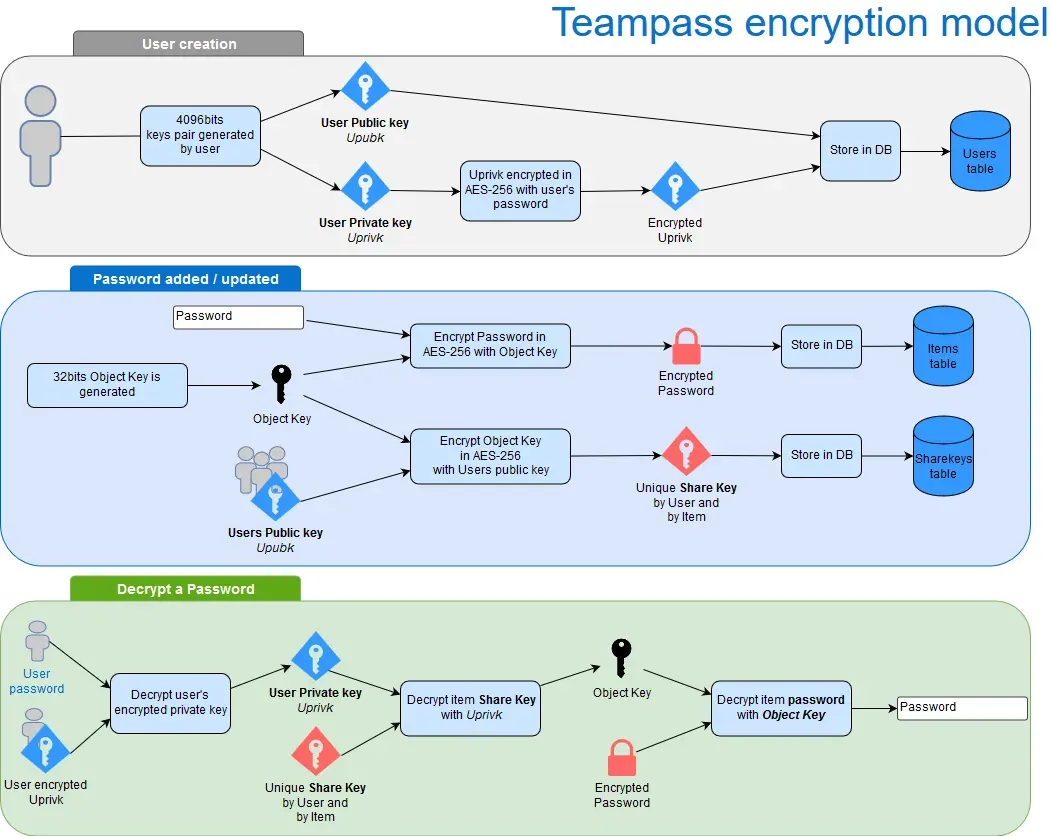
Official diagram of how user key pairs, item object keys and per-user share keys are created and used to decrypt a password.
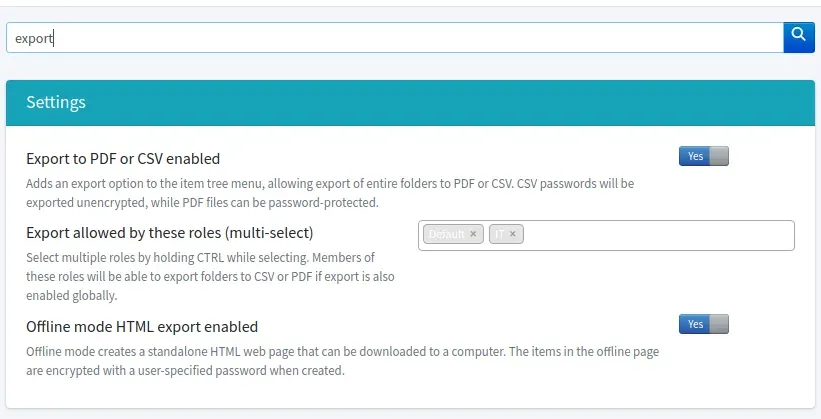
Official documentation screenshot of the export settings, where administrators choose allowed roles and enable the offline HTML export.
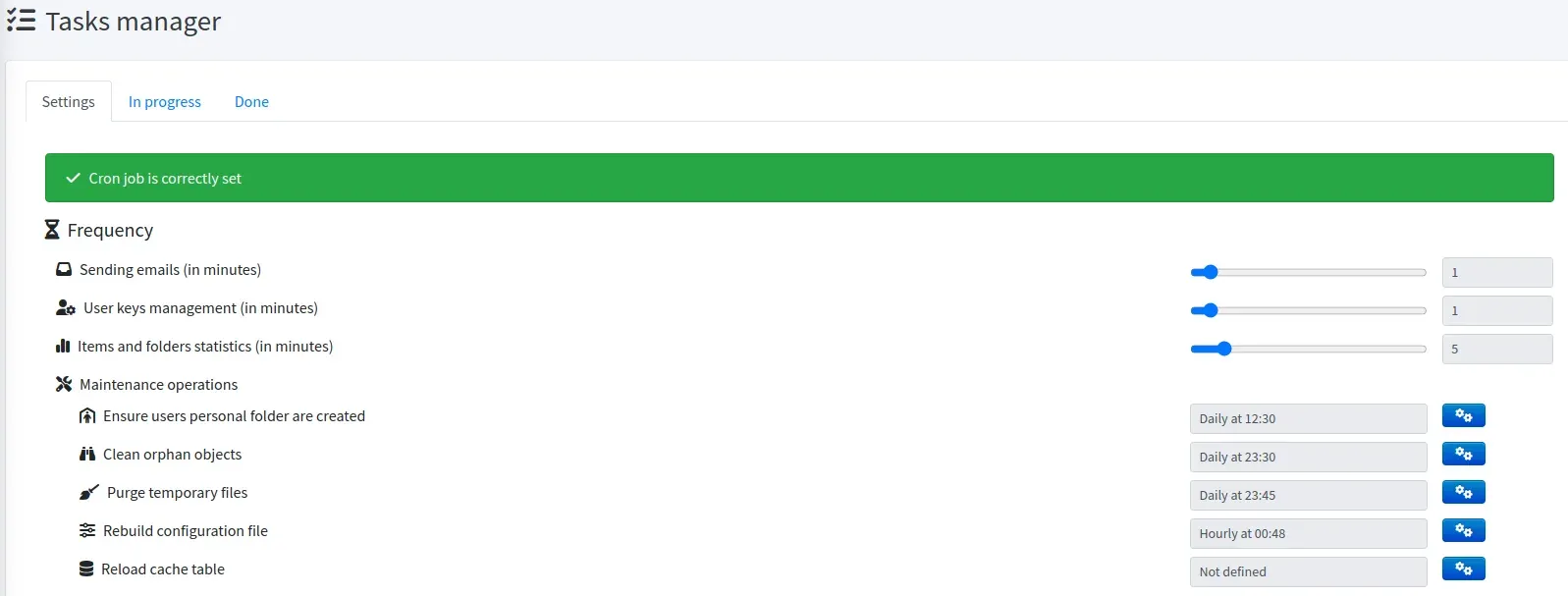
Official documentation screenshot of the Tasks manager, showing the cron status and the frequency of background jobs.
Source: official Teampass project page.
Key capabilities
- Folder tree and personal folders Items live in folders that nest without a stated limit, and each folder can carry its own password complexity rule. A user can also have a personal folder: according to the encryption documentation, only the owner and the internal recovery account hold a share key for its items, so no other user can decrypt them, administrators included.
- Five folder permission types Each role defines one permission per folder: Write, Write without delete, Write without edit, Write without edit or delete, and Read only. Moving an item requires Delete on the source folder and Edit on the destination, and the same rule applies to bulk moves, the item form and the API.
- Least permissive wins When a user holds several roles that define the same folder, the most restrictive permission applies, and a role with no-delete combined with a role with no-edit results in no-edit and no-delete. The rights documentation gives the full resolution order.
- Per-user allowed and forbidden folders On top of roles, an administrator can grant specific folders to one account, which always gives full write access, or forbid folders, which removes all access and overrides every other source. A Visible folders view on the Users page lists each folder a user can reach and the role responsible for it.
- Privilege levels Accounts have one of five levels: Administrator, HR Manager, Manager, User and Read-only. The Administrator level grants the configuration pages but, by design, not the items or folder contents, which are always reached through roles or direct grants. HR Managers manage all users, Managers manage the users assigned to them.
- Encryption model Every user receives a public and private key pair, and each encrypted element (password, custom field) has one share key per user, decryptable only with that user's private key. Secrets use AES-256-GCM with random nonces, per-secret salts and 256-bit object keys, and the private key is protected with PBKDF2-SHA256 at 600,000 iterations. Account passwords are hashed with Symfony PasswordHasher (bcrypt or argon2 depending on the PHP build).
- Key management Administrators can regenerate keys, recover access and repair per-user keys. A second copy of each private key lets LDAP and OAuth2 users whose password changed outside Teampass sign in, and since 3.2.2.7 that copy is also encrypted with the instance key, so a database dump alone cannot open it.
- LDAP and Active Directory Users can sign in with directory accounts, including nested groups. Each AD group maps to one Teampass role, a user in several mapped groups receives all the matching roles, and a role is revoked at the next login after the user leaves the group. An optional setting restricts sign-in to members of one group, located anywhere in the directory tree.
- OAuth2 and OpenID Connect Microsoft Entra ID is supported, and since 3.2.4.2 generic OpenID Connect providers such as authentik and Keycloak work as well, with the provider's groups and Keycloak realm roles matched against role titles. At the first SSO sign-in, an existing local or LDAP account whose login matches the provider's username is switched to OAuth2.
- Multi-factor authentication The authentication documentation covers Google Authenticator compatible TOTP and Duo Security, and the README also lists YubiKey and AGSES. Once enabled, MFA is mandatory for every user, with options to exempt administrators, disable it per user or limit it to selected roles.
- Passkeys Since 3.2.3, Teampass stores the passkeys of other sites in items, with a private key kept on the server, and the browser extension signs in with them. Separately, users can register a passkey to sign in to Teampass itself, as a second factor or without a password.
- Governance and security posture Access recertification campaigns record immutable decisions, compliance reports and CSV evidence export document access, rotation tracking records what was rotated and by whom, a leaver-risk view lists what a departing user could still know, and four-level data classification adds ownership and sensitivity labels. A personal security score flags weak, reused, breached and overdue credentials, with Have I Been Pwned checks that do not send the passwords.
- Linux Account Password Rotation LAPR rotates the passwords of local Linux accounts over SSH without an agent: it generates a password from a policy, pushes it with
chpasswd, then re-encrypts the item. Rotations run as background tasks, and the target account must be root or have passwordlesssudoforchpasswd. - Secure Send and one-time view A user can share an encrypted copy of an item or an ad-hoc secret with someone who has no account, through a time-limited link with a view limit and an optional recipient passphrase. The Secure Send guide describes exposing only the recipient route on a separate public address while the full application stays restricted.
- REST API The API is disabled by default and uses JWT tokens obtained with an account and its API key, or a personal access token for OAuth2 users. Endpoints cover listing, reading, searching (by label, description or URL), creating, updating, moving and deleting items, reading OTP codes and tags, synchronising a cache, and listing, creating, updating and deleting folders. An OpenAPI specification and a command-line client are provided, and Apache needs
LimitRequestFieldSize 200000. - Browser extension The official extension for Chrome, Edge and Firefox lists the credentials of the current site, fills logins, passwords and TOTP codes, saves new logins and generates passwords. It receives a revocable access token rather than the user's password and can be locked with a PIN. It requires a commercial licence sold in packs: 3 users for 49 euros a year, 10 for 150, 25 for 350, 50 for 600 and unlimited for 1,200, with a 30-day trial.
- Mobile pairing (experimental) An experimental, disabled-by-default protocol lets an external client receive a dedicated personal access token after approval in the web session. Its documentation states that the current scope is Android, that an Android scanner and end-to-end prototype still need to be implemented, and that no iOS support is claimed.
- Real-time collaboration When the optional WebSocket server is enabled, users viewing the same folder see item changes, edition locks and presence live. Without it, Teampass works the same, without the live layer.
- Import, export and backups Imports accept the Teampass CSV format, KeePass 2 XML and exports from Bitwarden, LastPass, 1Password and KeePassXC. Exports produce CSV (unencrypted), password-protectable PDF and an offline HTML vault encrypted with a user-chosen password. Scheduled encrypted database dumps and a cron-driven task manager handle backups, key distribution, emails and maintenance.
Where Teampass fits
Sharing credentials across a team
An administrator creates a folder tree, defines roles and assigns each role one of the five permission types per folder. Users see only the folders where they hold at least one permission, folders with a read-only result show no Add item button, and exceptions are handled with per-user allowed or forbidden folders. The Visible folders view shows the effective access of any account.
Mapping Active Directory groups to roles
After the LDAP connection is configured in Settings, the Roles page offers an LDAP synchronization view that lists AD groups and the Teampass role mapped to each. Roles from AD groups are merged with manually assigned roles and refreshed at each login, and the same least-permissive rule resolves conflicts. The roles documentation describes the mapping.
Single sign-on with Entra ID or an OpenID Connect provider
The OAuth page takes the provider's endpoints and scopes. For Microsoft Entra ID the project documents the settings on both sides, and since 3.2.4.2 a generic provider such as authentik or Keycloak uses scopes set to openid,profile,email, with sub and preferred_username required and groups matched to role titles. OAuth2 users reach the API and browser extension through personal access tokens.
Rotating Linux account passwords
With LAPR enabled, an administrator enrolls a Linux server (host, port, credential and trusted host key), links an existing item whose login is the local account, and assigns a policy with a rotation frequency and password rules. A scheduler queues due rotations, pushes the new password over SSH, re-encrypts the item and every share key, and audits each step without writing secrets to the logs.
Sending a secret to someone without an account
From an item, or for an ad-hoc secret, a user creates a Secure Send link with an expiry, a view limit and an optional passphrase. The recipient confirms the reveal on a public page. Users can list and revoke the links they created, and the project's deployment guide places that page on its own hostname with every other path denied.
Scripting access to items and folders
After the API is enabled globally and for the account, a script requests a JWT with the account's login and API key, then calls the item and folder endpoints. The folder endpoints return only folders accessible to the account, and one of them lists every accessible folder in tree order with a read-only flag on each entry. The API guide includes request and response examples and a command-line client.
Install
docker run -d --name teampass -p 8080:80 -v teampass_data:/var/www/html teampass/teampass:latestReviews of Teampass
Be the first to share your experience with Teampass.
Write a review
Loading review form…
Alternatives to Teampass
 VaultwardenVaultwarden is an unofficial Rust implementation of the Bitwarden Client API for self-hosting, with personal vaults, organization sharing and multifactor login.
 KeePassXCKeePassXC is an open-source password manager for Windows, macOS and Linux that stores entries in an offline, encrypted KeePass-compatible KDBX file.CVCryptex VaultCryptex Vault is an AGPL-3.0 password manager with a web app, Chromium extension and Android app that syncs encrypted vaults directly between linked devices.