

What is Nextcloud?
Nextcloud is a self-hosted content collaboration platform. File sync and sharing form the core, and the same server runs Nextcloud Talk for chat and calls, Groupware (Calendar, Contacts and Mail), Nextcloud Office, the Nextcloud Assistant and Nextcloud Flow as apps. The project was started in June 2016 by Frank Karlitschek and Niels Mache and is developed by Nextcloud GmbH, registered in Stuttgart, Germany, together with community contributors. The nextcloud/server repository holds the PHP core, the Files web interface and the apps shipped by default.
Major server versions carry Hub names: Hub 26 Winter is Nextcloud 33, Hub 26 Spring is Nextcloud 34 and Hub 26 Summer is Nextcloud 35, whose 35.0.0 release is dated September 16, 2026 in the official changelog. Three branches receive maintenance releases in parallel. On October 15, 2026, versions 35.0.2, 34.0.5 and 33.0.10 were published together, and GitHub marks 33.0.10 as Latest because it was published last; the version field of this profile follows that label, while 35.0.2 is the newest stable version on the install page. Release candidates for 35.0.3, 34.0.6 and 33.0.11 appeared on the GitHub releases page on November 5, 2026.
The Nextcloud 35 changelog brings a unified sharing sidebar and dialog, per-recipient share permissions, rate limiting and brute-force protection on the sharing API, quota management for team folders, a redesigned unified search with a keyboard shortcut, inline comments in the Text editor and an accept or decline step for federated calendars. Office is now a shipped app, and the office suite settings list Euro-Office in place of ONLYOFFICE. Administrators get occ db:info, db:size, db:index-usage and db:locks, Valkey cluster support through predis and changes for running under FrankenPHP. The upgrade notes for 35 drop PHP 8.2, MariaDB 10.6 and MySQL 8.0, and the changelog marks 32-bit support as removed for the following Hub 27 Winter release.
The server is a PHP application with a JavaScript and TypeScript front end. The current system requirements list PHP 8.3, 8.4 or 8.5, Apache 2.4 or nginx with php-fpm, and MySQL, MariaDB, PostgreSQL, SQLite for small or test instances, or Oracle with an enterprise subscription. Nextcloud GmbH maintains the All-in-One Docker installation, a VM appliance and release archives; snap, Docker Hub, NextcloudPi and distribution packages are community-maintained. The server does not run on Microsoft Windows.
Code contributed since June 16, 2016 is licensed under AGPL-3.0-or-later, and the project does not require a contributor license agreement. Nextcloud GmbH sells Nextcloud Enterprise subscriptions with support and longer maintenance; hosted accounts come from third-party providers. Browser office editing needs a document server, larger Talk calls need the high-performance backend and TURN, and AI features need configured providers. Server-side encryption does not hide file or folder names.
Nextcloud screenshots
Explore the interface. Open a screenshot to view it at full size.
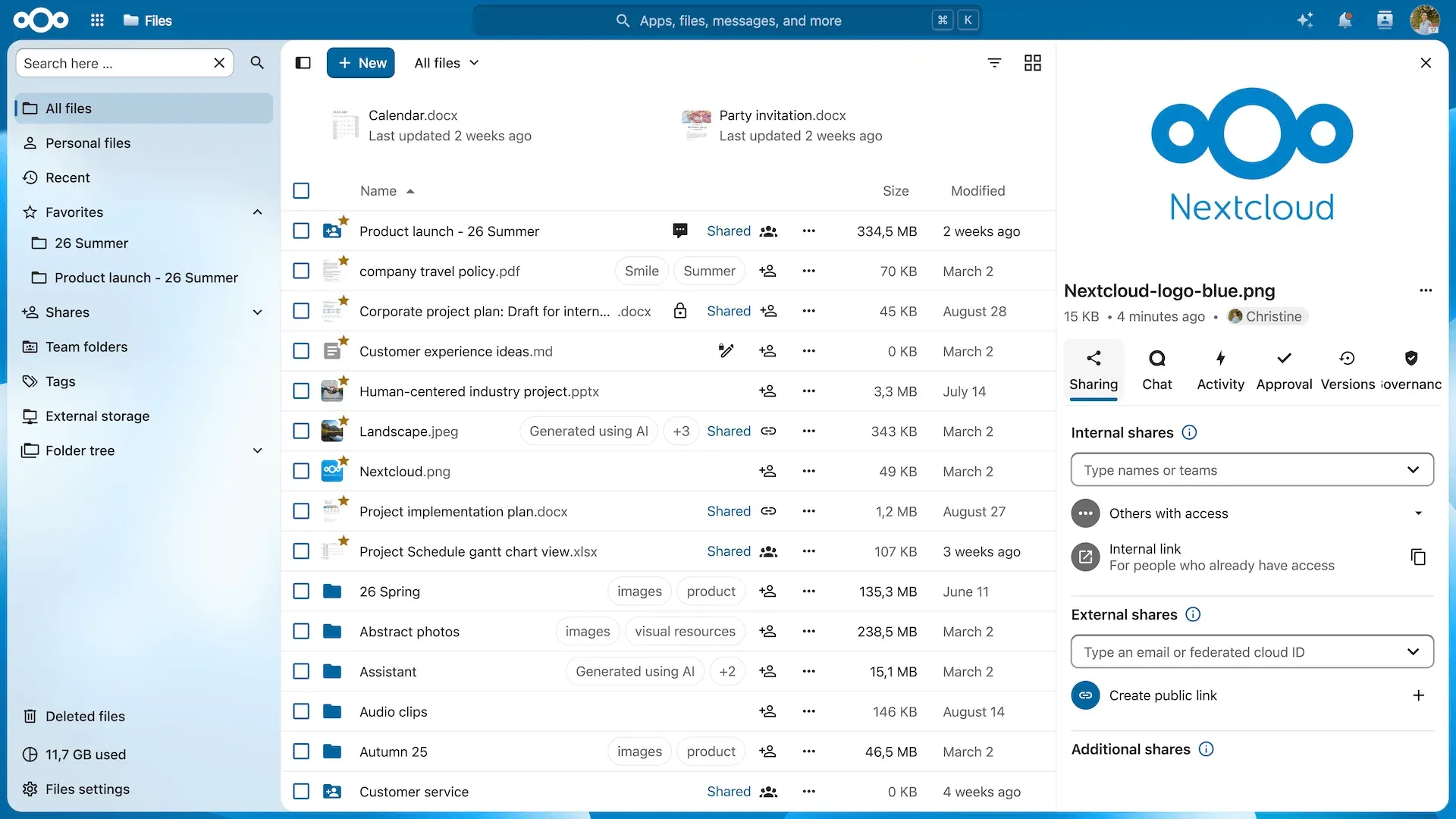
Official Hub 26 Summer screenshot of the Files app: navigation for personal files, shares, team folders and external storage, with internal and external sharing options in the sidebar.
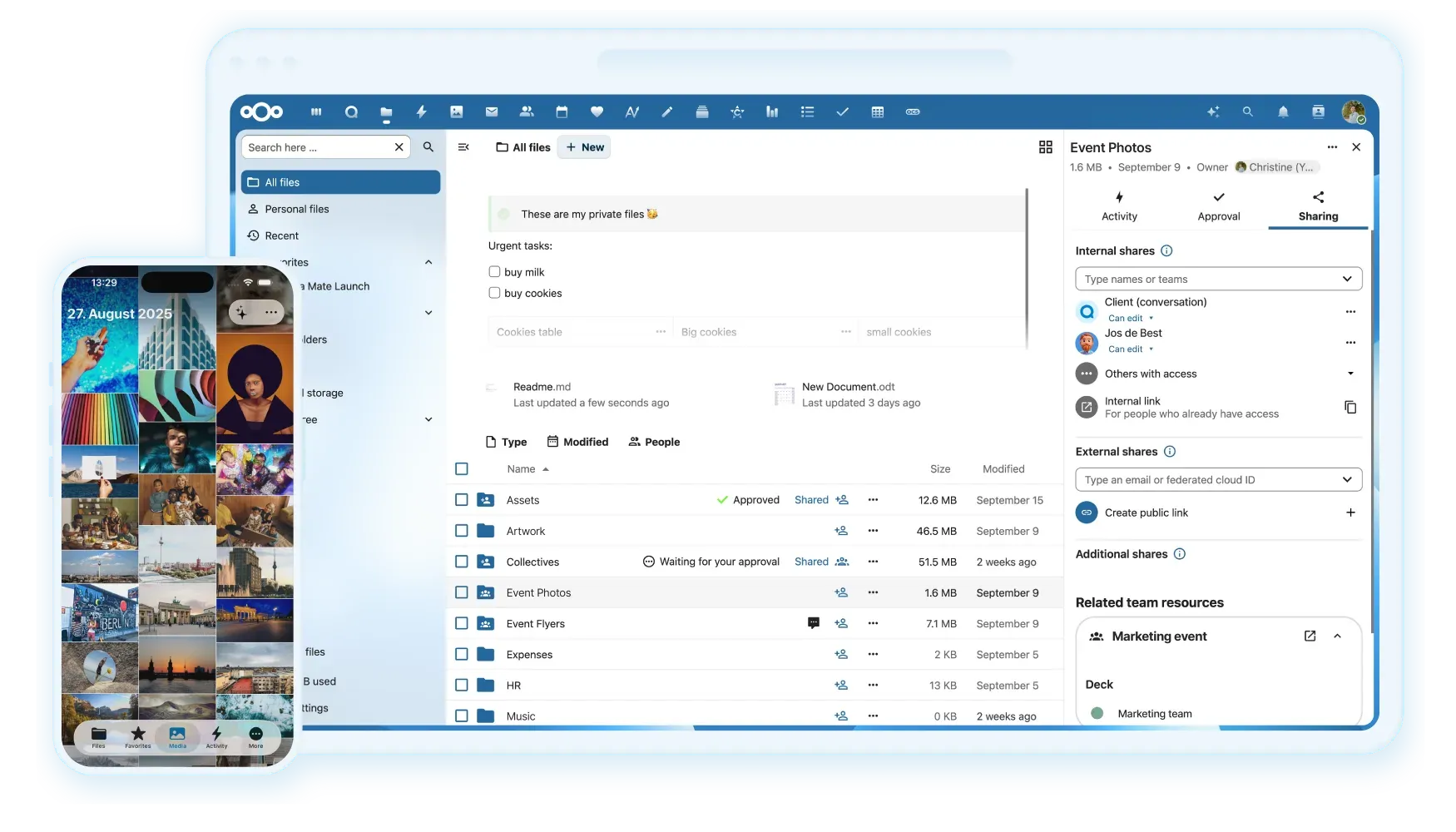
Official README screenshot from the Hub 25 generation: the Files web app with approval status and related team resources, beside the mobile app media view.
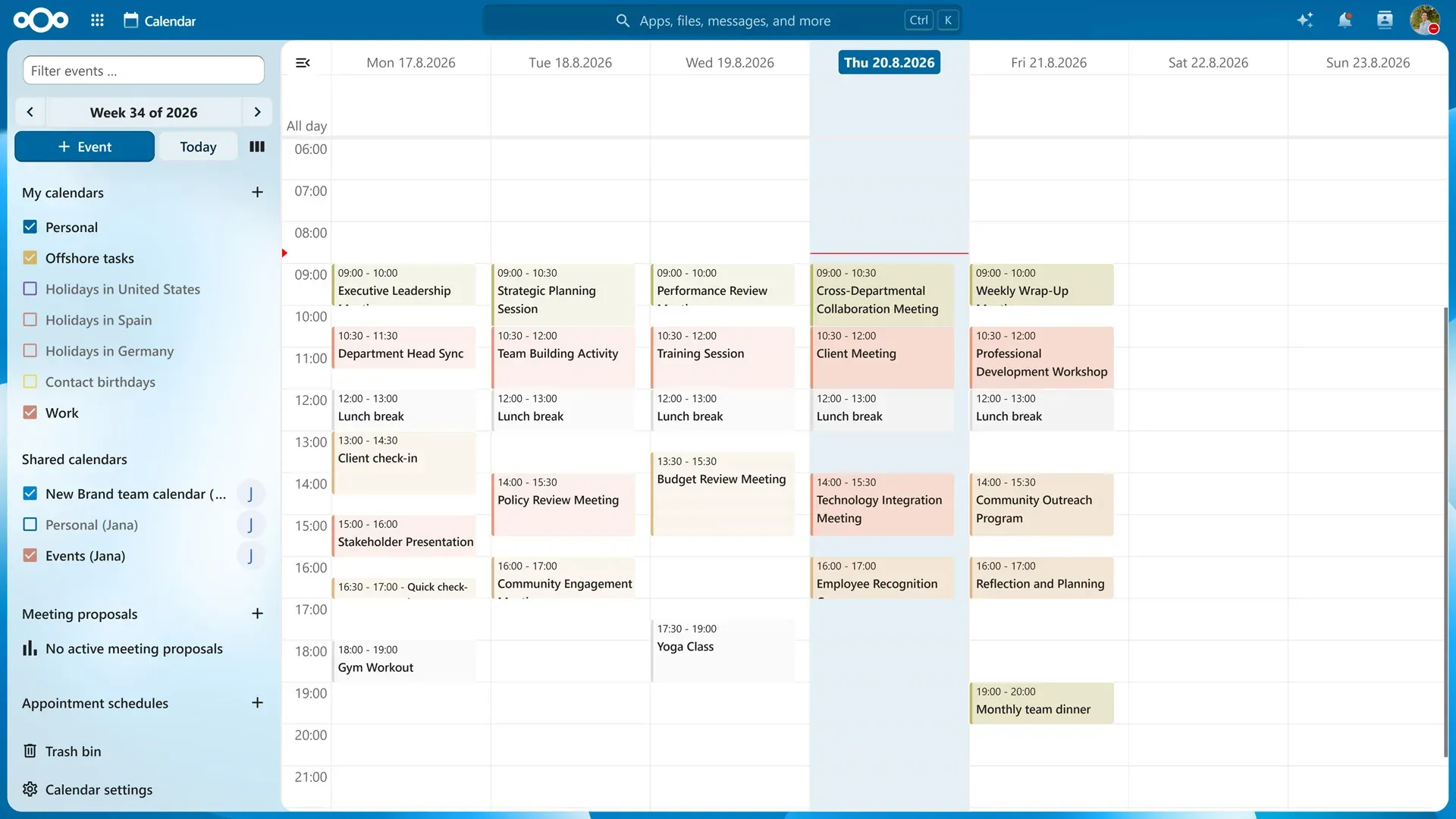
Official Calendar screenshot with a week view, shared calendars, meeting proposals and appointment schedules.

Official Talk screenshot of a six-person video call with the chat sidebar and reaction menu open.
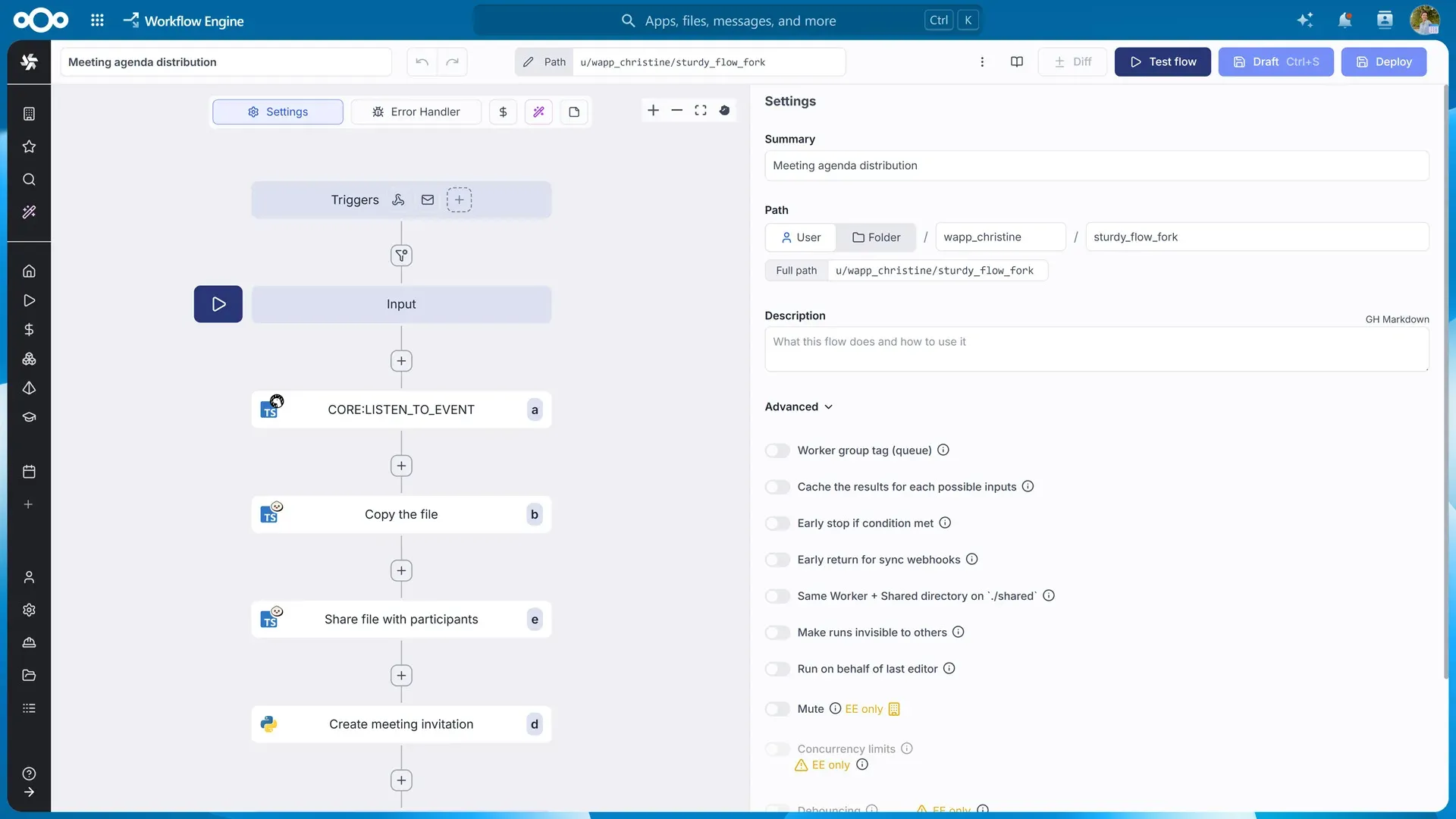
Official Hub 26 Summer screenshot of the Workflow Engine: a meeting agenda flow with an event trigger, file steps and settings, some marked enterprise-only.
Source: official Nextcloud project page.
Key capabilities
- Self-hosting with Nextcloud All-in-One The official Docker installation starts a mastercontainer that publishes ports 80, 8080 and 8443 and then manages Nextcloud, PostgreSQL, Redis with APCu and the client push backend from a web interface. Optional containers cover Nextcloud Office, Euro-Office, the Talk high-performance backend with TURN, Talk recording, BorgBackup, Imaginary previews, ClamAV, full-text search and Whiteboard. The AIO documentation recommends its Compose file over a plain docker run for production use. A VirtualBox appliance exists, but the install page notes it is not suited to a reverse-proxy setup.
- Manual installation from the release archive Download latest.zip or latest.tar.bz2, check the MD5 or SHA256 checksum and the PGP signature, and extract it into a directory served by Apache 2.4 or nginx with php-fpm. Supported 64-bit server systems include Ubuntu 26.04 and 24.04 LTS, RHEL 10 and 9, Debian 13, SLES 16 and 15 SP7 or later, openSUSE Leap 16, CentOS Stream and Alpine. The manual asks for at least 128 MB RAM per PHP process, recommends 512 MB, and needs 256 MB for the built-in updater.
- Community packages and the web installer A snap package with release channels, a multi-architecture Docker Hub image, NextcloudPi images for Raspberry Pi and similar boards, and distribution packages are maintained by the community rather than Nextcloud GmbH. The setup-nextcloud.php web installer downloads the same version as the built-in updater, which can trail a new major release by up to a month.
- Download the desktop sync client Nextcloud Files for desktop is offered as a 64-bit MSI for Windows 10 version 1809 or later, a PKG for macOS 13 or later and an x86_64 AppImage for Linux, at version 35.0.3 on the install page. A legacy 3.13.4 build remains for macOS 11 and 12. Linux distribution packages for Arch, Fedora, Debian, Ubuntu, openSUSE and Alpine are community builds. Separate desktop apps exist for Nextcloud Talk (Windows MSI, macOS DMG, Linux Flatpak) and for the Nextcloud Office desktop editors.
- Mobile apps for iOS and Android The Files app requires iOS 17 or Android 9 and is distributed through the App Store, Google Play, F-Droid and as a direct APK. The Talk app requires iOS 16 or Android 8 with server 22 and Talk 12 or newer.
- Files web interface The Files app lists personal files, recent items, favorites, shares, team folders, tags, external storage and a folder tree, with a sidebar for sharing, comments, activity and versions. Deleted files go to a trash bin, and earlier versions can be restored. Nextcloud 35 adds a system tag filter and a centered search input in the top bar.
- Sharing with people, teams and links Internal shares go to users, groups or teams; external shares go to an email address or a federated cloud ID; public links can carry passwords and expiry dates. Nextcloud 35 merges these options into one sharing sidebar and dialog, adds per-recipient permissions, applies password expiration rules to email recipients and adds rate limiting with brute-force protection to the v1 sharing API. Administrators also get an API kill switch for sharing.
- Federation between servers Users on different Nextcloud instances share files with each other through federated cloud IDs, and the remote share appears in the recipient's file list. In 35, accepted external shares schedule a scan job, remote avatars are fetched, and federated calendars require an explicit accept or decline. Federation depends on both servers being reachable over HTTPS and allowing it in the sharing settings.
- External storage backends The external storage app mounts Amazon S3, FTP or FTPS, local paths, another Nextcloud, OpenStack Object Storage, SFTP, SMB/CIFS and WebDAV into the file tree, as described in the external storage guide. Mounts can be assigned to specific users and groups, and since 35 the
files_external:createcommand accepts applicable users and groups directly. Configuration values can now be loaded from a file instead of being stored in the database. - Teams and team folders Teams group users, groups and other teams and can own shared resources. Nextcloud 35 can bind a team folder to a team, add quota management to team folders, create invitation links for teams and connect team membership to SCIM and OIDC sources. Encryption of team folders is a separate setting that applies only to new or changed files.
- Nextcloud Talk Talk provides one-to-one and group chat, audio and video calls, screen sharing and SIP integration through the browser, desktop and mobile apps. Firefox or Chromium-based browsers are recommended for calls and screen sharing. Larger calls need the high-performance signaling backend and a TURN server, and recording needs the separate recording server; AIO packages all three as optional containers. A Talk-only enterprise plan is priced separately.
- Calendar, Contacts and Mail Groupware combines the Calendar, Contacts and Mail apps on CalDAV, CardDAV and IMAP, so phones and desktop clients synchronise without a proprietary connector. The Calendar interface includes shared calendars, meeting proposals and appointment schedules. Nextcloud 35 adds OCS endpoints for calendar and contacts import. A Microsoft integration syncs files, calendars, contacts and tasks with Outlook or Thunderbird.
- Office documents and Text Nextcloud Office is a LibreOffice-based online suite for DOCX, XLSX, PPTX and OpenDocument files with co-editing, served by a separate Collabora Online-based document server; Euro-Office is offered as another backend. Office became a shipped app in 35 with preview thumbnails in its list view. The Markdown-based Text editor gains inline comments in 35. Format fidelity depends on the chosen backend and needs testing with your own templates.
- Nextcloud Assistant and task processing The Assistant offers text generation, Context Chat to answer questions about stored data, Context Write, translation, summaries and image generation, using local or remote providers that the administrator installs. Nextcloud 35 adds task types for subtitles from audio, audio translation, text improvement and multimodal chat with tools, and marks legacy AI providers. Many providers run as external apps through AppAPI in Docker. In the enterprise price table, the Assistant is part of the Ultimate plan.
- Flow and the Workflow Engine The basic Flow app runs rule-based actions on files, such as tagging, conversion or access control. The advanced business process automation component is based on Windmill and builds flows from triggers and TypeScript or Python steps; some of its settings are marked enterprise-only in the official screenshot. Since 35, workflow rules can block the creation of file versions.
- Security controls Two-factor authentication covers TOTP, WebAuthn and notification-based approval, and since 35 a user-verified WebAuthn login can skip the second factor. Brute-force protection, a password policy app, suspicious-login detection, server-side encryption and a separate end-to-end encryption app are available. Setup checks can now run by category or class. The project runs a HackerOne bug bounty and publishes CVEs about three weeks after a fixed minor release.
- Administration with occ The occ command line handles installation, upgrades, apps, users, encryption, maintenance mode and background jobs. Nextcloud 35 adds
occ db:info,db:size,db:index-usageanddb:locks, a command to list executed background jobs, commands to add and delete OAuth2 clients, and SSL/TLS options for the database connection during setup. The serverinfo app exports OpenMetrics data for monitoring. - APIs, apps and integrations Clients talk to the server through WebDAV, CalDAV, CardDAV and the OCS REST API documented in the client API manual. The Nextcloud App Store lists hundreds of apps, and PHP apps build on the public OCP interfaces, which 35 extends with an entity API, an interaction API and cursor-based pagination. External apps written in other languages run through AppAPI and can register setup checks and file actions.
Where Nextcloud fits
Replacing a hosted file share for a team
Start with All-in-One on a 64-bit Linux host with a domain pointing to it, open the AIO interface on port 8080 by IP address and select only the optional containers you need. Enable the daily BorgBackup job and restore one archive to a second host before moving production data. Check that the data directory sits on storage with enough space for versions and trash, and that quotas match what users had before.
Rolling out sync clients to a fleet
Match client minimums to your device inventory: Windows 10 1809, macOS 13 (or the legacy 3.13.4 build for macOS 11 and 12), x86_64 Linux, iOS 17 and Android 9 for the Files app. Package the Windows MSI through your software distribution tool and test large folders, long paths and files open in other applications. Confirm how conflicts appear to users before migrating shared folders.
Sharing files with external partners
Decide whether partners get public links, email shares or federated shares from their own Nextcloud. Set default expiry and password rules for links, and use the per-recipient permissions in 35 when one share needs different rights for different people. Review the Shares view regularly and check the sharing API rate limits if partners automate uploads.
Running meetings and chat on the same server
Install Talk, then add the high-performance backend and a TURN server before inviting more than a few participants to a call; AIO offers both as containers. Test calls from outside the company network, from mobile networks and through restrictive firewalls. Add the recording server only if recordings are required, and define where recordings are stored and for how long.
Editing office documents in the browser
Choose a document server, such as the Collabora Online-based Nextcloud Office or Euro-Office, and run it as a separate container or host. Open your own templates, tracked changes, macros and large spreadsheets and compare the saved files in desktop Office. Check co-editing latency with several users, and confirm that the document server can reach the Nextcloud domain and the other way round.
Upgrading across major versions
The upgrade guide states that major releases cannot be skipped, so an instance on 33 moves to 34 and then to 35. Before 35, move to PHP 8.3 or newer, MariaDB 10.11 or MySQL 8.4, and a supported operating system such as Ubuntu 24.04 or Debian 13. Check that third-party apps support the target version, put the instance in maintenance mode, back up the database, config and data, and run the upgrade on a copy first.
Install
sudo docker run --init --sig-proxy=false --name nextcloud-aio-mastercontainer --restart always --publish 80:80 --publish 8080:8080 --publish 8443:8443 --volume nextcloud_aio_mastercontainer:/mnt/docker-aio-config --volume /var/run/docker.sock:/var/run/docker.sock:ro ghcr.io/nextcloud-releases/all-in-one:latestReviews of Nextcloud
Be the first to share your experience with Nextcloud.
Write a review
Loading review form…
Alternatives to Nextcloud
 DropboxDropbox is a file storage and sync service with team folders, shared links and apps for Windows, macOS, Linux, Android, iPhone, iPad and the web.
 BoxBox is a cloud content management platform for file collaboration, shared links, AI document tools and workflow automation, with APIs and SDKs.
 CryptPadAGPL-licensed collaboration suite from XWiki that encrypts documents in the browser before they reach the server. Use a public instance such as CryptPad.fr, buy a hosted or on-premise enterprise plan, or self-host it with Node.js or Docker.