
What is VFS365?
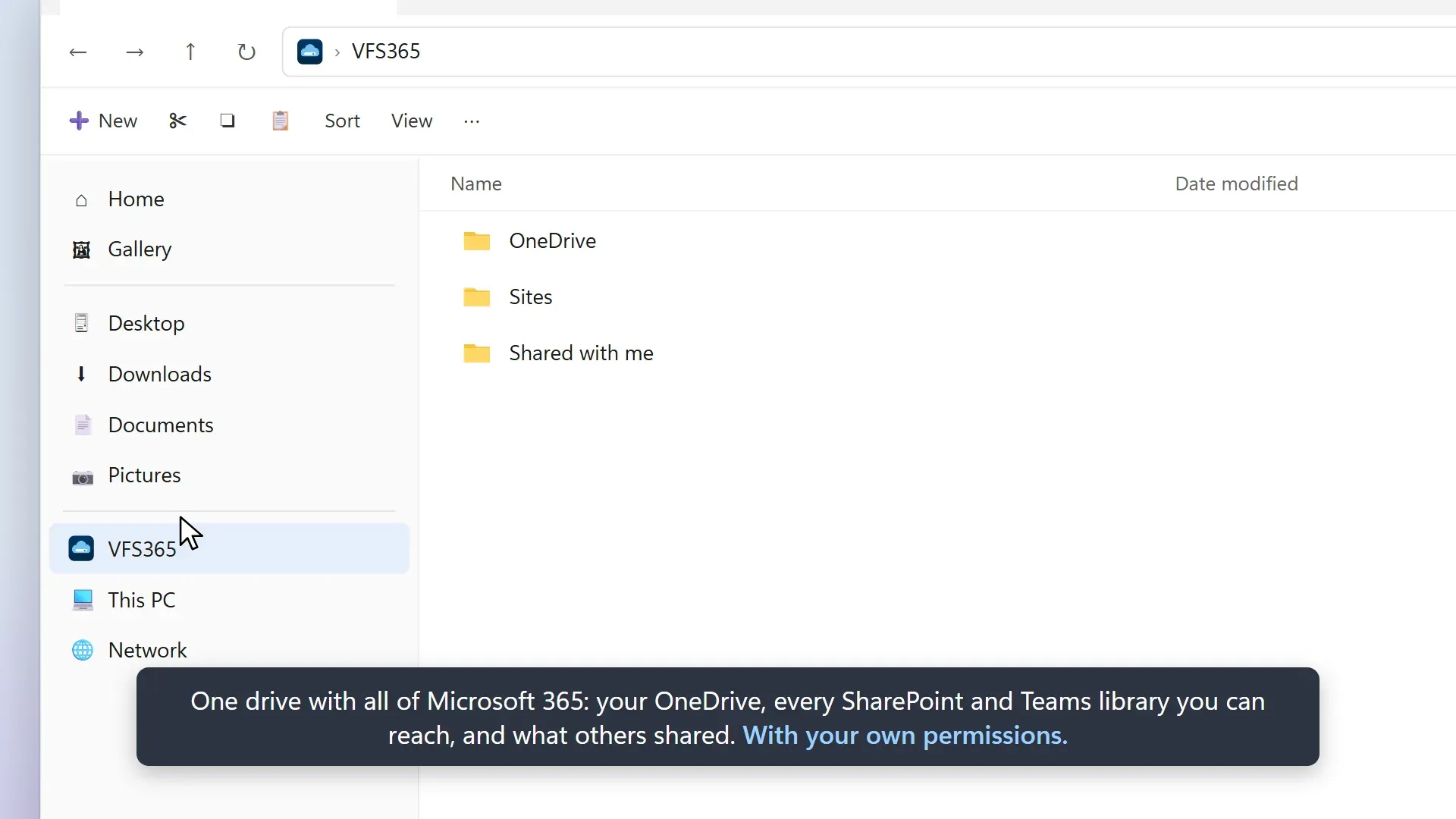
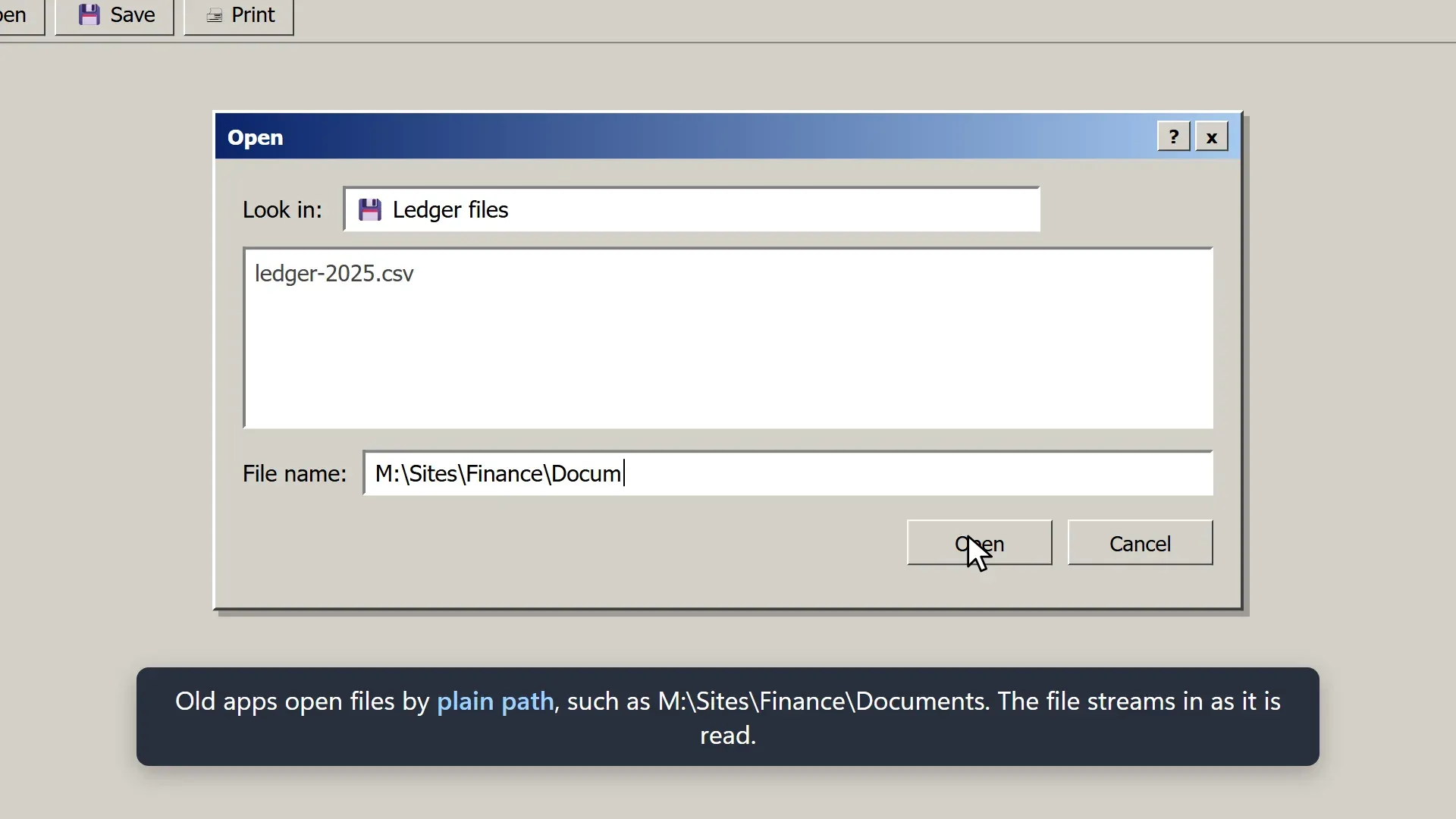
VFS365 is a virtual file system for Windows that shows Microsoft 365 files (OneDrive, Teams and SharePoint document libraries) as a drive and as an entry in Explorer's navigation pane. Users browse with their own permissions, and older applications open, save, rename and delete files through ordinary paths such as M:\Sites\Finance\Documents\Budget.xlsx or \\VFS365\<user>\Sites\.... It is written by Jos Lieben and published by JSolve B.V. as free software under the GNU GPL version 3. The repository was created on October 6, 2026, the same day as the first release build, and the author announced it on October 27, 2026 as the successor of his OneDriveMapper script, which mapped the same libraries over WebDAV.
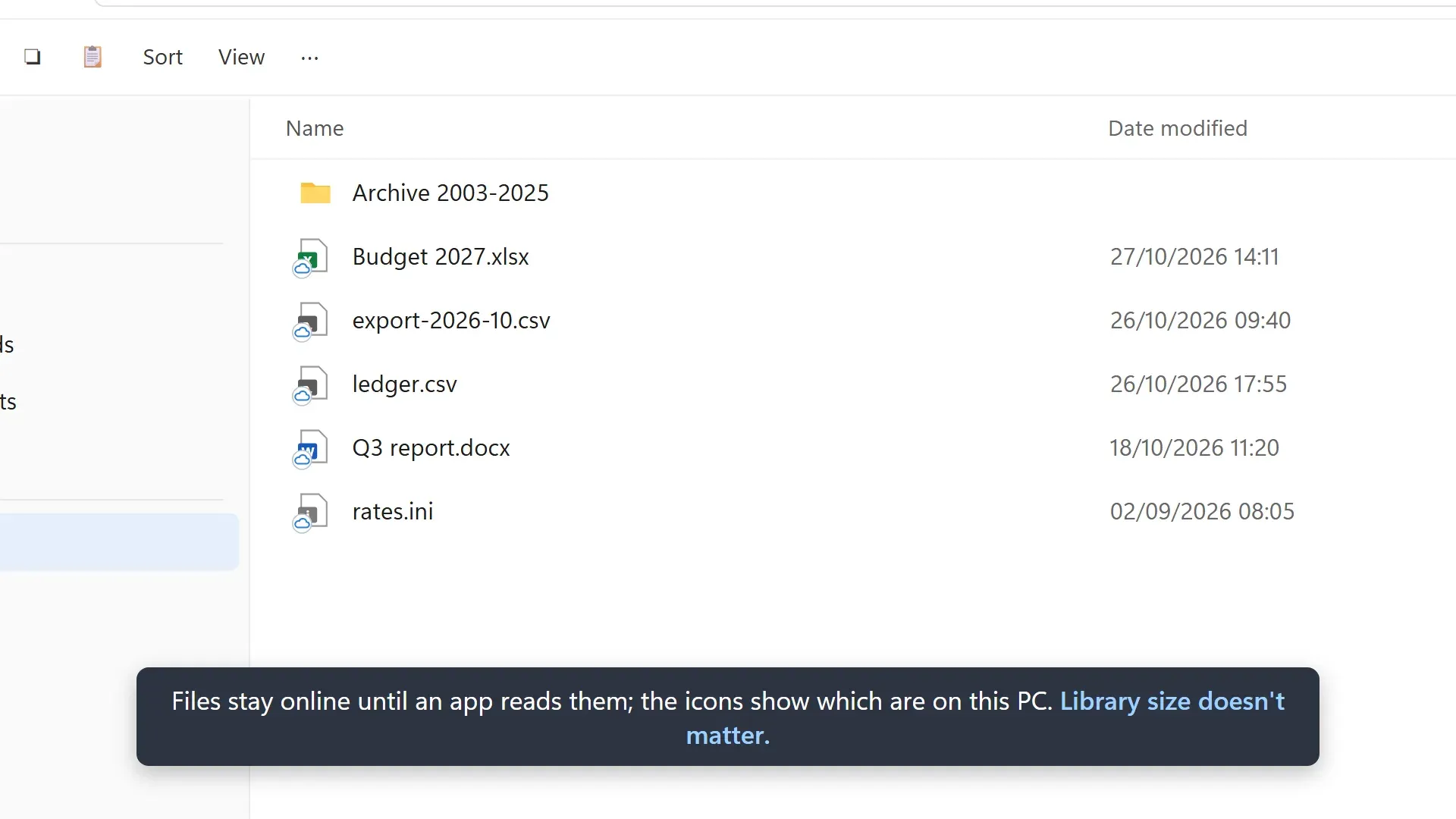
VFS365 is not a sync client. Nothing is mirrored in advance: a folder is listed when it is opened and a file streams in when an application reads it, so library size does not change the cost of mounting it. Each signed-in user gets a WinFsp network volume at \\VFS365\<user>, served by a per-session agent (vfs365-agent.exe) that starts at logon. The architecture document splits it into a platform-neutral engine (namespace, metadata cache, content cache, upload queue and change feed), a thin Microsoft Graph and SharePoint REST client with a request governor, the WinFsp front end, the agent with sign-in and policy handling, the vfs365.exe console tool and vfs365np.dll, a small network provider written in C so typed \\VFS365 paths resolve. The rest is C# on .NET 10, shipped self-contained so devices need no .NET runtime.
The documented requirements are Windows 11 on x64 or ARM64, WinFsp (installed by the setup program when missing) and a one-time admin consent per tenant. By default VFS365 signs in as the user through Windows' Web Account Manager with JSolve's multi-tenant public client app, which uses only delegated permissions: User.Read, Files.ReadWrite.All and Sites.Read.All in Microsoft Graph and AllSites.Read in SharePoint. Tenants that only allow their own apps, and forks, can register a public client app with the Web Account Manager redirect URI and set its ID in the ClientId policy, as described in the app registration guide. Entra joined or registered devices sign in silently, other devices prompt once, and only member accounts of the tenant are accepted: guests and accounts synced in from another tenant are refused.
All releases so far carry 0.x version numbers. The latest, VFS365 0.8.2, was published on November 6, 2026 and adds the DefaultLibrarySites policy, which mounts a site's default library directly so a Teams channel folder sits one level higher. Version 0.8.1 fixed an agent crash caused by an unresponsive Explorer window after sleep, and 0.8.0 introduced opening Word, Excel and PowerPoint files from Microsoft 365 with co-authoring. The GitHub releases page lists 19 releases, from 0.1.9 on October 7, 2026, none marked as a pre-release; earlier builds appear only in the changelog, and the announcement states that VFS365 is already in production use at a large organisation. Releases from 0.4.2 on are Authenticode signed with JSolve B.V.'s certificate through Azure Artifact Signing and carry build provenance attestations from the repository's release workflow; the full history is in the changelog.
The GPL-3.0 licence covers VFS365 itself; WinFsp, by Bill Zissimopoulos, ships unmodified under GPLv3 with its FLOSS exception, the .NET libraries under MIT and the WiX installer components under MS-RL. Because the repository carries its own licence, JSolve's commercial use policy, which governs OneDriveMapper, does not apply to it. The support page states that VFS365 is free but support is not: issues are handled on a best-effort basis, and paid help with deployment, troubleshooting or custom changes is offered by JSolve B.V. without a published price. The product page lists the boundaries: Windows only, member accounts only, no co-authoring when Office opens the drive copy through its own File, Open dialog, and multi-user database files are unsafe across machines.
Key capabilities
- One Explorer location for Microsoft 365 The drive root holds
OneDrive,Shared with meandSites, with every SharePoint and Teams library the user can reach. TheScopepolicy can limit it to SharePoint or OneDrive,Labelrenames it (default VFS365), andDriveLetteradds a letter such asM:or picks the first free one counting down from Z. - Plain file paths for legacy applications Applications reach files through the drive letter or the UNC path
\\VFS365\<user>with normal Win32 file calls. Nothing is configured per library or per user: libraries appear when a user gains access and disappear when access ends. - Automatic library discovery Libraries are found per user with SharePoint Search, the method of the author's M365AutoLink tool, between 5 and 90 minutes after sign-in and then daily. Site URL patterns and site templates (
GROUP,SITEPAGEPUBLISHING,TEAMCHANNEL,STS) filter what shows,PinnedLocationsadds sites that search does not return, andvfs365 whyexplains why a library is shown or hidden. - Streaming reads and fast starts At logon the drive shows the libraries and folders of the last session at once, while discovery runs in the background. Big folders show their first entries while the rest loads, cached folders and files stay available offline, and copies out of the drive download the next small files ahead (
ReadAheadFiles, default 8). - Saves into the original item Changes go to a journaled local copy first, so a crash or power cut loses nothing, and then upload into the existing SharePoint item with an
If-Matchcheck, keeping version history, sharing links and metadata. New files upload right after they are closed, four at a time. When a colleague changed the file in the meantime, the local version is saved next to it as a conflict copy and the tray names who saved the other version. - Changes from elsewhere Each library in use follows a change feed with delta queries and push notifications, so edits made in the browser or on another device appear in open Explorer windows within about 20 seconds (
ChangeCheckSeconds). Idle drives make no calls, and libraries only glanced at get no change checks. - Office files with co-authoring Since 0.8.0, a double-click on a
.docx,.xlsxor.pptxfile opens it in the desktop app from Microsoft 365, with co-authoring and AutoSave, unless the drive copy has changes not uploaded yet. TheOfficeFilespolicy chooses the desktop app, Office for the web or the local copy, andOfficeFileTypesextends it to macro-enabled and older formats, OneNote and Visio. - Explorer menu and status icons A VFS365 submenu on files and folders in the drive offers Open in browser, Open in desktop app, Copy link (no new sharing link is created), Version history and Share in browser, plus Keep this version and Compare on conflict copies. Overlay icons mark files as online only, on this device, uploading or failed; Explorer loads only 11 overlay handlers, so VFS365 registers four.
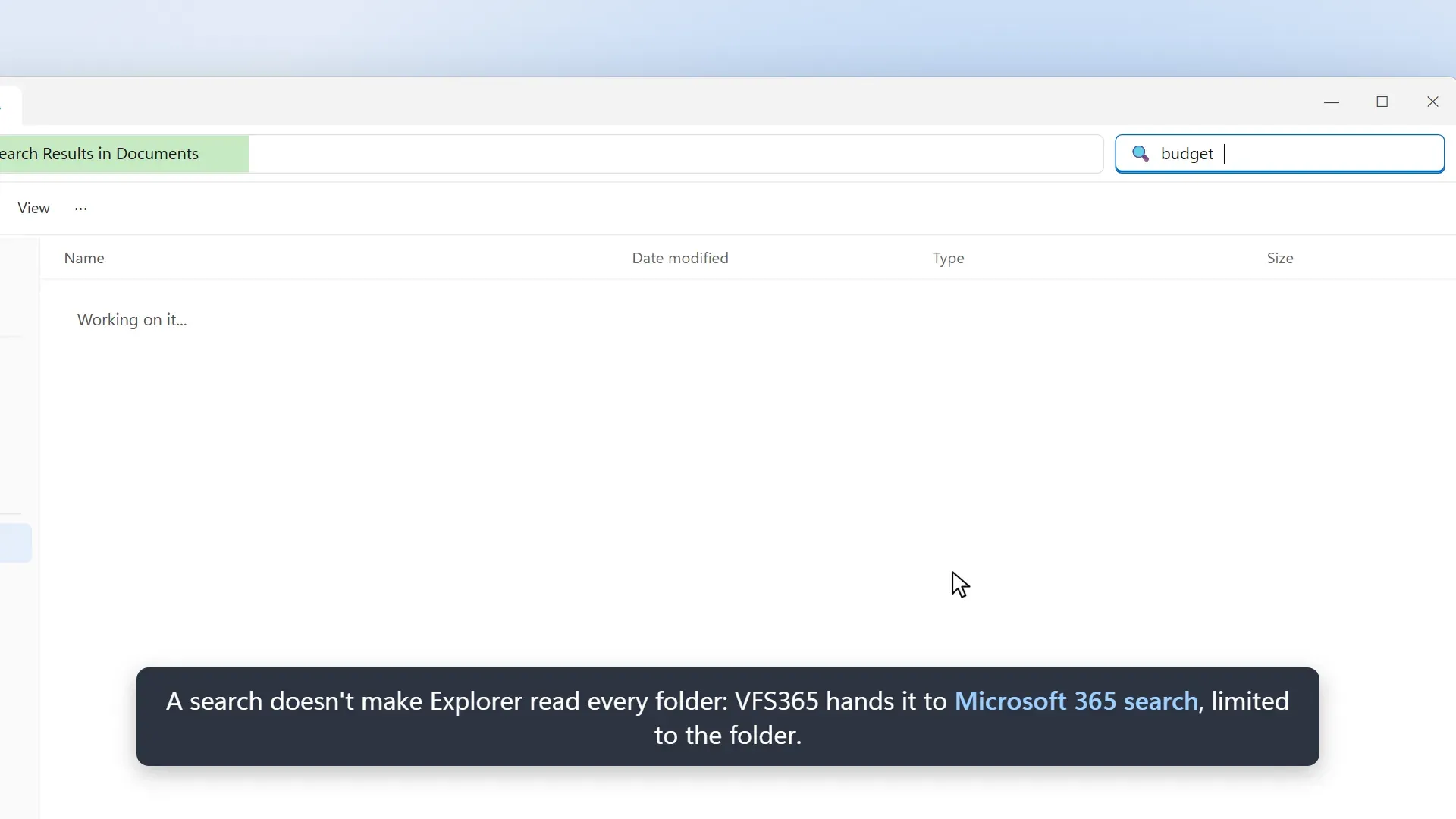
- Search handed to Microsoft 365 A search in Explorer's search box on the drive would otherwise list every folder below it and spend the tenant's request budget. With the default
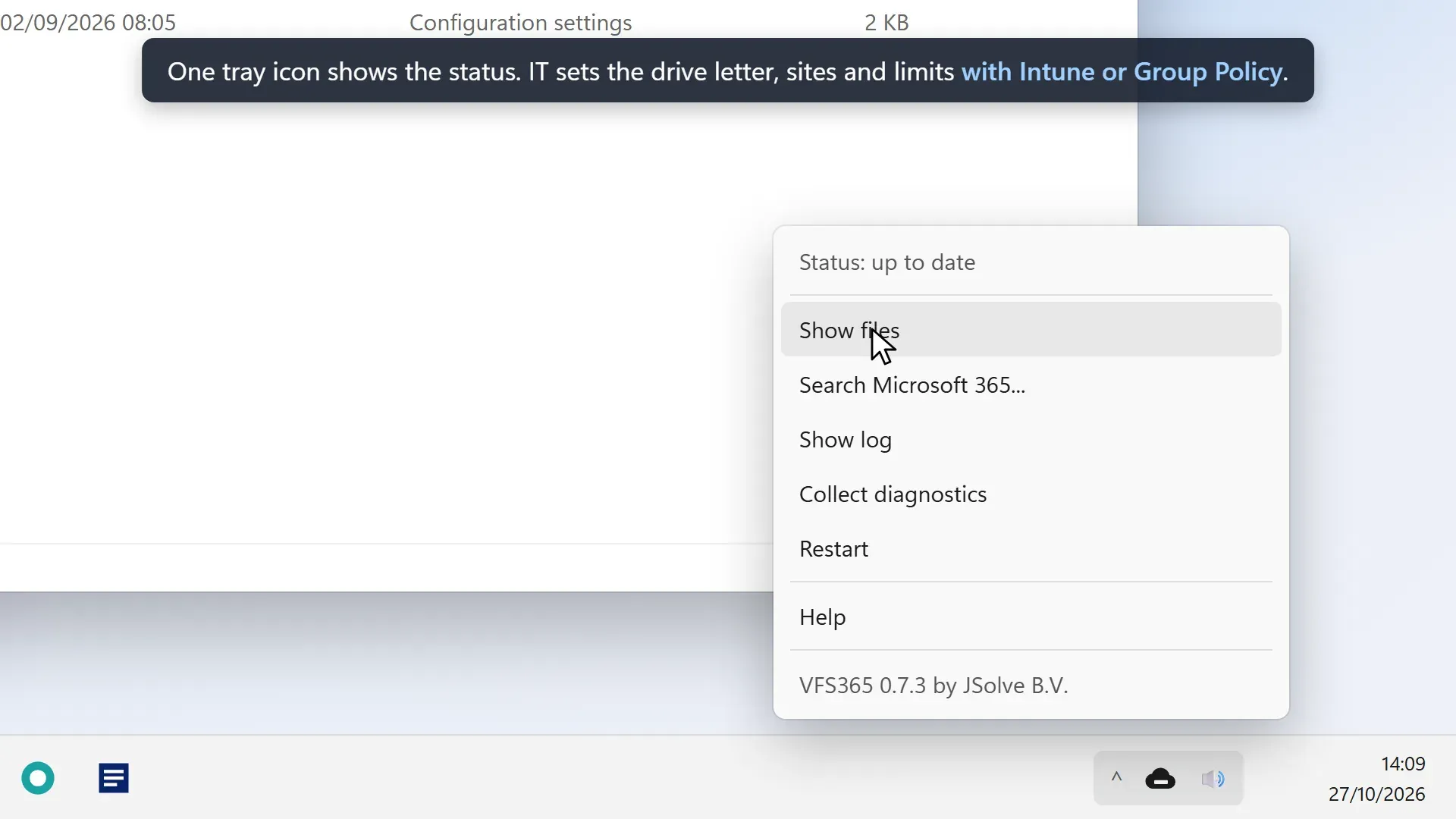
ExplorerSearchsetting, VFS365 stops that crawl and opens SharePoint search in the browser with the same words, limited to the current folder, library or site. - Tray icon and diagnostics The tray icon follows the taskbar theme and shows whether everything is saved, something waits to upload or attention is needed. Its menu has Show files, Search Microsoft 365, Show log, Collect diagnostics (a zip for the helpdesk with tokens removed), Restart, Sign in when needed and Help, which opens a page set by policy. The menu language is English or Dutch.
- Encrypted per-user cache Copies of opened files are kept under
%LOCALAPPDATA%\VFS365, encrypted with AES-256 under a key wrapped by DPAPI for that user, and limited byCacheSizeMB(default 2,048 MB). The cache is wiped byvfs365 signout, on an account or tenant change and when the device leaves Intune; unsaved changes in the staging folder are kept until they upload. - Folder redirection and extra drive letters
FolderRedirectionmoves Windows user folders such as Desktop and Documents into VFS365 while the drive is mounted and puts them back at unmount.DriveMappingsgives libraries or folders a letter of their own, for exampleZ:=Sites\Finance\Documents|Finance, with environment variables,%UPN%placeholders and wildcards. - Request budget and throttling Microsoft limits each app per tenant, and all VFS365 users of a tenant share the budget of the app they sign in with.
ApiBudgetPerMinute(default 600 resource units per user) caps peaks, background work uses only half of it, and after a 429 or 503 response background work pauses forThrottlePauseMinutes(default 15) while user actions continue. - Policies for Intune and Group Policy Every setting is a registry value under
HKLM\SOFTWARE\Policies\JSolve\VFS365or the HKCU equivalent, written by the ADMX and ADML templates shipped with each release for Intune ADMX import or Group Policy. Machine policy wins per setting, and settings are read when the agent starts. - Optional monitoring in your own Azure storage With the
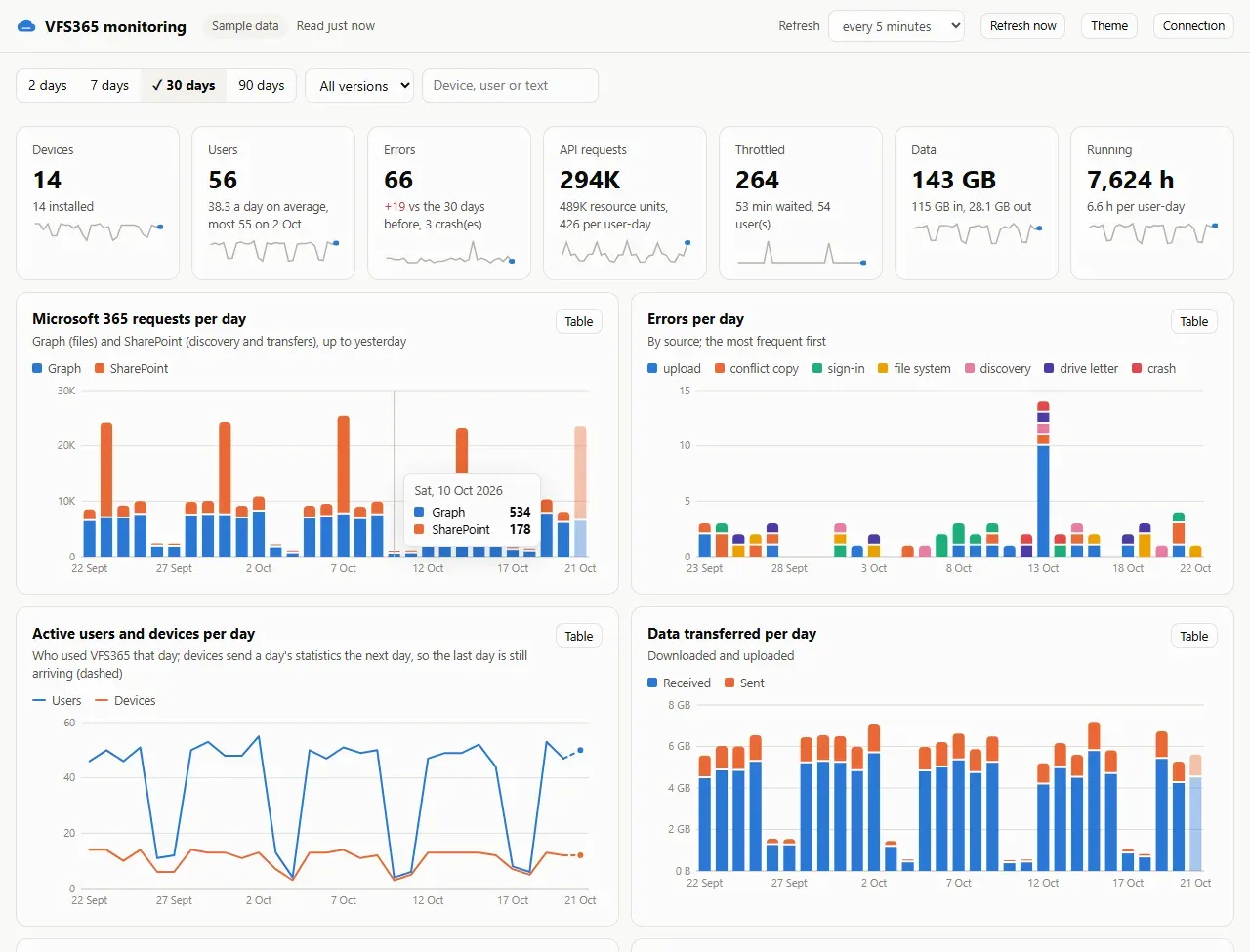
MonitoringUrlpolicy, devices report errors, daily usage and installs to three tables in the organisation's Azure Table storage through an add-only SAS. A single-file HTML dashboard reads them with a read-only SAS and shows trends, per-device and per-user details and headroom under Microsoft's per-app limits; a Deploy to Azure template creates the storage account and hosts the dashboard. Rows contain user and device names, andMonitoringDetail=NoPathshashes file paths. - Health checks and Intune remediation
vfs365.exe healthchecks WinFsp, the network provider order and each user's agent and mount, with exit codes and JSON output. The repository'sdeploy/intunefolder has detection and remediation scripts for Intune Remediations, and the agent writes events to the Windows Application log under source VFS365 for Defender, Sentinel or Splunk. - Setup programs and MSIs for x64 and ARM64 The 0.8.2 release attaches setup programs for x64 (about 34 MB) and ARM64 (about 32 MB) that install WinFsp and VFS365, the policy templates, the monitoring dashboard and
SHA256SUMS.txt. The deployment guide documents quiet installs (/quiet /norestart) and a separate MSI route for organisations that deploy WinFsp on their own.
Where VFS365 fits
Legacy applications that open files by path
The product page describes the starting point: a sync client keeps a local copy or placeholder of every file, Microsoft advises at most 300,000 synced files and each library has to be added by the user, while applications that open files by path only need the path to exist. With DriveLetter set, every user on a machine sees the same path such as M:\, so file paths that an application stores keep working for colleagues. Byte-range locks do not cross machines, so the DatabaseFiles policy can make Access, QuickBooks and SQLite files read-only or block them.
Replacing OneDriveMapper drive letters
The documentation page of OneDriveMapper now states that VFS365 supersedes it. In VFS365, DriveMappings recreates letters such as Z: for a library or folder, and the deployment guide states that a letter still held by an old SharePoint WebDAV mapping, from OneDriveMapper or a net use to *.sharepoint.com, is taken over and that mapping removed. A letter used by anything else is left alone and reported.
Rolling out with Intune
The deployment guide treats the setup program as an Intune Win32 app in device context, installed with /quiet /norestart and detected through the VFS365 product entry or C:\Program Files\VFS365\vfs365-agent.exe. Before that, an administrator grants consent for the JSolve app once, policies are set from the imported ADMX in the settings catalog, and the health scripts can run as an Intune Remediation. Win32 packaging tools listed on iThub include IntunePrepTool, and IntuneAutomation collects PowerShell scripts for Intune.
Azure Virtual Desktop and multi-session hosts
Every user on a multi-session host runs an own agent and volume that nobody else can open; requests from other users are refused before any lookup, and UNC paths include the user name because they are machine-wide. Downloaded copies sit in %LOCALAPPDATA%\VFS365\cache, which FSLogix places in the profile container by default; the guide lists which files to keep there for a fast start and which cache folder can be excluded at the cost of downloading again.
Working on Office documents together
Files opened by double-click or Enter in Explorer open as Microsoft 365 documents, so several people can edit a workbook at once with AutoSave. Office's own File, Open dialog, its Recent list, the command line and other programs open the copy on the drive without co-authoring; that version still uploads into the same item, and a concurrent change produces a conflict copy instead of an overwrite.
Protecting the VFS365 name on the network
While a user's drive is not running, Windows treats \\VFS365 as an ordinary server name and looks it up through DNS, LLMNR and NetBIOS, so whoever answers could receive an NTLM response and files saved to remembered paths. The deployment guide and the security policy describe the countermeasures the project documents: turning off LLMNR and NetBIOS name resolution, creating a VFS365 DNS record that points to 127.0.0.1, blocking NTLM for SMB and stopping the WebClient service where nothing needs it. The agent logs a warning and reports a security row when the name resolves elsewhere.
Install
VFS365-0.8.2-x64-setup.exe /quiet /norestartReviews of VFS365
Be the first to share your experience with VFS365.
Write a review
Loading review form…
Found VFS365 useful? Upvote it todayYour vote helps other IT teams find it in the daily ranking.