

What is OneDriveMapper?
OneDriveMapper is a PowerShell script for Windows that maps OneDrive for Business and SharePoint Online document libraries as drive letters or Explorer network locations without the OneDrive sync client. It is written by Jos Lieben and published by his company JSolve B.V. in the OnedriveMapperV5 repository on GitHub. The script does not synchronise files: it connects each library over WebDAV through the Windows WebClient service and NET USE, so Explorer shows a network drive such as X: whose files are read from Microsoft 365 over HTTPS, and no local copy of the library is kept. The author's blog announced the first release in March 2015, and the documentation page says the script was written to cover functions the sync client lacked at the time, especially in virtualized environments.
The current generation is version 6. The script on the main branch identifies itself as OneDriveMapper v6.10, announced in a July 2026 blog post. The repository has no GitHub releases; earlier builds from v3.29 to v6.10 are kept as single files in its Releases folder. Version 6 signs in with a headless Microsoft Edge: Edge uses the device's Primary Refresh Token (PRT) for silent single sign-on to Entra ID, SharePoint issues the FedAuth and rtFa cookies, the script reads them over the Chrome DevTools Protocol, writes them into the WinINET cookie store and then runs NET USE, which the WebClient service authenticates with the same cookies. When silent sign-in is not possible, a visible Edge window opens for a manual sign-in. Version 5 drove Edge through Selenium and msedgedriver, version 4 used Internet Explorer COM automation, and version 3 made direct HTTP calls with ADFS modes and cached credentials; the README lists v3 as legacy and v4 and v5 as deprecated.
According to the README, the script needs Windows 10 or 11 or Windows Server 2016 or later, PowerShell 5.1, Microsoft Edge and the WebClient service, which it tries to start itself, with the SharePoint URLs in the Local Intranet or Trusted Sites zone. Silent sign-in requires an Entra ID joined or hybrid joined device with an active PRT; on other devices the user signs in through the Edge window. No app registration, client secret, Microsoft Graph permission, Selenium or WebDriver download is involved. Settings are variables at the top of OneDriveMapper.ps1, and since v6.10 every setting can also come from registry policies, so the same unmodified file can be run by Intune, a Group Policy logon script or a scheduled task.
The repository has no SPDX licence. Its LICENSE file and the README point to the JSolve commercial use policy: source that JSolve publishes on GitHub is free to use and modify with attribution as long as nobody makes money from it, directly or indirectly. Commercial use, which the policy illustrates with managed service providers using the scripts at customers and contractors implementing them for paying clients, requires a yearly or perpetual licence priced by the number of users affected. One licence covers all of JSolve's public work that carries no licence of its own, and technical support is not part of it. Although the documentation page calls the script open source, these terms restrict commercial use, so OneDriveMapper is source-available software rather than open source under an OSI-approved licence.
The documentation page now opens with a notice that OneDriveMapper is superseded by VFS365, a GPL-3.0 virtual file system for Microsoft 365 by the same author. The README links an enterprise alternative called OneDriveMapper Cloud; that page publishes no product or price of its own, repeats the VFS365 notice and refers readers who want commercial support to a third-party drive mapping product. The documentation states that there is no dedicated free support, that the script may stop working without notice if Microsoft ends WebDAV support, and that WebDAV shows an empty drive when a library holds too many files and folders.
Key capabilities
- OneDrive for Business as a drive letter With
sourceLocationPathset toautodetect, the script resolves the user's personal OneDrive URL from the UPN and maps its document library, namedDocumentsby default ($libraryName), to a letter such asX:. An optional$o365UserLoginoverrides the detected account when the script would pick the wrong user name. - SharePoint Online document libraries Any number of SharePoint Online or Teams document libraries can be mapped by putting the full library URL in
sourceLocationPath. Each entry in the$desiredMappingsarray has adisplayNamethat Explorer shows as the drive label, a target type and a target path. - Network locations instead of letters The
networklocationtype creates an Explorer shortcut rather than a drive letter. Since a May 2026 fix, the script places it in%USERPROFILE%\Links, where it usually shows in Quick Access; the configuration comments state that the base folder setting is ignored on Windows 10 and 11. - Converged drives The
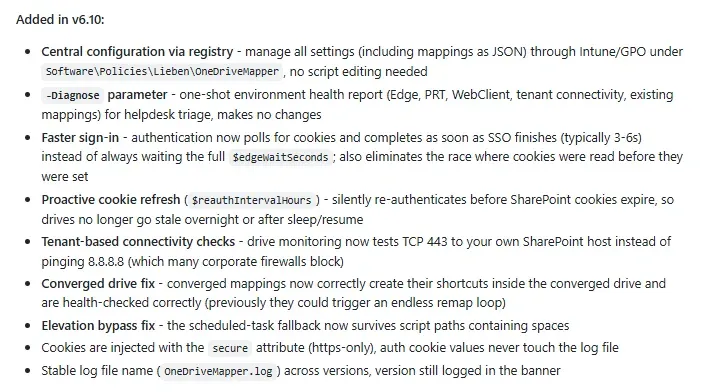
convergedtype gathers several SharePoint libraries as links under one drive letter, labelledSharePoint and Team sitesunless$convergedDriveLabelsays otherwise. Version 6.10 fixed converged mappings so their shortcuts are created inside the converged drive and health-checked correctly; before, they could trigger an endless remap loop. - Silent sign-in through Edge and the PRT On Entra ID joined or hybrid joined devices, a headless Edge completes single sign-on with the Primary Refresh Token through its BrowserCore integration, and the script extracts the session cookies over a DevTools WebSocket.
$edgeWaitSeconds(default 10) is a ceiling: since v6.10 the script polls and continues as soon as the cookies appear, which the README puts at typically 3 to 6 seconds. Edge runs with a temporary profile folder under%TEMP%that the script deletes afterwards. - Manual sign-in fallback If silent sign-in fails, for example on a device without a PRT or when Conditional Access blocks the headless browser,
$fallbackToVisibleAuthopens a visible Edge window. The user has up to$visibleAuthTimeoutseconds (300 by default) to sign in, and the cookies are still read over CDP without any browser automation framework. - Proactive cookie refresh
$reauthIntervalHours(default 12) re-authenticates silently before the SharePoint cookies expire, so drives do not go stale overnight or after sleep and resume. It works only while drive monitoring is enabled, and0turns it off. - Drive monitoring and automatic remapping
$autoRemapMethodkeeps watching mapped drives and remaps them when they disconnect:Pathchecks the underlying WebDAV path,Linkonly checks that the letter exists andDisabledturns monitoring off. Since v6.10 connectivity checks open TCP port 443 to the tenant's own SharePoint host instead of pinging 8.8.8.8. - Folder redirection With
$redirectFoldersenabled (off by default), Windows known folders such as Desktop, Documents and Pictures are redirected into paths on the mapped OneDrive drive, for exampleX:\Desktop, with a per-foldercopyExistingFilesswitch. The README pairs this with$restartExplorerso Explorer picks up the change immediately. - Active Directory group targeting
mapOnlyForSpecificGrouptakes the CN of an Active Directory group and maps the entry only for its members. This requires a domain-joined device that can reach a domain controller; an empty value maps the entry for every user. - Central configuration through registry policies Added in v6.10: every scalar setting, plus the mapping and redirection tables as JSON strings, can be set under
HKCU\Software\Policies\Lieben\OneDriveMapperorHKLM\Software\Policies\Lieben\OneDriveMapper, with the machine key taking precedence. Booleans and numbers are DWORD values and text is REG_SZ, and the log lists which settings came from policy at startup. - Diagnostics mode Running the script with
-Diagnoseproduces an environment report covering Edge, the PRT, the WebClient service, tenant connectivity, existing mappings and the effective configuration, then exits without changing anything. The README describes it as a tool for helpdesk triage. - Progress bar, tray icon and notifications A progress window shows
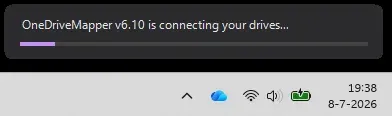
OneDriveMapper v6.10 is connecting your drives...with a configurable accent color and text, and an optional tray icon reports the state and shows a balloon notification with the number of connected drives.$displayErrorsshows a dialog when a mapping fails, and-HideConsolehides the PowerShell window. - Elevation bypass When the script detects that it was started as administrator, it creates a scheduled task that starts it again as the standard user. Version 6.10 fixed this fallback for script paths that contain spaces.
- Mapping housekeeping options Further switches control persistent mappings (
/PERSISTENT:YES), removal of existing SharePoint and OneDrive mappings before remapping, removal of dead or empty mappings, disabling automatic proxy detection to speed up WebDAV, a URL to open in Edge after mapping, and automatic per-user folders on chosen shared drives ($createUserFolderOn). - Logging The script writes a timestamped log with INFO, WARNING and ERROR lines to
%APPDATA%\OneDriveMapper.logand rotates it at 2 MB ($maxLocalLogSizeMB). Since v6.10 the file name stays the same across versions, authentication cookie values are never written to the log, and cookies are injected with thesecureattribute so they are sent over HTTPS only. - Single-file distribution OneDriveMapper is one
.ps1file with no external dependencies, downloaded from the main branch and edited or configured by policy. Older generations remain available asReleases/v5.16.ps1,v4.08.ps1andv3.30.ps1; the repository also still contains theWebDriver.dllSelenium library that version 5 used. - Commercial licence tiers The commercial use policy prices licences by users affected, in euro excluding VAT, per year or perpetual: Startup (0 to 10 users) EUR 200 or EUR 500, Tiny (10 to 50) EUR 400 or EUR 1,000, Small (50 to 150) EUR 750 or EUR 2,000, Medium (150 to 500) EUR 1,500 or EUR 4,000, Large (500 to 2,500) EUR 3,000 or EUR 8,000, Very Large (2,500 to 10,000) EUR 6,000 or EUR 18,000 and Corporate (10,000 and more) EUR 12,000 or EUR 30,000. Verified NGOs and educational institutions get 75 percent off, a licence is ordered by e-mail and invoiced, and a trial of up to 24 consecutive hours needs no licence.
Where OneDriveMapper fits
Drive letters for applications that expect file paths
The documentation page names the situations the script was built for: automated processes that cannot yet be rewritten for the OneDrive API, and multi-user environments where the web interface is not an option. The feature list on that page also mentions mapping drives inside Azure RemoteApps and Citrix published applications. A driveletter entry with a library URL gives such an application a path like Z:\ on SharePoint Online. The author's answers on the same page give 5,000 items per folder as the SharePoint limit that WebDAV inherits.
Logon mapping on Entra ID joined devices with Intune
The README describes deployment as an Intune PowerShell script that runs in the user context, with execution policy Bypass and the -HideConsole argument. On Entra ID joined devices with a PRT the drives then connect without user interaction, and tenant name, mappings and behavior can be pushed as registry policies instead of editing the file. Other Microsoft 365 and Intune tools listed on iThub include IntuneAutomation, a set of PowerShell scripts for Intune, and WinTuner, which packages WinGet apps for Intune.
Group Policy logon scripts on domain-joined PCs
For domain environments the README gives a logon script command line that runs the script hidden from a file share with -ExecutionPolicy Bypass, and a Register-ScheduledTask example with an at-logon trigger and limited run level. Entries with mapOnlyForSpecificGroup are mapped only for members of the named Active Directory group, and machine-wide settings can come from the HKLM policy key.
Redirecting Desktop and Documents into OneDrive
Folder redirection moves the Desktop, Documents and Pictures known folders onto the mapped OneDrive letter, optionally copying their existing content. The documentation page lists measures that accompany WebDAV mappings in general: excluding them from scheduled virus scans, keeping Windows Search from indexing them, disabling WebClient file locking and clearing the WebDAV cache when it grows large. The README notes that the WebClient file size limit, FileSizeLimitInBytes, defaults to 50 MB.
Helpdesk triage
-Diagnose prints the state of Edge, the PRT, the WebClient service, tenant connectivity and existing mappings without making changes, and the log in %APPDATA% records every step. The README's troubleshooting section maps common messages to causes: a stopped WebClient service, a device that dsregcmd /status does not report as AzureAdJoined with AzureAdPrt, NET USE error 67 when the SharePoint URL is not in a trusted zone, and an empty drive caused by the library name or the WebDAV file size limit.
Moving from OneDriveMapper to VFS365
The documentation page states that VFS365 supersedes OneDriveMapper. According to the VFS365 deployment guide, its DriveMappings policy gives folders their own letter for applications that expect one, and a letter held by an old SharePoint WebDAV mapping, such as one made by OneDriveMapper, is taken over and that mapping removed. VFS365 is a separate installed product with different requirements, including Windows 11 and admin consent for an Entra ID app.
Reviews of OneDriveMapper
Be the first to share your experience with OneDriveMapper.
Write a review
Loading review form…
Found OneDriveMapper useful? Upvote it todayYour vote helps other IT teams find it in the daily ranking.