

What is n8n?
n8n is a workflow automation platform for building multi-step workflows and AI agents. Workflows are assembled on a visual canvas from nodes (triggers, app integrations, logic and code steps), and the README lists 1500+ integrations and 9,000+ community workflow templates. The name is short for "nodemation", according to the README, and is pronounced n-eight-n. The product is made by n8n GmbH, whose imprint gives an address in Berlin, Germany, with Jan Oberhauser as managing director.
n8n is distributed in two ways. The self-hosted version runs on your own infrastructure, on-premises or in a private cloud; the hosting documentation describes a one-line setup script that requires Docker, Docker Compose, Docker images from docker.n8n.io/n8nio/n8n, npm and cloud provider guides. All self-hosted installations use the same core product: without a license key it runs as the free Community edition, and a Business or Enterprise license key unlocks those editions. n8n Cloud is the hosted service; the security page states that it runs on Microsoft Azure with data hosted in the European Union.
The code is written mainly in TypeScript in the n8n-io/n8n repository, created in June 2019. n8n describes its licensing as fair-code rather than open source: the code is published under the Sustainable Use License, with files containing .ee. in their name under the n8n Enterprise License. The Sustainable Use License allows use and modification for internal business purposes and for non-commercial or personal use, and free distribution for non-commercial purposes. n8n states that it was licensed under Apache 2.0 with Commons Clause until 17 March 2022.
The latest stable GitHub release is n8n@2.47.3, published on November 9, 2026, with fixes to scheduled task cleanup and migration report permissions. Pre-releases of the 3.x line (3.1.0 and 3.2.0) are published in parallel. The n8n 3.0 breaking changes page describes 3.0 as an early access release and states that self-hosted n8n 3.0 requires a Docker-based deployment: it no longer supports installations run with npm or npx n8n and does not publish a runnable n8n package to npm. A migration report under Settings lists workflows and instance settings affected by the upgrade.
Similar workflow automation tools on iThub include Activepieces, Automatisch and ByteChef.
n8n screenshots
Explore the interface. Open a screenshot to view it at full size.
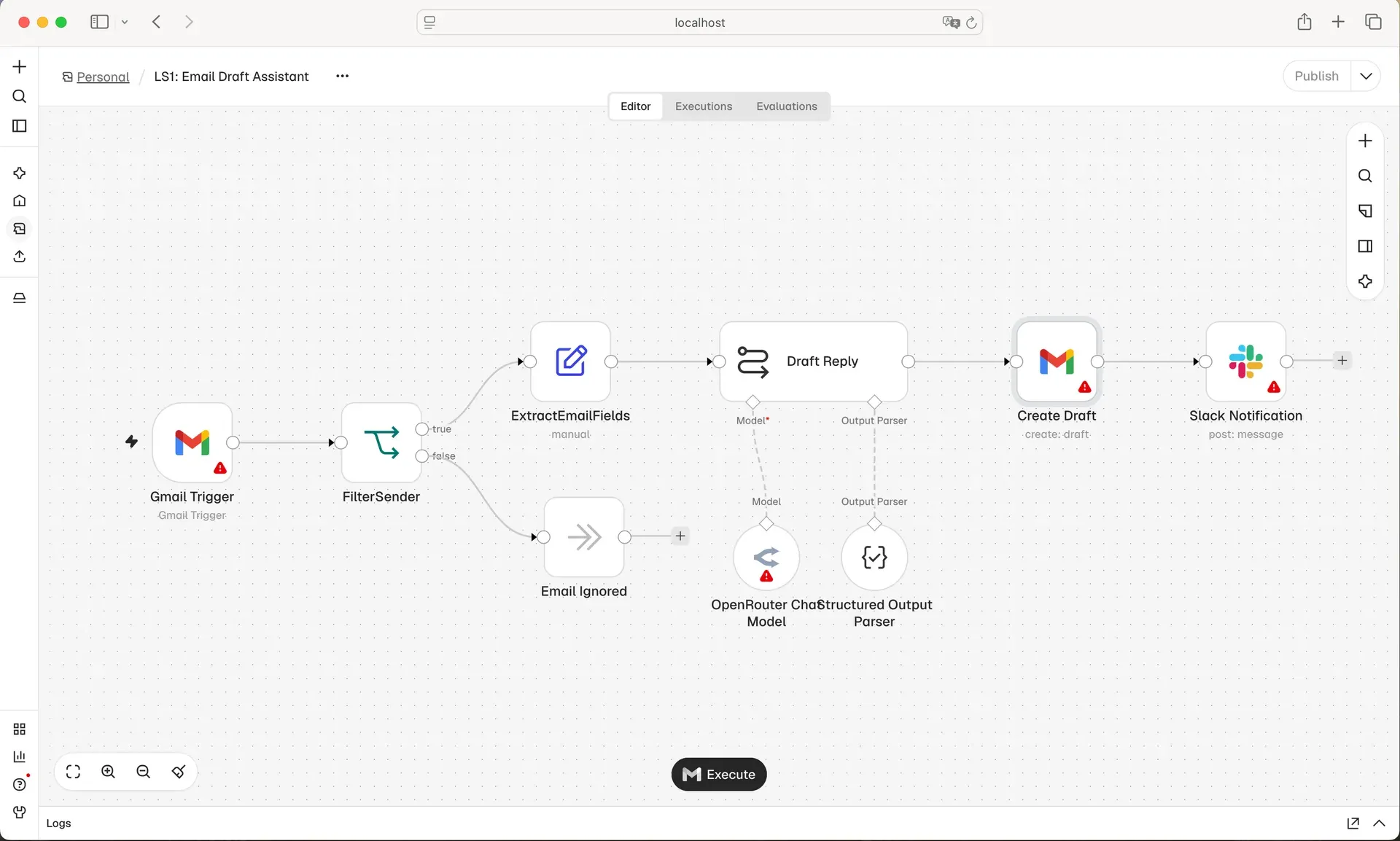
n8n workflow editor showing an email draft assistant workflow, from the n8n README.
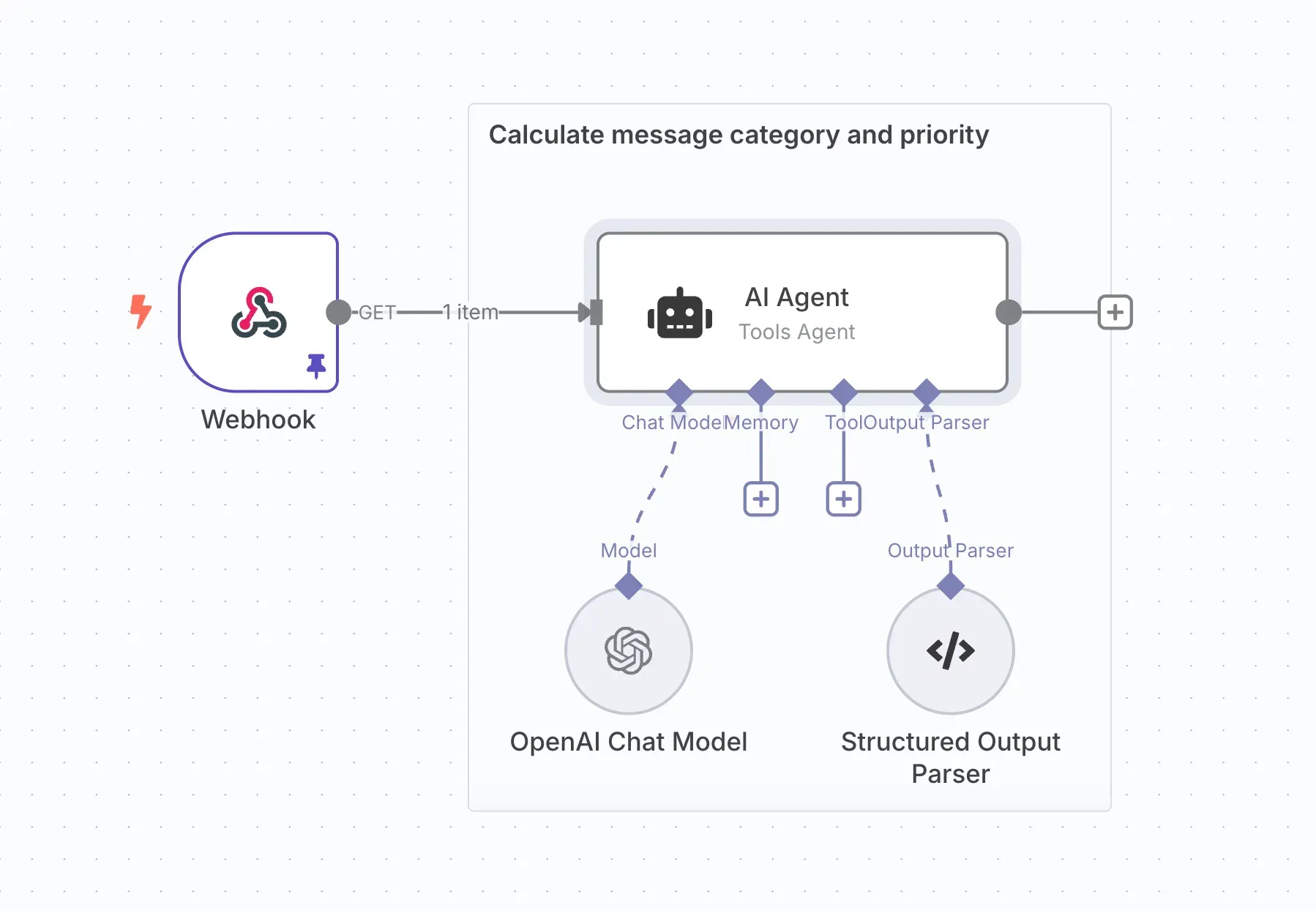
AI Agent (Tools Agent) node inside a sticky-note group, with chat model, memory, tool and output parser connectors.
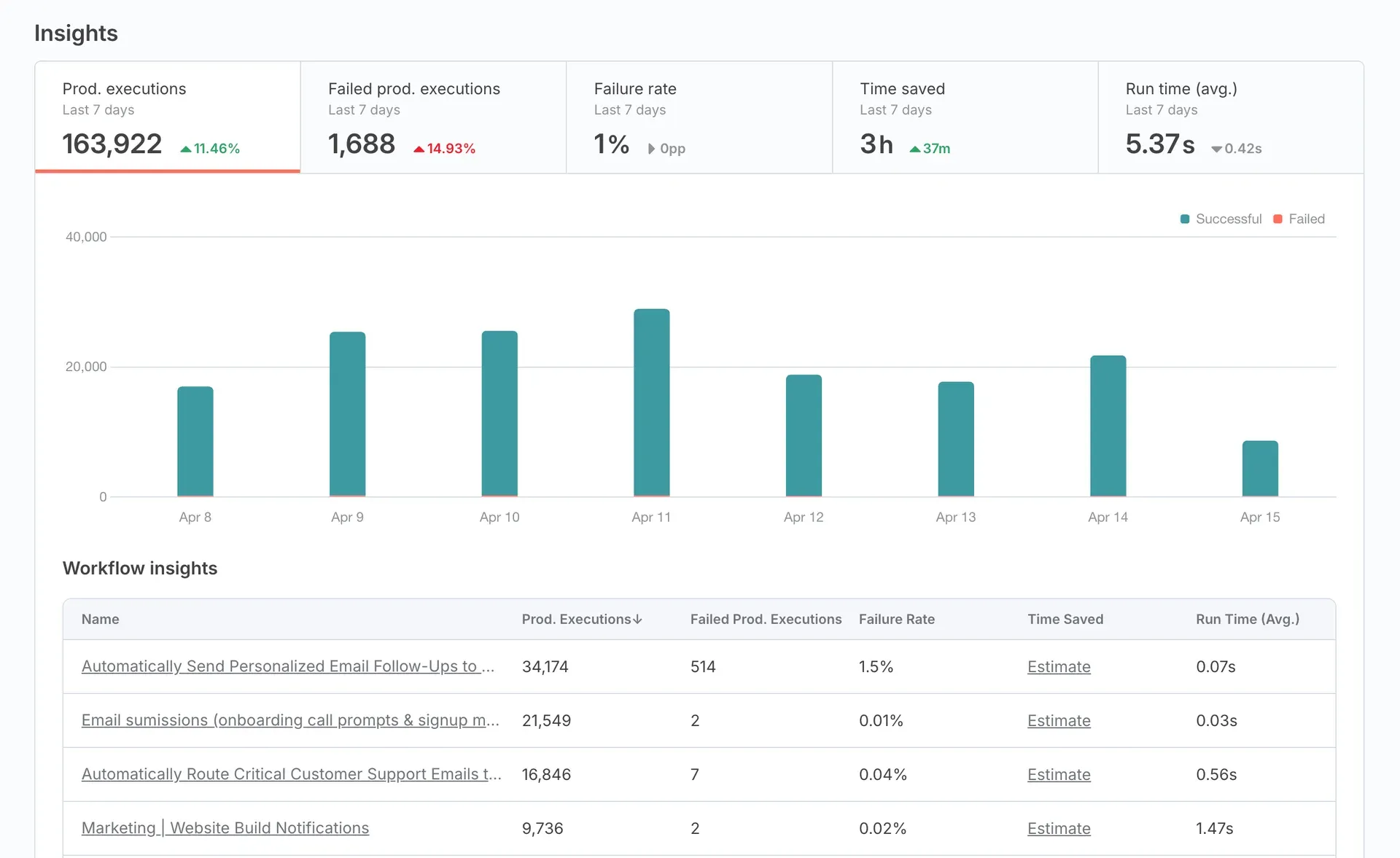
Insights dashboard with seven-day execution chart and workflow insights table, from the n8n documentation.
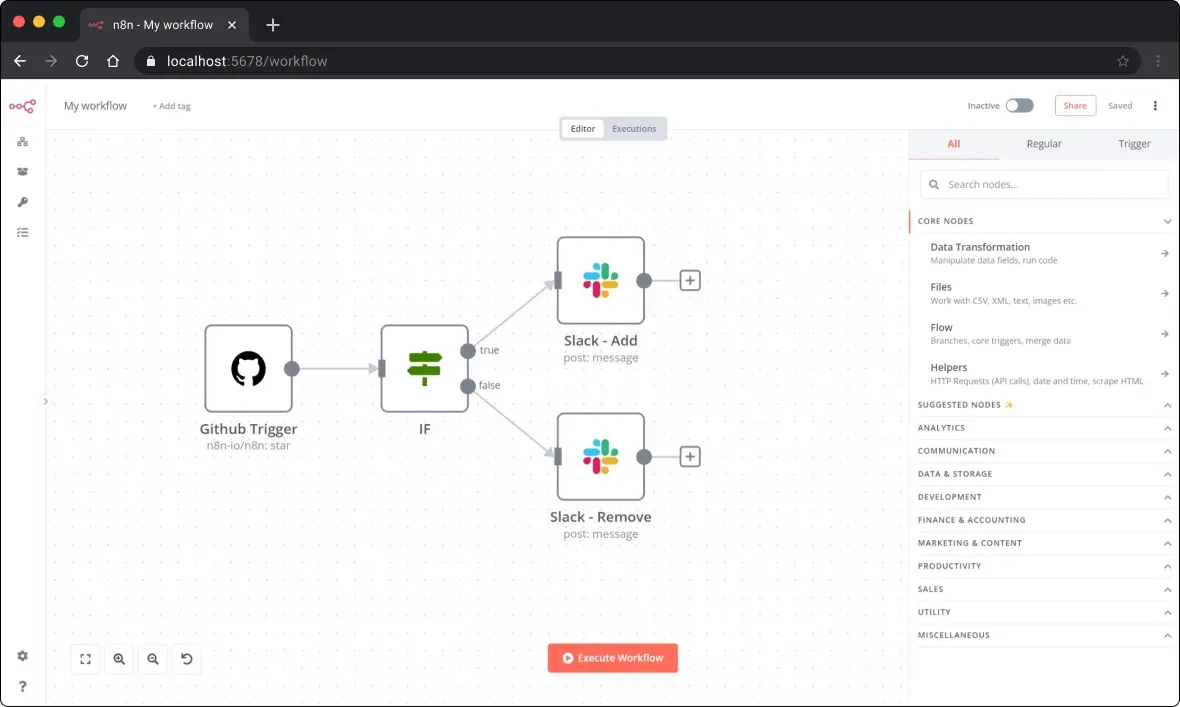
Earlier version of the editor with the node panel open, from the n8n repository assets.
Source: official n8n project page.
Key capabilities
- Visual workflow editor Workflows are built on a canvas by connecting trigger nodes, app nodes, logic nodes such as IF and Filter, and output nodes. The editor has separate Editor and Executions views per workflow, and a workflow is published or activated from the editor. Each node shows its input and output data so a workflow can be executed step by step.
- 1500+ integrations The integrations directory lists built-in nodes for SaaS applications, databases and services, plus core nodes such as HTTP Request, Webhook, Schedule and data transformation. Community nodes extend the catalog, and n8n publishes tooling (
npm create @n8n/nodeand then8n-nodeCLI) for building custom nodes. - Code steps The README states that visual building can be combined with JavaScript, Python and npm packages. Code runs inside workflows alongside regular nodes, and the hosting documentation includes a section on hardening task runners, which execute code for self-hosted instances.
- AI agents and LLM nodes The AI documentation covers AI Agent nodes with attached chat model, memory, tool and output parser sub-nodes. The README lists OpenAI, Anthropic, Google and open-source models as connectable providers, and n8n describes multi-step agents with tool use and human approval steps.
- MCP server and MCP client N8n has a built-in, instance-level MCP server that lets supported clients such as Claude Desktop search workflows, trigger exposed workflows and create or edit workflows and data tables. Separately, an MCP Server Trigger node exposes tools from a single workflow, and an MCP Client node calls external MCP servers.
- Public REST API The n8n public REST API covers many of the tasks available in the GUI, with authentication, pagination, idempotency keys for supported POST requests and rate limits. It is available on n8n Cloud Starter, Pro and Enterprise and on all self-hosted editions, but not on the free trial. An n8n API node and an n8n CLI wrap the API.
- Templates library The workflow template library holds 9,000+ templates according to the README, covering AI, sales, IT operations and other workflows that can be imported into an instance and adjusted.
- Insights dashboard Insights report production executions, failed executions, failure rate, time saved and average run time per period and per workflow. The pricing page lists 30 days of insights on the Business plan and 365 days on Enterprise.
- Databases Self-hosted n8n uses SQLite by default to store credentials, executions and workflows, and supports PostgreSQL. The database page lists PostgreSQL 17 and 18 plus 16 for compatibility as of July 2026, marks Amazon Aurora as experimental and states that derivatives such as AlloyDB, CockroachDB and YugabyteDB are not supported.
- Queue mode and workers In queue mode, a main instance handles triggers and webhooks and passes execution IDs through Redis to a pool of worker instances. Workers share the main instance encryption key to read credentials. Queue mode does not support binary data storage on the filesystem; S3 external storage is the documented option.
- Editions and licensing Self-hosted editions are Community (free, no license key), Registered Community (free, unlocked by registering an email), Business and Enterprise (paid license keys). The edition comparison lists the differences. For Business or Enterprise features, the license key pings n8n's license server daily, according to the pricing FAQ.
- Source control and environments The documentation describes Git-based source control for pushing and pulling workflows between instances and for building separate environments. The pricing page lists Git version control under the Business plan.
- Access control and SSO The pricing page lists shared projects on all paid plans, SSO and LDAP on Business, and the README mentions role-based access and audit trails. Security documentation covers SSO configuration, blocking specific nodes, SSRF protection, execution data redaction, encryption key rotation and security audits.
- n8n Cloud plans The pricing page bases plans on monthly workflow executions. It lists Starter at 20 EUR per month billed annually (2.5k executions, 5 concurrent executions), Pro at 50 EUR per month billed annually (10k executions), Business at 667 EUR per month billed annually (40k executions, self-hosted) and Enterprise on request. Self-hosting the Community edition has no execution limit.
- One-line self-hosted setup
curl -fsSL https://get.n8n.io | shsets up n8n locally with Docker on Linux or macOS, or on Windows through WSL. The manual Docker route creates ann8n_datavolume and runsdocker.n8n.io/n8nio/n8non port 5678. - Docker Compose and cloud guides The hosting section documents Docker Compose with PostgreSQL for team or production instances and guides for cloud providers. A self-hosted AI Starter Kit bundles n8n with additional AI services.
- npm installation (2.x only) On the 2.x line,
npx n8nornpm install n8n -grun n8n with Node.js 20.19 to 24.x. The docs state that npm-based installs are deprecated from n8n 3.0 and that the n8n Assistant is not available on npm installs.
Tested by iThub
· Version 2.45.7
- Environment
- Windows AMD64; Docker Desktop 4.95.0, Docker Engine 29.8.2, Linux containers; synthetic local data; SQLite; 768 MiB container limit
- Scenario
- Import and execute a Manual Trigger to Edit Fields workflow
- Observed result
- The local health endpoint returned OK. A two-node workflow executed successfully through the CLI and returned service=ithub-local-fixture, status=ok and count=3. Its imported workflow was also opened in the actual editor.
The container reported that Python was unavailable for the Python task runner. The tested Manual Trigger and Edit Fields nodes still completed; no Python Code node was tested.
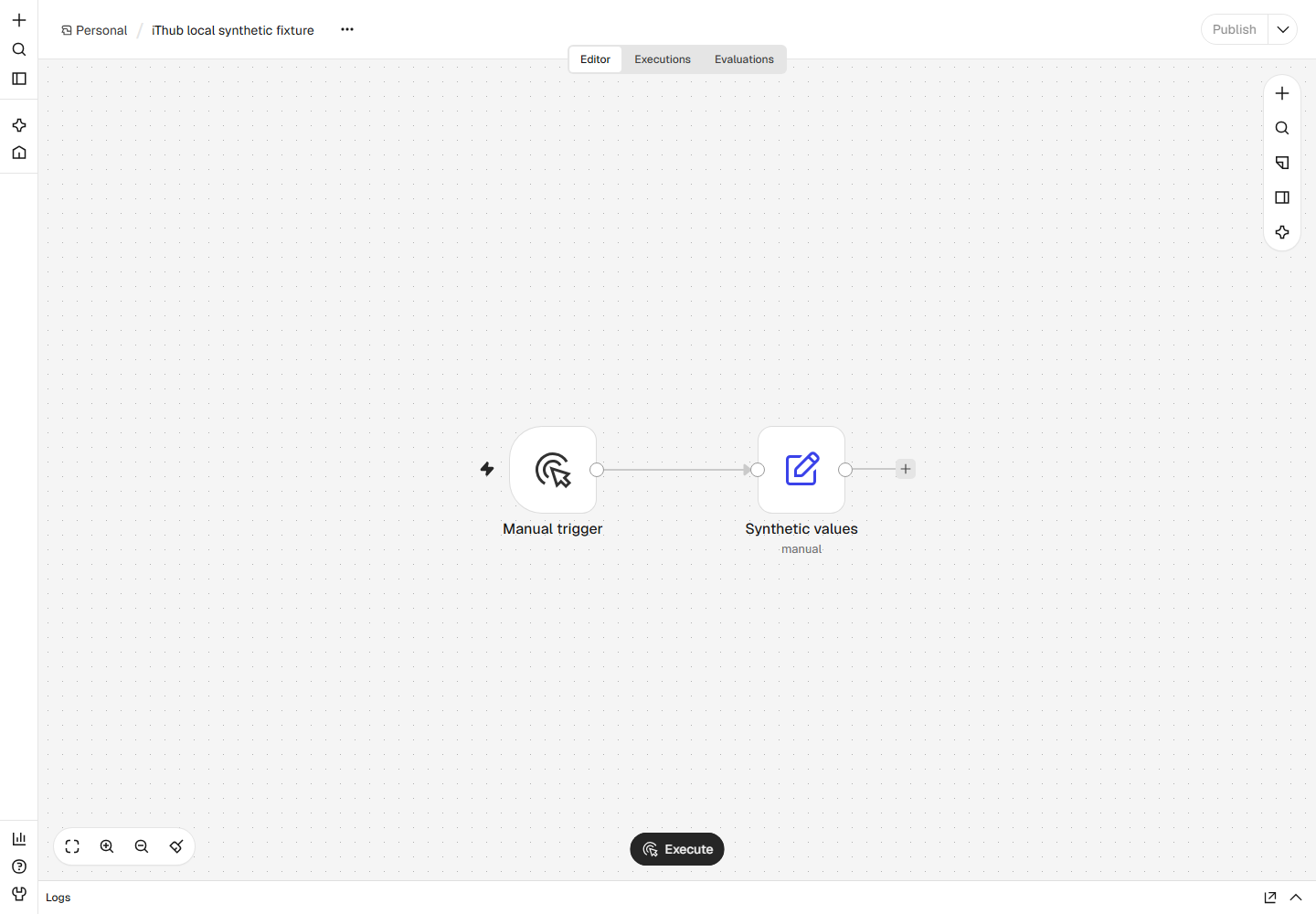
Scope and limits. This used an ephemeral local fixture account and SQLite. External credentials, SaaS integrations, schedules, webhooks, Python, queue mode and production scaling were not tested.
Download the test record (JSON)How we record testsProject source ↗Project source ↗
Where n8n fits
AI agents connected to business systems
An AI Agent node receives input from a trigger such as a webhook, chat message or new email, and is connected to a chat model, optional memory, tools and a structured output parser. Tools can be other n8n nodes or workflows, so the agent can read from and write to connected applications. n8n describes human approval steps and logging of each step for these multi-step agents.
Email, ticket and message routing
A trigger node (for example Gmail or a helpdesk webhook) passes each item through Filter or IF nodes and, where needed, an LLM classification step. The result is written back as a draft reply, a ticket update or a Slack message. The README screenshot shows this pattern as an email draft assistant ending in a Slack notification.
Integration between SaaS applications and internal APIs
Built-in app nodes and the HTTP Request node connect systems that do not share a native integration. Data is mapped between nodes with expressions or transformed in JavaScript or Python code steps, and webhooks or schedules start the workflow. The integrations directory lists the available nodes.
IT operations and DevOps automation
Schedule and webhook triggers run checks, call APIs, and post results to chat or incident tools. The n8n API and CLI allow workflows to be managed from scripts, and source control moves workflows between development and production instances on plans that include Git version control.
Exposing workflows to AI clients through MCP
With instance-level MCP access enabled, an MCP client connects to the server URL ending in /mcp-server/http and can search and run workflows that have been marked as available in MCP. The MCP documentation describes permissions and client examples.
Scaled self-hosted deployments
For higher execution volume, a self-hosted instance runs in queue mode with PostgreSQL, Redis and multiple workers, optionally with S3 external storage for binary data. The hosting documentation covers configuration, monitoring, logging and updates for these deployments.
Install
curl -fsSL https://get.n8n.io | shReviews of n8n
Be the first to share your experience with n8n.
Write a review
Loading review form…
Alternatives to n8n
 ActivepiecesActivepieces is an MIT-licensed automation platform for building trigger-based flows and AI agents across business apps. Self-host it with Docker or Kubernetes or use the cloud; integrations are TypeScript packages that also power its MCP server.
 AutomatischAGPL-3.0 workflow automation for Node.js and PostgreSQL: connect apps with trigger and action flows, webhooks, schedules and AI steps. The hosted cloud closed on January 1, 2026, so self-hosting through Docker Compose is the way to run it.
 ByteChefByteChef is an Apache 2.0 platform for visual workflow automation and AI agents, with 250+ connectors, MCP and A2A support, Docker and Kubernetes self-hosting, a managed cloud and an Enterprise embedded edition.