

What is ByteChef?
ByteChef is an open-source platform for building workflow automations and AI agents that connect applications, APIs and databases. Workflows are drawn in a visual editor with a JSON definition underneath, and an AI agent is available as one step inside a workflow rather than as a separate product. The project is developed by the bytechefhq organization and began in 2021 as a fork of the Piper workflow engine, as the repository credits note. The product site is bytechef.io and the documentation lives at docs.bytechef.io.
The core is licensed under Apache 2.0. Code under server/ee/ and client/src/ee/ falls under the separate ByteChef Enterprise License and covers features such as the embedded edition, the AI Copilot, workflows exposed as authenticated HTTP endpoints, Git integration and multi-environment promotion. The README marks several further enterprise items, including SSO, an AI gateway and microservice deployment, as in development, so check the current table before planning around them.
You can run ByteChef yourself with Docker, Docker Compose, Kubernetes or Helm, or use the managed ByteChef Cloud. The quick-start command starts a single container with an embedded H2 file database for evaluation. The README states that H2 is for evaluation only, that there is no migration path from H2 to PostgreSQL, and that the knowledge base and the Copilot need PostgreSQL with pgvector. The recommended setup is the Docker Compose file, which starts PostgreSQL and ByteChef together. Credentials for connections are encrypted with a key generated on first start and stored under ~/.bytechef.
The latest release is v0.36.0, published October 27, 2026. It adds new agent tools (HTTP client, script, vector store search, MCP client, call workflow, ask user question, auto memory and a task tool with subagents), A2A servers that expose project workflows to other agents, a rebuilt embedded edition, per-node disable and enable in the editor, and a project deployments panel. The server is written in Java and the web client in TypeScript. Workflow steps can run JavaScript, Python or Ruby on GraalVM. ByteChef is a workflow and agent runtime, not a data warehouse, a BI tool or a hosted model provider: language models come from providers you connect.
ByteChef screenshots
Explore the interface. Open a screenshot to view it at full size.
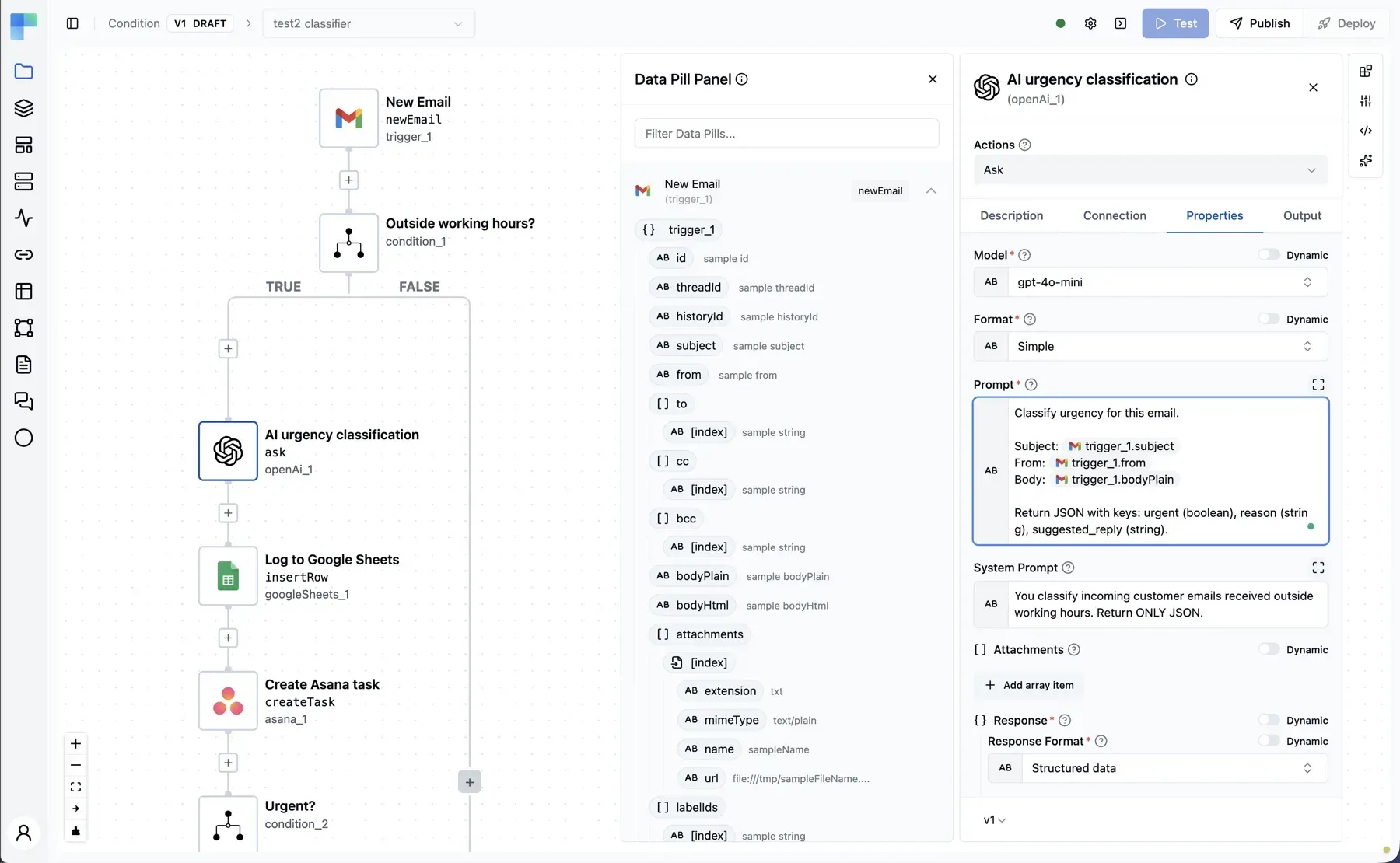
Official ByteChef workflow editor screenshot showing a branching workflow, the data pill panel and a configured OpenAI step.
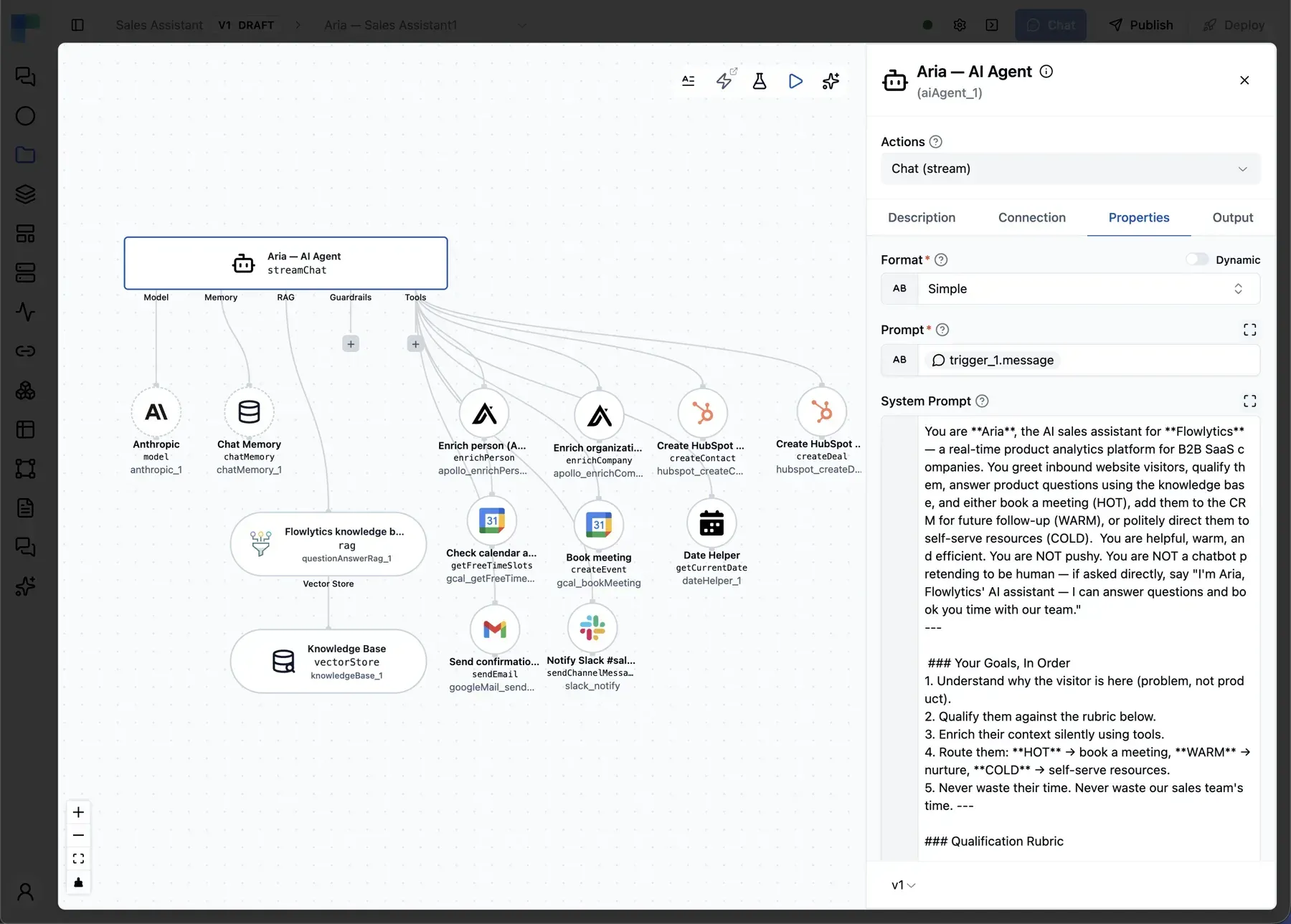
Official screenshot of an AI Agent step with its model, chat memory, RAG knowledge base and connector tools drawn on the canvas.
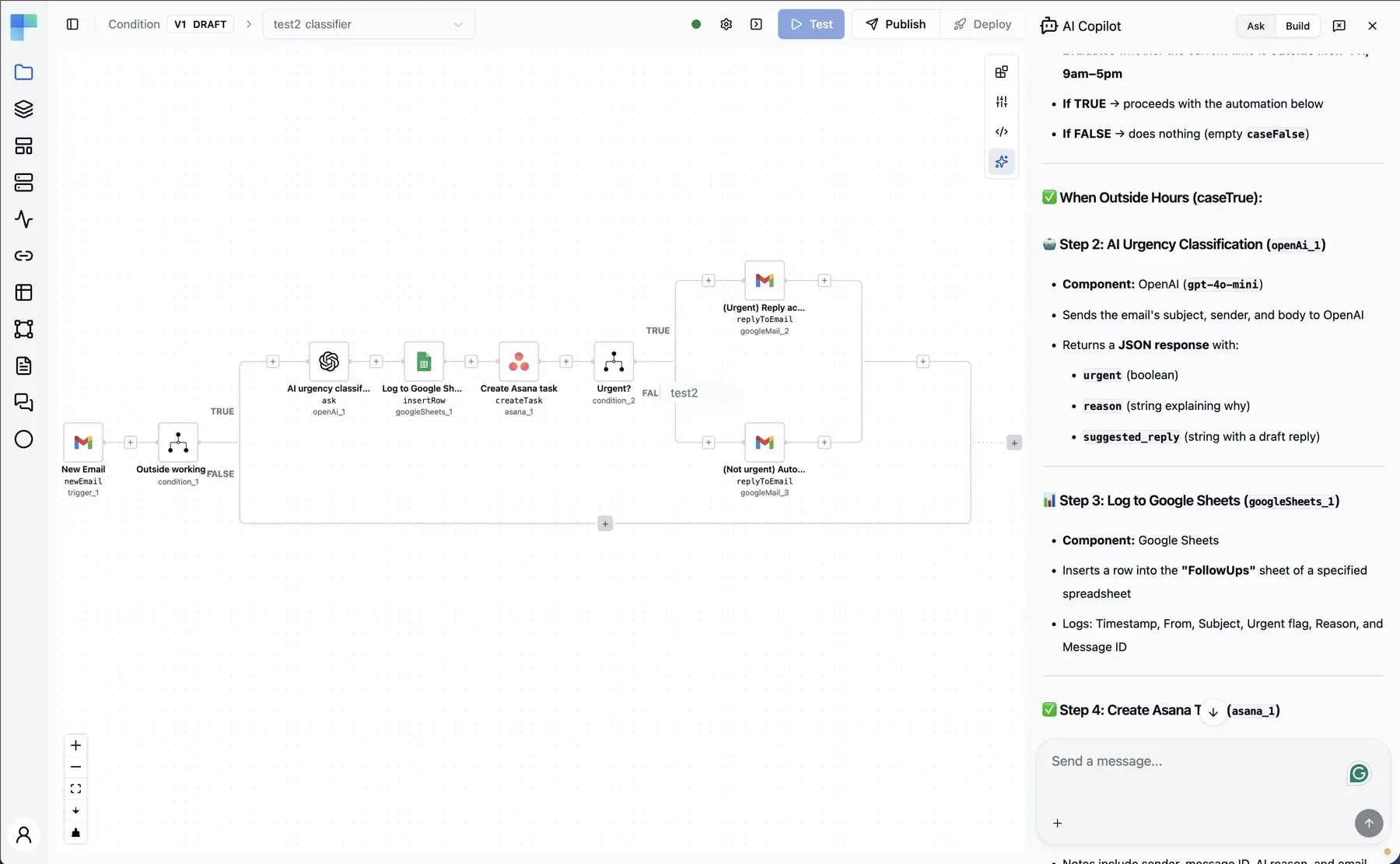
Official screenshot of the Copilot side panel explaining a workflow. The Copilot is an Enterprise feature.
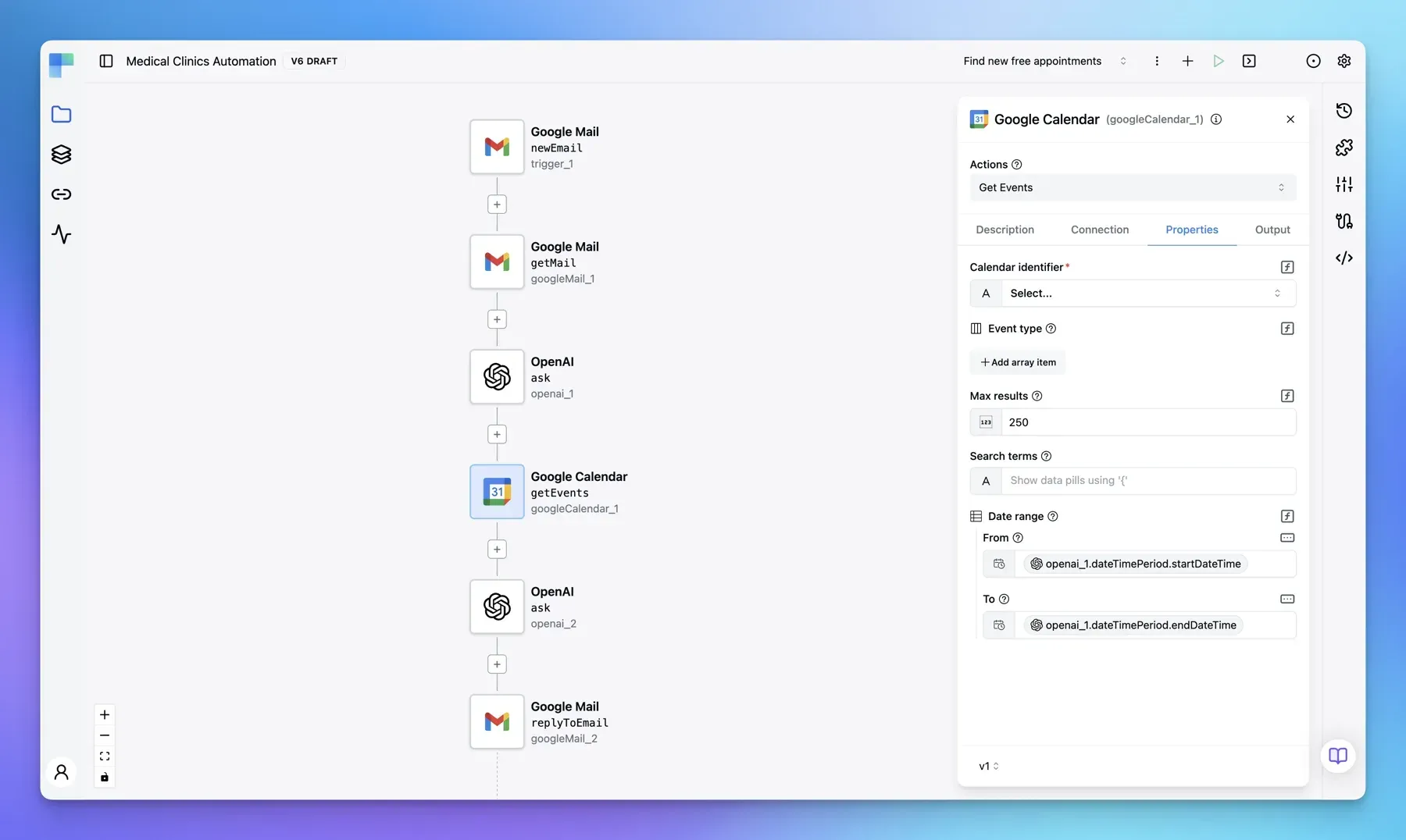
Official ByteChef screenshot of a linear workflow with the Google Calendar step selected.
Source: official ByteChef project page.
Key capabilities
- Visual workflow editor with JSON underneath Steps are placed on a free-form canvas, configured in a properties panel and referenced through a data pill panel that shows the output of earlier steps. The workflow definition is JSON, which the README describes as Git-friendly. Individual nodes can be disabled and re-enabled without deleting them since v0.36.0.
- AI Agent as a workflow step The agent component runs the full loop of model call, tool selection, execution and observation, with streaming and structured output. Because the agent is one step in a durable workflow, a run that fails or pauses for a person can resume from that step. The editor draws the agent's model, memory, guardrails, knowledge base and tools as connected elements on the canvas.
- Model providers The README lists twelve direct providers: OpenAI, Anthropic, Azure OpenAI, Amazon Bedrock, Google Gemini, Mistral, Groq, DeepSeek, Nvidia, Perplexity, Stability and Ollama. Four aggregator components (OpenRouter, Requesty, LiteLLM and NanoGPT) cover gateway routing. Ollama can run locally with no key, and v0.36.0 reads the real model list from your Ollama server.
- Connectors that double as agent tools More than 250 connectors cover CRM, marketing, communication, e-commerce, cloud storage, databases, helpdesk and finance. Every connector can be offered to an agent as a tool, and a property marked with a
fromAiexpression is filled in by the model at runtime. The integrations catalog and the component reference list what each connector supports. - Flow controls and triggers Conditions, branches, loops, each, map, parallel, fork-join, subflows, error handlers, terminate and human approvals structure a workflow. Triggers include static and dynamic webhooks, polling, hybrid triggers, app events, callable workflows, schedules and forms.
- Durable execution on the Atlas runtime Each task execution is persisted in PostgreSQL, so a stopped, failed or approval-paused run resumes from the task it reached instead of restarting from the trigger. Queue mode scales workers horizontally, and the message broker can be memory, Redis, RabbitMQ, Kafka, JMS, AMQP or Amazon SQS.
- Code steps in several languages A script step runs JavaScript, Python or Ruby on GraalVM when no connector fits. The documentation also describes writing connectors in Java. Treat code steps as part of your trust boundary and review what they can reach.
- Knowledge bases and RAG Documents can be ingested and chunked natively and stored in a built-in knowledge base or one of the supported vector stores, such as pgvector, Pinecone, Qdrant, Weaviate and Milvus. Two RAG patterns ship as components,
rag-modularandrag-questionanswer. A configurable pgvector dimension setting arrived in v0.36.0 for embedding models that do not use 1536 dimensions. - Chat memory backends Agents can keep conversation memory in JDBC, Redis, MongoDB, Cassandra, Cosmos DB, Neo4j, a vector store or in memory. The one-command Docker run in the README uses in-memory chat memory, which is meant for evaluation.
- Guardrails Twelve guardrail components attach to an agent in the same way as tools and memory. They cover PII, LLM-based PII detection, jailbreak, NSFW content, topical alignment, keywords, secret keys, URLs, sanitization, custom regular expressions and custom rules, plus an aggregator that decides what happens when several fire together.
- MCP in both directions ByteChef can consume external MCP servers as a tool source and can expose its own workflows as an MCP server behind an API-key-authenticated endpoint, so clients such as Claude Desktop or Cursor can call them. v0.36.0 hardened the automation MCP server and added per-tool switches.
- A2A servers Project workflows can be exposed to other agents through the Agent2Agent protocol, a feature new in v0.36.0. MCP servers and A2A servers are grouped together in the automation sidebar.
- Human approvals An approval component pauses a run, routes the request to channels such as email or Slack, and resumes when someone responds. v0.36.0 added signed approval tokens for approval form links and resume tokens.
- Execution logs and testing Workflows can be tested in the editor, and the execution log shows each step's input and output. The Logs tab became searchable in v0.36.0. Enterprise deployments add OpenTelemetry traces, logs and metrics over OTLP.
- AI Copilot (Enterprise) A side panel generates workflows from a prompt, adds configured agent steps and explains failed runs. The README lists the Copilot as an enterprise feature that needs PostgreSQL with pgvector.
- Embedded iPaaS (Enterprise) The embedded edition lets a SaaS product offer integrations and agents to its own customers, under its own UI and tenancy. v0.36.0 rebuilt it with an integration marketplace, an automation hub, shared connections, field mapping, workflow permissions and a custom workflow builder.
- Workflow templates A public template library offers starting points. The README suggests importing the Learn ByteChef by doing template, which needs no credentials, as a first run.
- Installation and deployment Run the documented docker run command for evaluation, the Docker Compose file for PostgreSQL-backed use, or follow the self-hosted guides for Kubernetes and cloud providers. The self-hosted section of the documentation also describes the runtime job runner, file storage options and plan limits. Docker Desktop is the stated requirement for the quick start.
Where ByteChef fits
Automating a business process across SaaS tools
Start with a trigger such as a webhook, schedule or new email, then add connectors for the systems involved and a condition for the exceptions. Use the execution log to confirm each step's output before deploying, and keep credentials in connections rather than in step properties. Check what happens when an external API returns an error, because the durable runtime resumes from the failed task.
Building an AI agent that acts through existing connectors
Add the AI Agent component, connect a model, attach the connectors it may use as tools and write clear instructions. Mark only the properties the model should decide with fromAi expressions and fix everything else. Review the tool-call log from a test run and add guardrails and an approval step before any action that spends money or changes records.
Answering questions from your own documents
Create a knowledge base, ingest the documents and attach it to an agent or a RAG component. This needs PostgreSQL with pgvector or another supported vector store, not the evaluation H2 database. Test with questions whose answers you know and check whether the cited source passages are the ones you expect.
Exposing workflows to other agents
Publish a workflow as an MCP tool or an A2A endpoint so Claude Desktop, Cursor or another agent can call it. Scope the API key, enable only the tools you want and confirm that the workflow's input schema reflects its trigger inputs. Version 0.36.0 includes fixes in this area, so use a current release.
Embedding integrations in your own product
The Enterprise embedded edition suits a SaaS team that wants customers to connect their own accounts without leaving the product. Plan tenancy, connection ownership and workflow permissions first, then evaluate the integration marketplace and SDK activation dialog. Confirm licensing with the vendor, since this code is under the Enterprise License.
Running automation on your own infrastructure
Deploy with the Docker Compose file or Kubernetes, point it at PostgreSQL, back up the encryption keys stored under the mounted directory and decide on a message broker for queue mode. Document how you will upgrade, because the README notes there is no migration from the H2 evaluation database.
Install
docker run --name bytechef -it -p 8080:8080 --env BYTECHEF_DATABASE=h2 --env BYTECHEF_AI_MEMORY_PROVIDER=in_memory -v ~/.bytechef:/root/.bytechef docker.bytechef.io/bytechef/bytechef:latestReviews of ByteChef
Be the first to share your experience with ByteChef.
Write a review
Loading review form…
Alternatives to ByteChef
 n8nn8n is a fair-code workflow automation platform from n8n GmbH in Berlin. It combines a node-based visual editor with JavaScript and Python code, AI agent nodes, 1500+ integrations, a REST API and an MCP server, self-hosted or on n8n Cloud.
 ActivepiecesActivepieces is an MIT-licensed automation platform for building trigger-based flows and AI agents across business apps. Self-host it with Docker or Kubernetes or use the cloud; integrations are TypeScript packages that also power its MCP server.
 AutomatischAGPL-3.0 workflow automation for Node.js and PostgreSQL: connect apps with trigger and action flows, webhooks, schedules and AI steps. The hosted cloud closed on January 1, 2026, so self-hosting through Docker Compose is the way to run it.