

What is Activepieces?
Activepieces is an open-source automation platform for building trigger-based workflows, called flows, and AI agents that act across business applications. It was founded in 2022 by Ashraf Samhouri and Mohammad AbuAboud, and the company develops it in the public activepieces/activepieces monorepo. A flow starts from a webhook, a schedule or an application event, then runs steps such as HTTP requests, branches, loops, TypeScript code and actions from integrations. Integrations are called pieces: the website lists more than 770, each published as a TypeScript npm package, and most of them are contributed by the community.
The product is distributed in two ways. Activepieces Cloud is the hosted service, with a free tier and paid plans. Self-hosted installations run the activepieces/activepieces container image: the documented options are a one-line installer that writes a Docker Compose stack with PostgreSQL and Redis, a single-container hobby setup with an embedded PGlite database, and an official Helm chart for Kubernetes. Third-party templates for Railway, Elestio, PikaPods and other hosts exist but install the Community edition and may lag behind. The self-hosting guide lists the requirements.
The latest GitHub release is 0.92.3-hotfix.2, published October 28, 2026. It fixes an unauthenticated, webhook-triggerable crash of the API process caused by a Return Response header name containing an illegal character. The preceding 0.92.3-hotfix.1 moved the Docker image to Node.js 24.22.1 for the October 2026 Node.js security releases, and the same Node.js update was backported as hotfix tags for older lines back to 0.82. Version 0.92.0 added a Deno code sandbox and many agent-ready piece actions; 0.92.2 moved {{ }} template-expression evaluation back to the legacy sandbox to reduce memory pressure; 0.91.0 let a flow step run a saved agent and extended the audit log to agent actions. Self-hosted operators are asked to read the breaking changes page before upgrading.
The stack is TypeScript throughout. A Fastify API server organizes flows, webhooks and scheduled jobs; workers pull jobs from a BullMQ queue on Redis and run them through an engine compiled into a single JavaScript file inside a sandbox; the interface is a React application. PostgreSQL is the main database and S3-compatible storage holds flow bundles and files in production. The architecture overview describes the components and the one-flow-per-worker execution model.
Licensing is split. The core is MIT-licensed, while enterprise features in packages/ee are under a commercial license and need a license key on a self-hosted instance. Activepieces is a server application reached through a browser: there are no desktop or mobile clients, and it is not an RPA tool for driving desktop software. The gallery shows official screenshots and a documentation diagram; some builder screenshots come from older interface versions.
Activepieces screenshots
Explore the interface. Open a screenshot to view it at full size.
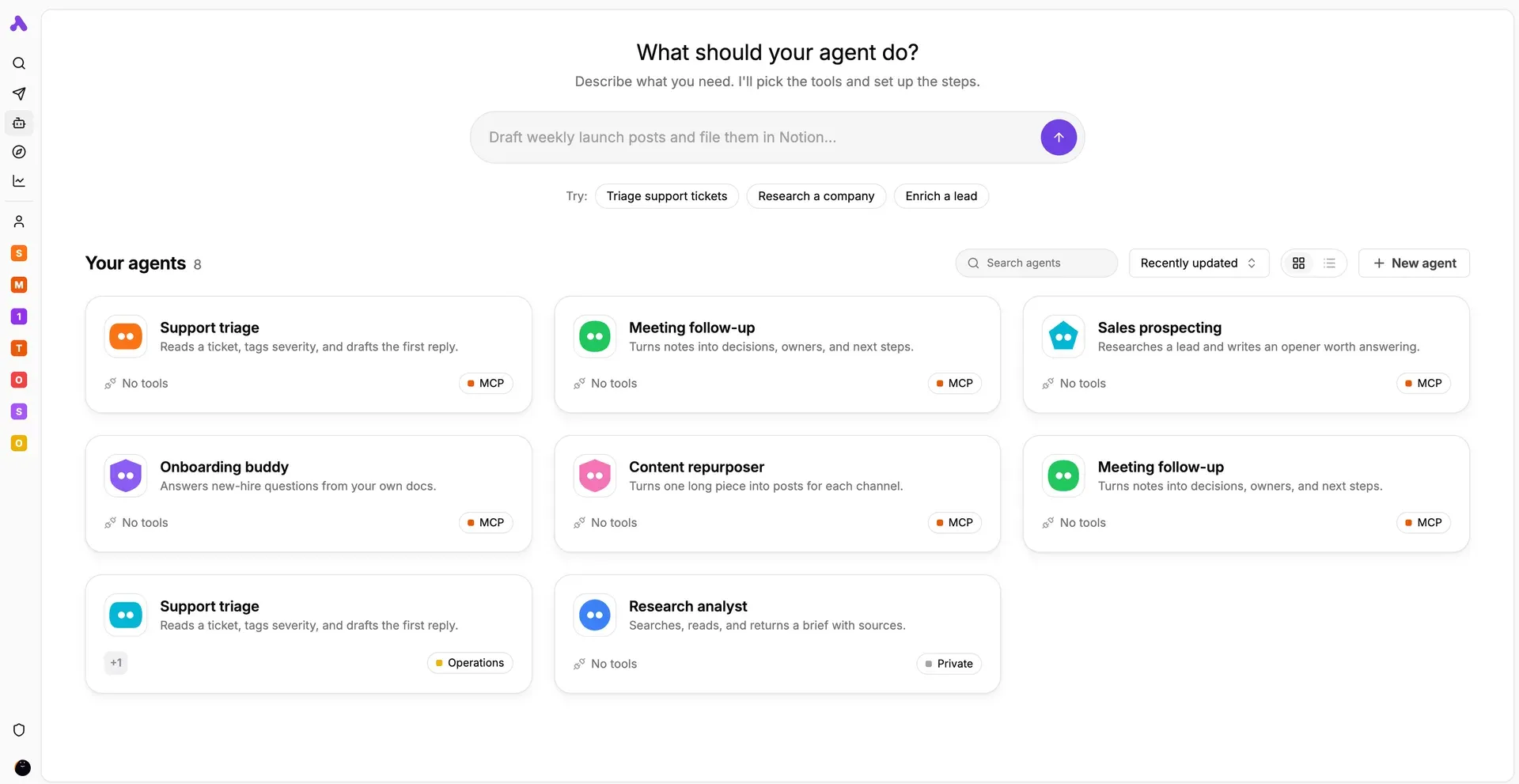
Agents page from the official documentation: a prompt to describe a new agent and a grid of existing agents with their tools and MCP badges.
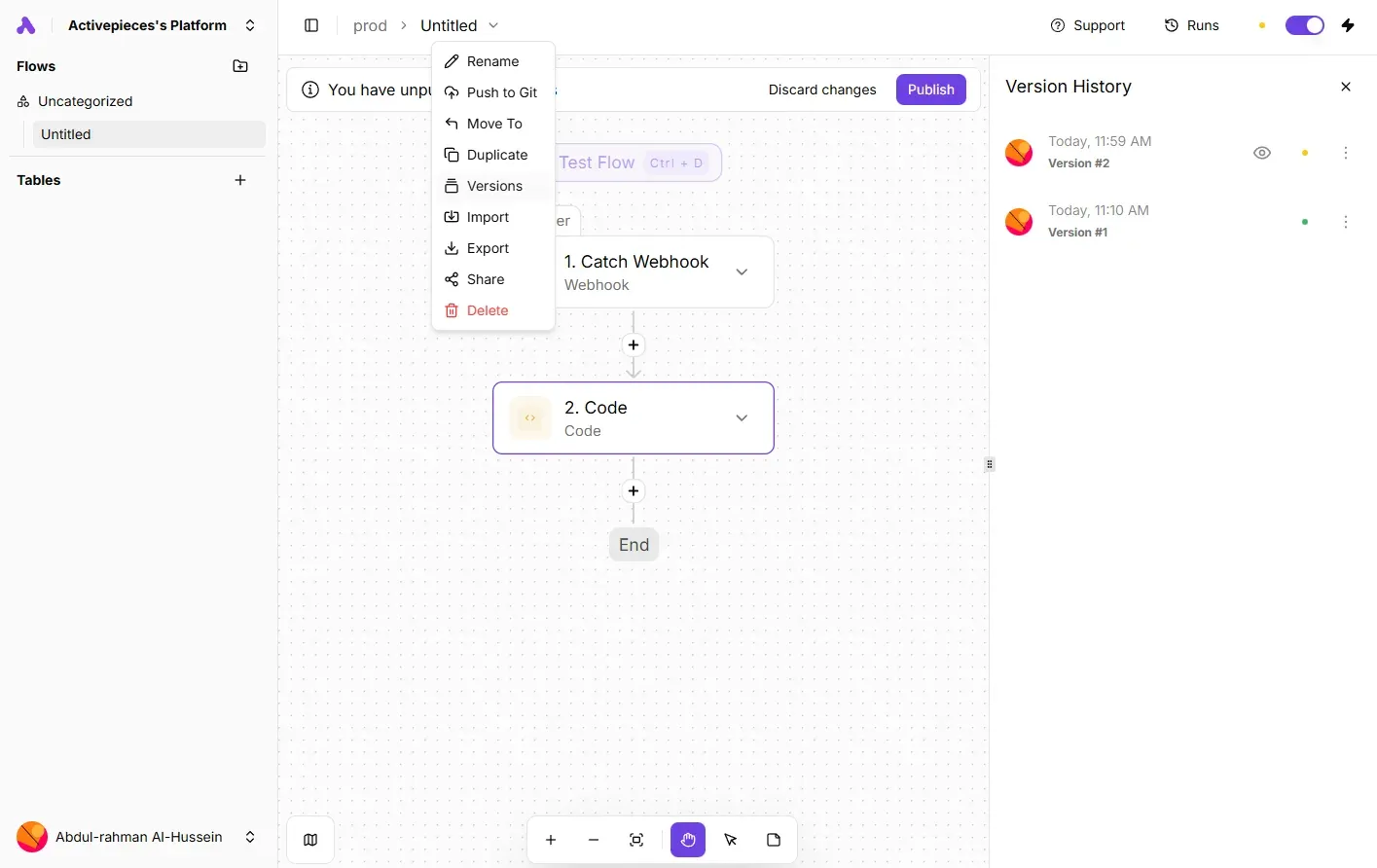
Flow builder with the flow menu open (Push to Git, Versions, Export) and the version history panel showing a draft and a published version.
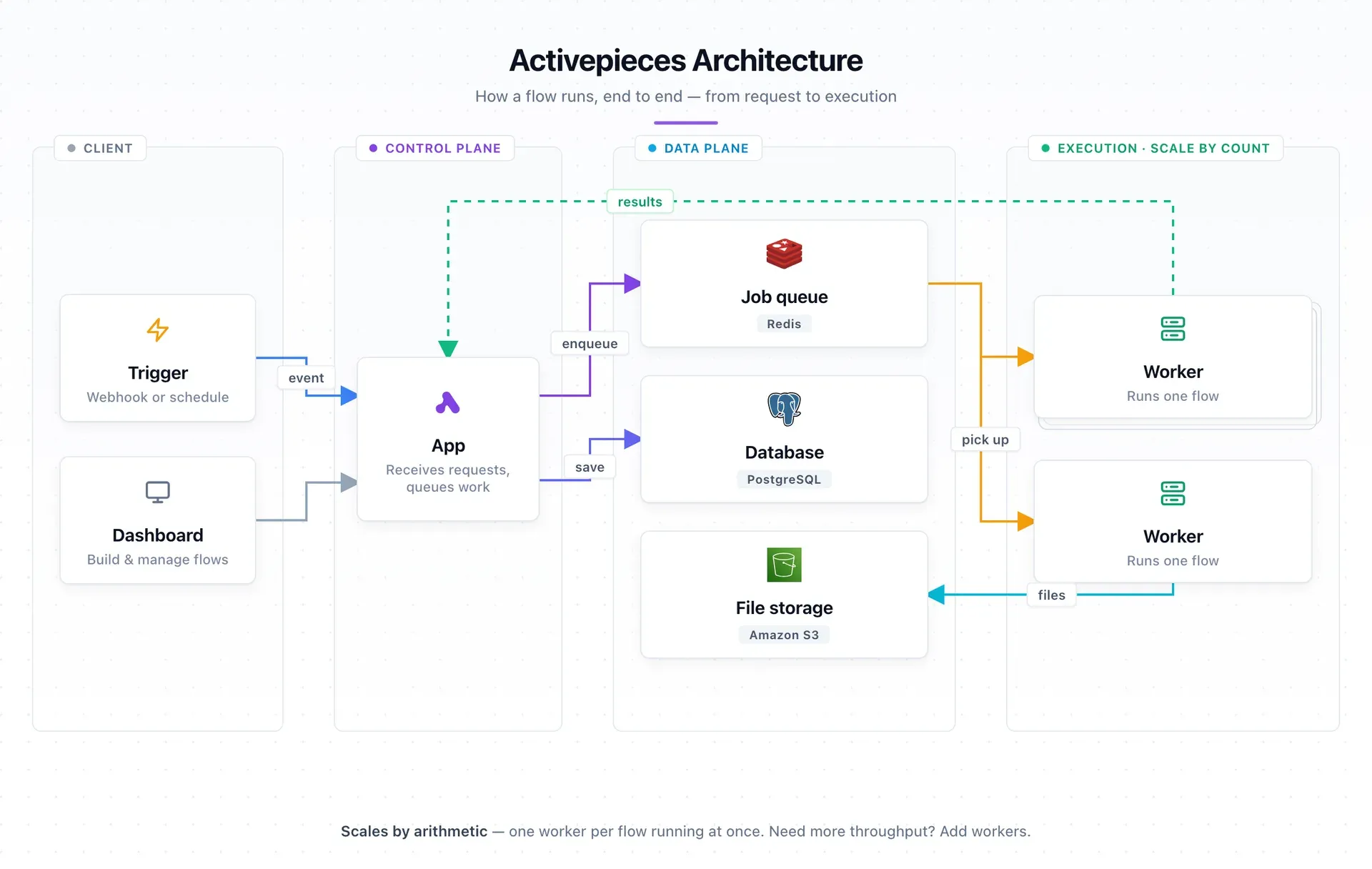
Official architecture diagram from the documentation, showing the control plane, data plane and one-flow-per-worker execution tier.
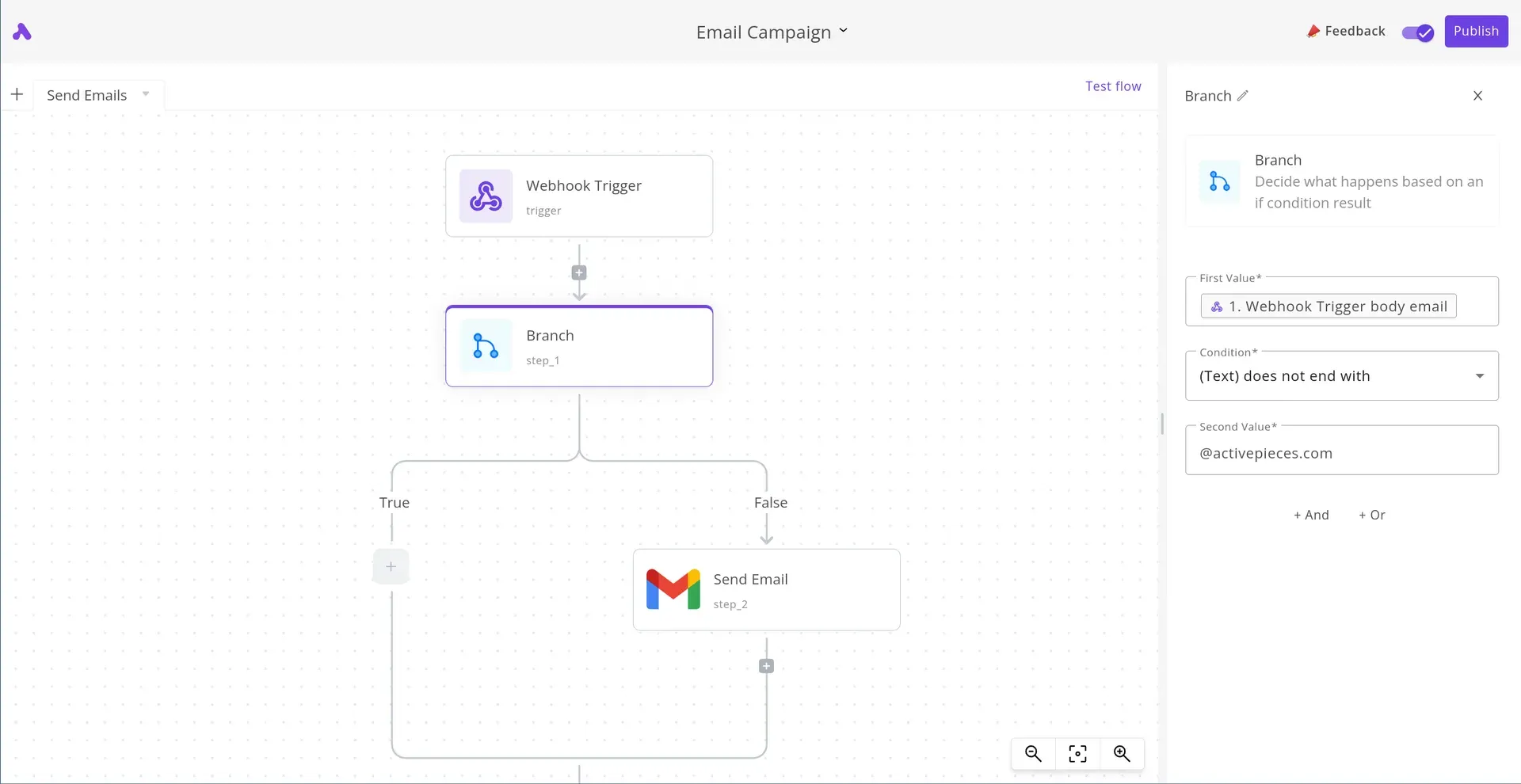
Branch step configuration in an earlier version of the builder interface: a text condition on the webhook email decides whether an email is sent.
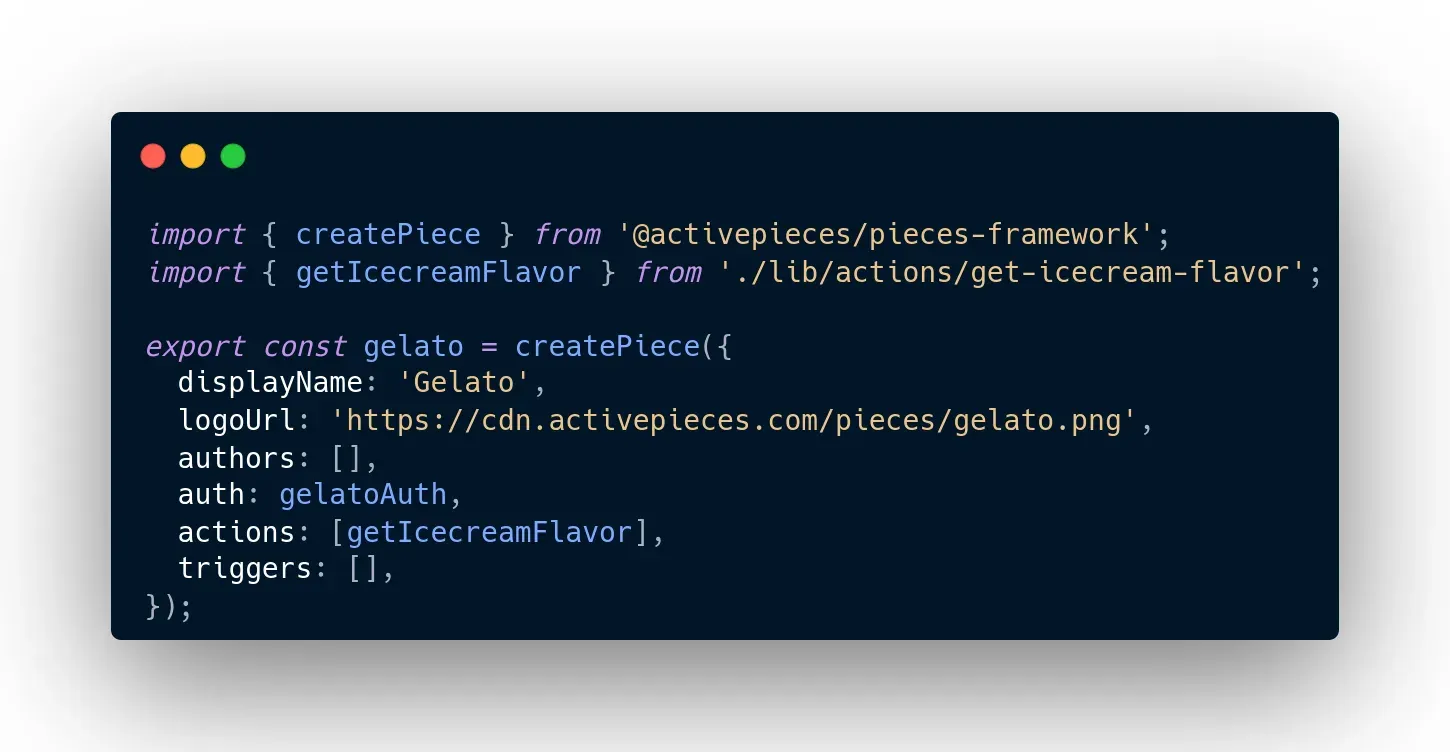
Example piece definition from the repository, written with the @activepieces/pieces-framework package.
Source: official Activepieces project page.
Key capabilities
- One-line self-hosted install The recommended installer,
curl -fsSL https://get.activepieces.com | sh, writes the configuration, generates secrets and starts four containers with PostgreSQL and Redis on port 8080. It requires Docker Compose v2, at least 2 vCPU and 4 GB of RAM, and WSL2 on Windows. A manual path clones the repository and runstools/deploy.sh, which needs openssl to fill the generated keys. - Hobby container and Kubernetes chart A single
docker runwithAP_DB_TYPE=PGLITEand in-memory Redis suits one personal machine, but it cannot scale or move to the Enterprise edition. The Helm chart targets Kubernetes 1.19 or later with Helm 3, external PostgreSQL and Redis supplied as secrets, and deploys a StatefulSet or an Argo Rollout. - Visual flow builder Flows are assembled on a canvas from a trigger and a chain of steps, with branches, a router, loops, automatic retries, error handling and subflows. Data from earlier steps is inserted through a data selector, and steps can be tested individually before publishing. Flows remain readable as JSON, which the engine parses at run time.
- Pieces: triggers and actions for third-party apps Pieces cover applications such as Google Sheets, Gmail, Slack, HubSpot, Notion, Jira Cloud, Salesforce and OpenAI. Each is a versioned npm package in TypeScript, so its source can be read in the repository. Recent releases added AI-agent actions and output schemas to many pieces, including Gmail, HubSpot and Resend.
- Code steps and HTTP Code steps run TypeScript, and HTTP steps call any REST endpoint. Whether a code step can import npm packages depends on the sandbox mode: the multi-tenant
SANDBOX_CODE_ONLYmode runs code in a fresh V8 isolate with 128 MB, norequireand no filesystem. The sandboxing page compares the four modes. - AI agents An agent receives a plain-language brief, a set of tools drawn from piece actions and MCP servers, and optional knowledge from documents and tables. Agents belong to one project, which decides the connections and files they can reach. Since 0.91.0 a flow step can run a saved agent and receive structured output, and agent actions appear in the audit log.
- AI Router The AI Router replaces per-branch conditions with one question, such as which team should handle a message. An evaluation model picks one route, or every matching route when configured. The documentation recommends the ordinary router for numbers, dates, exact values and anything that must be reproducible or auditable.
- Built-in MCP server Each instance can expose an MCP server that Claude Desktop, Claude.ai, Cursor and Windsurf connect to through OAuth. Tools cover discovery, flow building and publishing, tables, and test runs, enabled per category in each project. Connection secrets are never returned by tools, and only
ap_run_actionconsumes a credit per call. - Tables Tables store structured records inside Activepieces, with five field types and CSV import and export. Flows can read and write rows or start when a record is created, and an agent can use a table as a knowledge base. They remove the need for an external database for small state such as processed leads.
- Human input and approvals Chat Interface and Form Interface triggers collect input from people, and Delay and Wait for Approval steps pause a run. Paused time does not count against the run timeout, and a paused flow can wait up to 30 days by default. Project-level Flow Approvals, a paid feature, require review before a non-admin publishes in a sensitive project.
- Versioning, releases and Git sync Published flows are locked; editing creates a draft and earlier versions stay restorable, as the version history guide shows. Paid plans add project releases, rollback and Git Sync for moving flows between environments.
- Embedding for SaaS vendors The embedding SDK places the builder inside another product, provisions users with a signed JWT and can collect connections from end customers. Embedding, custom branding and custom domains are commercial features; the Embed plan starts at 36,000 USD per year.
- REST API The API manages projects, flows, connections and runs with bearer-token API keys and cursor pagination. API keys are created in the platform dashboard, so programmatic platform management is tied to paid editions.
- Team and governance controls Paid plans add projects and multi-tenancy, SSO with Okta or Entra ID, standard and custom roles, SCIM provisioning, audit logs, external secret managers, global connections and worker groups. On a self-hosted instance these are unlocked by subscribing in the app for Plus or Team, or by a license key for custom and enterprise plans.
- Documented limits The limits page lists cloud values and self-hosted defaults: a 600-second run timeout, 1 GB worker memory, 30-day execution data retention, a 30-second synchronous webhook response, 25 MB webhook payloads and step files, and 50 MB run logs. Each limit maps to an
AP_environment variable on self-hosted instances. - Production sizing guidance The production setup recommends one worker per concurrent flow at 0.5 vCPU and 1 GB, one app container per ten workers, managed PostgreSQL and Redis, and S3 storage with signed URLs. It includes benchmark figures and warns that database CPU grows with throughput.
- Network egress controls Setting
AP_NETWORK_MODE=STRICTinstalls an in-process SSRF guard that blocks user code from private, loopback, link-local and cloud-metadata addresses. The default is unrestricted, and an allow-list variable admits specific internal hosts. - Building custom pieces The piece developer guide covers the TypeScript framework, a local development setup with hot reloading and publishing to npm. A piece becomes available to flows, agents and the MCP server once installed on the instance.
Where Activepieces fits
Routing inbound requests and leads
Start with a webhook or form trigger, normalise the payload in a code or formula step, then send it to the CRM, a ticketing tool or a chat channel. Use the AI Router when the input is free text and an ordinary router when the decision depends on fields or thresholds. Check the 30-second synchronous webhook budget if the caller waits for a reply, and test how failed authentication on the webhook appears in run history.
Running agents with approval gates
Create an agent in a dedicated project, give it only the piece actions it needs, and add documents or a table as knowledge. Call it from a flow when the input varies, and keep the deterministic steps in the flow itself. Insert a Wait for Approval step before actions that touch money, customers or production, then review the audit trail of what the agent ran.
Letting AI assistants build and run flows through MCP
Enable the MCP server under the project settings, copy the server URL into Claude, Cursor or Windsurf, and complete the OAuth sign-in. Enable only the tool categories the assistant needs. Behind a reverse proxy with a path prefix, set AP_FRONTEND_URL including the prefix, and confirm that the client honours the WWW-Authenticate discovery header.
Self-hosting for an internal automation team
Install with the Compose script on a host with at least 2 vCPU and 4 GB, back up the generated .env, and put the instance behind TLS. Choose the sandbox mode before production, since it decides whether code steps can use npm packages and whether workers need privileged containers. For growth, follow the production sizing model and add S3 storage before raising the worker count. Keep a staging instance on the same version to rehearse upgrades.
Keeping small operational state in tables
Use a table to record which items a flow already processed, such as contacted leads or unpaid invoices, and trigger a second flow on new records. Export to CSV regularly if the data matters outside Activepieces, and remember that execution data, unlike table rows, is deleted after the retention window.
Embedding automations in a SaaS product
Software vendors can embed the builder, provision their customers with signed JWTs and ship custom pieces for their own API. Price the Embed plan and the branding requirements first, then test connection collection and multi-tenant isolation with the V8 sandbox mode before exposing the builder to customers.
Install
curl -fsSL https://get.activepieces.com | shReviews of Activepieces
Be the first to share your experience with Activepieces.
Write a review
Loading review form…
Alternatives to Activepieces
 n8nn8n is a fair-code workflow automation platform from n8n GmbH in Berlin. It combines a node-based visual editor with JavaScript and Python code, AI agent nodes, 1500+ integrations, a REST API and an MCP server, self-hosted or on n8n Cloud.
 TemporalTemporal runs application logic as durable Workflows and Activities written with SDKs in Go, Java, Python, TypeScript, .NET, PHP, Ruby or Rust. The MIT-licensed server is self-hosted or used as the usage-priced Temporal Cloud.
 NangoNango is an open-source platform for product integrations, with managed auth for 1,000+ APIs and TypeScript functions run on its production runtime.