

What is Automatisch?
Automatisch is an open-source workflow automation tool that connects web services so that an event in one service triggers actions in others, without writing code. The official site and the README position it as an open source alternative to Zapier and Integromat, with the argument that you keep your data on your own servers, which matters for regulated industries and for European companies bound by the GDPR. The code is a JavaScript monorepo with a Node.js backend and a React front end.
The latest tagged release is v0.15.0, published August 8, 2025. Its notes are mostly engineering work: removal of Lerna and Yarn workspaces, a large set of user model tests, a restructuring of workers and queues, renamed OAuth client models, the option to rename flow steps and inline error messages in the sign-up and password forms. Commits on the main branch after that release add Google Docs and AI agent features, an MCP app, and, from November 2025, notices about the end of the hosted service.
That last point is the most important status fact. The in-app notice in the repository says Automatisch Cloud at cloud.automatisch.io was to be discontinued on January 1, 2026 and asks users to migrate their workflows to a self-hosted instance, and the project disabled registration on the cloud in December 2025. The marketing site still mentions a cloud option and carries older copyright years, so treat self-hosting as the only supported way to run Automatisch today. The most recent commit seen in the repository dates from January 2026, and the project has had no tagged release since August 2025.
Automatisch runs as two services from one Docker image, automatischio/automatisch: a main service and a worker, backed by PostgreSQL and Redis. The community edition is licensed under AGPL-3.0. The repository also holds files marked .ee. that fall under a separate commercial Enterprise license, as the license page explains; no public pricing for the Enterprise edition was found. Not included are a hosted service, a public API reference and a native mobile client.
Automatisch screenshots
Explore the interface. Open a screenshot to view it at full size.
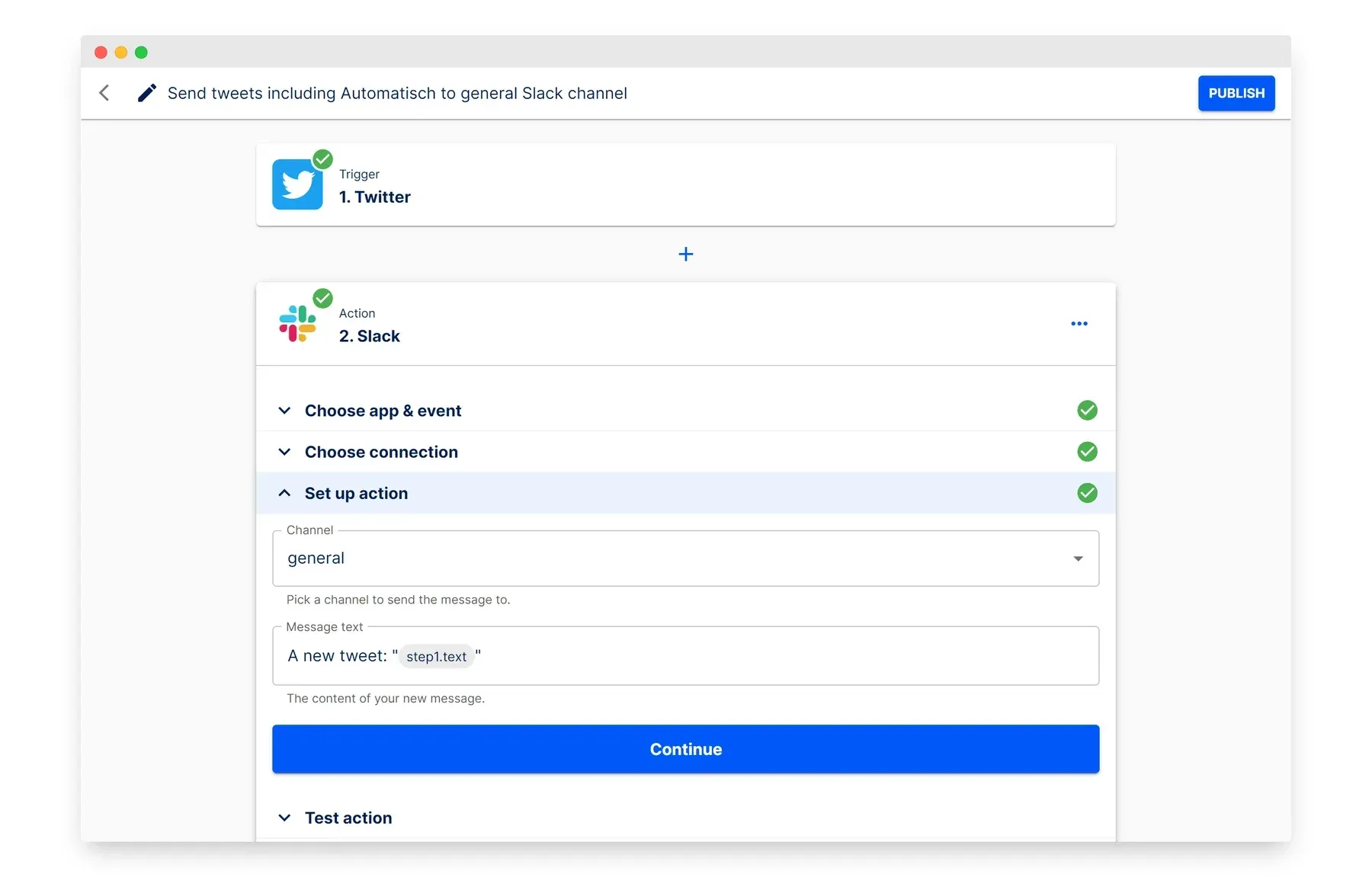
Official README screenshot of the flow editor: a trigger step, an action step and the set up action panel with a variable from step 1.
Source: official Automatisch project page.
Key capabilities
- Visual flow editor A flow is built in the browser as a trigger followed by one or more actions, with each step configured in a panel that has three stages: choose app and event, choose connection and set up the action. Data from earlier steps is inserted into later fields as variables, for example the text of a trigger event. Steps can be tested one at a time before publishing, and since v0.15 a step can be renamed.
- Apps, connections, flows and steps The key concepts page defines four terms. An app is a third-party service, a connection stores the credentials for it, a flow is the whole workflow and a step is a trigger or an action. Several connections can exist for the same app, which helps when you use more than one account.
- Around 80 integrations The available apps list includes Slack, Discord, Telegram, Mattermost, GitHub, GitLab, Gitea, Google Sheets, Google Drive, Gmail, Notion, Airtable, HubSpot, Salesforce, Pipedrive, Stripe, Twilio, WordPress, Ghost, Odoo, Firefly III, ERPNext, FreeScout and Zendesk. The catalogue is much smaller than that of large commercial tools, so check that every service in your process is present before you commit.
- Core utility apps Webhooks, Scheduler, HTTP Request, Filter, Formatter, Delay, Datastore, Cryptography, RSS, SMTP and PostgreSQL apps cover logic and plumbing. The HTTP Request app is the escape hatch when a service has no dedicated integration. These apps do not need an external connection.
- Webhook and scheduled triggers Flows can start from an incoming webhook, from a schedule or from polling an app for new items. Webhook requests are verified with the
WEBHOOK_SECRET_KEYsetting. A flow only runs while the main and worker services are up, so missed schedules during downtime need a recovery plan. - AI services Apps for OpenAI, Anthropic, Mistral AI, OpenRouter, Perplexity, Together AI, DeepL and LibreTranslate let a flow send text to a language model or a translation service. A newer Agents app lets a flow run a configured agent, and the codebase includes an MCP app, which the source marks as an enterprise feature. Provider keys and costs are yours.
- Encrypted credentials Credentials for connected services are stored encrypted with AES, using the
ENCRYPTION_KEYsetting. The documentation warns that changingENCRYPTION_KEYorWEBHOOK_SECRET_KEYbreaks existing connections and flows, so store both in your secrets manager before the first real connection. - Docker Compose installation The documented path is to clone the repository and run
docker compose up, then open port 3000. The guide covers upgrades withgit pulland a forced rebuild. A Render blueprint file is included, and plaindocker runinstructions exist for running the main and worker containers yourself. - Required services and configuration PostgreSQL and Redis are required, and the configuration page lists variables for host, protocol, port, database, Redis, SMTP and log level. SMTP settings are needed for invitations and password resets. An optional BullMQ dashboard can be enabled to inspect queues.
- Main and worker split The main service serves the web interface and API while the worker executes flows from queues. Both must share the same environment except for
WORKER=trueon the worker. This split lets you add worker capacity later, although the documentation does not describe a scaling procedure. - Users and roles The community edition has users and an admin who invites others by e-mail. A sample user with a default address and password is created on first start and must be changed on the settings page. Role-based permissions, SAML single sign-on and similar controls sit in the Enterprise edition, judging by the
.ee.code and license split. - Execution history and testing Every run is recorded as an execution with the data of each step, which helps debug a failing flow. Because this data can contain personal information from your services, plan retention and access for the database. Telemetry is a separate topic covered below.
- Building your own integrations The documentation has a section on building integrations with folder structure, app definition, authentication, triggers, actions and a global variable. Each app is a small JavaScript module under the backend source tree. Writing a missing integration is realistic for a developer, but you then maintain it yourself.
- Anonymous telemetry, on by default The built-in telemetry system collects anonymous usage data such as flow and step counts without credentials, execution counts, random instance and organization IDs, and diagnostic data like version, operating system and CPU and memory information. It is enabled unless you set
TELEMETRY_ENABLED=false. The telemetry page lists what is and is not collected. - Open source with an enterprise edition Community files are under AGPL-3.0 and files with
.ee.in their name are under a commercial license, all in one repository. The repository also contains a contributor license agreement. If you modify the community code and offer it as a network service, AGPL source obligations apply.
Where Automatisch fits
Moving form submissions into chat and a spreadsheet
Use a form app or a webhook as the trigger, then add actions that post to Slack, Mattermost or Discord and append a row in Google Sheets. Test each step with real sample data, then publish. Check what happens when the target service is unreachable, and watch the execution log for failed runs after publishing.
Syncing leads between a CRM and other tools
Trigger on a new contact in HubSpot, Pipedrive or Salesforce and send it to a mailing tool or an internal channel. Map fields explicitly, add a Filter step for records that should be skipped and test the flow with a sandbox account. Check how duplicates are handled, and add your own check if the same record can arrive twice.
Scheduled reports and notifications
Use the Scheduler as the trigger, fetch data with the HTTP Request or PostgreSQL app and send the result by e-mail through SMTP or to a chat channel. Verify the time zone setting on the server, and make sure the worker is monitored, because a stopped worker means silent missed runs.
Calling language models from a flow
Add an OpenAI, Anthropic, Mistral or OpenRouter step to summarize, classify or translate incoming text before routing it. Keep prompts and keys in the step settings under access control, and check the data protection terms of the model provider, since the text leaves your server.
Self-hosting as a data-control measure
Run the main and worker containers with PostgreSQL and Redis in your own network, set strong values for the three secret keys and put the interface behind TLS. Change the sample login immediately and back up PostgreSQL together with the secret keys, since encrypted credentials are useless without the key.
Adding an integration that does not exist yet
Check the available apps first, then use the HTTP Request app for simple REST services. For something reusable, follow the build-integrations guide and write a small app module with authentication, a trigger and an action. Plan to keep it updated across releases, as the project has slowed down.
Install
git clone https://github.com/automatisch/automatisch.git && cd automatisch && docker compose upReviews of Automatisch
Be the first to share your experience with Automatisch.
Write a review
Loading review form…
Alternatives to Automatisch
 n8nn8n is a fair-code workflow automation platform from n8n GmbH in Berlin. It combines a node-based visual editor with JavaScript and Python code, AI agent nodes, 1500+ integrations, a REST API and an MCP server, self-hosted or on n8n Cloud.
 ActivepiecesActivepieces is an MIT-licensed automation platform for building trigger-based flows and AI agents across business apps. Self-host it with Docker or Kubernetes or use the cloud; integrations are TypeScript packages that also power its MCP server.
 BudibaseBudibase is an operations platform for building internal apps, automations and AI agents around existing databases, REST APIs and business systems. The core is GPLv3, paid features are under a Business Source License, and it runs self-hosted with Docker or Kubernetes or on Budibase Cloud.