

What is Budibase?
Budibase is a platform for building the software behind business processes: data tables, internal web apps with forms and screens, automations triggered by events or schedules, and AI agents that answer requests and call tools. The README describes it as an open-source operations platform for agents, apps and automations, and the about page describes Budibase as an open source software company whose team works remotely across the United Kingdom, Ireland, Spain, Portugal and Greece. The company states that Budibase supports more than 400,000 users. The code is developed in the Budibase/budibase repository, created in June 2019.
Budibase is a TypeScript monorepo managed with Lerna. The builder is a Svelte application, the client package renders apps in the browser from JSON definitions, and the server is a Koa application that serves the builder and apps and provides the API. The built-in database is CouchDB, and the Docker Compose setup adds MinIO for files and attachments, an Nginx proxy, the Budibase server and a worker service. Apps can also read and write external data sources such as PostgreSQL, MySQL and MariaDB, Microsoft SQL Server, Oracle, MongoDB, DynamoDB, Snowflake, Google Sheets, Elasticsearch, Redis, S3 and REST APIs.
Self-hosting is documented on the hosting methods page with guides for a single Docker image, Docker Compose, Kubernetes, DigitalOcean, Portainer, Podman, Windows Server and several cloud services. The single-image guide runs budibase/budibase:latest on host port 10000 with a mounted data volume and recommends 2 CPU cores and 6 GB of RAM for most use cases. Budibase Cloud is the hosted service run by Budibase.
The latest release is v4.0.0, published on November 10, 2026 with OpenAPI JSON and YAML specifications as assets. Its changes include a platform actions activity view that records agent tool calls and automation steps with real-time updates and plan-based retention, a sessions and events API for those actions, a requests portal, project dependency packaging and assignment, portable project agents, optional row and attachment exports for projects, and dependency security updates.
Licensing is split by package. According to the README and LICENSE file, Budibase is GPLv3 overall, the client and component libraries that ship inside generated apps are under MPL 2.0 so apps can be licensed freely, and paid features in packages/pro are under the Business Source License. Budibase also ships Structured Query Server from The Neighbourhoodie Software GmbH under its own license. Similar platforms in this directory include Appsmith, ToolJet and NocoBase.
Budibase screenshots
Explore the interface. Open a screenshot to view it at full size.
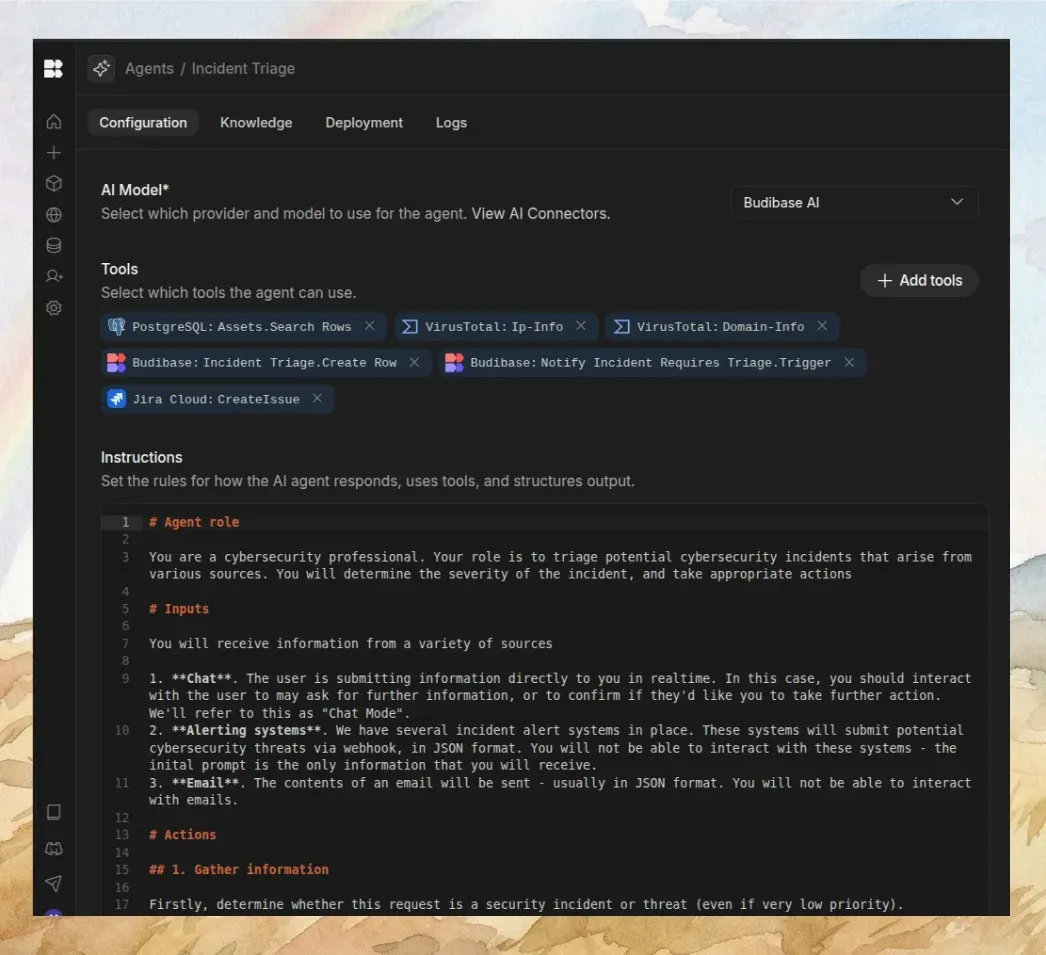
Agent configuration screen from the Budibase README.
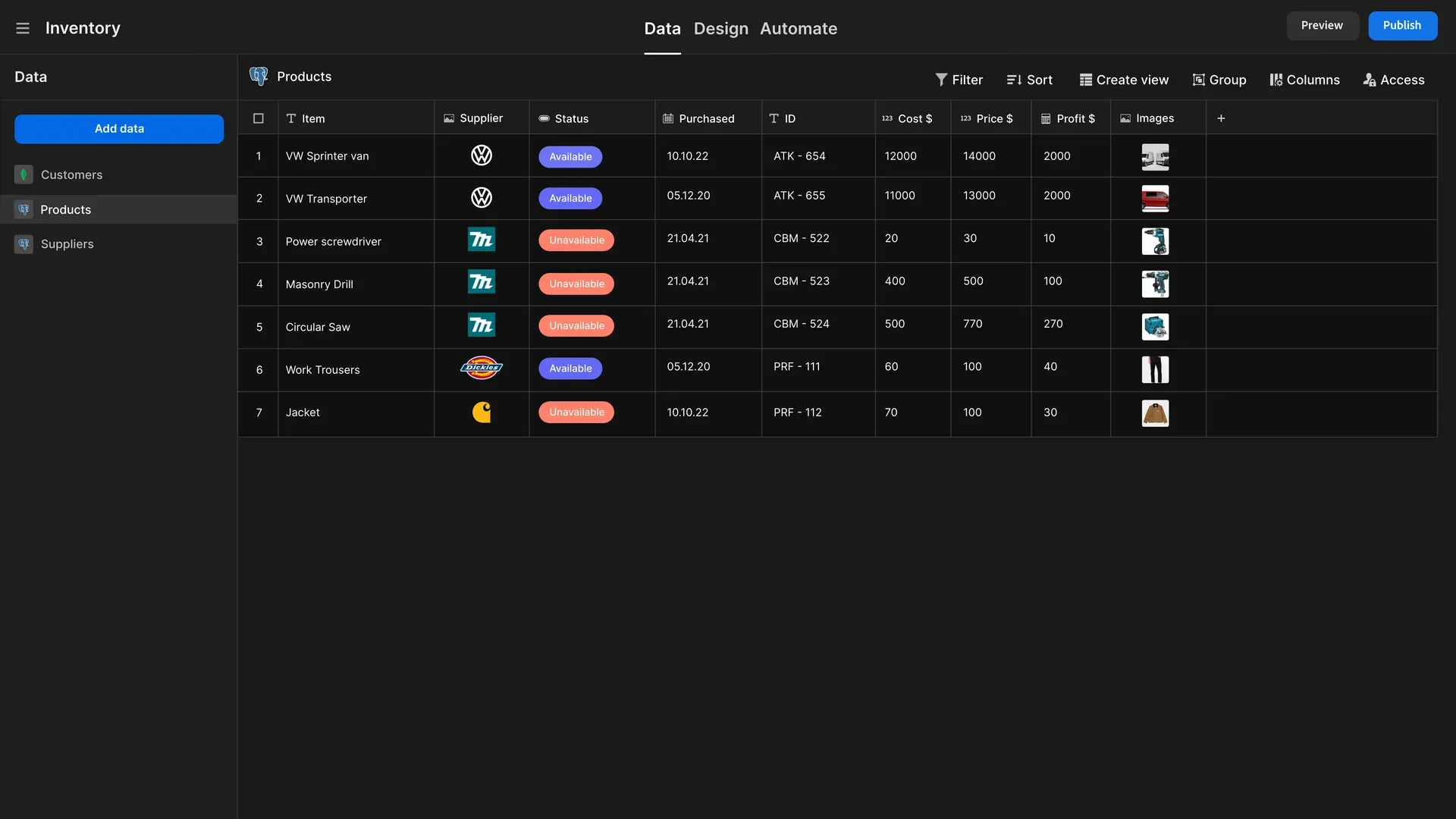
The Data section with a table, filter, sort, view, group, columns and access controls; screenshot from an earlier version of the Budibase README.
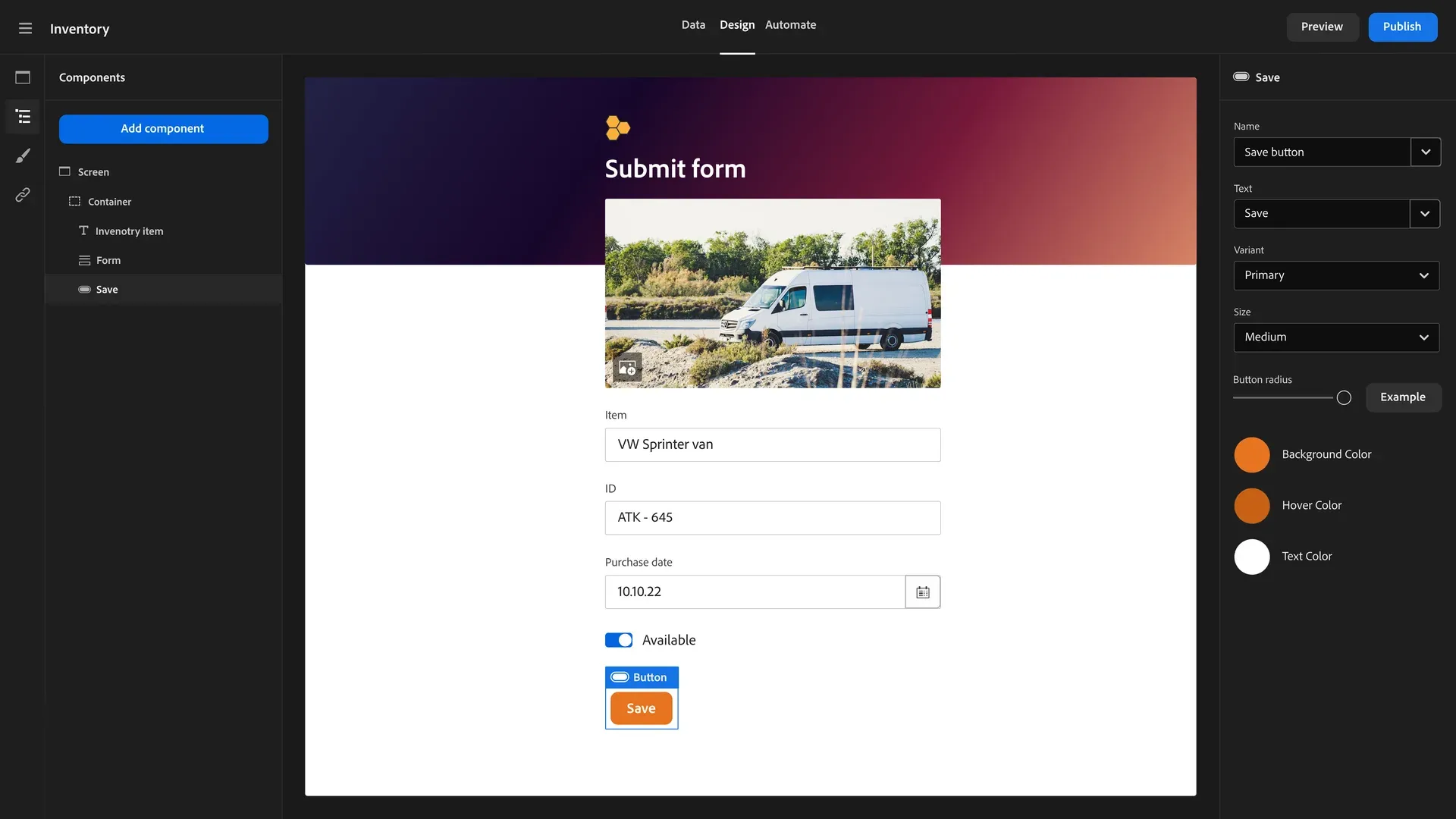
Building a form screen with the component tree and component settings; screenshot from an earlier version of the Budibase README.
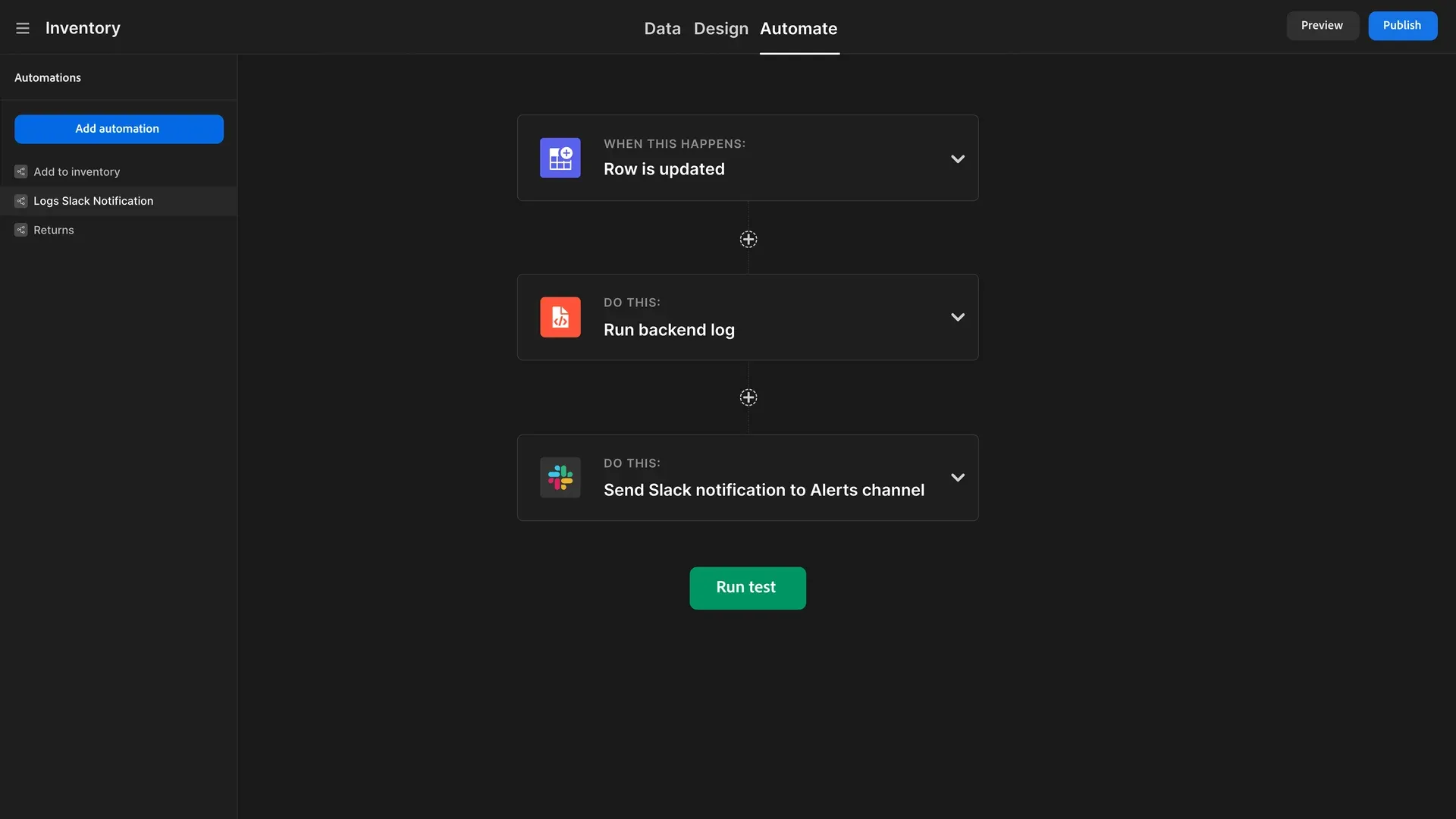
An automation triggered when a row is updated that logs to the backend and sends a Slack notification; screenshot from an earlier version of the Budibase README.
Source: official Budibase project page.
Key capabilities
- Budibase DB tables The internal database, based on CouchDB, stores tables with column types for text, number, boolean, date and time, options, multi-select, relationships, attachments, barcode or QR, JSON and user. Tables support views, a users table and CSV import, and a development and production switcher separates test data from live data. An AI column type is a paid feature.
- External data sources Apps and automations connect to PostgreSQL, MySQL and MariaDB, Microsoft SQL Server, Oracle, MongoDB, CouchDB, DynamoDB, Firestore, Elasticsearch, Redis, S3, Snowflake, Google Sheets and REST APIs. REST queries support authentication including OAuth2, variables, pagination and import of query definitions. If a source is missing, a custom data source plugin can be written.
- App builder Apps are built from screens, navigation, blocks such as form and multi-step form blocks, and components including tables, cards, charts, forms, side panels, signature fields, maps and barcode scanners. Data providers, repeaters, filters and search bind components to data, and conditional UI, app state and custom CSS adjust behavior and appearance. Apps can be designed for mobile, themed and embedded.
- Bindings and JavaScript Values in components and automations are set through bindings written with Handlebars helpers or JavaScript, with helper groups for math, arrays, strings, dates and comparisons. Snippets for reusable JavaScript are a paid feature.
- Automations Automations start from triggers such as on demand, schedule, webhook, row created, updated or deleted, row actions and an email listener. Action steps include query rows, send email, branching, conditions, loops, JavaScript, an external data connector and integrations with Slack, Discord, Zapier, Make and n8n. Automation history and a test runner are built in.
- AI automation steps Automation steps for AI include classify text, translate, summarise, generate text, LLM prompt, extract document data and calling an agent. On Budibase Cloud, AI usage is counted in AI credits.
- AI agents Agents are configured with an AI model, a set of tools and written instructions, with knowledge sources, deployment and logs in separate tabs. Tools can be data source queries, Budibase table actions, automation triggers and external services such as Jira. The documentation covers embedding models, vector databases, testing and agent activity.
- Messaging channels and agent chat Agents can be reached through an agent chat interface and through Slack and Microsoft Teams messaging channels, as listed in the documentation. The README shows agents creating records and routing requests from chat.
- Platform actions and activity Release 4.0.0 records agent tool calls, automation step executions and related sessions in an activity view with real-time updates, stores them in a dedicated workspace database and exposes them through a sessions and events API. Retention depends on the plan.
- Users, roles and SSO User management covers users, roles, workspace access and user groups. Authentication supports OpenID Connect with documented setups for Okta, Google, Auth0, Azure AD, OneLogin and Keycloak; SCIM provisioning and enforced SSO are paid features.
- Public API The public API lets Budibase act as a backend and integrate with other systems, with an interactive API reference. Release 4.0.0 attaches OpenAPI specifications in JSON and YAML.
- Plugins Custom components, custom data sources and custom automation steps can be built as plugins with a defined schema, and community plugins can be added to an installation.
- Single Docker image The documented command runs
budibase/budibase:latestdetached with port 10000 mapped to port 80 and a host directory mounted at/data. Secrets such asJWT_SECRET,INTERNAL_API_KEYandREDIS_PASSWORDare generated into a.envfile in the volume if they are not set. - Docker Compose and Kubernetes The Docker Compose guide downloads
docker-compose.yaml,.envandlitellm_config.yamland starts CouchDB, MinIO, Nginx, the server and the worker; a Linux host is recommended for production. A Kubernetes guide and guides for DigitalOcean, Portainer, Podman, Ansible, Azure and Google Cloud Run are also published. - Administration features Settings include email and SMTP, a user portal, branding, translations, analytics events, backups and audit logs, with several of these marked as paid features. Workspaces can be exported, imported and migrated between versions.
- Plans The pricing page lists Community, self-hosted at 0 USD with unlimited users, apps, agents, automations and requests and standard SSO; Cloud from 299 USD per month with 2 creators, 20 end users, 250K monthly actions and 50K monthly AI credits, a 14-day trial and add-on creators and end users; and Enterprise with custom pricing, extended logs, backups, enterprise identity controls and air-gapped deployment.
Where Budibase fits
Building CRUD apps on an existing database
A team connects Budibase to a PostgreSQL, MySQL, SQL Server or Oracle database, or to Budibase DB, and builds screens with tables and forms for the selected tables. Components are bound to the data through data providers and bindings, and access is set through roles before the app is published to users.
Request and approval workflows
Forms collect requests such as hardware, access or purchase requests into a table. Row triggers start automations that branch on conditions, notify approvers by email, Slack or Discord and update the request status. Release 4.0.0 adds a requests portal for these processes.
Operations agents in chat
An agent is configured with a model, instructions and tools that query data sources, create rows or trigger automations. Employees reach it through agent chat, Slack or Microsoft Teams to ask questions or submit requests, and the activity view records which tools the agent called.
AI steps inside automations
Automations use AI steps to classify incoming text, summarise or translate it, extract data from documents or send an LLM prompt, and pass the result to later steps such as saving a row or sending a notification.
Scheduled jobs and integrations
Schedule and webhook triggers run automations that query rows, call REST APIs through the external data connector, run JavaScript and hand work to Zapier, Make or n8n. Automation history shows each run for troubleshooting.
Extending the platform with plugins
Developers add capabilities that are not built in by writing plugins: custom components for the app builder, custom data sources for systems without a connector and custom automation steps. Each plugin type follows a documented schema, and the public API with its OpenAPI specification lets external systems create and manage apps and data.
Self-hosting on own infrastructure
Organizations that keep data on their own servers run the single Docker image for small installs or Docker Compose and Kubernetes for larger ones. The Community plan has no per-user fees, and paid self-hosted features are unlocked with a license.
Reviews of Budibase
Be the first to share your experience with Budibase.
Write a review
Loading review form…
Alternatives to Budibase
 AppsmithAppsmith is an Apache-2.0 low-code platform for admin panels, dashboards and internal tools, with drag-and-drop widgets, JavaScript, Git versioning, database and API connectors, self-hosting on Docker or Kubernetes, and a cloud.
 ToolJetToolJet is an open-source, AGPL-3.0 platform for building internal tools, admin panels and dashboards on your existing databases, APIs and SaaS systems.
 RetoolRetool is a platform for building internal software, with an AI app builder, drag-and-drop apps, workflows and Free, Team, Business and Enterprise plans.