

What is NocoBase?
NocoBase is a self-hosted platform for building and running business systems such as CRM, order management, help desks and internal admin tools. Its model is data-driven: you define collections (tables), then build pages, forms, charts and workflows on top of them in a visual interface, or let a coding agent do the same through a command-line client and skills. The project's current description reads "the open-source platform for building, running, and evolving business systems with AI". The product site is nocobase.com and the documentation is at docs.nocobase.com.
NocoBase is developed by NOCOBASE PTE. LTD., a Singapore company named in its license agreement. The repository is large and plugin-based: the kernel, an extensive set of first-party plugins (access control, workflow, file manager, charts, kanban, calendar, gantt, map, notifications, backup and others) and the application templates share one monorepo. It is written in TypeScript. Some capabilities are separate commercial plugins sold with the paid editions.
Two product lines exist side by side. The stable line is NocoBase 2, an AI plus no-code platform, which the site says is maintained alongside version 3. The default branch of the repository now holds NocoBase 3, described as a development platform for agents, which ships as beta builds. The latest stable GitHub release is v2.2.40, published on November 4, 2026, with fixes such as an audio preview bug in the file manager and feedback during large backup downloads. Beta tags for version 3 appeared as recently as November 6, 2026. The README of version 3 asks for Node.js 24 or later and pnpm 11, and says Windows users should use WSL.
The license needs a careful read. The root LICENSE file is the NocoBase License Agreement, which incorporates Apache License 2.0 plus supplementary terms. It allows commercial use, but forbids removing NocoBase branding except the main logo, and forbids offering a no-code, low-code or AI platform as SaaS or PaaS to the public. Treat it as source-available with restrictions, not as plain Apache-2.0.
NocoBase screenshots
Explore the interface. Open a screenshot to view it at full size.
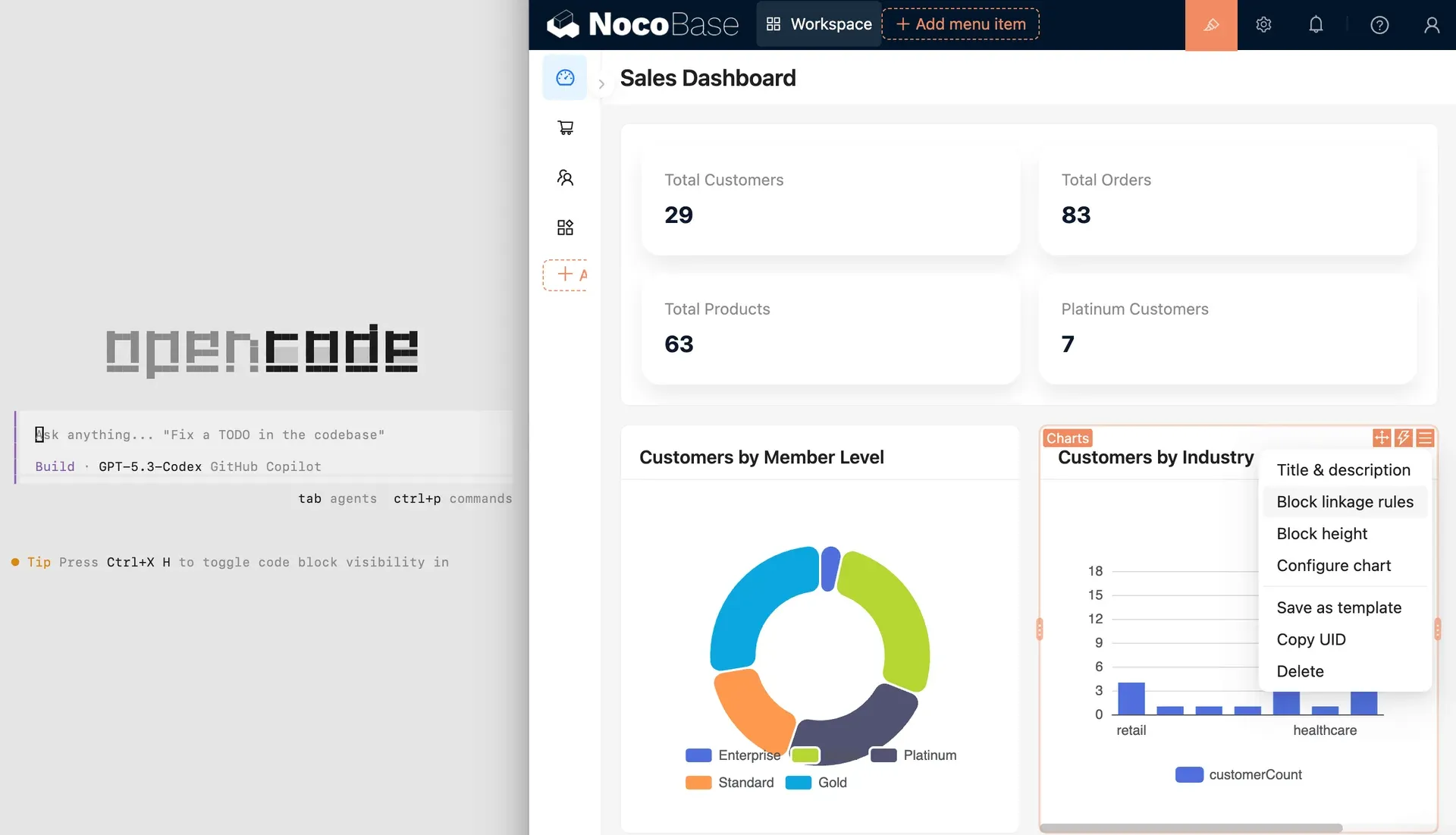
Official README image: a NocoBase dashboard in configuration mode next to a coding agent terminal. Sample data.
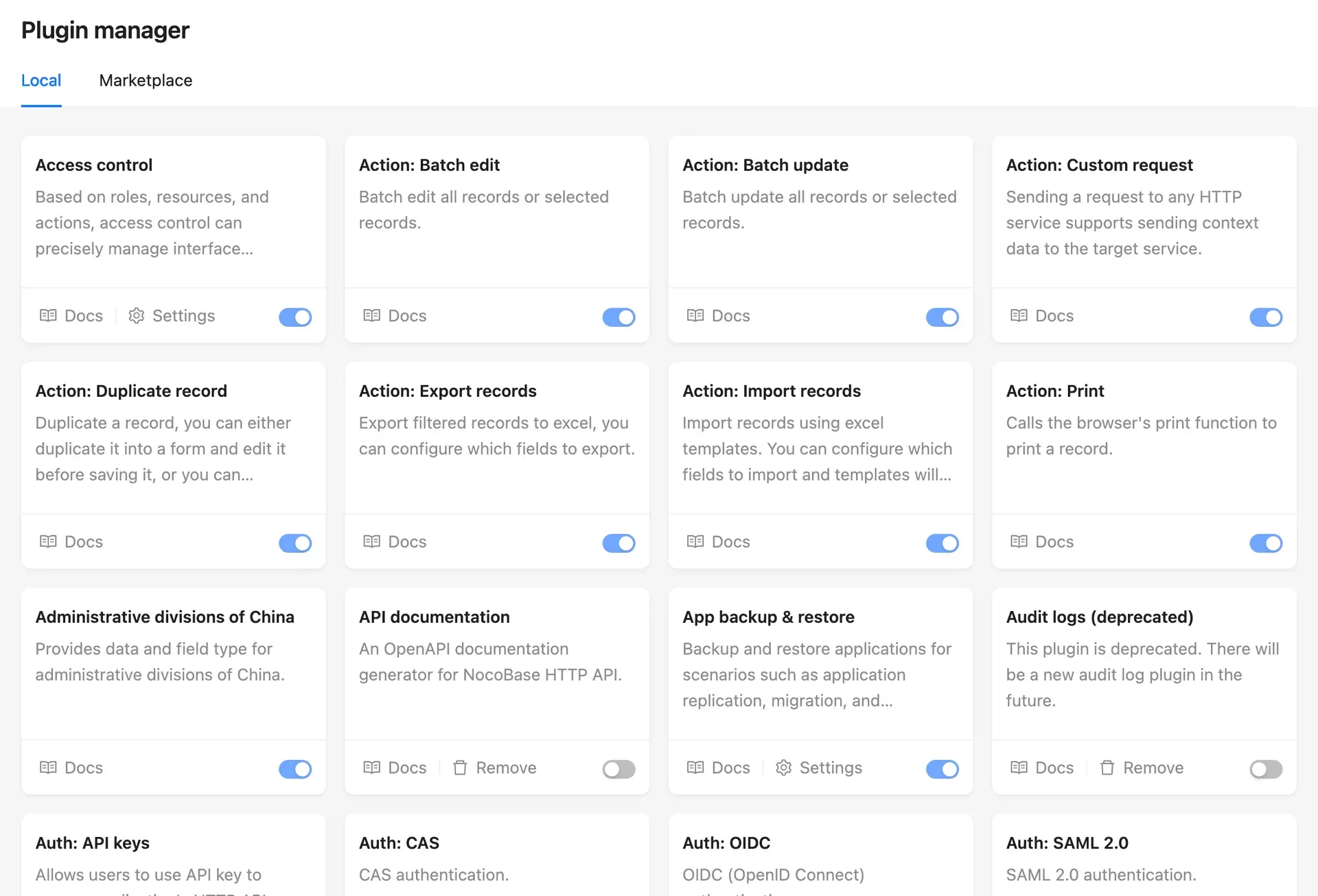
Official README image of the plugin manager with enable toggles, docs and settings links.
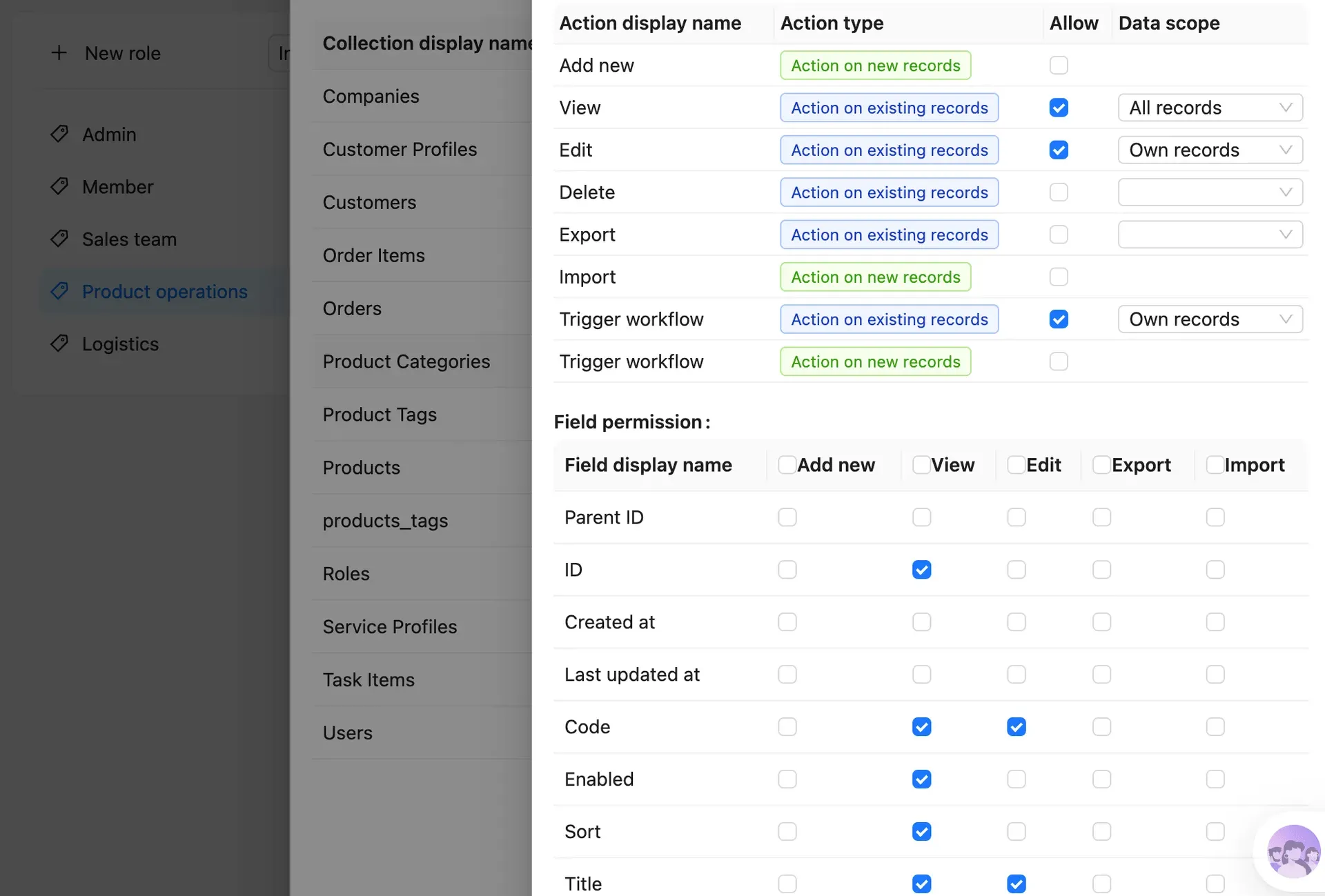
Official README image of role configuration: actions per collection, data scope and field permissions.
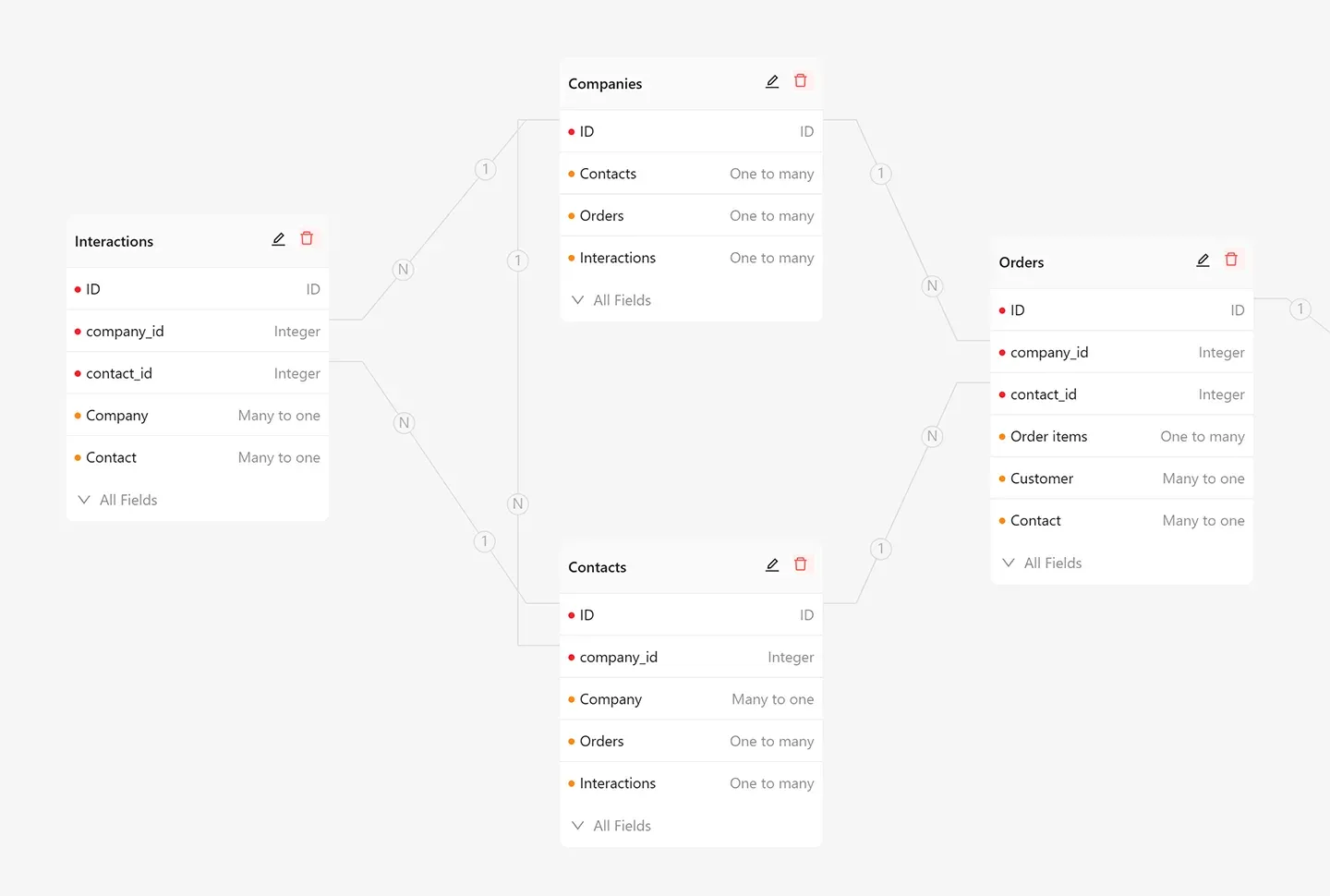
Official README image of the collection relationship view with one-to-many and many-to-one fields.
Source: official NocoBase project page.
Key capabilities
- Docker installation The Docker guide provides compose files for PostgreSQL, MySQL or MariaDB, with image tags such as latest, beta, alpha, pinned versions and -full variants. The full image adds database client tools for backup and migration plugins and LibreOffice for PDF template printing. The container listens on port 80, mapped to 13000 by default, and you should replace the APP_KEY and pin a version for production.
- CLI and create-app install The repository README for the stable line installs a command-line client with npm install -g @nocobase/cli and starts a wizard with nb init --ui. The version 3 README uses pnpm create with a SQLite option, needing Node.js 24 or later. Source installation from Git is also documented for developers.
- System requirements The docs give a minimum of 1 CPU core and 2 GB of memory for a single application node, and say this covers only the application process, not the database or cache. Linux is recommended for production, and macOS is for development.
- Data source manager The main data source runs on PostgreSQL, MySQL, MariaDB, KingbaseES or OceanBase. Documented external sources include PostgreSQL, MySQL, MariaDB, MSSQL, Oracle, ClickHouse, Doris, another NocoBase application and a REST API source. Some external connectors may be commercial plugins, so check the plugin list before relying on them.
- Collections and visual modeling Collections can be general, tree, SQL, view, file and other types, with relation fields and an ER-diagram style view of entities. Business data lives in standard relational tables, separate from the user interface, so it stays in your own database.
- Interface builder Switch between usage mode and configuration mode and arrange blocks on pages: tables, forms, details, lists, grid cards, kanban, calendar, gantt, maps, charts and markdown. Actions such as import, export, batch edit, duplicate and print are plugins you can enable.
- Access control Roles define allowed actions per collection, data scope such as own records or all records, and field-level read and write permissions. A role can also restrict menus and plugin settings. Audit logs record data changes in the editions that include them.
- Workflows The workflow engine triggers on collection events, schedules, custom actions and more, with nodes for conditions, loops, parallel branches, delays, manual approval, HTTP requests, SQL, JavaScript, mail and notifications. Advanced items such as approvals, subflows and webhooks are listed under the Professional edition on the pricing page.
- AI employees AI employees are roles with a name, a bio, tasks and skills, such as a data organizer that fills forms from pasted text. They act inside the interface under the same role-based permissions as people. They send content to the language model you configure, so review that provider's data terms.
- Coding agent integration NocoBase publishes skills and a CLI so agents such as Claude Code, Codex, Cursor and OpenCode can set up apps, create data models and pages and handle releases. The version 3 README installs a nocobase-create-app skill with npx skills.
- MCP and HTTP API The platform exposes HTTP APIs, an MCP interface and an OpenAPI documentation plugin so outside agents and systems can query data and trigger actions within the same permission model. An API keys plugin supports token access to the HTTP API.
- Authentication options The plugin manager lists password sign-in, API keys, OIDC, SAML 2.0, CAS and SMS verification as authentication plugins. The pricing page places single sign-on in the Professional edition.
- Multi-app, backup and environments Multi-app management, application backup and restore and environment variables are plugins. The Enterprise edition adds cluster deployment and detailed user action logging, while Professional adds version control and separate development, test and production environments.
- Plugin development Plugins extend the server, client and data model. The plugin development guide covers writing your own, and a marketplace tab in the plugin manager distributes commercial plugins.
- Editions and pricing The pricing page lists a free Community Edition, a Standard Edition at $800 as a one-time payment, a Professional Edition at $8,000 and an Enterprise Edition by contact. Standard replaces branding and adds external databases and large Excel import or export, while Professional adds SSO, approvals and client application rights.
Where NocoBase fits
Internal admin tools on an existing database
Connect the relational database you already run, model the tables as collections and build list and form pages with filters and role-based actions. Check which connector you need first, because some external database sources are commercial plugins, and test writes on a copy before you let users edit production rows. Keep a backup of the source database before the first write.
CRM and order management
Model companies, contacts, orders and interactions as related collections, add a dashboard with charts and set roles per team. Verify that own-record scopes behave as expected by signing in as a limited user, and export a sample to confirm field-level permissions hide what they should.
Approval and notification workflows
Use a collection event trigger to start a workflow that waits for a manual approval, then sends a message or an HTTP request. Test failure paths, check how long a delayed node survives a restart and confirm which advanced workflow nodes belong to your edition.
Letting a coding agent build the first version
Give a supported agent the create-app skill, review the data model and pages it generates, then refine them in the visual interface. Keep the generated structure in version control where your edition allows it, and read the AI documentation for agent boundaries before connecting production data.
AI employees for data entry and analysis
Assign an AI employee a narrow task such as extracting contact details into a form, with a role that can only see the fields it needs. Check every filled value before submitting, and record which model provider receives the data.
Customer-specific applications
Agencies that build apps for clients should read the license first. Selling upper-layer applications needs the Professional or Enterprise license, and hosting NocoBase itself as a platform for the public is restricted under the agreement.
Install
npm install -g @nocobase/cli && nb init --uiReviews of NocoBase
Be the first to share your experience with NocoBase.
Write a review
Loading review form…
Alternatives to NocoBase
 NocoDBNocoDB is a free, self-hostable Airtable alternative with grid, gallery, form, kanban and calendar views and Docker install options.
 BudibaseBudibase is an operations platform for building internal apps, automations and AI agents around existing databases, REST APIs and business systems. The core is GPLv3, paid features are under a Business Source License, and it runs self-hosted with Docker or Kubernetes or on Budibase Cloud.
 AppsmithAppsmith is an Apache-2.0 low-code platform for admin panels, dashboards and internal tools, with drag-and-drop widgets, JavaScript, Git versioning, database and API connectors, self-hosting on Docker or Kubernetes, and a cloud.