

What is Appsmith?
Appsmith is an open-source low-code platform for building internal applications such as admin panels, dashboards, CRUD front ends, customer 360 views, IT automation and service management tools. Applications are assembled from drag-and-drop widgets, connected to databases, SaaS tools and REST or GraphQL APIs, and customized with JavaScript. The project is developed by Appsmith, Inc.; its about page names co-founders Abhishek, Arpit and Nikhil.
There are two ways to start, according to the GitHub README: an account on Appsmith Cloud, or a self-hosted installation. The installation guides cover Docker (single container, described as suited to local testing, development and small-scale use), Kubernetes with Helm (described as the production-grade, high-availability option), AWS AMI, AWS ECS on EC2 and on Fargate, Azure Container Instances, Google Cloud Run, DigitalOcean, Ansible and an Airgapped Edition. Two Docker images exist: appsmith/appsmith-ee installs the Commercial edition, which includes the free plan and can be upgraded to a paid plan, and appsmith/appsmith-ce installs the Community edition.
The repository is licensed under Apache-2.0, and the website states that the Community Edition is fully maintained, community supported and has a public roadmap. The code base is mainly TypeScript and JavaScript for the client and Java for the server. In the default Docker Compose setup, MongoDB, Redis and PostgreSQL run inside the Appsmith container; the documentation asks for at least 8 GB of RAM on the host for that all-in-one deployment.
The latest release is v2.6.0, published on October 28, 2026. Its notes describe a move to a new workflow engine: Enterprise users must finish existing Temporal workflow runs on v2.5.1 before upgrading. It also includes a fix for a Node.js Brotli decoder vulnerability, requires resolved literal values in customized docker.env files and requires static command names in Redis queries. The earlier v2.5.0 release notes state that the Appsmith AI datasource reached end of life on September 30, 2026, with queries to be migrated to direct OpenAI, Anthropic or Google AI datasources, and that Git-connected applications move to server schema 13.
The README also mentions Appsmith Agents, a separate agentic AI offering described on appsmith.com/ai. Similar low-code builders listed on iThub include ToolJet, Budibase and Retool.
Appsmith screenshots
Explore the interface. Open a screenshot to view it at full size.
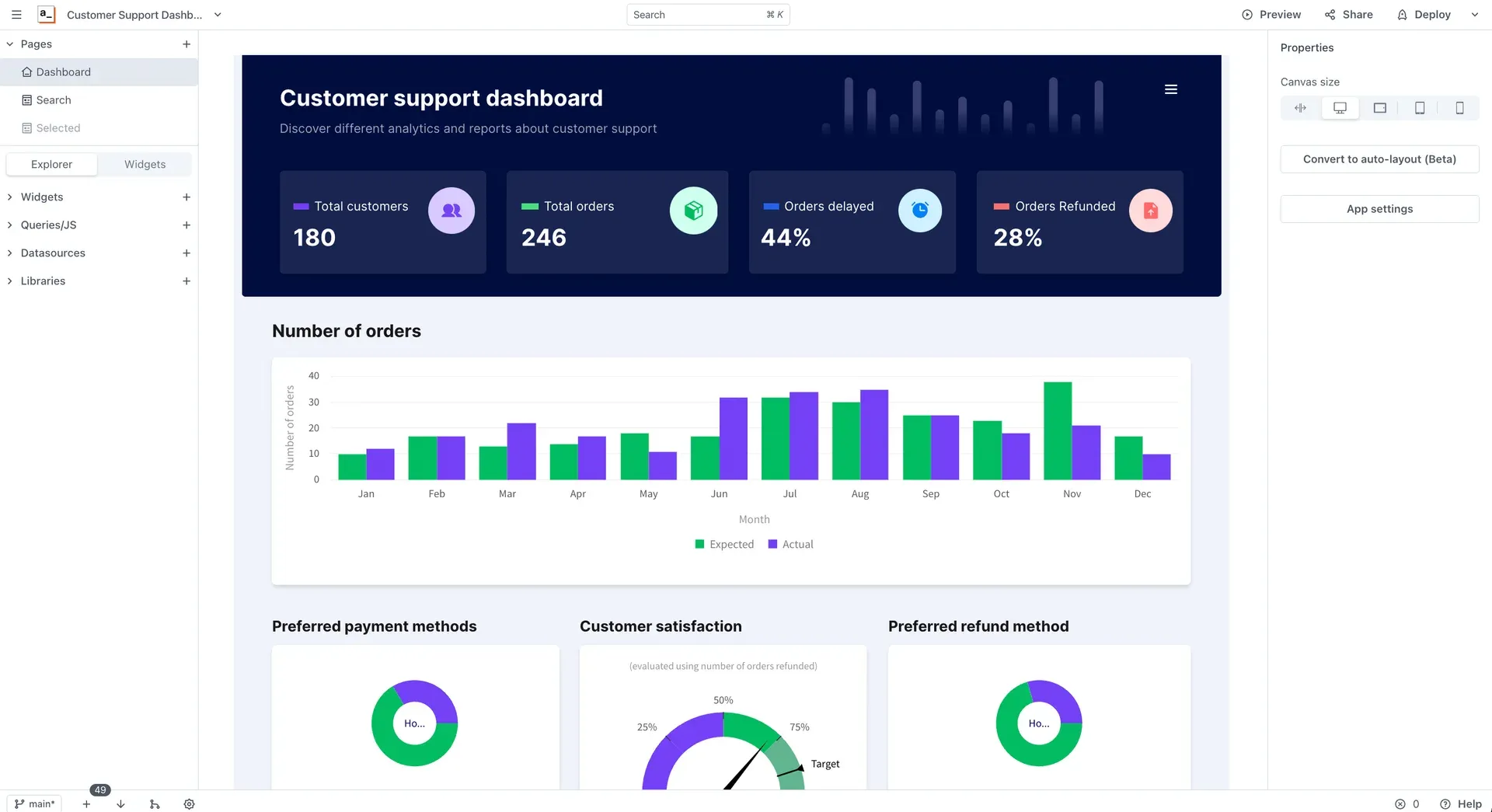
Appsmith editor building a customer support dashboard, with pages, widgets and queries in the left panel.
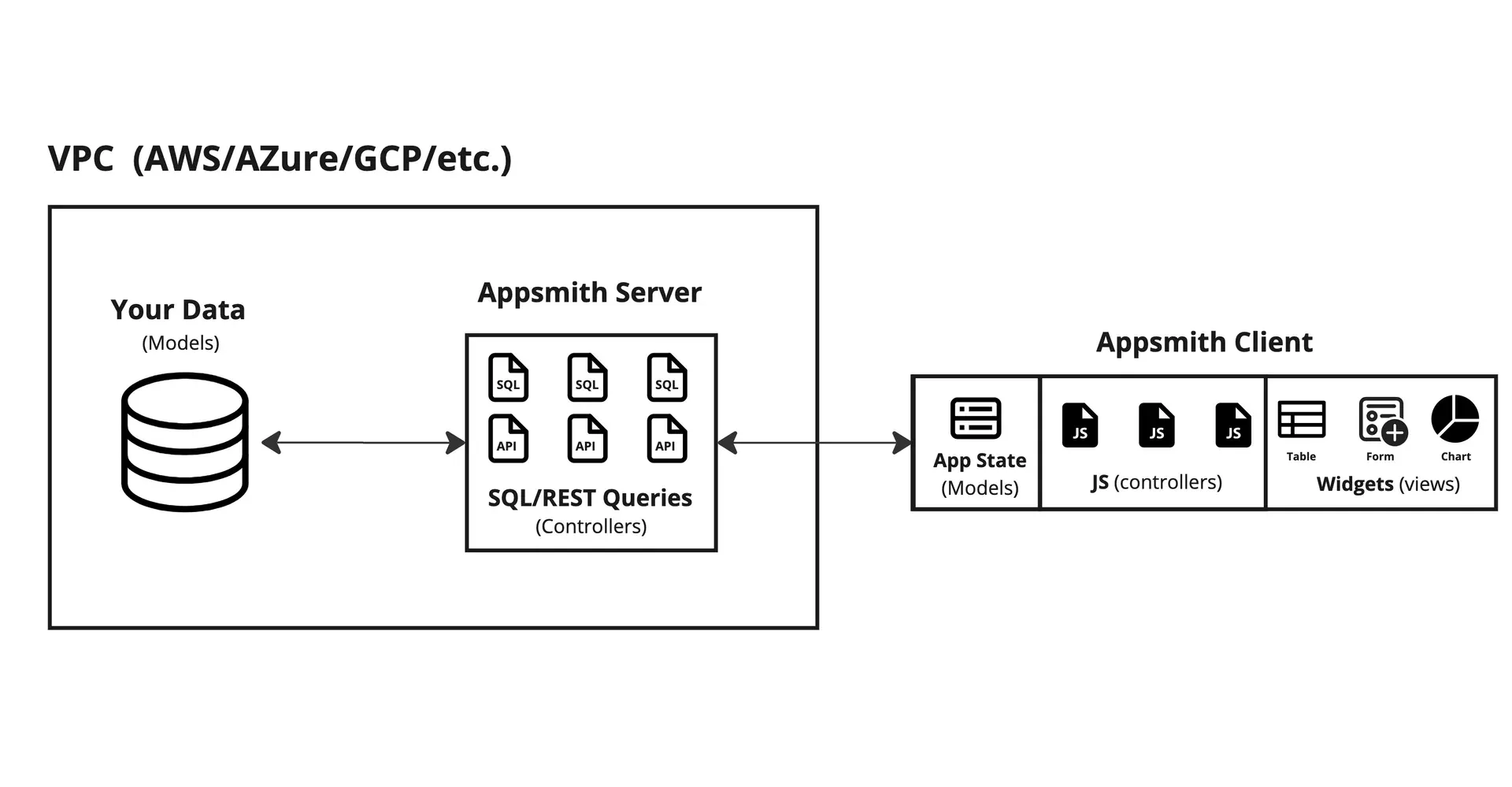
Documentation diagram of the Appsmith client and server model.
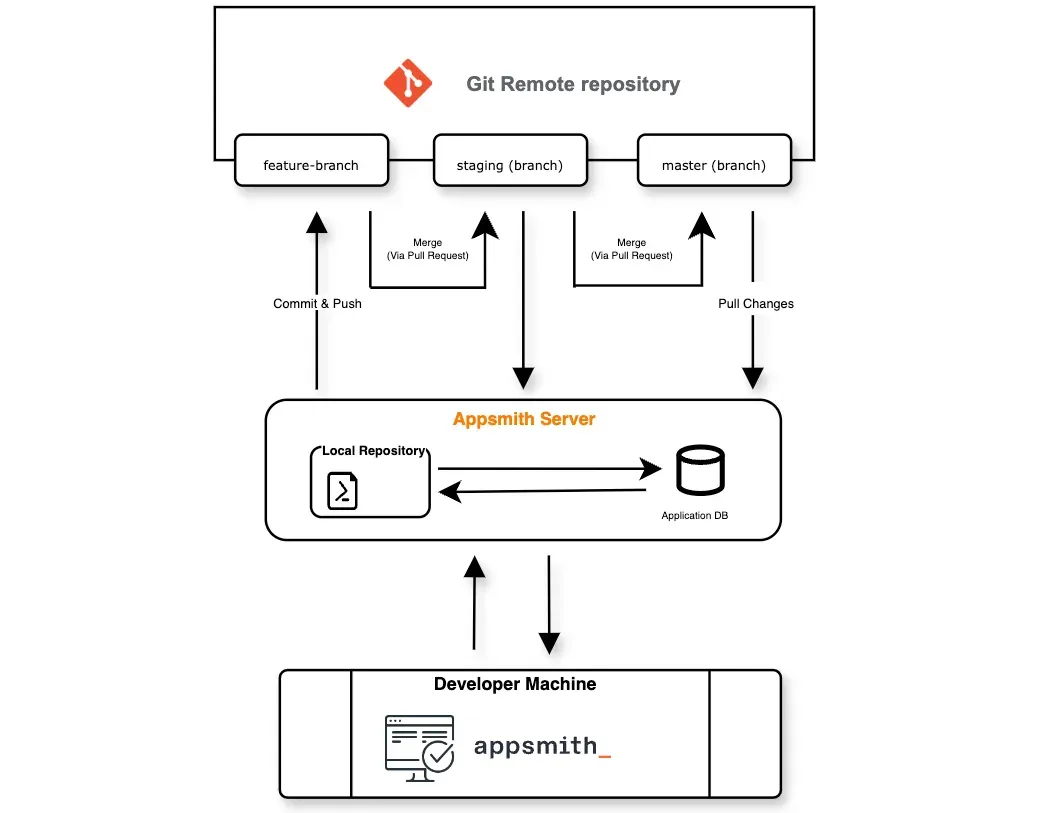
Documentation diagram of Git version control with feature, staging and master branches.
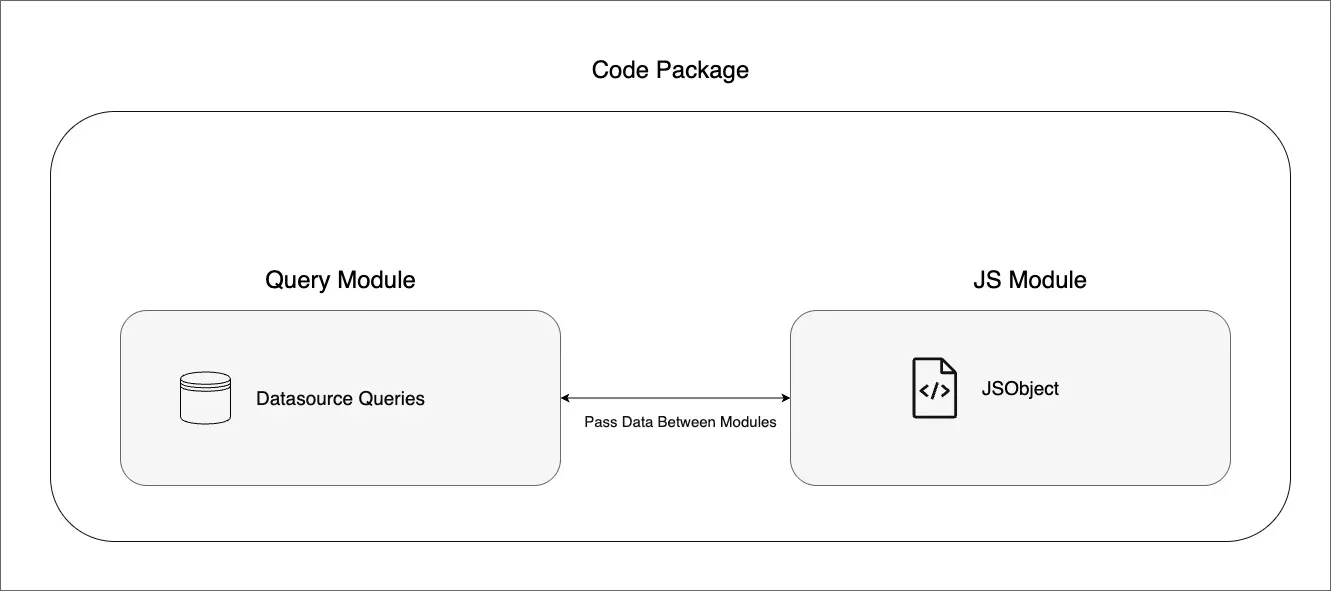
Documentation diagram of a code package with query and JS modules.
Source: official Appsmith project page.
Key capabilities
- Drag-and-drop widget canvas Interfaces are built from widgets such as tables, forms, charts, inputs and modals placed on pages. The canvas has desktop, tablet and mobile size presets, and the docs list Responsive Widgets as an alpha feature. Custom widgets can be written in JavaScript, HTML and CSS, or generated from natural-language prompts according to the homepage.
- Database connectors The datasource reference lists PostgreSQL, MongoDB, MySQL, Elasticsearch, Redis, Microsoft SQL Server, Firestore, Redshift, S3, DynamoDB, Snowflake, ArangoDB, Oracle, SMTP and Databricks. Queries can read and write data directly from the editor.
- REST and GraphQL APIs Any service without a dedicated connector can be reached through the REST API or GraphQL datasource. Authenticated APIs are configured once as datasources and reused across queries.
- SaaS integrations The documented SaaS integrations include Airtable, Amplitude, Asana, AWS Lambda, ClickUp, Confluence, Dropbox, Freshdesk, Gmail, GitHub, Google Docs, Google Drive, Google Sheets, HubSpot, Jira, LinkedIn, Linear, Mixpanel, Monday.com, Notion, Outlook, Salesforce, Slack, Stripe, Trello, Twilio and Zendesk. The pricing page lists premium integrations under the Business plan.
- AI integrations OpenAI, Anthropic and Google AI are available as datasources that run queries with a custom prompt and optional file context. The former Appsmith AI datasource reached end of life on September 30, 2026.
- JavaScript everywhere Bindings, transformations and business logic are written in JavaScript inside
{{ }}expressions and JS Objects. The homepage describes a centralized IDE with auto-complete, multi-line editing, debugging and linting, and external JavaScript libraries can be imported into apps. - Git version control Applications can be connected to a Git repository to commit, branch, review pull requests and deploy merged changes from designated environment branches. The Free plan includes 3 repositories; Business and Enterprise include unlimited repositories, and branch protection and default branch configuration are listed for paid plans.
- Reusable packages Packages group query modules, JS modules and UI modules that can be reused across applications, with their own version control. The pricing page lists reusable packages under Business and Enterprise.
- Workflows Appsmith Workflows run server-side automations triggered by webhooks, by Appsmith apps as an integrated datasource, or by scheduled cron jobs. The docs describe human-in-the-loop steps such as approvals. Workflows are listed under the Business plan; release v2.6.0 moves workflows to a new engine.
- Access control and SSO The Free plan has 3 standard roles and Google and GitHub OAuth. Business adds custom roles and attribute-based permissions, and Enterprise adds SAML and OIDC single sign-on (Okta, Auth0, Active Directory) plus SCIM user provisioning and group sync.
- Audit logs and branding Business and Enterprise plans include audit logs and can remove the "Powered by Appsmith" branding; Enterprise adds custom branding. Custom domains and environments are listed in the plan comparison.
- Embedding Public apps can be embedded on every plan. Enterprise adds private app embedding with shared logins, which the homepage describes as a way to extend legacy and SaaS applications.
- Docker installation A single container started with Docker Compose (Docker 20.10.7 or later, Compose 1.29.2 or later) holds the application and its MongoDB, Redis and PostgreSQL services. The Docker guide recommends pinning the image to a release tag and requires outbound access to cs.appsmith.com.
- Kubernetes installation The Helm chart requires Kubernetes 1.33 or later, Helm 3.14 or later, a default StorageClass and an ingress controller. The docs specify at least 6 GB of memory for application pods and a minimum of 2 nodes with 2 vCPUs and 8 GB each.
- Cloud platform templates Guides exist for AWS AMI, AWS ECS on EC2 and Fargate, Azure Container Instances, Google Cloud Run, DigitalOcean and Ansible. An Airgapped Edition is available as an Enterprise add-on.
- Backup and restore The plan comparison lists backup and restore when updating Appsmith on the Free plan, and on-demand backups synced to AWS S3 on Business and Enterprise.
- Telemetry controls Self-hosted instances can turn anonymous telemetry off. The telemetry page states that a keep-alive ping every 2 hours and a setup ping on first installation are sent regardless of that setting, and that data returned by APIs and databases is not captured.
- Templates and tutorials A template gallery covers customer support, business analytics, inventory dashboards and IT asset trackers, and the documentation includes tutorials for building a first app, packages and workflows.
Where Appsmith fits
Admin panels on top of production databases
An admin panel connects a PostgreSQL, MySQL, MongoDB or other datasource, binds query results to a table widget and uses forms and buttons to run update and insert queries. Self-hosting keeps database credentials and traffic inside the organization network; the build apps overview describes the client and server model in which queries run on the Appsmith server.
Dashboards for support and operations teams
Dashboards combine chart, statistic and table widgets fed by SQL queries or API calls. The homepage use cases include customer support dashboards and the official screenshot shows a customer support dashboard with order metrics, monthly charts and payment breakdowns.
UIs for scripts and IT automation
Appsmith describes building interfaces on top of workflow scripts, where a form collects parameters and triggers an API, Lambda function or workflow. The homepage cites a customer that built an app to patch a fleet of Linux servers.
Approval and back-office processes
Workflows triggered by webhooks, apps or cron schedules automate tasks such as syncing CRM leads or sending stock alerts, and can include human approval steps. The workflow tutorial walks through creating a workflow that sends email notifications.
Git-based release process
Teams connect an application to a Git repository, develop on feature branches, merge through pull requests and deploy merged changes to environment branches such as staging and production. Business plans add unlimited repositories and branch protection; Enterprise adds CI/CD.
Extensions for existing SaaS tools
Custom apps can be embedded in existing applications, privately with shared logins on Enterprise. The homepage describes this as building extensions for SaaS platforms such as Salesforce and project management tools instead of adding seat licenses.
Reviews of Appsmith
Be the first to share your experience with Appsmith.
Write a review
Loading review form…
Alternatives to Appsmith
 ToolJetToolJet is an open-source, AGPL-3.0 platform for building internal tools, admin panels and dashboards on your existing databases, APIs and SaaS systems.
 BudibaseBudibase is an operations platform for building internal apps, automations and AI agents around existing databases, REST APIs and business systems. The core is GPLv3, paid features are under a Business Source License, and it runs self-hosted with Docker or Kubernetes or on Budibase Cloud.
 RetoolRetool is a platform for building internal software, with an AI app builder, drag-and-drop apps, workflows and Free, Team, Business and Enterprise plans.