

What is Virola Messenger?
Virola Messenger is a self-hosted team communication system that combines private and group chat, voice and video meetings, screen sharing with remote control, file sharing and a built-in task board. It consists of Virola Server, which an organisation installs on its own machine, cloud instance or isolated local network, and Virola Client apps for desktop and mobile that connect to that server. The official site describes it as free for teams of up to 10 online users and as requiring no personal data for registration of a self-hosted server.
Virola is made by the team behind Provide Support Live Chat, a product launched in 2003. According to the About page, development of Virola started in 2019 and the product left the pre-release stage and became production-ready in 2024. Provide Support is described there as a private company incorporated in Delaware with headquarters at 65 Broadway, New York. Virola is closed-source commercial software; the company publishes installers rather than source code.
The version history lists Virola 2.9.2 build 26100616, released October 6, 2026, as the current version, adding screen sharing on Linux under Wayland, redesigned notification settings and API calls to manage users. Earlier 2026 releases added improved calls and native desktop notifications (2.9.1), group room avatars, voice messages and custom push notifications (2.8.1), and a built-in web client plus installation of the server as a service (2.7.1).
The vendor states that Virola is developed in C++ entirely in-house without third-party plugins or modules, and that Virola Server can run on 1 CPU core and 512 MB of RAM, with roughly 1 MB of RAM per user. Data is stored on the customer's server and encrypted in transit and at rest. The security page lists the outbound connections a server makes: a license check to virola.io, and, when mobile push notifications are enabled, Google Firebase and Apple APNs plus Virola's push-token server every 50 minutes. End-to-end encryption is not supported; the vendor states it would conflict with features such as issue tracking, screen sharing in group chats and unlimited history.
Licensing is per online user, meaning users connected through a desktop or mobile client. A free Small Team license for up to 10 online users is installed by default on new servers, and paid monthly, annual and perpetual licenses are described on the pricing page. A free Virola Cloud server exists for testing only. Similar self-hosted chat products listed on iThub include Mattermost and Rocket.Chat.
Virola Messenger screenshots
Explore the interface. Open a screenshot to view it at full size.
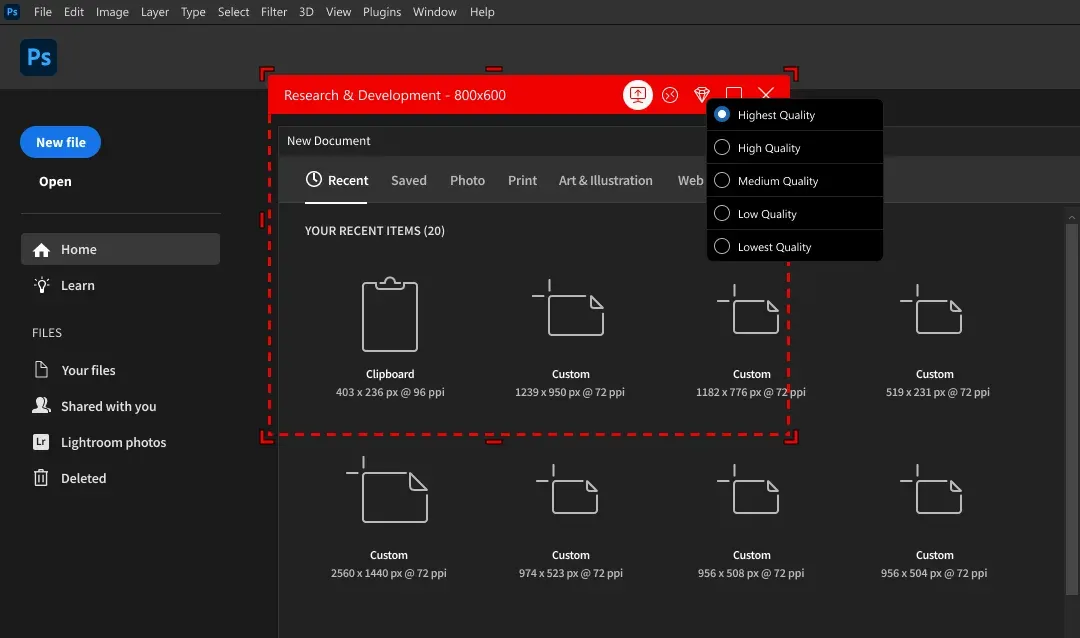
Official Virola image of a shared window with stream quality options from highest to lowest.
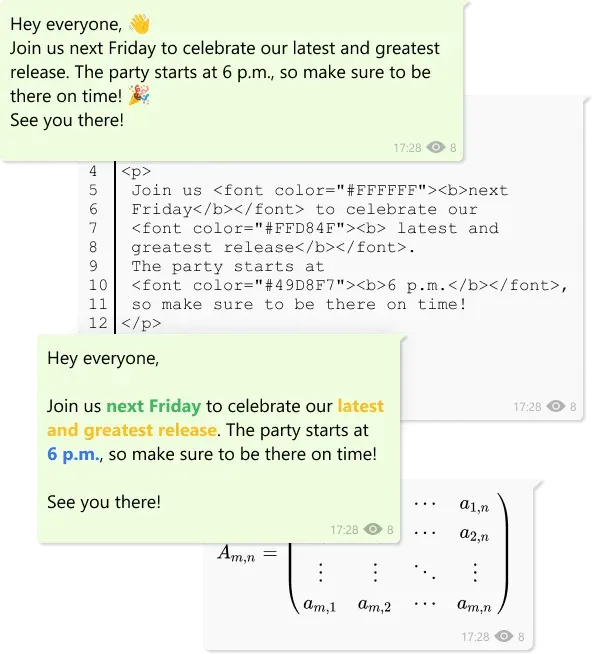
Official Virola image of plain text, HTML and LaTeX message formats.
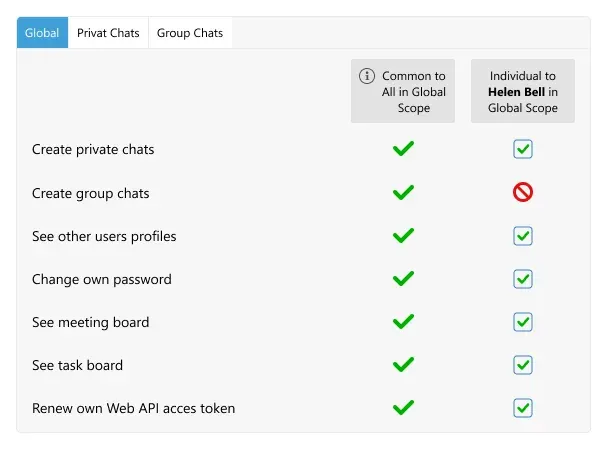
Official Virola image of app-level permissions, with a group chat permission denied for one user.
Key capabilities
- Private and group chats One-to-one conversations and group chat rooms, with pinned, recent, private, meeting and archived room categories. Messages support replies, mentions, reactions, editing and deletion, delivery and read receipts, and links to individual messages.
- Discussions and message formats Discussions (threads) can be started from any chat message, a feature added in Virola 2.1.1. Messages can be posted as plain text, code with line numbers, Markdown, HTML or LaTeX equations, and converted between formats; LaTeX support was added in 2.2.6 and voice messages in 2.8.1. A message can also be converted into a task or a meeting.
- Topic-based channels and read-only rooms Group rooms can be created per department, project or team, and the permissions framework allows read-only news channels with designated managers. Task board filters can isolate tasks created in a specific room.
- Voice and video meetings The conferencing engine is built into the client: users join an ongoing meeting with one click, switch video streams on or off and see who is listening or speaking. Intercom mode allows joining meetings in several rooms simultaneously.
- Meeting recording Voice and video meetings can be recorded without a time limit and saved into any room, including a personal notes space. The vendor notes that recording can be done without notifying other participants.
- Screen sharing and remote control Users can share a full screen or a single window, choose a quality level and let a teammate take control of their desktop. Hardware-accelerated video streaming was added in 2.6.2, and Wayland screen sharing on Linux in 2.9.2.
- Task board An integrated Kanban board turns chat messages into issues with status, type, priority, reporter and assignee, filterable by room and exportable. Tasks can be created and assigned directly in a group room.
- File sharing and snipping tool Attachments can be sent in conversations and discussions, opened with an integrated viewer or video player, and managed as shared files. A built-in snipping tool captures screen regions for messages.
- Permission framework Admin and moderator roles plus app-level, room-level and per-user permissions control who can create chats, send messages or files, edit or delete content, react, change issues created by others or record meetings. The permission framework page documents the hierarchy.
- Guest users and self-registration Admins can create guest accounts with limited rooms and permissions, and can let users join through a self-registration link. Only a username and password are required for a user account; other profile fields are optional.
- LDAP and Active Directory integration Virola Server can bind to Active Directory or OpenLDAP to authenticate users by a unique attribute such as userPrincipalName, import users from organisational units and synchronise data at a set interval, as described in the LDAP guide.
- Web API A REST Web API retrieves, sends, deletes and marks messages as read in rooms and to users, authenticated by a secure session cookie. Version 2.9.2 added API calls to manage users.
- Push notification options Mobile push notifications go through Firebase and APNs and are AES-256 encrypted on the server and decrypted by the client app. They can be disabled entirely, or Android push can be configured with an organisation's own Firebase project.
- Multiple servers and profiles Separate servers can be run for different teams or projects, each with its own database, and the client supports several profiles connected to different servers at the same time.
- Desktop, mobile and web clients Clients are published for Windows 10 1809 or later and Windows 11, macOS 12 or later, Debian-based, Arch-based and RPM-based Linux distributions, iOS 16 or later and Android 9 or later, with a downloadable APK. A built-in web client was added in version 2.7.1.
- Server installers and Docker Virola Server installers exist for Windows 10 and 11 and Windows Server 2019 or later, macOS 12 or later and Linux (glibc 3.4.29 or later; 3.4.30 for Arch), plus a Docker image on Docker Hub. Setup guides cover a DigitalOcean 1-Click Droplet, AWS, Linode and VPSserver.
- Air-gapped LAN deployment The server can run on a local network isolated from the public internet. With push notifications disabled, the only external dependency the vendor lists is the license check server.
- Licensing and list prices The pricing page calculator, read on November 10, 2026, listed $100 per month for 100 online users on the monthly subscription ($1.00 per user per month), $1,000 per year on the annual subscription ($0.83 per user per month) and $2,000 once for a perpetual license ($20.00 per user). Per-user prices fall as the user count rises; the calculator covers 11 to 1,000 users, and larger deployments are quoted by support. A perpetual license covers one major version, an upgrade to the next major version costs 50 percent of the price or is free if the license was bought less than a year before that release, and each license covers one production server.
- Demo workspace and support A public demo workspace can be joined with the client through a self-registration link. Technical support by chat or email is free; a paid Premium Support service handles server setup and configuration.
Where Virola Messenger fits
Internal messaging on an isolated network
Virola Server can be installed inside an office LAN or intranet without public internet access, with clients connecting to it directly. The vendor's LAN messenger page describes this setup for offices with restricted or no internet connectivity, with central control of users, permissions, conversations and files.
Small team on the free license
A new self-hosted server includes the Small Team license for up to 10 online users with all features. The team installs the server on Windows, macOS, Linux or Docker, installs the client, logs in as administrator and creates user accounts or a self-registration link.
Daily standups and project rooms
Teams create a group room per project, enable intercom for continuous voice meetings, share screens during discussions and record sessions into the room. Tasks raised in the room appear on the shared Kanban board, where they can be filtered by room, status, priority or assignee.
Remote support inside the company
Screen sharing with remote control lets a technician view and operate a colleague's desktop from inside a chat room or meeting, with a selectable stream quality and single-window sharing.
Directory-backed corporate deployment
Organisations using Active Directory or OpenLDAP connect Virola Server to the directory, map attributes to profile fields, import users from organisational units and keep them synchronised. Permissions are then set globally, per room and per user, and guest accounts are created for external collaborators.
Customer or community chat with anonymous accounts
Because accounts need only a username and password, an operator can open a server to outside users through a self-registration link. The anonymity page states that setting up a self-hosted server requires no account on the Virola website, and that an email address is needed only to buy a license or try the cloud sandbox.
Install
docker run -it --rm -p 8888:7777/tcp -p 8888:7777/udp -v $HOME/virola-storage:/virola virolamessenger/virola-server:latestReviews of Virola Messenger
Be the first to share your experience with Virola Messenger.
Write a review
Loading review form…
Alternatives to Virola Messenger
 MattermostMattermost is an open core, self-hosted collaboration platform with channels, threads, playbooks, boards, audio calls and AI agents. It runs on Go and PostgreSQL, with a free Entry mode and paid plans sold by quote.
 Rocket.ChatRocket.Chat is a TypeScript and MongoDB communication platform for channels, threads, calls, Matrix federation and customer conversations. The core is MIT-licensed and self-hosted with Docker or Kubernetes; enterprise features and add-ons need a paid plan.
 SlackSlack is a messaging platform with channels, huddles, clips and no-code Workflow Builder automations, available with a free plan and paid upgrades.