

What is Mattermost?
Mattermost is a self-hosted collaboration platform from Mattermost, Inc. built around team channels, threaded conversation, file sharing, audio calls with screen sharing, playbooks for repeatable procedures and boards for task tracking. The company positions it for defense, intelligence, security and critical infrastructure organizations, and the same server is also used by engineering and IT teams as a ChatOps hub. The mattermost/mattermost repository is the primary source for core development; the README describes the server as written in Go with a React web client, running as a single Linux binary on PostgreSQL.
Distribution follows the server deployment guide: Linux packages and tarballs for Ubuntu, Debian and Red Hat family systems, container images with Docker Compose, and Kubernetes. A hosted cloud workspace is offered by the company, and there are desktop apps for Windows, macOS and Linux and mobile apps for iOS and Android. The documentation states that Docker deployments are intended for evaluation and testing rather than production or high availability, and recommends Kubernetes when clustering is needed.
The reviewed release is Mattermost v12.0.2, published November 4, 2026, which the v12 changelog lists with medium to high severity security fixes, a database migration change that avoids a long index rebuild on upgrade, and a fix for pre-packaged plugins in the FIPS Docker image. Version 12.0 was the major release of October 2026 and removed RHEL 7 and RHEL 8 as supported server targets. Mattermost ships a new server version on the 16th of each month, with extended support releases every nine months.
Licensing is split. Compiled binaries produced by Mattermost, Inc. are offered under an MIT license; source code used to build your own binaries is available under AGPL v3.0 or a commercial license, with the webapp, templates and some tooling under Apache 2.0, as described in the repository license notice. The commercial Enterprise Edition adds proprietary features, and the free Entry mode of that edition has usage limits.
Mattermost screenshots
Explore the interface. Open a screenshot to view it at full size.
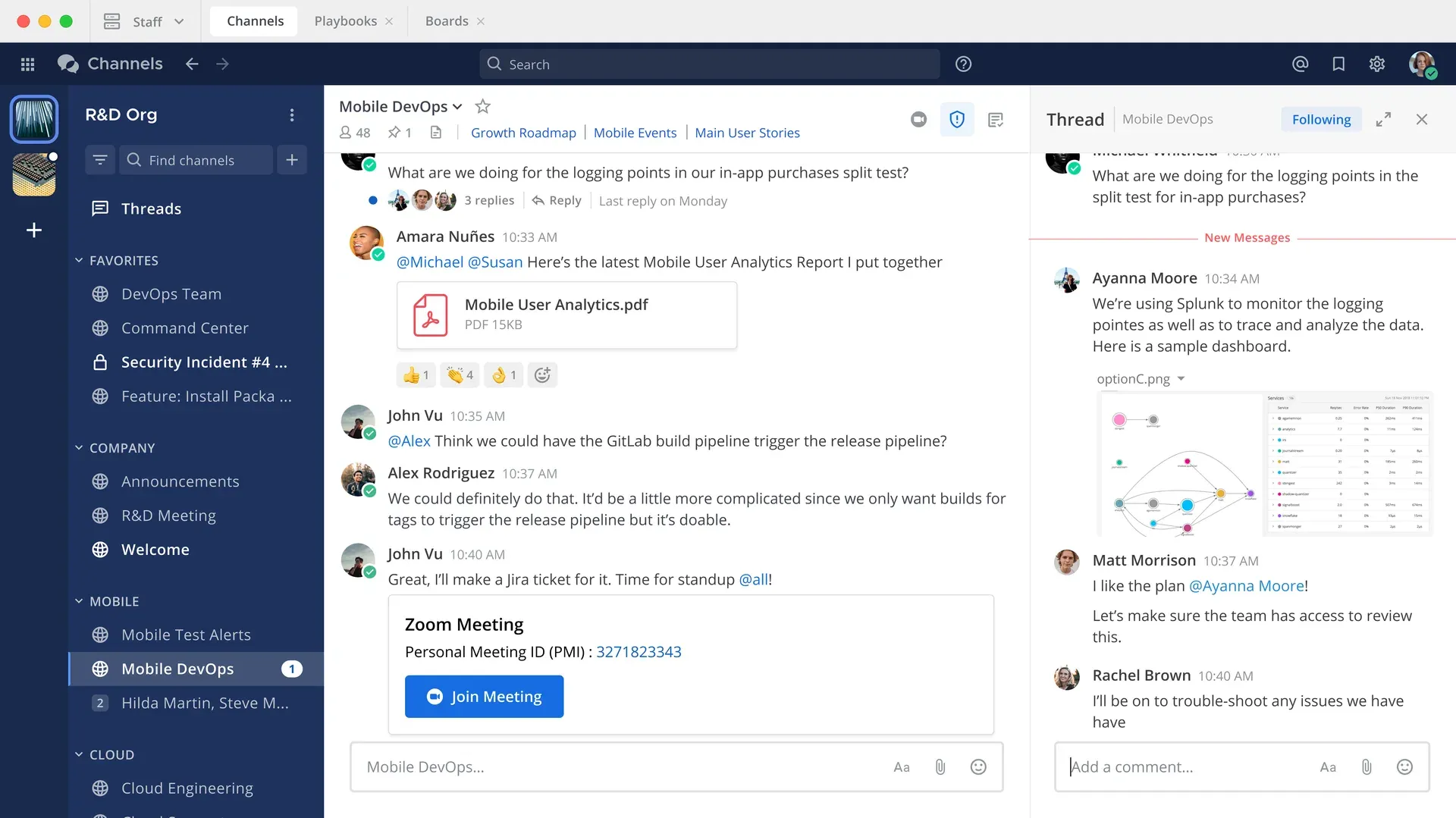
Official product image of the Channels workspace with a thread open beside a channel.
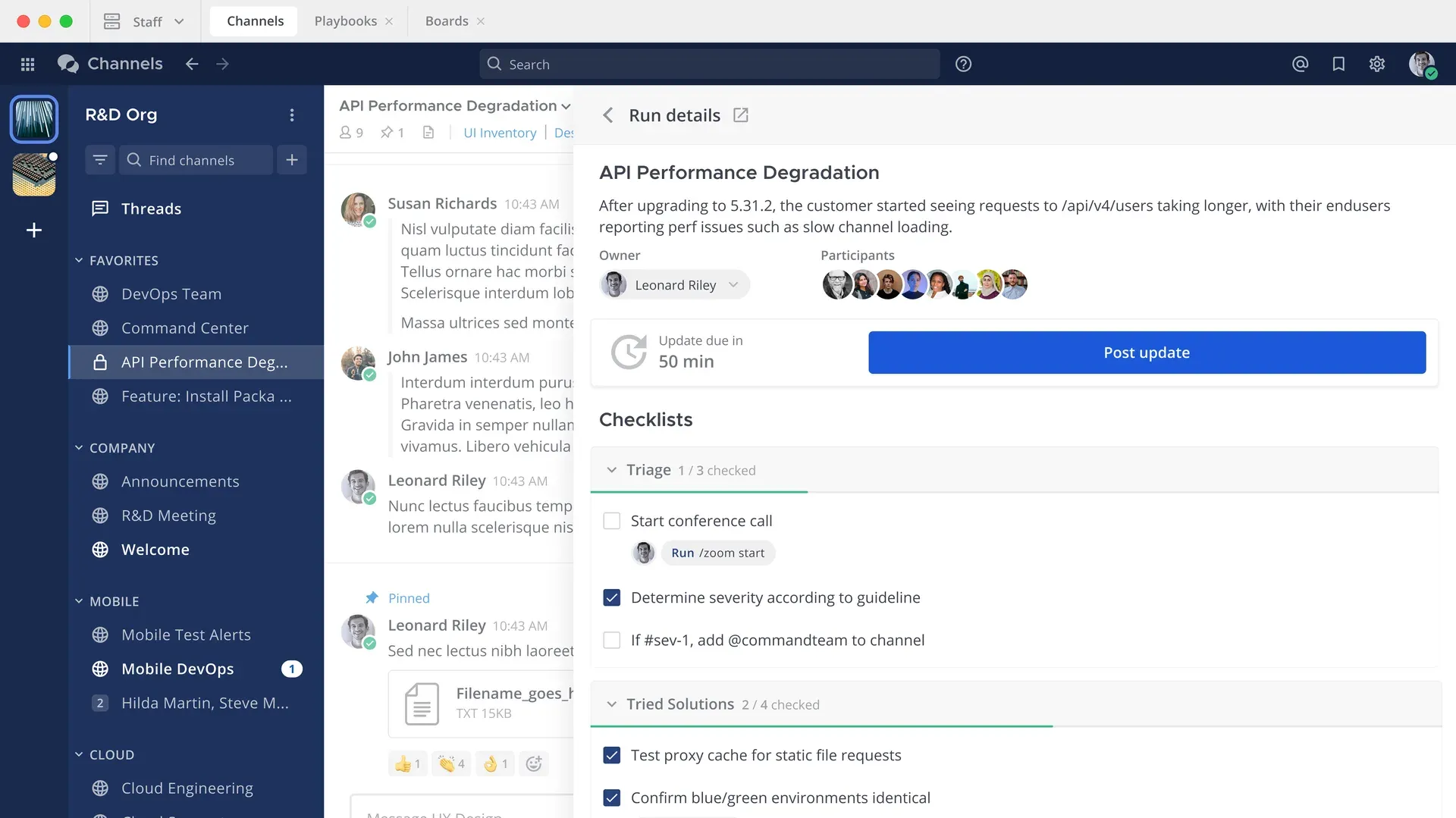
Official product image of a playbook run with owner, participants and checklists.
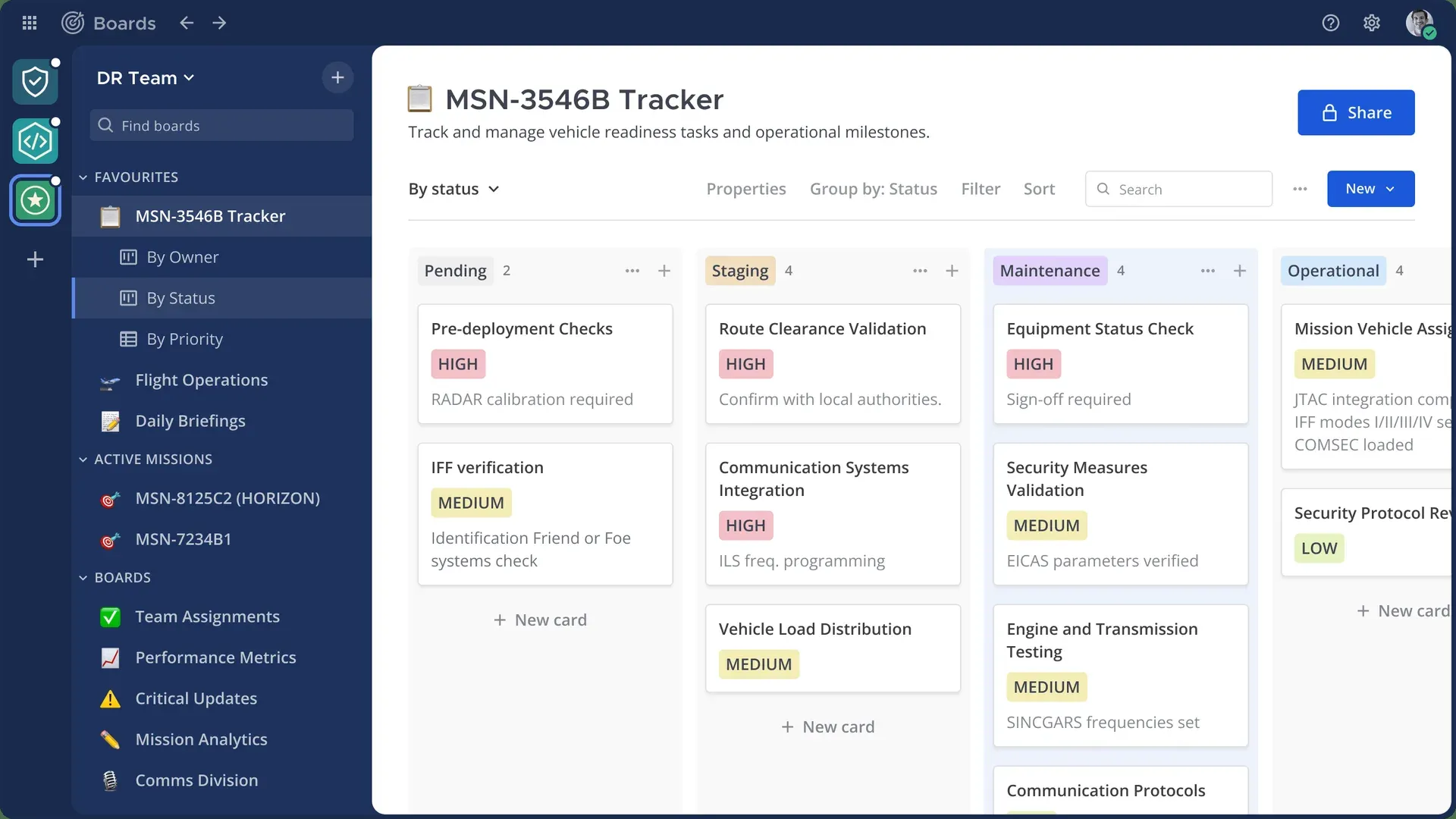
Official product image of Boards grouped by status with priority labels.
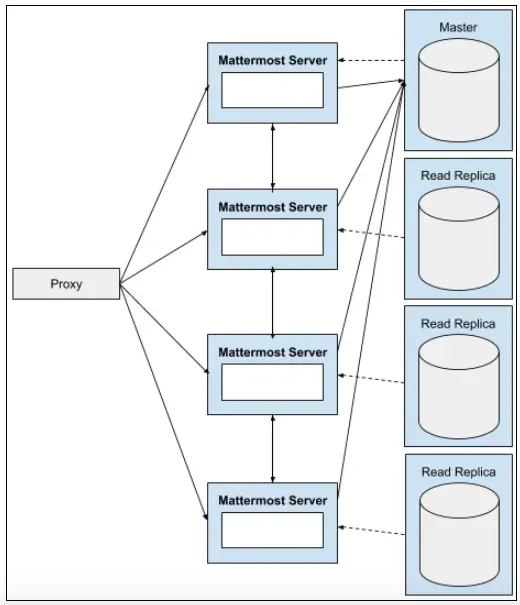
Official high availability architecture diagram: a proxy in front of several servers and a database primary with read replicas.
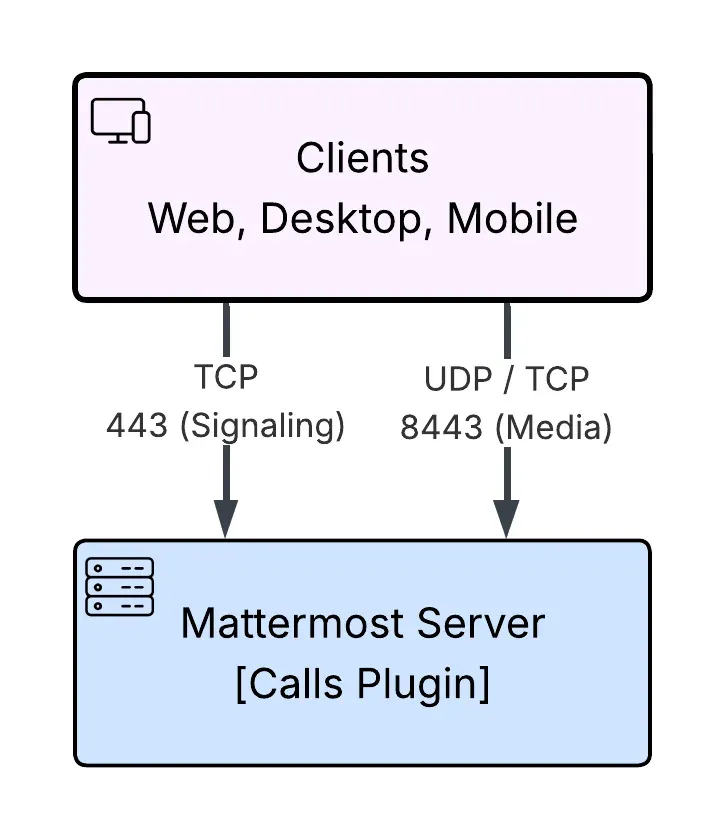
Official diagram of an integrated Calls deployment: TCP 443 for signaling and UDP or TCP 8443 for media.
Source: official Mattermost project page.
Key capabilities
- Channels and threads Public and private channels, direct and group messages, threaded replies with a thread inbox, file sharing, link and media previews, and search. The documentation says core search runs in the relational database and suits deployments up to roughly two to three million posts and file entries, after which Enterprise Search is recommended.
- Web, desktop and mobile clients The requirements page lists desktop apps for Windows 11 or later, macOS 15 or later and Ubuntu LTS 22.04 or later, mobile apps for iOS 18 and Android 11 or later, and current Chrome, Firefox, Safari and Edge for the web client. Flatpak packages for Linux are described as beta.
- Server stack and requirements The server needs PostgreSQL 15 or later and runs on Ubuntu 22.04 or later, Debian Bookworm or later, CentOS Stream 9 or Red Hat Enterprise Linux 9 or later and Oracle Linux 9. MySQL is no longer the supported route; the documentation points to a migration guide. Fedora, FreeBSD and Arch Linux have community support only.
- Audio calls and screen sharing The Calls plugin provides self-hosted audio calls and screen sharing. The documented integrated deployment uses TCP 443 for signaling and UDP or TCP 8443 for media, so firewall rules and a reverse proxy need to allow those paths. Live transcription and agent summaries are listed under the higher plans.
- Playbooks Playbooks turn procedures such as incident response into checklists with owners, run details and status updates posted into a channel. Enterprise plans add automated triggers and retrospectives. Entry mode limits active runs per month, and the limit is noted as taking effect in a future release.
- Boards Boards provides Kanban and table views with properties, grouping and filters for tracking tasks. Entry mode lists a 1000-card limit, also marked as taking effect in a future release. Check the current limits in the documentation before sizing a team.
- Integrations, webhooks and slash commands Incoming and outgoing webhooks, slash commands, bots and plugins connect the server to other tools. The README points to the developer documentation and a marketplace of more than 700 integrations. Professional adds Jira, GitHub and GitLab integrations for DevSecOps work.
- REST API A documented REST API covers users, teams, channels, posts, files, bots, plugins and administration. The reference is at the API documentation and lists hundreds of endpoints, so most routine administration can be scripted.
- Authentication and directory sync Professional lists SSO through SAML, OIDC and OAuth, multi-factor authentication and AD or LDAP synchronization. Enterprise adds group, team and channel synchronization from LDAP groups. Guest accounts and custom user groups are part of Professional.
- AI agents and bring-your-own LLM The plans page describes agent creation, MCP and tool controls, channel summaries and per-user token tracking, with models that you host or choose yourself. The documentation says any OpenAI-compatible endpoint can be connected. Treat what leaves your network as a function of the model you select.
- Compliance, retention and audit Enterprise plans cover data retention policies, legal hold, compliance export, granular audit logs and delegated administrative roles. The documentation lists these as unavailable in the free Entry mode. The marketing pages mention support for programs including ISO 27001, SOC 2, GDPR, NIS2 and DORA; check the Trust Center for current evidence.
- High availability and scale Enterprise supports a clustered deployment with Enterprise Search. The pricing page cites clusters up to 50,000 users for Enterprise and up to 200,000 concurrent users for Enterprise Advanced; verify those figures with your own load test. See the high availability guide for the architecture.
- FIPS and STIG container images Mattermost publishes FIPS-compliant, STIG-hardened variants of its container images, selected by changing the image tag, as described in the container build guide. The pricing page ties FIPS 140-3 validated images to the Enterprise plan.
- Air-gapped and offline operation Enterprise Advanced documents air-gapped deployment, offline operation and resynchronization after connectivity returns. A quick-start runbook covers the process. This is a planning topic, not a switch: models, plugins and updates need an internal mirror.
- Attribute-based access control Enterprise Advanced lists dynamic attribute-based access control using clearance, program and device posture, classification banners and burn-on-read messages. These controls target regulated and classified environments and need a policy design before configuration.
- Evaluation paths The documentation offers a one-hour cloud preview and a single-container preview, started with
docker run --name mattermost-preview -d --publish 8065:8065 mattermost/mattermost-previewand described as evaluation only. The Docker preview page lists 1 GB of RAM and 1 GB of disk as prerequisites.
Where Mattermost fits
Replacing a hosted team chat with a server you operate
Start with the deployment planning guide, then decide the database, file storage, reverse proxy and TLS design before inviting users. Use the Slack migration documentation for existing history. Check the retention behavior and the message size limit, because new installations from v12.0.2 accept messages up to 262,144 characters while existing installations keep their current column size.
Running incident response and ChatOps
Create an incident channel per event, attach a playbook with triage and communication checklists, and connect alerting and ticketing through webhooks or the integrations listed for your plan. Rehearse the path where the primary chat is down, since an out-of-band channel is listed as an Enterprise feature.
Operating in a regulated or restricted network
Plan identity, logging, retention and legal-hold needs first, then check which plan carries them. For disconnected sites, build an internal artifact mirror for the server, plugins and desktop installers, and test an upgrade there. Record who can read exported data and where audit logs go.
Coordinating DevSecOps work
Connect Jira, GitHub or GitLab, use boards or channels for release coordination and keep deployment notifications in dedicated channels. Review who owns each bot token and which webhooks are enabled, because integrations act with the permissions you give them.
Adding AI assistance without sending data elsewhere
Choose a model endpoint that you control, limit which channels the agent may read and review the permissions of any MCP tools. Test with a non-sensitive channel and read the logs for what is sent to the model before widening access.
Sizing and upgrading a production server
Read the release policy and choose between monthly releases and an extended support release. Test upgrades on a copy of the database, check migration notes such as the v12.0.2 change to the message columns and move to Kubernetes or a clustered Linux layout if you need high availability.
Reviews of Mattermost
Be the first to share your experience with Mattermost.
Write a review
Loading review form…
Alternatives to Mattermost
 Rocket.ChatRocket.Chat is a TypeScript and MongoDB communication platform for channels, threads, calls, Matrix federation and customer conversations. The core is MIT-licensed and self-hosted with Docker or Kubernetes; enterprise features and add-ons need a paid plan.
 ElementElement is the open-source Matrix client from Element Creations for browsers, Windows, macOS and Linux. It connects to any Matrix homeserver, encrypts DMs and private rooms by default and can be self-hosted as static files, a Debian package or a Docker image.
 SlackSlack is a messaging platform with channels, huddles, clips and no-code Workflow Builder automations, available with a free plan and paid upgrades.