

What is Rocket.Chat?
Rocket.Chat is an open-source team communication platform written in TypeScript. It combines channels, direct messages, threads, discussions and teams with voice and video calls, an omnichannel contact center for customer conversations, federation with other servers, and an app framework for extensions. It is developed by Rocket.Chat Technologies Corp., which describes itself as a fully remote company of more than 150 people in over 30 countries; the about page says the project began in 2015 as a side project of four friends. The vendor now markets the product as a Secure CommsOS for regulated and mission-critical organizations, which explains the strong focus on air-gapped deployment, access control and compliance in recent releases.
The server is a Meteor application running on Node.js with MongoDB as its only database. Release 8.9 requires MongoDB 8.0 and Node.js 22.22.3 or later in the 22.x line, or 24.15.0 or later in the 24.x line, and it bundles Apps-Engine 1.67.0. Official Docker images and Helm charts include Node.js, but MongoDB must be run and maintained separately. File uploads should go to object storage such as Amazon S3, Google Cloud Storage or MinIO; the documentation does not recommend GridFS for production. Deployments above 5,000 concurrent users run as microservices on Kubernetes, with NATS as the internal message broker.
The latest stable release is 8.9.1 LTS, published November 6, 2026. It fixes heavy database load from the Engagement Dashboard and from mass disconnects, removes a 2-second pause that made push and email notifications pile up under load, makes the server exit with a logged error when a startup step fails, fixes SAML login after a restart, and moves the Docker base image to Node.js 24.22.1 on Debian bookworm. The preceding 8.9.0 added hybrid keyword and semantic retrieval to AI Search, custom sidebar categories on Enterprise plans, and support for federation room version 11. Version 9.0.0 is in release candidates and contains breaking changes, covered in the What you get and Why it matters sections below.
Minor versions ship roughly monthly. According to the version durability policy, standard releases are supported for 6 months and LTS releases for 12 months, so 8.9 LTS is supported until October 31, 2027. After end of life a server keeps running, but the push notification gateway, the Marketplace and omnichannel integrations stop working, and the official mobile and desktop apps may refuse to connect.
Most of the repository is under the MIT license. Code in the ee/ and apps/meteor/ee/ directories is under the Rocket.Chat Enterprise Edition license, which allows modification and testing but requires a valid subscription for production use of those features. Clients are separate projects: Rocket.Chat.Electron for desktop and Rocket.Chat.ReactNative for iOS and Android. Rocket.Chat is not a document editor, project tracker or video conferencing server of its own: conferencing runs through integrated providers, and the product's scope is messaging, calls, customer conversations and the administration around them.
Rocket.Chat screenshots
Explore the interface. Open a screenshot to view it at full size.
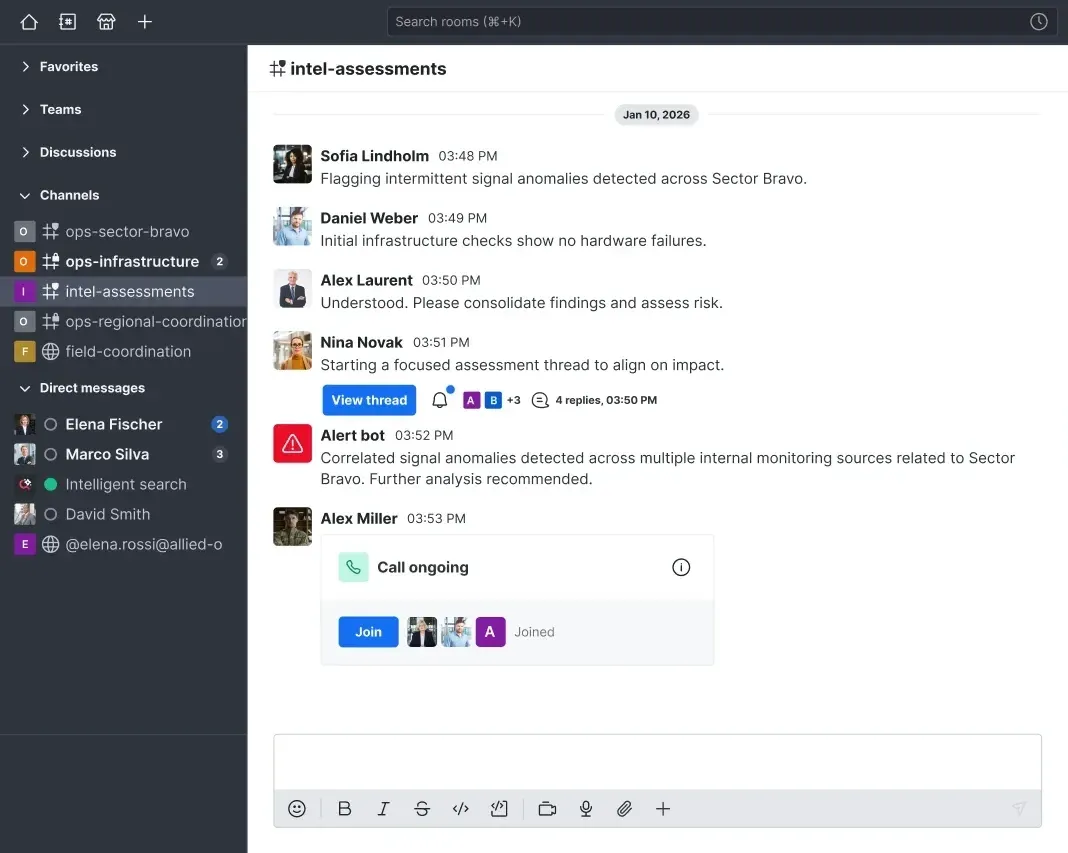
Official product image from rocket.chat: the current web client with grouped sidebar, a thread link, a bot alert and a call that members can join.
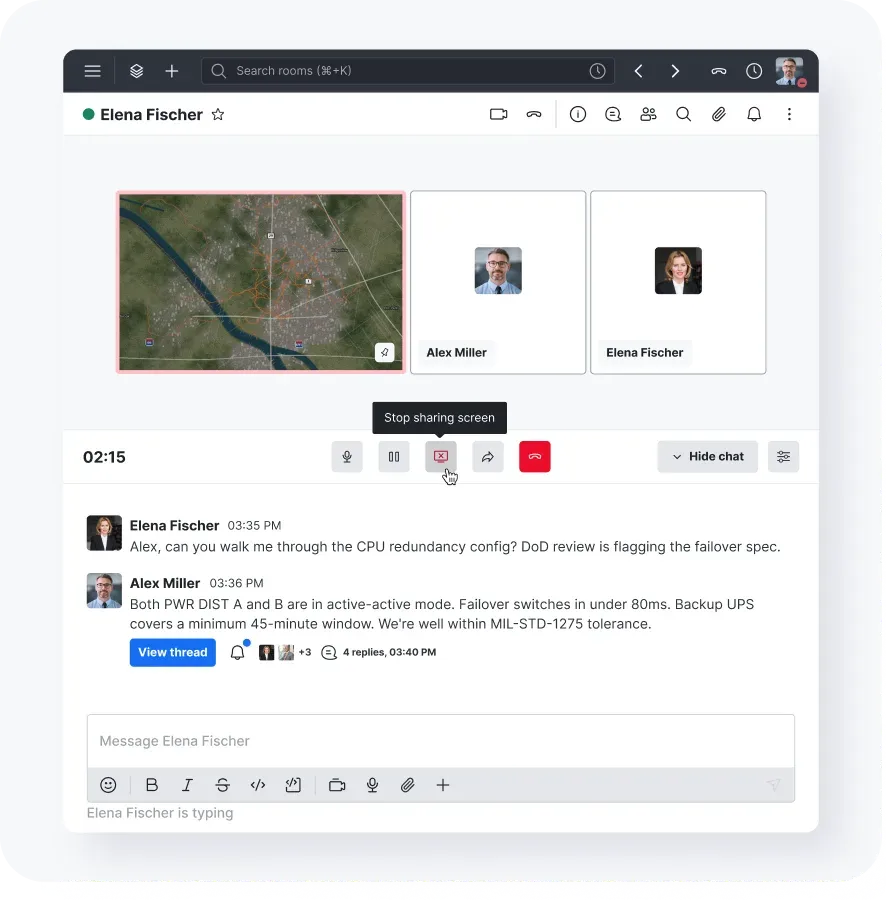
Official product image from rocket.chat showing a direct voice call with screen sharing, call timer and controls above the conversation.
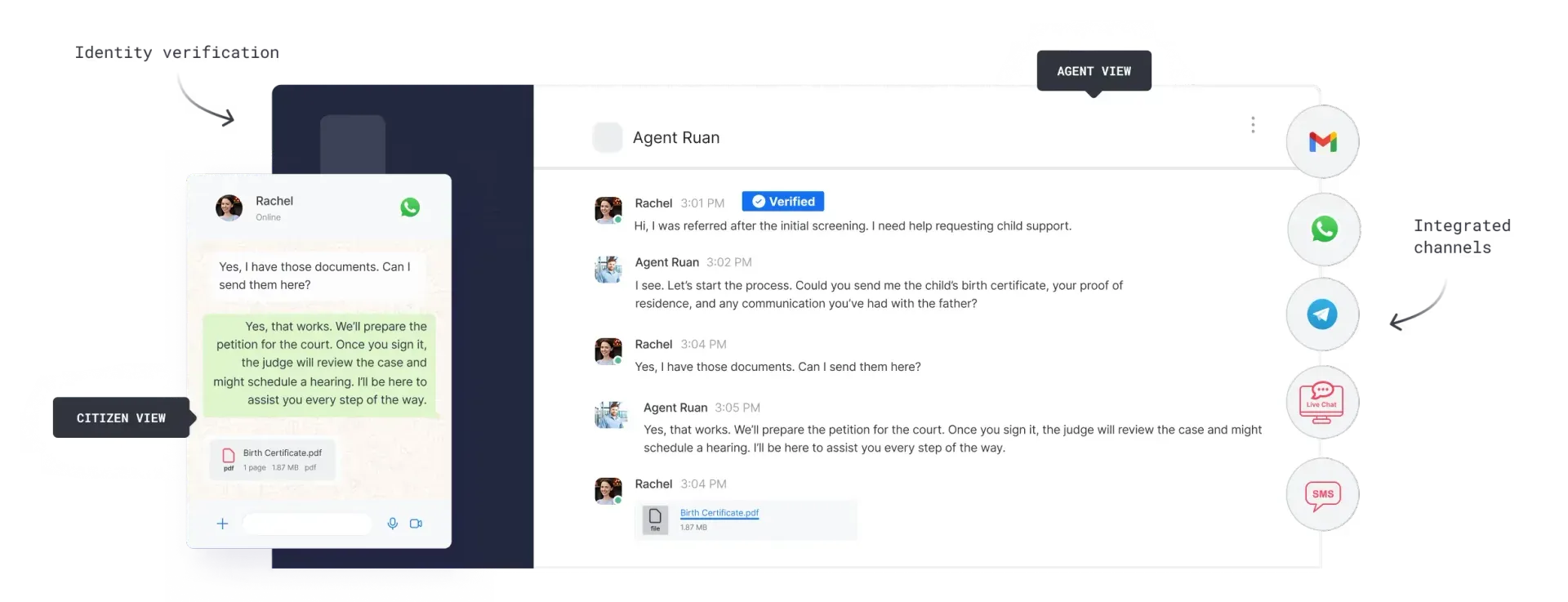
Official Omnichannel illustration from rocket.chat: the agent view beside the customer's WhatsApp view, with a verified contact badge and integrated channels.
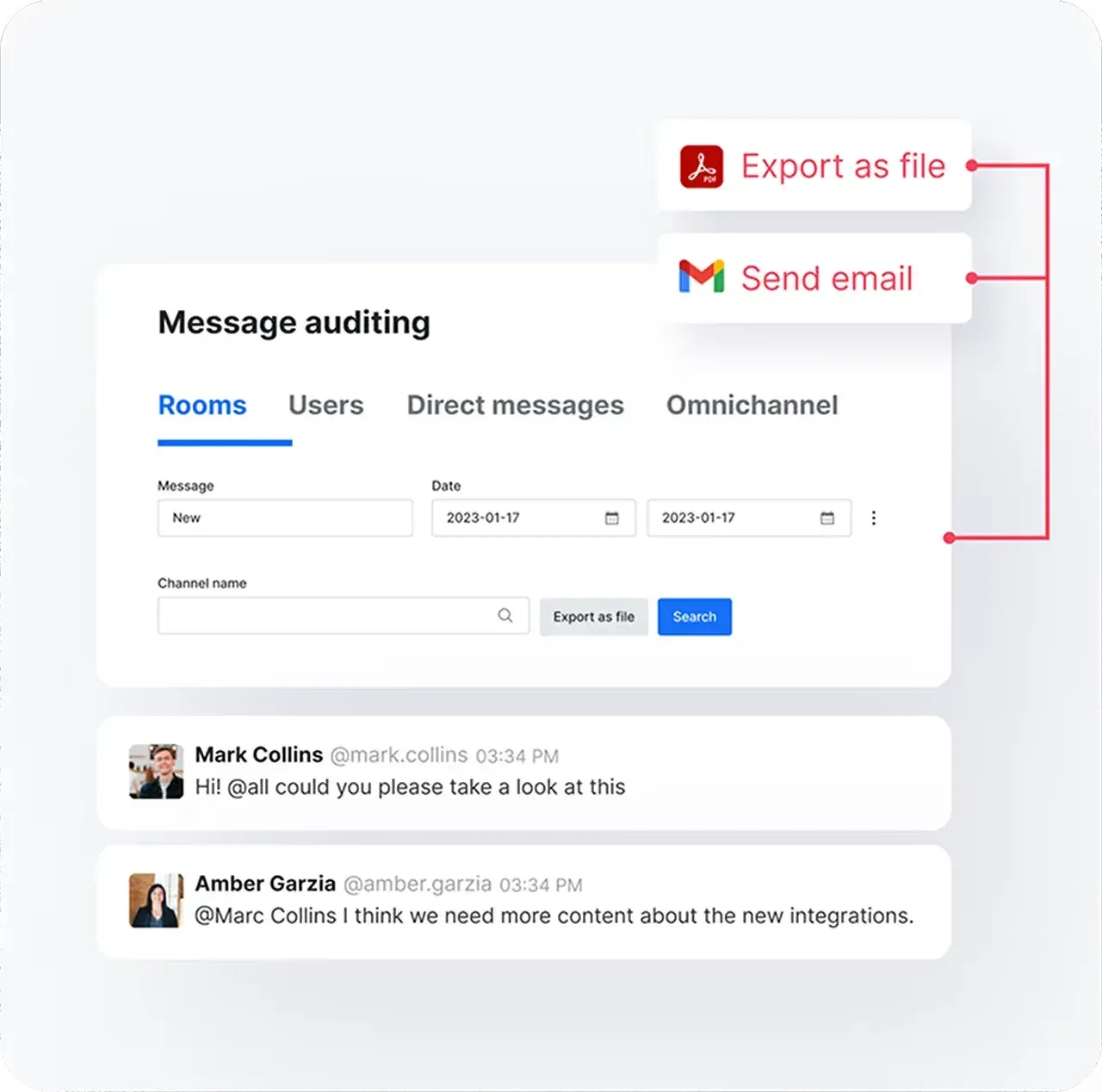
Official illustration from rocket.chat of the message auditing panel, with search filters and options to export results as a file or send them by email.
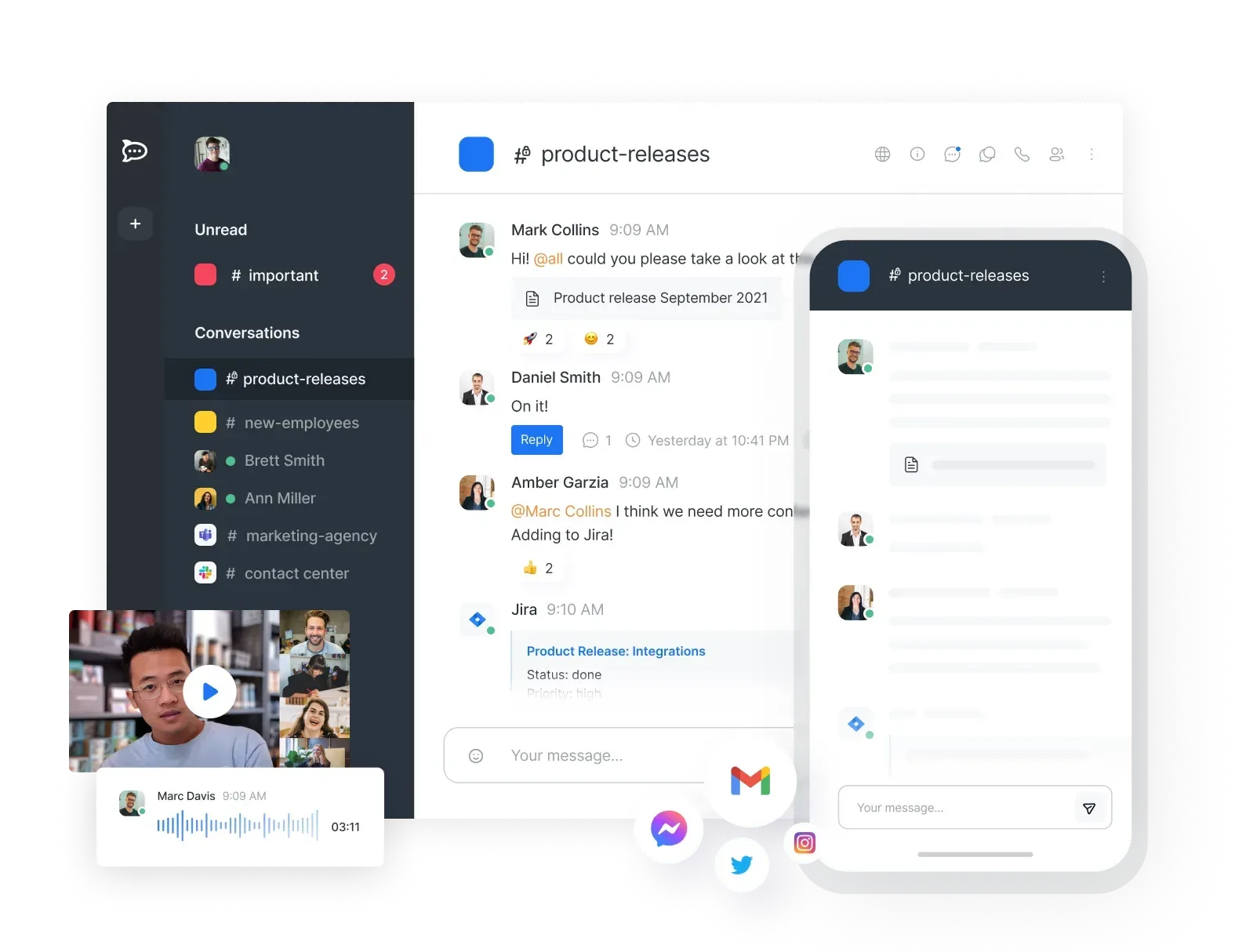
Product illustration from the Rocket.Chat README showing the earlier desktop layout next to the mobile app, with an integration message and a recorded voice message.
Source: official Rocket.Chat project page.
Key capabilities
- Docker Compose deployment The official rocketchat-compose repository splits the stack into files for Rocket.Chat, MongoDB, NATS, Traefik with Let's Encrypt, and a monitoring layer with Prometheus, Loki and Grafana. You copy
.env.exampleto.env, pinRELEASEto a fixed version, setDOMAIN,ROOT_URLand a Grafana admin password, then rundocker compose up -dwith the listed compose files. The guide warns that MongoDB 8.x may fail on Ubuntu 26.04 and recommends Ubuntu 24.04 LTS. - Kubernetes, Podman, Launchpad and air-gapped installs The deployment guide lists Docker, Podman and Kubernetes with Helm as recommended methods, plus Launchpad for a managed Kubernetes setup where dependencies are handled for you. Air-gapped deployment without internet access is documented for regulated networks, but the plans page lists it for paid plans only.
- Sizing and system requirements For a Starter workspace without high availability and up to 500 concurrent users, the system requirements list 2 vCPUs, 4 GiB RAM and 20 GiB storage for Rocket.Chat, plus a MongoDB host with 2 vCPUs and 4 GiB RAM. High-availability tiers start at 4 vCPUs and 8 to 12 GiB RAM per application node and a 3-member MongoDB replica set. Ports 443 and 80 must be reachable by clients, and 27017 must be open between Rocket.Chat and a separate MongoDB host.
- Channels, teams, threads and discussions Conversations happen in public and private channels, direct messages, teams that group channels, threads under single messages and discussions that branch off into their own rooms. The sidebar groups rooms into favorites, teams, discussions, channels and direct messages, and 8.9 added user-defined categories on Enterprise plans.
- Voice calls, video conferencing and screen sharing Built-in voice calls between users include screen sharing, and 9.0 adds a permission that controls who may share their screen. Video conferences run through integrated providers: according to the plans page, Starter includes Pexip, Jitsi, BigBlueButton, Google Meet and Zoom, while Community includes Jitsi and BigBlueButton. Release 9.0 adds LiveKit as a built-in provider in alpha, off by default. External telephony through SIP is sold as a VoIP add-on on paid plans.
- Omnichannel contact center The Omnichannel module routes external conversations to agents, with managers, monitors, departments, business units, business hours, canned responses, tags, SLAs, priorities, chat transcripts and real-time analytics. A Livechat widget embeds on websites, and omnichannel apps add channels such as WhatsApp, SMS and Telegram. From 9.0 the Omnichannel setting is off by default on new workspaces, while upgraded workspaces keep their current value.
- End-to-end encryption Direct messages, discussions, private channels and private teams can be end-to-end encrypted; public channels cannot. Each user's key is protected by a generated E2EE password of at least 30 characters that is shown once and not stored on the server. Since 8.8 an administrator can force encryption on all newly created private rooms, which locks the toggle and makes the API reject unencrypted private rooms. Federated rooms are exempt because federation does not support end-to-end encryption, and encrypted messages do not appear in search, cannot be audited and may be unreadable to bots.
- Authentication and identity Sign-in options include local accounts with TOTP two-factor authentication, LDAP, SAML, CAS and OAuth providers including Apple, GitHub, GitLab, Google, Nextcloud and custom OAuth. Release 8.8 added SAML login in the mobile and desktop apps through the system browser. On version 9.0, LDAP, SAML and custom OAuth require a license that includes the matching enterprise module, and several older built-in OAuth providers such as Facebook, LinkedIn, Twitter and WordPress are removed.
- Roles, permissions and attribute-based access control Role-based permissions apply at workspace and room level. Enterprise workspaces can use attribute-based access control: 8.8 added classification banners for ABAC-managed rooms that follow US government marking conventions, and 9.0 adds workspace-wide ABAC enforcement, ABAC-managed private channels and teams, and a dedicated permission for editing room attributes.
- Federation with Matrix and XMPP Native federation uses the Matrix protocol so users can message people on other Rocket.Chat or Matrix-compatible servers, including threads, reactions, mentions and files. The documentation marks it as a Premium feature. Release 9.0 adds a native XMPP server in the Enterprise federation module for server-to-server messaging and presence with XMPP networks.
- Auditing, retention and exports Message auditing searches rooms, users, direct messages and omnichannel conversations by date range and exports results. Since 8.8 the audit functions are also available as REST endpoints that need the auditing license and are limited to 10 requests per 60 seconds. Granular retention policies, message search and export, and tamper-evident audit logs are listed as capabilities of the paid plans. Encrypted rooms are outside the reach of auditing.
- Marketplace and Apps-Engine Apps from the Rocket.Chat Marketplace add integrations, slash commands, UI blocks and bots. Developers write their own apps in TypeScript with the open-source Apps-Engine, which in 8.9 gained media call lifecycle events and a read-only call history accessor. Since 8.8 apps run on Node.js instead of Deno by default.
- REST and realtime APIs, webhooks and MCP The API reference documents REST endpoints for users, rooms, messages, omnichannel and settings, plus a realtime API. Recent releases move remaining Meteor methods to REST, and 9.0 removes 157 unused methods and the old
queryandfieldsparameters, so check external clients before upgrading. With the AI add-on, a native Model Context Protocol endpoint at/api/v1/mcpaccepts personal access tokens and, from 9.0, OAuth tokens. - AI Search and Sovereign AI AI Search finds messages by meaning, and 8.9 added a balance setting between semantic and keyword retrieval so exact strings such as error codes still match. Release 9.0 adds room, author and date filters behind a feature preview and explains to admins why a search pipeline failed. The Rocket.Chat AI app summarizes omnichannel conversations with your own LLM deployment, and the MCP endpoint and AI Center require the AI add-on, sold as Sovereign AI on paid plans.
- Desktop and mobile apps The Electron desktop client supports Windows 10 (NSIS and MSI), macOS 12 or later (DMG and PKG) and Linux (AppImage, deb, rpm, snap), and is also in the Mac App Store, the Microsoft Store and Snapcraft with
sudo snap install rocketchat-desktop. Aservers.jsonfile can preload workspaces for managed rollouts. Mobile apps for iOS and Android are distributed through the App Store and Google Play. The apps guide covers installation, and the apps check the server version, so an unsupported server may be refused. - Push notifications Mobile push notifications are delivered through the Rocket.Chat cloud push gateway, which requires a registered workspace and a supported server version. The plans page lists unlimited push notifications on Starter and a cap of 10,000 per month on the Community edition. Organizations that cannot send notification metadata to an external service can compile their own mobile apps with their own push credentials, as described in the developer documentation.
- Plans and licensing tiers Every workspace on version 6.5 or later starts as Starter, which is free, self-managed and limited to 50 users. The MIT-licensed Community edition is limited to 100 concurrent users. Commercial, Government and Defense plans are quoted by sales, with add-ons such as Sovereign AI, VoIP, FIPS 140-3 and Mission Critical support. The self-service Pro plan has been legacy since April 29, 2026.
Where Rocket.Chat fits
Running a self-hosted team chat for an organization
Start with the Compose stack on a host that meets the Starter sizing, pin RELEASE to the current LTS version and point a DNS record at the server so Traefik can obtain a certificate. Complete the setup wizard, register the workspace if you need mobile push, and configure object storage before users upload files. Create default channels and teams, set retention and upload limits, and check that the desktop and mobile apps connect. Confirm which plan limit applies to you: 50 users on Starter, or 100 concurrent users on Community.
Replacing a hosted messaging service
Teams leaving Slack or a similar service usually care about channel structure, threads, integrations and search. Map existing channels to Rocket.Chat channels and teams, recreate bots as incoming and outgoing webhooks or Apps-Engine apps, and test that notification behavior on desktop and mobile matches what users expect. Check which video provider you will use and whether your sign-in method needs a license on version 9.0.
Operating a customer contact center
Enable Omnichannel explicitly, which new 9.0 workspaces require, then create departments, business hours, agents and monitors. Embed the Livechat widget on your site and install the apps for WhatsApp, SMS or Telegram that your customers use. Define canned responses, tags, SLAs and priorities, and verify that transcripts are sent and stored as your records policy requires. Compare the agent workflow with a ticketing product such as Zendesk if you also need case management.
Secure communication in regulated or isolated networks
Government, defense and critical infrastructure teams typically combine forced end-to-end encryption on private rooms, SAML or LDAP with role and attribute-based access control, and audit exports. Air-gapped deployments, FIPS 140-3 cryptography and classification banners are tied to paid plans and add-ons, so confirm the contract scope early. Plan offline workspace registration through the documented flow and test how mobile clients receive notifications without the public push gateway.
Collaborating with external organizations through federation
Native federation lets your users join rooms with partners on other Rocket.Chat or Matrix-compatible servers without guest accounts on your workspace. Configure server identity, signing keys and allowed domains in the federation settings, then test messages, threads, reactions and file transfer with a partner server. Remember that federated rooms cannot be end-to-end encrypted and cannot carry ABAC attributes, so classify which conversations may be federated.
Automating workflows with bots, apps and AI clients
Use incoming webhooks for alerts from CI, monitoring or ticketing systems, outgoing webhooks or slash commands to trigger external jobs, and Apps-Engine apps for richer UI and permissions. Authenticate scripts with personal access tokens and a dedicated bot user with minimal roles. With the AI add-on, MCP clients can connect to /api/v1/mcp; on 9.0 they can use OAuth with PKCE and optional dynamic client registration, which is off by default.
Install
git clone --depth 1 https://github.com/RocketChat/rocketchat-compose.git && cd rocketchat-compose && cp .env.example .envReviews of Rocket.Chat
Be the first to share your experience with Rocket.Chat.
Write a review
Loading review form…
Alternatives to Rocket.Chat
 SlackSlack is a messaging platform with channels, huddles, clips and no-code Workflow Builder automations, available with a free plan and paid upgrades.
 Virola MessengerVirola Messenger is a closed-source, self-hosted team messenger for Windows, macOS, Linux, Docker, iOS and Android with chat, video meetings, remote control, a Kanban task board and LDAP. Free for up to 10 online users.
 HulyHuly is an EPL-2.0 platform for issue tracking, team planning, chat, collaborative documents, virtual office calls, HR and recruiting. The hosted service has shut down and the original repository is frozen, so new deployments run on Docker Compose or Kubernetes.