

What is Huly?
Huly is an open-source workspace that combines a project tracker, team planner, chat, inbox, collaborative documents, a virtual office for calls, and modules for HR, recruiting, controlled documents and test management. It is built on the Huly Platform, a TypeScript framework for business applications published by Hardcore Engineering Inc. The same platform also powers TraceX, a separate product named in the README. The source code is licensed under EPL-2.0.
Two notices in the platform repository change how Huly should be evaluated today. First, the hosted Huly service has been discontinued because its hosting is no longer funded, and the README points existing users to a backup and restore guide. Second, since late September 2026 the hcengineering repository is frozen and no longer actively maintained; the notice says development continues in Platform-Collective/platform, a fork that describes itself as developed independently under the same license. The huly.io marketing and pricing pages were still online when this profile was checked, but they no longer describe an available service.
The latest production release in the original repository is v0.7.426, published July 5, 2026. It added required card attributes and reference versioning, a process trigger that fires when an execution finishes, product version actions, email confirmation for invite links, a fix for an account information disclosure, removal of a deprecated import endpoint, and a backup download button with a matching script. The previous release, v0.7.423, added a card grid, user statuses, guest and anonymous guest spaces, and a Korean locale. Production versions use v* tags; s* tags are development builds that the README does not recommend for production.
Self-hosting is the supported path. The huly-selfhost repository provides a Docker Compose stack with an nginx front, a setup script, a migration guide per version, a sample Kubernetes configuration and a Helm chart. Its README describes Huly as resource-heavy: 2 vCPUs and 8 GB RAM minimum, 4 vCPUs and 16 GB RAM recommended. Optional services such as mail, web push, audio and video calls, AI, Google Calendar and GitHub sync are added as extra containers.
Under the interface sits a set of more than 30 services documented in the architecture overview: an account service, a transactor that keeps WebSocket connections and processes every change, a Y.js collaborator for document editing, CockroachDB as the main database, Elasticsearch for full-text search, MinIO for files and Redpanda for events. Building from source needs Node.js 20.11.0, Docker, Microsoft Rush and a GitHub token with read:packages. There is no native mobile app; the Huly documentation describes browser access and notifications through web push or Telegram instead.
Huly screenshots
Explore the interface. Open a screenshot to view it at full size.
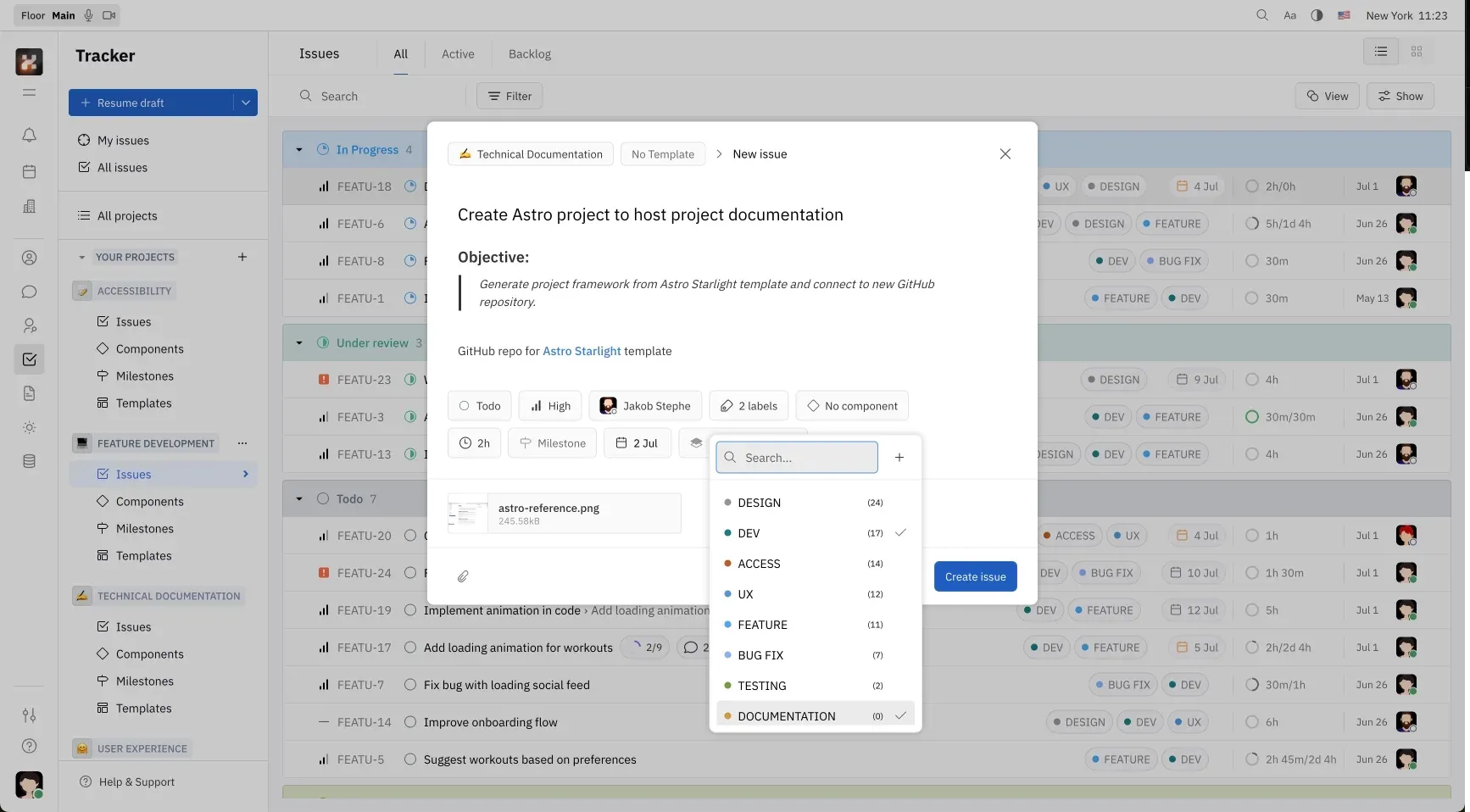
Tracker view from the Huly documentation: issues grouped by status, with the New issue dialog and its label picker open.
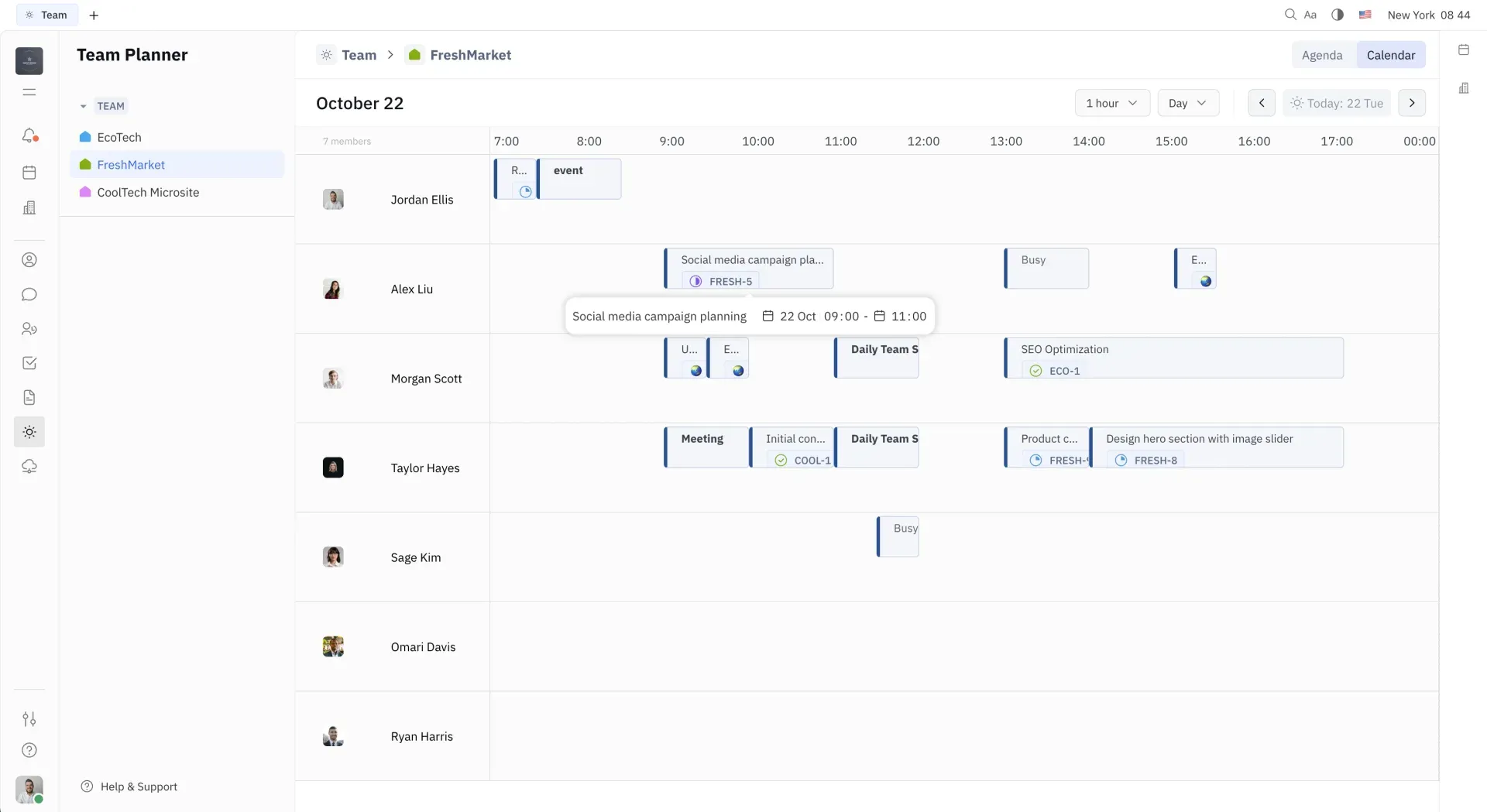
Team Planner in calendar mode from the Huly documentation, showing one project's scheduled action items per member in 1-hour slots.
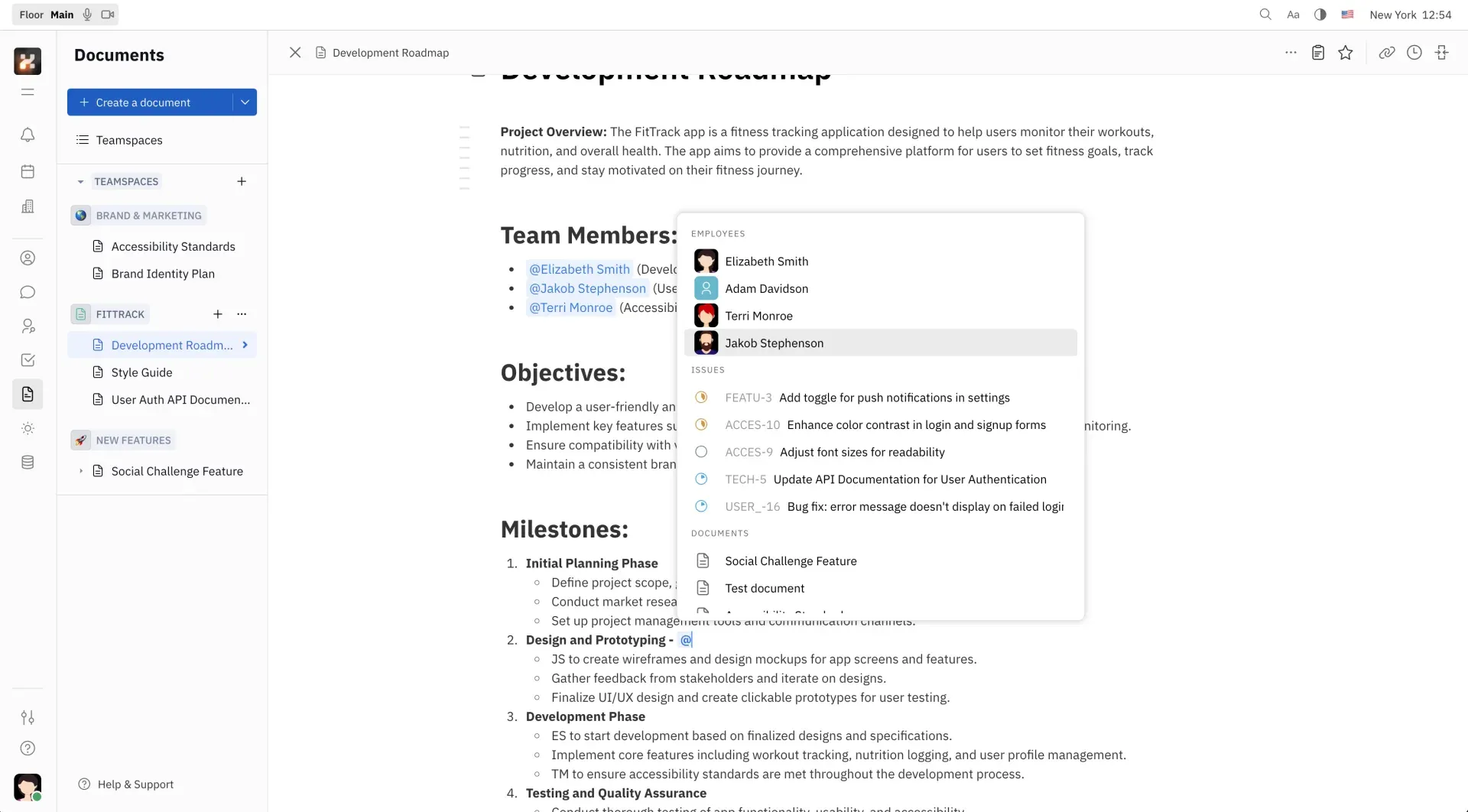
Documents module from the Huly documentation: a teamspace document with the mention menu for people, issues and other documents.
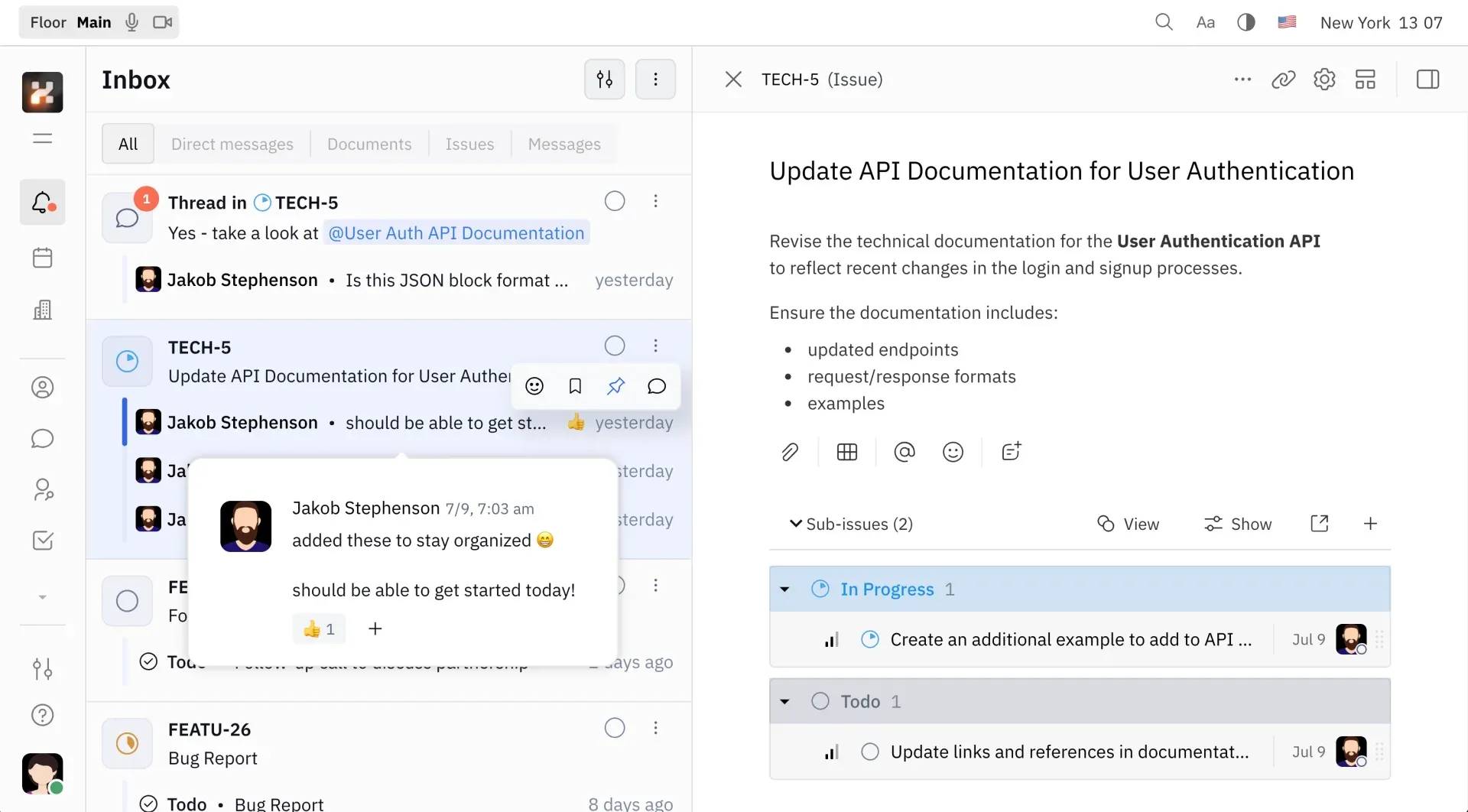
Inbox from the Huly documentation: notification filters on the left and an issue with sub-issues opened in the side panel.
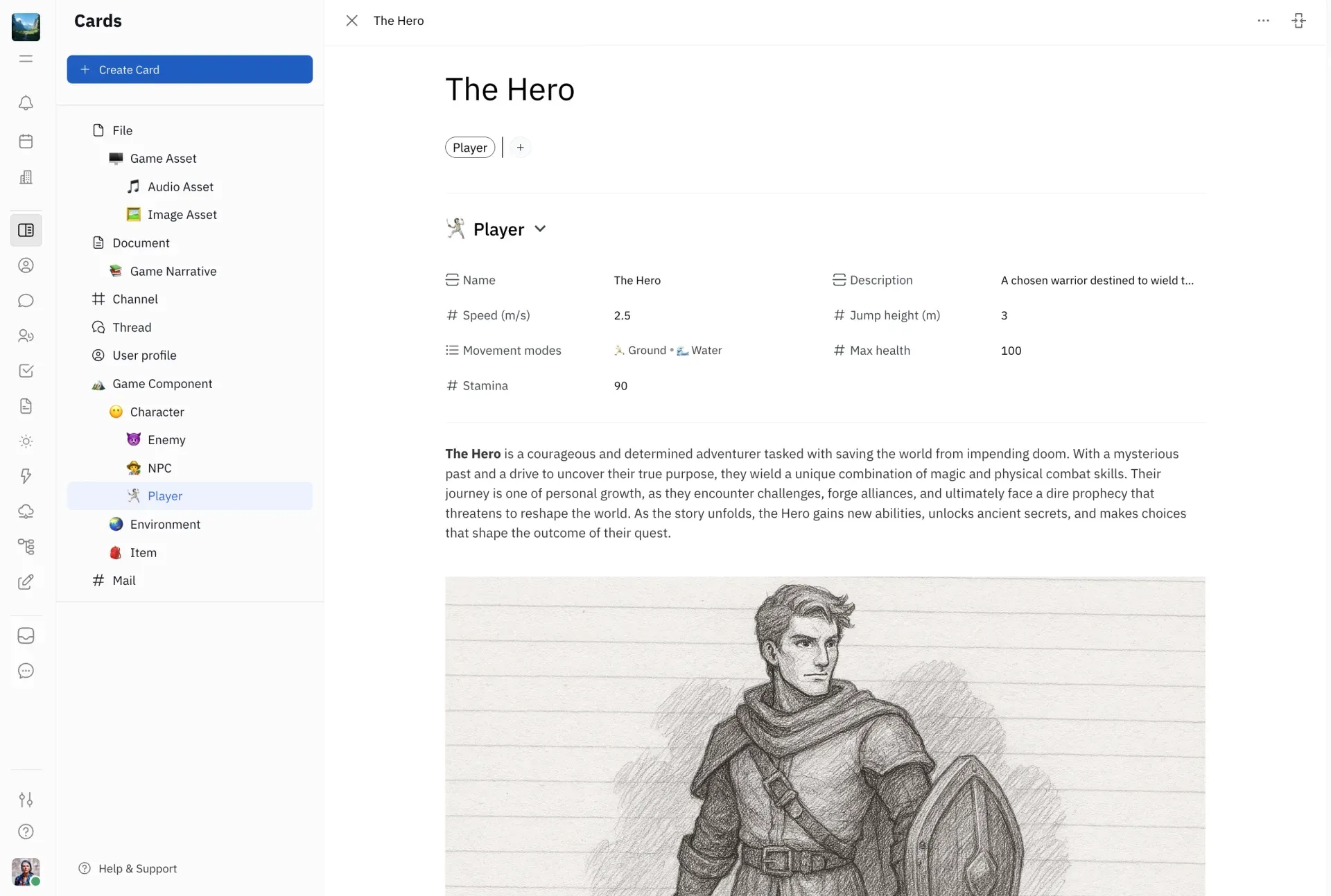
Cards module from the Huly documentation: a card type tree on the left and a typed card with custom attributes and content.
Source: official Huly project page.
Key capabilities
- Docker Compose self-hosting Clone huly-selfhost, run
./setup.shto generate the configuration and an nginx site file, then start the stack withdocker compose up -d. A--quickmode skips all prompts and serves Huly on localhost:8087 for local testing only. The README sets a minimum of 2 vCPUs and 8 GB RAM and warns that smaller servers may stop responding. The bundled CockroachDB and Redpanda configurations are flagged as possibly not production-ready. - Kubernetes and Helm The huly-selfhost repository includes a sample Kubernetes configuration and a Helm chart with templates for the account, front, collaborator, fulltext, Elasticsearch, CockroachDB, GitHub and AI services. The chart also contains backup CronJobs for CockroachDB, files and MongoDB. Treat it as a starting point and review storage classes and secrets for your cluster.
- Versioned upgrades with a migration log Each release has a section in MIGRATION.md; v0.7.426 needs no configuration changes, while v0.7.423 made
FRONT_URLmandatory for the print service. Upgrades changeHULY_VERSIONin the environment file, pull images and restart. Moving from 0.6.x to 0.7.x must follow the dedicated v0.7.204 procedure, since a direct upgrade locks the deployment into MongoDB-specific data. - Tracker for projects and issues Issues live in projects and can be split into sub-issues, grouped by components and milestones, labelled and created from templates. Priority runs from No priority to Urgent, and drafts are kept when you navigate away. Setting an issue to Todo with an assignee creates an action item in that person's planner. List, Kanban and timeline views are available, with filters and grouping.
- Personal and team planning Each member schedules action items as time blocks in a personal planner. The team planner shows agenda and calendar views per project, with 1-hour or 30-minute increments in the daily calendar. Visibility follows project membership, so members see only their own projects while the workspace owner sees all of them; there is no single view of every project at once.
- Chat, threads and inbox Direct messages, group channels, threads, reactions and inline comments sit alongside an inbox that filters notifications by direct messages, documents, issues and messages. An inbox item opens the related object in a side panel. Notification preferences, including email and Telegram, are set per user rather than per workspace.
- Virtual office with audio and video The office contains personal rooms where visitors must knock, voice-only team rooms and video meeting rooms, all with screen sharing. Calls run on LiveKit: a self-hosted instance needs the
loveservice plus a LiveKit Cloud account or another LiveKit host. Knock and invite prompts, typing indicators and presence require the optional HulyPulse service. - Collaborative documents and files Documents are organised in teamspaces and edited in real time through a Y.js CRDT collaborator, with version history, mentions of people, issues and other documents, tables, Mermaid diagrams and a drawing board. A drive module stores files with permissions. The rekoni service extracts text from PDF, DOC, DOCX, RTF and HTML files so they appear in full-text search.
- Controlled documents for quality work A separate module manages quality and technical documents with templates, ownership and authorship, versions, review and approval steps, and links to products. Release 0.7.423 added copying controlled document content and printing documents by class and ID. A sign service handles certificate-based document signing in the service list. Check the review workflow against your own quality system before relying on it for audits.
- Cards, types and processes Cards are typed records with custom attributes, tags, parent and child cards and relations, viewable as tables or a grid. The process module automates steps on cards with triggers, transformations and required fields. Recent releases added required attributes, reference versioning, bulk association creation and an
OnExecutionDonetrigger. This is the most actively changed area in the 0.7 release notes, so expect behaviour to differ between versions. - HR, recruiting and other business modules Additional modules cover employees and HR (including public holidays and office slots), recruiting with candidate tracking and resume parsing, leads, surveys, trainings, products, inventory and test management. Self-hosters can hide unused modules for every workspace with the
DISABLED_FEATURESvariable on the front service, documented in disableFeatures.md. - Two-way GitHub synchronisation The GitHub service syncs issues, pull requests, comments and reviews between Huly projects and one or more repositories. A self-hosted deployment needs its own registered GitHub App with read and write permissions for issues, pull requests, projects and contents, plus a webhook secret. The self-hosting README lists the required permissions and event subscriptions.
- Other integrations Optional containers add Google Calendar sync through your own Google Cloud OAuth credentials, Gmail mailboxes, outbound Telegram notifications through a bot you create, and email through SMTP or Amazon SES, but not both at once. Each one is a separate service with its own environment variables and nginx route.
- Optional AI assistant The aibot service adds chat with an AI bot, message translation and live translation for calls. It needs an OpenAI API key or a compatible base URL and a MongoDB container for conversation data. By default it uses
gpt-4o-minifor chat, translation and summaries, and the model can be changed through environment variables. - Sign-in and access control Accounts can sign in with a password, an OpenID Connect provider or GitHub OAuth. Public sign-up can be disabled so that new users join only through workspace invite links, and v0.7.426 requires email confirmation for invites. Guests and anonymous guests can be limited to selected spaces. Password aging can now be switched off.
- Backup, export and restore Workspace owners download backups from Settings, Backup as a single ZIP with a RESTORE.md file or through a script that reads the token from
HULY_BACKUP_TOKEN. Video, audio and files above the blob-size limit are excluded and must be downloaded individually. Restores run throughrestore-workspace.shorbackup-restore.shin huly-selfhost, or thebackup-restorecommand of the admin tool. - API client and import tool The typed API client package exposes Huly operations to scripts and integrations, with examples in the huly-examples repository. The import tool converts data into a human-readable Unified Import Format, and the docs list direct imports from Notion and ClickUp. The API is described as basic, so check that the objects you need are covered.
- Desktop client and browser access The main client is a web application; the repository also contains an Electron desktop package with Windows NSIS, macOS and Linux AppImage and deb build targets. Self-hosters keep
DESKTOP_CHANNELaligned with the server version for desktop updates. No desktop binaries are attached to the GitHub releases, and with the hosted service closed, desktop distribution should be verified before you plan around it. - Building from source The monorepo uses Rush, Node.js 20.11.0 and Docker, and pulls dependencies from GitHub Packages, which requires a personal access token with
read:packages.rush docker:buildandrush docker:upbuild and start the full stack, whiledocker:minvariants skip optional services. Since October 2026 the build also runs natively on Windows through Git Bash; a full local stack uses more than 35 GB of Docker disk under WSL.
Where Huly fits
Moving a former hosted workspace onto your own server
Open Settings, Backup in the old workspace, check the Last backup time, and download the archive or, for large workspaces, use the download script. Download items in the Not backed up list separately, because video, audio and oversized files are excluded. Install huly-selfhost at the same production version, start the stack and run restore-workspace.sh with the backup folder and an admin email. The backup and restore guide covers the options for existing workspaces and snapshot dates.
Running issue tracking with planning for a product team
Create projects with components and milestones, define issue templates and labels, then assign Todo issues so they reach each member's planner. Use the team planner to compare scheduled time per project. If the code lives on GitHub, register a GitHub App for your deployment and map repositories to projects so issues and pull requests stay in sync. Confirm how closed, reopened and transferred issues behave in your repository before switching a team over.
Replacing separate chat, docs and meeting tools
Combine channels, the inbox, teamspace documents and the virtual office in one workspace, which reduces the number of accounts and permission models to manage. Calls require LiveKit and the love service, and presence features need HulyPulse, so plan those services from the start. Check that notification settings work for each user, since email and Telegram preferences are personal. Compare messaging needs with Slack and document needs with your existing wiki before migrating history.
Managing controlled documents and quality records
Use the controlled documents module for procedures, technical documentation and product-linked records that need versions, ownership and formal review. Set up templates and approvers, then walk one document through draft, review, approval and a revision. Export or print the approved result and confirm that the history you need for audits is retained. Treat the platform as a document workflow, not a certified quality management system, unless your own validation says otherwise.
Operating and upgrading a self-hosted instance
Size the host for at least 8 GB RAM, place CockroachDB, Elasticsearch, MinIO and Redpanda volumes on known paths, and add SMTP so password recovery and email notifications work. Before each upgrade, read the matching section in MIGRATION.md, take a backup, then change HULY_VERSION and pull new images. Pin production to v* tags and keep DESKTOP_CHANNEL aligned if people use the desktop client. With the original repository frozen, decide whether to stay on v0.7.426 or track releases from the Platform-Collective fork.
Extending Huly with scripts and imports
Use the typed API client to create or update issues, documents and other objects from your own services, starting from the huly-examples repository. For migrations, convert existing data into the Unified Import Format or use the Notion and ClickUp importers described in the API and tools page. Run imports against a test workspace first and compare counts, attachments and links before importing into production.
Install
git clone https://github.com/hcengineering/huly-selfhost.git && cd huly-selfhost && ./setup.shReviews of Huly
Be the first to share your experience with Huly.
Write a review
Loading review form…
Alternatives to Huly
 PlanePlane is a project management tool for tracking work items, running cycles, grouping work into modules and writing pages. The Community Edition is AGPL-3.0 and self-hosted with Docker or Kubernetes; Plane Cloud and the Commercial Edition add paid plans.
 LinearLinear is a product development tool for planning and building software, with issue intake, projects, cycles and workflows shared by humans and agents.
 AtlassianAtlassian, founded in 2002 by Mike Cannon-Brookes and Scott Farquhar, makes Jira for work tracking and Confluence for knowledge, plus the Forge platform.