

What is Plane?
Plane is a project management application for tracking work items, running time-boxed cycles and organizing larger efforts into modules, with project pages for documentation and analytics across projects. Its README describes it as a tool to track issues, run cycles and manage product roadmaps. The code is developed in the makeplane/plane repository, created in November 2022, and the about page lists its open source debut in 2023.
Plane is available in three forms. Plane Cloud at app.plane.so is the hosted service with a free plan. The Community Edition is the AGPL-3.0 code in the GitHub repository, installed with a setup.sh script that pulls Docker images and a plane.env configuration file. The Commercial Edition is installed with curl -fsSL https://prime.plane.so/install/ | sh -, starts on the Free plan with 12 seats per workspace without a license key, and unlocks Pro, Business or Enterprise Grid features with a license key, according to the Docker Compose guide. The documented minimum for the Commercial Edition is 2 CPU cores on x64 or ARM64 and 4 GB of RAM, with 8 GB recommended for production, on Ubuntu, Debian, CentOS, Amazon Linux 2 or 2023, macOS or Windows with WSL2.
The stack listed in the README is a Django backend with a React Router and Node.js frontend. Self-hosting methods in the developer documentation are Docker Compose, Docker AIO, Kubernetes with Helm, Docker Swarm, Podman Quadlets, Coolify, Portainer and airgapped Docker or Kubernetes. Instance administrators configure instance-wide settings in an admin area the project calls God mode. Official mobile apps exist for iOS 14 or later and Android 10 or later, and a desktop app for macOS and Linux; the mobile apps work with Plane Cloud and the self-hosted Commercial Edition, not the Community Edition, and push notifications are limited to Plane Cloud.
The latest Community Edition release is v1.4.3, published on October 28, 2026. Two pre-releases followed: v1.5.0-rc1 on November 10 and v1.5.0-rc2 on November 12, 2026, whose notes list further access checks such as restricting project entity search to active project members and checking page access on every live collaboration connection. The v1.4.3 notes describe a set of access control fixes and state that self-hosted instances should upgrade, including required project membership to publish a project, binding of comments, reactions and votes on published boards to their own project, rate limiting of email and password sign-in, and no longer returning webhook signing secrets on list and retrieve. Bundled object storage moved from the MinIO image to pgsty/silo, and dependencies and Docker base images were updated.
The Community Edition is licensed under GNU AGPL v3.0. Plan features such as work item types, dashboards, initiatives, teamspaces, templates and time tracking are part of the paid plans described on the pricing page. Comparable tools in this directory include Atlassian, Huly and ClickUp.
Key capabilities
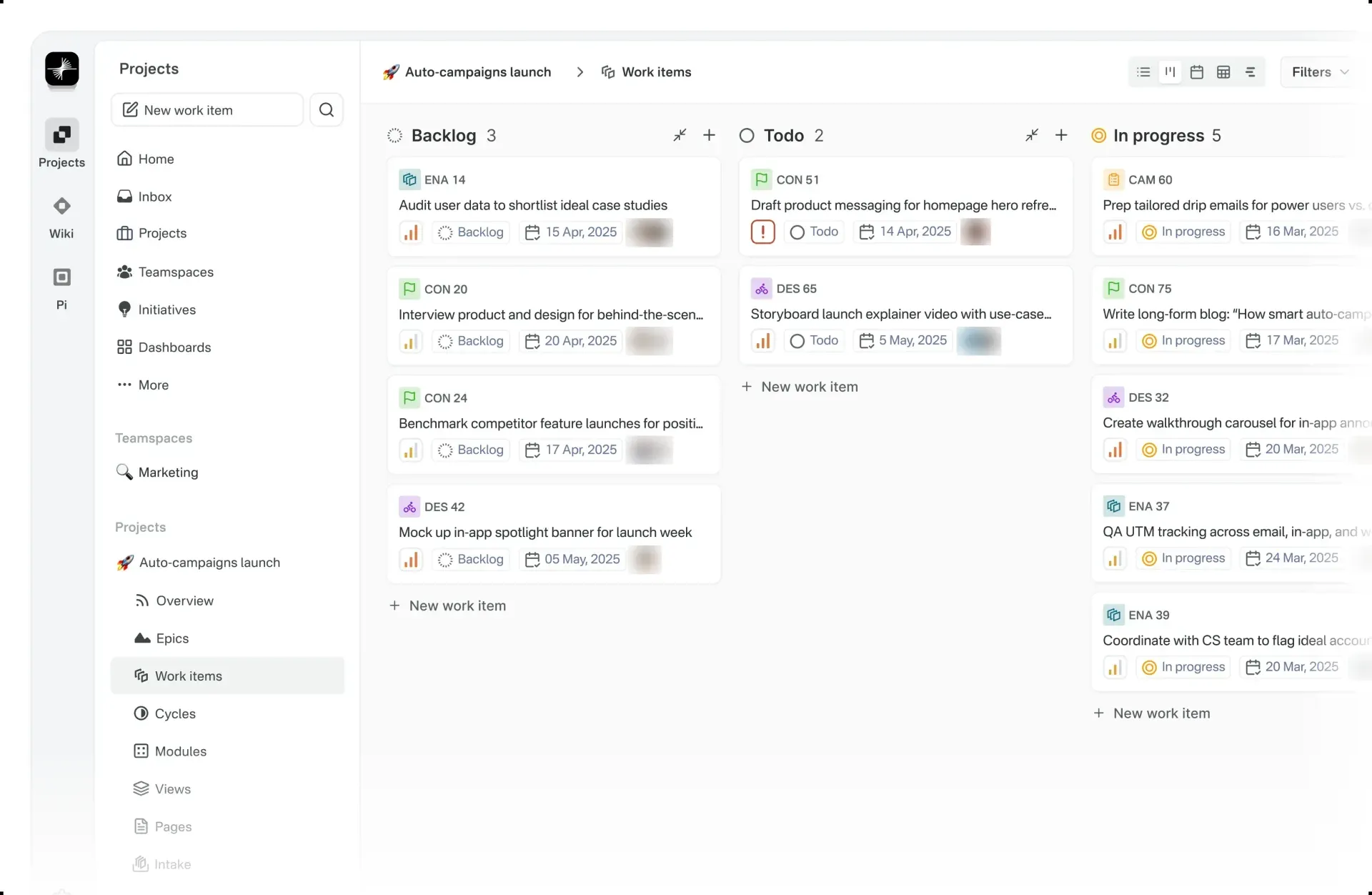
- Work items Tasks are called work items and have a rich text description with file uploads, state, priority, assignees, labels, start and due dates, sub-work-items and references to related items. Each item has an identifier made from the project prefix and a number, such as MOB-71. States are configured per project and grouped into backlog, unstarted, started, completed and cancelled.
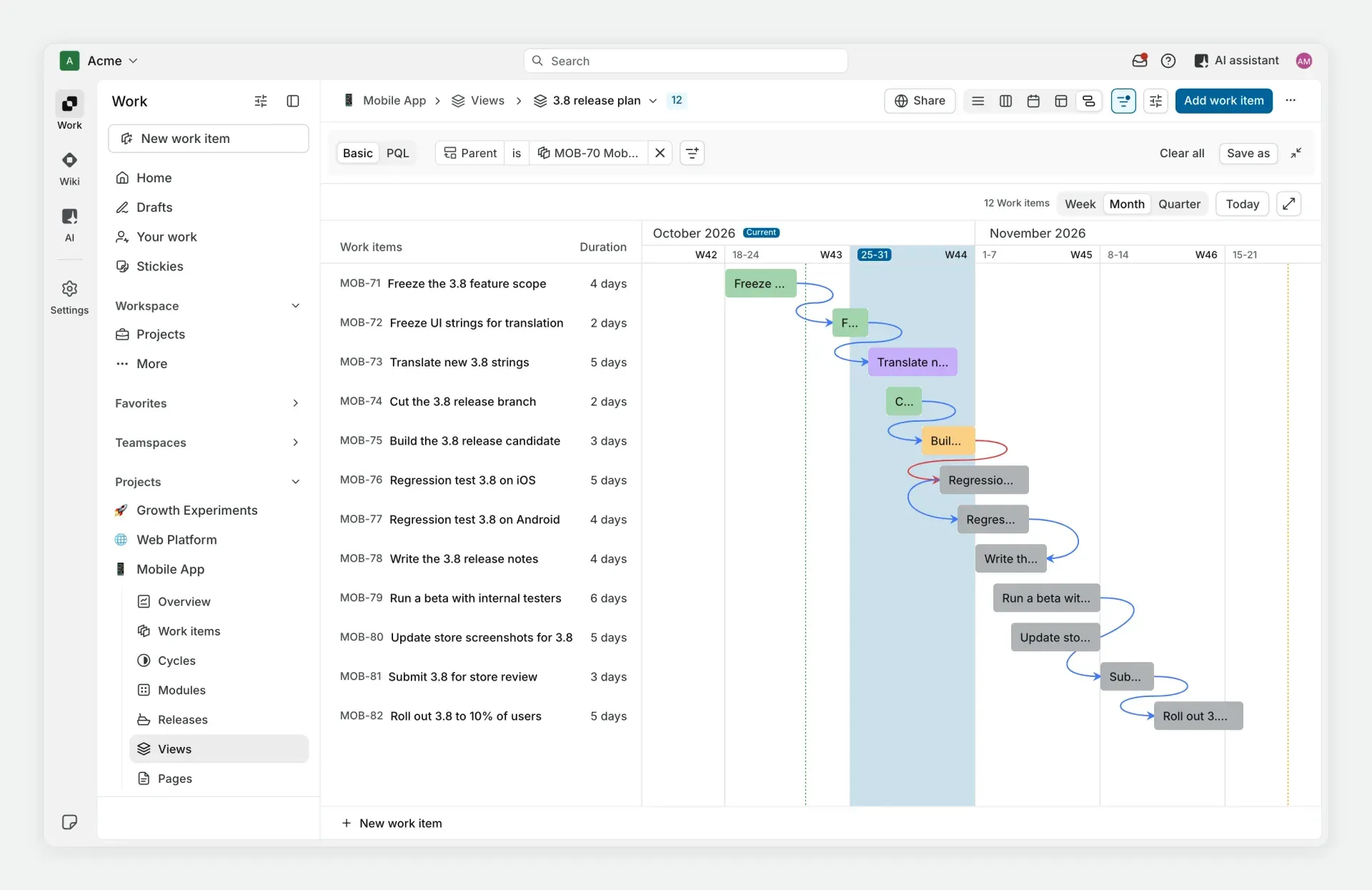
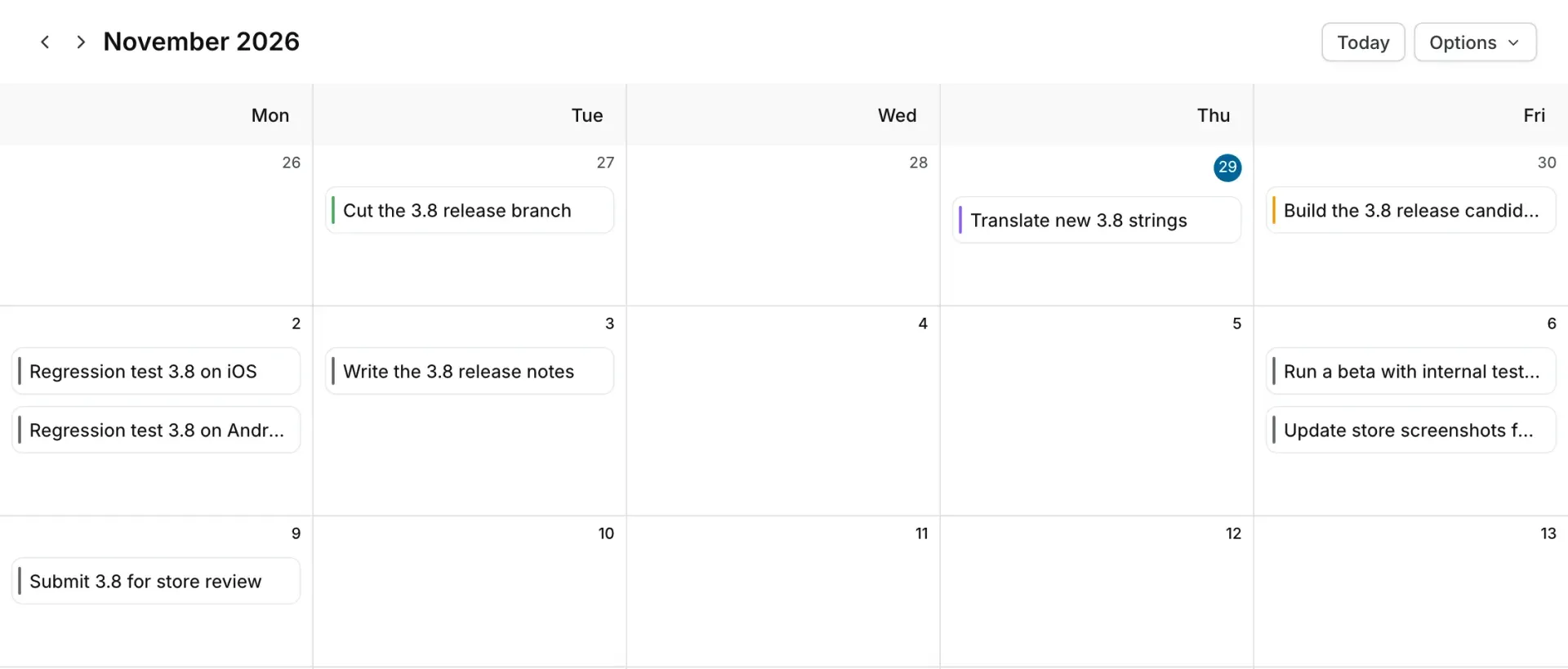
- Five layouts The layouts documentation describes List, Board, Calendar, Table and Timeline layouts. The Timeline layout works like a Gantt chart, and the Table layout supports detailed data and bulk edits.
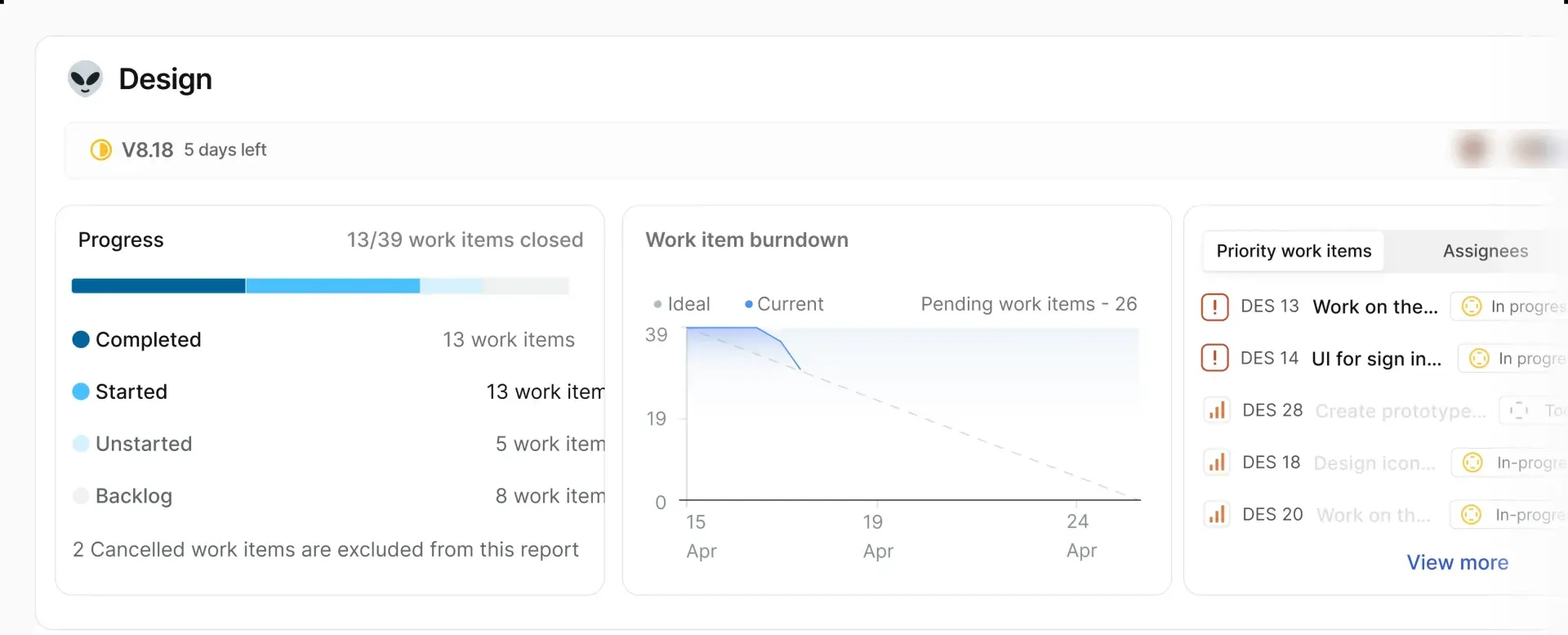
- Cycles Cycles are Plane's time-boxed iterations, comparable to sprints. A cycle page shows progress by state, a work item burndown against an ideal line and lists of priority work items and assignees.
- Modules Modules group work items into smaller parts of a larger project, each with a status such as planned, in progress or paused, start and end dates, a lead, members and a progress chart.
- Views and filters Saved views store filters on state, priority, assignee and other properties so a list of work items can be reopened and shared. Views can be personal or project-level.
- Timeline dependencies On the timeline, work items can be linked with dependencies so that one item follows another, as shown in the timeline dependency documentation. The timeline switches between week, month and quarter scales. The pricing page lists timeline dependencies from the Pro plan upward.
- Intake Intake lets guests submit work items that admins and members review. Items can be accepted into a project state, declined, snoozed until a date or marked as a duplicate of an existing work item. Intake is off by default and is enabled per project; email and form sources are listed in the Business plan.
- Pages Project pages are rich text documents with formatting, images and links, and text in a page can be turned into work items. Pro adds a workspace wiki, and Business adds nested pages and embeds.
- Estimates Projects can define an estimate system and attach estimates to work items. Estimates are included in the Free plan.
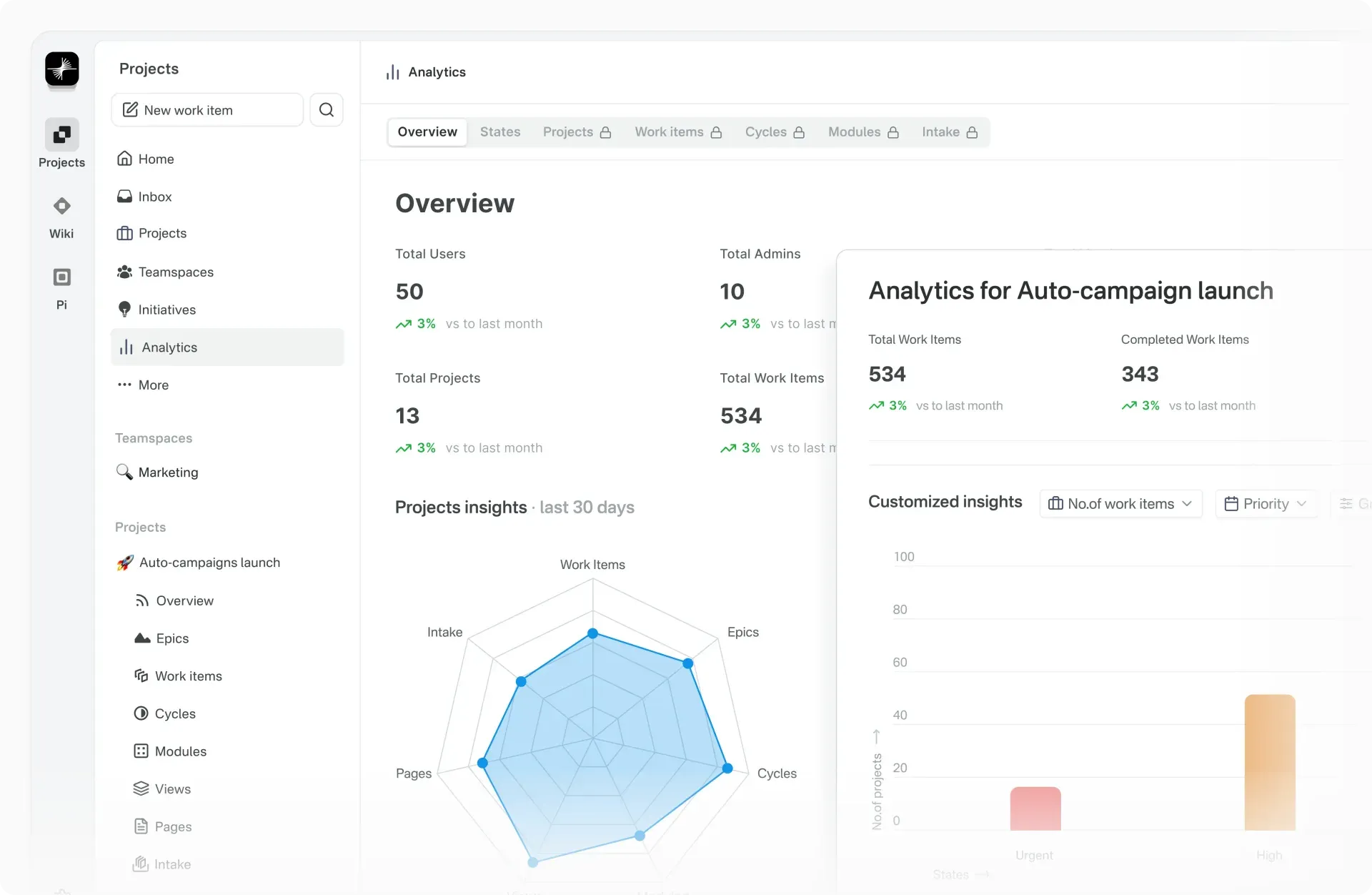
- Analytics The analytics area shows totals for users, admins, projects and work items and per-project insights for work items, cycles, modules, pages, intake and epics, as described in the analytics documentation.
- Dashboards, initiatives and teamspaces On paid plans, dashboards combine widgets such as counts and charts by project, state, priority and assignee; initiatives and teamspaces appear in the navigation for organizing work above the project level. These features are listed from the Pro plan upward.
- REST API and webhooks The API reference uses
https://api.plane.so/on Plane Cloud and anX-API-Keyheader, with OAuth tokens as an alternative. The limit is 60 requests per minute per API key, reported inX-RateLimit-RemainingandX-RateLimit-Resetheaders. Webhooks deliver events to external endpoints. - AI features and MCP server Plane AI is a paid feature with credits per seat on Plane Cloud: 500 per seat on Pro and 1,000 on Business. The documentation also describes agents, AI skills and a Plane MCP server for connecting AI clients.
- Importers and integrations The pricing page lists importers for Jira, Linear, Asana, ClickUp and CSV on every plan, and Confluence and Notion importers from Business upward. Integrations with GitHub, GitHub Enterprise, GitLab, GitLab Enterprise, Slack, Sentry and Draw.io are listed from Pro upward, along with an integrations marketplace.
- Work item types, custom properties and templates Pro adds work item types, project-level custom properties and work item and page templates; Enterprise Grid moves custom properties to the workspace level with roll-ups. Business adds project templates and recurring work items that are created on a schedule.
- Time tracking and worklogs From Pro upward, time can be logged per work item, with aggregated reports and filters. Business and Enterprise Grid add approvals for worklogs, according to the pricing comparison.
- Workflows, automations and approvals Business includes a single workflow per project that controls how work items move between states, plus trigger-and-action automations. Enterprise Grid runs multiple workflows by work item type, with designated approvers for each transition.
- Releases and customers On Business and Enterprise Grid, releases group work items into named, versioned releases with a target date, lead, status and changelog. Customer profiles link customer requests to work items on the same plans.
- Self-hosting with Docker Compose The Community Edition is installed by downloading
setup.shfrom the latest GitHub release, running it to install, editingplane.envand running it again to start the services. Defaults are HTTP on port 80 and HTTPS on port 443, withWEB_URLset tohttp://localhostuntil changed. - Kubernetes and other deployment methods A Helm-based Kubernetes deployment is documented for production, along with Docker AIO, Docker Swarm, Podman Quadlets, Coolify, Portainer and airgapped installs. Release assets include
docker-compose.yml,setup.sh,swarm.sh,restore.shandrestore-airgapped.sh. - Mobile and desktop apps IOS and Android apps and a macOS and Linux desktop app are offered on the download page. They connect to Plane Cloud or to the self-hosted Commercial Edition; the desktop app requires Commercial v3.0.0 or later.
- Plans Free covers up to 12 users with projects, work items, cycles, modules, layouts, views, in-app intake, basic estimates and project pages. Pro costs 8 USD per seat per month, or 6 USD billed annually; Business costs 15 USD per seat per month, or 13 USD billed annually; both start with a two-week free trial and allow 5 guests per paid member. Enterprise Grid is priced on request and adds granular access control, multiple workflows and approvals, LDAP, group sync, work item security, audit logs through the API and private or managed deployments. On the Cloud tab of the pricing page, SAML and OIDC are listed from Business upward; on the Self-hosted tab, from Pro upward.
Where Plane fits
Running sprints with cycles
A team creates a cycle with start and end dates, adds work items from the backlog and tracks progress by state during the cycle. The cycle page shows how many items are completed, started, unstarted or in backlog, a burndown chart against an ideal line and the remaining priority work items.
Planning releases on a timeline
Work items with start and due dates appear in the Timeline layout as bars. Dependencies between items show the order of steps such as freezing scope, translating strings, building a release candidate and running regression tests, and the same items appear in the Calendar layout by due date.
Breaking large projects into modules
Larger efforts such as a feature area or a bug backlog for self-hosted installs are split into modules. Each module has its own status, dates, lead, members and progress chart, so several modules can run in parallel inside one project.
Collecting requests through Intake
Guests or external stakeholders submit work items into a project's Intake instead of directly into the backlog. Admins and members review each submission and accept it into a state, decline it, snooze it or mark it as a duplicate of an existing item.
Documenting work in pages
Specifications, meeting notes and plans are written as project pages next to the work items. Text in a page can be converted into work items, and paid plans add a workspace wiki and nested pages.
Building project reporting
Managers open the Analytics area for totals of users, projects and work items and for per-project insights on work items, cycles, modules, pages and intake. On paid plans, dashboards add configurable widgets such as open, completed and blocked counts, work items by project and state, by priority and by assignee, and completed items per week.
Tracking time and approvals on paid plans
On Pro and above, members log time against work items and aggregated worklog reports can be filtered as needed. On Business, worklogs can go through approvals, and a project workflow defines which state transitions are allowed; Enterprise Grid adds separate workflows per work item type with named approvers for each transition.
Operating Plane on own infrastructure
Teams that keep project data on their own servers install the Community Edition with Docker Compose or Kubernetes, or the Commercial Edition with the prime.plane.so installer and an optional license key. Upgrades are published as GitHub releases, and backup and restore scripts, including an airgapped variant, ship with each release. Since v1.4.3 the bundled object storage uses the pgsty/silo image instead of MinIO.
Install
curl -fsSL https://prime.plane.so/install/ | sh -Reviews of Plane
Be the first to share your experience with Plane.
Write a review
Loading review form…
Found Plane useful? Upvote it todayYour vote helps other IT teams find it in the daily ranking.


