

What is Kaneo?
Kaneo is an open-source project management application for teams that want boards, schedules and repository-linked tasks without a large configuration surface. It is developed in the public usekaneo/kaneo repository under the MIT license and maintained by Andrej Acevski with outside contributors. Teams can run it themselves or use Kaneo Cloud, the hosted service operated by the same maintainer. The web application is the main client, with an official command-line client, an MCP server for AI assistants and a mobile app for iPhone and iPad.
Self-hosting is documented through several routes in the installation guide: Docker Compose with the ghcr.io/usekaneo/kaneo image, the drim CLI that generates a Compose stack with a Caddy reverse proxy, Coolify, Railway and a Helm chart for Kubernetes 1.23 or later. Kaneo runs as a single container holding the web app and the API, plus PostgreSQL. S3-compatible object storage is needed only for attachments, SMTP for email delivery, and Redis only when several API instances must share live updates. The documentation suggests at least 2 GB of memory and 10 GB of free disk as a starting point for a small installation.
The latest GitHub release is v2.49.0, published November 2, 2026. It adds an audit log for administrative actions, pull request links created through the API, expandable subtasks in the project list and inline description editing with autosave in the mobile app, and fixes workspace ownership protection along with vulnerable dependencies. Version 2.48.0 added tasks that repeat after completion, back-channel logout and provider-managed profile fields for custom OIDC, and hidden options for retired custom-field values. Version 2.47.0 introduced the Expo mobile app, a configurable database pool size and German and Chinese translation updates. Releases ship frequently, and the release notes are the reference before any upgrade, because the API runs database migrations when it starts.
The codebase is a TypeScript monorepo. The API uses Hono, Drizzle ORM, the pg driver and Better Auth; the web client uses React 19, TanStack Router and Vite. Separate packages provide the CLI, the stdio MCP server, the importers and a shared rich-text editor schema used by web and mobile. A running instance publishes its own OpenAPI schema at /api/openapi, and the hosted API reference is generated from the same specification.
Kaneo deliberately stays a task and project tool. Its documentation describes no wiki or document editor, no team chat, no invoicing and no portfolio budgeting. Each task has a single assignee, so imports from tools that allow several assignees keep only the first. Time tracking exists at task level, but no timesheet approval or billing workflow is documented. Teams that need those functions pair Kaneo with other software rather than expecting them inside it.
Kaneo screenshots
Explore the interface. Open a screenshot to view it at full size.
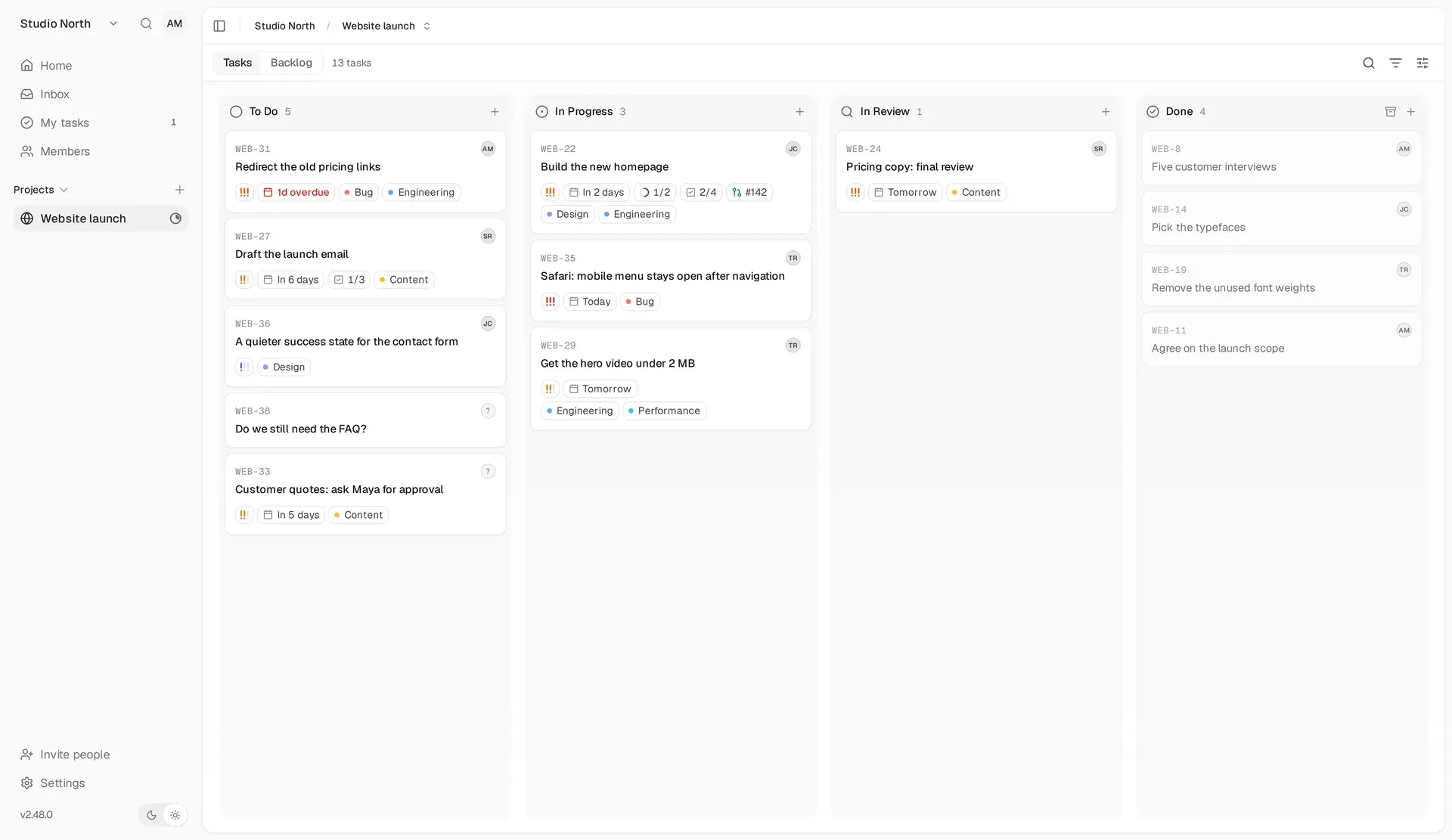
Official press-kit screenshot of the board view in light mode, with task numbers, priorities, due dates, labels and a linked pull request on a card.
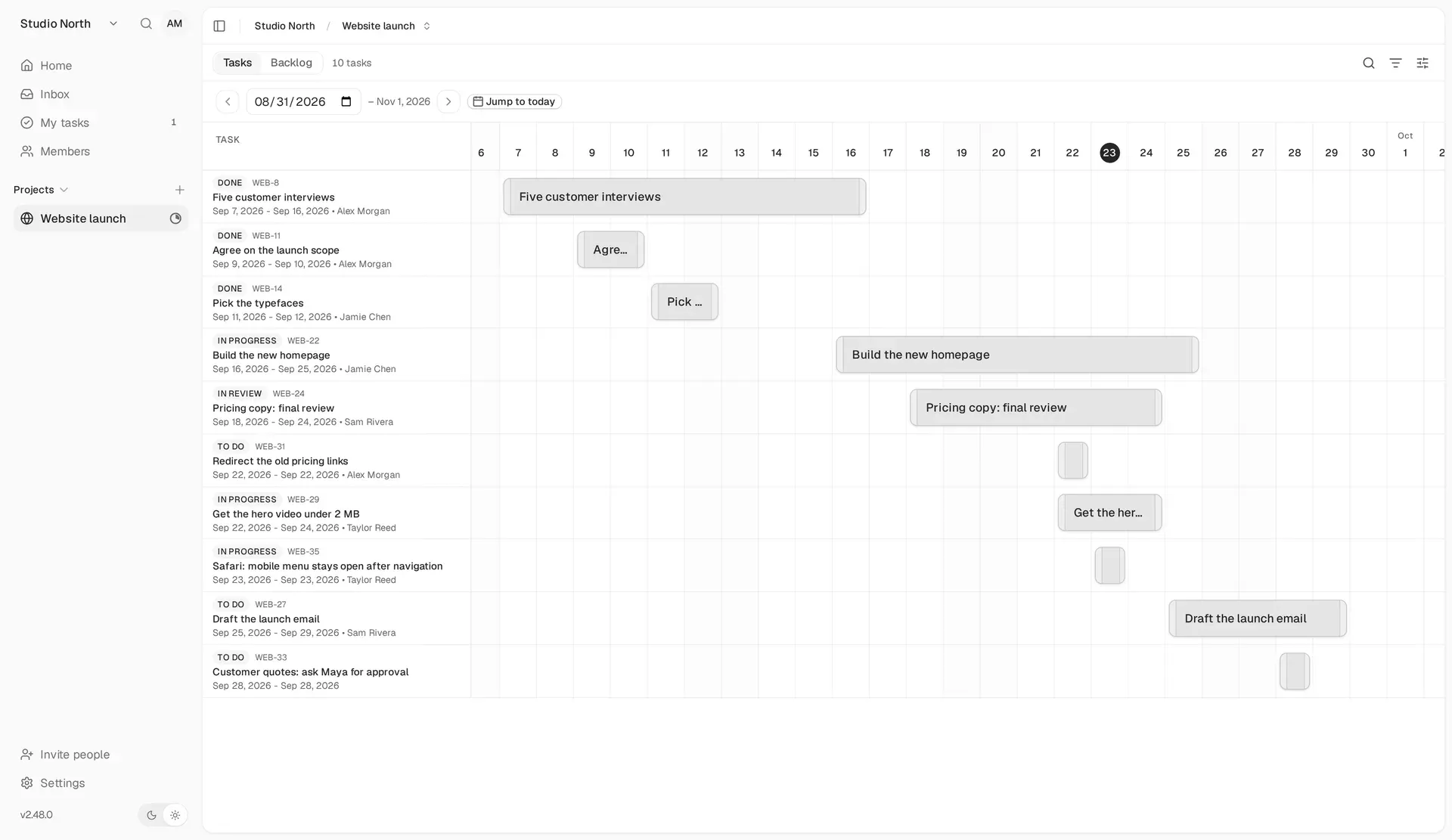
Gantt layout from the official documentation: tasks with start and due dates placed on a shared September 2026 timeline.
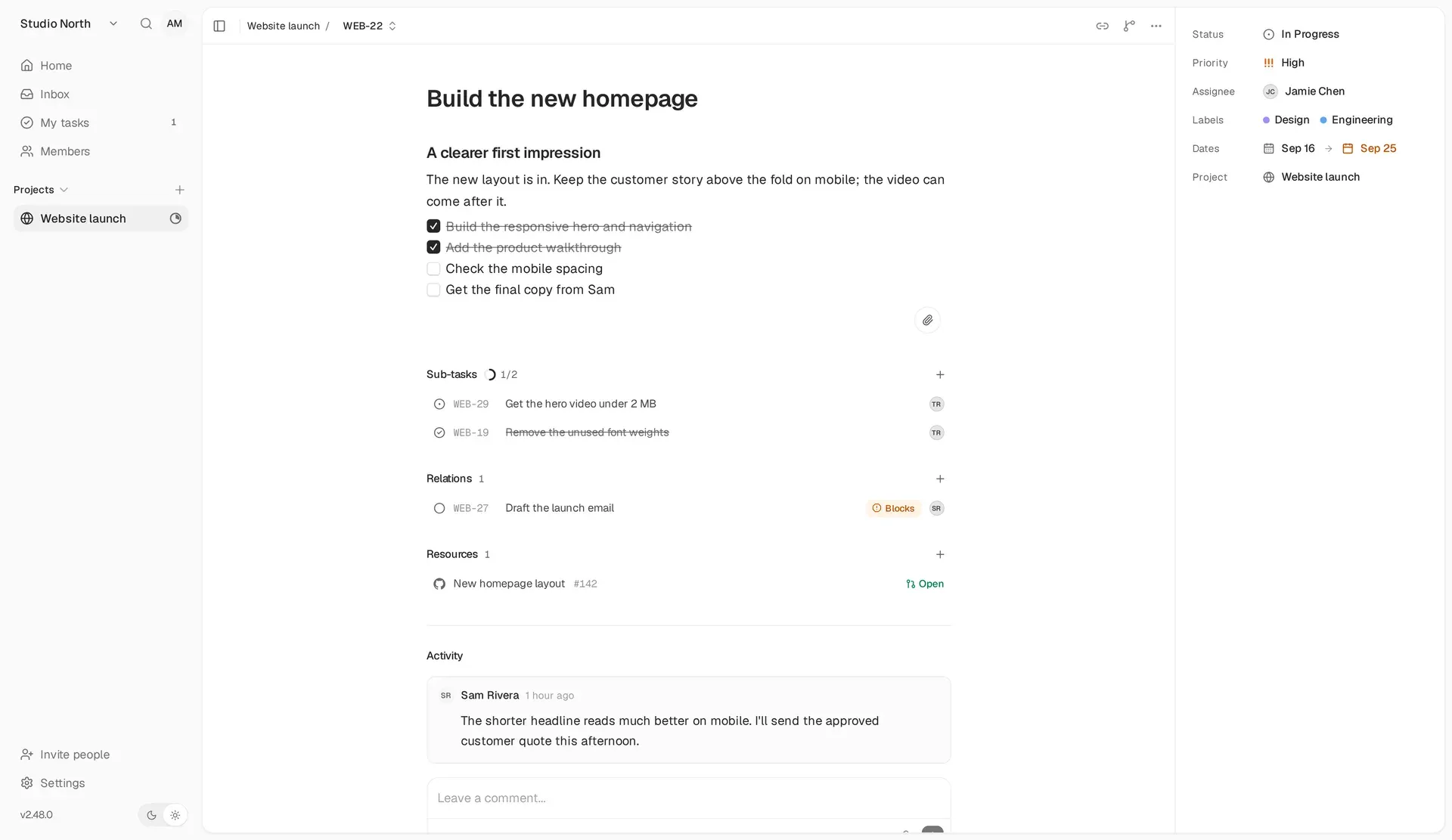
Task details from the documentation: description checklist, subtasks, a Blocks relation, a linked GitHub pull request and properties for status, priority, assignee, labels and dates.
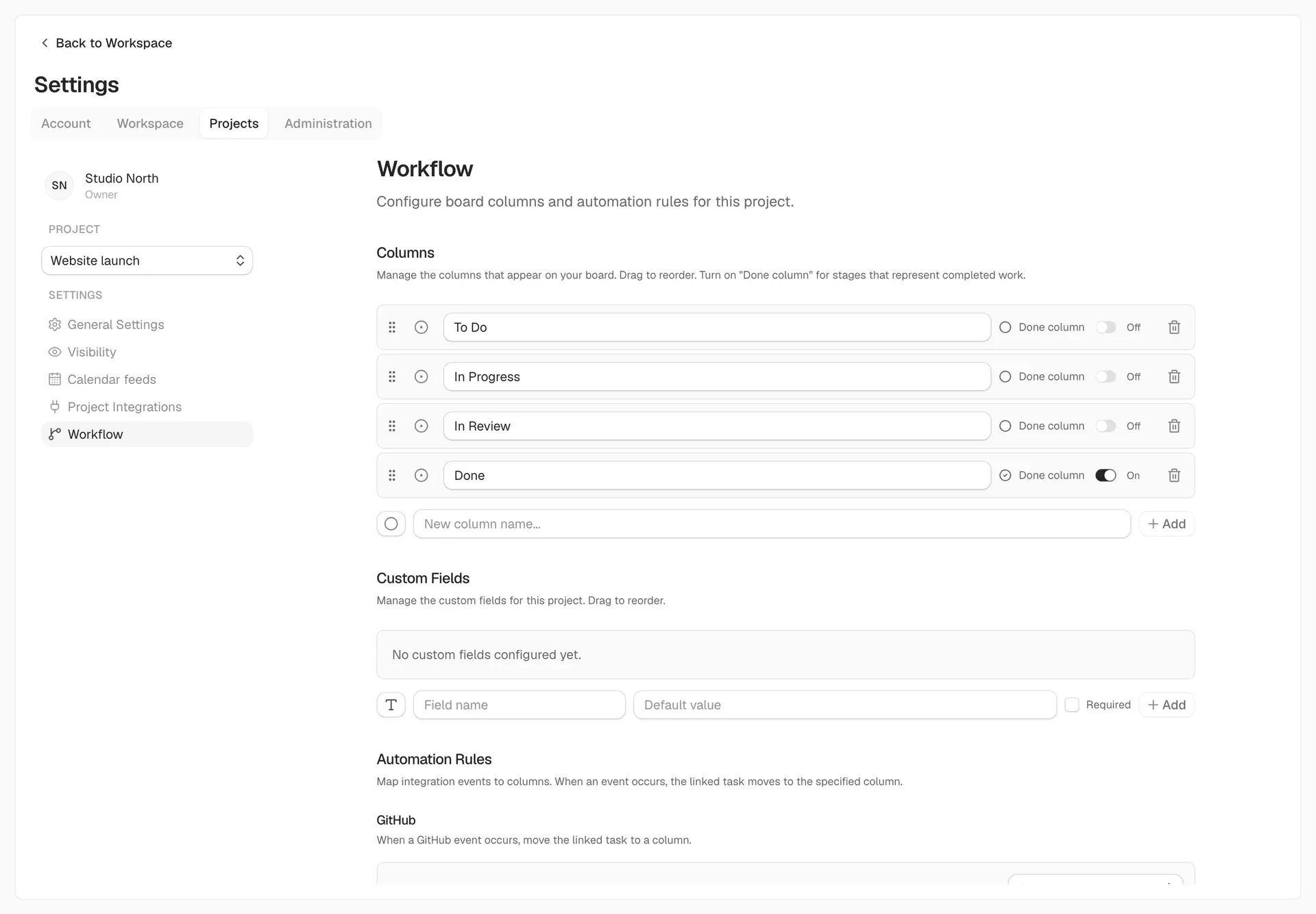
Project workflow settings from the documentation: editable columns with a Done flag, custom fields and the start of the GitHub automation rules.
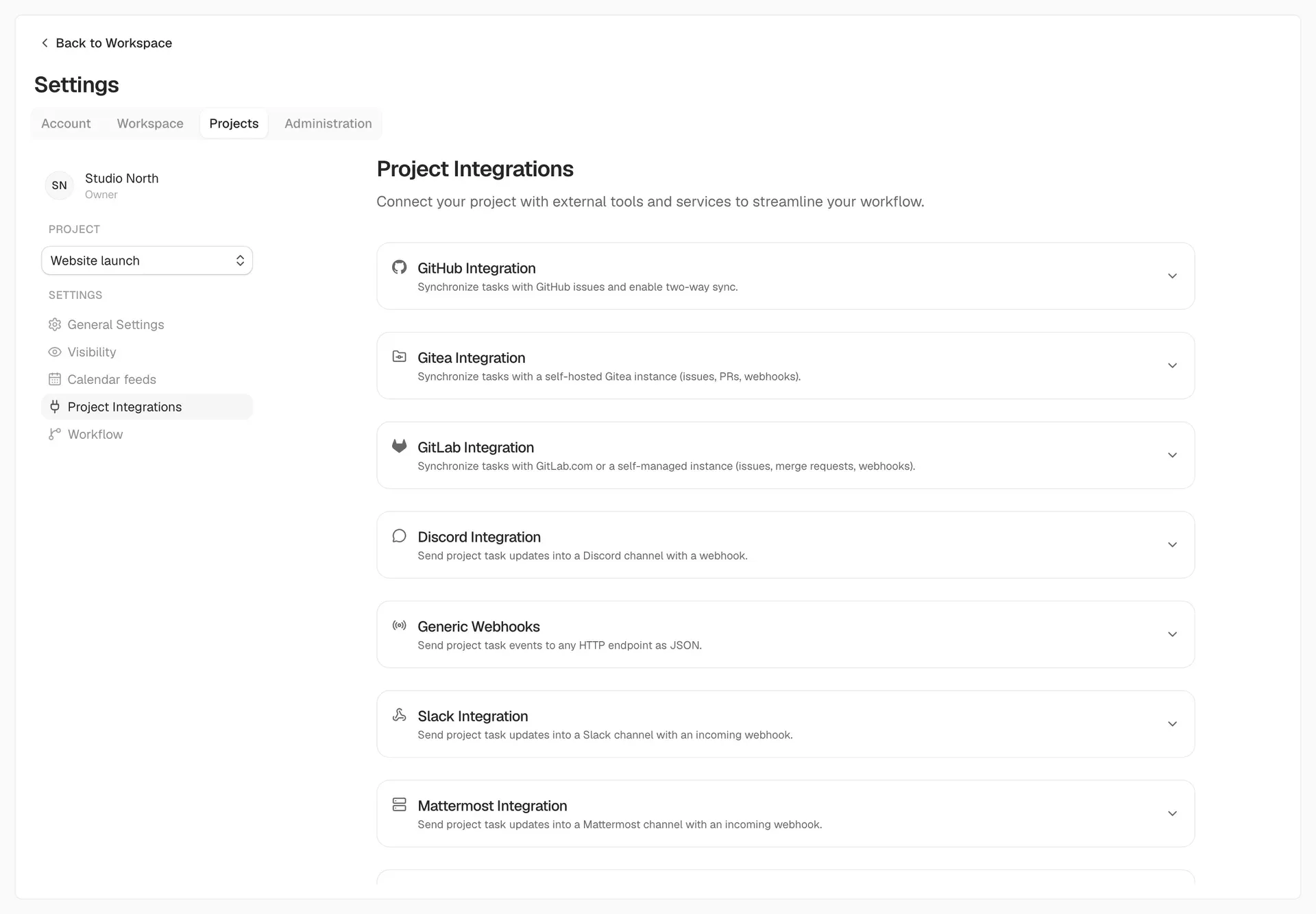
Project integration settings from the documentation, with repository sync for GitHub, Gitea and GitLab and notification channels.
Source: official Kaneo project page.
Key capabilities
- Board, List, Calendar and Gantt views Each project shows the same tasks in four layouts chosen under Display. The board supports drag and drop between columns, the list compares properties, and Calendar and Gantt place tasks that have a start or due date. Backlog tasks with dates appear in the schedule views, archived tasks do not, and a due date never closes a task by itself.
- Backlog and planning Unscheduled ideas live in a separate backlog with Plan and Move All actions, sorting and filters. Collapse state for list and backlog groups is kept per project. The backlog keeps future work out of the active board until someone moves it in deliberately.
- Task details, subtasks and relations A task holds a rich-text description with checklists, inline images and attachments, plus assignee, priority, start and due dates, labels and comments. Subtasks are full tasks with their own status and owner, and relations such as blocking dependencies link tasks to each other. There is one assignee per task.
- Recurring tasks Since version 2.48.0, the due date picker offers daily, weekly, monthly, yearly or periodic repetition. When a repeating task reaches a done column, Kaneo creates the next occurrence in the first open column with the same title, description, assignee, priority, labels and custom fields. Subtasks are not copied, and the CLI can set or stop a rule with
kaneo task repeat. - Custom columns and custom fields Each project defines its own columns and marks which ones count as done. Custom fields can be text, number, date, dropdown or checkbox, with defaults and a required flag. A field type cannot change after creation, and options still used by tasks can be hidden but not removed, as described in the workflow guide.
- Repository sync with GitHub, Gitea and GitLab A project can connect a GitHub repository, a Gitea server or GitLab.com and self-managed GitLab. Issues, comments and pull or merge requests link to tasks, and label-based sync scopes decide which tasks and issues cross in each direction. When a linked task stops matching, sync pauses until someone reviews and resumes it.
- Automation rules from repository events Repository events such as a branch push or a merged pull request can move the linked task to a chosen column. Rules are configured per connected repository and per event. Branch names must match the integration's pattern for a task to be recognized.
- Team notifications and webhooks Project events can go to Slack, Discord and Mattermost through incoming webhooks, to Telegram through a bot, or to any HTTP endpoint as JSON through generic project webhooks. Private network destinations are blocked unless the operator sets
KANEO_ALLOW_PRIVATE_WEBHOOK_DESTINATIONS=true. - Personal notifications Each user receives in-app notifications and can add email, ntfy, Gotify or a personal webhook for assignments, mentions and due-date reminders. Preferences choose which workspaces and projects may send them. Email on a self-hosted instance requires SMTP configuration.
- Workspaces, roles and project-level access Workspaces have Viewer, Member, Admin and Owner roles whose permissions administrators can edit. A member can be limited to selected projects, which also restricts their search results, notifications, API keys and MCP clients. Invitations work by link even without email delivery.
- Instance administration and audit log The first account on a new instance becomes the instance administrator. Administration pages cover user management, sessions and API keys per user, custom instance roles with permissions such as
users:sessions, workspace ownership transfer and a system health overview. Version 2.49.0 records administrative actions in an audit log. - Sign-in options and single sign-on Accounts can use email and password, emailed sign-in codes, GitHub, Google, Discord or a custom OAuth 2.0 or OIDC provider such as Keycloak, Auth0, Okta or Pocket ID. Operators can disable password registration or the login form and auto-redirect to the provider. Back-channel logout and provider-managed name, picture and locale fields need a discovery URL.
- REST API and API keys The REST API covers projects, tasks, columns, labels, comments, time entries, notifications, workflow rules and search. API keys are created under account settings and limited to 100 requests per 60 seconds by default, with standard rate-limit headers. The authentication guide also documents device authorization for interactive clients.
- Kaneo CLI The
kaneobinary runs on macOS, Linux and Windows and works with Kaneo Cloud and self-hosted instances. It installs through a checksum-verifying script, Homebrew (brew install usekaneo/tap/kaneo) or npm (npm install -g @kaneo/cli, Node.js 20 or newer). Output is styled in a terminal and plain JSON in scripts, and the CLI documentation lists every command. - MCP server for AI assistants Every instance exposes a Streamable HTTP MCP endpoint at
/api/mcpwith OAuth 2.1 and PKCE, so an assistant acts as the approving user. A separate@kaneo/mcpstdio package for Node.js 24 or newer registers itself with Cursor, Claude Desktop or a custom config. Both expose tools for workspaces, projects, tasks, custom fields, comments and labels. - Importers for Linear, Jira, Trello, Plane and PLANKA Workspace admins can import up to 50 projects at a time from Linear, Jira Cloud or Data Center, Trello, Plane, PLANKA or another Kaneo instance. Project keys and task numbers are kept where possible, and assignees are matched by email. The source token is used once and not stored, and each run creates new projects rather than merging.
- Install on a server Docker Compose needs Docker with Compose V2, a PostgreSQL 16 container and two generated secrets in a
.envfile; the guide pins an image tag and exposes port 5173 on loopback. drim installs Docker where missing, writes the Compose, Caddyfile and environment files and requests HTTPS certificates. Kubernetes users install the Helm chart from the repository'scharts/kaneofolder. - Kaneo Cloud The hosted service at
cloud.kaneo.appoffers a Personal plan at $40 per year and a Team plan at $50 per user per year, both with unlimited projects and tasks, automatic backups and updates, and a 14-day trial without a credit card. Managed dedicated instances in the EU, with their own domain, single sign-on and daily backups, start at $299 per month. Current terms are on the pricing page. - Mobile apps for iOS and Android Kaneo for iPhone and iPad is on the App Store and covers boards, task details, My tasks, the inbox and activity. It is free with Kaneo Cloud; connecting to a self-hosted server is a one-time $9.99 in-app purchase per Apple ID. An Android build is published as a signed APK with checksums on the GitHub releases page, version 0.3.2 at the time of checking, while the docs still describe the store release as coming soon.
Where Kaneo fits
Running a software team's board next to its repository
Connect the project to its GitHub, Gitea or GitLab repository under project integrations, then map events in the workflow settings so a branch push moves a task to In Progress and a merged pull request moves it to Done. Test one event with a branch name that matches the integration pattern before relying on it. If only part of the work belongs in the issue tracker, set label-based sync scopes and check the preview of affected tasks. The GitHub setup guide covers the app and webhook configuration.
Moving off Jira, Linear, Trello or Plane
Invite the team first, because assignees are matched by email and unmatched tasks are imported unassigned. Run the importer from workspace settings with a token from the source tool, choose up to 50 projects and read the per-project report for warnings, especially tasks that had several assignees. On a self-hosted instance the API server itself must reach the source, and private network sources need an explicit operator setting. The import documentation lists what each source maps to.
Self-hosting for a small organization
Start with the Docker Compose guide, keep the image tag pinned and put the instance behind HTTPS before opening registration. Create the administrator account first, configure SMTP so invitations and sign-in codes arrive, and add Silo or another S3-compatible store only if attachments are needed. Plan backups of PostgreSQL, object storage and configuration together, including AUTH_SECRET, and run a restore once. Check the upgrade guide before each version change, since migrations run at startup and old images may not read a migrated database.
Working with clients or contractors
Invite an outside person with the Viewer or Member role and limit them to selected projects. Their search, notifications, API keys and MCP clients follow the same restriction, and tasks can only be assigned to people who can see the project. The README also lists public project views, so check each project's visibility setting before sharing links. Review role permissions after inviting, because administrators can change what the default roles allow.
Letting scripts and AI assistants handle routine updates
Use the CLI with an API key for CI jobs, for example to create tasks or set status from a pipeline, and pin KANEO_VERSION so installs do not depend on the GitHub API rate limit. For AI assistants, point an OAuth-capable client at the instance's /api/mcp endpoint so every change is attributed to the approving user. Watch the default limit of 100 API key requests per 60 seconds when bulk-editing, and pace jobs instead of retrying on 429 responses.
Scheduling a launch with dates and recurring work
Give tasks start and due dates so they appear in Calendar and Gantt, and keep unscheduled ideas in the backlog. Use repeating tasks for weekly reports or maintenance checks; the next occurrence appears when the current one is moved to a done column, not on a timer. Filters are saved per project and apply to every layout, so clear them if a task seems to be missing before creating a duplicate.
Reviews of Kaneo
Be the first to share your experience with Kaneo.
Write a review
Loading review form…
Alternatives to Kaneo
 PlanePlane is a project management tool for tracking work items, running cycles, grouping work into modules and writing pages. The Community Edition is AGPL-3.0 and self-hosted with Docker or Kubernetes; Plane Cloud and the Commercial Edition add paid plans.
 HulyHuly is an EPL-2.0 platform for issue tracking, team planning, chat, collaborative documents, virtual office calls, HR and recruiting. The hosted service has shut down and the original repository is frozen, so new deployments run on Docker Compose or Kubernetes.
 KanKan (kan.bn) is an AGPL-3.0 kanban project management app with boards, lists, cards, labels, comments, checklists, activity logs and templates. It runs on Kan Cloud or self-hosted with Docker Compose and PostgreSQL.