
What is Linger?
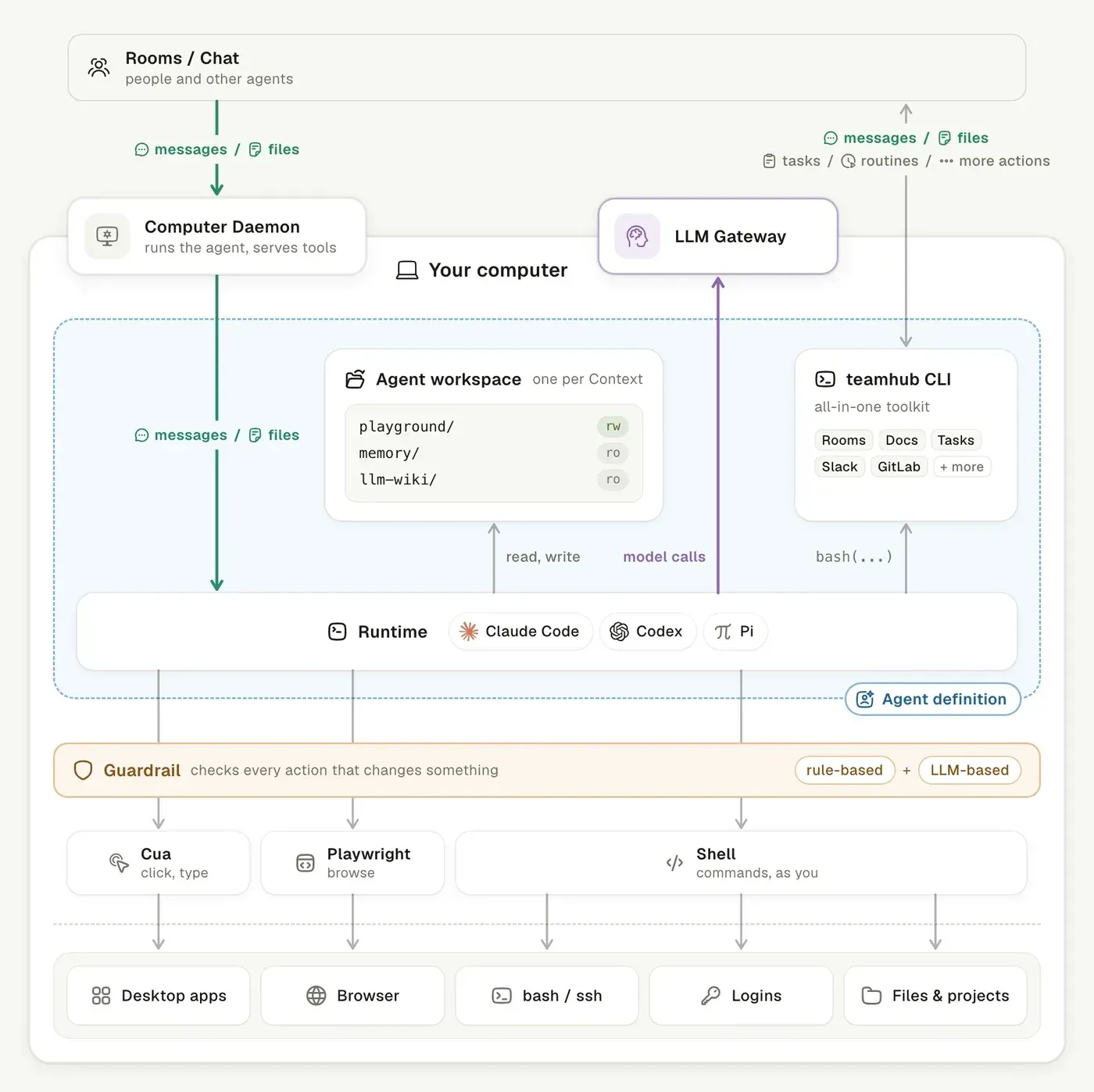
Linger is a personal AI agent from SimplexAI that runs on the user's own computer. Its agent, called Another Me, keeps a personal wiki of people, clients and projects, uses desktop apps and a signed-in Chrome, watches mail, calendars and Slack to message the user first, hands long work to background Tasks and builds teams of agents in chat Rooms, as the Linger documentation describes. Linger has no agent loop of its own: it starts an installed Runtime (Claude Code, Codex, Pi or, since 0.1.6, the Antigravity CLI) and adds memory, Skills, approvals and a Guardrail. The source is in the simplexai-labs/linger repository, created on November 10, 2026.
Models run locally first. Setup reads the GPU, free VRAM, available memory and bandwidth, proposes one model with a quantization, context pool and slot count, downloads nothing until the plan is approved and counts a model as installed only after it answers a real question. Apple silicon plans run on llama.cpp with Metal. NVIDIA plans run on llama.cpp with CUDA or on PolyStrata, an MIT-licensed mixture-of-experts engine published by SimplexAI Labs and built on Strata. A cloud model is optional: the subscription a Runtime is signed in to, or a user-supplied OpenAI-compatible or Anthropic endpoint and key.
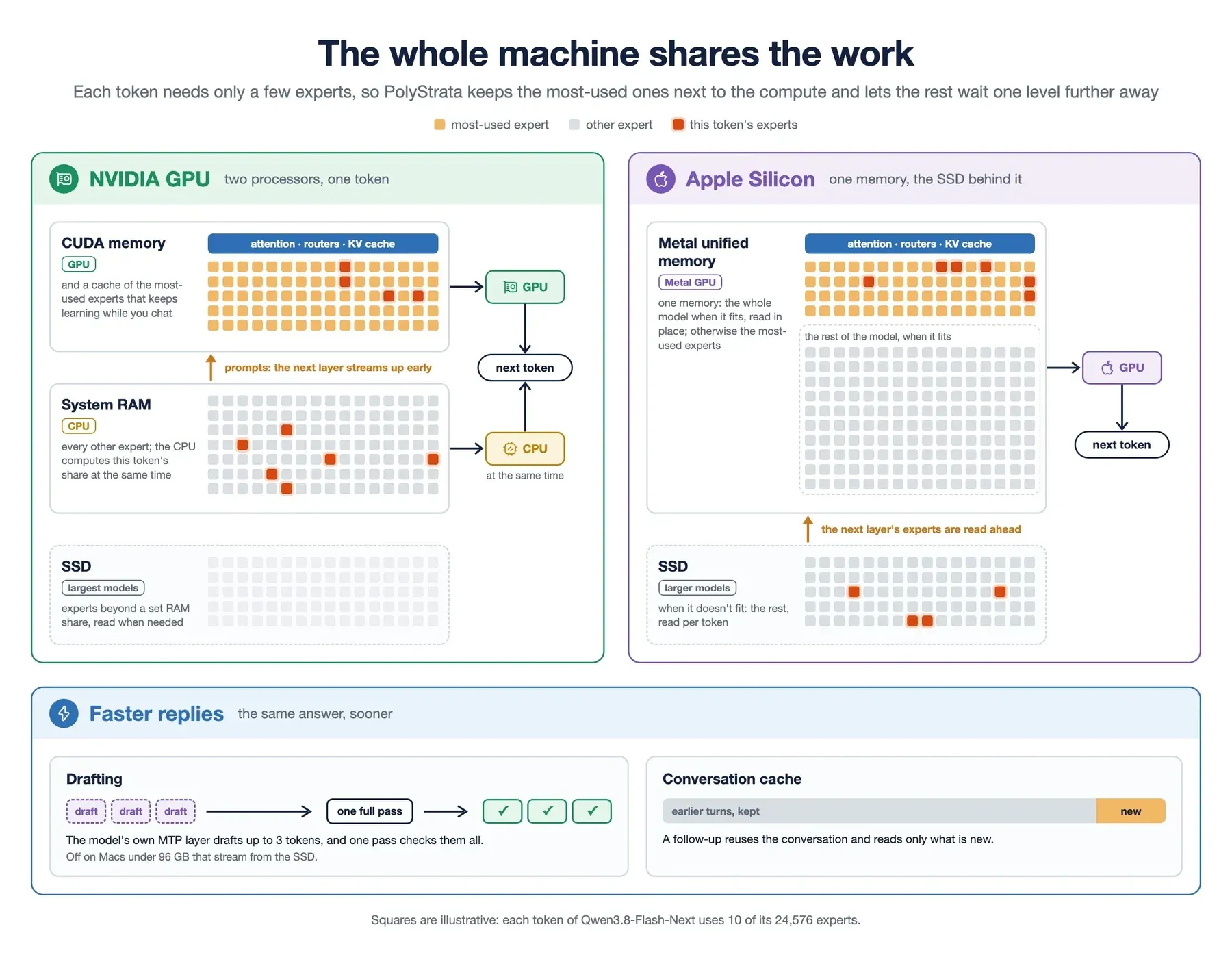
The README's headline phrases, "a Claude-class brain", "a 125B model on a 12 GB GPU", "the Grok Bot experience" and "zero token fees", are the project's own wording. The documentation explains them as follows. Qwen3.8-Flash-Next has 125B parameters and uses 10 of its 24,576 experts per token, so PolyStrata keeps the most-used experts in GPU memory, computes the others on the CPU from system RAM and reads the rest from the SSD. The 45.5 tokens per second quoted for a 12 GB RTX 3060 comes from a community benchmark in the PolyStrata repository (Core i7-12700, 64 GB RAM, Windows 11, IQ2_XS file, 4,096-token prompt), and Linger's own planner does not select that model for 12 GB cards by default. The Claude comparisons in the README's tables rest on a SimplexAI score that the project derives from the third-party AIHOT leaderboard and lowers for quantization. The documented Grok Live voice mode calls xAI's cloud voice model with the user's own key, and "zero token fees" applies to local inference only.
The desktop app is published on GitHub Releases for macOS 14 or later on Apple silicon, Windows x64 and Linux x64 (glibc 2.35 or newer), and Docker Compose runs a server that several computers share. Linger Desktop 0.1.6, published on November 20, 2026, is the seventh desktop release since 0.1.0 on November 10; it added English and Simplified Chinese interface languages, built-in web search, Antigravity support, an Outlook Calendar connector and Windows support for PolyStrata. Builds are not yet code-signed on Windows or notarized on macOS. The website lists hosted access as a waitlist and publishes no prices.
The code is TypeScript and Go: a React 19 web app, a Go TeamHub server on PostgreSQL 17, Node.js memory and wiki services, LiveKit for voice and a Go Computer Daemon with Playwright MCP and Cua. The Linger Open Source License is Apache 2.0 with added conditions: a commercial license from SIMPLEX AI TECHNOLOGIES PTE. LTD. is required to offer Linger as a hosted or managed service to people outside one's own organization, or to remove or change the logo or copyright information in its frontend, and contributors accept that the producer may change the license. It is not an OSI-approved license, and GitHub reports it as NOASSERTION. Third-party parts keep their own licenses listed in NOTICE, including a LiveKit voice package whose models are proprietary and may only be used with LiveKit Agents. Language model weights are not bundled: they are downloaded after approval under each model's license.
Key capabilities
- Another Me, the personal agent Each user gets one personal agent called Another Me that answers in a direct chat, searches the personal wiki, uses connected apps and the computer, and creates other agents when a job needs them. Agents act with the access of their Runtime on that machine; the documentation states that the limits are server checks and approvals, not a sandbox.
- Local model planner The desktop setup or one installer command detects the GPU, VRAM, RAM and bandwidth, keeps plans that fit with at least a 64K context, ranks them by quality and then speed, and asks before downloading. The hardware compatibility page lists the default plans of stack CLI 0.1.0.dev41: a 16 GiB Mac gets Spark-X2.6-4B, 24 to 64 GiB Macs get Qwen3.8-27B, and only Macs with 96 GiB or more get Qwen3.8-Flash-Next. Below about 9 GiB of available memory there is no automatic plan.
- PolyStrata and llama.cpp engines PolyStrata keeps the busiest experts of a mixture-of-experts model on the GPU and the others in system RAM, where the CPU computes them at the same time; on a Mac the SSD serves what does not fit in unified memory. A multi-token prediction layer drafts up to three tokens that one pass checks, and a conversation cache avoids rereading earlier turns. The Linux 8 and 12 GiB plans run Qwen3.6-35B-A3B this way, while Windows plans, larger NVIDIA plans and Macs use llama.cpp.
- Hardware requirements Local models need an Apple silicon Mac with at least 16 GiB of unified memory or an NVIDIA GPU with at least 8 GiB of VRAM; the documentation names no AMD or Intel GPU for Linger's own plans. On Windows, 8 and 12 GiB cards get Spark-X2.6-4B at Q8_0 and need about 10 GiB of free RAM and 7.5 GiB of free VRAM; on Linux they get Qwen3.6-35B-A3B with CPU experts and need about 25 GiB of available RAM. Cards with 16 GiB or more get Qwen3.8-27B, and each plan states the disk space its downloads need.
- Published speed figures The project's benchmarks page lists decode speeds per tier, mostly measured on simulated tiers where a larger card or Mac is held to the tier's memory budget. Examples are 121 to 146 tokens per second for Qwen3.6-35B-A3B on a simulated 8 GB card with 32 GB of RAM, and 21.3 tokens per second on short prompts for Qwen3.8-Flash-Next Q2_0 on a simulated 12 GB card, where the first token after a 62K prompt took about three minutes. The page states that a real machine can be slower.
- Cloud models and BYOK Each Computer serves its agents from one source: Local model through Pi, Subscription through Claude Code or Codex on their own plans, or BYOK, an OpenAI-compatible or Anthropic endpoint and key kept in an owner-only file. Prompts and files sent to a remote model go to that provider and count against the user's account.
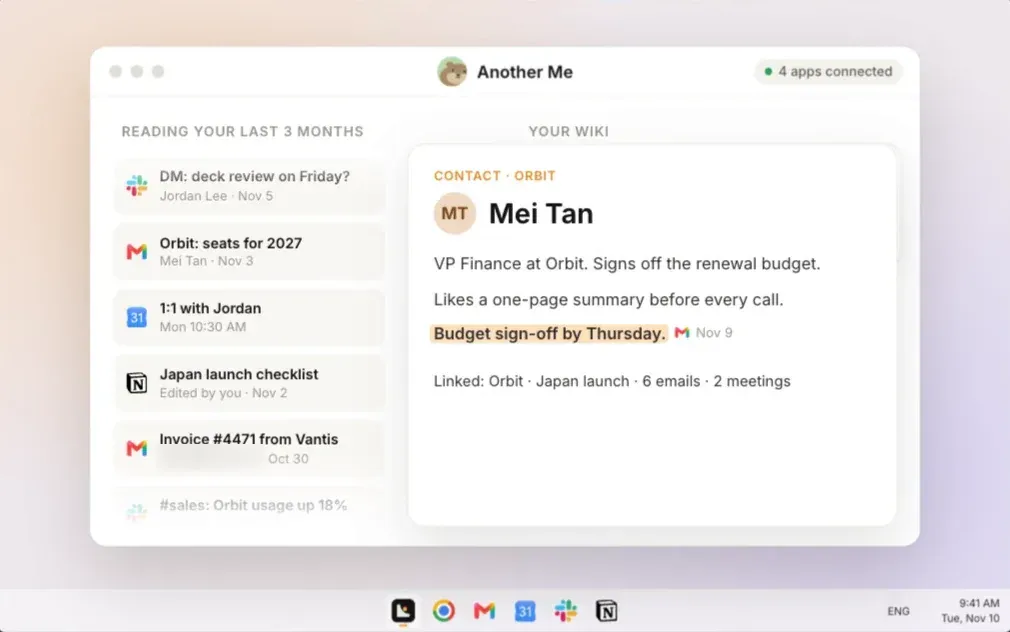
- Personal wiki After an inbox is connected, Another Me reads back through the last few months and builds typed Markdown pages for clients, contacts, projects, topics and meetings, then updates them every night. Facts cite the message or file they came from, and an app-written Change Log records each rewrite, edit, retraction or merge. Agents search it with PostgreSQL full-text search and reciprocal rank fusion, without an embedding model; the README reports 95% on the LoCoMo memory benchmark as the project's own result.
- Agent memory Each agent also keeps its own memory across Rooms, which no other agent sees. Extraction runs every five successful runs, consolidation after six idle hours, and the result is a read-only agent-memory folder with summary.md and MEMORY.md. The hosted documentation says these background calls run on Codex or Claude Code, while the repository's local inference page says a Computer Daemon 0.55.0 or later runs them on Pi's default model, which can be local.
- Proactive reminders Another Me polls Gmail and Outlook inboxes, Google and Outlook Calendar changes and Slack mentions every 10 minutes and decides per event to tell now, prepare material, follow up later or stay silent. From 22:00 to 08:00, or after five reminders in a day, app events are only recorded. Each night a step called Dreaming reads how its own messages were received and turns repeated or explicit replies into rules, without retraining a model.
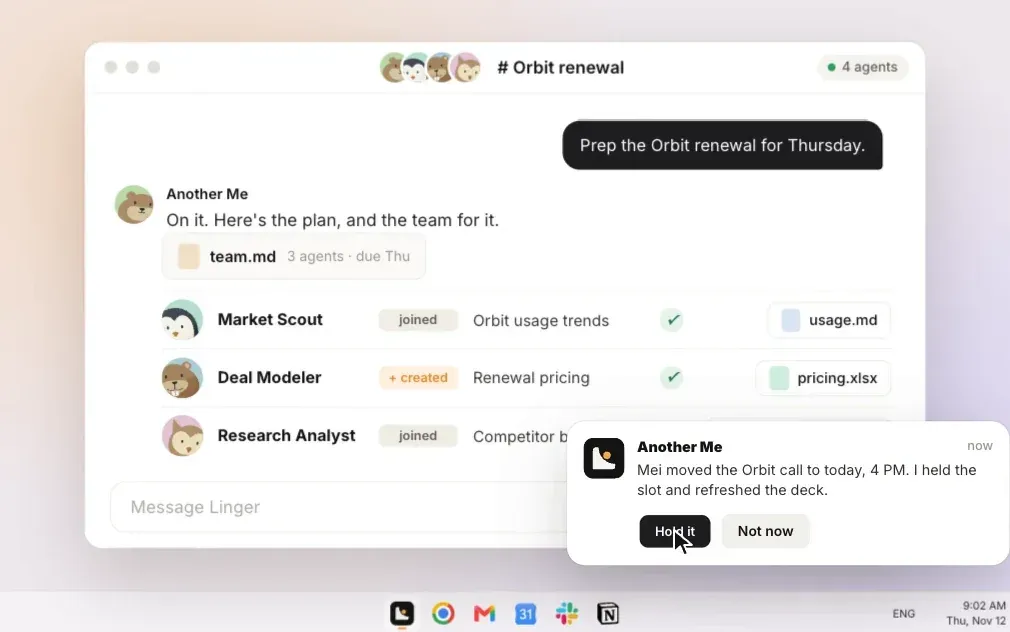
- Agent teams with team.md When a job needs several agents, Another Me brings in existing agents, creates the missing ones and publishes a team.md with the goal, the lead and the handoffs. TeamHub saves the file only when every ID belongs to an agent in the Room, then notifies each member, which starts its part or waits for its handoff.
- Background Tasks An agent in a chat, its Meta, hands long work to background copies of itself called AlterEgos, up to 10 running per agent, each with its own session and workspace. The chat stays available, results come back as cards, and a canceled Task keeps its files and session so the Meta can resume it.
- Desktop and browser use Agents read app windows as elements and click and type through Cua on macOS and Windows, or AT-SPI and xdotool on Linux. On a Mac or Windows PC they can work in the user's everyday Chrome with its sign-ins through the official Playwright extension; on Linux only the agent's own Chrome profile is used. Every input is logged before it runs, so an uncertain input is never sent twice.
- Connected apps and approvals Gmail, Outlook, Google Calendar, Slack, Notion, Google Drive, Figma and GitHub have dedicated teamhub CLI commands, and other apps are reached through generic search and execute commands. Connections run through Composio, which holds the app keys and requires a Composio API key. Reads run at once, while sending mail or Slack messages, Notion writes and GitHub comments or issues wait for an approval card that expires after 24 hours.
- Voice and meetings Meeting recording gives a live transcript, an Ask tab during the meeting and notes afterwards, and dictation turns speech into chat text; both need a Soniox key and send the audio to Soniox. Live voice mode uses xAI's Grok voice model with an xAI key. The desktop app bundles LiveKit and ffmpeg, which listen only on 127.0.0.1, and voice stays off until a key is set.
- Skills and web search Built-in Skills cover Word, PDF, PowerPoint and Excel files, single-file HTML artifacts, slide decks, team design, meeting minutes and image or video generation through a connected fal.ai or Higgsfield account. An agent can install further Skills from a GitHub repository. Web search uses keyless DuckDuckGo by default, with optional Tavily, Brave Search, Firecrawl, Exa or You.com keys.
- Model scheduling and Guardrail All agents, approvals and background jobs on a computer share one queue per model endpoint, ordered from tool approvals and chat down to memory and wiki work, with 1 to 8 parallel requests for gateway or key endpoints. Desktop, browser and shell actions pass rule-based checks; a model review is optional and off by default, and Pi runs without review. The Computer Daemon dials out over one WebSocket and opens no network port.
- Desktop app downloads Release 0.1.6 ships a DMG for macOS 14 or later on Apple silicon, a per-user Windows x64 setup program without administrator rights or a portable ZIP, and a Linux x64 tar.gz for glibc 2.35 or newer, each listed in SHA256SUMS.txt. The macOS app needs
xattr -dr com.apple.quarantine /Applications/Linger.appor Open Anyway on first launch, and Windows SmartScreen warns about the unsigned installer. There is no Intel Mac package; the install guide points to Docker Compose there. - Docker Compose server For a server that several computers share, the repository builds every service with Docker Compose, PostgreSQL and voice included, and needs at least 5 GiB of memory for Docker's virtual machine. Models and agents still run on the computers that connect to it. For other machines, the self-hosting guide requires a private LINGER_SECRET_SEED, and the docs ask for HTTPS in front of port 3000.
- Updates and diagnostics Installed apps check GitHub Releases for an Ed25519-signed update manifest. The documentation describes no usage analytics, and Send Diagnostics uploads a redacted zip only after the user reviews the file list and chooses Send.
Where Linger fits
Setting up a local personal agent on one computer
The desktop app's Quick Install sets up a Linger server on the same computer, signs the user in and connects the computer. Setup asks for a Runtime (Auto, Codex, Claude Code or Pi), installs one if none is present, then names the local model the machine can run with its download size, disk and memory needs. Nothing downloads before approval. If no plan fits, setup explains the refusal and offers Runtimes that use their own sign-in. The quickstart also covers Docker Compose and running from source with pnpm dev.
Keeping a searchable record of clients and projects
In the project's example, Gmail is connected on day one and Another Me starts an Acme rollout page; pricing settled in a chat on day four is added that night; on day nine an agent in another Room answers what pricing was agreed through a knowledge search over the page. Each search returns two ranked lists, wiki pages and the original messages, transcripts, documents and emails, and agents are instructed to search the originals before saying something was never recorded. Details are on the personal memory page.
Hearing about mail and calendar changes at the right time
With a connected inbox and calendar, Another Me judges each event against general rules, learned rules and open follow-ups. In the documented example, an email from Acme asking for a revised quote is set to follow up later and returns as a reminder on Wednesday; after the user says client replies should come right away, that rule is learned overnight. Two replies of the same kind about vendor invoices become a "vendor invoices, tell now" rule. The proactive page lists every decision type and quiet hour.
Splitting a job across agents and background Tasks
In the Atlas demo described in the use cases, a request to get a demo ready leads Another Me to create a Research agent and a Dev agent and publish a team.md. Research reads interview notes in Finder, Dev runs tests in Terminal and Another Me drafts a partner email in Gmail, all on the same computer. For two long requests, such as researching rivals and drafting a deck, the agent starts one background Task for each, a follow-up joins the matching Task, and both results return as cards while the chat continues.
Working in signed-in apps with confirmation before sending
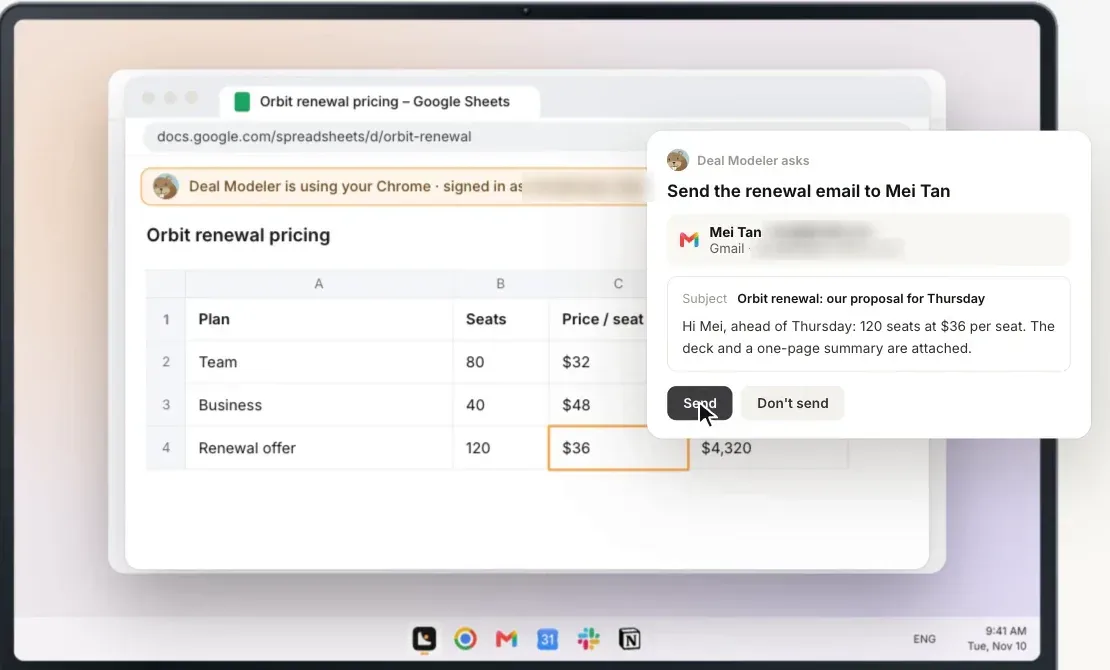
Agents use desktop apps and, on macOS and Windows, the user's own Chrome with existing sign-ins; the Chrome connection key stays on the computer and never enters the chat or the model. On macOS this needs Screen Recording and Accessibility permissions for Linger and its CuaDriver helper. Writes that reach other people, such as an email built from a Google Sheets price table, wait for a Send or Don't send card in the Room, and an approved write runs exactly once. The approvals page lists which actions wait.
Recording a meeting and handing off the follow-up
With a Soniox key on the server, a recording shows a live transcript, and the Ask tab answers questions from what was said or sends a request to Another Me. When the recording stops, the recording, transcript and a short summary appear in the Another Me chat, and full notes with decisions and action items follow in Library, Meetings. Grok Live voice mode, with an xAI key, reads mail and calendars, edits documents and starts Tasks, and waits for a spoken yes before it sends anything. Setup steps are in Enable voice.
Install
git clone https://github.com/simplexai-labs/linger.git && cd linger && cp .env.example .env && docker compose up --build --detach --waitReviews of Linger
Be the first to share your experience with Linger.
Write a review
Loading review form…
Found Linger useful? Upvote it todayYour vote helps other IT teams find it in the daily ranking.