

What is OpenClaw?
OpenClaw is an open-source personal AI assistant written in TypeScript. A long-running process called the Gateway owns sessions, tools, channel connections and state, and the assistant answers wherever the Gateway is connected: a browser-based Control UI, the CLI and TUI, native companion apps, or messaging services such as Telegram, WhatsApp, Slack, Discord, Signal, Microsoft Teams and iMessage. The same Gateway can serve one person on a laptop or a trusted team as a shared multiplayer claw; the documentation describes the difference as configuration rather than a separate edition.
The project was started by Peter Steinberger with the community and is now stewarded by the OpenClaw Foundation, an independent 501(c)(3) that employs the core team and signs releases. Donors and infrastructure sponsors, OpenAI among them, fund the Foundation without owning the project. The README states that there is no paid tier, hosted service or token. The code is MIT-licensed, with incorporated third-party code listed in THIRD_PARTY_NOTICES.md.
Distribution covers several paths. The installer scripts for macOS, Linux, WSL2 and Windows PowerShell provision Node.js when needed and start onboarding. The npm package openclaw needs Node 24.16.0+ on the 24.x line or 26.1.0+. Container images are published to GitHub Container Registry with a Docker Hub mirror, and the installation guide also covers Nix, Podman, Kubernetes, Ansible, Raspberry Pi and several VPS providers. Desktop companions exist for macOS (menu bar app) and Windows (Windows Hub, with a Tauri app as backup), Linux builds ship as AppImage and DEB, and the iOS and Android apps act as device nodes paired to a Gateway.
The latest stable release on GitHub is 2026.11.1, published November 5, 2026, with macOS DMG and ZIP builds for Apple Silicon and Intel, a Linux AppImage and DEB, checksums and a release manifest. Its notes focus on reliability: failed Mac settings saves no longer overwrite secrets, Telegram, Discord and webhook conversations keep reaching the agent after earlier turns finish, crashed or canceled updaters recover, and the Windows Gateway is restored after a failed update verification. The preceding 2026.10.10 release added a Chat Details panel beside the conversation, an Advisor that can suggest course corrections during a task and split speech mode for browser Talk. Version numbers follow a year.month.number scheme, with beta builds published as prereleases.
Architecturally, clients and nodes connect to the Gateway over WebSocket, by default on 127.0.0.1:18789, using JSON frames validated against a schema. Models and agent harnesses, including Claude, Codex and local models, are plugins, as are most channels. OpenClaw does not ship its own language model: hosted provider costs and terms apply to whichever provider you configure. Running mutually untrusted users on one Gateway is out of scope; the documentation recommends a separate Gateway per trust boundary.
OpenClaw screenshots
Explore the interface. Open a screenshot to view it at full size.
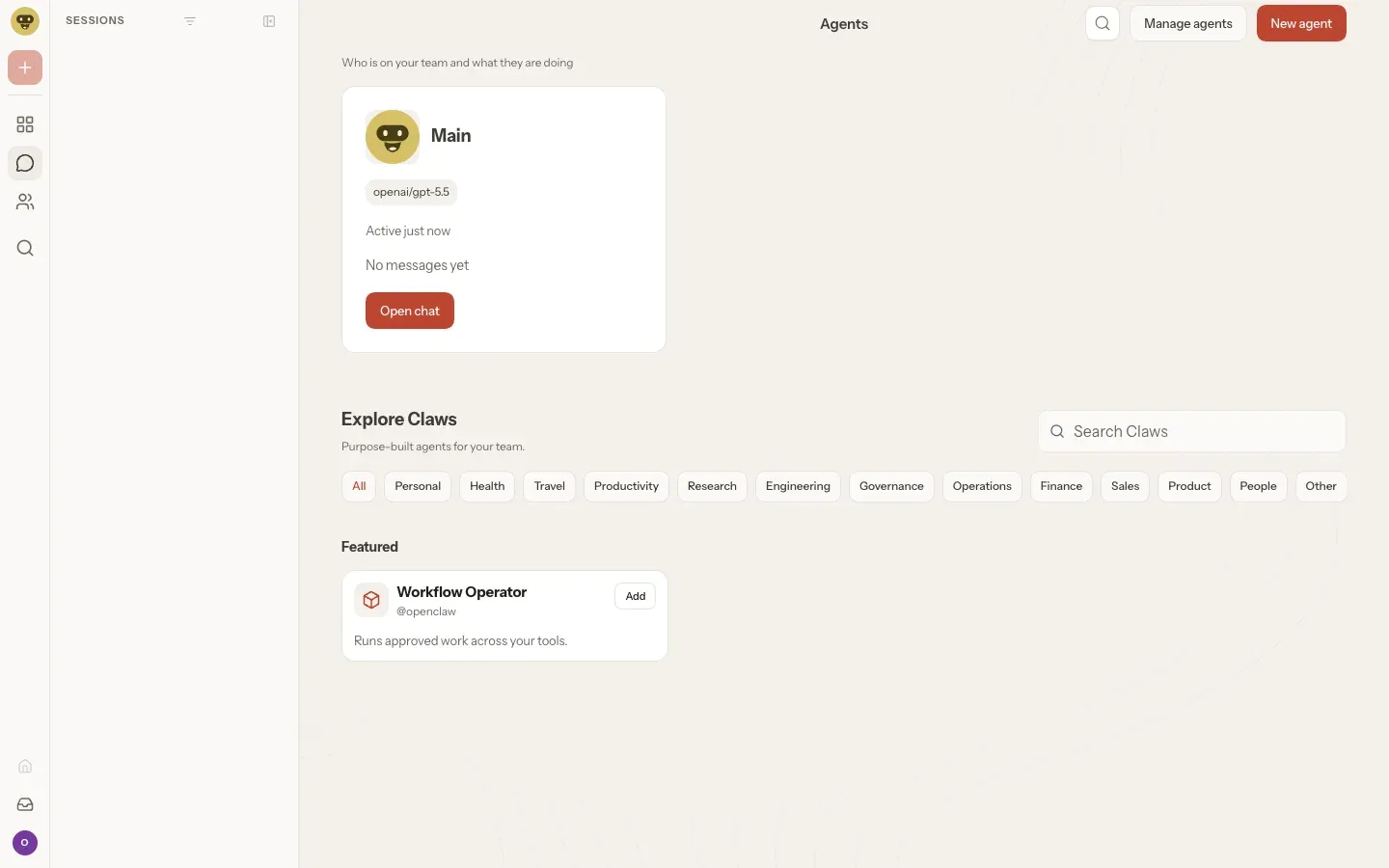
Control UI Agents view showing the Main agent, its configured model and category filters for purpose-built Claws. Project screenshot from the OpenClaw repository.
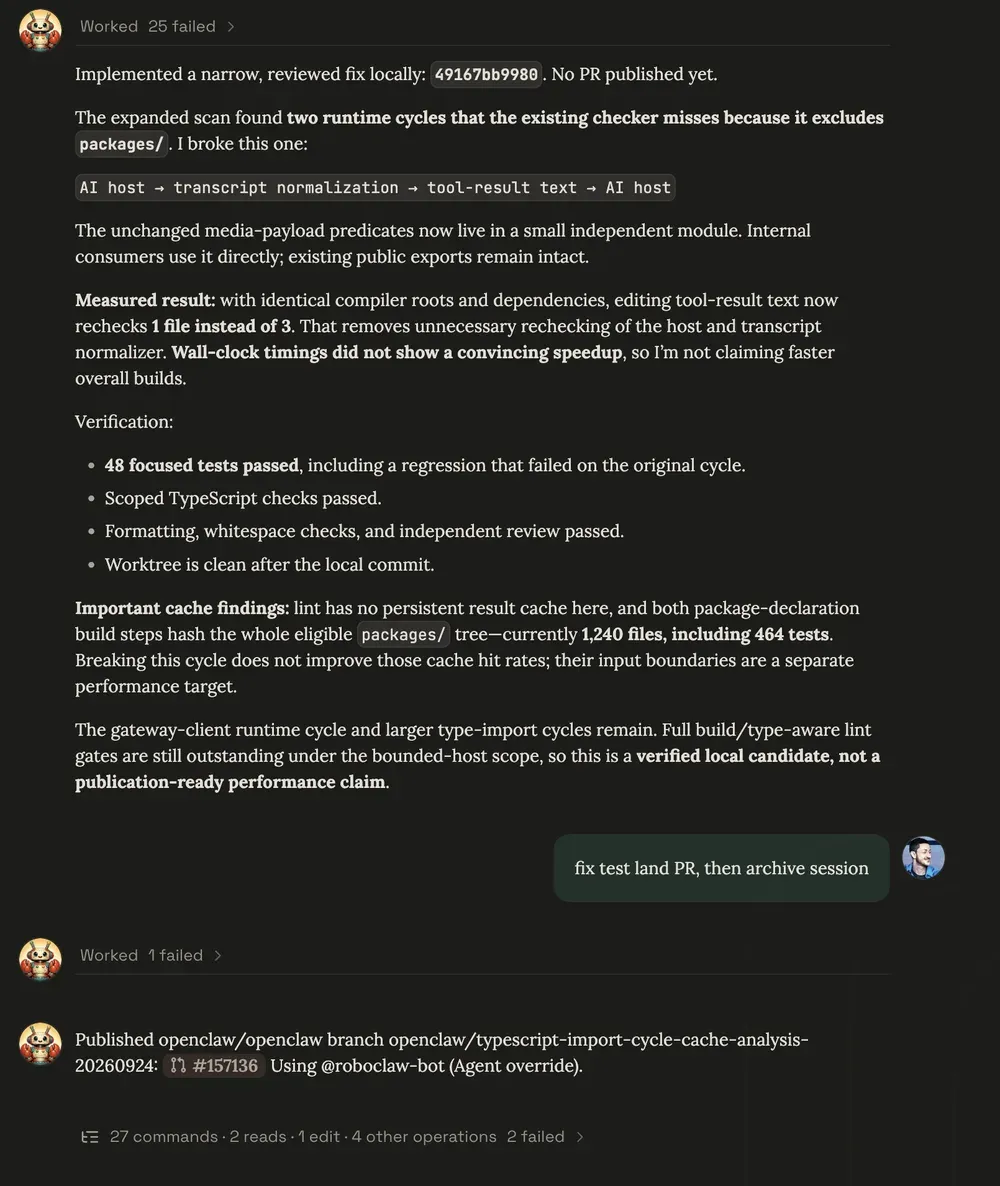
A repository task on the project's own multiplayer claw: the agent summarizes verification results, then publishes a pull request after a user request. Figure from the multiplayer documentation.
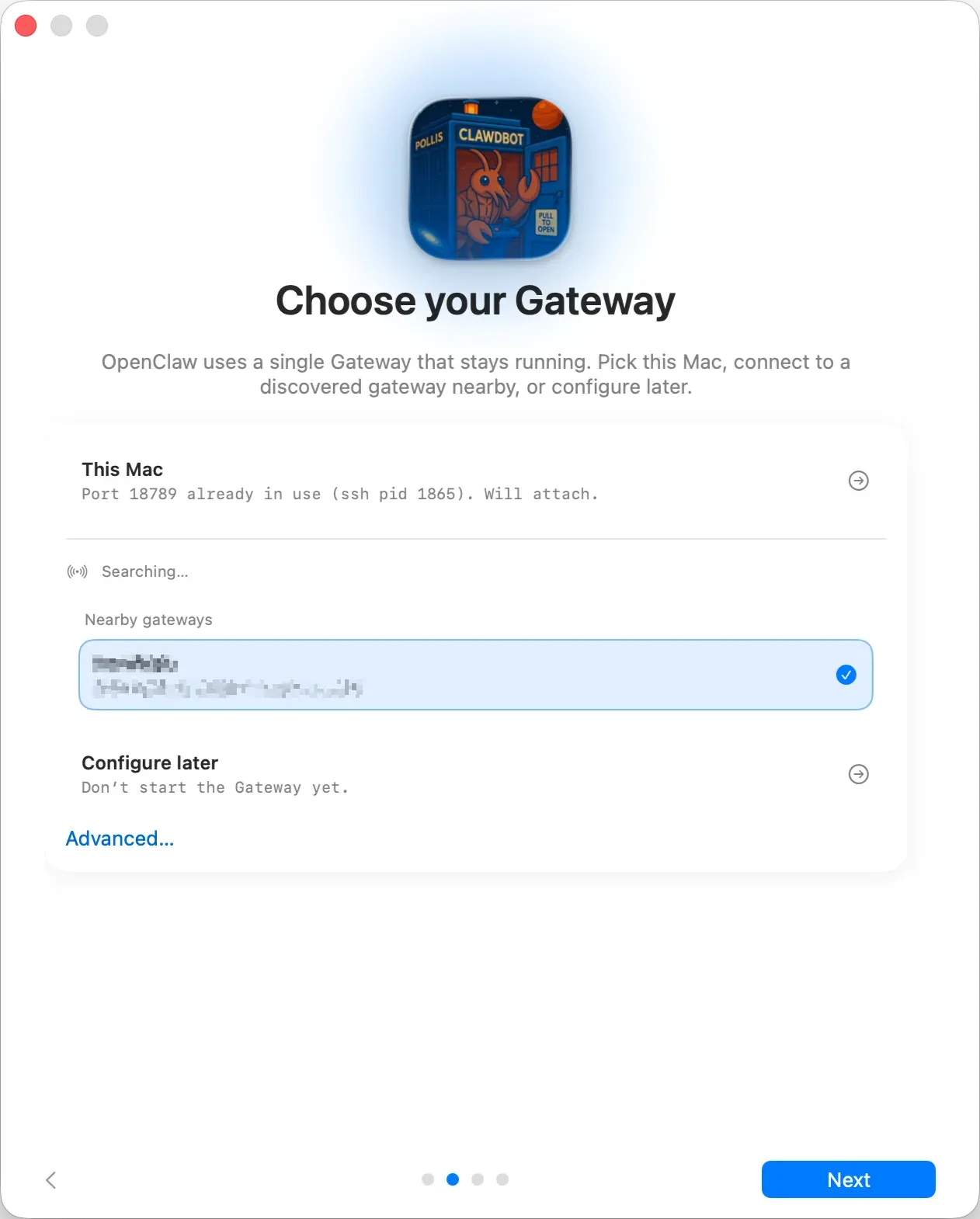
macOS app onboarding: run the Gateway on this Mac, attach to a discovered Gateway nearby or configure later. The app icon shown is earlier artwork.
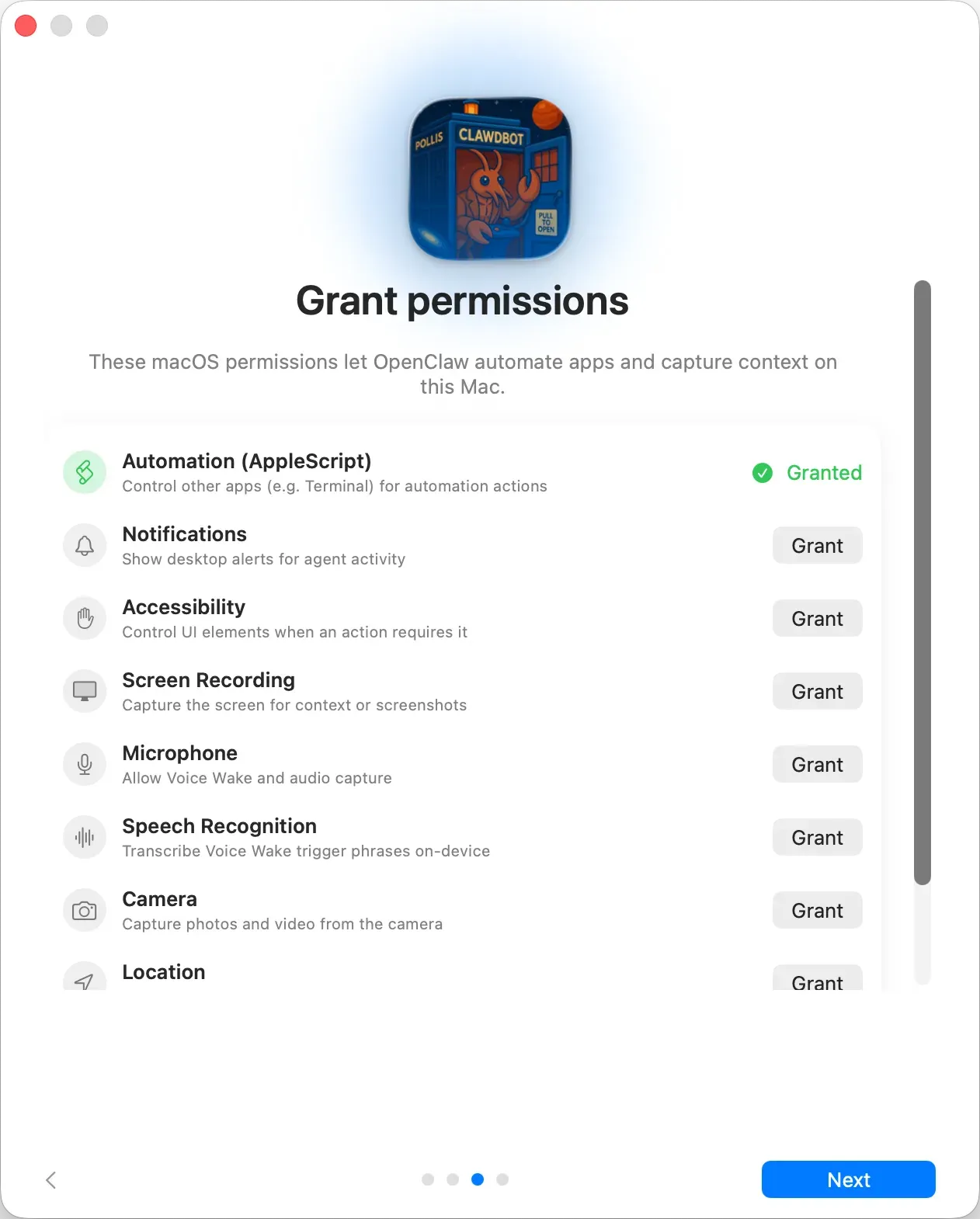
macOS permission step: each capability, such as AppleScript automation, screen recording or microphone access, is granted separately.
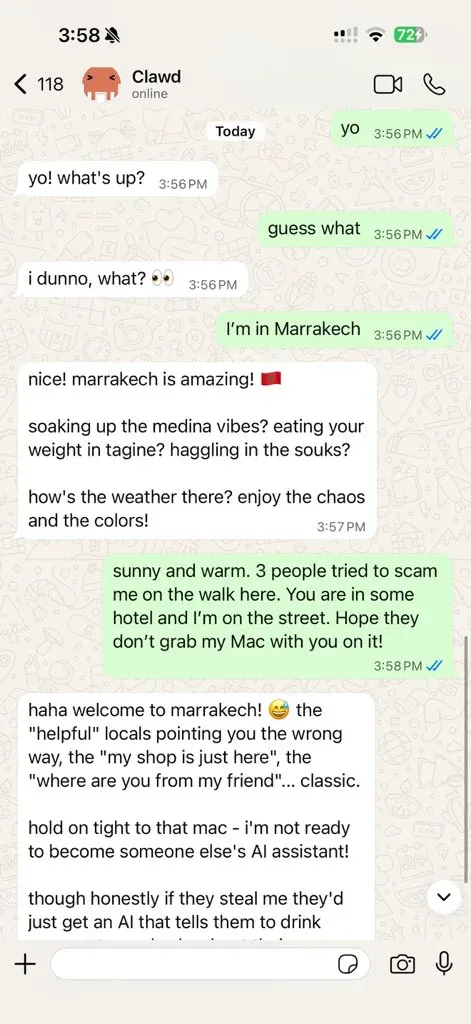
An OpenClaw assistant answering in WhatsApp, one of the supported messaging channels. Image from the project documentation.
Source: official OpenClaw project page.
Key capabilities
- Installer script for macOS, Linux and WSL2
curl -fsSL https://openclaw.ai/install.sh | bashdetects the operating system, installs Node.js when it is missing (Node 26 on macOS, Node 24 LTS on Linux), installs OpenClaw and opens onboarding. A--no-onboardflag skips the wizard, and a separateinstall-cli.shkeeps OpenClaw and Node under a local prefix such as~/.openclaw. Flags for CI use are documented in the installer reference. - Windows install paths The recommended desktop route is the Windows Hub companion, a signed installer for x64 and ARM64 with setup, tray status, chat and node mode, published from the openclaw-windows-node repository. Terminal users can run
iwr -useb https://openclaw.ai/install.ps1 | iex, and WSL2 is described as the most Linux-compatible Gateway runtime. On native Windows the Gateway service is registered as a Scheduled Task, with a Startup-folder fallback when task creation is denied. - npm, pnpm or Bun package Teams that manage Node themselves install
openclaw@latestglobally and runopenclaw onboard --install-daemon. The package requires Node 24.16.0+ on 24.x or 26.1.0+, and the README recommends 24.22.1+ or 26.12.1+ for security fixes. Bun 1.4.4+ can run the CLI and Gateway as an explicit opt-in; Node remains the default runtime. - Docker images and containerized Gateway Images are published to
ghcr.io/openclaw/openclawwith a Docker Hub mirror atopenclaw/openclaw, includinglatest,extended-stable, slim variants and-browservariants with Chromium. The setup script builds or pulls the image, writes a Gateway token to.envand starts Docker Compose v2. A local source build needs at least 6 GB of RAM, and an--offlinemode supports airgapped hosts. See the Docker guide. - Gateway control plane One Gateway per host owns sessions, tools, events and channel connections, and exposes a typed WebSocket API with requests, responses and server-push events. It binds to loopback on port 18789 by default. Remote use goes through Tailscale Serve, a trusted LAN or tailnet bind, or an SSH tunnel. New devices need pairing approval, and every connection signs a challenge nonce.
- Control UI, CLI and TUI The Control UI is a Vite and Solid single-page app served by the Gateway at
http://<host>:18789/, with an optional base path. It covers chat with session details, agents, settings, models and channels. TheopenclawCLI handles onboarding, Gateway status, channels, plugins, pairing, automations and diagnostics, and a terminal UI connects to the same Gateway. - Messaging channels Telegram ships as a bundled plugin and needs only a bot token; WhatsApp uses QR pairing and stores more state on disk. Official plugins cover Discord, Slack (Socket Mode, HTTP or relay), Signal through signal-cli, iMessage through imsg, Microsoft Teams, Google Chat, Matrix, Mattermost, IRC, LINE, Feishu, Nextcloud Talk, Nostr, Twilio SMS and others. Text works everywhere; media and reactions vary by channel. The channel catalog lists the current set.
- DM pairing and access control DM-capable channels pair unknown senders by default, and an operator approves each request with
openclaw pairing approve <channel> <code>. Group allowlists and access groups limit who can trigger the agent in shared rooms. The 2026.11.1 release keeps explicitly empty group allowlists empty instead of repopulating them. - Model providers and local models Hosted providers such as Anthropic, OpenAI, Google and Amazon Bedrock are configured through provider plugins, with API key rotation and failover options. For local inference, the llama.cpp plugin can install a managed local server after showing model size and backend, and LM Studio, Ollama or any OpenAI-compatible server can be used instead. The smallest managed recipe has an 8 GiB host-memory floor and uses a 64K context.
- Agent harnesses and coding agents Claude CLI and Codex run as swappable harness plugins. Release 2026.11.1 lets saved Claude subscription accounts make configured models available without a separate native login, and adds an opt-in setting for native Agent and Workflow orchestration that is off by default. Managed worktrees give coding sessions their own branch and checkout.
- Markdown memory in the workspace The agent remembers by writing plain Markdown files in its workspace, by default
~/.openclaw/workspace:USER.mdfor stable preferences,MEMORY.mdfor long-term facts and dated daily notes. Files can be read, edited and backed up like any text. Memory provenance records exclude files marked untrusted from automatic context, andopenclaw doctorlists them. - Skills and the ClawHub registry Skills are directories containing a
SKILL.mdfile with YAML frontmatter that teaches the agent when and how to use tools. They load from workspace, personal, managed and bundled sources in a documented precedence order, with gating by environment, config and binary presence. Community skills are shared through ClawHub, and a Skill Workshop keeps change history for skills the agent writes itself. - Plugins and the plugin SDK Channels, providers, storage backends and new capabilities are packaged as plugins. Official plugins install with
openclaw plugins install @openclaw/<id>and apply to a running Gateway. The README states that new capabilities usually belong in plugins built on the plugin SDK rather than in core. - Automations and scheduled jobs The built-in scheduler persists jobs, wakes the agent at the configured time and delivers output to a chat channel, a webhook or nowhere. Jobs are managed with
openclaw automations(openclaw cronremains an alias), including one-shot reminders, run history and deletion after a run. - Agent-controlled browser OpenClaw can run a dedicated Chrome, Brave, Edge or Chromium profile through a loopback-only control service inside the Gateway, isolated from the personal browser profile. A separate
userprofile can attach to a signed-in Chrome session through Chrome DevTools MCP when the operator chooses it. - Sandboxing and exec approvals Tool execution can move into a Docker, Podman, SSH, OpenShell or Crabbox sandbox, while the Gateway itself stays on the host. Sandboxing is off by default, so tools run on the host for the main session until configured. Exec approvals add deny, allowlist, ask, auto and full modes for commands on a Gateway or node host. The documentation states that the sandbox is not a perfect security boundary.
- Native companion apps and device nodes The macOS menu bar app (macOS 26.2 or later) adds permission prompts, notifications, Quick Chat on Option-Space, voice wake and Mac-hosted node tools. The iPhone app on the App Store (iOS 26.2 or later) and the Android app on Google Play act as nodes with camera, screen, location and Talk capabilities. Mobile apps do not host the Gateway.
- OpenAI-compatible HTTP endpoints When enabled, the Gateway serves
/v1/chat/completions,/v1/modelsand/v1/embeddingson its own port, with/v1/responsesenabled separately. Requests run as normal agent runs with the Gateway's routing and permissions. The endpoint is disabled by default, and a valid token equals full operator access, so the API documentation advises keeping it on loopback, tailnet or private ingress. - Telemetry controls By default the Gateway sends one daily update check to telemetry.openclaw.ai with version, operating system, Node.js version and CPU architecture, without an install identifier. Anonymous feature statistics are opt-in.
openclaw telemetry showprints what would be sent, andupdate.checkOnStart: falsedisables both requests.
Where OpenClaw fits
Running a personal assistant on a laptop or home server
Install with the script or the npm package, complete openclaw onboard --install-daemon and confirm the service with openclaw gateway status. Onboarding verifies model access, creates the workspace and registers a LaunchAgent, systemd user service or Scheduled Task. Open the Control UI with openclaw dashboard and send a test message there before adding channels. Check that the Gateway still binds to loopback unless remote access is intended. The getting started guide covers channel setup and troubleshooting.
Reaching the assistant from Telegram, WhatsApp or Slack
Start with Telegram, which needs a bot token and no plugin install: openclaw channels add --channel telegram --token <bot-token>. Add WhatsApp through QR pairing, or Slack in Socket Mode, once the first channel works. Verify with openclaw channels status --probe, then send a message from an unknown account and confirm that it creates a pairing request instead of reaching the agent. Group behavior and allowlists deserve a separate test in each shared room.
Sharing one Gateway with a trusted team
A multiplayer claw puts one Gateway behind the team chat and the Control UI, with shared sessions that teammates can open and steer, and roles that bound what each person can do. The production path in the documentation adds Cloudflare Tunnel and Access, individual sign-in, verified GitHub identities and recoverable operations on an always-on Linux host. Keep one Gateway per trust boundary: people who should not share credentials or tool access need separate Gateways, ideally under separate OS users or hosts.
Scheduling reminders, digests and recurring checks
Create jobs with openclaw automations create, choosing a time, the target session and whether output goes to a channel, a webhook or nowhere. Use openclaw automations list and openclaw automations runs <job-id> to confirm that runs happen and to read their history. Keep in mind that each scheduled run consumes model tokens with the configured provider, and that a job with tool access acts with the same permissions as an interactive turn.
Running models locally or on private infrastructure
Install the llama.cpp plugin and choose a managed local server during onboarding, or point OpenClaw at LM Studio, Ollama or another OpenAI-compatible server. Setup shows the model, download size and backend before downloading and verifies a real tool call before changing the default model. Test full agent tasks rather than short prompts, since the system prompt, tools and history need context space. Local models do not include hosted providers' safety filters, so tighten tool permissions accordingly. See local models.
Hardening a Gateway that runs tools
Enable a sandbox backend in agents.defaults.sandbox so tool execution moves into Docker, Podman or a remote environment, and set exec approvals to ask or allowlist for host commands. Keep the OpenAI-compatible endpoint disabled unless a client needs it. Before exposing the Gateway beyond loopback, follow the security guide and exposure runbook, and on a VPS review the Docker DOCKER-USER firewall chain. Re-run the checks after each update, since release notes regularly change channel and network policy.
Install
curl -fsSL https://openclaw.ai/install.sh | bashReviews of OpenClaw
Be the first to share your experience with OpenClaw.
Write a review
Loading review form…
Alternatives to OpenClaw
 Hermes AgentMIT-licensed agent from Nous Research that runs in a terminal, desktop app, browser or chat apps. It keeps curated memory, writes and refines its own skills, schedules jobs and works with OpenRouter, Anthropic, OpenAI, local or Nous Portal models.
 LobeHubLobeHub is a TypeScript agent workspace with tasks, memory, pages and MCP tools. Agents answer in Slack, Discord or Telegram, can drive Claude Code or Codex on your devices, and run in LobeHub Cloud, desktop apps or a Docker Compose stack.
 RakazoRakazo is an Apache-2.0, self-hosted platform for persistent AI bots that keep memory, run routines and use a browser, terminal and desktop in Docker or cloud sandboxes, with your own model. Apps for web, desktop, iOS and Android.