

What is Rakazo?
Rakazo is an open-source, self-hosted platform for persistent AI teammates. Each bot keeps its own chats, memory, routines, skills and history, and can use a computer with a browser, terminal, files and a full desktop. The project describes itself as an open-source alternative to Grok Bot, and its README also lists Meta Muse, OpenAI Dots, Instinct, OpenClaw, Hermes Agent and Claude Duet as products it is an alternative to. Model access is bring-your-own: a bot can run on a Claude or ChatGPT subscription sign-in, an API key, OpenRouter, or a local OpenAI-compatible server.
According to the official about page, Rakazo is maintained by Inbox Zero Inc. and released under the Apache License 2.0. The rakazo.com footer carries the same company name, and the README thanks Inbox Zero in its credits section. The about page states that routines are kept in readable Markdown, that several model providers are supported, and that actions are recorded in an audit log. Public issues and contributions go through GitHub; community discussion is on Discord.
The software is distributed in three ways. Self-hosters run published container images with Docker Compose (tag edge by default, built for linux/amd64 and linux/arm64) through an install script, or deploy a Railway template. Client apps exist for the web, macOS (universal build), Windows, Linux (x64 AppImage), iPhone and iPad through the App Store, and Android through Google Play, all listed on the download page. A hosted service at app.rakazo.com is sold with monthly plans shown on the pricing page.
The latest release is v0.9.0, published November 10, 2026, with desktop builds for macOS, Windows and Linux attached. It added Spaces for sharing bots, chats, memory, routines and a computer with invited people, bot email addresses that can start routines, background research helpers, purchase spending limits, SCIM account provisioning, interface theming through RAKAZO_THEME, and an iOS Live Activity. Its security notes cover hidden MCP launch credentials, an unprivileged default user for Incus computers and a desktop viewer that can no longer read the host clipboard.
Rakazo is written in TypeScript. The README lists React 19, Vite and Tailwind CSS for the web interface, Electron and Expo for desktop and mobile, Hono and oRPC for the API, PostgreSQL with Prisma, Better Auth, Graphile Worker for background jobs, and Pi as the agent runtime. The computer runtime documentation explains that Pi runs in the API and worker processes, separate from the computers where bots act, so any model exposed through Pi can call the built-in computer tools. Screen operation requires a model that accepts images.
Rakazo screenshots
Explore the interface. Open a screenshot to view it at full size.
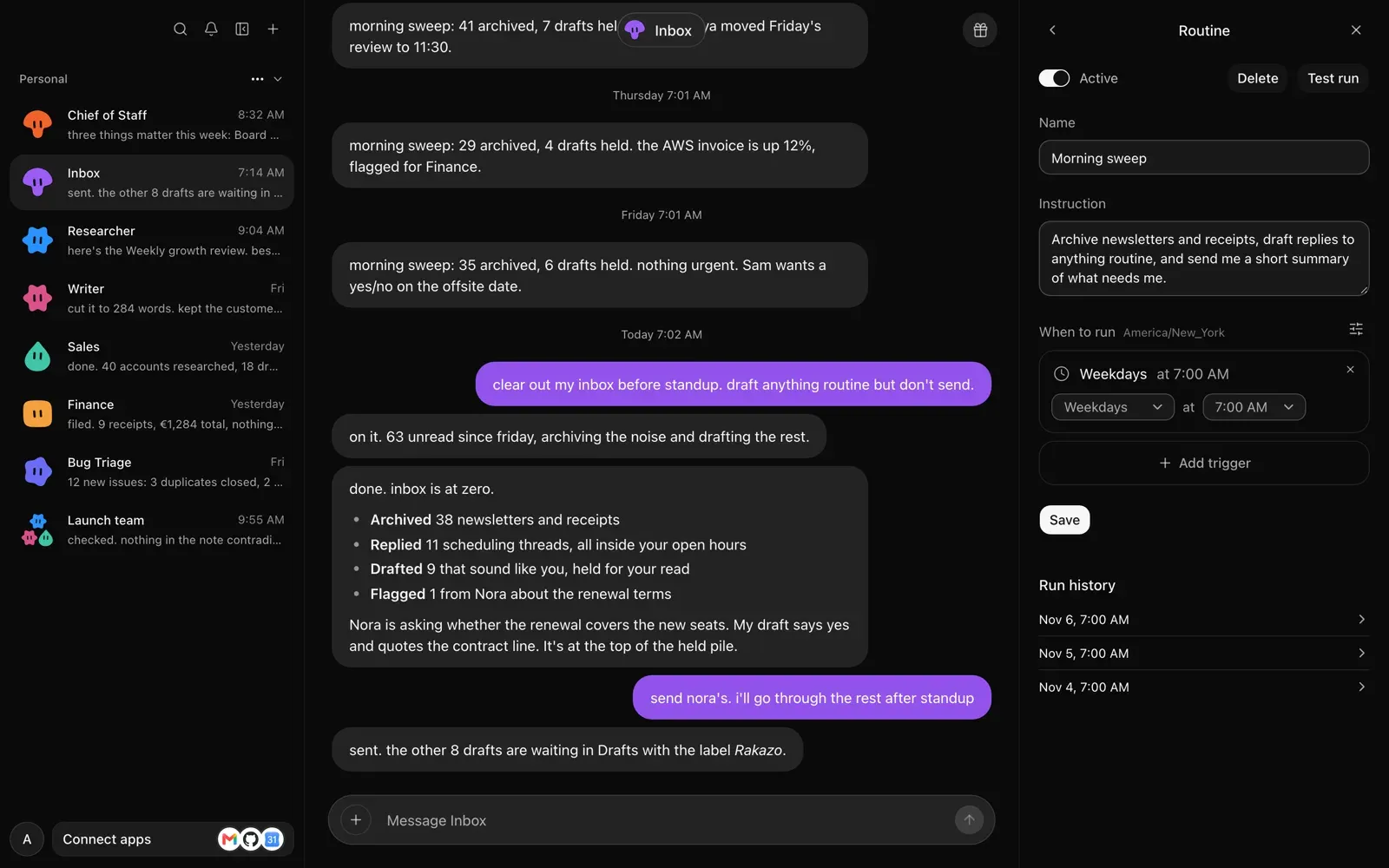
Official README screenshot: a Morning sweep routine with its trigger and run history beside the bot's chat.
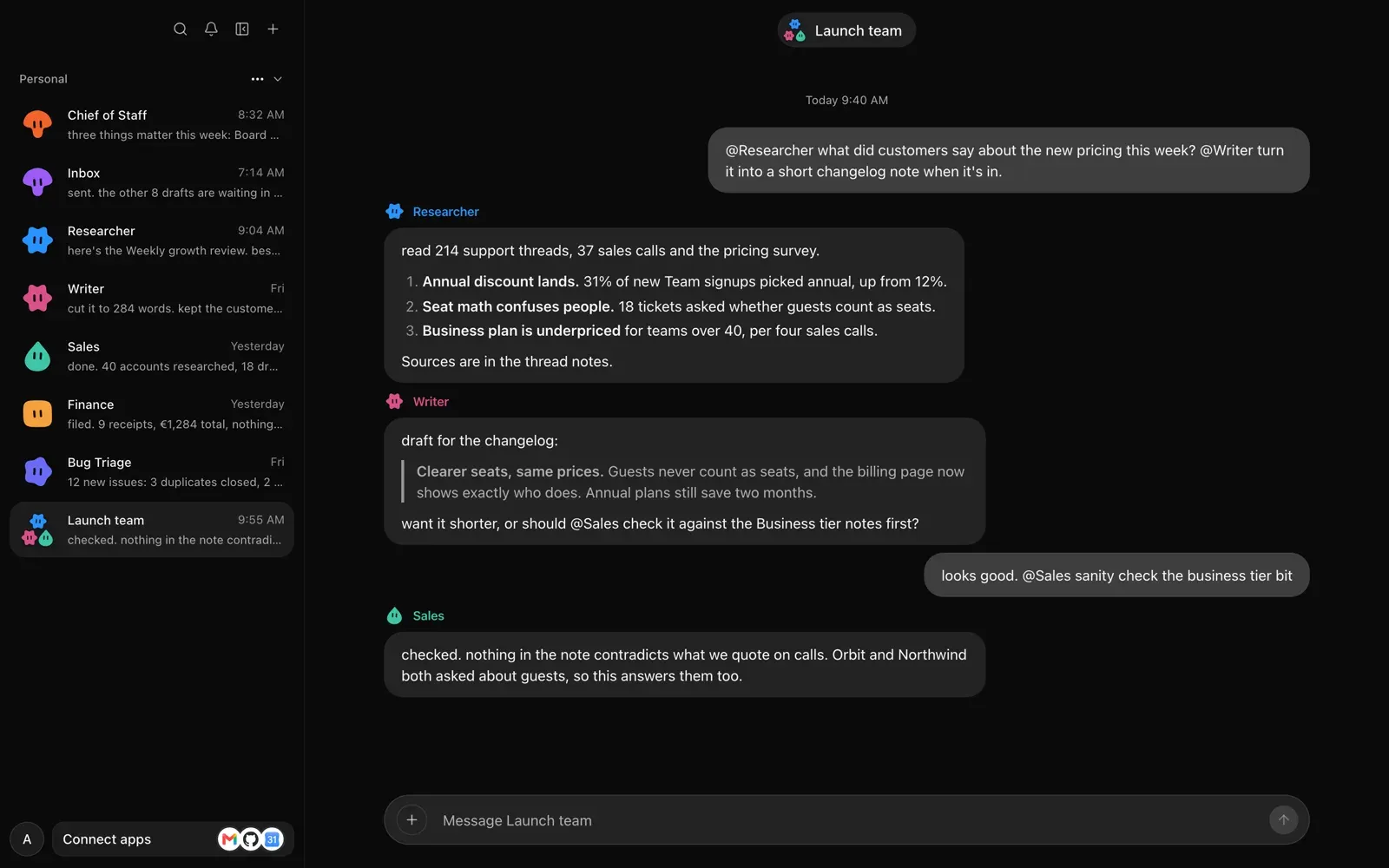
Official README screenshot: a Launch team group chat in which three bots respond to @mentions.
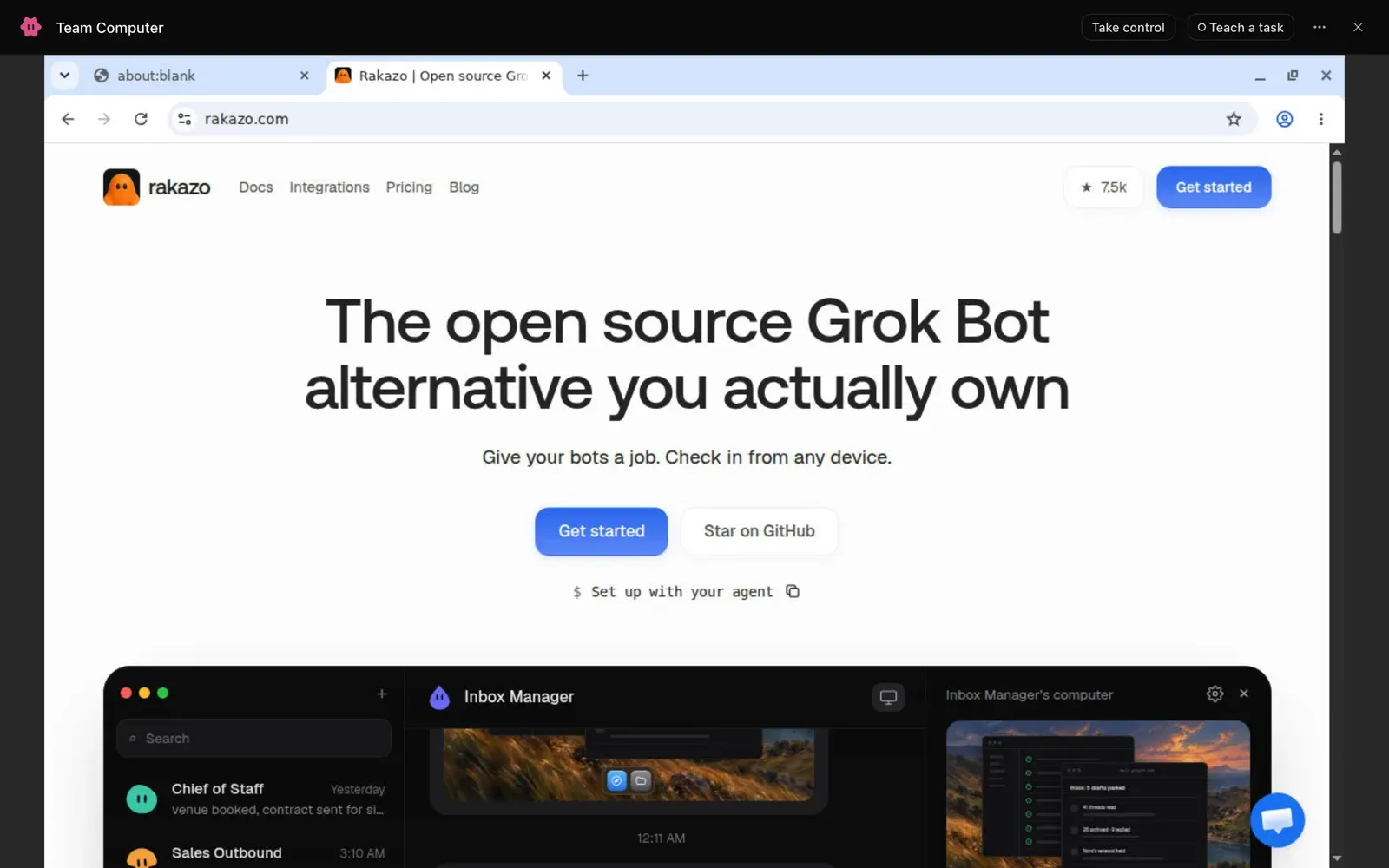
Official README screenshot: a bot's Team Computer with a browser open and the Take control and Teach a task controls.
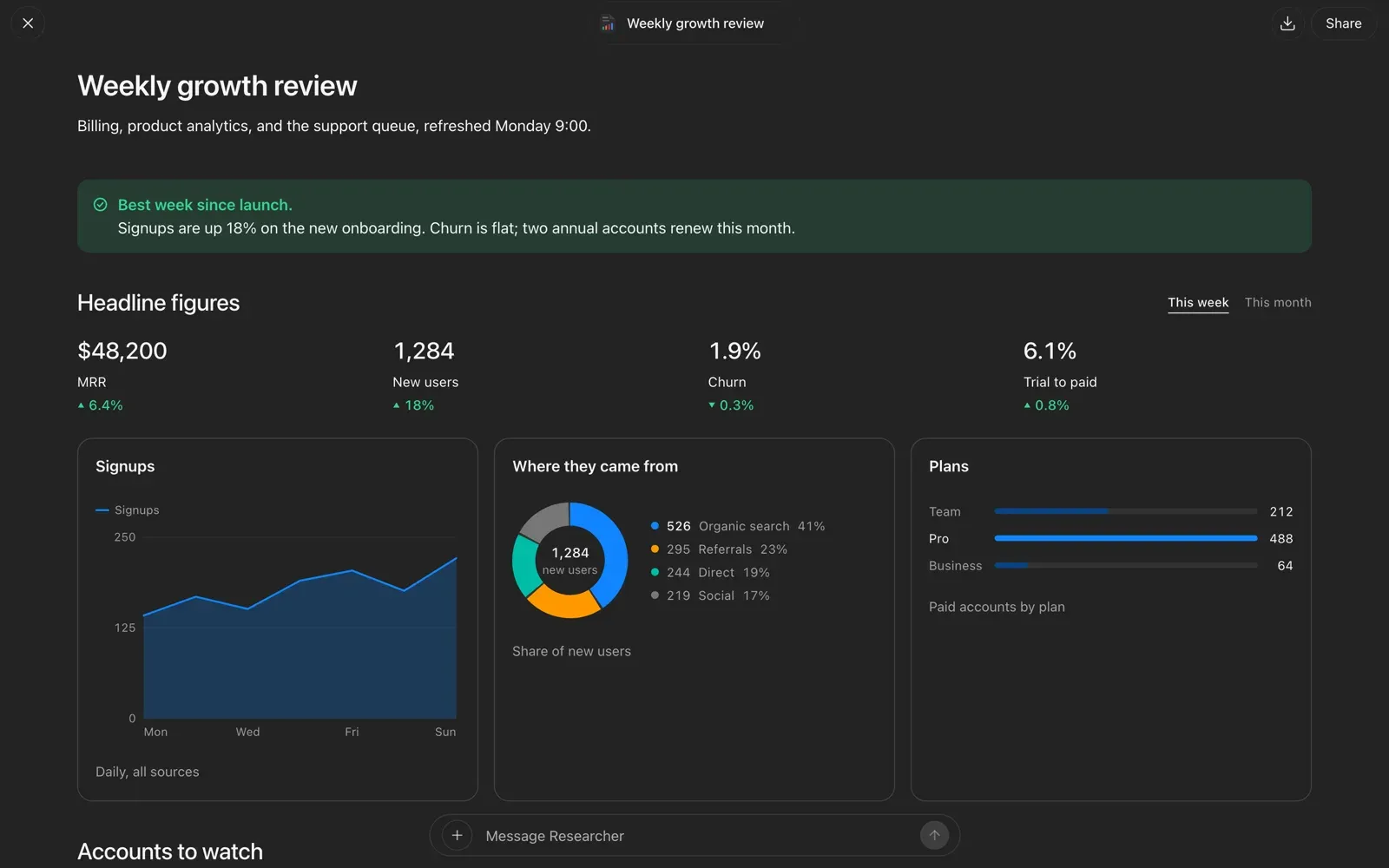
Official README screenshot: a dashboard page a bot built, with Share and download buttons and a message box below.
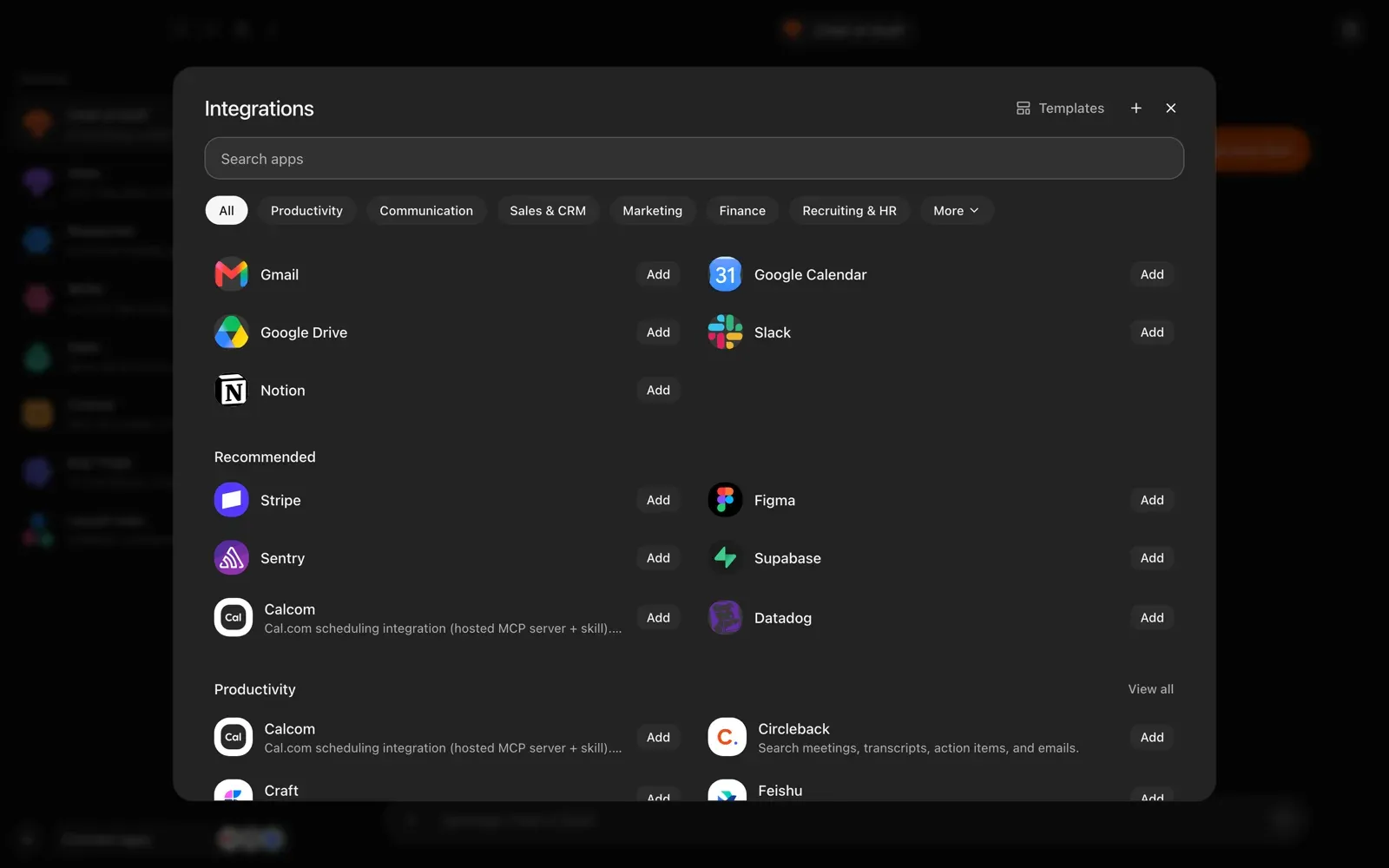
Official README screenshot: the integrations catalog with category filters and Add buttons.
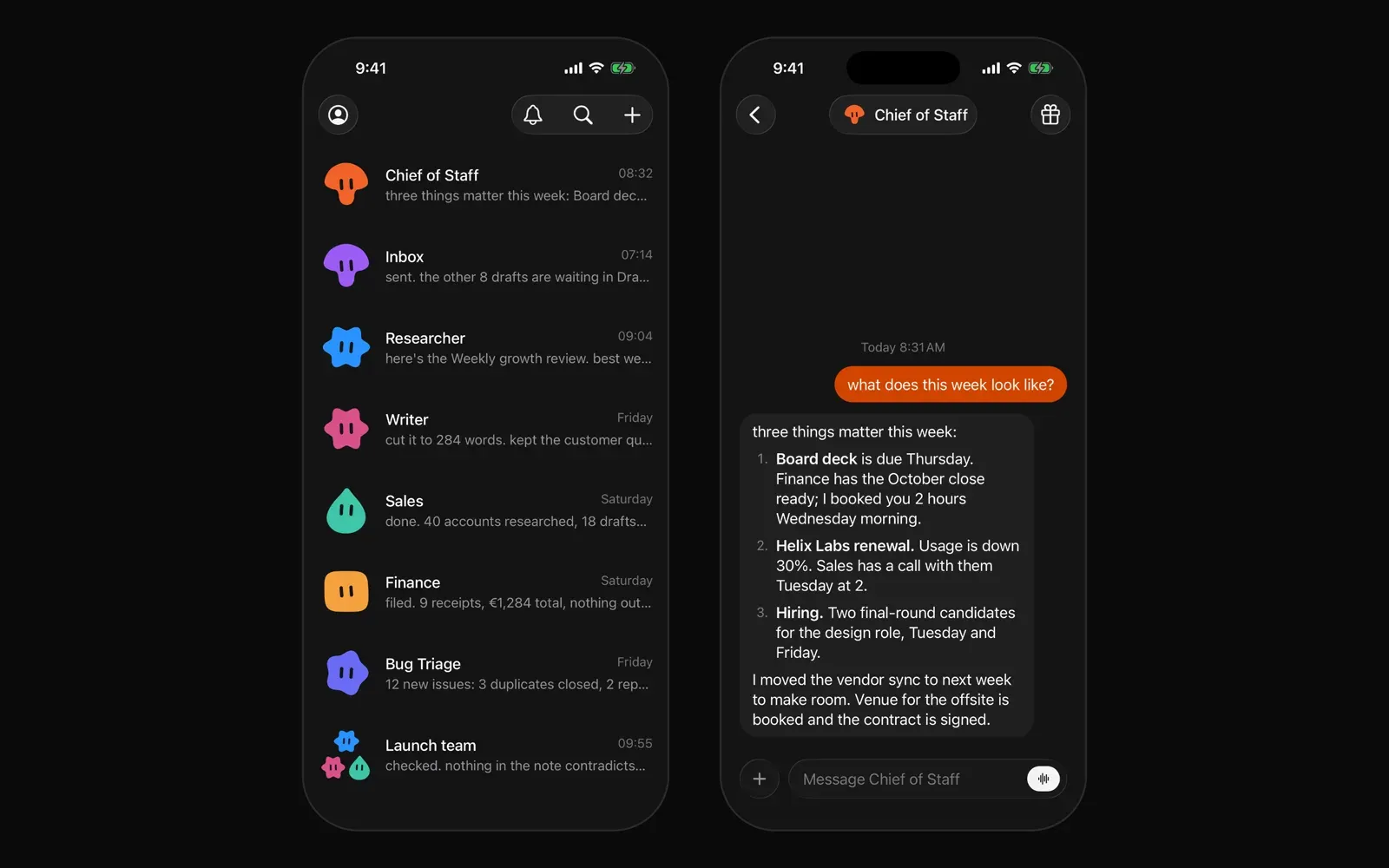
Official README screenshot: the bot inbox and a chat in the iPhone app.
Source: official Rakazo project page.
Key capabilities
- Persistent bots Each bot has its own conversations, memory, routines, skills and run history. Bots can be created from ready-made templates such as Inbox Manager, Sales Outbound, Expense Manager or Coding Agent, and each one can use a different model. A Replies setting chooses whether tool steps or only deliberate messages appear in chat.
- A computer for every bot Bots get a browser, terminal, files and a graphical desktop. A user can watch the screen, take control to sign in and hand control back. By default all bots in a workspace share one Team Computer, with a separate X display and Chrome profile per bot; a bot can instead use a Private Computer. The runtime documentation notes that Team folders organize work but are not security boundaries.
- Choice of sandbox provider
SANDBOX_PROVIDERselects where computers run: local Docker (the default for published images), Kubernetes pods, Incus containers, or managed remote providers including E2B, Novita, Daytona, CreateOS, Boat, Boxd, Railway and Wuying. The desktop app can also let bots run commands on the local machine after native confirmation, and that permission can be revoked from the app menu. Details are in the computer providers guide. - Bring your own model Supported paths include Claude Pro or Max and ChatGPT Plus or Pro sign-ins, API keys for Anthropic, OpenAI, OpenRouter or Grok, Amazon Bedrock and Google Vertex with host credentials, and local OpenAI-compatible servers such as Ollama, LM Studio, llama.cpp or MLX. The models guide documents a deployment default model (OpenRouter by default), per-bot models and a separate computer-use model for main models that cannot see images.
- Routines A routine is a prompt a bot runs on its own. Triggers include schedules (with cron expressions under Advanced), watches that check files, command output or a connected app tool at intervals from 5 minutes to a day, webhooks, incoming email, Slack messages and GitHub events. Each run is reported in the bot's chat, and a routine can use its own model and thinking level. See the routines documentation.
- Memory Bots write short notes indexed in a
MEMORY.mdfile, capped at about 4 KB of automatic notes, and users can read, edit, download or delete them. Shared memory holds facts every bot in a Space reads. Optional memory providers (Supermemory, Serenity, Honcho) add recall by meaning, as described in the memory guide. - Skills and teach-by-demonstration A skill is written know-how for a task. Skills can be written by hand, added from plugins or a GitHub repository (instructions only, bundled scripts are not run), or saved by a bot after a multi-step task. With Teach a task, a user records a demonstration on the bot's screen and the bot saves the steps as a skill.
- Group chats and delegation Several bots can share a group chat and be addressed with @mentions; they split work and report back. Bots can delegate to peer bots or short-lived subagents, and since v0.9.0 can hand read-only research to background helpers while the chat continues.
- Pages Bots build live pages such as dashboards, status boards and reports, which open full screen with the chat below for changes. Pages are private by default and can be shared with anyone holding the link without sign-in; a routine can keep a page updated. Web and desktop offer PDF download. See the pages guide.
- Integrations and MCP Optional managed catalogs come from Composio or Pipedream Connect. Without them, users can add an HTTPS MCP server or an OpenAPI JSON document under Integrations. Connector credentials are encrypted on the server and not returned by the API. Connected MCP servers can show interactive apps in chat.
- Chat apps Bots can be reached from Slack, Telegram, WhatsApp, iMessage and SMS, and Feishu (Lark), including group chats in those apps. Which apps appear depends on what the server operator configures; the homepage marks WhatsApp, Telegram and iMessage/SMS as self-hosted options. See chat apps.
- Voice and calls Voice mode covers dictation, reading replies aloud and calling a bot, and a bot can call the user when something needs attention. Providers include ElevenLabs, OpenAI, Fish Audio, xAI, Cartesia (speech only), a self-hosted OpenAI-compatible speech server such as Kokoro or Whisper, and macOS system voices when the server runs on a Mac.
- Approvals and audit log Approval modes are Never ask, Auto (an approval model passes actions that fit the request) and Ask. Purchases always require a person, and v0.9.0 added a spending limit for bot purchases. An always-on audit log records tool calls, approval decisions and settings or credential changes, exportable as JSON Lines.
- Content encryption at rest Chat messages, thread events, memory documents and uploaded or generated files are encrypted before they reach PostgreSQL or the artifact directory, per the encryption documentation. The database uses row-level security with a separate
rakazo_applogin for the application. - Self-hosting with Docker Compose The quick start needs Docker Engine, the Compose plugin, curl and OpenSSL; no clone or Node.js install. The installer downloads the Compose files, creates
.envwith random secrets and starts the stack on port 5173. For a server, the production guide covers putting HTTPS in front with Caddy and host hardening. Backup, upgrade, observability and restricted-network guides are also provided. - Desktop apps The Electron app for macOS, Windows and Linux can run Rakazo on the same computer (it installs the published images with Docker Compose, so Docker Desktop, OrbStack or Docker Engine must be present) or connect to an existing instance over HTTPS. On Linux the AppImage needs FUSE 2 (
libfuse.so.2). Podman is not detected automatically. - Mobile apps Expo-based apps for iPhone, iPad and Android connect to the hosted service or, through Use a custom server, to a self-hosted HTTPS origin. Recent releases added routine and memory editing, dictation, an iOS Live Activity and optional haptics on mobile.
- Hosted plans Rakazo also runs a hosted service. The pricing page lists Standard at $15 per month ($12 billed yearly), Pro at $49 and Max at $99 for use with your own model, each with a bot computer allowance (25, 100 and 200 hours a month), and Rakazo credits from $10 a month for model usage without markup. Trials last 7 days with 10 computer hours. Self-hosting is free.
Where Rakazo fits
Recurring inbox and admin work
The project's examples include an Inbox Manager bot connected to Gmail that archives newsletters, drafts replies and holds them for review, run each weekday through a routine. The routine panel shows the instruction, the schedule in the user's time zone and a run history. Drafts and actions that need confirmation follow the approval mode set in Settings, Approvals.
A team of bots with separate jobs
Templates cover roles such as Chief of Staff, Sales Outbound, Talent Scout, Expense Manager, Account Manager, Paid Media and Coding Agent. Bots can be placed in a group chat, mentioned by name and asked to review each other's output. Shared memory carries facts that every bot in the Space needs, and since v0.9.0 a Space can be shared with invited people who keep their own notifications and connected accounts. See Spaces.
Browser and desktop tasks on a sandboxed computer
A bot can open sites, run terminal commands and edit files on its computer. When a site needs a login, the user takes control of the screen, signs in and hands it back; each bot keeps its own browser profile. Repeated tasks can be recorded once with Teach a task and saved as a skill. The computer guide describes saved logins, purchase approvals and the spending limit.
Dashboards and reports shared by link
A bot can build a page from connected data, such as a weekly growth review, and a routine can refresh it on a schedule. The page opens full screen with the chat below it for edits, and can be shared with anyone holding the link. Since v0.9.0, bot edits to pages shared by link follow approval rules and show the proposed changes first.
Running on private or local models
Operators can list model IDs from an OpenAI-compatible server such as Ollama or LM Studio in RAKAZO_LOCAL_MODELS and make one the deployment default, with optional vision and reasoning flags per model. Desktop-managed local stacks can reach private model and speech endpoints through loopback addresses. When the main model cannot read screenshots, a separate computer-use model can operate the screen.
Always-on deployment on a VPS
The README documents running the same installer on a server with --prepare-only, setting SANDBOX_PROVIDER and RAKAZO_HOST in .env, and placing HTTPS in front of port 5173. Desktop and mobile apps then connect to that address with Existing instance or a custom server. The self-hosting guide covers image tags, pinned versions, backups and upgrades.
Install
mkdir -p rakazo && cd rakazo && curl -fsSLO https://raw.githubusercontent.com/elie222/rakazo/main/infra/compose/install-images.sh && bash install-images.shReviews of Rakazo
Be the first to share your experience with Rakazo.
Write a review
Loading review form…
Alternatives to Rakazo
 OpenClawOpenClaw is an MIT-licensed AI assistant that runs as a Gateway on your own machine or server, connects to Telegram, WhatsApp, Slack, Discord, iMessage and other channels, and keeps memory and credentials on hardware you control.
 Hermes AgentMIT-licensed agent from Nous Research that runs in a terminal, desktop app, browser or chat apps. It keeps curated memory, writes and refines its own skills, schedules jobs and works with OpenRouter, Anthropic, OpenAI, local or Nous Portal models.CCowAgentCowAgent combines language models with tools, reusable skills, memory and knowledge management. It runs locally or on a server, with a web console, desktop clients and messaging channels.