What is Docker?
Docker is a family of developer tools and services for building, sharing and running applications in containers, made by Docker, Inc. The core pieces are Docker Engine, the container runtime and daemon; the Docker CLI and Docker Compose; Docker Desktop, a desktop application that bundles these tools for macOS, Windows and Linux; and Docker Hub, the container image registry. The company page states that Docker is used by more than 20 million developers. Docker Engine 0.1.0 was released on March 23, 2013, according to the Engine release notes, and the subscription agreement lists Docker, Inc. at an address in Palo Alto, California.
Around these tools Docker sells and operates further products. Docker Scout analyzes image composition and vulnerabilities, Docker Hardened Images provides minimal, signed images with SBOMs and SLSA Build Level 3 provenance, and Docker Build Cloud runs docker buildx build on remote BuildKit builders with a shared cache. Docker Offload runs containers on cloud infrastructure, Testcontainers Cloud runs Testcontainers workloads remotely, and Docker Model Runner pulls and serves AI models from Docker Hub, OCI registries or Hugging Face. Newer AI products include Docker Sandboxes (microVM isolation for coding agents), an MCP Toolkit and Gateway, AI Governance and the Gordon assistant.
Licensing differs by component. Docker states in its pricing FAQ that its open-source software, such as Docker Engine, is accessible for all. Docker Desktop is licensed under the Docker Subscription Service Agreement. According to the Docker Desktop license page, Desktop is free for small businesses (fewer than 250 employees AND less than $10 million in annual revenue), personal use, education and non-commercial open source projects; it requires a paid subscription for professional use in larger organizations, for government entities and for commercial use beyond those limits. The Pro, Team and Business subscriptions include Docker Desktop.
Docker Desktop ships frequent releases. Version 4.99.0, released on November 9, 2026, bundles Docker Engine v29.9.3, Docker Compose v5.7.0, Docker Scout CLI v1.28.0, Docker MCP CLI v0.44.3 and Docker Offload v0.7.36. It fixes a socket leak in the system proxy, excess CPU use when sizing NFS or SMB volumes, and several Windows update and WSL 2 start issues, and adds BuildKit support for Windows containers with the containerd image store.
Other container tools on iThub include Podman, Rancher Desktop, OrbStack and Colima.
Key capabilities
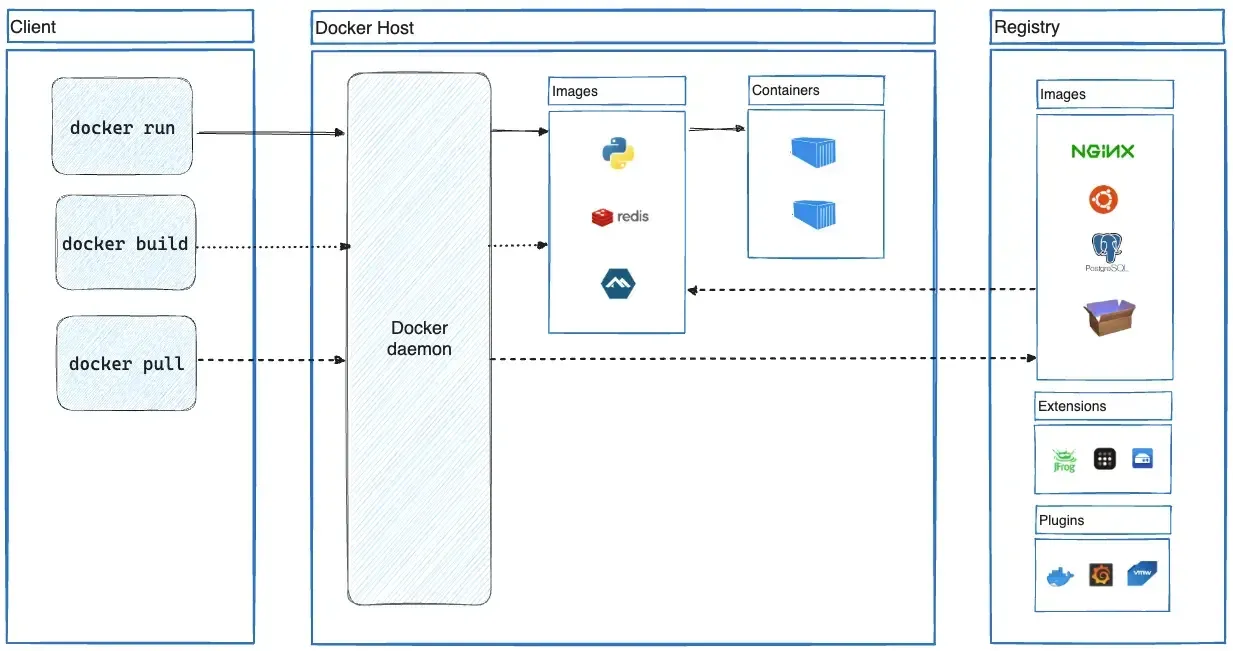
- Docker Engine The daemon builds images, runs containers and manages networks and volumes, controlled by the Docker CLI and a REST API. The Engine install guide lists packages for CentOS, Debian, Fedora, RHEL, Ubuntu and Raspberry Pi OS (32-bit) plus static binaries, across x86_64, arm64, 32-bit arm, ppc64le and s390x depending on the distribution.
- Engine convenience script Docker publishes a script at
get.docker.comthat installs the latest stable Engine release on supported Linux distributions. The documentation states that the script is not recommended for production environments and can cause unexpected major version upgrades. - Docker Desktop for macOS Separate DMG installers exist for Apple silicon and Intel Macs. Desktop supports the current and two previous major macOS releases and requires at least 4 GB of RAM; Rosetta 2 is optional on Apple silicon.
- Docker Desktop for Windows Desktop runs on Windows 10 22H2 (build 19045) and Windows 11 23H2 (build 22631) or later in the Enterprise, Pro or Education editions, using a WSL 2, Hyper-V or Docker VMM (beta) backend. Per-user installation without administrator rights is the default, the WSL 2 backend needs 8 GB of RAM, and Windows containers need a Pro or Enterprise edition.
- Docker Desktop for Linux Packages are documented for Ubuntu, Debian, Fedora, RHEL and Arch. Requirements include a 64-bit kernel with KVM virtualization, QEMU 5.2 or later, systemd, at least 4 GB of RAM and a GNOME, KDE or MATE desktop.
- What Desktop bundles Docker Desktop includes Docker Engine, containerd, the Docker CLI and GUI, Docker Compose, Kubernetes, Desktop Extensions and volume exports. Pro and higher add Synchronized File Shares and Docker Debug.
- Docker Compose Compose defines multi-container applications in a YAML file and starts them with one command. Desktop 4.99.0 ships Compose v5.7.0.
- Docker Hub Docker Hub stores and shares images with unlimited public repositories, private repositories, webhooks and the trusted content catalog of Docker Official Images and verified publishers. Personal accounts get 1 private repository and 100 pulls per hour; paid plans have unlimited private repositories and pull rate under fair use.
- Docker Scout Scout analyzes image layers and packages against an advisory database, shows health scores and remediation advice, and integrates with CI systems and registries. Personal includes 1 Scout-enabled repository, Pro 2, and Team and Business unlimited.
- Docker Hardened Images Hardened Images are minimal images with near-zero CVEs, SBOMs and SLSA Build Level 3 provenance. The community catalog is free under Apache 2.0; DHI Select starts at $5,000 per repository and adds FIPS and STIG variants and SLA-backed critical CVE fixes within 7 days, and DHI Enterprise adds unlimited customizations and an Extended Lifecycle Support add-on.
- Docker Build Cloud Builds are sent to BuildKit instances in the cloud instead of the local daemon, with a remote cache shared across team members and CI. Data is encrypted in transit, and results go back to the local image store or to a registry, as described in the Build Cloud docs.
- Testcontainers Cloud Testcontainers workloads from developer machines or CI run in Docker-managed cloud workers. Pro includes 100, Team 500 and Business 1,500 runtime minutes per month, with extra minutes at $3 per 100 prepaid or $4 per 100 on demand.
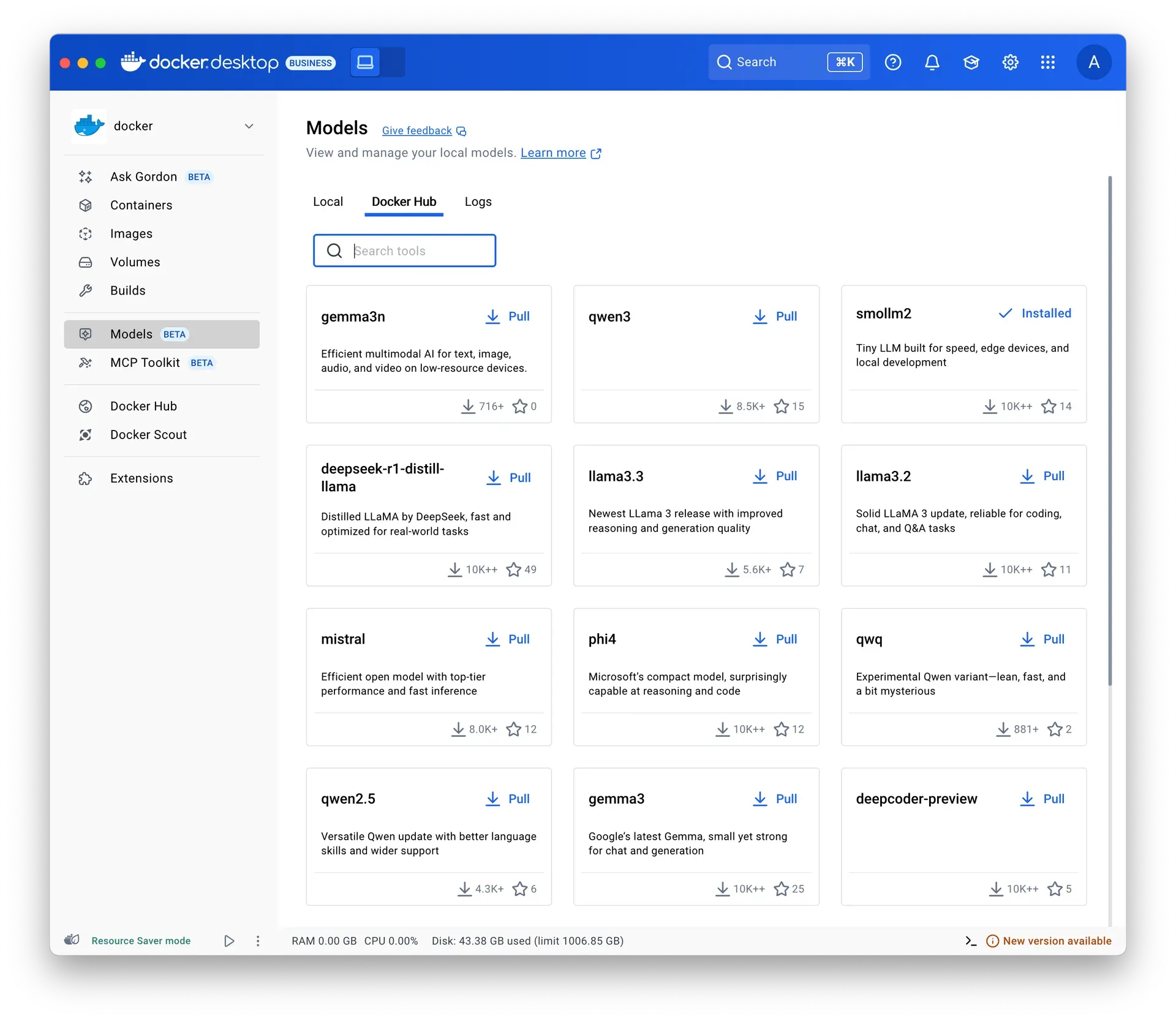
- Docker Model Runner Model Runner pulls, runs and serves LLMs and other AI models from Docker Hub, any OCI-compliant registry or Hugging Face. Docker Desktop shows a Models view with local models, a Docker Hub catalog and logs.
- Docker Sandboxes and AI tools Docker Sandboxes give coding agents isolated environments with microVM isolation, locally or on Docker-managed cloud infrastructure, through the
sbxCLI; the CLI and local compute are free and cloud compute is pay-as-you-go. Desktop also includes an MCP Toolkit and the Gordon assistant, which proposes actions and runs them after approval. - Team administration Team adds bulk user management, audit logs, Docker Hub role-based access control and organization access tokens for up to 100 users. Business adds SSO, SCIM provisioning, Hardened Docker Desktop with Enhanced Container Isolation, Settings Management, Registry and Image Access Management, an MSI installer, VDI support and a Desktop usage insights dashboard.
- Subscription prices The pricing page lists Personal at $0, Pro at $9 per user per month billed yearly ($11 monthly), Team at $15 yearly ($16 monthly) and Business at $24 per user per month. Support response targets are 5 business days for Pro, 2 for Team and 1 for Business, with Premium Support and TAM services as a Business add-on.
Tested by iThub
· Version 29.8.2
- Environment
- Windows AMD64; Docker Desktop 4.95.0, Docker Engine 29.8.2, Linux containers; synthetic local data
- Scenario
- Start pinned containers and serve a synthetic page on a loopback port
- Observed result
- The official hello-world image ran successfully. BusyBox 1.36.1 then served the expected synthetic fixture over HTTP 200 at 127.0.0.1:14360.
After interrupted image downloads, BusyBox 1.37.0 failed with exec format error. A fresh 1.36.1 image worked; the precise cause of the earlier local image failure was not established.
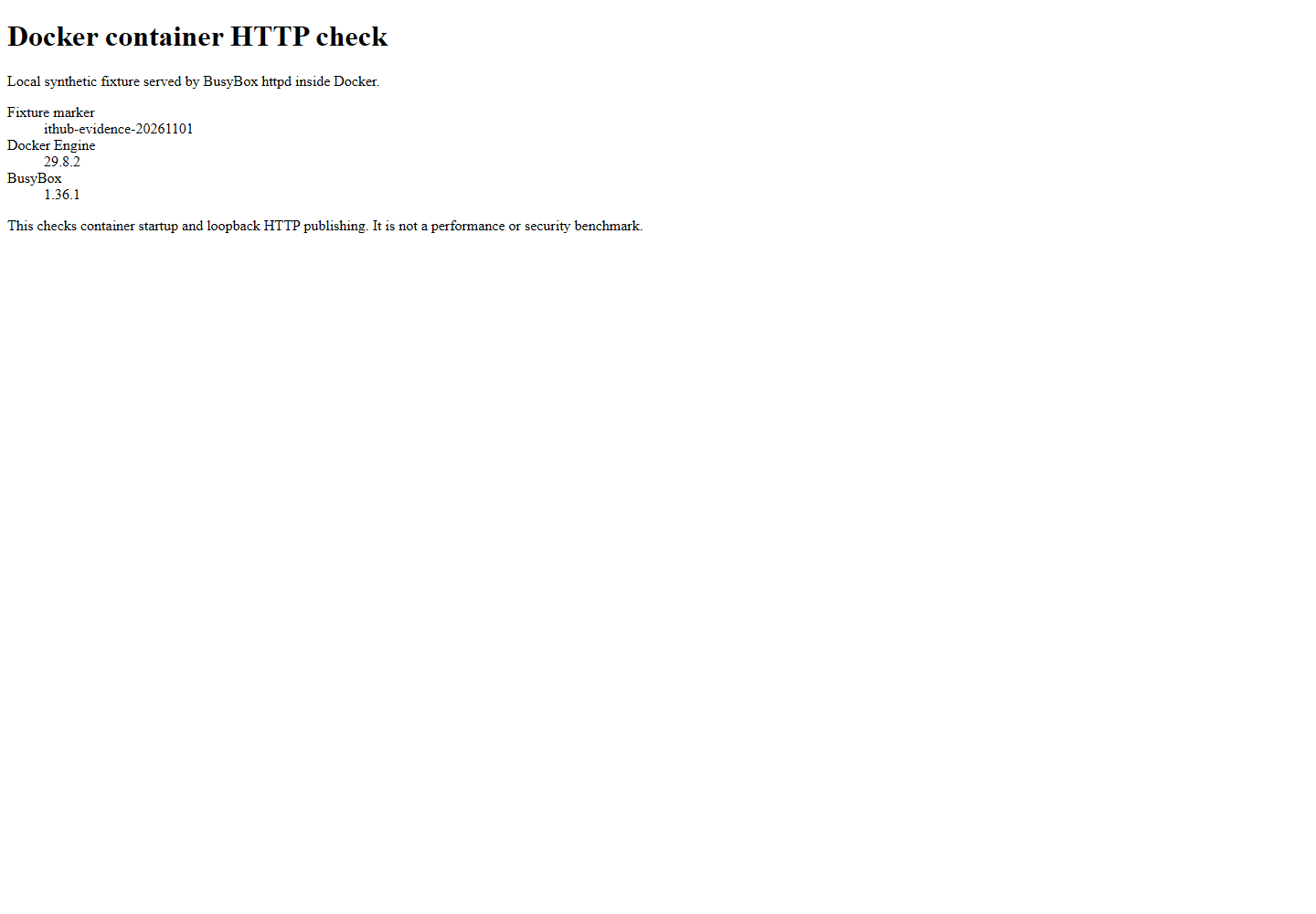
Scope and limits. One Windows host and two small Linux containers were exercised. This was not a performance, security, Compose, Kubernetes or production reliability test.
Download the test record (JSON)How we record testsProject source ↗Project source ↗Project source ↗
Where Docker fits
Local development environments
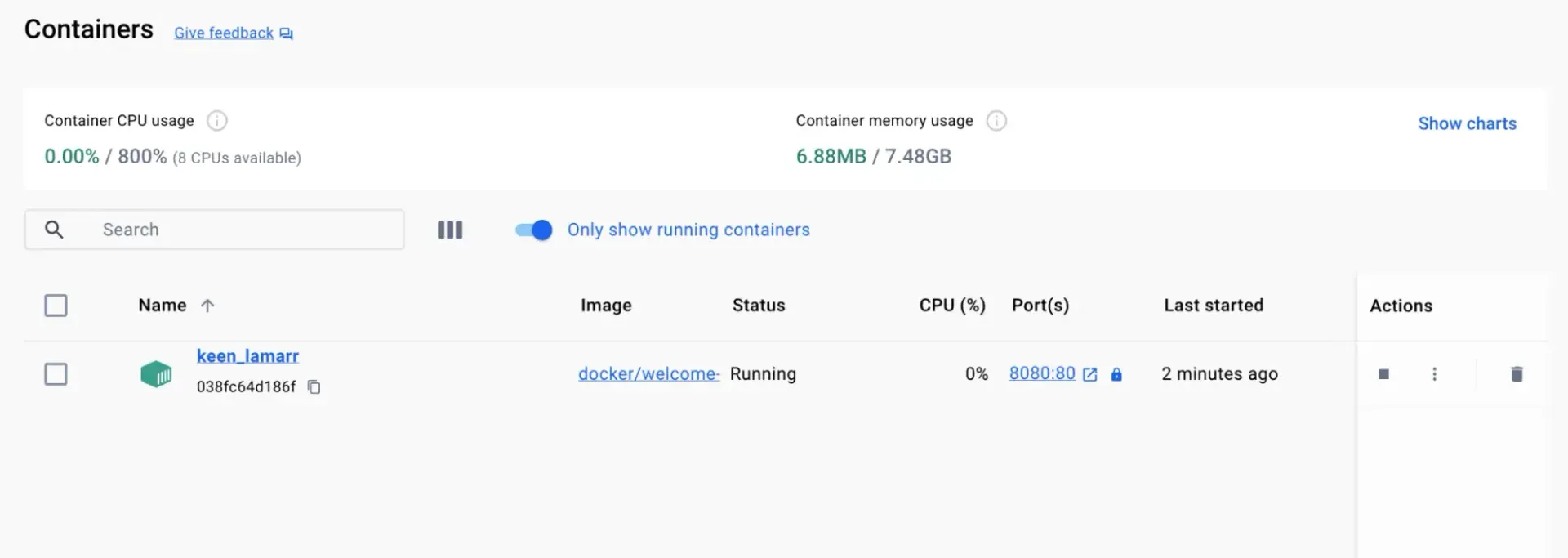
Developers install Docker Desktop on macOS, Windows or Linux and run databases, caches and application services as containers, often described in a Compose file so the whole stack starts with one command. The Desktop dashboard shows running containers with CPU and memory usage, ports and actions.
Building and publishing images
A Dockerfile describes the image, docker build or docker buildx build produces it, and docker push uploads it to Docker Hub or another registry. Build Cloud can run these builds on remote builders with a shared cache for teams and CI pipelines.
Running containers on Linux servers
On servers, Docker Engine is installed from the distribution packages Docker publishes, without Docker Desktop. The Engine then runs containers managed through the CLI, Compose or orchestration tools such as Kubernetes.
Supply chain security
Teams scan images with Docker Scout for vulnerabilities and policy violations, base their images on Docker Hardened Images, and restrict which registries and images developers may pull with Registry and Image Access Management on the Business plan.
Integration testing with real dependencies
Testcontainers libraries start throwaway containers for databases and other services during tests. With Testcontainers Cloud, those containers run on Docker-managed workers, for example from CI runners without a local Docker daemon.
Managing Docker Desktop across an organization
Business subscribers deploy Docker Desktop with the MSI installer, use SSO, lock settings with Settings Management, turn on Enhanced Container Isolation and review adoption in the Desktop usage insights dashboard. SCIM keeps users and groups in sync with the identity provider.
Running AI models and agents locally
Docker Model Runner pulls models such as Llama, Qwen, Mistral or Gemma variants from Docker Hub and serves them on the local machine. The MCP Toolkit connects MCP servers to AI clients, and Docker Sandboxes run coding agents in isolated microVMs.
Install
curl -fsSL https://get.docker.com -o get-docker.sh && sudo sh get-docker.shReviews of Docker
Be the first to share your experience with Docker.
Write a review
Loading review form…
Found Docker useful? Upvote it todayYour vote helps other IT teams find it in the daily ranking.