

What is Hermes Agent?
Hermes Agent is an open-source AI agent built by Nous Research and published under the MIT license. It runs as a long-lived process on a laptop, a small VPS or a container, and the same agent can be reached from a terminal UI, a desktop app, a browser workspace and messaging platforms such as Telegram, Discord, Slack, WhatsApp, Signal and email. Its distinguishing design is a learning loop: the agent keeps a bounded memory of facts and user preferences, writes reusable skills after complex tasks, refines those skills during use and searches its own past sessions.
Distribution is broad. A shell installer covers Linux, macOS and WSL2, a PowerShell installer covers native Windows, and Hermes Desktop ships as an Apple Silicon DMG, a signed MSIX package for Windows and a Microsoft Store listing. The platform support matrix puts macOS, Windows 10/11, glibc Linux, WSL2 and the nousresearch/hermes-agent Docker image in Tier 1, while Nix and an aarch64 Termux package for Android are best-effort Tier 2 targets. Intel Mac desktop bundles and PyPI installs are not supported.
The current release is v0.23.0, the Hearth Release, published November 5, 2026. Its main change is architectural: one gateway per machine now owns every session, and the CLI, TUI, Desktop, editors, bots and cron attach to it as clients, so a chat has one queue and one history. The release also adds an opt-in Webapp that serves the Desktop workspace in a browser tab, inline images in compatible terminals, a /rewind command, price tags and spend limits for paid MCP tools, pluggable delegation and plugin auto-updates. Desktop moved to Electron 44 and now needs macOS 13 or later and 64-bit Windows. The old browser_* tools were removed in favor of browser_exec, and hermes mcp serve became hermes mcp-serve.
The core is written in Python; first-party installs run on Python 3.14, and the installer pulls in Node.js, ripgrep and FFmpeg through its own package manager. Configuration and state live in a Hermes home directory, ~/.hermes/ on POSIX systems and %LOCALAPPDATA%\hermes on Windows, holding config.yaml, an .env file for keys, memories, skills and a SQLite session store. Tools execute through six built-in terminal backends: local, Docker, SSH, Modal, Daytona and Vercel Sandbox, with more available as plugins.
Hermes is model-agnostic. It works with OpenRouter, Anthropic, OpenAI, Gemini, self-hosted endpoints such as Ollama, vLLM or LM Studio, and Nous Portal, the optional paid subscription from Nous Research that bundles models with hosted web search, image generation, speech and a cloud browser. The agent itself does not include a model; output quality, latency and cost depend on the provider you configure. Full documentation is at hermes-agent.nousresearch.com/docs.
Hermes Agent screenshots
Explore the interface. Open a screenshot to view it at full size.
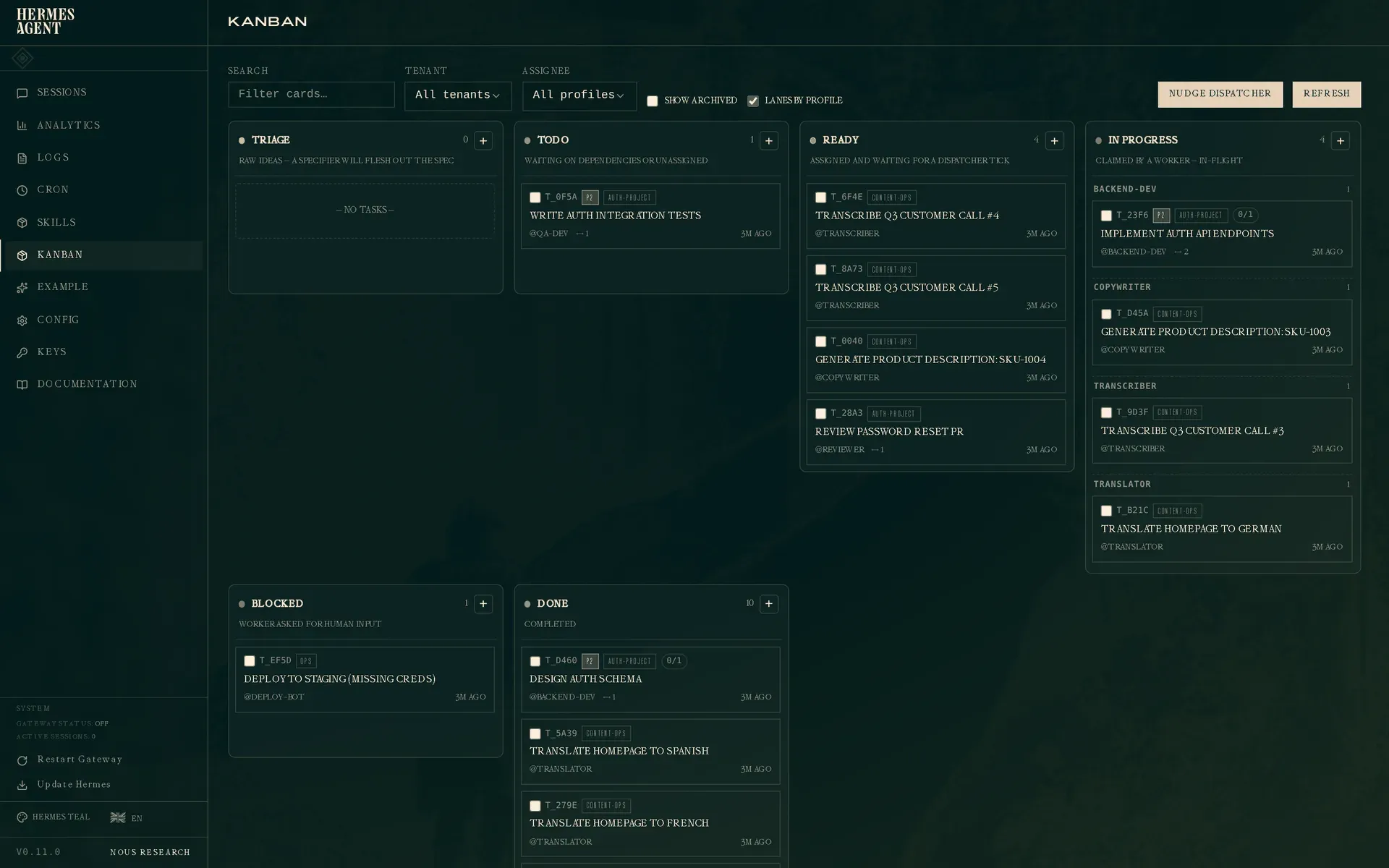
Official documentation screenshot of the Kanban board in the Hermes web dashboard, with tasks grouped by worker profile.
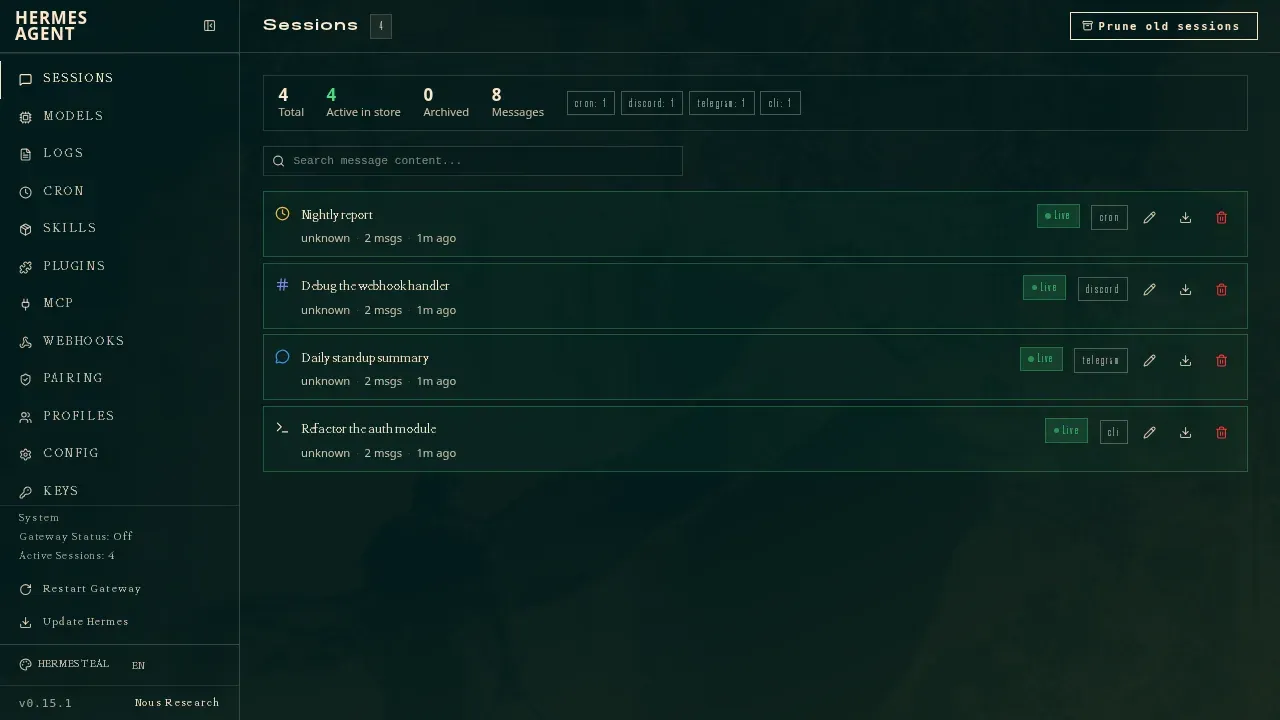
Sessions page of the web dashboard showing one store shared by a cron job, a Discord thread, a Telegram chat and a CLI session, with search and prune controls.
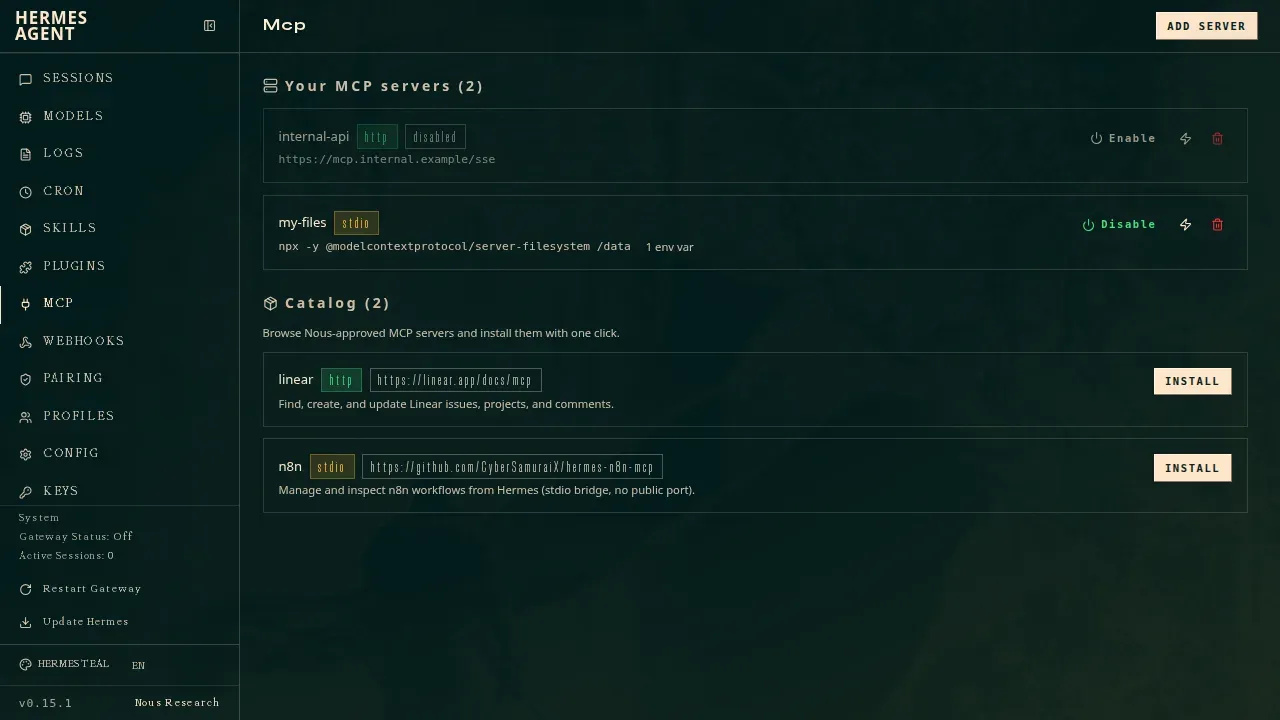
MCP page of the web dashboard with one HTTP and one stdio server configured, plus Nous-approved catalog entries for Linear and n8n.
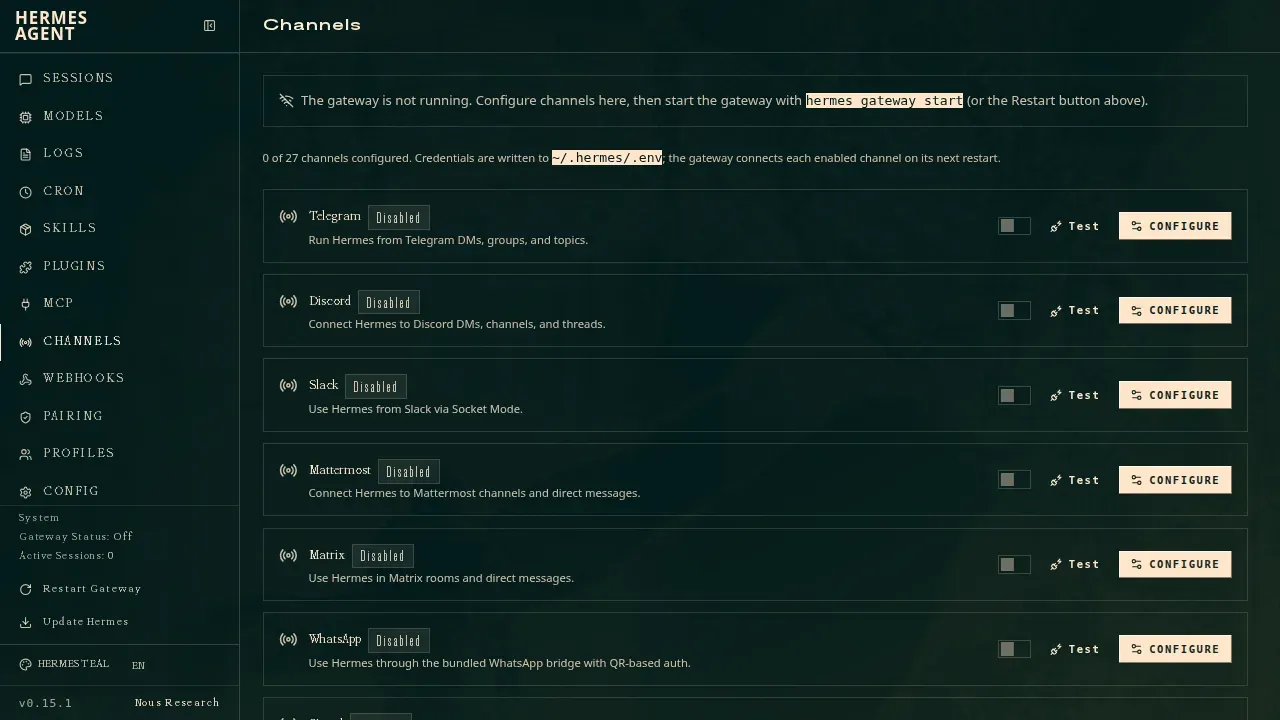
Channels page of the web dashboard, where messaging platforms are configured; credentials are written to ~/.hermes/.env and connected on the next gateway restart.
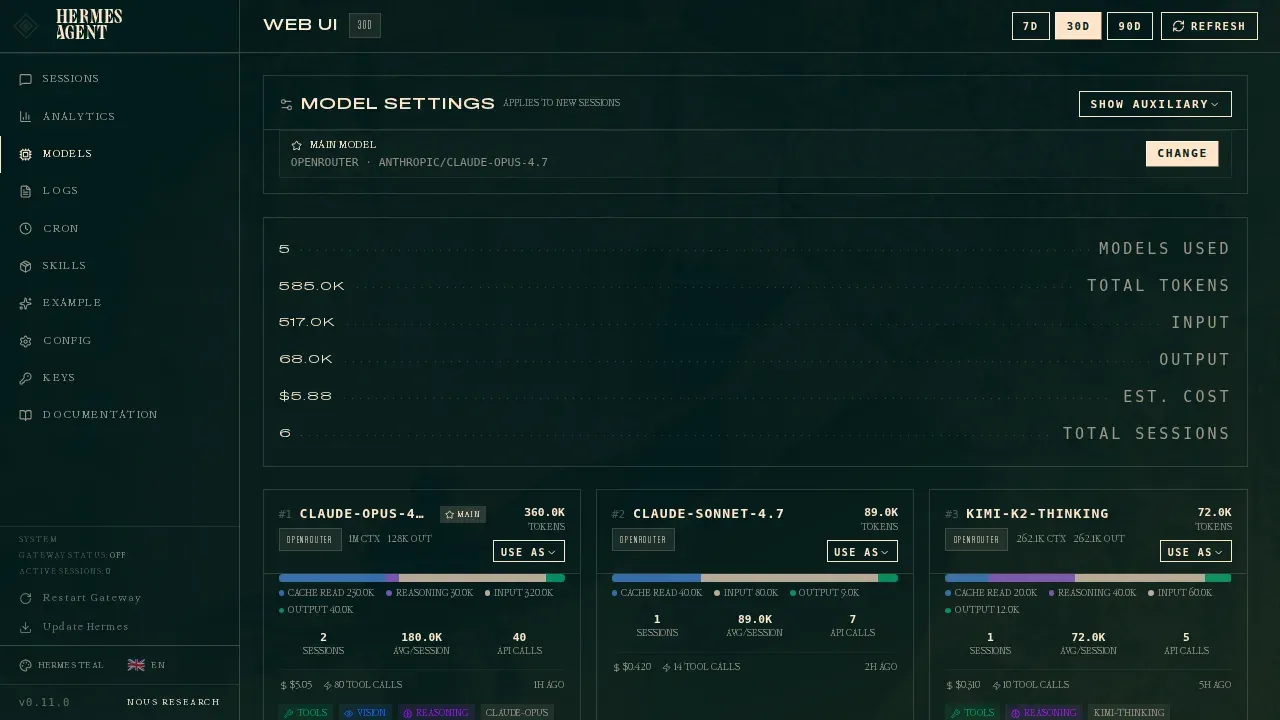
Models page of the web dashboard showing the main model, 30-day token and cost totals, and usage per model through OpenRouter.
Source: official Hermes Agent project page.
Key capabilities
- Install on Linux, macOS and WSL2 Run
curl -fsSL https://hermes-agent.nousresearch.com/install.sh | bash. The script needs Git, curl, tar and SHA-256 utilities, installs code to~/.hermes/hermes-agent/, places the launcher at~/.local/bin/hermesand, since v0.23.0, checks out the latest stable release rather than the tip ofmain. Flags such as--skip-browser,--non-interactiveand--include-desktoptrim or extend the install, as described in the installation guide. - Install on native Windows Run
iex (irm https://hermes-agent.nousresearch.com/install.ps1)in PowerShell. The CLI, gateway, TUI and tools work without WSL, with code and data under%LOCALAPPDATA%\hermes. The installer bundles Astral'suv, which some antivirus engines flag as a false positive; the README documents an attestation check and recommends excluding the folder rather than a file hash. - Hermes Desktop app A native Electron app that drives the same agent, config, keys, sessions and skills as the CLI. It is distributed as an Apple Silicon DMG, a signed MSIX bundle installed through Windows App Installer, and a Microsoft Store package; the MSIX requires Windows 11 22H2 or later. Version 0.23.0 requires macOS 13 or later and 64-bit Windows. Linux desktop packaging is disabled in the release workflow, so Linux users start the app from a source install with
hermes desktop. - Docker image and Android The
nousresearch/hermes-agentimage haslatest/stable,mainand versioned tags, mounts data at/opt/dataand serves the gateway API on port 8642. Docker installs do not supporthermes update; you upgrade by pulling a new image. A signed Termux APT repository provides an aarch64 Android package with Python, Node.js and the TUI, but it is a prerelease, Tier 2 target and Android can kill background processes. - Terminal UI and classic CLI
hermesopens an interactive session with multiline editing, slash-command completion, streaming tool output and interrupt-and-redirect. Version 0.23.0 draws pasted images and screenshots inline in kitty, Ghostty, iTerm2, WezTerm and Konsole, and adds/rewindto edit and resend an earlier prompt or fork a new session from it.hermes doctordiagnoses installation problems. - Messaging gateway
hermes gatewayconnects one agent to Telegram, Discord, Slack, WhatsApp, Signal, Mattermost, Matrix, email and other platforms, with every adapter now packaged as a plugin. Unknown direct-message senders are denied by default and must complete pairing with an eight-character code that expires after one hour. See the messaging gateway guide for per-platform setup. - Persistent, bounded memory Two files,
MEMORY.md(2,200 characters) andUSER.md(1,375 characters), are loaded into the system prompt as a frozen snapshot at session start. The agent edits them with itsmemorytool and must consolidate entries when a write would exceed the limit. FTS5 full-text session search with LLM summaries covers older conversations, and external memory providers such as Honcho can replace or extend the built-in store. - Self-written skills Skills are on-demand Markdown documents in
~/.hermes/skills/, compatible with the agentskills.io standard and loaded through progressive disclosure to limit token use. The agent can create a skill after a complex task and revise it later. Version 0.23.0 reduced the bundled set from 58 to 44 and addedhermes curator lockso a hand-curated skill cannot be rewritten by the agent, even in YOLO mode. - Model and provider choice
hermes modelor/model provider:modelswitches between OpenRouter, Anthropic, OpenAI, Gemini, Amazon Bedrock, LM Studio, Ollama Cloud, custom OpenAI-compatible endpoints and Nous Portal without code changes. Fallback providers and provider routing are configurable. When no model is chosen, v0.23.0 defaults to GLM-5.3. - Scheduled jobs A built-in cron scheduler creates one-shot or recurring jobs from natural language or cron expressions through a single
cronjob_managetool. Results can go back to the originating chat, a file or another platform, and a no-agent mode runs a script on a schedule with no LLM call. Since v0.23.0 a running job can be cancelled and each job sets its own missed-run policy. - Subagents and Kanban board
delegate_taskspawns isolated subagents for parallel work, and the delegation backend is pluggable, with an officialadvanced-delegationplugin for per-model or per-profile routing. A SQLite-backed Kanban board in~/.hermes/kanban.dbcoordinates multiple named profiles as separate worker processes with retries and crash recovery. - Terminal backends and sandboxing Commands run locally or in Docker, SSH, Modal, Daytona or Vercel Sandbox, with Singularity and bubblewrap available as plugins. The Docker backend drops all Linux capabilities except three, sets
no-new-privilegesand a 256-process limit, and forwards no host environment variables unless listed. Modal and Daytona can hibernate an idle environment. - MCP client and catalog MCP servers are declared under
mcp_serversinconfig.yaml, as local stdio commands or remote HTTP endpoints, with per-server tool filtering. A curated catalog of Nous-reviewed servers installs disabled by default, and the consent card shows the exact command or URL each server will run or contact. Paid MCP tools can declare a per-call price, and Hermes asks before a chat exceeds its spend limit. Details are in the MCP guide. - OpenAI-compatible API server Setting
API_SERVER_ENABLED=trueand anAPI_SERVER_KEYexposes the agent athttp://127.0.0.1:8642/v1with Chat Completions, Responses and Runs endpoints. Frontends such as Open WebUI, LibreChat or LobeChat can then use Hermes, with its tools and memory, as a backend. The API server reference documents session keys, idempotency and terminal statuses. - Web dashboard and Webapp
hermes dashboardserves an admin panel on127.0.0.1:9119for config, keys, sessions, logs, cron, skills, MCP, channels and pairing. The separate Webapp, off by default, serves the full Desktop workspace on port 9120 for a single user. Any non-loopback bind requires an auth provider: basic auth, Nous Portal OAuth or self-hosted OIDC. - Profiles Each profile is a separate Hermes home with its own config, keys,
SOUL.mdpersona, memory, sessions, skills and cron jobs. The documentation warns against pointing two agent processes at one profile, because both write memory automatically. - Migration from other agents The official
agent-importersplugin imports settings, memories and skills from OpenClaw, Claude Code, Codex CLI and Cursor, with a--dry-runpreview. API keys are only migrated from OpenClaw, and only with--migrate-secrets. - Research tooling Batch trajectory generation and trajectory compression support training tool-calling models, which reflects Nous Research's work on its own Hermes model family. These features are aimed at researchers rather than everyday users.
Where Hermes Agent fits
Running a personal agent on a small VPS
Install with the shell script or the Docker image, run hermes setup to choose a provider, then start hermes gateway as a service and pair your Telegram, Discord or Signal account. The agent keeps working on the server while you talk to it from a phone. Check that approvals.mode is not off, that only paired users can reach the bot, and that hermes gateway stop refuses while sessions are live. The Docker guide covers volume layout and the published ports.
Unattended reports and maintenance jobs
Ask the agent in plain language for a daily summary, a nightly backup check or a weekly audit, or create the job with hermes cron. Choose the delivery target, attach any skills the job needs and decide whether missed runs should catch up. For scripts that do not need a model, use no-agent mode so stdout is delivered verbatim with no token cost. Headless runs deny dangerous commands by default through cron_mode; review that setting before relying on a job that needs elevated actions.
Coding and repository work from the terminal
Start hermes in a project, add context files and let the agent read, patch and test code. With LSP enabled, patch and write_file return in milliseconds while type errors still reach the model. Use /rewind to retry from an earlier prompt, /compress when context grows, and a Docker or SSH backend if the agent should not run commands on your workstation. Spawn subagents with delegate_task for parallel reviews.
Using Hermes as a backend for a chat frontend
Enable the API server in ~/.hermes/.env with a strong API_SERVER_KEY, restart the gateway and point Open WebUI or another OpenAI-compatible client at port 8642. Requests pass through the gateway's admission queue, so they share history and tools with the other surfaces. Verify that interrupted turns report cancelled rather than stop in your client, and keep the port on loopback or behind a proxy.
Coordinating several specialized agents
Create one profile per role, for example a researcher, a coder and a reviewer, each with its own model, skills and memory. Use the Kanban board to hand work between them as durable tasks, or Bot Mode Group Chats in Desktop where a lead bot or automatic router picks who answers. Bot-to-bot exchanges stop after max_hops, four by default, following the last human message. Read the Kanban reference before running workers unattended.
Migrating from OpenClaw or Claude Code
During hermes setup, accept the import offer, or install the agent-importers plugin and run hermes import-agent openclaw --dry-run first. Review the persona file, memories, skills and command allowlist that will be copied, then run the real import. MCP servers from ~/.claude.json map to mcp_servers in config.yaml. Re-check approval rules afterwards, because an imported allowlist carries the old agent's trust decisions.
Install
curl -fsSL https://hermes-agent.nousresearch.com/install.sh | bashReviews of Hermes Agent
Be the first to share your experience with Hermes Agent.
Write a review
Loading review form…
Alternatives to Hermes Agent
 OpenClawOpenClaw is an MIT-licensed AI assistant that runs as a Gateway on your own machine or server, connects to Telegram, WhatsApp, Slack, Discord, iMessage and other channels, and keeps memory and credentials on hardware you control.
 LettaLetta Code is an open-source stateful agent harness whose agents keep memory and identity over time, used from a CLI, a browser or messaging apps.
 Agent ZeroAgent Zero is an open-source, MIT-licensed AI agent that works in its own Dockerized Linux workspace with a terminal, browser and desktop apps.