

What is Agent Zero?
Agent Zero is an open-source AI agent framework that gives the agent its own Linux workspace. The agent researches, writes code and creates or edits documents with a terminal, a web browser and desktop apps, and it can create new tools for itself as it works. It is developed by Agent Zero, s.r.o., a company in Brno, Czech Republic, that states it is dedicated solely to developing and maintaining the framework. The GitHub repository was created in 2024.
Agent Zero runs in a Docker container that acts as its sandbox. On desktops, A0 Launcher for Windows, macOS and Linux guides the Docker setup, creates an instance and opens the Web UI. On servers and SSH sessions, the A0 Install script creates a Dockerized instance with a persistent workspace, and hosts that already run Docker can start it with a single docker run command. Time Travel keeps snapshots of the /a0/usr workspace for rollback, and the optional A0 CLI Connector or Launcher Host access lets the agent reach files, commands and a browser on your own computer.
The software is free of charge under the MIT License. You bring the model: a cloud provider API key, a supported AI account such as ChatGPT for Codex models, or a local model server such as Ollama or LM Studio. It connects external tools through MCP, talks to other agents through A2A, exposes an external HTTP API protected by an API key, and installs community providers, tools and integrations from its Plugin Hub. Documented use cases include software engineering, web and UI QA, research, office documents, data analysis and scheduled monitoring tasks.
Agent Zero screenshots
Explore the interface. Open a screenshot to view it at full size.
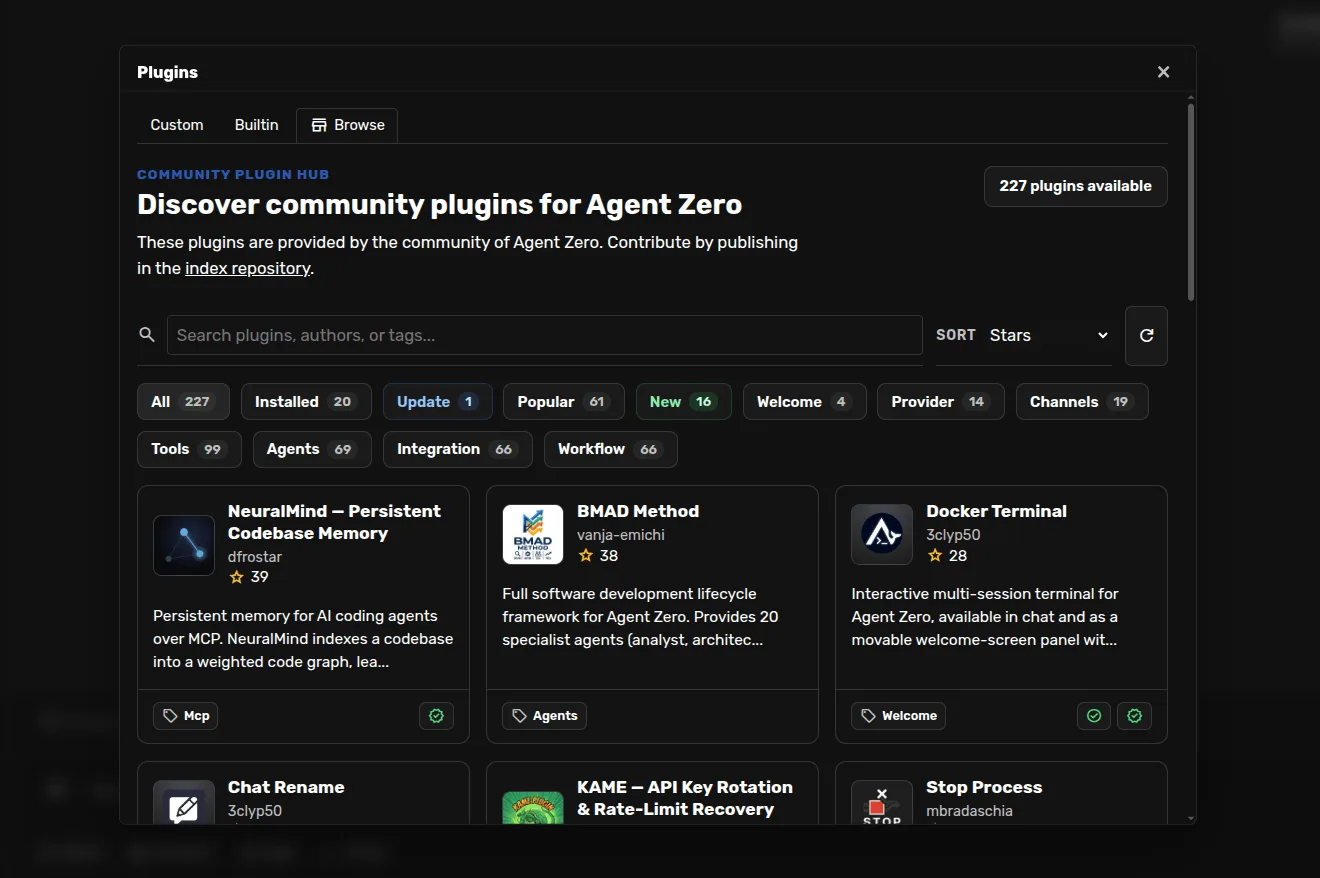
Source: official Agent Zero project page.
Key capabilities
- Linux workspace A Dockerized Linux environment with a terminal, a file manager and desktop apps such as Blender. You can watch the agent work and take over with your own mouse and keyboard.
- Built-in browser The agent opens pages, fills forms, uploads files and takes screenshots. Annotate mode lets you click an element and request a change.
- Document cowork A Markdown editor and LibreOffice files that the agent edits alongside you, saved as ODT, ODS or ODP.
- Projects and memory Separate workspaces, instructions, memory, secrets, knowledge and Git repositories per project, with a Memory view to search, edit or remove stored entries.
- Multi-agent delegation Agent Zero hands parts of a task to other agents, each with its own instructions and conversation, which then report back.
- Time Travel Snapshots of the /a0/usr workspace to compare files, inspect a past state and roll back.
- Install paths A0 Launcher for desktops, A0 Install for servers, or a direct docker run command.
Where Agent Zero fits
- MCP tool integration External MCP servers, started by a command or reached at a URL, are added as JSON in the MCP/A2A settings.
- A2A interoperability Other agents can talk to Agent Zero as a collaborator over the A2A protocol.
- External API HTTP endpoints such as /api_message and /api_log_get send messages and read chat logs, authenticated with an X-API-KEY header.
- Model providers Cloud provider API keys, ChatGPT sign-in for Codex models, and local servers such as Ollama, LM Studio and oMLX.
- Customization Prompts, tools, Skills, Agent Profiles and Model Presets can be inspected, changed, replaced or extended.
- Plugin Hub Community providers, tools, memory systems, integrations and UI additions installed from the Web UI.
- Scheduling and secrets A task scheduler runs recurring or one-off jobs, and a Secrets store keeps credentials out of prompts.
- Host access The A0 CLI Connector links a terminal, files and browser on your machine to a local instance or a remote one on a VPS.
Install
docker run -d -p 127.0.0.1:5080:80 -v a0_usr:/a0/usr agent0ai/agent-zeroReviews of Agent Zero
Be the first to share your experience with Agent Zero.
Write a review
Loading review form…
Alternatives to Agent Zero
 CrewAICrewAI is an MIT-licensed open-source Python framework for orchestrating multi-agent AI workflows; CrewAI Enterprise adds a hosted runtime with a free Basic tier and custom-priced governance features.
 Kortix CompanyOSSource-available platform for running AI agents across a company: event-triggered agents, 3,000+ connectors, per-session cloud computers, approvals and audit, from Kortix Cloud or a self-hosted Docker Compose stack.
 LangChainLangChain is an MIT-licensed open-source framework (Python/JS) for building LLM applications and agents via LangGraph; LangSmith adds optional hosted tracing, evaluation and deployment.