

What is CrewAI?
CrewAI is an open-source Python framework for building multi-agent AI systems, developed by the company CrewAI and released under the MIT license. The README describes it as a standalone framework with its own primitives for agents, tasks, crews, flows, tools and orchestration. It offers two complementary models: Crews, teams of agents with roles, goals and backstories that collaborate and delegate work, and Flows, event-driven workflows with explicit state, branching and routing in which crews, single LLM calls and ordinary Python code run as steps.
The framework is published on PyPI as crewai and requires Python 3.10 or later and earlier than 3.14. The installation guide uses uv to install the CLI with uv tool install crewai. crewai create crew scaffolds a JSON-first project with agents in agents/*.jsonc and tasks in crew.jsonc, while --classic produces the older Python and YAML layout. Tools come from the separate crewai-tools package, which the company describes as hundreds of open-source tools, with support for MCP servers and E2B and Daytona sandboxes. The README also documents the anonymous telemetry the library sends and how to disable it with OTEL_SDK_DISABLED=true.
Releases are frequent. The current release is 1.15.41, published November 12, 2026; it allows approved private URL hosts, moves projects to PyMuPDF 2.x and keeps earlier step outputs when a run resumes after human feedback. Version 1.15.40, a day earlier, removed chromadb from the embedding function layer, added exact historical state lookup by row id and made standalone agent projects scaffold as JSON by default. The 1.15.0 release in June 2026 introduced declarative Flow definitions with CLI support, conversational flows in the CLI TUI and fixes for credential file permissions and symlink path traversal in skill archives.
Model access uses native SDK integrations for OpenAI, Anthropic, Google Gemini, Azure OpenAI and AWS Bedrock, with LiteLLM as an optional layer for more than 100 further providers; local models run through Ollama or LM Studio. The LiteLLM removal guide notes that the litellm package was quarantined on PyPI after a security and reliability incident and shows how to run on native integrations only. Without other configuration, agents call the OpenAI API.
CrewAI AMP (Agent Management Platform) is the commercial layer. The AMP documentation describes a no-code Studio, deployment from GitHub, other Git providers, a ZIP upload or the CLI, automations with their own REST API, triggers, traces, webhook streaming, role-based access control, a secrets manager and PII redaction in traces. The pricing page lists a free Basic plan with 50 workflow executions per month and two automations on CrewAI cloud, and an Enterprise plan with custom pricing that adds SSO, enterprise connectors and deployment in a dedicated VPC or on the customer's own infrastructure. Other agent frameworks listed on iThub include LangChain, Agno and LlamaIndex.
CrewAI screenshots
Explore the interface. Open a screenshot to view it at full size.
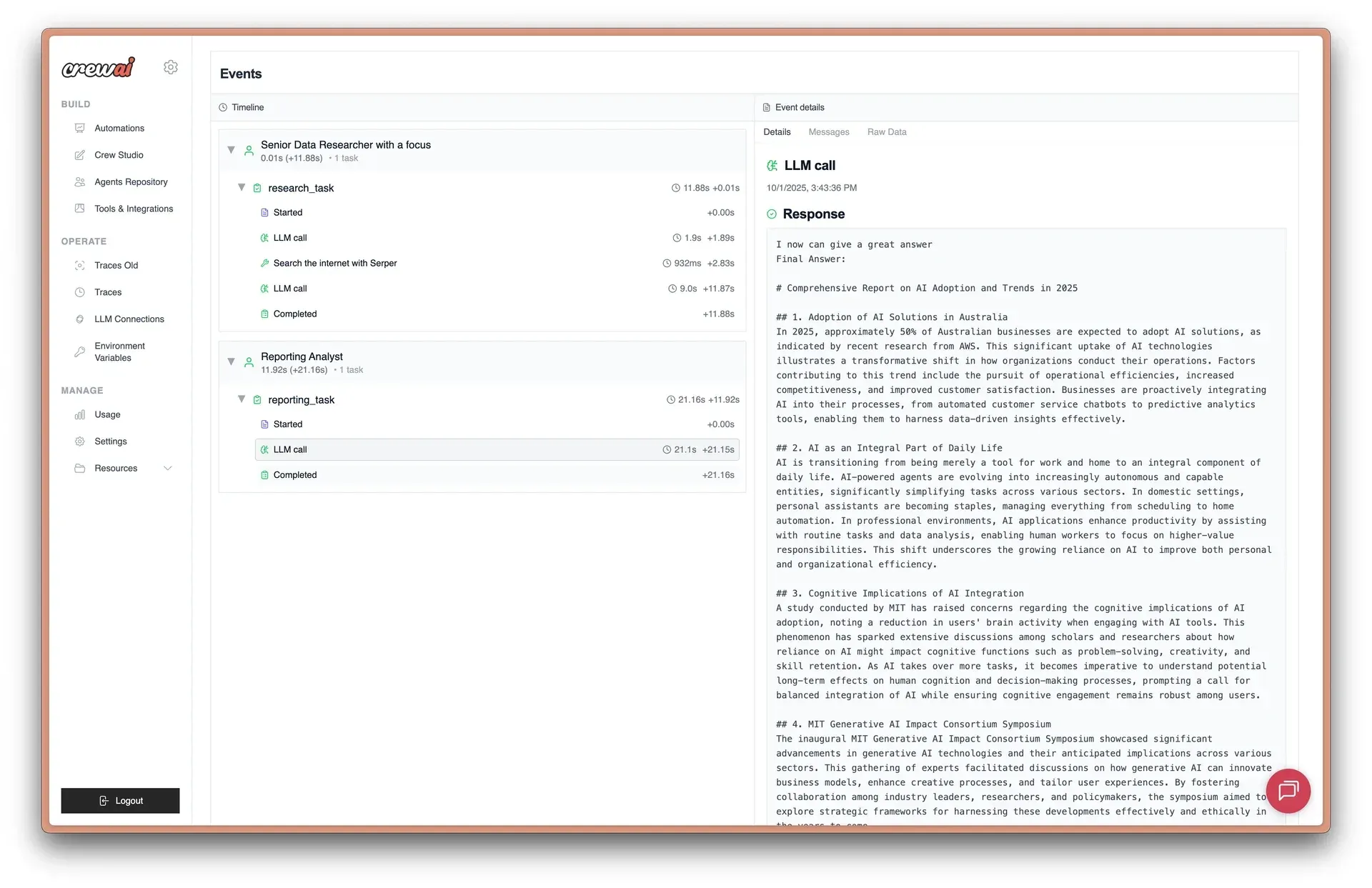
CrewAI tracing in AMP: each agent's tasks, LLM calls and tool calls appear on a timeline with timings, and the selected event shows the model response. From the CrewAI documentation.
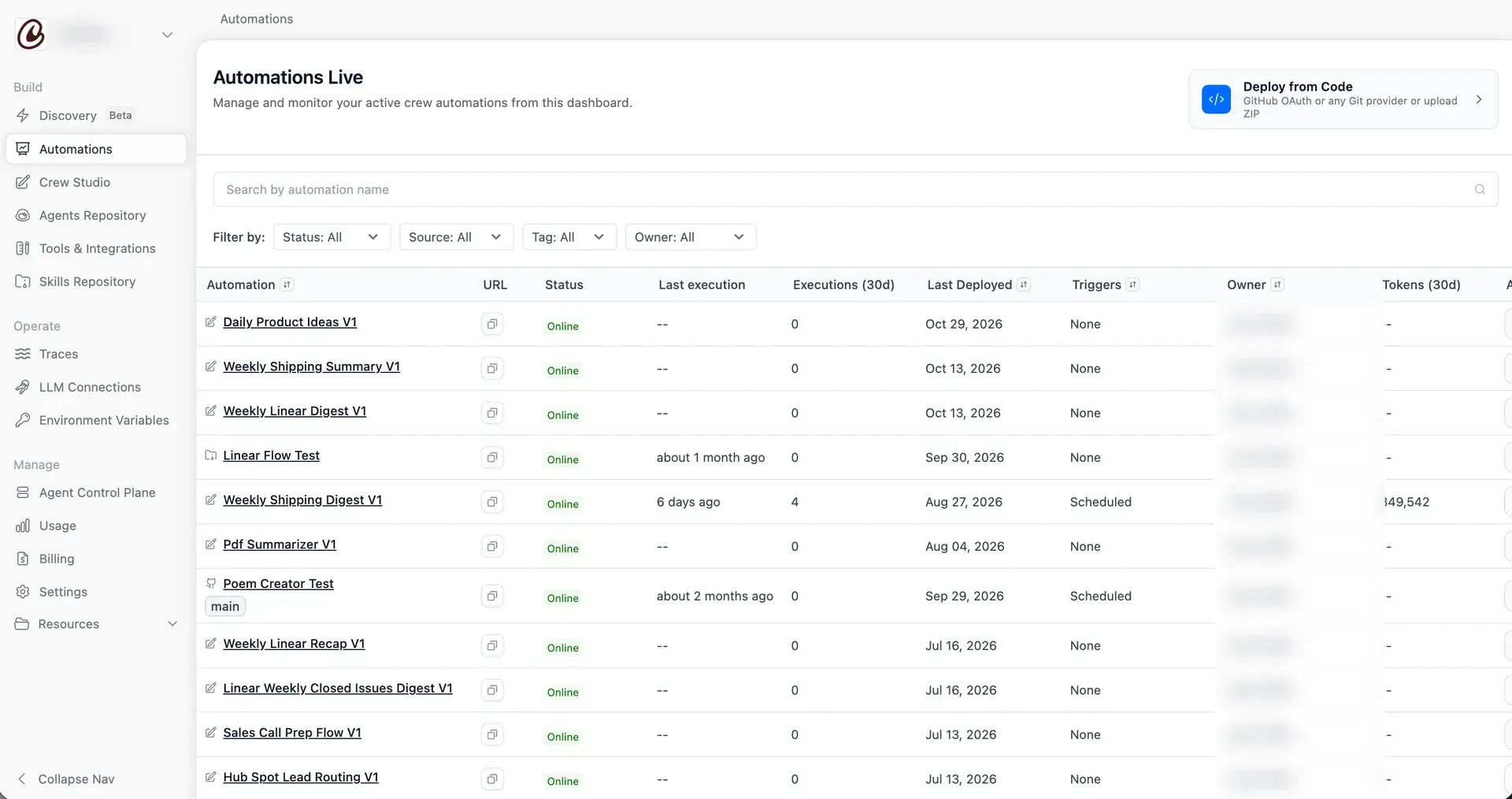
Automations dashboard in CrewAI AMP, from the AMP documentation. Account and owner names are blurred.
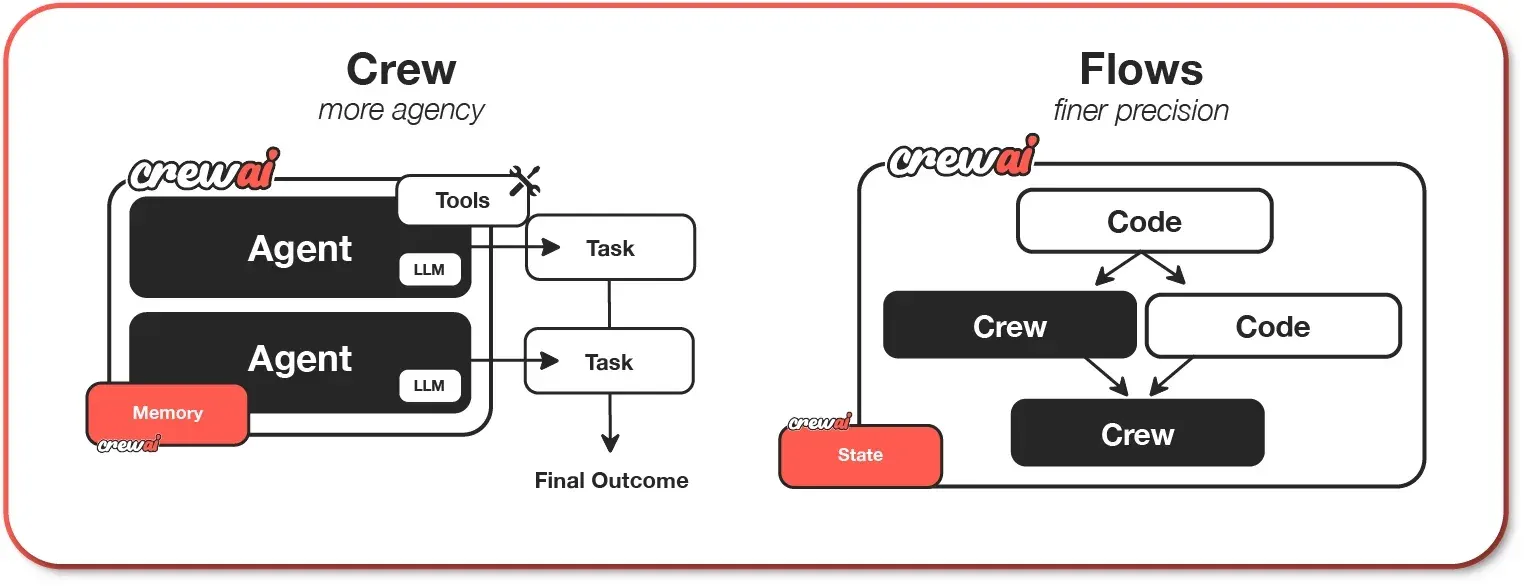
Official diagram of the two CrewAI models: Crews for agent autonomy and Flows for precise, stateful control. From the CrewAI repository.
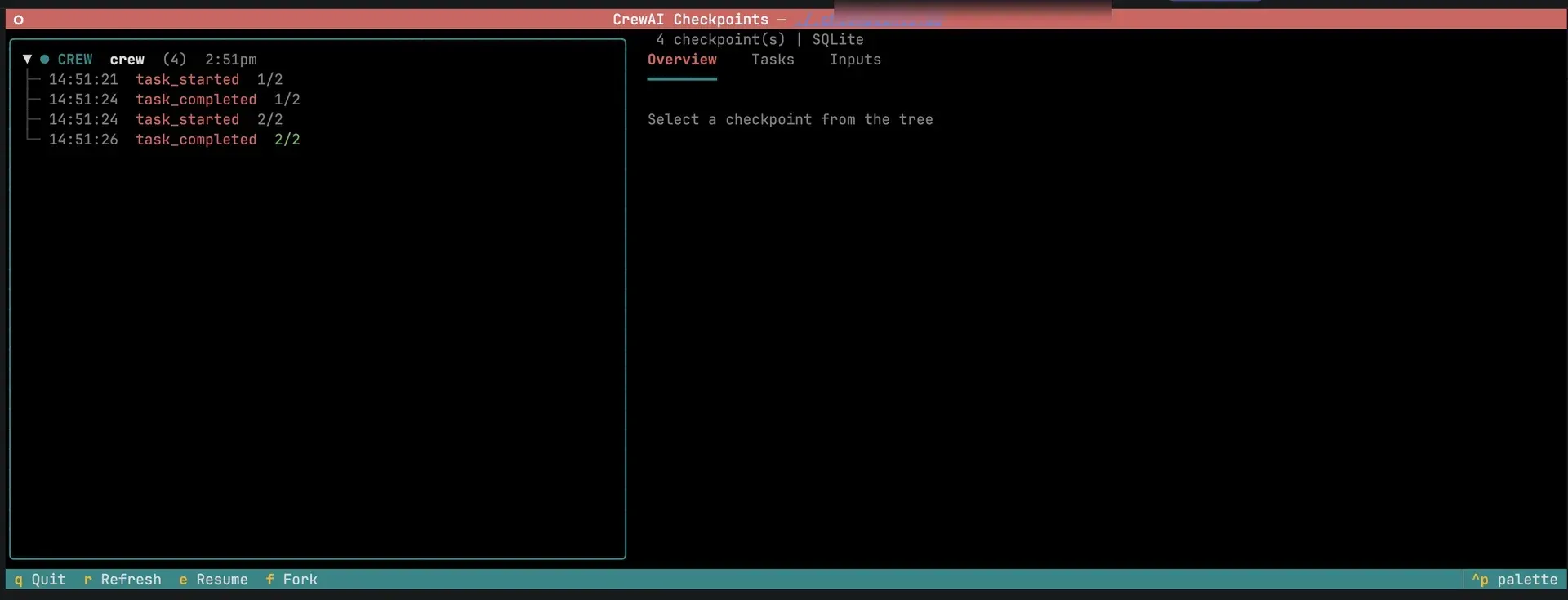
Checkpoint browser in the terminal, from the CrewAI checkpointing documentation: stored checkpoints can be inspected, resumed or forked.
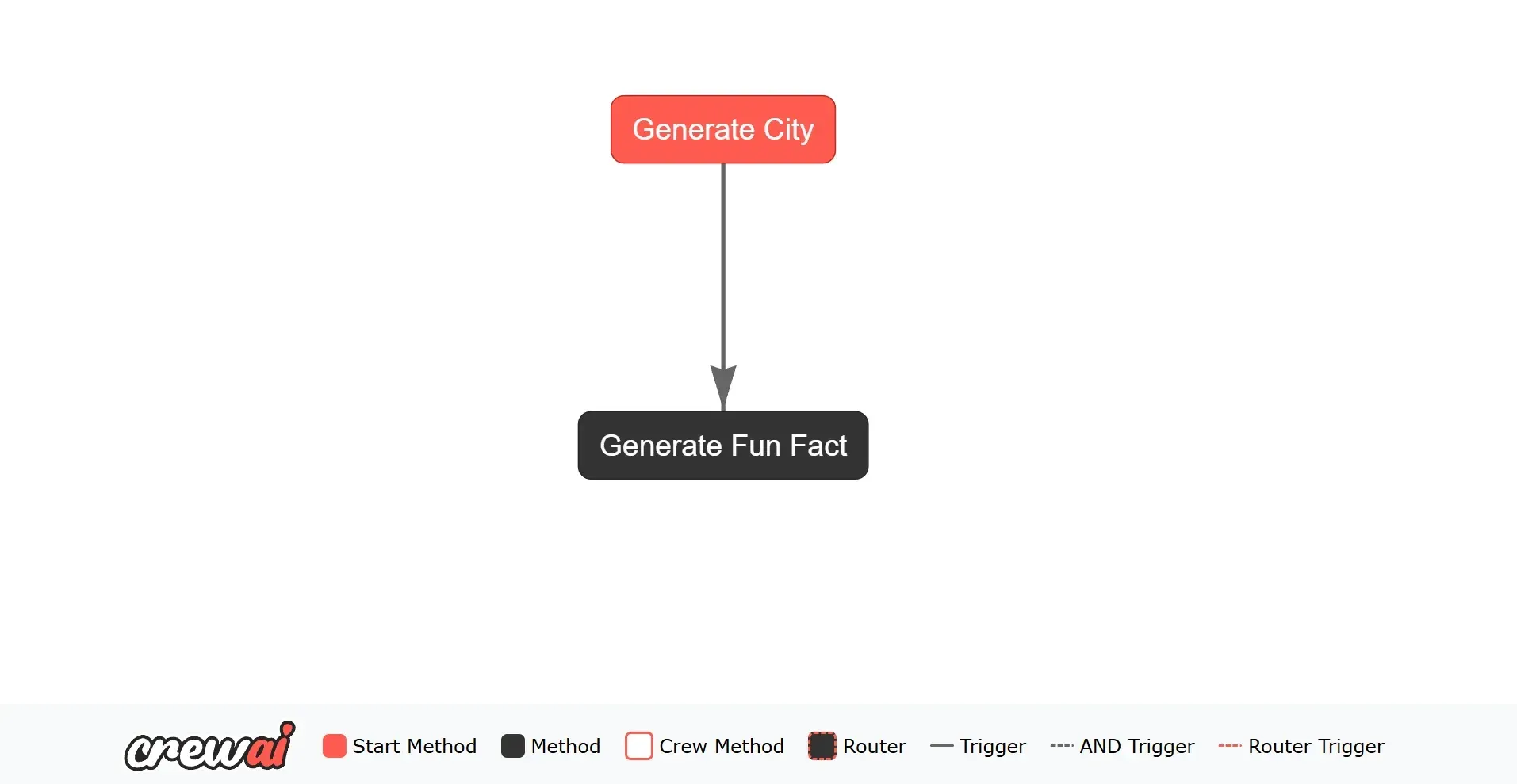
Plot of a simple two-step Flow generated by CrewAI, from the Flows documentation.
Source: official CrewAI project page.
Key capabilities
- Install with uv on macOS, Linux or Windows Uv is installed with the official shell or PowerShell script, then
uv tool install crewaiadds the global CLI anduv tool update-shellfixes PATH warnings. On Windows, achroma-hnswlibbuild error is resolved with Visual Studio Build Tools and the Desktop development with C++ workload, according to the README. Upgrading the global CLI does not upgrade the crewai version inside an existing project. - Project scaffolding and CLI
crewai create crewgenerates a JSON-first project withagents/,crew.jsonc,knowledge/,skills/,tools/and a.envfile;crewai installandcrewai runinstall dependencies and execute it, prompting for missing input placeholders. Flows have their own scaffold and Quickstart, and standalone agent projects are available as an experimental option. - Agents Each agent has a role, goal and backstory, plus an optional LLM, tools, skills, knowledge sources, memory and planning settings. Agents can be defined in JSON, YAML, Python or a mix. The agents reference lists every attribute.
- Tasks and processes Tasks carry a description, expected output, assigned agent, dependencies and structured output through Pydantic models or JSON. Crews run tasks with a sequential process or a hierarchical one, which needs a manager LLM or a custom manager agent to delegate and validate work. Conditional tasks, asynchronous kickoff and kickoff for each item in a list are documented.
- Flows Flows are Python classes whose methods are wired with
@start,@listenand@router, combined withor_andand_conditions. They hold structured or unstructured state, can persist it, and can call crews, single agents or plain LLM calls as steps. Declarative Flow definitions and conversational flows that handle multi-turn chat are also supported. - Tools and MCP The crewai-tools package covers web search, website interaction, vector database queries, code execution and more, and custom tools can be written in Python. MCP servers are attached through stdio, SSE or streamable HTTP transports, or with the
mcpsfield on an agent, and the docs include an MCP security page. - Memory, knowledge and files A unified memory system stores and recalls information across runs, knowledge sources attach documents to agents or crews, and agents can receive images, PDFs, audio, video and text files for multimodal processing. Skills are filesystem-based packages that inject domain instructions into agent prompts.
- Checkpointing Checkpoints capture crew, flow or agent state when selected events fire, by default after each completed task. A run can resume after a failure, skipping completed tasks, or be forked under a new lineage with different inputs, and a terminal UI browses, resumes and forks stored checkpoints.
- Human in the loop Tasks can request human input during execution, and Flows use a
@human_feedbackdecorator to pause for a decision. Deployed automations on AMP expose a resume endpoint that continues an execution with human feedback. - Hooks and events Execution hooks registered with the
@ondecorator intercept LLM calls, tool calls, steps and the start and end of crew and flow runs, and event listeners feed custom integrations and monitoring. Prompts used internally by the framework can also be customized. - Model providers Native integrations exist for OpenAI, Anthropic, Google Gemini, Azure OpenAI and AWS Bedrock, each installed as an extra such as
crewai[anthropic]. LiteLLM remains available for over 100 additional providers, and custom LLM classes can wrap other endpoints. - Observability integrations Built-in tracing reports to CrewAI AMP, and the documentation covers OpenTelemetry-based integrations with Arize Phoenix, Braintrust, Datadog, Galileo, Langfuse, MLflow, Opik, Weave and other tools.
- Frontend and channels Frontend guides use CopilotKit and the AG-UI protocol to stream agent state to React components, render generative UI, share state in both directions and pause for user decisions. The same agent can run as a Slack or Teams bot through the CopilotKit Channels SDK.
- Training and testing
crewai train -n <iterations>trains agents over a set number of iterations with human feedback, andcrewai testruns a crew for a chosen number of iterations and reports performance metrics, as described in the training and testing concepts. - CrewAI AMP The hosted platform at app.crewai.com builds crews and flows in a no-code Studio, deploys code from Git or the CLI and turns each deployment into an automation with its own API. Operations features include triggers, cron scheduling, traces with LLM and tool calls, usage dashboards, webhook streaming and an agent control plane with cost limits and PII redaction.
- AMP REST API Each automation exposes
GET /inputs,POST /kickoff,GET /status/{kickoff_id}andPOST /resume, documented in the API reference. - Plans Basic is free with Studio, the visual editor and AI copilot, GitHub integration, tracing, guardrails and 50 executions per month across two automations on CrewAI cloud. Enterprise has custom pricing and adds enterprise connectors, SSO with Microsoft Entra or Okta, role-based access control, a dedicated VPC or customer infrastructure, flexible overage and dedicated support with onboarding.
- Skills for coding agents The official crewaiinc/skills package teaches coding agents CrewAI patterns. It installs in Claude Code from the crewAIInc plugin marketplace, or in Cursor, Codex, Windsurf and others with
npx skills add crewaiinc/skills, and a docs MCP server answers API questions.
Where CrewAI fits
A research and reporting crew
The README quickstart builds a crew with a researcher and a reporting analyst: the researcher gathers recent information on a topic, using Serper web search when SERPER_API_KEY is set, and the analyst expands it into a report written to output/report.md. The model provider key goes in .env, input placeholders such as {topic} get defaults in crew.jsonc, and crewai run executes the crew sequentially.
Wrapping crews in an event-driven Flow
A Flow combines deterministic Python steps with crews where open-ended work is needed. Methods marked @start run first, @listen methods react to earlier results, and @router methods choose a branch based on state, for example sending a sentiment score to different follow-up crews. The Flows documentation covers state models, persistence and plotting the flow graph.
Pausing for people and resuming runs
Workflows that need approval use human input on tasks or the @human_feedback decorator in Flows. With checkpointing enabled, a run that fails or stops resumes from its last checkpoint, and a fork re-runs from a chosen point with different inputs. Release 1.15.41 keeps earlier step outputs when a run resumes after human feedback.
Agents with external tools, MCP and A2A
Agents receive tools from crewai-tools, custom Python tools or MCP servers reached over stdio, SSE or streamable HTTP. CrewAI also supports the Agent-to-Agent (A2A) protocol for collaboration with and discovery of other agents, and native E2B and Daytona sandbox tools let agents execute code outside the host process. The MCP guide explains adapters for single and multiple servers.
Adding an agent interface to an application
With CopilotKit and the AG-UI protocol, a CrewAI Flow serves a chat or application UI that shows reasoning, renders tool calls as React components, keeps shared state in sync and pauses for user decisions. The same agent can be exposed in Slack or Microsoft Teams through the Channels SDK.
Deploying to CrewAI AMP
A crew built in code is deployed to AMP from GitHub, another Git provider, a ZIP upload or the CLI, or designed directly in Studio. Each deployment becomes an automation that starts on a schedule, an app trigger or a REST call to /kickoff, with progress read from /status and every LLM and tool call visible in Traces. Enterprise plans can run the same platform in a dedicated VPC or on the customer's infrastructure.
Install
uv tool install crewaiReviews of CrewAI
Be the first to share your experience with CrewAI.
Write a review
Loading review form…
Alternatives to CrewAI
 LangChainLangChain is an MIT-licensed open-source framework (Python/JS) for building LLM applications and agents via LangGraph; LangSmith adds optional hosted tracing, evaluation and deployment.
 LlamaIndexLlamaIndex is an MIT-licensed open-source framework (Python/TypeScript) for RAG pipelines and data agents on top of LLMs; LlamaCloud adds hosted document parsing and extraction.