

What is Kortix CompanyOS?
Kortix CompanyOS is a platform for running AI agents for a whole company, described in its README as a cloud-native agent harness. Instead of one chat session on one laptop, you write custom agents on pi, an open-source agent harness, and Kortix deploys them to the cloud. Each session runs on its own cloud computer that sleeps after 15 to 20 minutes of inactivity and wakes on the next message or event with its history intact. A built-in agent called My Kortix answers first and hands longer work to the agent made for it.
Agents, skills, rules, connectors and company context are files in one git repository that the customer owns, declared in a kortix.yaml file. Agents can be started by schedules, signed webhooks, connector events and merged change requests, and changes that reach the main branch go through a change request that a person approves. The project describes this as company as code. A manifesto in the repository sets out the idea behind it, and the Kortix guide documents the concepts.
It is offered as Kortix Cloud, as a self-hosted Docker Compose stack, and in a VPC or on-premises for enterprise customers. The monorepo contains a web app, an API, a command line client, a desktop app built with Electron and a mobile app, and the platform ships under one version number. The latest release is v0.15.1, published November 7, 2026, which adds credit codes, server-side Goals that only a verifier session can mark done, proactive Spaces and fixes for image-heavy sessions. The release notes also rename new audit rows from opencode.* to agent.*, which matters for saved SIEM filters.
The license needs attention. The repository ships the Elastic License 2.0, a source-available license that forbids offering the software to third parties as a hosted or managed service and bars circumventing license-key features. The README calls the project open source, but ELv2 is not an OSI-approved open source license, so iThub lists it as source-available. A separate free white-label license exists with its own conditions.
Kortix CompanyOS screenshots
Explore the interface. Open a screenshot to view it at full size.
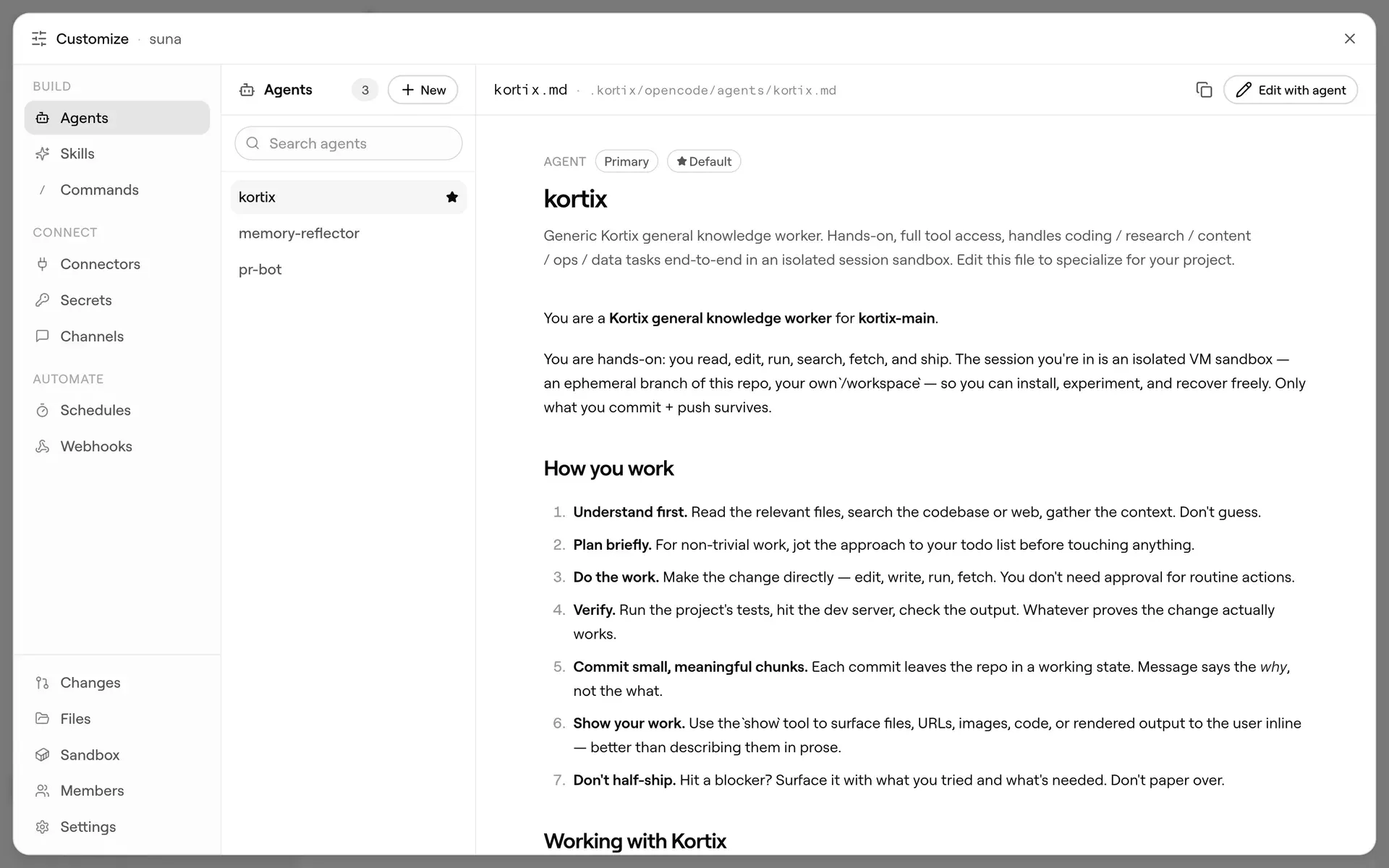
Official landing-page screenshot of the agent editor, where an agent is defined as a Markdown file.
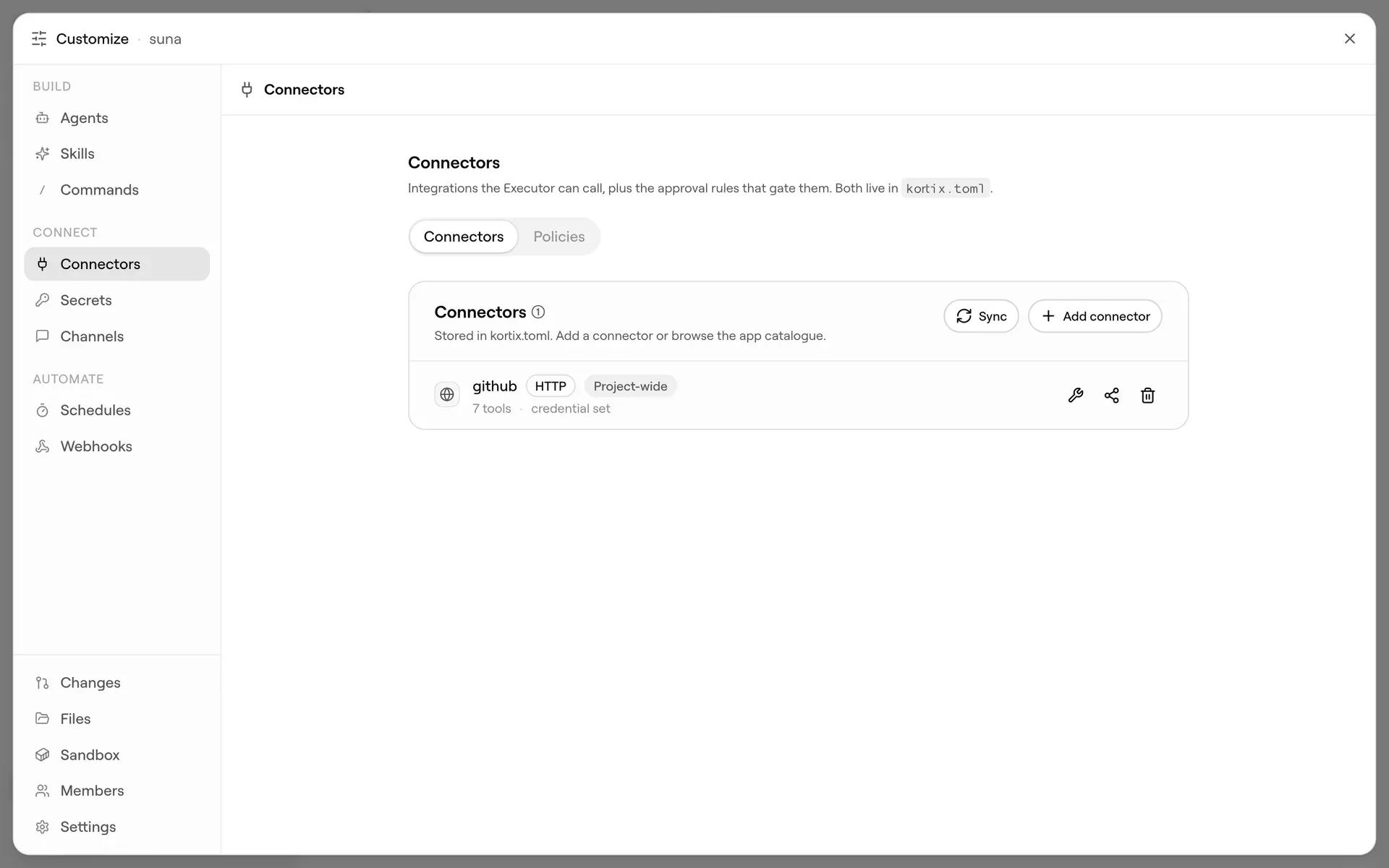
Official screenshot of the connectors panel and its policies tab.
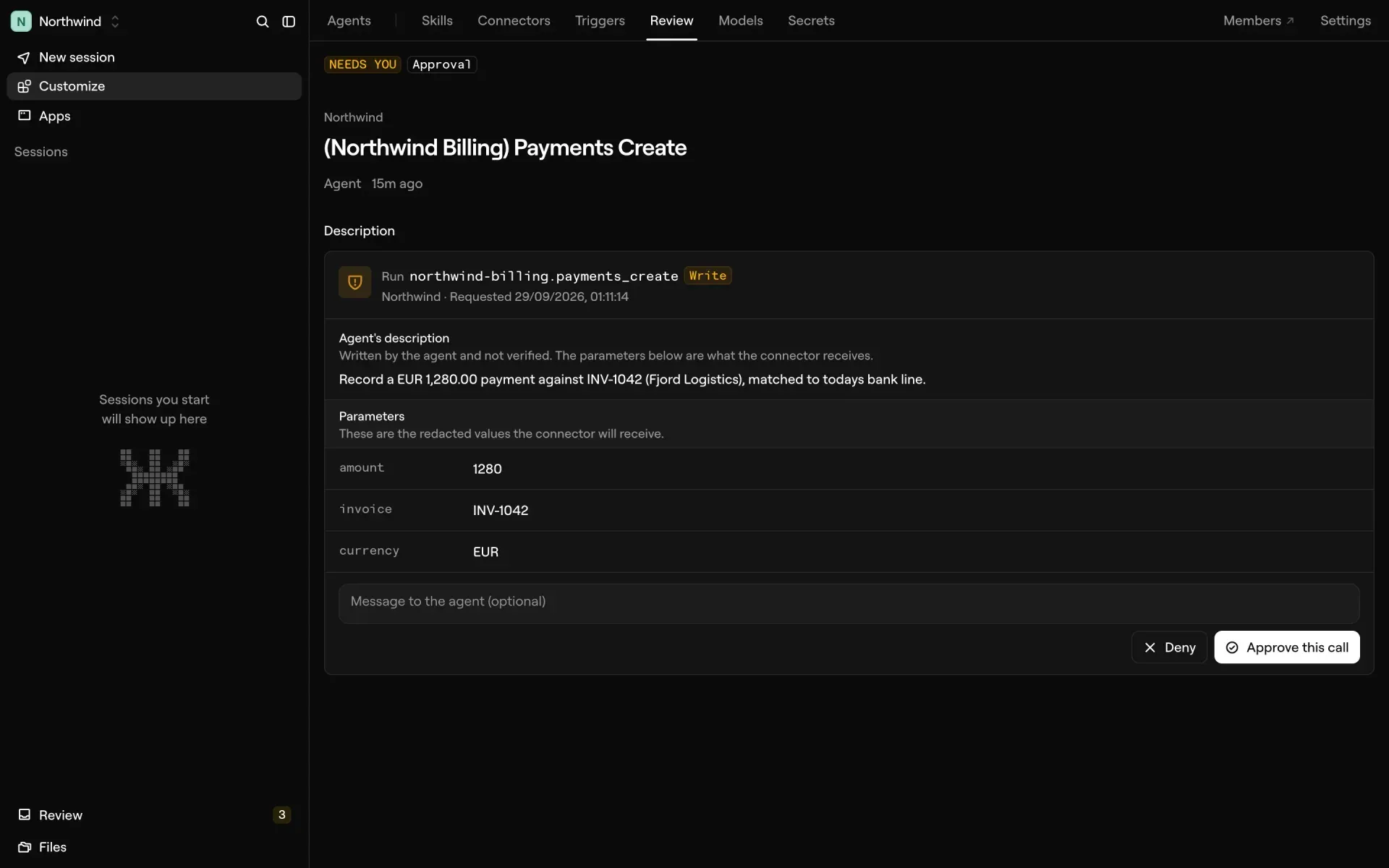
Official sample screen with fictional data, showing the approval step for a write call.
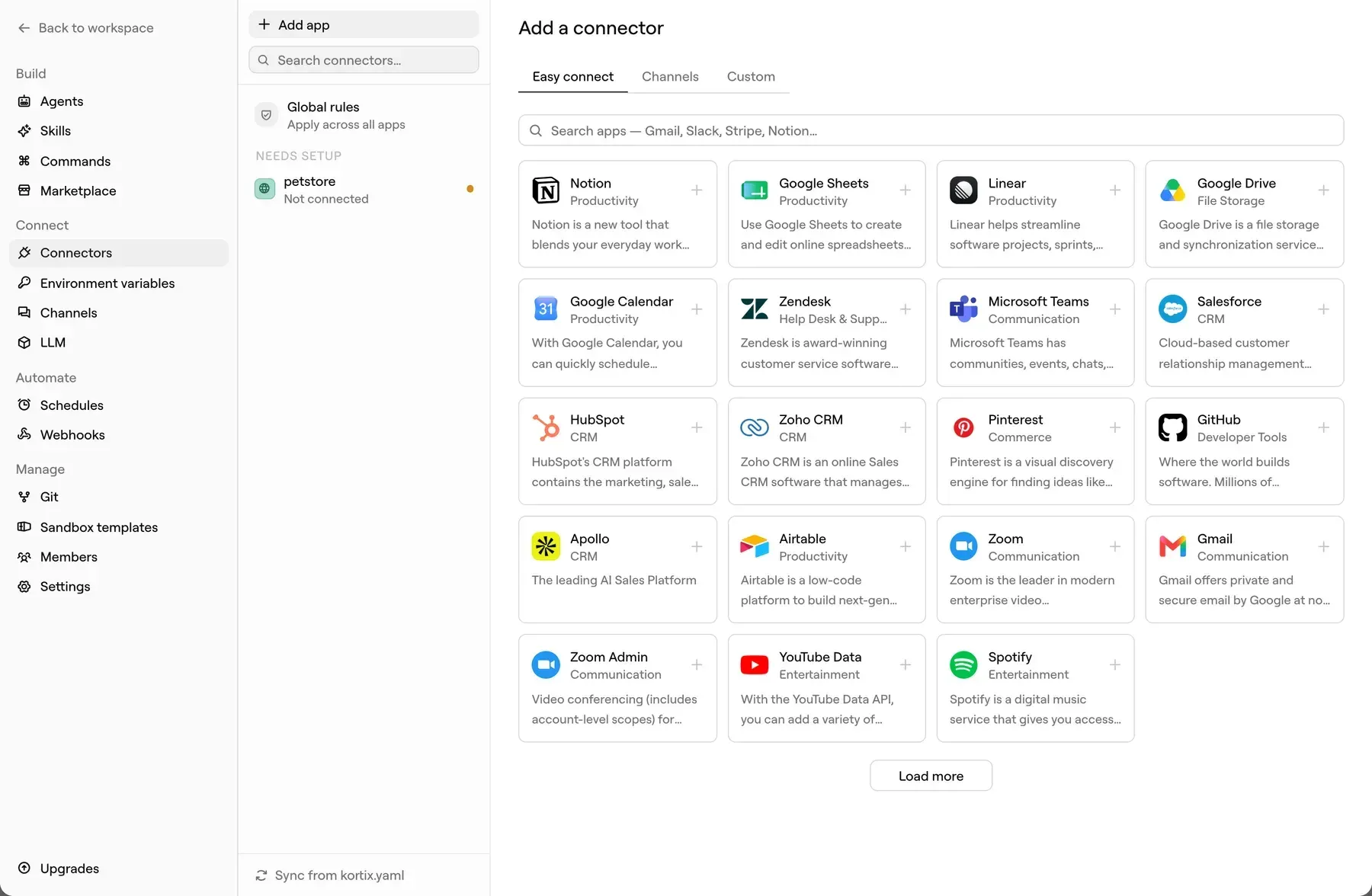
Official documentation image of the connector catalogue; the interface may have changed since.
Key capabilities
- My Kortix, the front agent You talk to one agent, which answers at once and hands writing, research, code or app work to a specialized agent in a separate session. Follow-up messages go to the same agent with what it already knows, so a long job does not block the conversation.
- Custom agents on pi An agent is a prompt, a model, permissions and the skills, tools, commands and pi extensions it may use. The repository shows agents defined as Markdown files, and an agent can propose changes to its own skills that a person approves.
- Per-session cloud computers Each session gets an isolated computer with a terminal, a browser and a desktop you can watch live. Compute and state are separate: the computer sleeps when idle and wakes with its history, and files persist in the session workspace, the repo and Drive. For self-hosted installs, agent sandboxes run on the provider you configure, with Platinum as the default.
- Triggers Schedules, signed webhooks, connector events, app events and merged change requests start agents with nobody at the keyboard. A filter written in code can drop noise before a model runs, and a loop can wake a session later, once or repeatedly.
- Swarms and workflows A session can hand work off in the background, run a workflow that coordinates many agents and message other sessions. The project says thousands of agents can run in parallel on one configuration; that is a vendor figure, so test your own scale and cost.
- Outcomes and verification You state a goal with a definition of done. An agent works on it across wake-ups until a separate verifier session confirms it. Release 0.15.1 moves goal state to the server, where only a verifier session can mark a goal complete.
- Connectors More than 3,000 apps are available through a catalogue, plus MCP, OpenAPI, GraphQL and raw HTTP. Each tool can be set to Allow, Ask or Block, and credentials stay on the server instead of entering the machine. The connectors guide covers setup.
- Approval of tool calls and changes Calls that need a decision appear in a review queue showing the parameters the connector will receive. Merges are denied by default for agents, and approval rules are set by the team. Held approval requests expire after 24 hours by default, with a configurable window from 5 minutes to 30 days.
- Drive and company memory Drive holds shared folders and company memory as Markdown files. When a context fills, the agent continues in a fresh one and searches the session's full record for exact lines instead of relying on a summary.
- Apps hosted by agents Agents can build and host sites, internal tools and backends at a stable URL behind Kortix sign-in. The README lists always-on or on-demand machines, up to 20 per group, persistent volumes, snapshots, releases and rollback.
- Models and gateway Choose Kortix-managed models, your own provider keys, a ChatGPT subscription or a Claude subscription. Requests pass through the Kortix LLM gateway with budgets and access rules. Managed models use inference providers with zero data retention, according to the security page; with your own key, your agreement with that provider applies.
- Reach: web, desktop, mobile, terminal and chat People work from the web app, desktop and mobile apps, the terminal, Slack, Microsoft Teams and email, and other AI tools reach it through MCP. All surfaces read the same projects and sessions.
- Teams, SSO and audit Roles, groups and per-resource permissions decide who can do what. SAML 2.0 single sign-on, SCIM 2.0, advanced RBAC and audit logs are listed in the Enterprise plan. Audit entries are accessible for 90 days and archived through day 365; reading or exporting logs requires Enterprise.
- kortix CLI and installation Install the client with the official command
curl -fsSL https://kortix.com/install | bash, then runkortix initto scaffold kortix.yaml andkortix shipto push and run the project in the cloud. Commands such askortix sessions new,kortix cr lsandkortix chatmanage work from the terminal. - REST API and TypeScript SDK The developer reference covers the REST API, the
@kortix/sdkpackage, React hooks,@kortix/uiand generative UI for building on the platform. - Self-hosting The self-host guide describes one Docker Compose project with the frontend, API, LLM gateway and the Supabase distribution on a Linux VPS with at least 2 vCPU and 4 GB RAM (4 vCPU and 16 GB or more recommended), a domain, and ports 80 and 443 open for automatic TLS. A Terraform module covers AWS EC2. Images are pulled from Docker Hub, so this is self-hosted, not air-gapped.
Where Kortix CompanyOS fits
Run recurring company work with agents
Define an outcome such as a weekly reporting task, give an agent a schedule, and require a verifier to confirm it. Start with read-only connectors and review the first runs in the change and approval queues. Check cost per run against your credit budget before widening scope, and record which agent owns each outcome.
Connect business apps with controlled permissions
Add a connector from the catalogue or through MCP or OpenAPI, then set Allow, Ask or Block for each tool. Test a write action such as creating a payment record in a sandbox account and confirm the approval screen shows the parameters you expect. Keep credentials in the secrets store, not in prompts.
Share agents and memory across a team
Put agents and skills in the project repo, invite teammates with roles and let people reach the same agents from the web app, Slack or Teams. Check that company memory in Drive does not collect personal or regulated data, and that group access matches your organization chart.
Build and host an internal app with an agent
Ask an agent to build a small internal tool and publish it as an App behind Kortix sign-in. Review the code through a change request, and confirm restart behavior, volumes and rollback before anyone depends on it.
Self-host the platform
Provision a Linux server with a domain, run the guided init and start the stack. Confirm which services remain external: sandboxes run on the configured provider, and the security page states that the server must be reachable from the internet. Decide whether that fits your network rules before rollout.
Develop against the API and SDK
Use the CLI, REST API or @kortix/sdk to start sessions from your own systems, such as a ticketing event or a deployment hook. Pin the platform version, since the whole product ships under one version number and audit event names have changed. Test such automation against a throwaway project first.
Install
curl -fsSL https://kortix.com/install | bashReviews of Kortix CompanyOS
Be the first to share your experience with Kortix CompanyOS.
Write a review
Loading review form…
Alternatives to Kortix CompanyOS
 LobeHubLobeHub is a TypeScript agent workspace with tasks, memory, pages and MCP tools. Agents answer in Slack, Discord or Telegram, can drive Claude Code or Codex on your devices, and run in LobeHub Cloud, desktop apps or a Docker Compose stack.
 EigentApache 2.0 desktop app built on the CAMEL framework for Windows, macOS and Linux. Run one agent or a coordinated Workforce with your own API keys, local models, MCP servers, Skills and scheduled Automations.