

What is Eigent?
Eigent is an open-source desktop application for running AI agents against your own files, browser sessions, terminal and connected services. The project describes itself as an open-source Cowork desktop: you open a Space tied to a local folder, start a Session for a goal and send Tasks to either one agent or a coordinated team of agents. It is developed by Eigent.AI (the website footer names EIGENT UK LTD) and is built on CAMEL, the multi-agent framework from the CAMEL-AI.org research community. The backend pins the camel-ai[eigent] package, so the Workforce engine, agents and toolkits come from that framework.
Distribution is through GitHub releases and the official download page. Release 1.0.7 ships a macOS DMG and ZIP for Apple Silicon and for Intel, a Windows x64 installer (Eigent.Setup.1.0.7.exe) and a Linux x64 AppImage. The installation guide requires macOS 11 Big Sur or later. There is no mobile or tablet build. Developers can also run the app from source with Node.js 18 to 22, npm install and npm run dev, and produce their own packages with npm run build:mac, build:win or build:linux.
The current version is Eigent 1.0.7, published October 30, 2026. It lets you show up to three Sessions side by side in a Space or open a Session in its own window or browser tab, adds a Session menu that can turn a Session into a Skill or an Automation, and adds BytePlus ModelArk managed agents as a remote sub-agent provider. Version 1.0.6 redesigned Automations with example workflows and a run dashboard, unified model settings and tightened authorization checks on legacy local-backend routes. Version 1.0.5 added task queue reordering, a background process panel, Meta Model API support and a default-off preview of parallel Session execution. The 1.0 line started on June 16, 2026, after the 0.0.x preview series.
The stack is an Electron desktop shell with React, TypeScript, Tailwind CSS, Radix UI, Zustand and React Flow on the frontend, and a FastAPI backend run with Uvicorn and managed with uv. A separate local server (FastAPI plus PostgreSQL in Docker Compose) replaces the Eigent cloud account service, so user accounts, provider settings, tool secrets, chat history and MCP configuration stay in a local database. Models are not bundled: you choose Eigent Cloud credits, your own provider key, or a local OpenAI-compatible server such as Ollama, vLLM, SGLang, LM Studio or llama.cpp.
The source code is licensed under Apache License 2.0. The company sells optional Eigent Cloud plans with task credits and an Enterprise offer with SSO, custom development and negotiated SLAs. Some interface items are still marked as coming soon in the documentation, including browser plugins, X, WhatsApp, Reddit and GitHub connectors, and Telegram, Lark and WhatsApp remote channels. Scheduled Automations run only while the desktop app stays open, and Eigent is a desktop application rather than a hosted multi-user workspace; shared team features are listed as coming soon.
Eigent screenshots
Explore the interface. Open a screenshot to view it at full size.
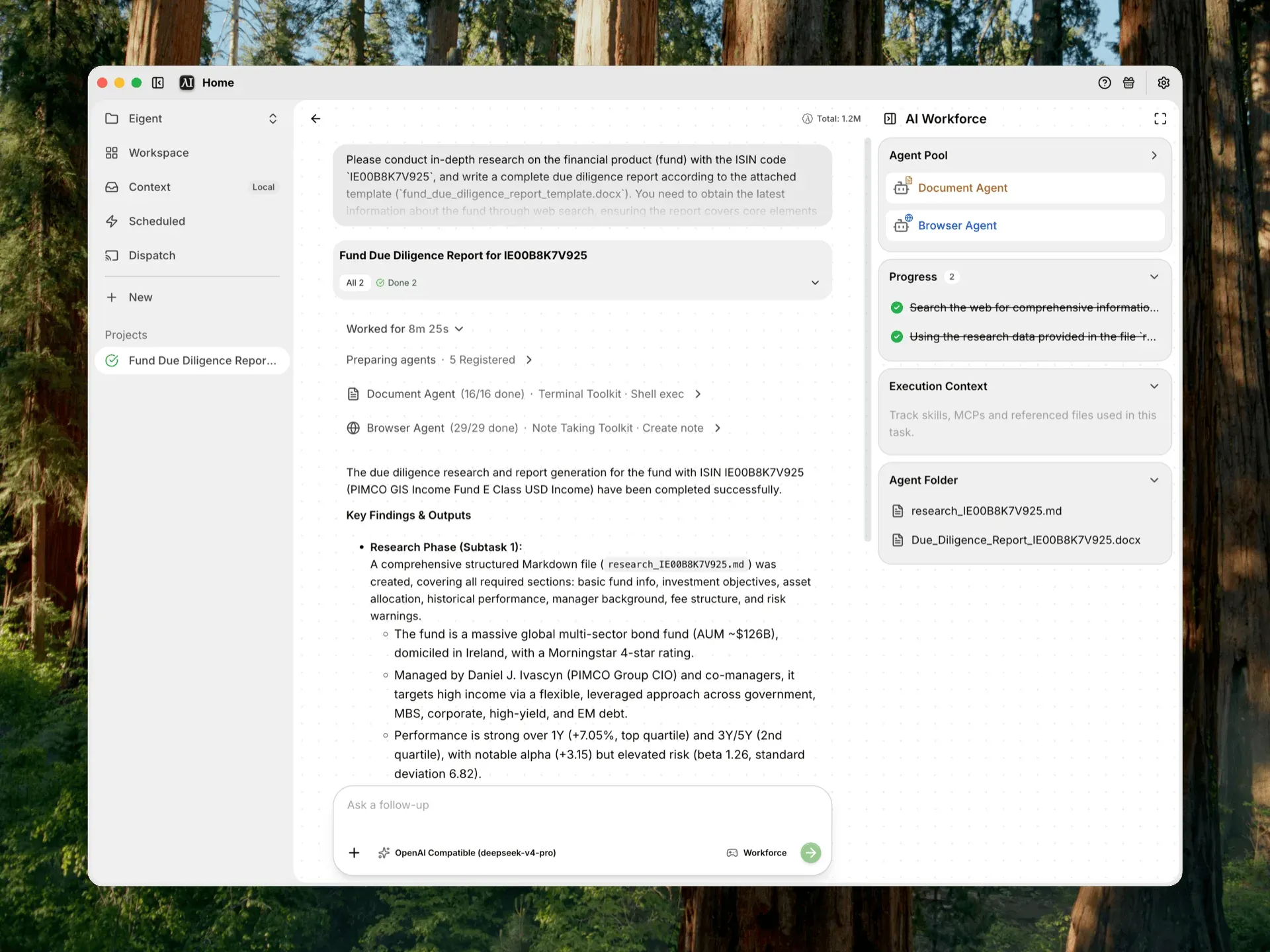
Workforce Session from the official docs: the request, per-worker toolkit activity, the AI Workforce panel with agent pool, progress and agent folder, and the model selector set to an OpenAI-compatible provider.
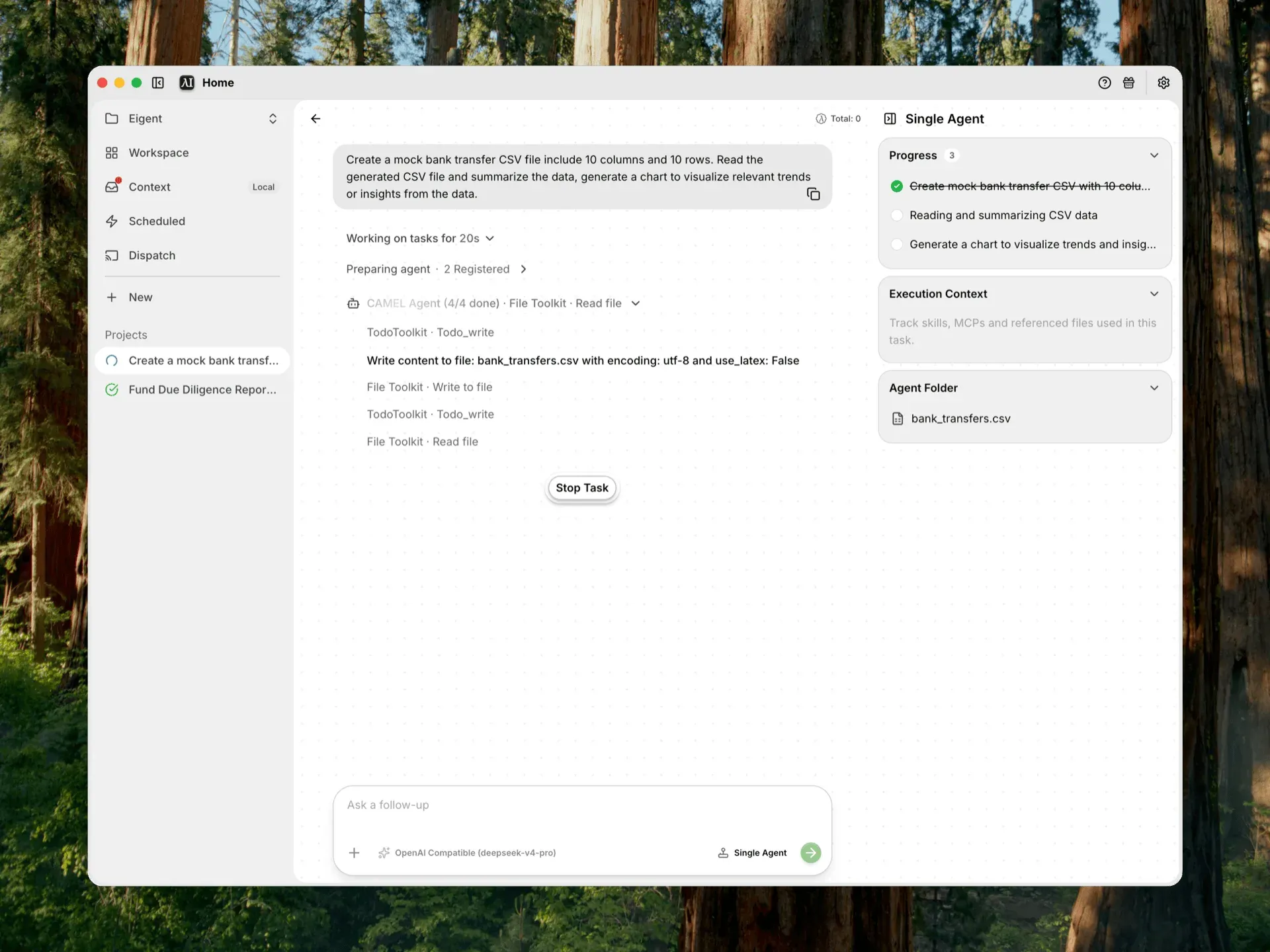
Single Agent mode from the official docs: a CAMEL agent working through File and Todo toolkit calls, with progress, execution context and the agent folder in the side panel.
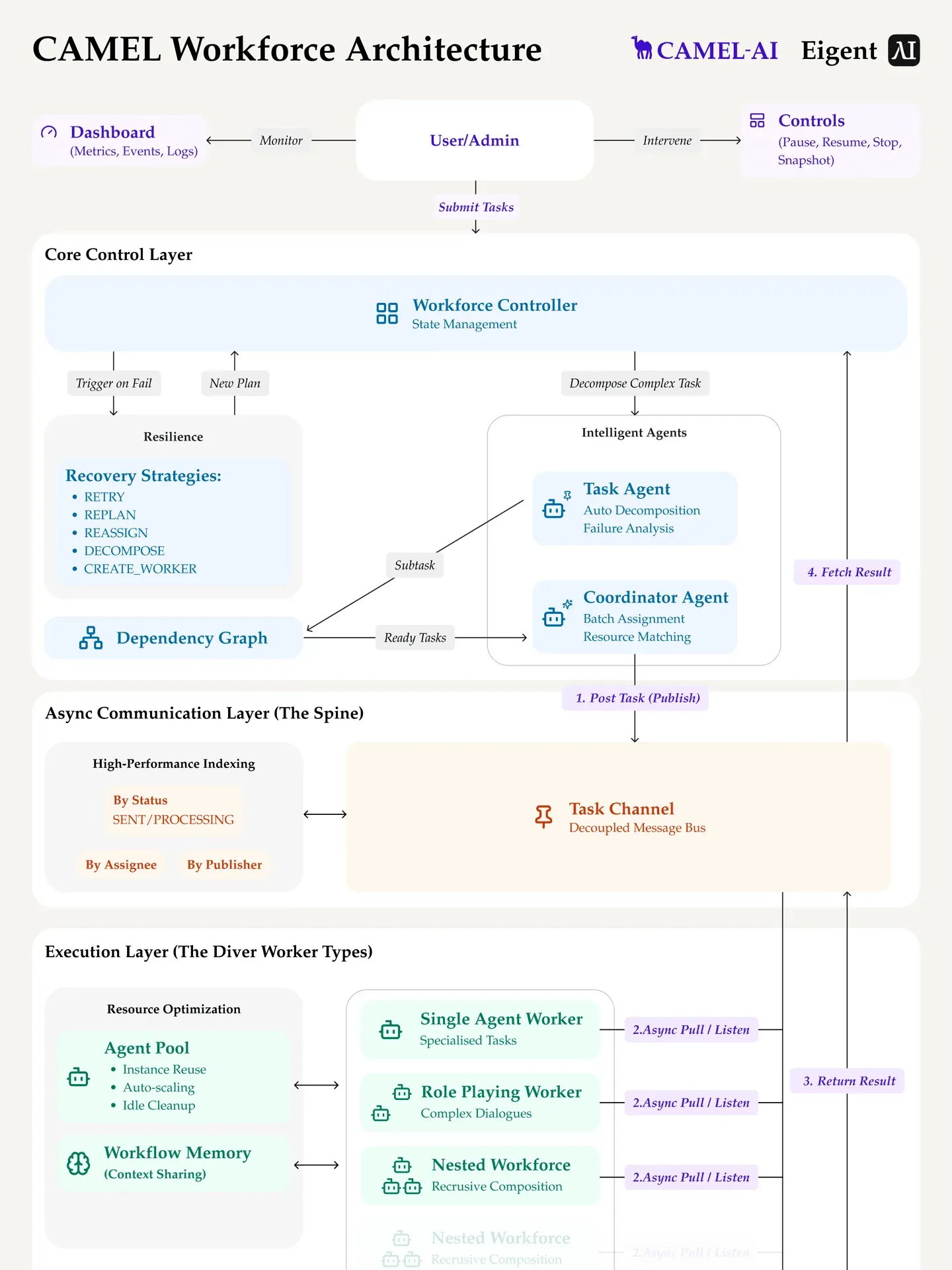
Official architecture figure: a Workforce controller with task and coordinator agents, recovery strategies, a dependency graph, the task channel message bus and single, role-playing and nested worker types.
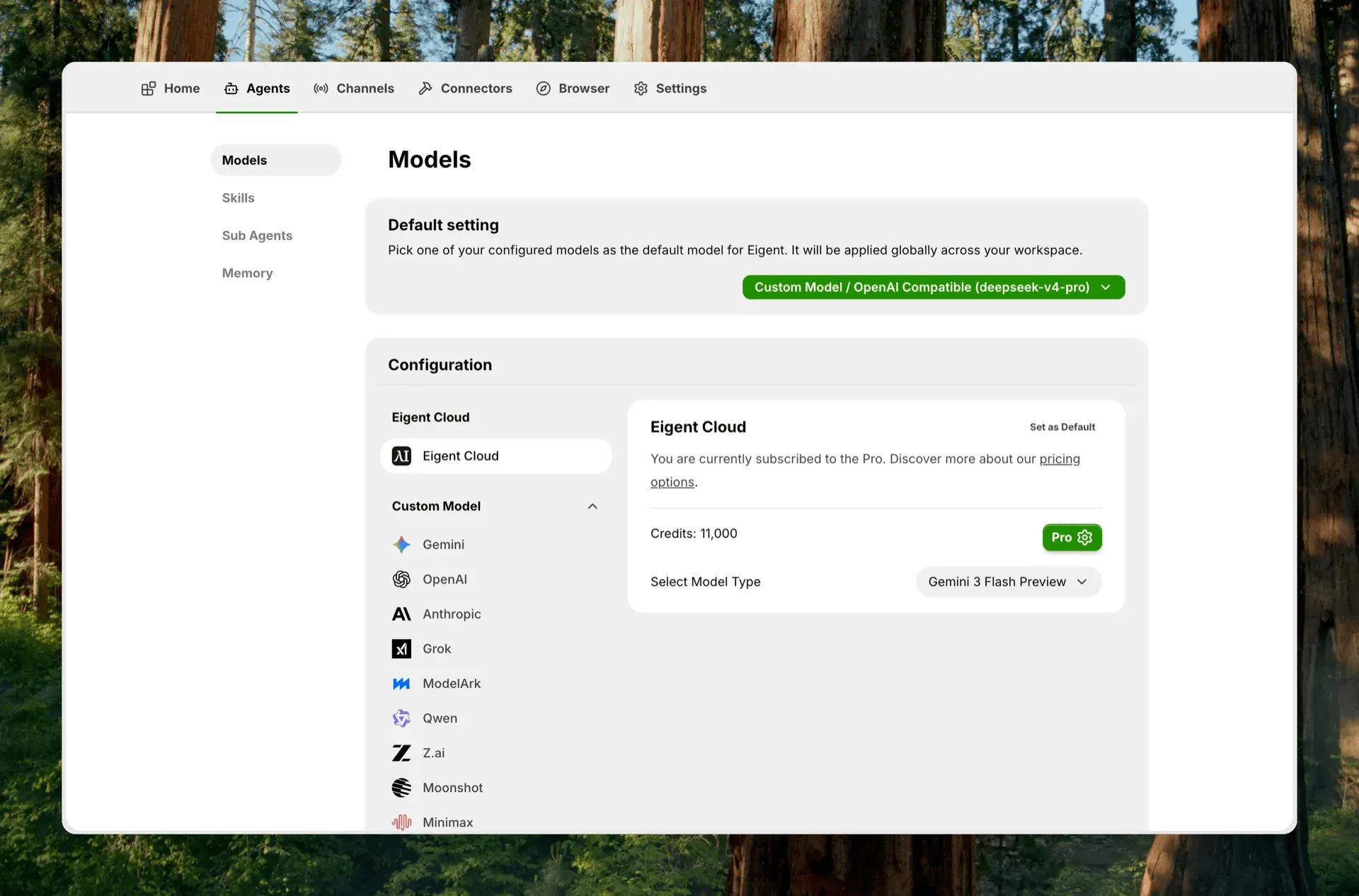
Agents, Models settings from the docs: the global default model, the Eigent Cloud plan and credits, and custom providers such as Gemini, OpenAI, Anthropic, Grok, ModelArk, Qwen, Z.ai, Moonshot and MiniMax.
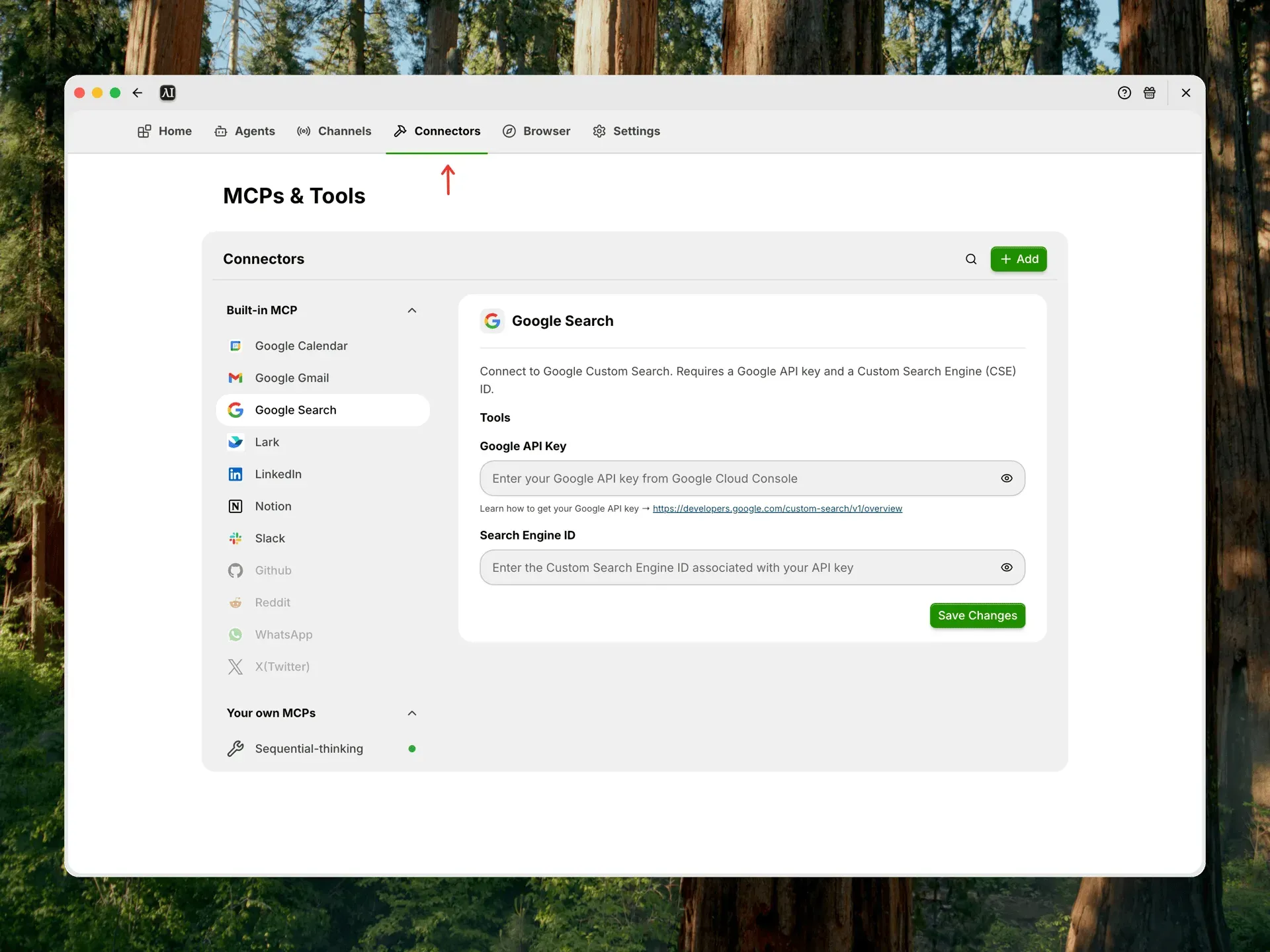
Connectors page from the docs: built-in integrations, greyed-out entries that are not yet available, a custom Sequential-thinking MCP server and the Google Custom Search key form.
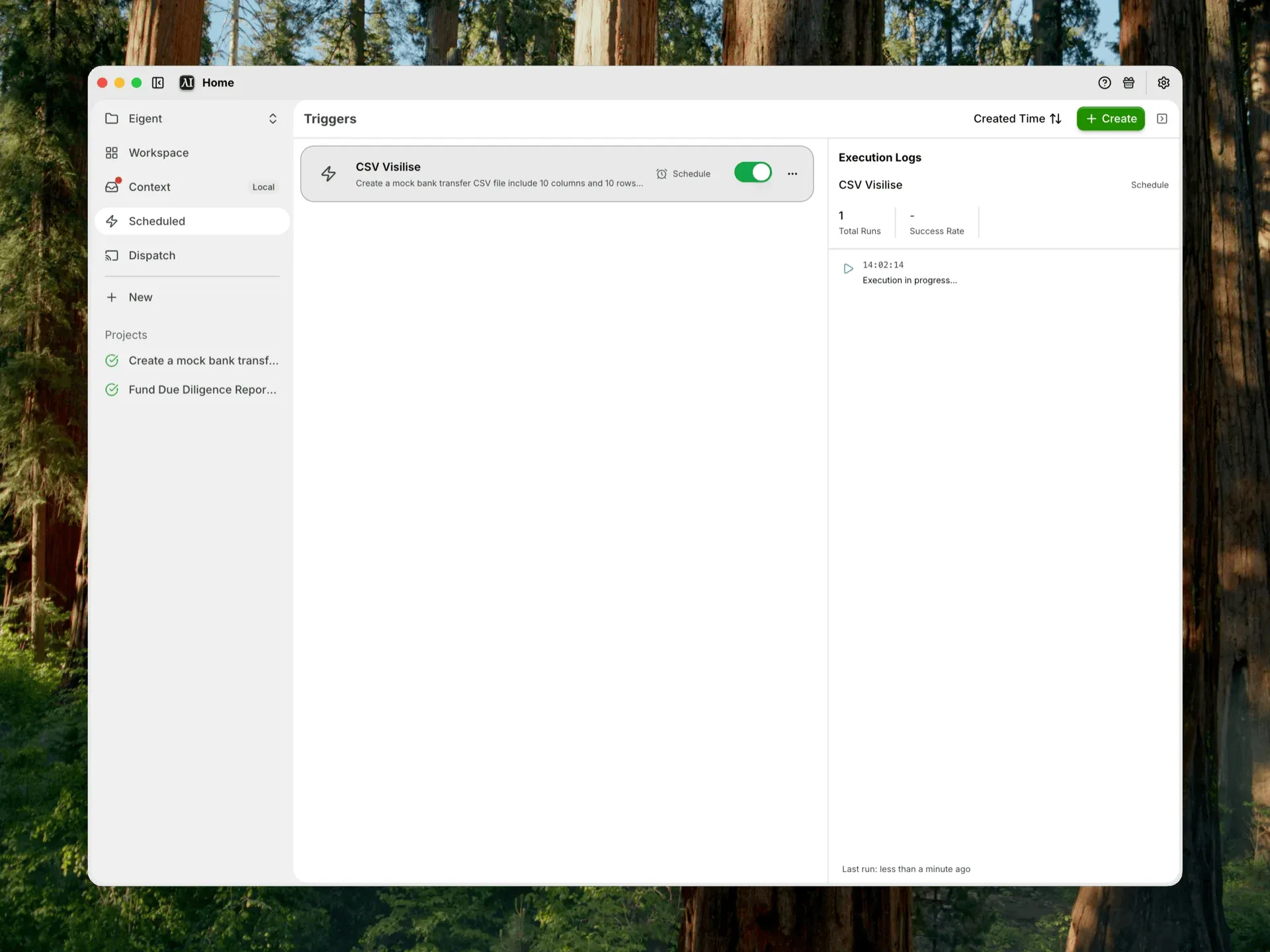
Scheduled automation view from the docs: an enabled schedule trigger, total runs, success rate and the execution log. Later releases renamed and redesigned this page as Automations.
Source: official Eigent project page.
Key capabilities
- Spaces, Sessions and Tasks Work is organized as Space, then Session, then Task. A Space owns a local folder and its working files, a Session holds the history for one goal, and Tasks are the individual requests inside it. The quick start recommends connecting a project, research or client folder before the first Session so agents can read the material they need.
- Single Agent mode One CAMEL-based agent handles the Task with a continuous context and no Workforce planning stage. It still has access to models, Skills, files, a browser and a terminal. The Single Agent guide positions it for focused, short tool-driven work and iterative follow-ups where coordination overhead would add little.
- Workforce multi-agent mode A task planner agent splits the request into subtasks and a coordinator agent routes them to worker nodes through a shared task channel, where results become inputs for later steps. Failed subtasks are decomposed and retried, or a new worker is created for the problem. A workflow is halted after a task fails or is decomposed more than a set number of times, three by default.
- Preconfigured workers Eigent ships a DeveloperAgent (terminal, code execution, local web deployment), a BrowserAgent (search and a stateful browser), a DocumentAgent (files, PPTX, Excel, MarkItDown conversion, Google Drive MCP) and a Multi-ModalAgent (audio analysis, video download, OpenAI image generation). A custom worker takes your own system prompt and any MCP toolkit you select.
- Toolkits from CAMEL Workers act through CAMEL toolkits such as TerminalToolkit, HybridBrowserToolkit, FileToolkit (Markdown, DOCX, PDF and plain text), ExcelToolkit, PPTXToolkit, NoteTakingToolkit and HumanToolkit. HumanToolkit lets an agent pause and ask you for credentials or a decision. The Workforce reference lists which toolkits each worker receives.
- Model choice: cloud, BYOK or local At least one valid model is required before Eigent starts a task. Eigent Cloud uses credits; bring-your-own-key covers providers including OpenAI, Anthropic, Google Gemini, OpenRouter, Qwen, DeepSeek, MiniMax, Z.ai, Moonshot, Mistral, xAI Grok, AWS Bedrock, Azure OpenAI, Baidu ERNIE and any OpenAI-compatible endpoint. Since 1.0.6 a default model is chosen in Settings, and since 1.0.7 a model picked inside a Session changes only that Space.
- Local inference Local models connect through an OpenAI-compatible server: Ollama, vLLM, SGLang, LM Studio or llama.cpp. The endpoint must include the expected
/v1path and be reachable from the Eigent process. Hardware needs depend entirely on the model you serve, so check memory and GPU capacity before choosing a large model. - Connectors and MCP servers The Connectors page combines guided integrations (Notion, Slack, Google Calendar, Gmail, LinkedIn and Lark), Google Search and your own MCP servers, either a local command or a remote URL. Self-hosted installs need Google Custom Search credentials for web search. X, WhatsApp, Reddit and GitHub are listed as coming soon. Installed connectors must be assigned to a worker before a Workforce uses them.
- Agent Skills Skills are file-based instruction packages that agents load when relevant. You upload a single
SKILL.mdwith YAMLnameanddescriptionfrontmatter, or a ZIP that contains one or more skill folders. Custom Skills are stored locally per user and can be assigned to specific agents; the Skills guide warns to audit Skills from untrusted sources. - Browser control Agents can open a managed browser or attach to an existing Chrome or Chromium instance through the Chrome DevTools Protocol. A dedicated login browser lets you sign in once and import the resulting cookie domains so agents work in authenticated sessions. Take Control hands the browser back to you for manual steps, then returns it to the agent.
- Automations A Task prompt can run once or on a daily, weekly, monthly or custom cron schedule, or start from an HTTP endpoint when an external system sends a request. Controls cover maximum failure count, hourly and daily execution limits and an expiry date, and the run log separates start failures from task failures. Scheduled runs require the desktop app to stay open, and incoming app triggers on a self-hosted server need a public HTTPS domain.
- Dispatch remote control Dispatch creates a shareable Remote Control link that targets the active Space, so you can send follow-up commands and read status from another device while the desktop app runs. The activity log records session creation, connections and command delivery. Telegram, Lark and WhatsApp channels are shown but not yet available.
- Approvals, questions and memory Since 1.0.7, approvals and agent questions appear above the message box and name the file or command they concern, and a pending question survives a reload. Memory changes ask for confirmation and show their details, and Eigent asks before quitting while a task is running or waiting. Memory can be scoped to you, the Space or the Session.
- Session tooling and previews The Session side panel shows progress, execution context, generated files, Skills and tools, plus browser and terminal panels for the selected Task. Release 1.0.5 added a background process panel to open terminal output or local server previews and stop processes; HTML previews accept files up to 10 MiB. Interrupted tasks list the actions they completed and the files they wrote.
- Desktop downloads Release 1.0.7 provides
Eigent-1.0.7-arm64.dmgfor Apple Silicon,Eigent-1.0.7.dmgfor Intel Macs, ZIP variants of both,Eigent.Setup.1.0.7.exefor Windows x64 andEigent-1.0.7.AppImagefor Linux x64. Windows x64 builds bundle Git since 1.0.5 so the backend starts on machines without Git installed. Signing in to an Eigent account is needed for the default cloud-connected setup. - Fully local deployment The
server/folder runs a FastAPI API and PostgreSQL withdocker-compose up --build -d, after copying.env.exampleto.env. Prerequisites are Docker Desktop, Python 3.12 and Node.js 18 to 22. The API listens on host port 3001 with Swagger UI at/docs, data lives in theserver_postgres_datavolume, and Alembic migrations run at container start. - Build from source Clone the repository, run
npm installandnpm run dev; after pulling new code, runnpm installagain anduv syncinbackend/. The self-hosting guide listsnpm run build:mac,build:winandbuild:linuxfor distributable packages and asks you to review Electron signing before handing builds to other users. - Enterprise options The README describes an Enterprise edition with SSO, access control, custom development, scalable deployment and negotiated SLAs, sold through the sales team. The pricing page adds local deployment, custom agent reinforcement-learning environments and invoice billing. These features are not documented as part of the open-source repository.
Where Eigent fits
Research and report writing in Workforce mode
Attach a template, such as a DOCX outline, and ask for a report that needs web research. The planner usually splits the job between a BrowserAgent for search and a DocumentAgent for the output file, and the side panel shows each worker's progress and the files in the agent folder. Check the sources the BrowserAgent visited, confirm the model you selected supports tool calls reliably, and open the generated document before reusing any figures it contains.
Organizing and processing local files
Create a Space from the folder you want changed, start a Single Agent Session and ask it to inspect the folder first. File, Excel and MarkItDown toolkits cover reading, conversion and writing, and the terminal toolkit can run shell commands. Work on a copy or a Git-tracked folder, review approvals that name a file or command, and note that since 1.0.6 Eigent warns about unpublished changes before removing a Session working directory.
Running agents on a private model
Serve a model with Ollama, vLLM, SGLang, LM Studio or llama.cpp, then add it under Agents, Models as a local provider and mark it preferred. Pair it with the local server so account data and history also stay on the machine. Avoid remote MCP servers and external providers if the goal is a fully offline setup, and test tool-use reliability on a representative task, since smaller local models can fail at multi-step tool calls.
Recurring jobs with Automations
Turn a working Session into an Automation, choose a cron or calendar schedule, and set failure, hourly and daily limits plus an expiry date. A webhook-triggered automation gives an HTTP endpoint that external systems can call. Treat webhook URLs as credentials, keep the desktop app running for scheduled jobs, and read the execution log after the first runs to confirm the task, not just the trigger, succeeded.
Working in authenticated web applications
Open a dedicated login browser, sign in to the internal tool or SaaS account the task needs, and let Eigent import those cookie domains. Agents can then navigate, click and type in that session, and Take Control hands over for CAPTCHAs or MFA prompts. Use a separate browser profile, keep the remote-debugging port off untrusted networks and delete cookies once the task no longer needs them.
Extending agents with Skills and MCP
Package team procedures as a SKILL.md and upload it, or add an MCP server for a system Eigent does not cover. Assign the connector or Skill to the worker that should use it and name the expected action in the prompt. Run any MCP command independently first to confirm it starts, give it least-privilege credentials, and audit third-party Skills because they can direct agents to run tools.
Reviews of Eigent
Be the first to share your experience with Eigent.
Write a review
Loading review form…
Alternatives to Eigent
 Cherry StudioAGPL-licensed desktop client for Windows, macOS and Linux that connects 60+ model providers and local servers such as Ollama, and adds agents with folder access, MCP and Skills, knowledge bases, image generation and a local API gateway.
 gooseApache-2.0 AI agent written in Rust, with a desktop app, a CLI and an ACP server. It works with 15+ model providers or built-in local inference, connects to MCP extensions and runs reusable recipes. Originally from Block, now hosted by AAIF.CCowAgentCowAgent combines language models with tools, reusable skills, memory and knowledge management. It runs locally or on a server, with a web console, desktop clients and messaging channels.