

What is goose?
goose is a general-purpose AI agent that runs on your own machine. It reads and writes files, runs shell commands, calls tools exposed by Model Context Protocol (MCP) servers and reports back in a chat session. Software work is the most common use, but the project also documents research, data analysis, writing and automation tasks. It is available as a desktop application for macOS, Windows and Linux, as the goose CLI, and as an Agent Client Protocol (ACP) server that editors and custom clients can drive.
The project was started at Block and its repository was created in August 2024. In April 2026 Block donated goose to the Agentic AI Foundation (AAIF) at the Linux Foundation, the same foundation that hosts MCP and AGENTS.md. The repository moved from block/goose to aaif-goose/goose and the documentation moved to goose-docs.ai. A public governance document describes contributors, maintainers and core maintainers, with major changes going through at least one week of open review.
Releases ship roughly weekly on GitHub. The current release is v1.57.0, published October 28, 2026. It makes the extension allowlist require HTTPS and validate redirects, lets callers supply their own session IDs, makes scheduled runs honor recipe settings and terminates owned shell process trees when a task is cancelled. Version 1.56.0 added a Windows NSIS installer, a cap on concurrent subagents and resumable delegate subagents, and replaced the code-mode runtime with the Boa JavaScript engine. Version 1.55.0 capped automatic context compaction at 225k tokens by default, and 1.54.0 added an HTML session export with an interactive viewer.
The core is a Rust workspace with crates for the agent loop, providers, MCP extensions, context management, the CLI and on-device inference. The desktop client in the repository is built with Electron and talks to the agent through goose serve; a TypeScript terminal UI and a Tauri desktop rewrite were announced as beta work in the goose 2.0 beta post. The same agent components are published as the goose Development Kit (GDK) for building other agents. Sessions are stored in a local SQLite database, and settings live in ~/.config/goose/config.yaml.
goose itself is free under the Apache-2.0 license, but it does not include a hosted model. You bring an API key, an existing Claude, ChatGPT or Gemini subscription through ACP, a local runner such as Ollama, or the built-in llama.cpp provider. Model quality, cost and data retention therefore depend on the provider you configure, as the architecture page notes. goose has no managed cloud service of its own, and its safeguards are documented as aids rather than a sandbox.
goose screenshots
Explore the interface. Open a screenshot to view it at full size.
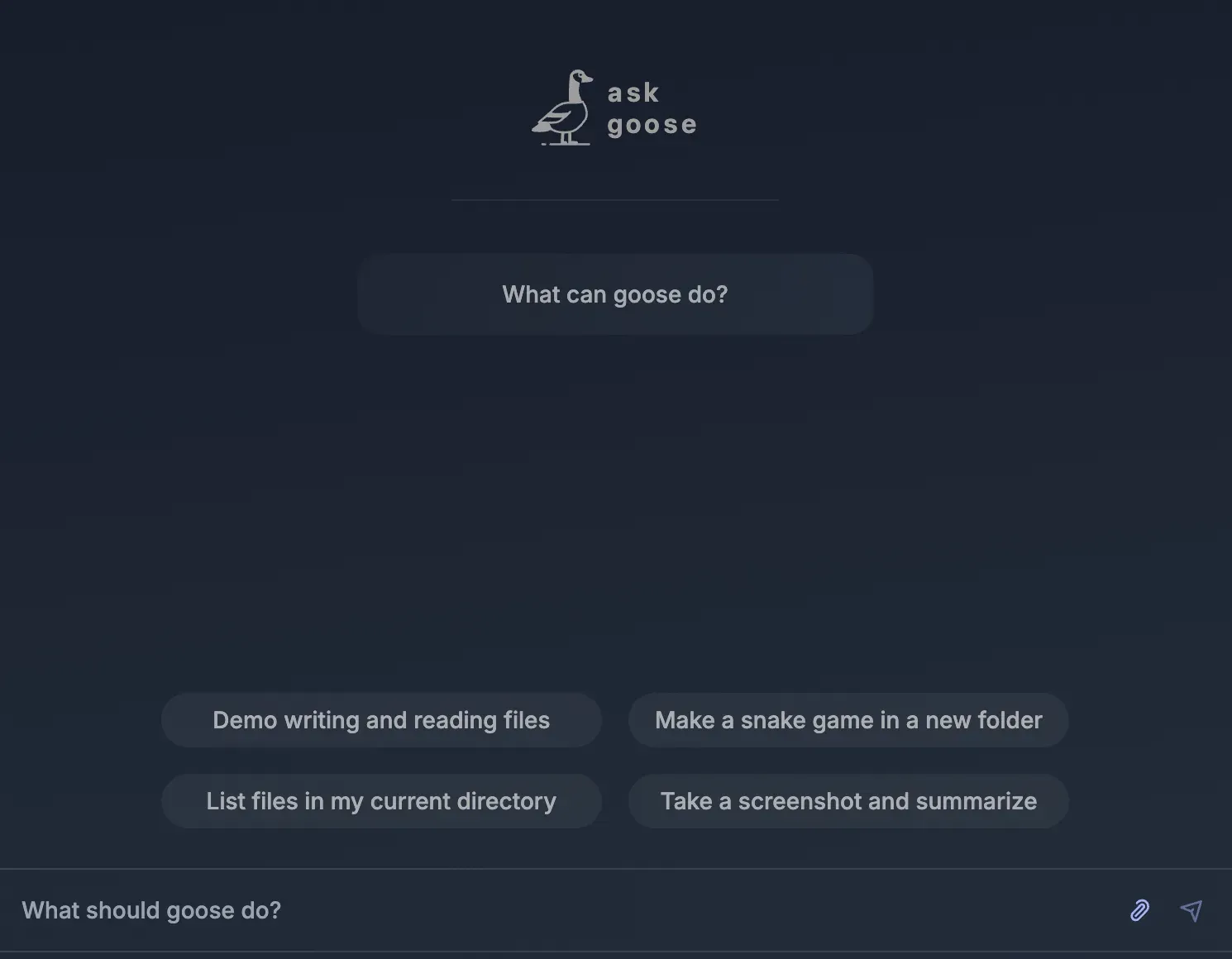
Official documentation screenshot of a new goose Desktop session with starter prompts. The interface may differ in the current release.
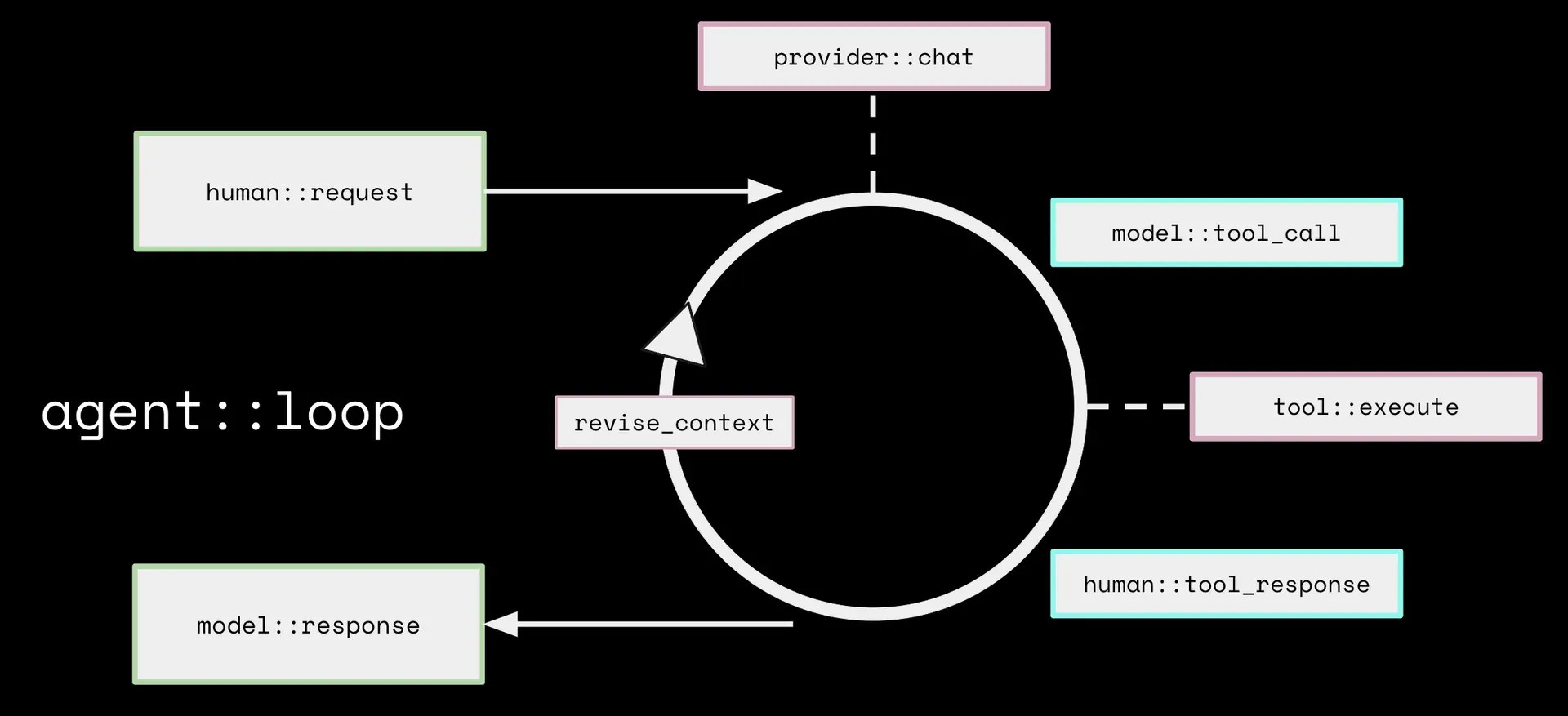
Official architecture diagram of the goose interactive loop from the documentation.
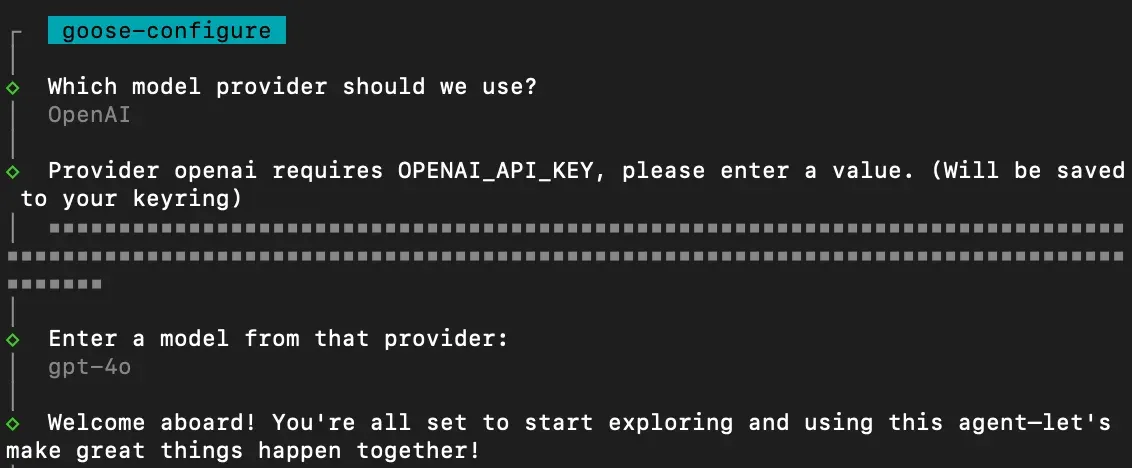
Official screenshot of provider setup with goose configure in the CLI. Model names shown are from an earlier release.
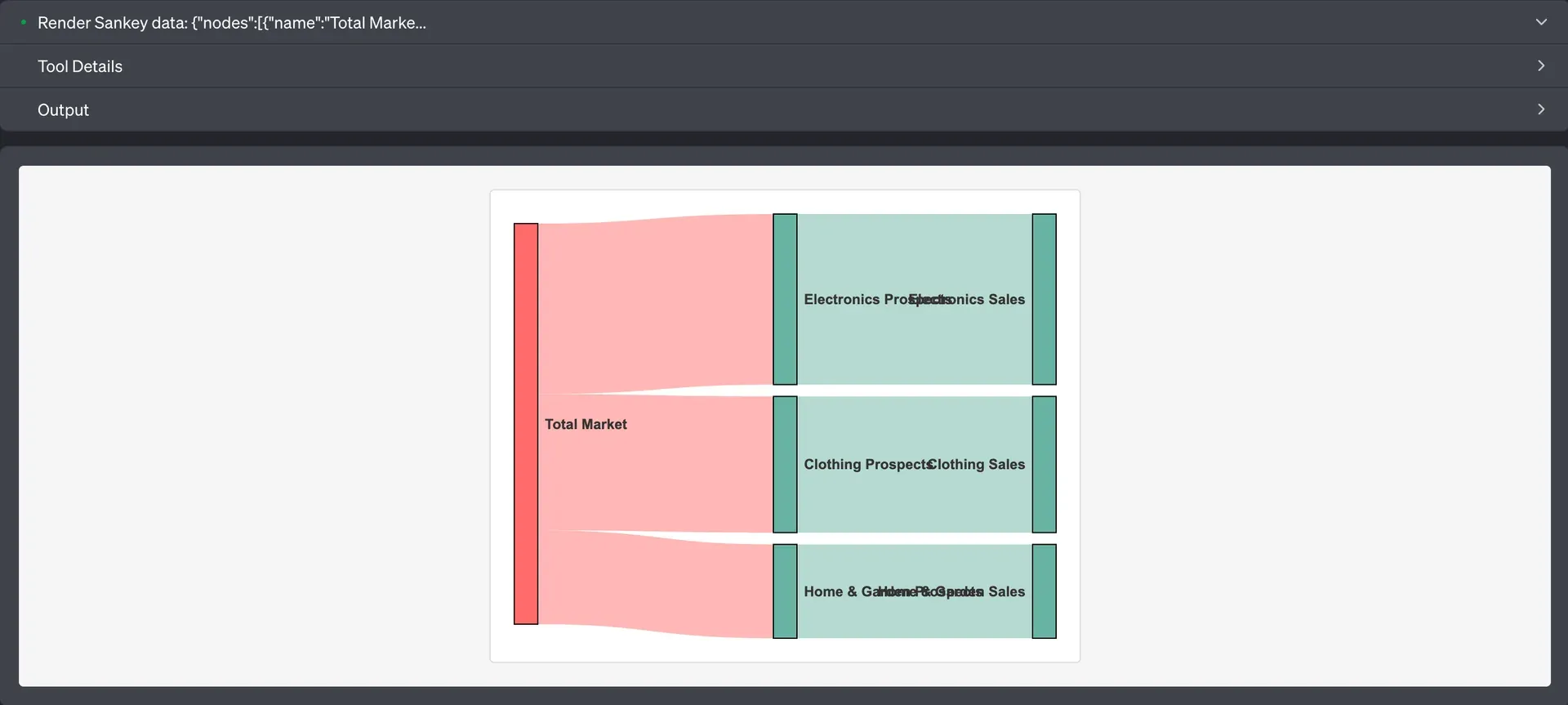
Official documentation example of the Auto Visualiser extension rendering a Sankey chart inside a session.
Official documentation example of a custom HTML app created and launched through the Apps extension.
Source: official goose project page.
Key capabilities
- Download goose Desktop for macOS The release page offers separate Apple silicon and Intel zip builds; unzip the archive and launch the app. Homebrew users can install the same build with
brew install --cask block-goose, which also handles updates. The installation guide notes that the app needs read and write access to~/.configto create its log directory. - Download goose Desktop for Windows Windows x64 users can choose the NSIS setup executable added in 1.56.0 or a portable zip. A separate CUDA build is published for NVIDIA GPU acceleration of local models. Release packages are listed on the v1.57.0 release page; Windows on ARM is not among the desktop assets.
- Download goose Desktop for Linux Each release includes DEB and RPM packages for x86_64 and arm64, plus Flatpak bundles for both architectures. Every format also has a Vulkan variant for GPU-accelerated local inference. On Debian or Ubuntu, install the DEB with
sudo dpkg -iand launch goose from the application menu. - goose CLI The CLI installs with
curl -fsSL https://github.com/aaif-goose/goose/releases/download/stable/download_cli.sh | bashon macOS, Linux, Git Bash or MSYS2, withCONFIGURE=falseto skip interactive setup. Windows users can also run the PowerShell scriptdownload_cli.ps1, and macOS users can usebrew install block-goose-cli. Prebuilt binaries cover macOS (arm64, x86_64), Linux glibc and musl (x86_64, aarch64) and Windows x64;goose updateupgrades in place. - Container image A prebuilt image is published at
ghcr.io/aaif-goose/goose:latest, and the repository Dockerfile builds a multi-stage image of about 340 MB that contains only the CLI. Providers are configured through environment variables such asGOOSE_PROVIDER,GOOSE_MODELand the provider API key. This route suits CI jobs and servers rather than desktop use. - Model providers The provider list covers Anthropic, OpenAI, Google Gemini, Vertex AI, Amazon Bedrock, Azure OpenAI, Azure AI Foundry, Databricks, Snowflake, Mistral, Groq, OpenRouter, LiteLLM, GitHub Copilot and many more, plus any OpenAI-compatible endpoint. First-run setup offers OpenRouter or Tetrate sign-in, or manual entry of credentials, which are stored in the system keyring when available. Several models can be combined for different tasks.
- Subscriptions through ACP providers Goose can delegate turns to external ACP agents such as Claude Code or Codex and use the subscription those tools are signed in to. In that mode the external agent executes tools itself and goose passes its configured extensions through as MCP servers. The ACP providers guide explains the setup and its limits.
- Built-in local inference The Local provider embeds llama.cpp, downloads quantized GGUF models from Hugging Face into the shared cache and runs them in-process, with no separate server or API key. The local inference announcement recommends Gemma 4 models for native tool calling and vision, while other models rely on tool emulation. The local-inference crate also has an optional MLX backend for Apple silicon. Smaller local models remain less reliable for long multi-step tasks than large hosted models.
- MCP extensions Every tool goose uses comes from an extension, which is an MCP server. Built-in extensions include Developer (shell and file editing, enabled by default), Analyze, Computer Controller, Memory, Chat Recall, Todo, Summon, Skills, Apps and Auto Visualiser. External MCP servers can be added from the desktop app, the CLI or a deeplink, and the README cites more than 70 available extensions.
- Permission modes and tool permissions Four modes control autonomy: Completely Autonomous, Smart Approval, Manual Approval and Chat Only. The documentation states that Autonomous mode is applied by default, and since 1.54.0 the first-time configuration prompts for a mode. Per-tool permissions can mark individual tools as Always Allow, Ask Before or Never Allow, as described in the permissions guide.
- Prompt injection detection and adversary mode Optional detection checks tool-call parameters against threat patterns such as recursive deletion, downloading and executing remote scripts or reading SSH keys, with an optional ML classifier endpoint. Adversary mode adds a second reviewer, driven by the same model, that returns ALLOW or BLOCK for each tool call against rules in
~/.config/goose/adversary.md. The docs state that both are safeguards rather than guarantees, and adversary mode fails open if the reviewer errors. - Extension allowlist for organizations Administrators can publish a YAML allowlist of permitted MCP server commands and point goose at it with
GOOSE_ALLOWLIST. Installation of any extension whose command is not listed is rejected. Since 1.57.0 the allowlist URL must use HTTPS and redirects are validated, and goose blocks installs when the policy fails. - Recipes and scheduling Recipes package instructions, extensions, parameters, a structured response schema and retry rules into a YAML or JSON file that others can run or open from a link. Sub-recipes can run in parallel, and recipes can be scheduled with a cron expression from the desktop app or the CLI. The recipes section includes a full field reference.
- Subagents, skills and hooks Goose can start subagents that work in isolated contexts and return results to the main session; 1.56.0 added a concurrency limit through
GOOSE_MAX_CONCURRENT_SUBAGENTS. Project context comes from.goosehintsfiles, or from other rule files such as AGENTS.md throughCONTEXT_FILE_NAMES. Lifecycle hooks follow the Open Plugins specification and run shell scripts on events such as PreToolUse, PostToolUse and SessionStart. - Headless runs and CI
goose run -torgoose run -i instructions.mdstarts a session, executes the task and exits, which makes goose usable in scripts and pipelines. The CI/CD tutorial shows a GitHub Actions workflow that reviews pull requests. Headless jobs use the permission mode and extensions you configure, so restrict both before granting repository write access. - ACP server, remote server and GDK
goose acpexposes the agent over stdio for editors such as Zed and JetBrains IDEs, andgoose serveruns an ACP server that goose Desktop can reach on another machine using TLS, a shared secret and certificate fingerprint pinning. The GDK documentation covers the Rust components for building your own agent, and custom distributions can preconfigure providers, extensions and branding. - Sessions, context management and export Sessions persist in a local SQLite database (
~/.local/share/goose/sessions/sessions.dbon Linux and macOS) and can be resumed, searched through Chat Recall or exported to HTML with an interactive viewer. goose summarizes older context with smaller models and compacts automatically, capped at 225k tokens by default since 1.55.0. Optional Code Mode lets the model write JavaScript that discovers and chains tool calls to reduce context use when many extensions are enabled.
Where goose fits
Working on a code repository from the terminal
Install the CLI, run goose configure to choose a provider and model, then start goose session inside the repository. The Developer extension reads files, edits them with find-and-replace and runs commands such as tests and linters. Add a .goosehints file with build commands and conventions so they do not need repeating. Check which permission mode is active with /mode before asking for changes, and review the diff in git rather than relying on the chat summary.
Running a desktop assistant for non-code tasks
goose Desktop gives the same agent a chat interface with extension and settings screens, which suits research, document drafting, spreadsheet analysis or browser-based automation through Computer Controller. Enable only the extensions the task needs, since each one adds tools to the model context. For tasks that touch personal folders or accounts, choose Manual or Smart Approval and keep an eye on each tool call before it runs.
Using goose with private or local models
Select the Local provider in Settings, search Hugging Face for a supported GGUF model and download it, or point goose at Ollama, LM Studio, Docker Model Runner or an internal OpenAI-compatible endpoint. Pick a model with native tool calling where possible, because tool emulation is less reliable. Confirm that no cloud provider remains configured as a fallback and that the model fits in available GPU or system memory.
Automating recurring work with recipes
Capture a successful session as a recipe, add parameters for the parts that change and define a response schema if another system will read the output. Store recipes in the repository so changes are reviewed like code, and schedule them with a cron expression for reports or maintenance checks. Since 1.57.0 scheduled runs use the recipe settings, so verify the provider, model and extensions declared in the file.
Pull request review in GitHub Actions
The CI/CD tutorial installs goose in a workflow, configures a provider from repository secrets and runs a headless prompt against the pull request. Give the job the narrowest token permissions it needs and pin the goose version rather than following the stable channel. Treat the posted review as an input for a human reviewer, and test the workflow on a fork before enabling it on protected branches.
Rolling goose out to a team
Publish an extension allowlist over HTTPS and set GOOSE_ALLOWLIST on managed machines, decide on a default permission mode and document which providers are approved for company data. Teams that need a branded build can follow the custom distribution guide to preconfigure providers and bundled extensions. Use the usage data setting to confirm the telemetry choice, and keep logs available for incident review.
Install
curl -fsSL https://github.com/aaif-goose/goose/releases/download/stable/download_cli.sh | bashReviews of goose
Be the first to share your experience with goose.
Write a review
Loading review form…
Alternatives to goose
 Codex CLIOpen-source Rust CLI from OpenAI that reads a repository, edits files and runs local commands inside a sandbox with approval prompts. Includes code review, MCP, skills, codex exec for CI, a TypeScript SDK and an app-server.OOpenCodeOpenCode is an open-source AI coding agent available through a command-line interface and a beta desktop app. It provides separate agents for development work and read-only code exploration.
 PiPi is an MIT-licensed coding agent CLI from Earendil that works in your terminal with read, bash, edit and write tools. Extensions, skills and Pi packages add features, and print, JSON, RPC and SDK modes let other programs drive it.