

What is Codex CLI?
Codex CLI is the coding agent from OpenAI that runs in a terminal on your own computer. Started inside a project directory, it reads the repository, plans a change, edits files and runs the build, test and shell tools already installed on the machine. The openai/codex repository also holds the app-server that powers rich clients such as the Codex IDE extension, the TypeScript SDK and the platform sandbox helpers. OpenAI documents the tool on the Codex CLI documentation page.
Codex CLI is distributed as standalone installer scripts for macOS and Linux (curl) and for Windows (PowerShell). By default they download from releases.openai.com and fall back to GitHub Releases. It is also published as the npm package @openai/codex and the Homebrew cask codex. Each GitHub release carries binaries for macOS on Apple Silicon and x86_64, statically linked musl builds for Linux x86_64 and arm64, and Windows x64 and ARM64 executables, together with a SHA256SUMS file for the package archives, Sigstore bundles for the Linux archives and a DotSlash file named codex for pinning one version in source control.
The current release is Codex CLI 0.167.0, published on November 6, 2026 under the tag rust-v0.167.0. It adds an agent command center (codex agents --no-daemon) with unread markers, switching between connected backends from the session picker without losing drafts, a grouped "Sign in another way" menu with an opt-in Google Cloud Vertex AI setup wizard, an experimental opt-in for macOS or Windows system proxy settings, and inline patch details while an approval prompt is open. Version 0.166.0, released on October 29, added keyboard-driven transcript selection and search, codex queue --resume and codex doctor --network-only. Five stable releases shipped between October 15 and November 6, 2026, so pin versions in automation.
The code is a Rust workspace (codex-rs) with a terminal UI, a core agent loop and an app-server that speaks JSON-RPC 2.0 over stdio by default. Model-generated commands run inside an operating-system sandbox: Seatbelt on macOS, bubblewrap on Linux and WSL2, and a native Windows sandbox. Settings live in ~/.codex/config.toml, with project overrides in .codex/config.toml that load only for trusted projects. The repository is licensed under Apache-2.0. Its contribution guide accepts bug reports, reproductions and root-cause analysis through issues, but not external pull requests.
Several Codex surfaces sit outside this repository. OpenAI's open-source overview lists the IDE extension and Codex cloud as closed source, while the Codex SDK and app-server are open. Inference is not local by default: the CLI signs in with a ChatGPT plan or an OpenAI API key, and can be pointed at other providers, including built-in Ollama and LM Studio entries. The repository's install guide still lists Windows 11 via WSL2 as a requirement, while the current documentation describes native Windows use with its own sandbox.
Codex CLI screenshots
Explore the interface. Open a screenshot to view it at full size.
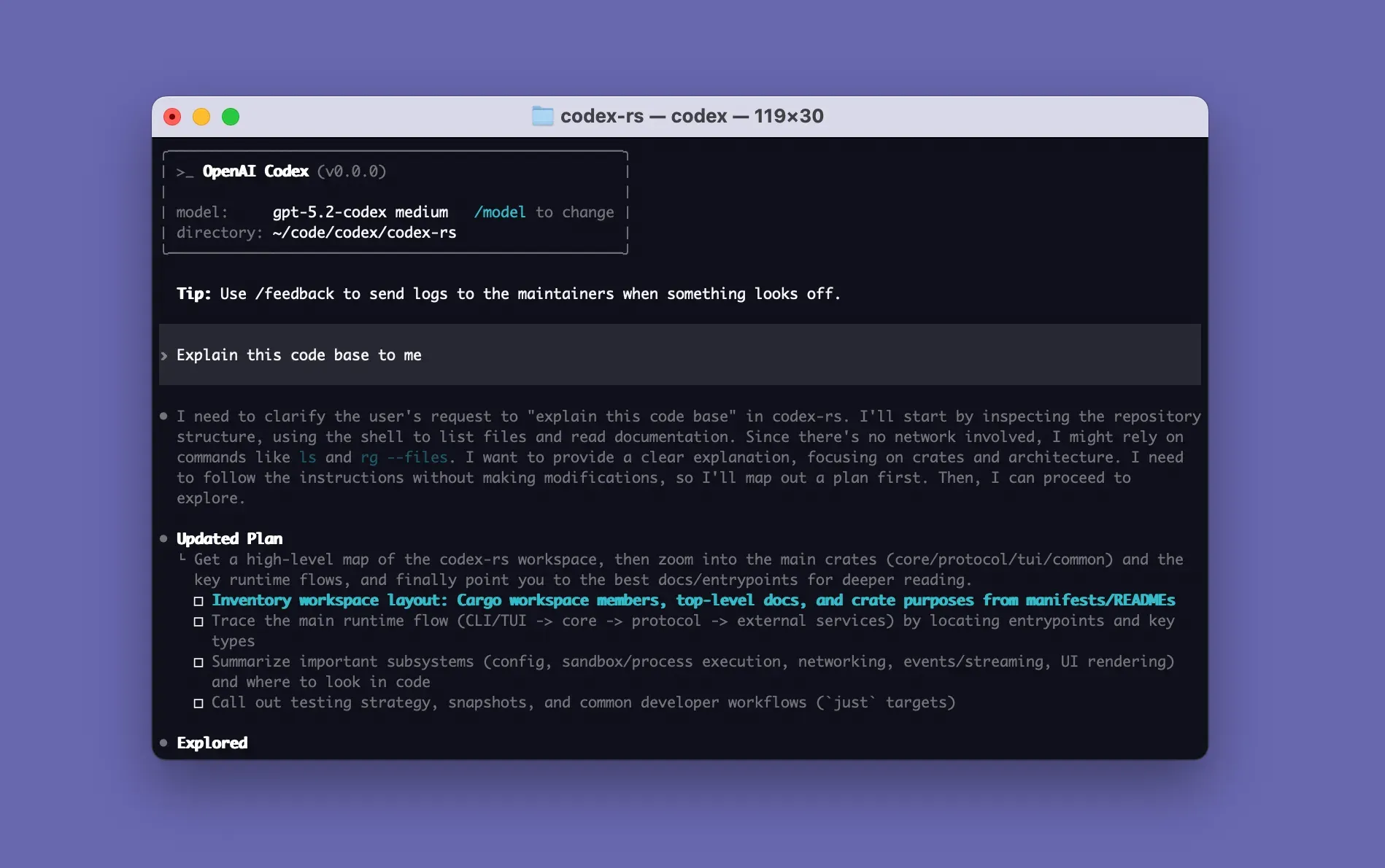
Official README image of a Codex CLI session in the codex-rs workspace. It shows an older development build and model name.
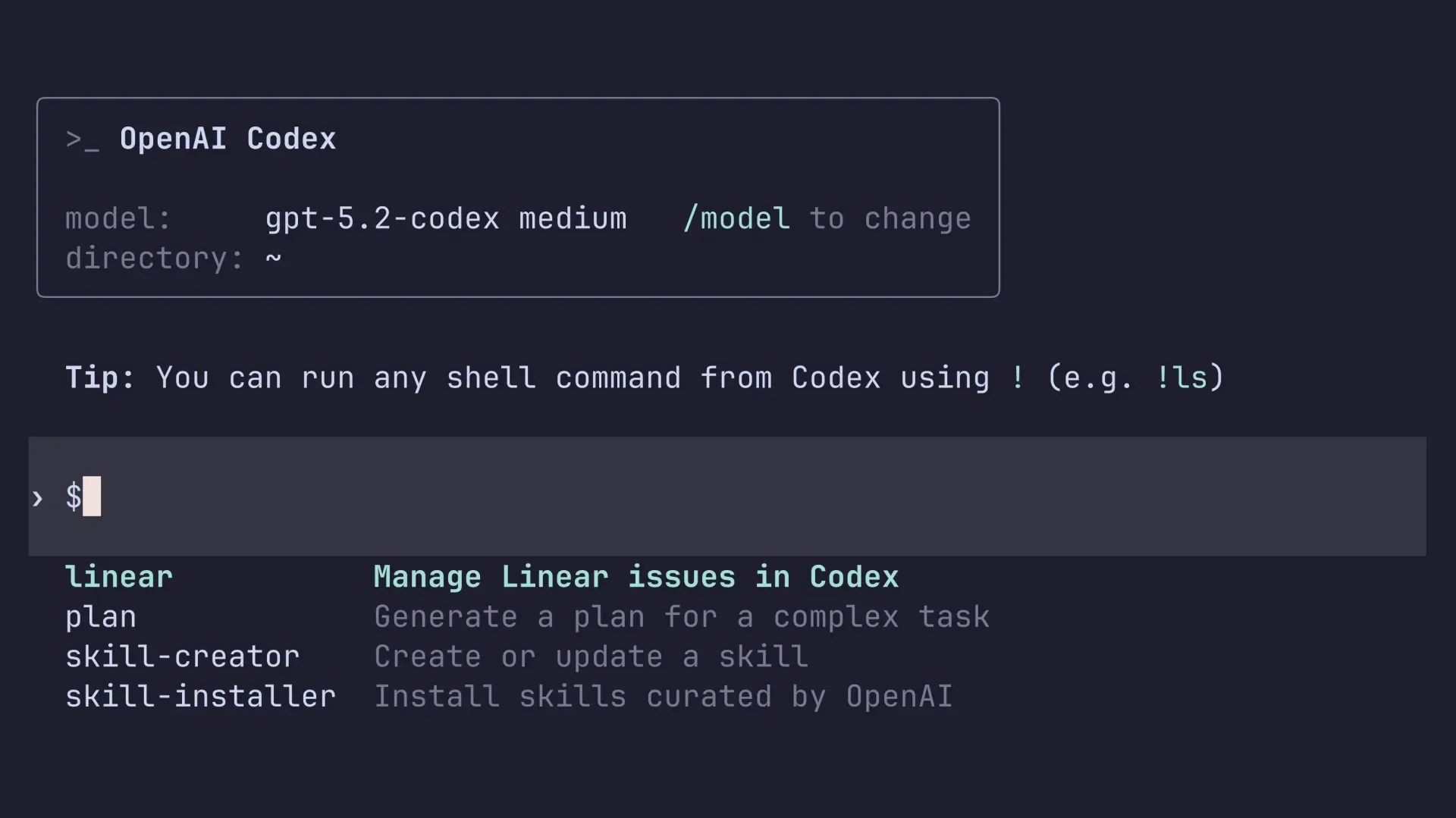
Typing $ in the Codex CLI composer lists the available skills. Official image from the Codex documentation.
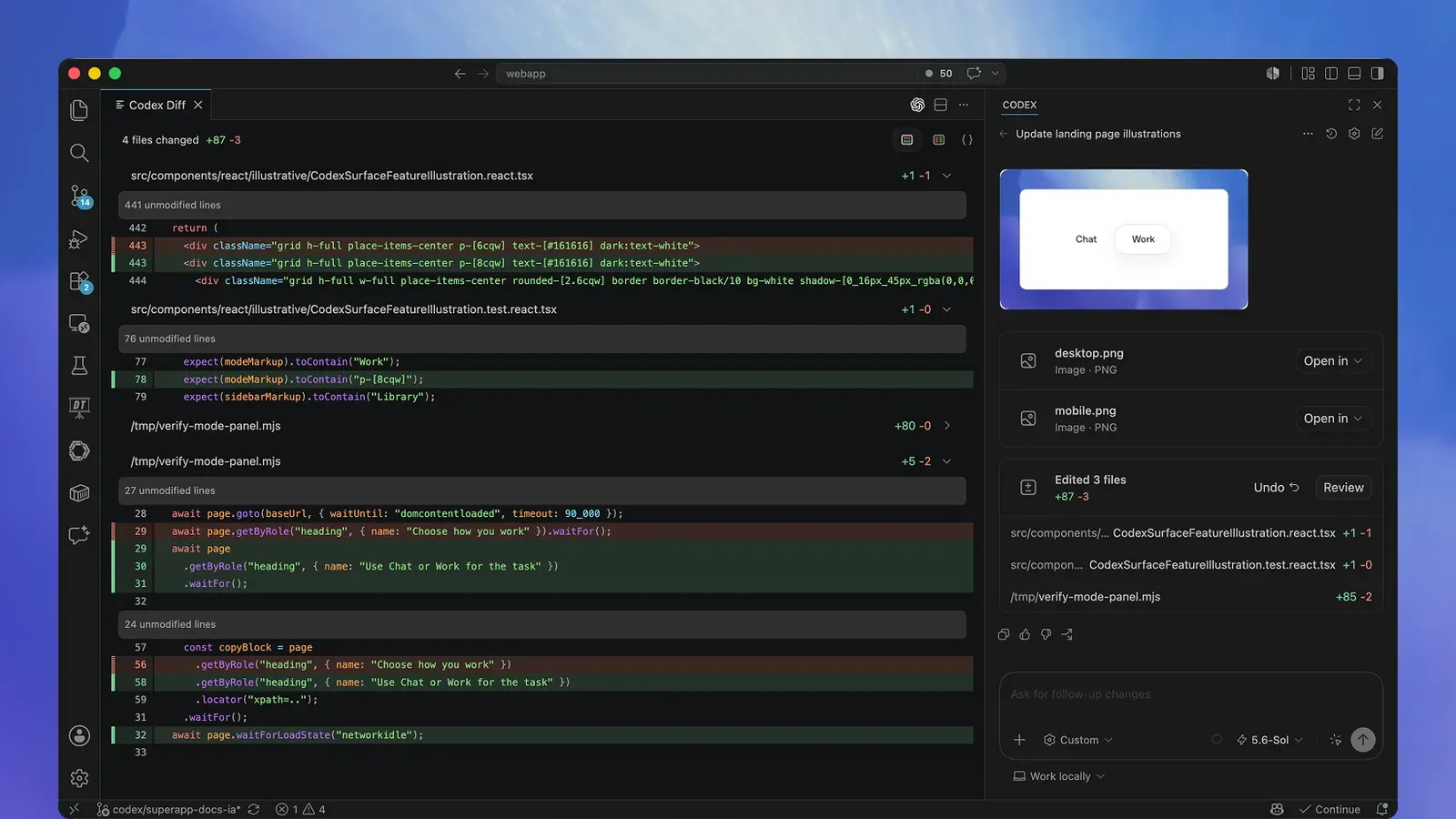
The Codex IDE extension reviewing edits in place. The extension is a separate, closed-source surface that uses the app-server.
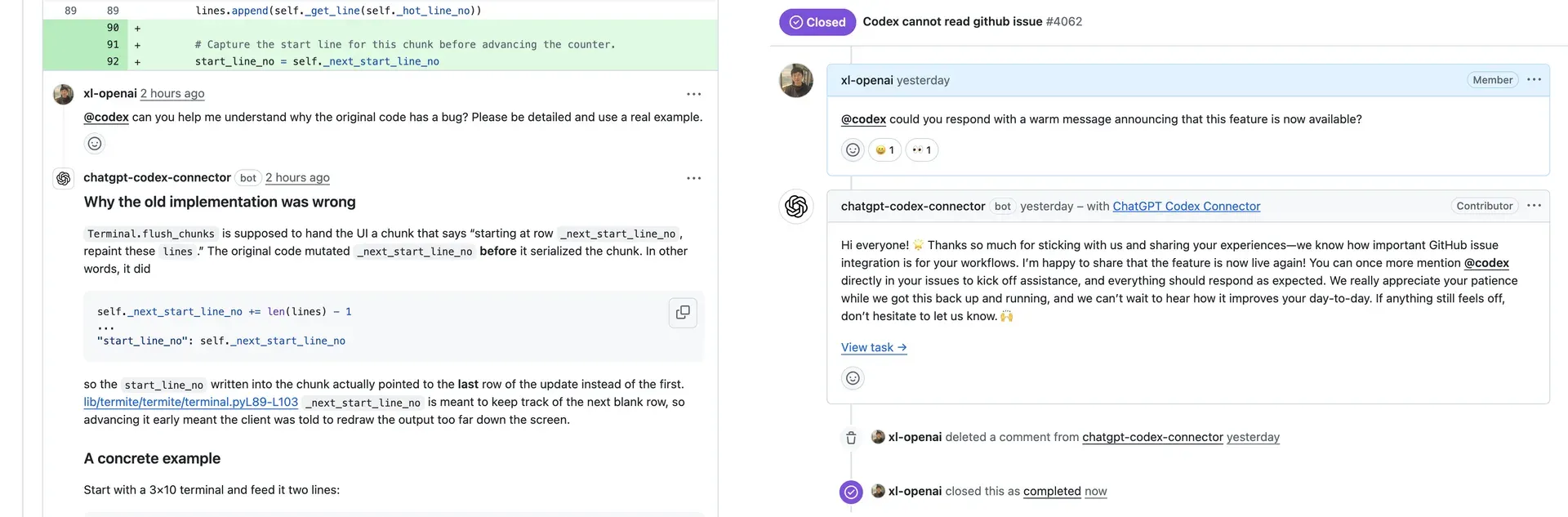
Codex answering @codex mentions on GitHub. This cloud integration requires ChatGPT sign-in and is not part of the local CLI.
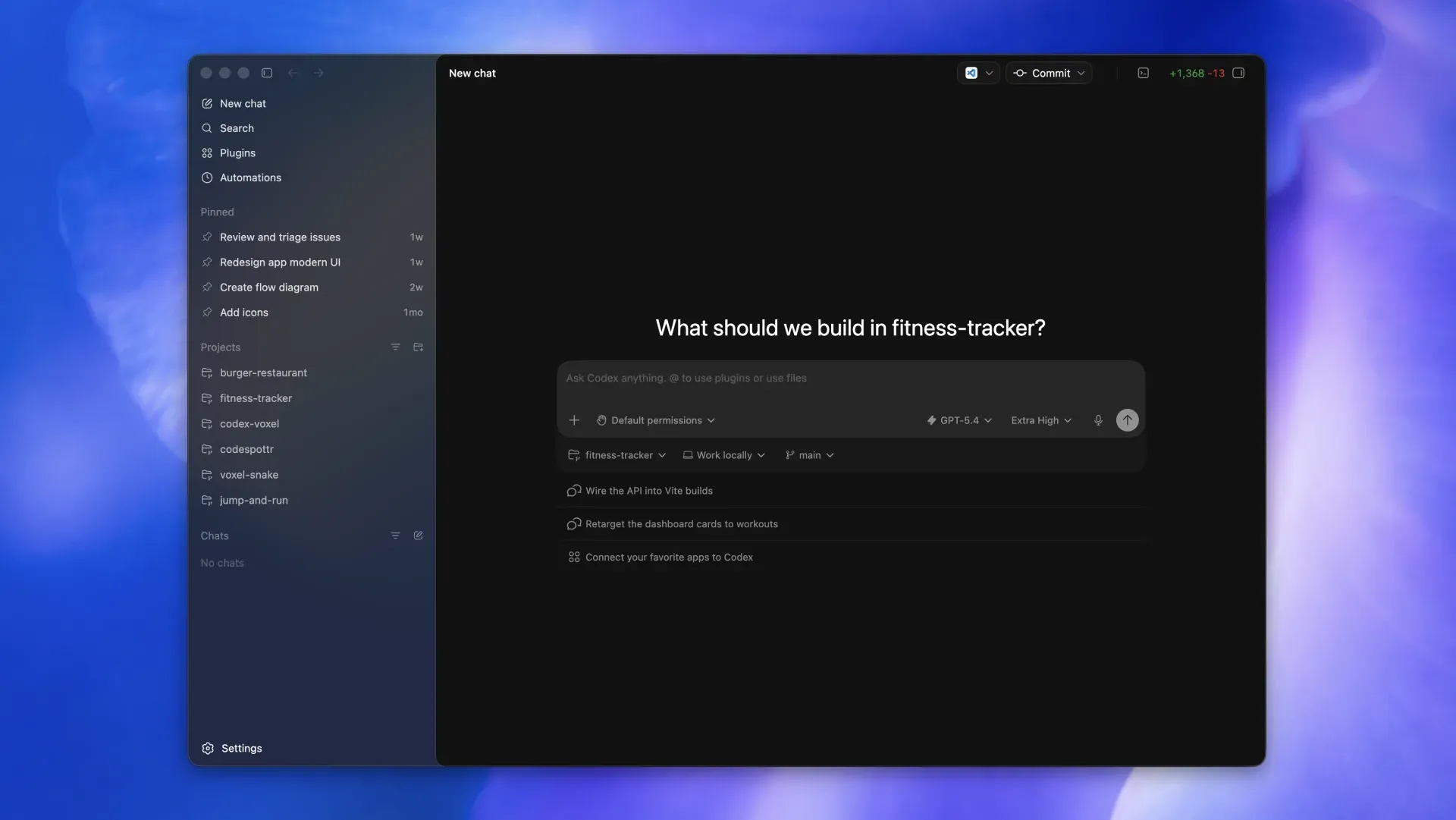
The desktop app view opened with codex app. It shares Codex sign-in and projects but is a separate surface from the terminal UI.
Source: official Codex CLI project page.
Key capabilities
- Install on macOS and Linux Run
curl -fsSL https://chatgpt.com/codex/install.sh | shand rerun the same command to update. SetCODEX_INSTALLER_USE_RELEASES_OPENAI_COM=falseto force downloads from GitHub Releases instead of releases.openai.com. The repository lists macOS 12 or later, Ubuntu 20.04 or later and Debian 10 or later, with 4 GB of RAM as the minimum and 8 GB recommended. Git 2.23 or later is optional but needed for the built-in pull request helpers. - Install on Windows Run
powershell -ExecutionPolicy ByPass -c "irm https://chatgpt.com/codex/install.ps1 | iex", or download the x64 or ARM64 executable from the latest GitHub release. The current documentation describes native Windows use of the CLI in PowerShell with a Windows sandbox, without WSL or a virtual machine. Inside WSL2, Codex uses the Linux sandbox and needs bubblewrap installed. - npm, Homebrew and pinned binaries
npm install -g @openai/codexandbrew install --cask codexinstall the same CLI. Release archives contain one binary with the target in its name, for examplecodex-x86_64-unknown-linux-musl. A DotSlash file lets a repository commit a lightweight pointer so every contributor runs the same version on any platform. - Interactive terminal agent Running
codexopens a full-screen terminal UI that shows the model, reasoning effort and working directory. Slash commands include/initto create an AGENTS.md file,/status,/permissions,/modeland/review. You can steer a turn while it runs, and a leading!runs a shell command directly. Since 0.167.0,Ctrl+Lclears the screen whileCtrl+Tkeeps earlier messages available. - Sandbox modes and approval policies Two layers control the agent: the sandbox mode sets what commands can technically do (
read-only,workspace-writeordanger-full-access), and the approval policy sets when Codex must ask. The Auto preset (--sandbox workspace-write --ask-for-approval on-request) lets Codex edit and run commands in the working directory and asks before writing outside it or using the network. The formeruntrustedapproval policy has been retired and can stop the client from starting; the approvals and security guide documents the replacement. - Network access off by default In
workspace-writemode, commands have no network access untilsandbox_workspace_write.network_access = trueis set. Thenetwork_proxyfeature then constrains outbound traffic to allow and deny rules per domain, with*.example.commatching subdomains only and**.example.comalso matching the apex domain. Domain rules do nothing unless the proxy feature is enabled. - Native Windows sandbox Windows supports three implementations. MXC uses Microsoft Execution Containers process isolation on Windows 11 24H2 (build 26100.9278) or 25H2 (build 26200.9278) without administrator setup.
elevateduses dedicated lower-privilege users and firewall rules after an administrator-approved setup, andunelevatedis a weaker fallback with a restricted token. From 0.162.0, a single command can test MXC support, as described in the Windows sandbox guide. - AGENTS.md, rules and project configuration Repository instructions go in AGENTS.md, which
/initcan generate. Execution-policy.rulesfiles decide which commands may run without approval, and project.codex/config.tomllayers apply from the project root down to the working directory. Untrusted projects skip project layers, hooks and rules, and provider or telemetry keys are ignored in project files. - Skills and plugins Skills package repeatable instructions; typing
$in the composer lists them, with built-in samples such as skill-creator and skill-installer. Plugins connect Codex to team tools and are browsed from configured marketplaces inside the CLI. OpenAI publishes reusable skills and plugins in its separate openai/skills and openai/plugins repositories. - MCP servers
codex mcpadds local or remote Model Context Protocol servers, handles their authentication and shows the tools available to the session before Codex uses them. Tool calls that advertise a destructive annotation always require approval. An MCP server markedrequired = truethat fails to start makescodex execexit with an error instead of continuing without it. - Local code review
/reviewoffers four presets: review against a base branch in pull request style, review uncommitted changes, review a commit, or follow custom instructions. Codex reports prioritized findings without modifying the working tree. This local review is separate from the cloud review that responds to@codexmentions on GitHub. - Images and web search
codex --imageattaches screenshots, diagrams or design references to the first prompt, and images can also be pasted into the composer, with local previews on supported terminals since 0.167.0.codex --searchswitches a run to live web search when a task depends on current documentation or releases, and search activity stays visible in the transcript. - Sessions, resume and subagents
codex resumereopens a recent chat from the current repository or searches older local chats. Codex can delegate focused investigations to subagents and bring their findings back. The agent command center lists tasks by status with unread markers, and the 0.167.0 session picker switches between connected backends while keeping drafts. - Non-interactive mode for scripts and CI
codex exec "task"streams progress to stderr and prints only the final message to stdout, so output can be piped. It defaults to a read-only sandbox.--jsonemits a JSON Lines event stream,--output-schemarequests a final answer that matches a JSON Schema,--ephemeralavoids writing session files, and--full-autois no longer supported. See the non-interactive mode guide. - TypeScript SDK
npm install @openai/codex-sdkprovides a server-side library, requiring Node.js 18 or later, that starts, continues and resumes local Codex threads from your own code. The oldercodex mcp-servercommand and standalone binary have been removed in favor of the app-server. - App-server protocol and remote terminal UI
codex app-serverexposes authentication, conversation history, approvals and streamed agent events over JSON-RPC 2.0, using JSONL over stdio by default, Unix sockets, or an experimental WebSocket listener.codex --remote ws://127.0.0.1:4500attaches the terminal UI to an app-server on another machine. Non-local connections need token authentication behind TLS, as explained in the app-server documentation. - GitHub Action
openai/codex-action@v1installs the CLI, starts the Responses API proxy when given an API key and runscodex execunder the permissions you set. It runs on Linux or macOS runners; Windows requiressafety-strategy: unsafe. See the GitHub Action guide. - Sign-in options and model providers Sign in with ChatGPT for plan-based usage, or pipe an API key to
codex login --with-api-keyfor usage billed at API rates. Built-in provider IDs include openai, ollama, lmstudio, amazon-bedrock and gcp, and custom OpenAI-compatible providers are defined undermodel_providersin the user configuration.openai_base_urlpoints the built-in provider at a proxy or a data-residency endpoint. - Codex cloud from the terminal
codex cloudbrowses active and completed cloud chats, submits work to a configured cloud environment and applies the result to the local repository. Cloud tasks require ChatGPT sign-in and run in OpenAI cloud environments, not on your machine.
Where Codex CLI fits
Exploring and changing an unfamiliar repository
Open the project directory, commit or stash local work, and run codex. Ask for an explanation of the structure first, then a focused change, and keep the default workspace-write sandbox with on-request approvals so that writes outside the project and network use need confirmation. Use /init to record build and test commands in AGENTS.md. OpenAI recommends Git checkpoints before and after a task so a change can be reverted. Check every diff before accepting it.
Running Codex in CI with codex exec
Call codex exec with the narrowest sandbox that works, typically read-only for analysis and --sandbox workspace-write for edits. Add --json for an event stream or --output-schema with -o for a structured result file. Authenticate with an API key stored as a CI secret, use --ignore-user-config for reproducible runs and pin the installed version. Reserve danger-full-access for isolated runners or containers.
Reviewing changes before a commit or pull request
Run /review and choose the base-branch preset to approximate a pull request review, or review uncommitted changes during development. Findings are prioritized and the working tree is not modified. For pull requests on GitHub, the Codex GitHub Action can run a committed prompt file and post the output. Treat findings as review input and confirm them with tests.
Rolling out on managed Windows workstations
Install with the PowerShell script or a pinned release binary, then choose a sandbox. Prefer MXC with features.prefer_mxc = true on supported Windows 11 builds, and verify it with the documented test command, which should print MXC_OK with exit code 0. Where MXC is unavailable, IT can provision the elevated sandbox for a named user with codex sandbox setup --elevated. Administrators can restrict implementations and block MXC through requirements.toml.
Connecting internal tools through MCP and skills
Add the team's MCP servers with codex mcp, inspect the tools each server exposes and keep destructive tools behind approval. Package repeatable procedures, such as release checklists, as skills so they appear in the $ selector. Keep provider and telemetry settings in the user-level configuration, because project files cannot set them, and test each server's sign-in flow before relying on it in automation.
Building a custom client on app-server or the SDK
Use the TypeScript SDK when Codex should run as a step in a pipeline or internal service. Use codex app-server when you need a full client with authentication, history, approvals and streamed events, as the IDE extension does. Keep the default stdio transport for local embedding. For remote terminal access, place the WebSocket listener behind TLS and pass the bearer token through an environment variable with --remote-auth-token-env.
Install
curl -fsSL https://chatgpt.com/codex/install.sh | shReviews of Codex CLI
Be the first to share your experience with Codex CLI.
Write a review
Loading review form…
Alternatives to Codex CLI
 PiPi is an MIT-licensed coding agent CLI from Earendil that works in your terminal with read, bash, edit and write tools. Extensions, skills and Pi packages add features, and print, JSON, RPC and SDK modes let other programs drive it.
 OpenHandsOpenHands Agent Canvas is an MIT-licensed control center for coding agents. It runs the OpenHands agent or ACP agents such as Claude Code and Codex on local, Docker, VM, Kubernetes or cloud backends, with scheduled and event-driven automations.