

What is OpenHands?
OpenHands is an open-source project for AI-driven software development. The OpenHands/OpenHands repository now holds Agent Canvas, a React and TypeScript browser client that acts as a control center for agent conversations, files, terminals, settings, backends and automations. Canvas does not execute agent actions itself: it talks to one or more OpenHands Agent Server instances, and an optional Automation Server decides when scheduled or event-triggered work runs. The company behind the project, OpenHands, also sells OpenHands Cloud and OpenHands Enterprise as managed or licensed backends.
The system is split across several repositories. The Python Software Agent SDK contains the agents, tools and the Agent Server with its REST and WebSocket API; OpenHands/automation owns schedules, webhooks and run history; and OpenHands/typescript-client is the browser client Canvas uses to call the Agent Server. Canvas runs the built-in OpenHands agent by default and can also drive Claude Code, Codex, Gemini CLI, Pi and OpenCode through the Agent Client Protocol (ACP), where the Agent Server spawns the agent CLI as a subprocess.
Distribution covers several paths. The npm package @openhands/agent-canvas provides the agent-canvas launcher, which starts the client, Agent Server, Automation Server and an ingress proxy on port 8000; it needs Node.js 24 or later and uv. A Docker image is published as ghcr.io/openhands/agent-canvas, an official Helm chart targets Kubernetes, and each GitHub release carries desktop preview installers: a universal macOS DMG, a Windows x64 setup executable, and a Linux DEB and AppImage. The macOS build is not yet signed with an Apple Developer ID or notarized.
The current release is v1.37.0, published November 6, 2026, which explains each automation with a generated Mermaid diagram and fixes chat history ordering and startup display issues. Version 1.36.0 lets automations run as a service account, unifies the create, view and edit flows for automations and lists Bitbucket Data Center and Azure DevOps repositories in template setup. Version 1.35.0 stores pins, archives and workspace metadata as server-side conversation tags and adds a file download button, and 1.34.0 introduced a per-conversation Docker runtime with a Settings, Runtime page. Releases ship every few days, with notes in the documentation release notes.
The source is MIT licensed. Out of scope for Canvas, according to its architecture notes: sandboxing or workspace isolation, hosting LLM credentials outside the configured backend, and running automations without an automation backend. Multi-user authentication, role-based access control and tenant isolation are not part of the open-source Helm deployment; those belong to the paid Teams and Enterprise editions described on the pricing page.
OpenHands screenshots
Explore the interface. Open a screenshot to view it at full size.
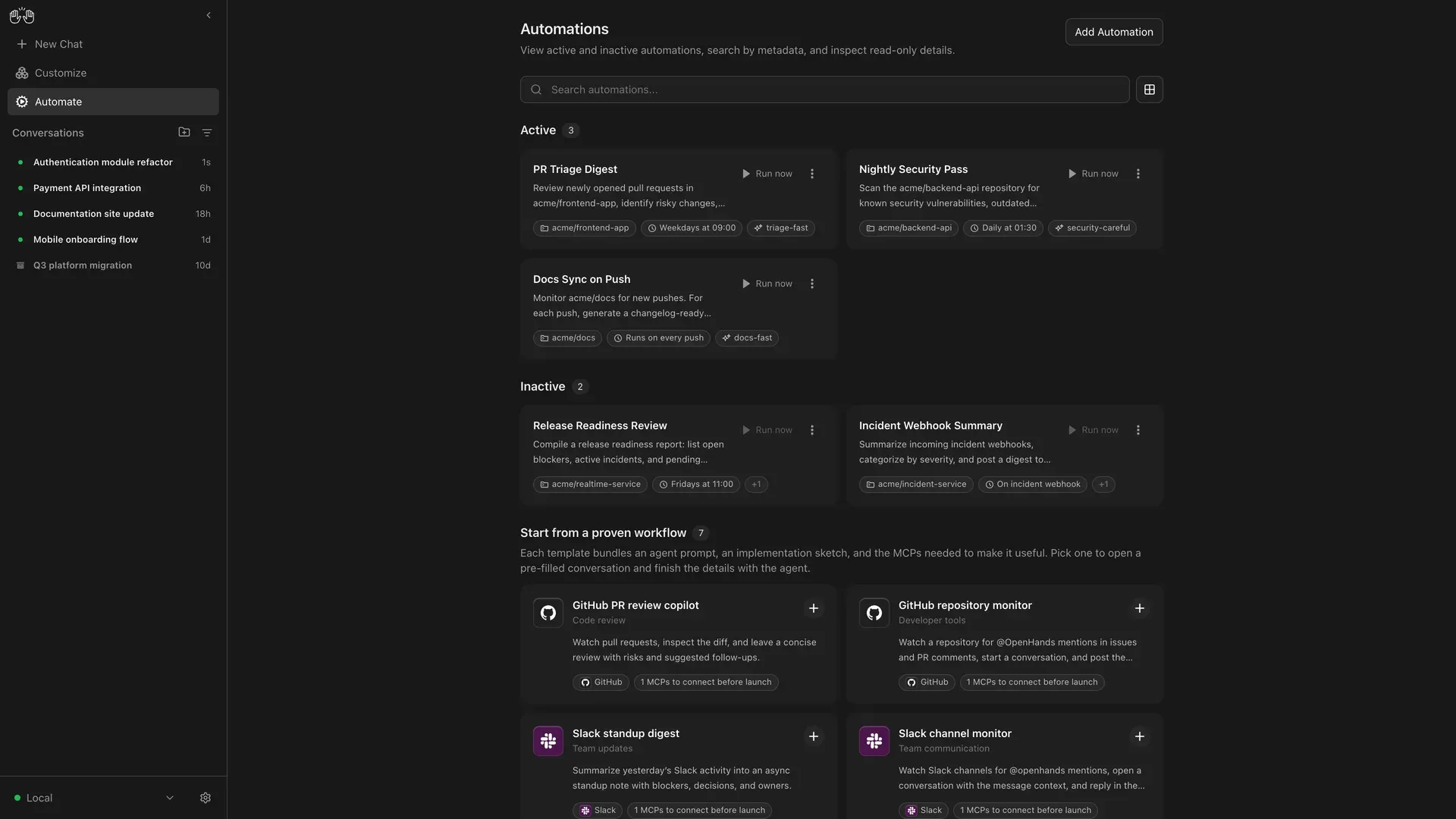
Official Agent Canvas preview of the Automate view with example automations and GitHub and Slack templates.
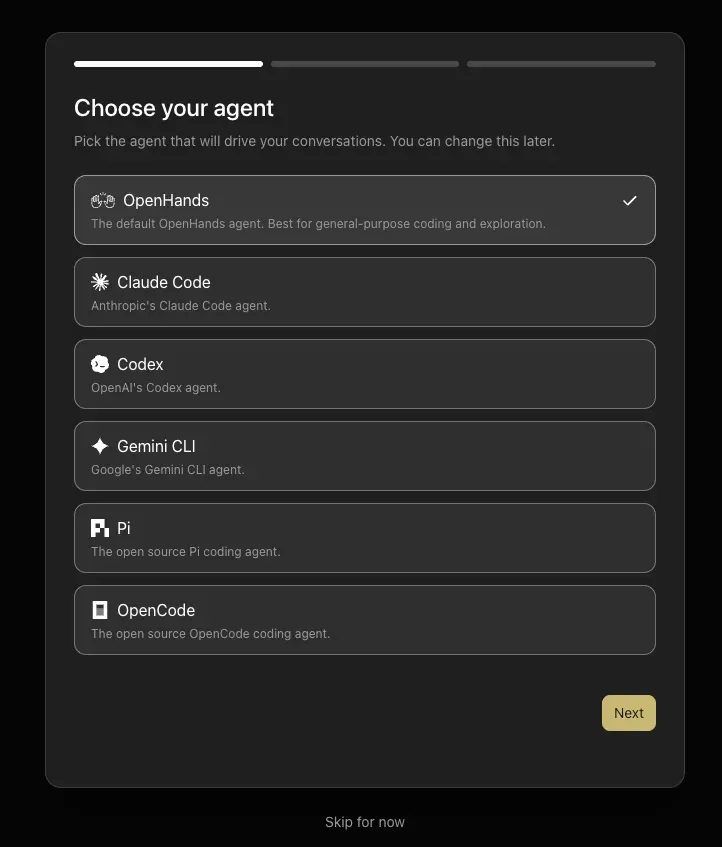
Onboarding dialog for choosing the agent that drives conversations, from the ACP agents documentation.
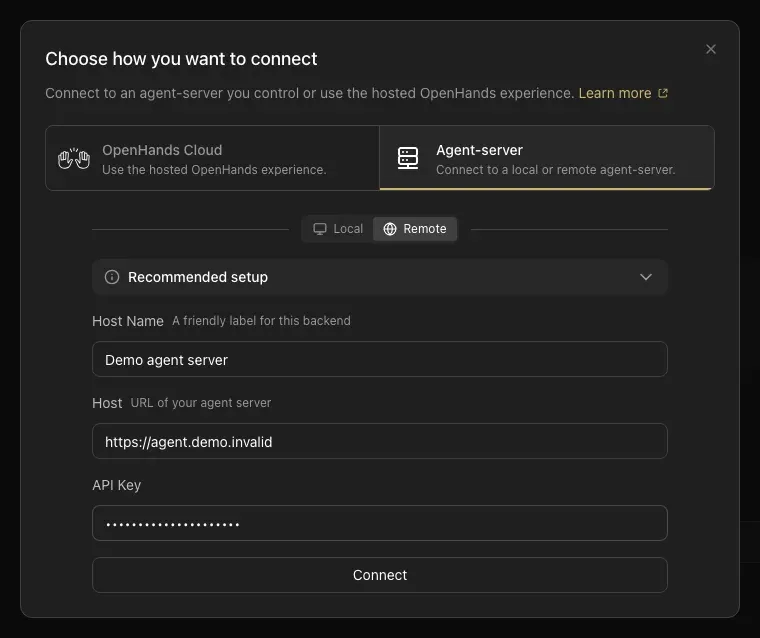
Add-backend dialog for connecting a remote Agent Server, from the backends documentation.
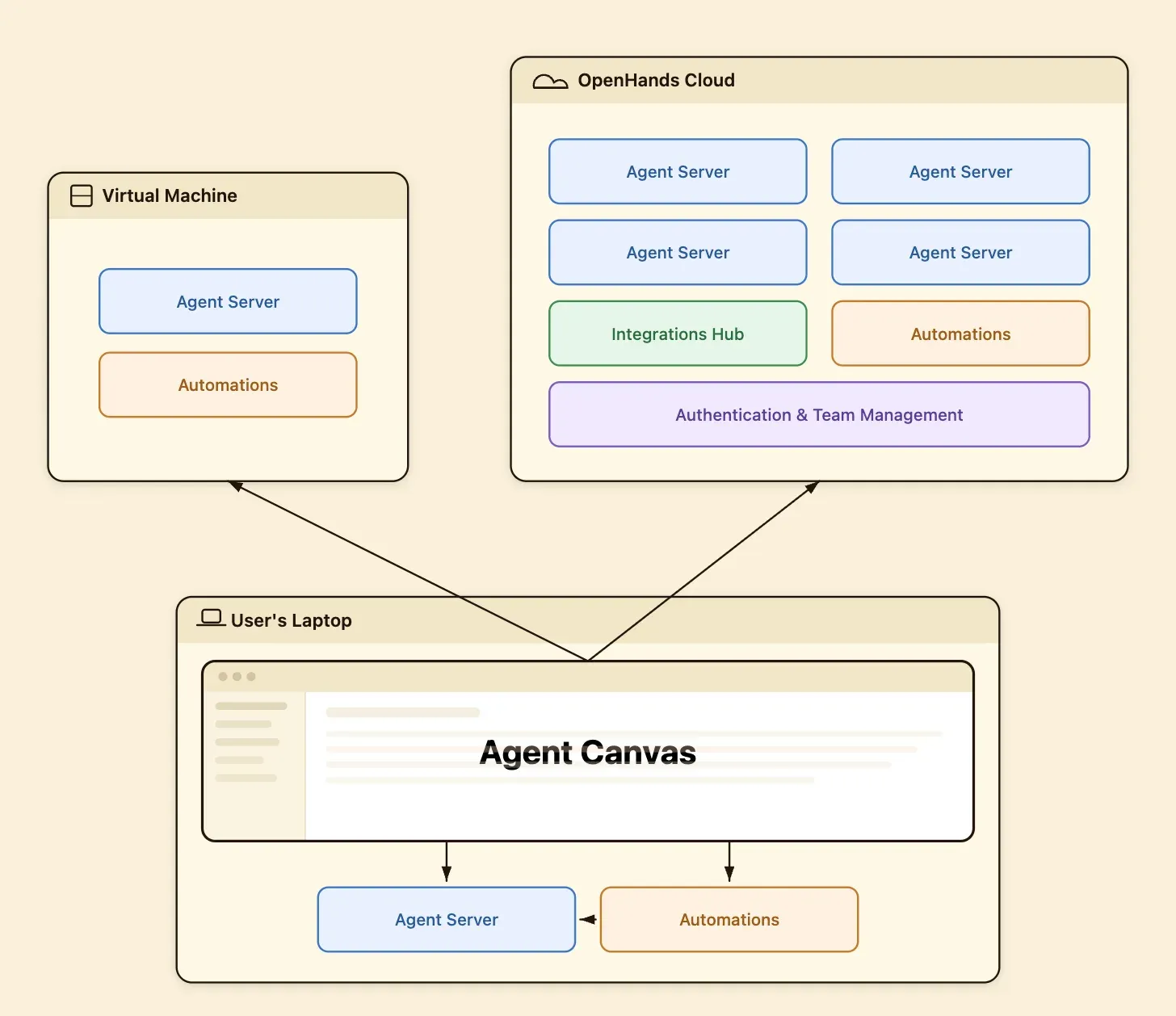
Official architecture diagram from the README: one Canvas client switching between local, VM and OpenHands Cloud backends.
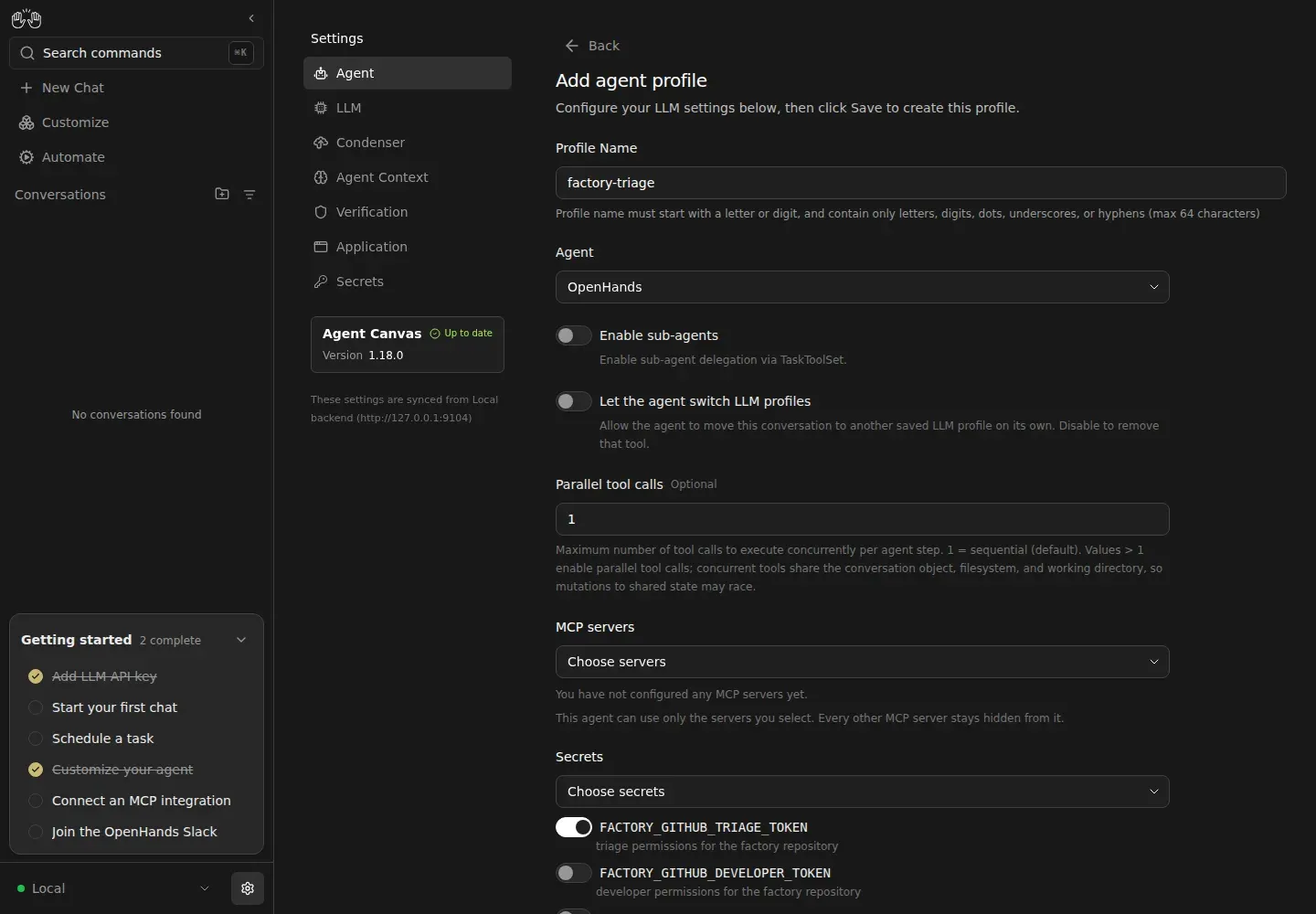
Agent profile form scoping a triage profile to one GitHub token, from the Software Factory guide.
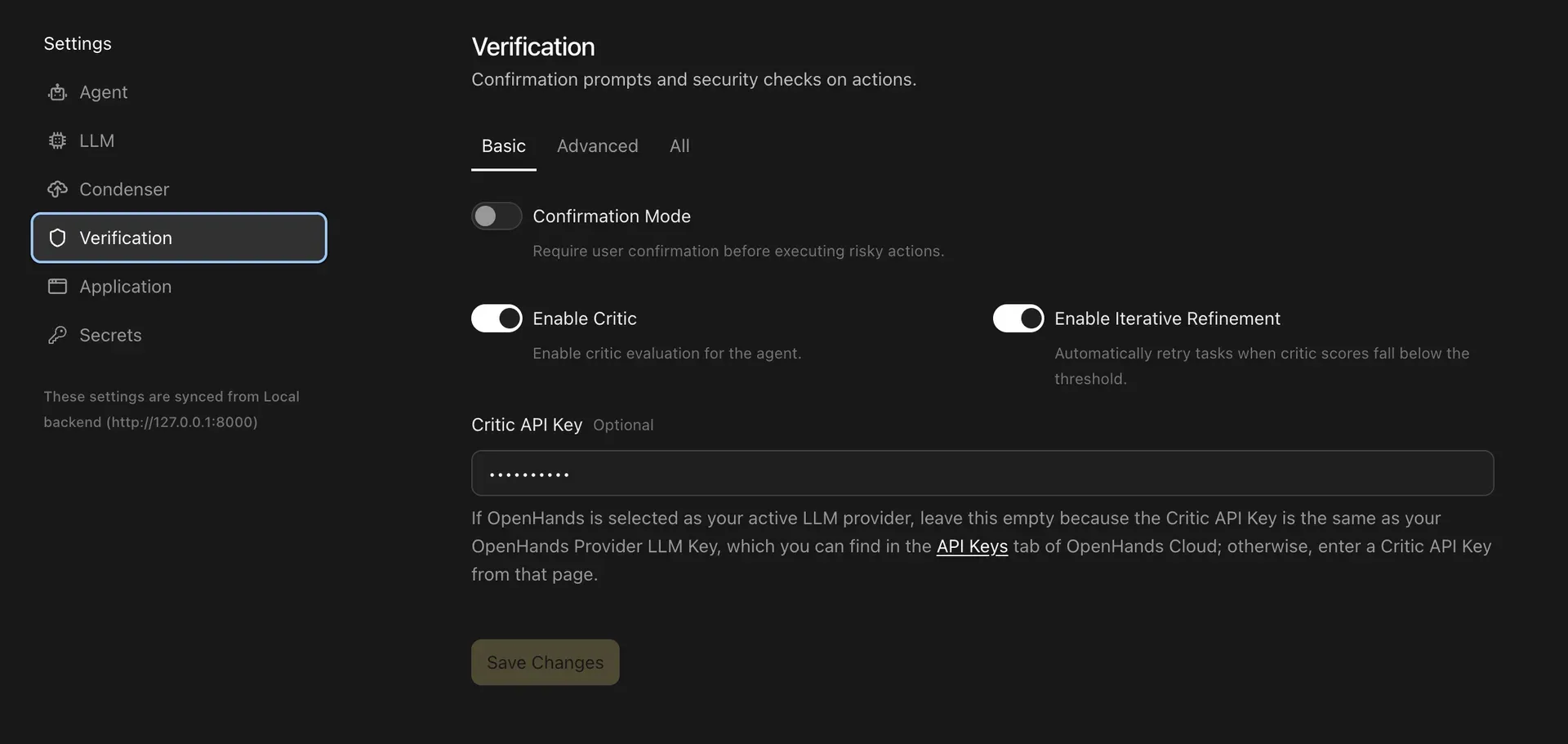
Verification settings for the experimental critic, from the Critic documentation.
Source: official OpenHands project page.
Key capabilities
- Install with npm or npx Run
npm install -g @openhands/agent-canvasand thenagent-canvas, or try it once withnpx @openhands/agent-canvas. Prerequisites are Node.js 24 or later anduv, which the local Agent Server runtime uses throughuvx. In this mode the agent runs directly on the host with your user account's permissions and full filesystem access, so the project recommends Docker for laptop use. - Docker image with mounted projects The image
ghcr.io/openhands/agent-canvas:1.37.0runs the whole stack in a container, with~/.openhandsmounted for state and aPROJECTS_PATHdirectory mounted at/projects. The agent can only reach mounted projects. The UI is served at/canvas, and the container exits with code 1 if the Agent Server stops answering its/alivecheck for about 30 seconds, so a restart policy is needed for recovery. Windows PowerShell commands are in a separate README. - Desktop preview for Windows, macOS and Linux Each GitHub release includes
OpenHands-Agent-Canvas-Setup-<version>.exefor x64 Windows, a universal DMG for Apple silicon and Intel Macs, and a DEB plus an AppImage for x64 Linux. The installers bundle Node.js anduvand start the local backend automatically. They are labelled an early preview: Windows may show a SmartScreen prompt and macOS Gatekeeper may report the unsigned app as damaged until the quarantine flag is cleared. - Per-conversation Docker containers Setting
OH_CONVERSATION_RUNTIME=dockerkeeps Canvas and the outer Agent Server on the host while each conversation runs in its own hardened Agent Server container. Settings, Runtime holds the default runtime, worktree base branch, branch prefix and Docker memory, CPU and browser limits. On Windows this mode requires WSL 2, because it relies on POSIX user and group IDs. - Multiple backends from one UI A backend switcher connects Canvas to local Agent Servers, a remote server on a VM, Docker, Modal, DigitalOcean Managed Agents, OpenHands Cloud or an OpenHands Enterprise host. LLM settings, secrets and MCP servers are stored per backend, so switching backends can also switch agent and model configuration.
- ACP agents alongside the OpenHands agent Claude Code, Codex, Gemini CLI, Pi and OpenCode can drive conversations through the Agent Client Protocol. A provider CLI login on the backend host takes priority over an API key; containerized and cloud backends need explicit credentials such as
CODEX_AUTH_JSONorCLAUDE_CODE_OAUTH_TOKEN. Pi and OpenCode are offered on local and self-hosted backends only, and they are downloaded throughnpxon first use. - Bring your own model The OpenHands agent calls models through LiteLLM, so hosted APIs, OpenAI-compatible gateways and local endpoints can be configured with a base URL. Saved LLM profiles let a conversation or automation use a specific model, and an agent profile can be allowed or forbidden to switch profiles on its own.
- Scheduled and event-driven automations The Automate view lists every automation on the active backend with its prompt or script bundle, trigger, LLM profile, tags and run history. Triggers can be cron schedules, webhooks or registered event sources. Runs report
PENDING,RUNNING,COMPLETED,FAILED,CANCELLEDorSKIPPED, the last one when the backend reaches its concurrency limit. - Prebuilt automation templates Templates cover a GitHub PR review assistant, a GitHub repository monitor, issue-to-pull-request implementation and a Slack channel monitor, among others. Each template bundles an agent prompt and the MCP connections it needs. Recent releases added repository pickers for Bitbucket Data Center and Azure DevOps and event types for Jira Data Center.
- Automation sync with Git Automations can be exported, imported and synchronized through a Git repository, which makes them reviewable and shareable like other configuration. Tag filtering requires automation service 1.26.0 or later.
- Agent profiles with scoped secrets An agent profile combines a model, a selected subset of secrets and a selected subset of MCP servers, with switches for sub-agents and parallel tool calls. Any MCP server or secret not selected stays hidden from that agent, which supports least-privilege setups such as separate triage, developer and reviewer tokens.
- Skills, plugins and MCP servers The Customize area manages skills that give agents instructions, plugins in the portable Agent Plugins format and MCP server connections. On an OpenHands Cloud backend, skills and plugins are managed in the Cloud settings instead of locally.
- Apps (beta) Trusted custom pages can be added to the Canvas sidebar from a Git repository or a path on the Agent Server machine. Apps are installed disabled, require accepting a trusted-code notice, and can make authenticated HTTP requests to the active Agent Server. They are unavailable on OpenHands Cloud backends and the API may change.
- Conversation workspace Each conversation has chat, terminal, browser and file views, plus a bundled OpenVSCode editor under
/vscode. Agents can launch linked child conversations in an isolated worktree or the parent's workspace. Activity is grouped into readable steps with hooks and reasoning folded into tool calls. - Critic and confirmation mode Settings, Verification offers confirmation prompts before risky actions and an experimental critic that scores the likelihood of task success. With iterative refinement enabled, a low score sends the agent back to improve its work. The hosted critic is currently free but needs an OpenHands provider key, and it applies to OpenHands agent conversations rather than ACP agents.
- Self-hosting on a VM or Kubernetes
npx @openhands/agent-canvas --publicwith aLOCAL_BACKEND_API_KEYruns a shared server that requires the key in the UI and in anX-Session-API-Keyheader. The self-hosting guide covers firewalling, systemd, nginx and Let's Encrypt. The Helm chart needs Kubernetes 1.24 or later and deploys a single-tenant StatefulSet with a persistent volume. - Agent Server API and SDK The Agent Server exposes conversations, tools and workspaces over REST and WebSocket, documented with the Agent Server package. Canvas components can also be embedded in a host application through the library entrypoints of the npm package.
Where OpenHands fits
Running coding agents locally in a sandbox
Start with the Docker image and mount only the project folders the agent should touch under PROJECTS_PATH. Publish the port on 127.0.0.1 as in the quickstart, pick the OpenHands agent or an ACP agent during onboarding and configure a model. Check that files outside the mount are invisible to the agent and that conversation history survives a container restart through the mounted ~/.openhands directory.
Choosing between Claude Code, Codex and other agents
Use the onboarding step or agent settings to switch the backend's agent kind. On a local backend an existing CLI login is reused, so a subscription can work without an API key; in Docker or on a cloud backend, supply the documented credential variables instead. Compare agents on the same repository with separate worktrees, and remember that critic scoring applies only to the OpenHands agent.
Automated pull request review and issue triage
Open Automate, pick the GitHub PR review or issue-to-PR template and connect the GitHub MCP server or a token. For a multi-step pipeline, the Software Factory guide sets up triage, developer, reviewer and watchdog automations, each with its own agent profile and a fine-grained token limited to the permissions that role needs. Verify that the reviewer cannot push code and review run history for SKIPPED or FAILED runs.
An always-on agent server for a small team
Provision a VM (the guide suggests Ubuntu 24.04 with 2 vCPU and 4 GB RAM for one user), block everything except SSH at the cloud firewall, then run Canvas with --public and a generated LOCAL_BACKEND_API_KEY under systemd. Add nginx with TLS only if browser access without an SSH tunnel is needed. Team members then add the server as a remote backend in their own Canvas. Keep in mind that the free edition shares one identity.
Parallel agents with isolated containers
Set OH_CONVERSATION_RUNTIME=docker, or make the runtime selectable per conversation, so several agents can work at once without sharing a shell. Choose separate directories or worktrees, because conversations on the same host workspace still share files. Tune Docker memory and CPU limits in Settings, Runtime and confirm the Docker option appears only when the Agent Server reports Docker support.
Internal agent platform on Kubernetes
Install the official Helm chart into a dedicated namespace with a ReadWriteOnce storage class and an authenticated ingress. Enable RBAC only when agents must deploy into the cluster, and avoid rbac.clusterAdmin unless cluster-wide access is required. Because the chart is unauthenticated and single-tenant, treat everyone with UI access as trusted and evaluate OpenHands Enterprise when SSO or tenant isolation is a requirement.
Install
npm install -g @openhands/agent-canvasReviews of OpenHands
Be the first to share your experience with OpenHands.
Write a review
Loading review form…
Alternatives to OpenHands
 MulticaMultica is a source-available workspace for assigning issues to AI coding agents, tracking runs and reviewing results, via cloud, desktop or self-hosting.
 ArchonArchon is an open source, self-hosted workflow engine that runs AI coding agents such as Claude Code and Codex from YAML workflows in isolated git worktrees.EEmdashEmdash is an open-source desktop app that runs coding agents in parallel, each task in its own Git worktree, locally or over SSH, with diff review and PRs.