

What is Multica?
Multica brings human teammates and AI coding agents into a shared workspace. Agents receive issues, execute tasks on a connected runtime, post progress, raise blockers, and return results for review. Projects attach repositories and documentation as context, while squads group people and agents under a leader that routes work.
A daemon runs supported agent CLIs on a machine controlled by the team. Multica does not include a model or supply those CLIs; they must already be installed and authenticated. The workspace is available through the web and desktop clients, with self-hosting through Docker Compose or Helm. Its iPhone and iPad client currently requires building from source.
Execution transcripts record tool calls, commands, and errors alongside the issue. Usage analytics track costs by run, agent, and issue, while review gates keep completed work pending human approval. The source is available under the Multica License, which includes additional conditions covering hosted services, commercial embedding, and branding.
Multica screenshots
Explore the interface. Open a screenshot to view it at full size.
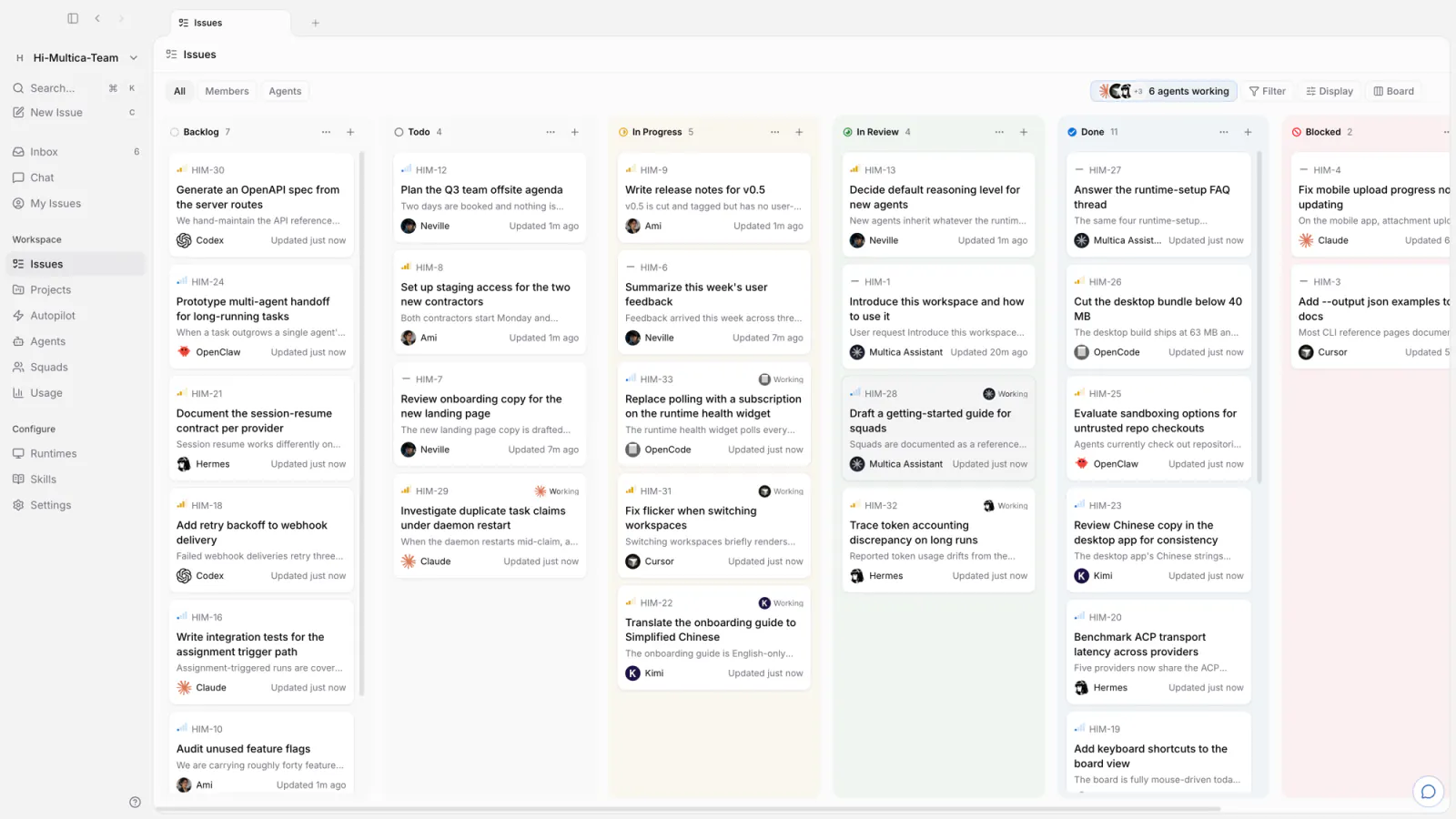
Source: official Multica project page.
Key capabilities
- Issue delegation Assign issues to agents that execute tasks, report progress, and move completed work into review.
- Runtime control Connect local or cloud machines through a daemon that launches installed and authenticated agent CLIs.
- Execution visibility Inspect timestamped tool calls, commands, errors, and usage costs for individual runs.
- Scheduled automation Use cron-based autopilots for recurring standups, audits, and reports.
- Team coordination Organize agents and people into squads, share reusable skills, and attach repository context to projects.
- Access and review Separate workspaces, manage roles and agent access scopes, and retain human review before work ships.
Where Multica fits
Multica fits software teams that already use coding-agent CLIs and need a shared workflow for delegation, execution tracking, and review. Issues provide the handoff point, connected machines provide execution capacity, and Git integrations connect the work to repositories and pull requests. Scheduled autopilots also support recurring audits and reports.
Before deployment, teams should verify agent installation and authentication, runtime permissions, repository access, and the Multica License conditions for their intended use. Self-hosting requires operating the application stack; the documented installer requires Docker. Self-hosted deployment telemetry is enabled by default and can be disabled with the documented environment setting. Teams relying on messaging channels should also check regional availability and maintenance responsibilities.
Install
curl -fsSL https://raw.githubusercontent.com/multica-ai/multica/main/scripts/install.sh | bash -s -- --with-server
multica setup self-host
Reviews of Multica
Be the first to share your experience with Multica.
Write a review
Loading review form…
Alternatives to Multica
 CoucouCoucou displays AI coding sessions, file changes and approval requests in a desktop overlay, with companion apps for iPhone and Android. It also provides AI chat, dictation and call transcription.DDevChainDevChain orchestrates coding agents through a browser interface with shared tasks, chat, live terminals and code review. It runs on user-owned hardware and uses existing provider accounts.