What is GitLab?
GitLab is a DevSecOps platform from GitLab Inc. that covers source code management, merge request review, CI/CD pipelines, artifact management, application security testing, planning with issues and epics, and AI features under the GitLab Duo Agent Platform. According to the company page, GitLab started in 2011 as an open source project with a single commit, GitLab CI followed in 2012, the company was incorporated in 2014, joined Y Combinator in 2015 and became a publicly traded company on the Nasdaq Global Market (GTLB) in 2021. The company describes itself as all-remote.
There are three deployment offerings. GitLab.com is the multi-tenant SaaS hosted by GitLab. GitLab Self-Managed is an instance the customer installs and operates, using the Linux package, Docker, the Helm chart, the GitLab Operator, the GitLab Environment Toolkit or reference architectures for large installations, as listed on the installation page. GitLab Dedicated is a single-tenant SaaS managed by GitLab with data residency in a chosen region, and GitLab Dedicated for Government runs on FedRAMP-compliant infrastructure on AWS GovCloud.
Self-managed instances use one of two packages. The Community Edition page explains that the Enterprise Edition (EE) package can run the Free features without a subscription and unlocks Premium or Ultimate features once an activation code is applied, while the Community Edition (CE) package has to be converted to EE before paid features can be used. GitLab recommends EE for new self-managed instances, also because the Registration Features program is only available with EE. Since 2019 both editions are developed in a single codebase; the former CE repository became the read-only GitLab FOSS mirror with proprietary code removed.
The source code is hosted on GitLab.com in the gitlab-org/gitlab project, not on GitHub. Its LICENSE places code outside the ee/ directories under the MIT Expat license, content under doc/ under CC BY-SA 4.0, and code under ee/ under the GitLab Enterprise Edition license, which permits production use only with a valid subscription. GitLab releases a new minor version monthly; GitLab 19.5 was released on October 15, 2026 and made the GitLab MCP server, GitLab Orbit and GitLab Secrets Manager generally available. The latest patch, 19.5.4 together with 19.4.6 and 19.3.8, was published on November 10, 2026 and fixes a critical heap-based buffer overflow in the bundled Git (CVE-2026-105437).
GitLab 19.6 is listed as an upcoming release whose features are already available on GitLab.com. For self-managed installations, the installation requirements give 8 vCPU and 16 GB of memory as the baseline for a single-node installation, with at least 8 GB possible in memory-constrained environments, and Redis 7.0 or later or Valkey 7.2 for sessions and background jobs.
Key capabilities
- Git repositories and source code management Projects hold Git repositories and are organized in groups; push rules are part of the source code management features. Projects can be imported from most existing providers, including GitHub and Bitbucket, according to the pricing FAQ.
- Merge requests and code review Merge requests combine diffs, review threads, approvals, pipeline status and security and code quality results. The plan comparison also lists merge request guardrails and code quality reports, and AI code review is available through GitLab Credits.
- Built-in CI/CD Pipelines are defined in
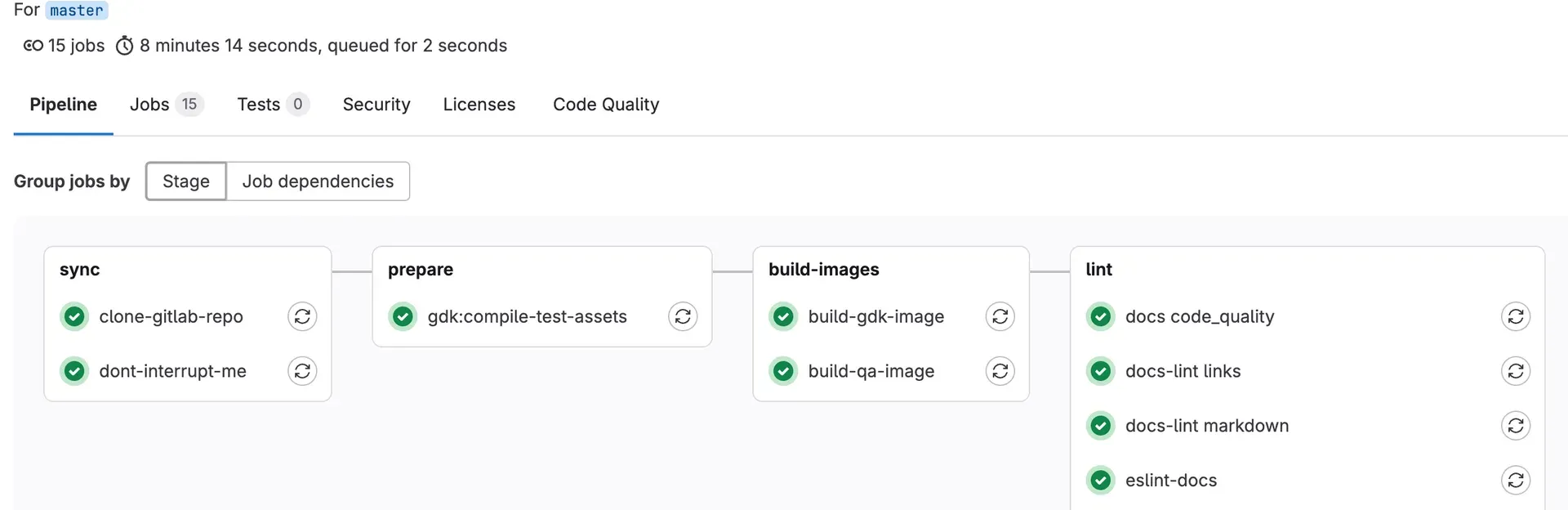
.gitlab-ci.ymland shown grouped by stage or by job dependencies, with tabs for jobs, tests, security, licenses and code quality. GitLab.com includes 400 compute minutes per month on Free, 10,000 on Premium and 50,000 on Ultimate; extra minutes cost $10 per 1,000. The pipeline documentation covers pipeline types and settings. - Environments and workspaces The plan comparison lists protected environments, remote development workspaces, container scanning and code quality reports among the source code management and DevOps workflow features, with advanced CI/CD included from Premium.
- Application security testing Static application security testing (SAST) is included in Free, and secret detection is listed with limited scope on lower tiers. The Ultimate tier adds application security testing such as software composition analysis, IaC scanning, DAST and fuzz testing, plus security dashboards and security policies, per the plan comparison.
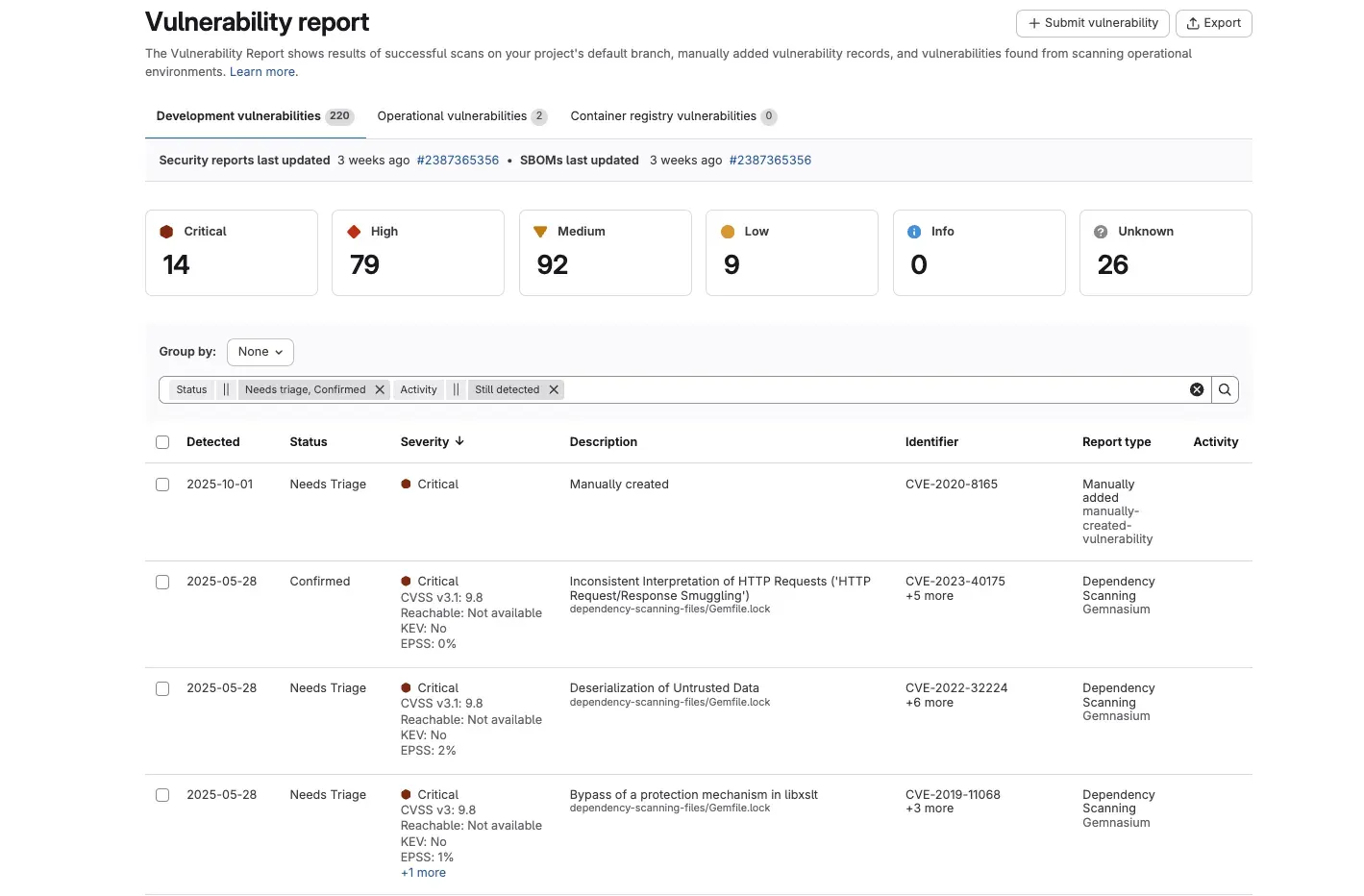
- Vulnerability management The vulnerability report in Ultimate lists findings from scans of the default branch, manually added records and operational scans, with severity counts, CVSS, EPSS and KEV data, triage status and links to issues, as described in the vulnerability report documentation.
- Planning and portfolio management Issues, boards, milestones, time tracking, wikis and issue weights cover team planning. Ultimate adds planning hierarchies, issue-to-epic promotion, insights and health reporting, value stream management and DORA4 metrics, and the Enterprise Agile Planning add-on gives non-technical users seats for $15 per user per month.
- GitLab Duo Agent Platform AI features include agentic chat, foundational and custom agents and flows, an AI Catalog, model selection and code suggestions and chat in the IDE. They are paid for with GitLab Credits at $1 per credit; Premium includes 12 and Ultimate 24 credits per user per month as a limited-time promotional offer.
- GitLab MCP server and governance Since GitLab 19.5 the MCP server is generally available on all tiers and offerings, giving MCP clients such as Claude Code or Cursor access to GitLab tools and Agent Platform agents and flows. An AI Governance Dashboard can also record sessions of externally connected agents through the
glabCLI (beta). - GitLab Orbit Orbit is a context graph that connects code, merge requests, work items, pipelines and vulnerabilities for people and agents, sold in query packs for Premium and Ultimate. It is generally available on GitLab.com since 19.5, with Self-Managed and Dedicated listed as coming in early November 2026.
- Secrets Manager GitLab Secrets Manager, built on OpenBao, stores CI secrets scoped to jobs by environment, branch and branch protection, uses existing group and project permissions and writes audit logs for every access. It is generally available for Premium and Ultimate on GitLab.com and Self-Managed and consumes GitLab Credits.
- Compliance and audit Group and project audit events, compliance frameworks and compliance dashboards support regulated teams, with the fuller set in Ultimate. Audit events can be streamed to a SIEM.
- Free tier GitLab Free costs $0 and on GitLab.com is limited to 5 users per top-level group, 400 compute minutes per month and 10 GiB of storage, with source code management, CI/CD and SAST. Storage can be extended for $5 per 10 GiB per month on paid plans.
- Premium and Ultimate Premium costs $29 per user per month billed annually and adds unlimited licensed users, 10,000 compute minutes, advanced CI/CD, team project management, SLA management and priority support. Ultimate is priced on request and adds application security testing, supply chain security, vulnerability management, portfolio and value stream management and compliance features, per the pricing page.
- Special programs and flexible billing Qualifying open source projects, educational institutions and startups receive free Ultimate licenses with 50,000 compute minutes per month. GitLab Flex combines seats and GitLab Credits into one annual commitment, and all users in a GitLab.com group or self-managed instance must be on the same plan.
- REST and GraphQL APIs GitLab exposes a REST API and a GraphQL API for projects, groups, pipelines and other resources. On GitLab.com, the Advanced Capacity add-on ($12,000 per top-level group per year) is listed as coming soon for higher API rate limits, with Premium and Ultimate rate limits planned for January 2027.
Where GitLab fits
Hosting code and reviewing changes
Teams create groups and projects, push Git repositories and work through merge requests with diffs, threads, approvals and pipeline results. Push rules and merge request guardrails apply checks to changes, and approvals record who reviewed a merge request before it is merged.
Building and deploying with CI/CD
A .gitlab-ci.yml file defines stages and jobs that run on runners for pushes and merge requests. The pipeline view shows each stage and job with its status, and deployments target environments that can be protected on paid tiers.
Integrating security scanning into pipelines
SAST and secret detection run in pipelines on all tiers, and Ultimate adds further scanners such as software composition analysis, IaC scanning and DAST. Results appear in merge requests and in the vulnerability report, where findings are triaged and linked to issues.
Planning and tracking work
Issues, labels, milestones and boards organize team work, while planning hierarchies, epics and value stream analytics in higher tiers track larger initiatives and delivery metrics such as the DORA metrics.
Working with AI agents
Developers use GitLab Duo agentic chat and flows inside GitLab or the IDE, or connect external agents such as Claude Code, Cursor or Codex through the GitLab MCP server and GitLab Orbit. Usage is billed in GitLab Credits.
Running a self-managed or dedicated instance
Organizations install the EE package (or CE) with the Linux package, Docker, Helm or the GitLab Operator, size it with the reference architectures and apply the monthly releases and patch releases, or choose GitLab Dedicated for a single-tenant instance managed by GitLab. Other code hosting platforms listed on iThub include GitHub, Bitbucket and Gitea.
Reviews of GitLab
Be the first to share your experience with GitLab.
Write a review
Loading review form…
Found GitLab useful? Upvote it todayYour vote helps other IT teams find it in the daily ranking.