

What is Cherry Studio?
Cherry Studio is a desktop AI workspace for Windows, macOS and Linux, developed in the open by the CherryHQ team at github.com/CherryHQ/cherry-studio. One application connects to cloud model providers such as OpenAI, Anthropic, Gemini, DeepSeek and OpenRouter, to local model servers such as Ollama and LM Studio, and to custom OpenAI-, Anthropic- or Gemini-compatible endpoints. On top of those connections it adds chat assistants, agents that work inside a local folder, knowledge bases, image generation, translation, Markdown notes and an API gateway that re-exposes the configured models to other programs on the same machine.
Distribution runs through GitHub releases and the official download page. Every release ships Windows installers and portable executables for x64 and arm64, macOS DMG and ZIP builds for Apple silicon and Intel, and Linux AppImage, DEB and RPM packages for x64 and arm64. The app updates itself from the release feed. A separate Cherry Studio Mobile app for iOS and Android is developed in its own repository; this profile covers the desktop application.
The current release is v2.1.10, published October 31, 2026. It lets users comment on lines of a text file, or on parts of Word, Excel, PDF and PowerPoint files, and send those comments to an agent as located references. It also adds a proxy connection test with PAC reporting, touch reordering, a timeline of skipped release notes, and fixes for long local dictation, stream replay and agent sessions after the data directory is moved. The 2.x line started with v2.0.0 on August 5, 2026, which brought a redesigned multi-window interface, a built-in agent runtime and Code Mate for configuring coding CLIs. Version 2.1.0 added System Doctor diagnostics, agent control of a built-in browser and an office-transform skill.
Technically the client is an Electron 45 application written in TypeScript with React 19, built with electron-vite and pnpm. Its v2 data layer uses SQLite through better-sqlite3 and Drizzle ORM. Model traffic goes through the Vercel AI SDK, MCP support uses the official TypeScript SDK, and agents run on either the Claude Agent SDK or the Pi coding-agent runtime. Local speech recognition and text-to-speech use sherpa-onnx models. Conversations, API keys and knowledge bases are stored on the device, and the privacy policy lists the anonymous usage and crash telemetry that can be switched off.
The Community Edition is licensed under AGPL-3.0, and commercial use is permitted when its terms are met; a commercial license that removes the AGPL obligations is offered on request. A separate Enterprise Edition adds centralized model management, shared knowledge bases, employee access controls and private deployment, with pricing by contact. Cherry Studio does not host or train models of its own beyond the free CherryAI service and the CherryIN gateway: answer quality, rate limits and token costs come from the provider you configure. It is a single-user desktop client, not a multi-user web portal.
Cherry Studio screenshots
Explore the interface. Open a screenshot to view it at full size.
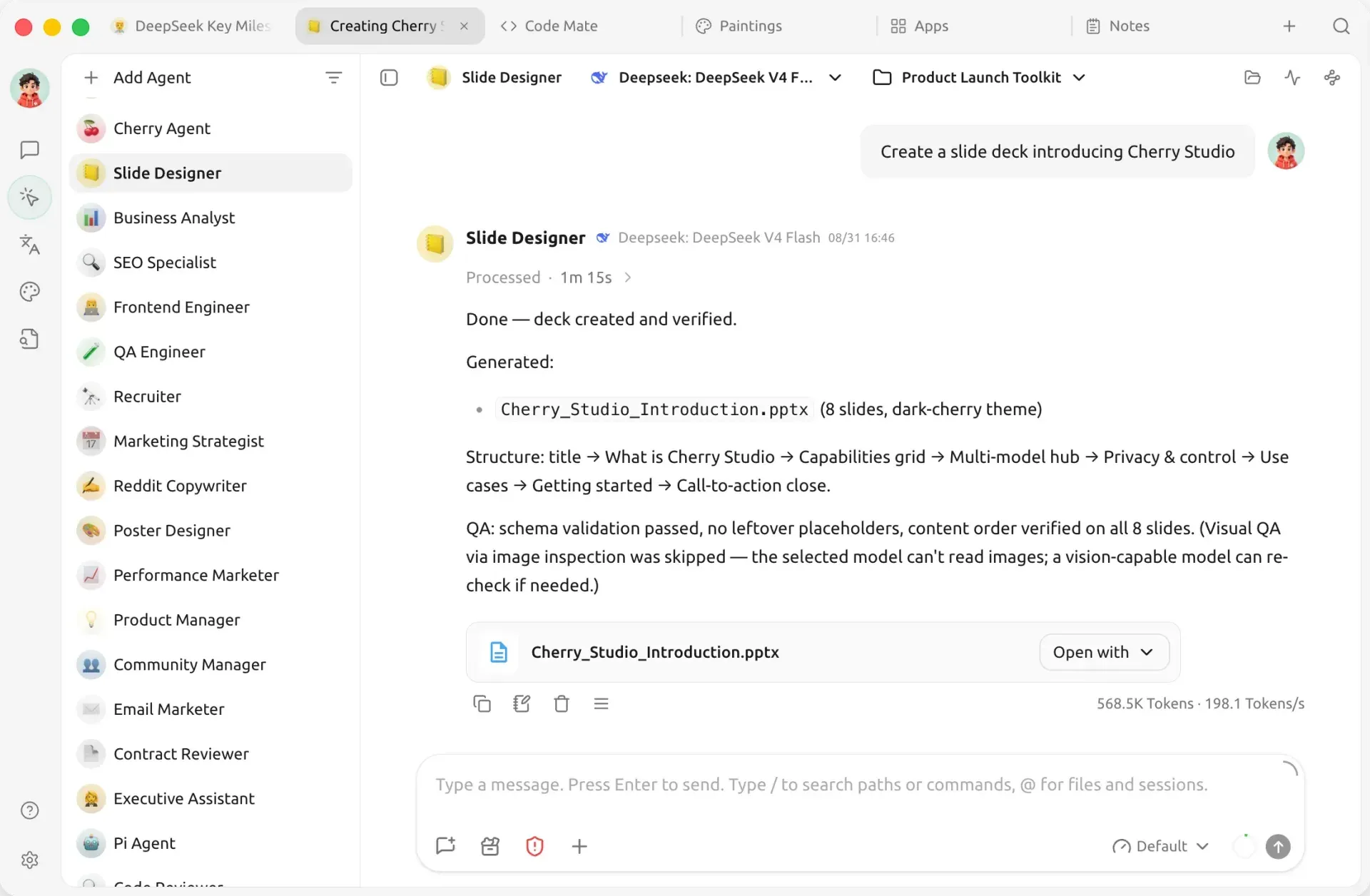
Official README screenshot: an agent in the Work view creates an eight-slide deck in a project folder using DeepSeek V4 Flash.
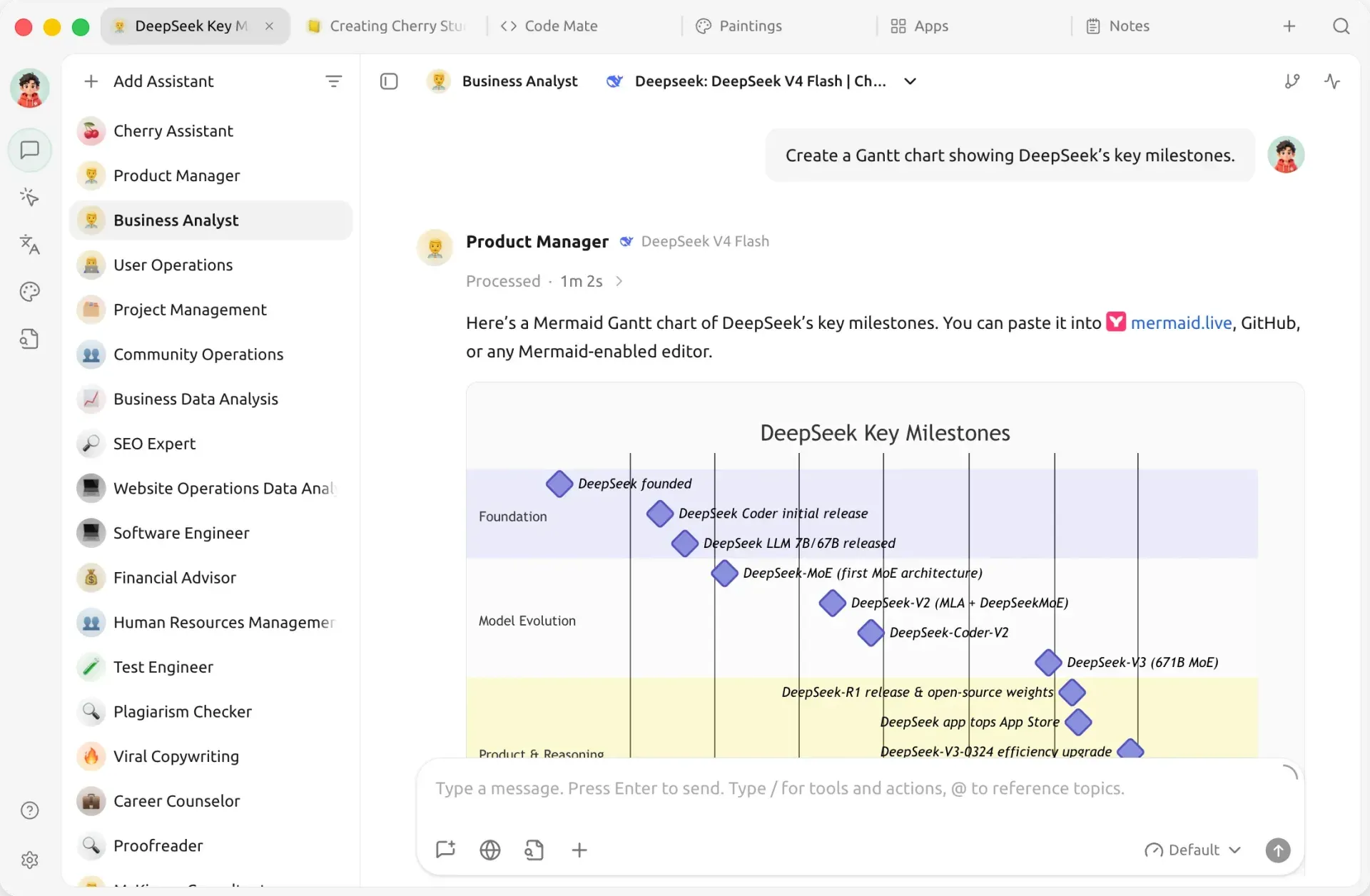
Official README screenshot: an assistant conversation that renders a Mermaid Gantt chart inline, with the assistant list on the left.
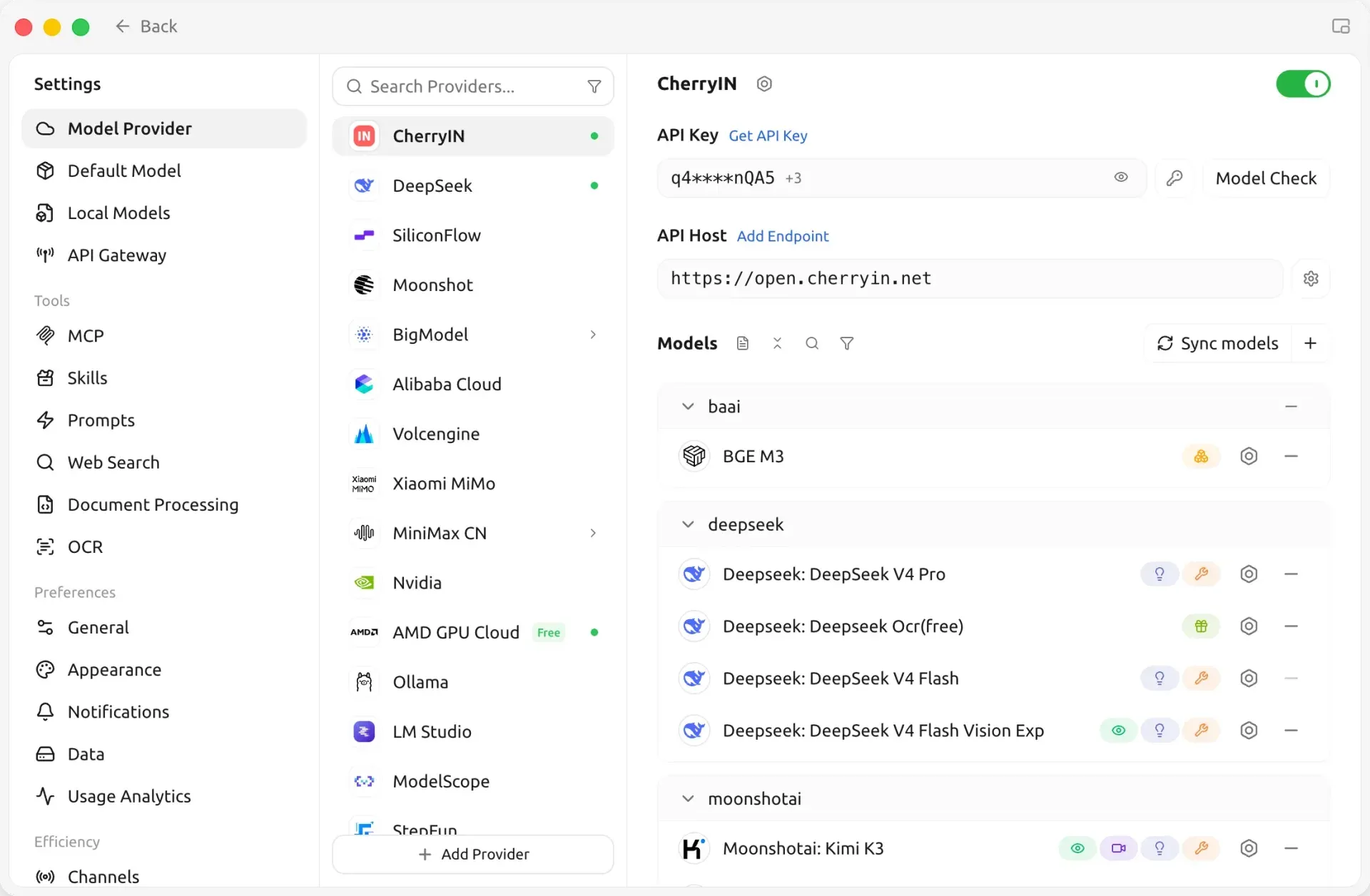
Official README screenshot: model provider settings with provider list, masked API key, API host, Sync models and Model Check.
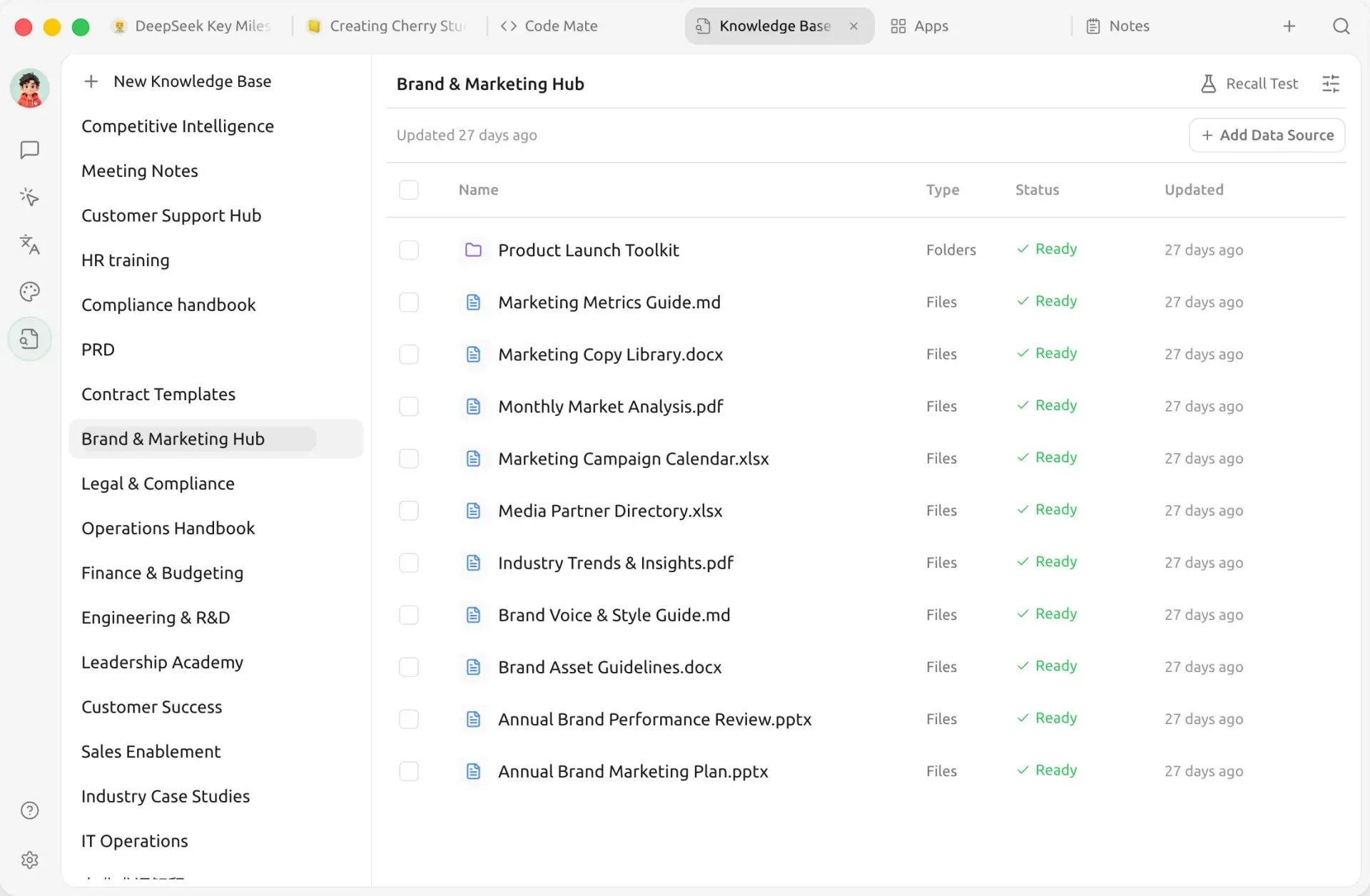
Official README screenshot: a knowledge base with a folder and Markdown, Word, Excel, PDF and PowerPoint sources indexed, plus the Recall Test button.
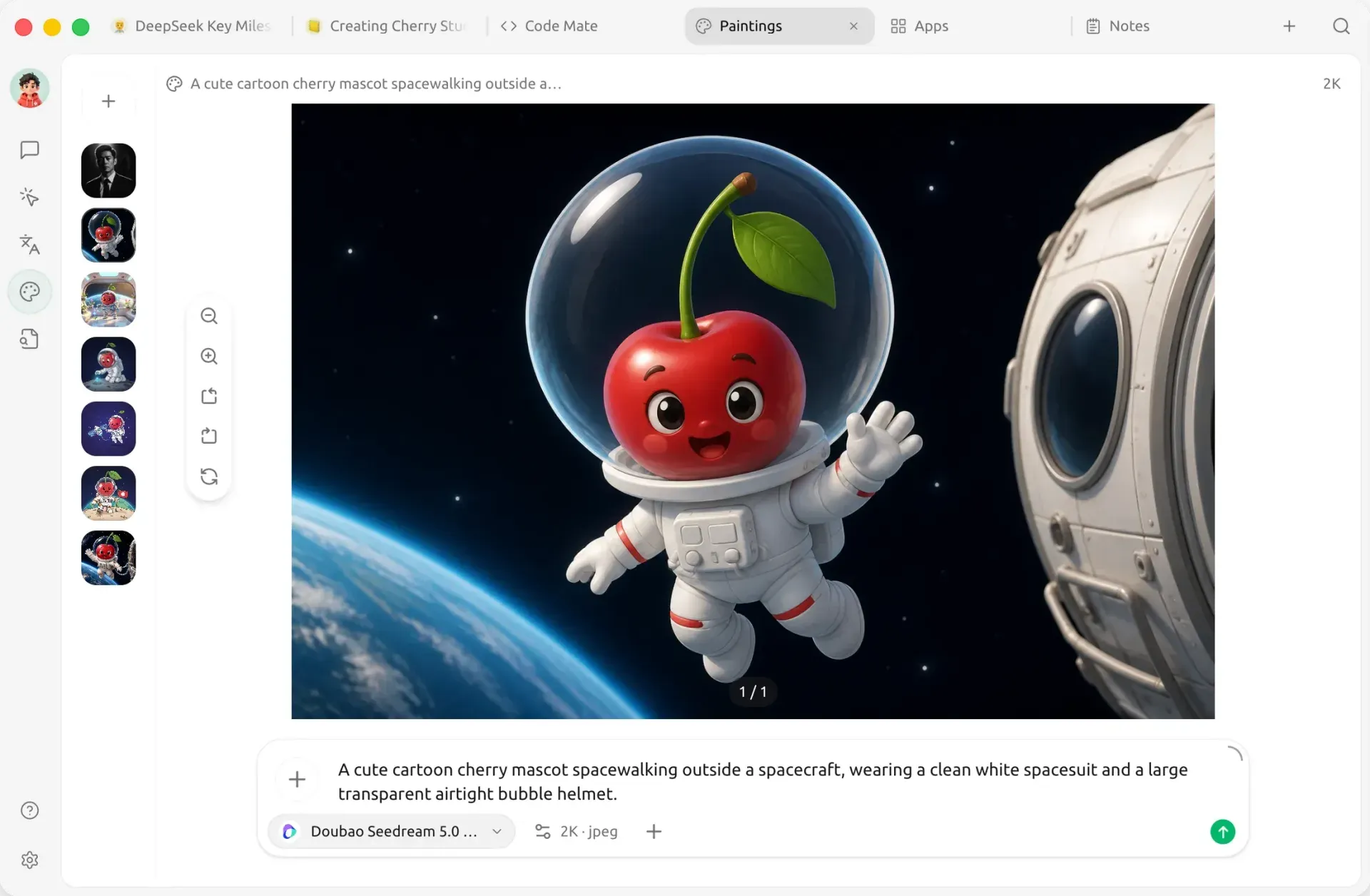
Official README screenshot: the Paintings view with a prompt, the selected image model, 2K JPEG output settings and earlier results.
Source: official Cherry Studio project page.
Key capabilities
- Windows installer and portable build Release assets include
Cherry-Studio-2.1.10-win-x64-setup.exeand a matching portable executable, plus separate arm64 builds for Windows on ARM devices. The documentation suggests checking Settings, System, About, System type to pick the right one. The portable build is useful for testing on a managed workstation before a wider rollout. - macOS DMG and ZIP builds Apple silicon and Intel Macs get separate DMG and ZIP packages. The installation guide describes the usual drag-to-Applications flow. Choose the build that matches the chip shown under About This Mac, since the arm64 and x64 packages are not universal binaries.
- Linux AppImage, DEB and RPM Linux packages are published for x64 and arm64: DEB for Ubuntu, Debian and Mint, RPM for Fedora, RHEL and openSUSE, and AppImage for other distributions or portable use. Check the architecture with
uname -m. Some features such as computer automation or dictation depend on desktop session permissions that vary between distributions. - Model provider management The provider settings carry connection templates for more than 60 services, grouped by protocol: OpenAI-compatible (
/v1/chat/completions), Anthropic-compatible (/v1/messages), Gemini through AI Studio or Vertex AI, AWS Bedrock and Azure OpenAI. After entering a key and host, Sync models fetches the model list and Model Check sends a short test request. Several API keys can be rotated for one provider, as shown in the model service guide. - Local model servers Ollama, LM Studio, GPUStack and OpenVINO Model Server are supported as local HTTP services. Cherry Studio connects to them rather than running chat models itself, so the model server must be installed and running separately. Release 2.1.0 enabled web search for tool-capable Ollama and LM Studio models.
- Built-in CherryAI and CherryIN services The provider list includes CherryAI (Free), a free built-in service, and CherryIN, is a gateway run by the project with both OpenAI and Anthropic endpoints, recommended for agents. According to the privacy policy, built-in model services relay request content only transiently and do not log it. Third-party providers are called directly from the device.
- Assistants and multi-model chat Assistants are reusable role presets with their own prompt and model. One conversation can collect answers from several models side by side, and branches can be created, switched and deleted. Responses render Markdown, code highlighting, LaTeX, Mermaid, Graphviz, SVG and ECharts previews, and conversations can be exported or imported from ChatGPT and Claude exports.
- Agents with a working directory Agents live under Work and are created in four steps: basic information with runtime mode, permission mode and model, then a system prompt, skills and knowledge. Each task gets one working directory, and the right panel shows status, sub-agents, background commands and files. The agent documentation notes that the Cherry agent runtime needs an Anthropic-compatible endpoint.
- Five permission modes Agent actions follow one of five modes: Ask Before Acting, Plan Only, Auto-accept Edits, Approve for Me and Full Access. Since 2.1.9, enabling Full Access shows a scope confirmation first. The project recommends the hands-off modes only for unattended runs such as channels or scheduled tasks.
- MCP servers and Skills MCP servers can be added over stdio, SSE or streamable HTTP, imported from JSON, DXT packages or MCPB bundles, and exported to
mcp-servers.json. Exports keep credentials in environment variables and headers unmasked, so they need review before sharing. Skills, MCP and knowledge bases are enabled per agent and take effect from the next message, as explained in the MCP guide. - Channels, scheduled tasks and heartbeats Channels attach an agent to messaging platforms; the documentation names Slack and Telegram as examples. Scheduled tasks run an agent at a set time with a chosen workspace and notification channel and keep run logs, while heartbeats check ongoing work at intervals. The automation guide advises allowing only required chat IDs.
- Code Mate for coding CLIs Code Mate installs, updates or launches coding agents including Claude Code, OpenAI Codex, OpenCode, Qwen Code, Kimi Code, GitHub Copilot CLI, Pi, Hermes Agent and OpenClaw. It reuses tools already on the PATH instead of overwriting them. A unified gateway can route a CLI through any configured model, and Claude Code can map separate models to its Opus, Sonnet, Haiku and subagent roles.
- Built-in browser for agents Since 2.1.0, agents and chat assistants can drive a built-in browser with a visible pointer, locate page elements, inspect console and network activity and call website WebMCP tools. Browsing history can be searched and imported, and history or cache can be cleared separately.
- Knowledge bases with hybrid retrieval A knowledge base takes files, notes, folders and URLs, stored as page snapshots. Retrieval uses BM25 keyword search by default; an optional embedding model adds vector search and an optional rerank model reorders candidates before the top K passages reach the chat model. Changing chunking settings requires a manual re-index, described in the knowledge base guide.
- Documents, files and office tools PDF, Office documents, images and text can be processed with configurable document processing and OCR providers. The agent file pane opens files in tabs with autosave settings, and the office-transform skill extracts worksheet ranges, paragraphs, PDF pages or slide shapes into new files. Select region quotes a precise part of a document into a prompt.
- Images, translation and voice The Paintings view generates and edits images with supported models and shows the parameters each model accepts. Translation covers text and documents, with quick translation and a selection assistant for text in other applications. Dictation and text-to-speech can use local models; recent release notes name FunASR Nano for local speech recognition and Kokoro for text-to-speech.
- API Gateway Settings, API Gateway starts a local HTTP service with OpenAI- and Anthropic-compatible APIs for the models configured in the app, protected by a bearer key that can be regenerated. Agents depend on this service. The gateway guide recommends local use only and leaves firewalling of any LAN exposure to the user.
- Backup, recycle bin and diagnostics Data settings offer local backups, WebDAV and S3-compatible storage, full or lite backups and automatic intervals from 5 minutes to 24 hours, plus archiving to Notion and Obsidian. Deleted topics, agents, assistants and files go to a recycle bin first. System Doctor checks installation, permissions, storage, providers and MCP, and log retention can be set to 7, 14, 30 or 90 days.
Where Cherry Studio fits
Comparing models before choosing a provider
Add two or three providers in the model settings, sync their model lists and run Model Check on each. Then open one conversation, select several models and send the same prompts, including a real document or code sample from your work. Compare answer quality, latency and the token counts the app shows, and read the provider price list alongside them, because Cherry Studio itself does not bill model usage. Keep the winning setup as an assistant preset so colleagues can repeat the test.
Building a private document knowledge base
Create a knowledge base, add a folder or a set of files and wait until each source reports Ready. Start with BM25 only, run the Recall Test with questions whose answers you know, and add an embedding and rerank model if phrasing mismatches cause misses. Remember that an embedding model hosted in the cloud receives your chunks, so pick a local model through Ollama or LM Studio when the material must stay on the machine. Re-index after changing chunking rules, as described in the knowledge base troubleshooting guide.
Delegating file work to a local agent
Create an agent with a dedicated working directory and the Ask Before Acting permission mode, then give it a bounded task such as turning a spreadsheet and notes into a slide deck. Watch the status panel for sub-agents and background commands, review generated files in the file pane and use file comments to request corrections on specific lines or slides. Only move to Auto-accept Edits once the agent behaves predictably on that folder, and keep the folder under version control or backup.
Routing coding CLIs through one model configuration
Open Code Mate, choose a working directory and a detected terminal, and pick a CLI such as Claude Code, Codex or OpenCode. Either select a compatible provider or use the unified gateway so the CLI can use any model configured in Cherry Studio. Verify with a read-only command first and confirm that the account or model shown by the CLI matches what you intended, following the Code Mate guide.
Exposing models to local scripts
Start the API Gateway, copy its URL and bearer key and point a local script or tool at the OpenAI- or Anthropic-compatible endpoint. Test a model list request and one short completion before wiring it into anything larger. Keep the key out of repositories and screenshots, regenerate it if it leaks, and leave the gateway bound to the local machine unless a firewall and access control are in place.
Running scheduled reports into a team channel
Connect a Slack or Telegram channel under Settings, Channels and send a test message. Create a scheduled task that runs a verified agent with a fixed workspace, run it manually once and read the log, then enable the schedule. Set the channel entry point to inherit agent settings or a stricter mode, and allow only the chat IDs that should reach the agent. A message that was not delivered does not prove the task did not run, so check the run log after failures.
Reviews of Cherry Studio
Be the first to share your experience with Cherry Studio.
Write a review
Loading review form…
Alternatives to Cherry Studio
 AnythingLLMAnythingLLM from Mintplex Labs is an MIT-licensed AI app for document chat with citations, agents, MCP tools and scheduled jobs, using local or hosted LLMs, as a desktop app, a multi-user Docker server or a hosted cloud.OWOpen WebUIOpen WebUI is a self-hosted AI platform that runs offline and connects to local models through Ollama or to OpenAI-compatible APIs.