
What is Suparagent?
Suparagent is an open-source workspace for AI coworkers: named agents that each have a job description, an engine, a workspace folder, memory, skills and an approval mode. Agents can work alone, as a team with a lead and specialists, or together in shared rooms, and routines can run them on a schedule, by webhook or on demand. The code is published in the Anil-matcha/suparagent repository under the Apache License 2.0. The project does not ship a model or a model subscription: every agent runs on an engine and provider account that the user connects.
The project was previously called Open Duet and Open Dots. Release 0.8.5 of November 9, 2026 renamed the app, its SUPARAGENT_* environment variables, installer file names and the GitHub repository, and stopped reading the older OPEN_DOTS_* and OPEN_DUET_* settings. The hosted service at suparagent.ai is operated by Vadoo Internet Services Private Limited according to the Terms of Service, and the README describes it as a product separate from the open-source desktop app and self-hosted core.
There are four ways to run it. The desktop app is an Electron application that can run from a source checkout with Node.js 22 or newer and uv, or from installers for macOS on Apple silicon (DMG) and Windows x64 (NSIS EXE). A self-hosted server runs on Linux through Docker Compose with an nginx or Caddy overlay, or as a direct install under systemd, as described in the self-hosting guide. The hosted web app runs in a browser, and a development checkout is documented for contributors. An Android phone app pairs with a self-hosted server.
All published GitHub releases are marked as pre-releases. The newest is v0.8.6, published November 11, 2026, with an arm64 DMG and a Windows setup EXE. According to the changelog, it lets the owner of a server install invite other people with owner, admin, member or viewer roles and per-person permissions, adds signed workspace grants for hosted deployments, and brings phone app 0.4.0 with a chat-first screen and an in-chat model and reasoning-effort switcher. Earlier 0.8.x releases added a visual workflow builder, Muapi as a cloud computer provider, saved reasoning effort per agent and profile imports.
Under the hood a Next.js interface, in a browser or inside Electron, talks to one FastAPI backend that owns conversations, approvals, agent data and routine scheduling, with PostgreSQL or SQLite as the database and Alembic migrations. Engine adapters translate Claude Code, Codex, Agent Client Protocol (ACP) agents and API chat engines into one thread runtime, and tool requests pass through an approval broker. Optional Docker computers give an agent an isolated shell or Linux desktop through a computer MCP server. The architecture document lists SSH computers and an enforceable outbound allowlist as not implemented.
The README labels the project as in active development. It lists the self-hosted server, Docker computers, browser tools and the macOS native desktop preview as experimental, describes the desktop installers as unsigned with limited platform verification, and states that the phone app has no push notifications or store release. A self-hosted server has a single owner who can invite teammates into one shared workspace; it is not a multi-organization service.
Key capabilities
- Named agents Each agent has a name, role, instructions, engine, model, workspace folder, approval mode, notes and skills. A conversation keeps its provider even if the agent later switches engines. The website lists eight editable role templates (researcher, planner, coding partner, data analyst, meeting notes, operations helper, writer and design reviewer) that fill in the create-agent form without creating an agent or granting access.
- Bring-your-own engines The engine guide lists Claude Code, Codex, Gemini CLI, Google Gemini through Antigravity, Cursor, OpenCode (experimental, opt-in), any ACP agent from a saved command, OpenAI-compatible endpoints such as Ollama, LM Studio and vLLM, and OpenRouter. Settings checks installation, login and endpoint readiness. Tools, image input, memory calls, team tools and computer access differ by engine.
- Approval modes Agents run in Ask first, Accept edits, Approve for me (Claude, Codex and Cursor) or Plan only. Tool requests go through an approval broker that applies the active mode, saved command rules and a safety floor, and the provider still enforces its own permission behavior where applicable. Tool activity and approval decisions are visible in the app.
- Teams and delegated work A team has a lead and specialists, and the teams guide explains that team tools are available through Claude and Codex as the lead engine. A lead can delegate jobs, create or configure specialists and open shared rooms. A full-screen team workspace groups jobs by attention, running, waiting and finished, with requester, assignee, parent job and timing.
- Shared rooms A room is one shared conversation for one to twelve selected agents with shared instructions and a single visible transcript. Rooms can be created from the Chat page or by a Claude or Codex lead. Teammate text is treated as data and cannot approve an action.
- Memory and context Each named agent keeps a
MEMORY.mdfile that loads into every turn (first 200 lines or 24 KB), topic files that are never loaded whole, an archive and a daily log, all stored in the local workspace rather than in model-provider state. The memory guide describes recall, proposals waiting for review and a change journal. Users can review and edit what agents remember. - Routines A routine runs a prompt on a local agent on a schedule, when a webhook calls it, or with Run now. Settings documented in the routines guide include a run limit of 1 to 240 minutes, an approval timeout, catch-up time and up to three retries. A routine always uses the stricter of its own and its agent's approval mode and never approves an action by itself. The backend has to stay running.
- Skills A skill is a Markdown file of instructions for one agent, chosen with
/when sending a message; the agent never applies one on its own. Skills are text only, limited to 32 KB each and 30 per agent, files next toSKILL.mdare never read, and anything that looks like a secret is replaced on save and on read. - Agent computers An agent can get its own Docker computer, either a shell or an isolated Linux desktop with screen viewing and takeover, as described in the agent computers guide. Only the agent's workspace folder is mounted at
/workspace, and every computer call passes the same approval gate. In the desktop app, Boat or Muapi cloud computers are also available under a separate provider account that may charge for usage. - Browser tools Claude and Codex agents with a Docker desktop computer can get a private, visible Chromium browser when Browser tools is enabled (off by default). Structured tools open pages, read accessibility snapshots and up to 20,000 characters of visible text, click, fill fields and manage tabs. No browser tool attaches to a host browser.
- Native macOS desktop preview The macOS desktop app can give a named Claude agent access to the Mac's real screen and accessible app controls after the user enables it per agent and grants Accessibility and Screen Recording. Every input needs its own approval, a fresh observation is required before each input, and Take control stops the agent immediately. It is off by default.
- Connected apps Apps are reached through Composio with the user's own Composio project key, and access is granted per Claude or Codex agent, according to the connected apps guide. GitHub, Gmail and Google Calendar have dedicated tools; Gmail can save drafts or send one plain-text email to one recipient. Other apps run through two general tools, and every call needs approval. The README notes these were tested against a fake Composio service.
- MCP Marketplace Individual tools can be added from an in-app MCP Marketplace. Third parties propose additions by adding a Community manifest and regenerating the catalog in a pull request. The README lists the marketplace among features without live-service or packaged-app qualification.
- Today view, tasks and calendar The Today view gathers approvals, questions, routine outcomes, engine failures and due tasks, and can show read-only Gmail and calendar items. A task board with Backlog, Ready, In progress, Waiting, Review and Done columns shares its tasks with a calendar and an upcoming list; assigning a task records who it is for without starting a conversation.
- Search, files and export Conversation search matches titles, user messages and agent answers on both SQLite and PostgreSQL. Users can attach text and images, import audio for transcription with their own consent and credentials, browse or download workspace files, and export history.
- Members on a self-hosted server Since v0.8.6 an admin can invite people to a server install with a one-time link. Each person has a role (owner, admin, member, viewer) and permissions such as reply, read files, answer commands, save standing rules and manage agents. Turns and approvals show who sent or answered them. The desktop app stays single-person.
- Phone app The phone app pairs with a self-hosted server by QR code or pairing code, lists and starts conversations, stops an answer, allows or denies tool calls, and with the Chat, files and agents scope can create and edit agents and rooms. An Android APK is published as a pre-release; there is no app store release and no push notifications.
- Desktop installers Release v0.8.6 provides
Suparagent-0.8.6-arm64.dmgfor macOS on Apple silicon andSuparagent-Setup-0.8.6.exefor Windows x64. Installers carry their own backend and need no Python, but need at least one ready engine. The setup guide states that the published Mac download is unsigned, and the assisted updater offers a SHA-256-verified installer without installing it automatically. A Linux desktop release is planned. - Self-hosted server The Docker Compose route builds the image from source and keeps data in the
suparagent_datavolume; the direct route uses Node.js 22, uv and a systemd unit. The owner sets a passphrase from the server shell, and adoctorcommand checks the machine. Credentials are encrypted with a key held inTOKEN_ENCRYPTION_KEYS, which backups do not contain. A published amd64 image workflow targetsghcr.io/anil-matcha/suparagent, with no image publication verified yet according to the guide. - Interface languages Language pickers on sign-in, chat and first-run setup cover English and 12 other locales, according to the 0.8.1 changelog. Specialized screens and engine-supplied text can still contain English.
Where Suparagent fits
Preparing a weekly project briefing with a team
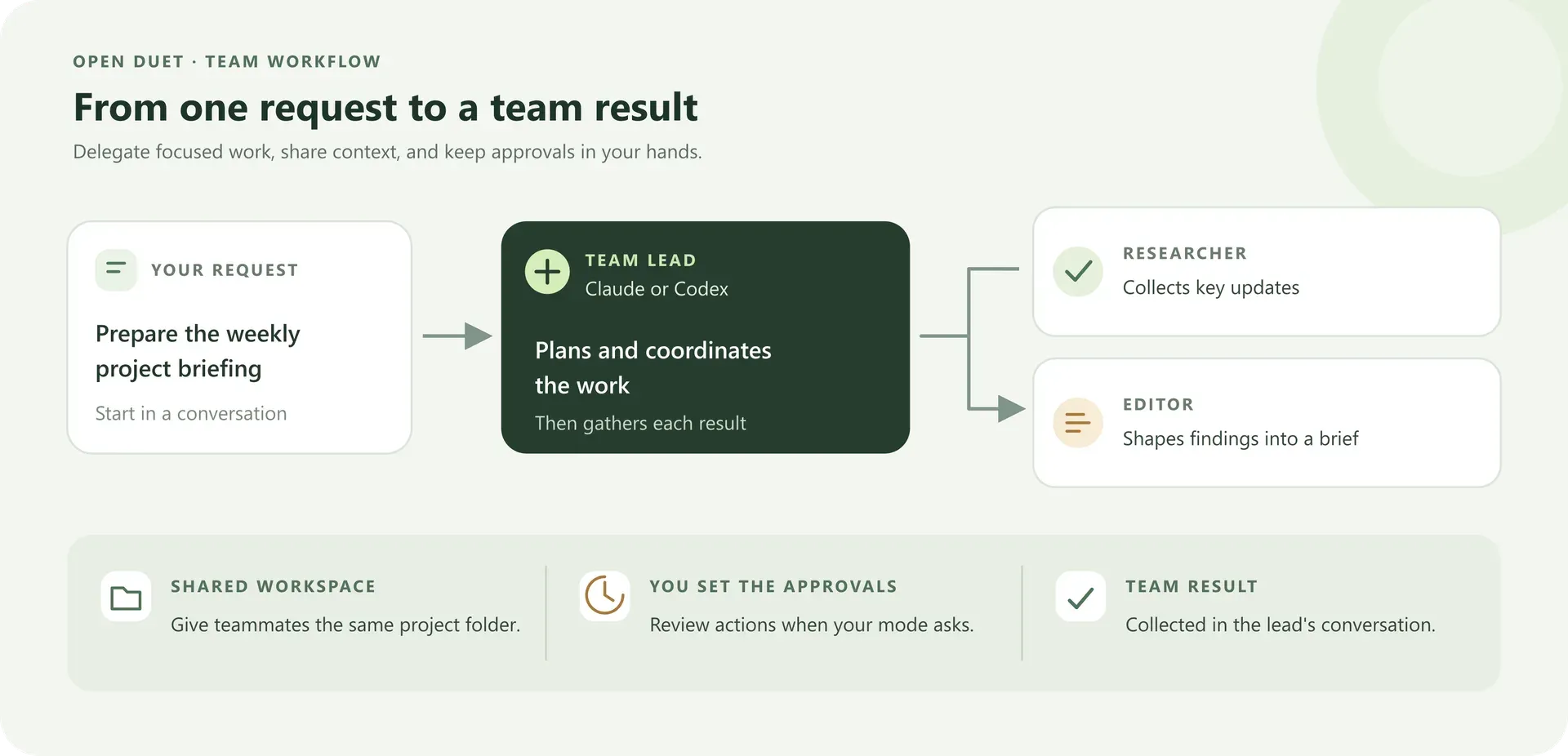
The README describes a lead agent on Claude or Codex with specialists such as a researcher and an editor, all sharing one project workspace. The lead splits the request into tasks, the specialists work in separate conversations, and the results return to the lead's conversation. Actions pause for approval when the settings require it, and the finished process can become a weekly routine whose runs are reviewed in the app.
Running recurring work on a schedule or webhook
Routines start ordinary agent conversations from a schedule, an incoming webhook or a manual run, and record occurrences and results. Pending approvals and failures are reported in the Today view. The project's hosted changelog notes that a scheduled run that wakes a sleeping hosted sandbox has been exercised, and that webhook senders need to retry temporary 503 responses while a sandbox wakes.
Keeping agents available on a personal server
The self-hosted route places agents and routines on a Linux server with HTTPS so they keep working while the owner's laptop is closed. The server is reached from a browser or the phone app, devices pair with one-time codes, and invited teammates share the same agents, conversations and memory. CLI engines must be installed and signed in on the server under the account that runs Suparagent.
Letting an agent work inside an isolated computer
An agent assigned a Docker computer runs its commands and file edits inside that container instead of on the host, with only the workspace folder mounted. Desktop computers add a visible Linux screen, takeover, and optional Chromium browser tools for web pages. Each tool call is bound to one approval for its exact input.
Working with email, calendar and repositories
After connecting GitHub, Gmail or Google Calendar through a personal Composio key, selected Claude or Codex agents can use their dedicated tools, for example drafting an email or reading calendar events, and changes wait for approval. The Today view can show read-only Gmail and calendar items next to routine outcomes and due tasks.
Using a hosted workspace in the browser
The hosted service gives each account a workspace and sandbox computer. On the pricing page, the Free preview has no Suparagent fee and bills sandbox compute to the user's own Boat account. Monthly plans include service-operated compute: Starter at $15 with 100 hours, Standard at $49 with 300 hours and Pro at $99 with 720 hours per billing period, with 51 GB or 111 GB machine disks. A one-time lifetime tier includes a MuAPI wallet-credit grant. AI provider usage is billed separately by each provider.
Similar projects: other open-source interfaces that run Claude Code, Codex and similar agents include T3 Code, Paseo and goose. AnythingLLM combines document chat with agents, and OpenHands covers coding agents and automations.
Reviews of Suparagent
Be the first to share your experience with Suparagent.
Write a review
Loading review form…
Found Suparagent useful? Upvote it todayYour vote helps other IT teams find it in the daily ranking.