

What is Paseo?
Paseo is an open-source agentic development environment for running coding agents such as Claude Code, Codex, GitHub Copilot, OpenCode, Pi, Antigravity and Muse Code through one interface; the homepage also lists OMP among the agents with a custom implementation. It ships no model and no agent of its own: it starts the agent CLIs already installed and signed in on a machine, groups their sessions into workspaces and adds a file editor, terminals, diff review, pull requests and a browser around them. The project is developed by Mohamed Boudra as an independent project from Barcelona, funded through GitHub Sponsors and a company sponsorship program.
The architecture follows a client and server split. A local process called the daemon manages agent processes, worktrees and terminals, and exposes a WebSocket API and an MCP server, listening on 127.0.0.1:6767 by default. The desktop app bundles the daemon and starts it automatically. On a server, VM or homelab host, the daemon comes from the @getpaseo/cli npm package or the official ghcr.io/getpaseo/paseo Docker image. Clients reach a remote daemon over SSH, a direct TCP or Tailscale connection, or an optional end-to-end encrypted relay, as described in the security model. The TypeScript monorepo contains the daemon, an Expo client for iOS, Android and web, the Electron desktop app, the CLI and the relay transport; the official relay service is a separate Elixir project.
The current release is v0.15.4, published November 10, 2026. Release assets include macOS DMGs for Apple Silicon and Intel, Windows installers for x64 and ARM64, a Linux AppImage, DEB and RPM for x86_64, and an Android APK. The phone apps are also listed in the App Store and Google Play, and the download page adds a Homebrew cask and a Nix flake. Stable desktop releases roll out over 36 hours; a beta channel receives release candidates first.
According to the changelog, 0.15.0 keeps terminal programs running across daemon restarts and supported updates, adds an opt-in setting that resumes interrupted agents in their existing conversations, restores up to 10,000 lines of terminal history on reconnect, copies ignored files listed in .worktreeinclude into new worktrees and honors HTTP_PROXY, HTTPS_PROXY and NO_PROXY. Version 0.15.1 fixed daemon startup on Windows machines where PowerShell 5.1 cannot run Get-CimInstance, 0.15.2 added a first-run setup that suggests projects from folders where Claude Code, Codex, OpenCode or Pi have run, and 0.15.3 fixed blurred conversation text on iOS 26. Version 0.15.4 added the Claude Fable 5.2 and Mythos 5.2 models with a medium default effort; both require Claude Code 2.1.321 or newer, and Mythos 5.2 appears only when Claude Code advertises access. On the same day, the pre-release v0.16.0-beta.1 went to the beta channel with a list of background tasks above the composer, faster diff loading, keyboard shortcuts on iPad and Android, touch-sized tablet controls, plugin sidebar views and composer controls, a rebuilt mobile chat timeline, undo for workspace archiving and fx as a provider in the catalog. Earlier, 0.14.0 let plugins give tools and MCP servers to agents and made voice mode opt-in, and 0.13.0 added delegation to agents on other machines.
Paseo is licensed under Apache-2.0, with third-party components under their own licenses. Paseo Hub, an optional service that starts agents from GitHub, Slack and Discord events, is a separate product that can be self-hosted or used as a managed service with paid seats. Out of scope: Paseo does not provide model inference, does not bundle agent CLIs in its Docker image and does not intercept provider API calls, so agent subscriptions and model usage stay with each provider. According to the privacy policy, the open-source apps and daemons send no analytics, telemetry or crash reports; the optional relay sees IP addresses, timing, message sizes and session identifiers, while payloads are encrypted end to end. Similar projects for parallel agents in worktrees include Orca, Emdash and T3 Code, and Coucou is a mobile companion for coding agents. Agents that Paseo can drive include Codex CLI, OpenCode and Pi.
Paseo screenshots
Explore the interface. Open a screenshot to view it at full size.
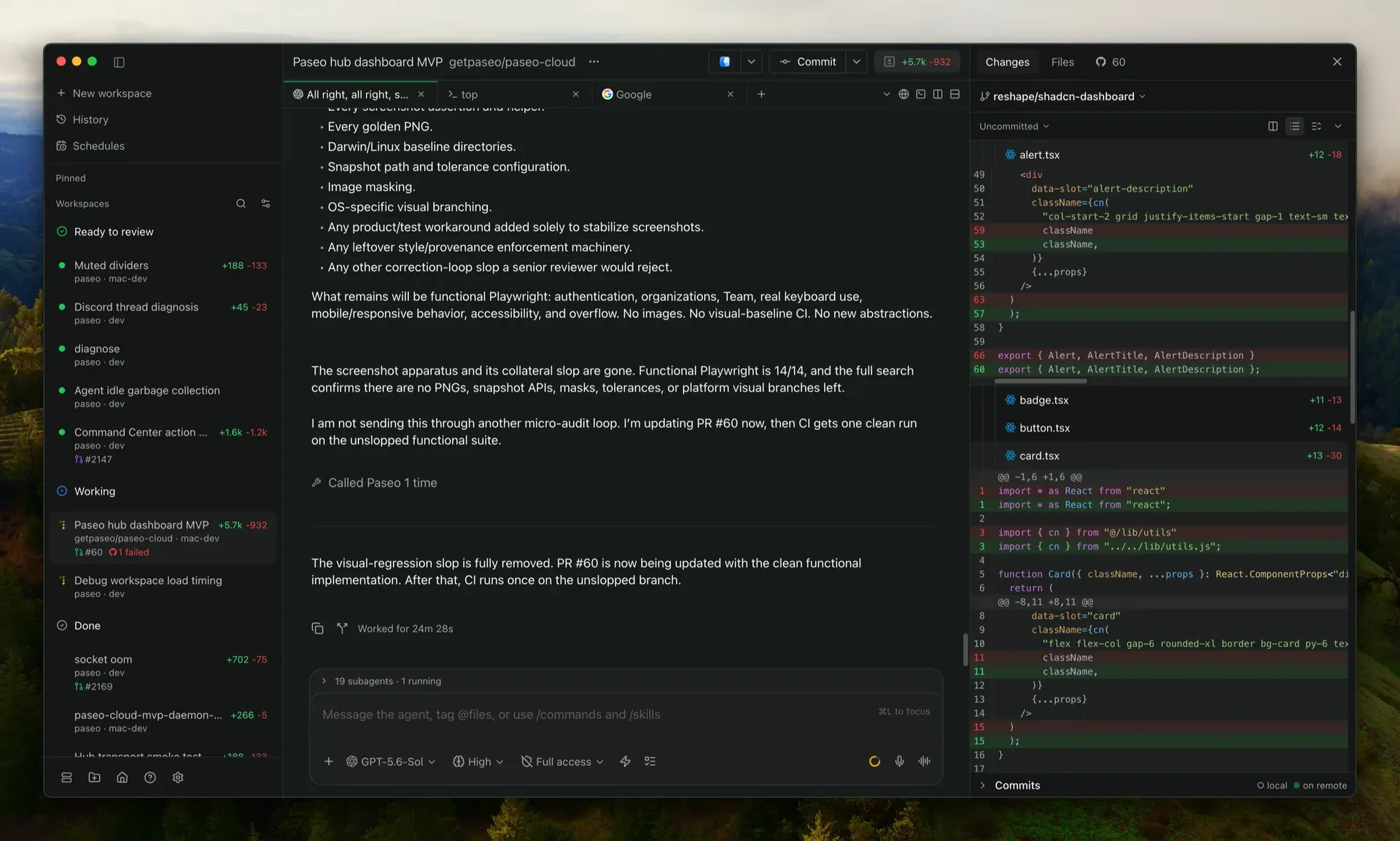
Official Paseo website image of the desktop app: workspace list by status, an agent chat with 19 subagents and a file diff review pane.
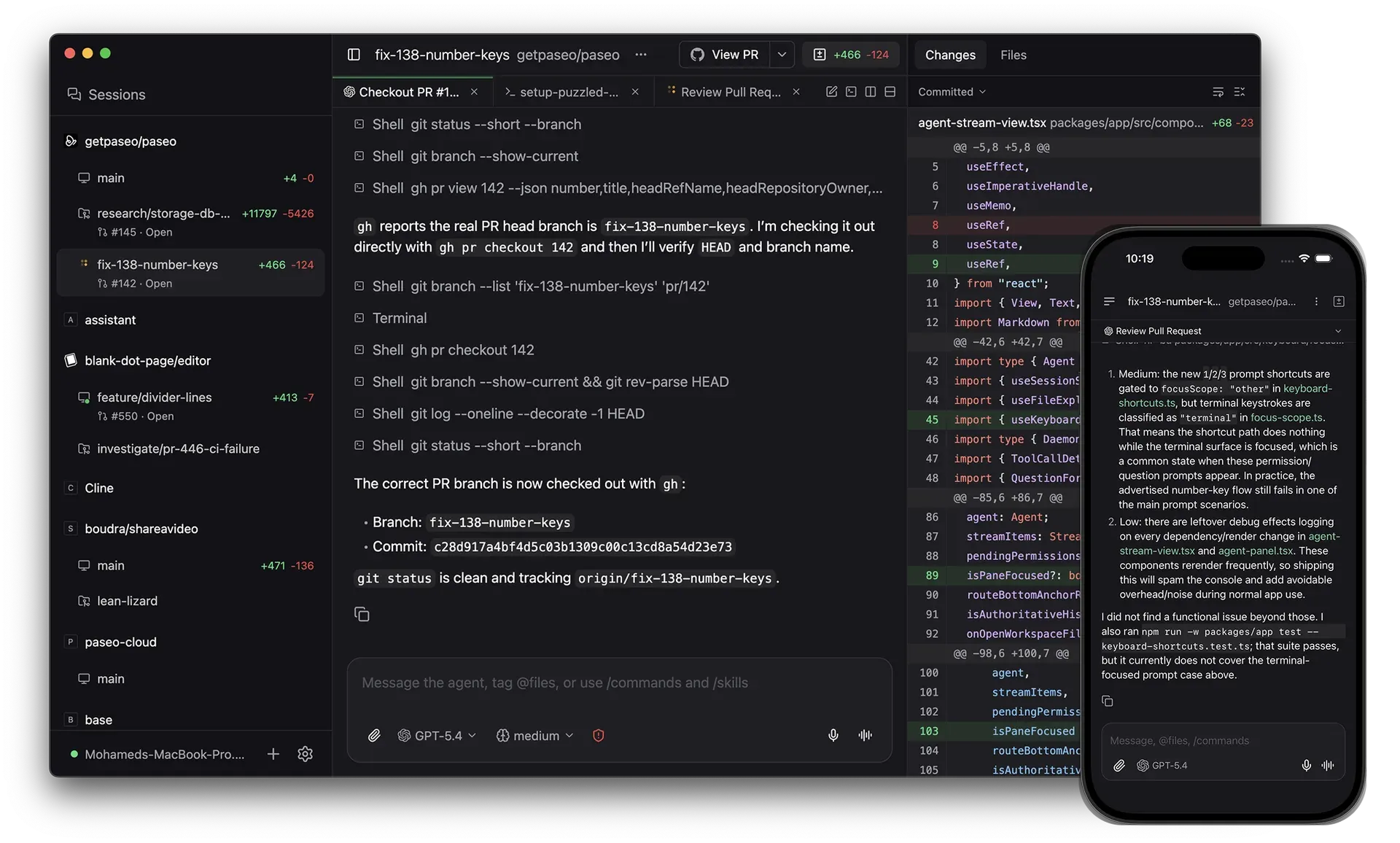
Official README image: an agent checks out PR 142 on the desktop while the phone app shows the review of the same branch.
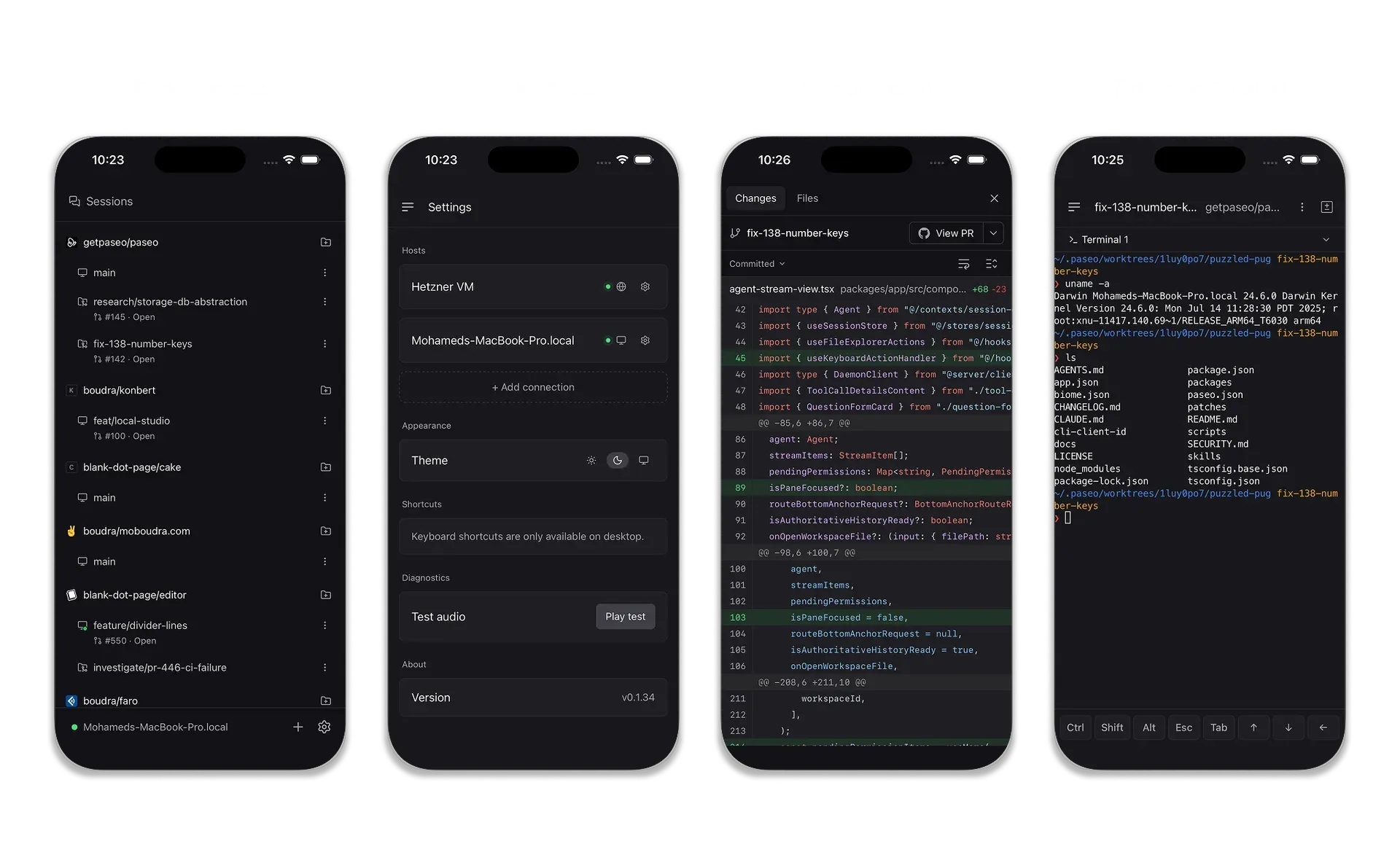
Official README image of the mobile app: parallel sessions, multiple hosts, diff review and the terminal.
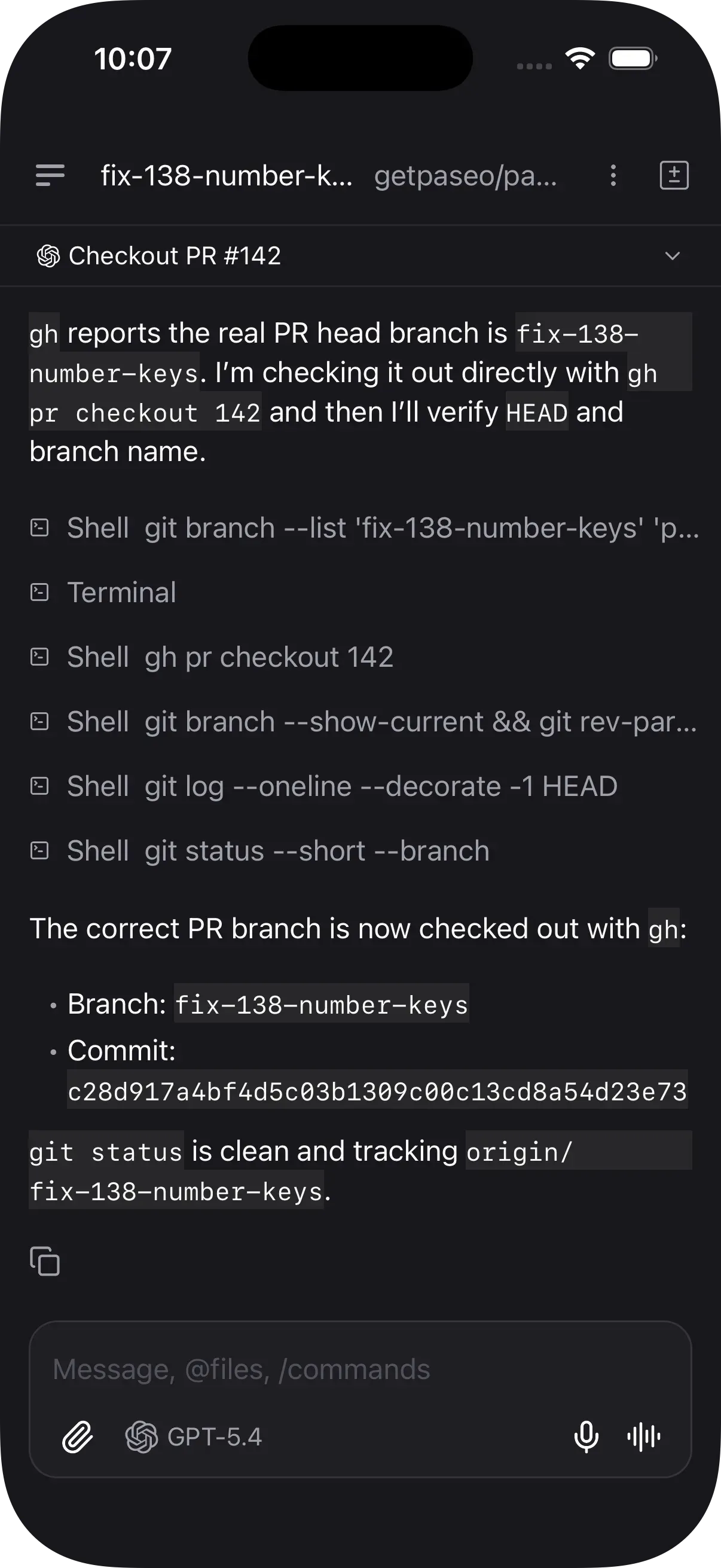
Official website screenshot of an agent conversation on the phone, with shell tool calls and the message composer.
Source: official Paseo project page.
Key capabilities
- Download Paseo for macOS The desktop app is distributed as DMG and ZIP packages for Apple Silicon and Intel and requires macOS 13 or newer, according to the download page. It can also be installed with
brew install --cask paseo. The bundled daemon starts with the app, so no separate server install is needed on that machine. Packaged desktop apps check GitHub Releases for updates. - Download Paseo for Windows Windows builds are published as setup executables for x64 and ARM64 on the GitHub releases page. Version 0.15.1 fixed a case where the daemon failed to start when Windows PowerShell 5.1 could not run
Get-CimInstance. The changelog notes that Windows desktop upgrades still close running terminals, unlike other platforms since 0.15.0. - Download Paseo for Linux Linux packages are an AppImage, a DEB for amd64 and an RPM for x86_64. No Linux ARM64 desktop package is listed in the v0.15.4 assets; the daemon itself is also distributed through npm and Docker.
- iOS and Android apps The mobile app is the full client rather than a remote viewer: sessions, terminals with native rendering and draggable selection handles, diffs and settings. It is listed in the App Store and Google Play, and the Android APK is also attached to each GitHub release. App store builds can lag behind desktop releases because of review, and there is no store beta channel.
- Server install with npm or Nix On a headless machine,
npm install -g @getpaseo/clifollowed bypaseostarts the daemon and asks whether to enable the relay.nix run github:getpaseo/paseois offered as an alternative. Configuration and state live underPASEO_HOME, which defaults to~/.paseo. - Official Docker image
ghcr.io/getpaseo/paseo:latesttracks the latest stable release, runs the daemon and agents as a non-root user (uid 1000) and serves the web UI on port 6767. It does not include agent CLIs; the guide installs providers in a child image. The Docker guide covers Compose, reverse proxies,PASEO_PASSWORDandPASEO_HOSTNAMES. - Multi-provider agent sessions Claude Code, Codex, OpenCode, Pi, Antigravity and Muse Code are supported natively once their CLIs are installed and authenticated on the daemon host. An in-app ACP catalog adds more than 30 further agents, including GitHub Copilot, Gemini CLI, Cursor, goose and Qwen Code. Custom providers can override commands and environment variables in
config.json. The Antigravity integration always starts with full access because that CLI cannot ask for permission when another app drives it. - Workspaces and Git worktrees Projects contain workspaces, and each workspace can hold several agent sessions, terminals, browsers and diffs. A workspace uses either an existing directory or a managed Git worktree under
$PASEO_HOME/worktrees, with setup hooks, scripts and services defined inpaseo.json. Paseo removes a managed worktree after its last workspace is archived. - Editor, diffs, pull requests and terminals Split panes combine agent chats, a file editor, terminals, a diff view against the base branch and pull request actions. PR-aware worktrees rely on an authenticated GitHub CLI (
gh). Since 0.15.0, terminal programs survive daemon restarts and reconnecting restores retained scrollback. - Agent-to-agent orchestration When Paseo tools are enabled per host, agents can create worktrees, launch agents with other providers or models, send them prompts and collect results, including on other reachable Paseo hosts. Tool injection is off by default. Per-provider
paseoToolspolicies can disable selected tools, but the MCP reference states this limits the catalog and is not a security boundary. - Orchestration skills Installable skills add
/paseo,/paseo-handoff,/paseo-advisorand/paseo-committeeworkflows for handoffs, second opinions and two-agent planning. They install from host settings or withnpx skills add getpaseo/paseo. The same workflows can be requested in plain language without the skills. - Schedules and heartbeats Schedules start a fresh agent on a cron cadence with a prompt, repository and agent settings; heartbeats send a recurring prompt into one existing agent. Both are managed from the app, the CLI, chat or MCP. Scheduled runs archive their workspace on finish by default, which removes the worktree unless that option is turned off.
- Browser automation for agents Agents can open, read, click and fill real browser tabs hosted by the desktop app, reading pages as an accessibility tree. Browser tools are off by default, require Paseo tools to be enabled and only work while a desktop app is connected. Tabs keep logged-in state, so the documentation advises enabling this only for trusted agents.
- Voice dictation and voice mode Local speech runs ONNX models on the CPU, with Parakeet for speech-to-text and Kokoro for text-to-speech by default; multilingual models such as Whisper can be downloaded from Voice settings. Dictation is on by default and voice mode is opt-in. OpenAI speech endpoints are an alternative that requires your own API key.
- Connectivity options Desktop and CLI can tunnel to a remote daemon through OpenSSH with key-based login. Phones connect through the relay, which is off on new installations and encrypts traffic end to end, or directly over Tailscale or another VPN. The connectivity guide lists the steps and troubleshooting for each path.
- Self-hosted web UI The daemon can serve the browser app from its own address, so the hosted app at app.paseo.sh is optional. The served UI always matches the daemon version. It is off by default outside Docker and is enabled with
features.webUi.enabled. - Command-line interface The
paseoCLI starts agents with a provider and model, lists them, attaches to live output and sends follow-up prompts, locally or against a remote host with--host. It also manages projects, workspaces, schedules, plugins and daemon settings. The CLI reference documents every command. - TypeScript SDK
@getpaseo/clientdrives a daemon over its WebSocket API from your own program: create an agent with a provider, directory and prompt, wait for the result or stream events. Agents created this way appear in the Paseo apps next to manual sessions. The API reference covers agents, workspaces and events. - Plugins and registry Plugins are TypeScript projects installed into one daemon that add screens, sidebar items, panels, slash commands, themes, agent lifecycle hooks or new providers, and render on every connected client including mobile. They install from the plugin registry with
paseo plugin add owner/slug, from Git or from a local directory. Plugins run with access to the daemon machine. - Paseo Hub for event-driven agents Hub registers daemons and starts agents from GitHub, Slack and Discord activity using trigger files kept in the repository. It can be self-hosted with
npx @getpaseo/hubusing an embedded PGlite database or PostgreSQL. The managed service has a Free plan with one seat and 50 agent runs a month and a Pro plan at 15 USD per seat per month with unlimited runs.
Where Paseo fits
Parallel tasks on one repository
The project describes one worktree-backed workspace per task, each with its own agent, and a diff of every branch against the base branch before merging. Install steps and long-running services defined in paseo.json run when a worktree is created, and ignored files listed in .worktreeinclude, such as local environment files, are copied into it. Pull request actions use the authenticated GitHub CLI. The parallel development guide covers the desktop workflow, including testing each branch in the built-in browser.
Following agents from a phone
A phone is paired from Settings, the host, then Pair Device, and connects either through the end-to-end encrypted relay or directly over Tailscale or another VPN. The pairing QR code or link carries the daemon public key. On the phone, the app shows sessions, permission prompts, terminals and diffs. Store builds of the mobile app can lag behind desktop releases because of app review.
Agents on a server or homelab host
The daemon runs from the Docker image or the npm CLI on a VPS, workstation or NAS. In the Docker setup, code is mounted into /workspace and provider credentials live in the persistent home volume. PASEO_PASSWORD protects a reachable port and PASEO_HOSTNAMES lists the DNS names allowed for browser access, as described in the Docker guide. Desktop and CLI clients can attach to such a host over SSH without exposing the daemon port.
Splitting work between providers
With Paseo tools enabled on a host, newly started agents receive a tool catalog that lets them launch a reviewer or implementer with a different provider or model. The project example is planning with Claude and handing implementation to Codex through /paseo-handoff. Agent profiles store model, mode and thinking settings with notes that guide delegation, and per-provider tool policies limit which tools a worker sees; the MCP reference describes that limit as a catalog restriction rather than isolation.
Recurring maintenance and build watching
Schedules start a fresh agent on a cron cadence for jobs such as daily triage, dependency refreshes or documentation audits, and a heartbeat sends a recurring prompt to one agent, for example to keep checking CI until it passes. Each run starts an agent with the configured repository and permission mode. The Archive on finish option, on by default, removes the run workspace afterwards. The schedules documentation covers creation from the app, CLI, chat and MCP.
Starting agents from GitHub, Slack or Discord
paseo hub init creates a starter trigger in .paseo/triggers; a daemon is then connected to Hub and the trigger is deployed from the CLI. A self-hosted Hub on localhost works with Slack Socket Mode, while GitHub webhook triggers need a public HTTPS address. Each trigger can restrict which users are allowed to start agents. The self-hosting guide explains embedded PGlite and PostgreSQL storage.
Install
npm install -g @getpaseo/cliReviews of Paseo
Be the first to share your experience with Paseo.
Write a review
Loading review form…
Alternatives to Paseo
 OrcaOrca is an MIT-licensed Electron app from Stably AI for running many coding agents at once, each in its own Git worktree. It adds chat and terminal views, diff review, a CLI, SSH and self-hosted servers, plus iOS and Android companion apps.EEmdashEmdash is an open-source desktop app that runs coding agents in parallel, each task in its own Git worktree, locally or over SSH, with diff review and PRs.TCT3 CodeT3 Code is an MIT-licensed interface for controlling coding agents through desktop, web and mobile apps while execution stays on the workspace host.