
What is T3 Code?
T3 Code is an open-source desktop, web and mobile interface for coding agents. Its README calls it the open-source control plane for coding agents: it runs agents such as Claude Code or Codex on a machine you control and shows their threads, approvals, diffs and terminals in one interface. Its FAQ states that T3 Code is not a harness itself; it drives the harnesses that are already installed and signed in on that machine, so prompts and code go from the machine to the provider under the user's own subscription or API key. T3 Code is published by T3 Tools Inc., the copyright holder in the MIT license file, and is developed in the pingdotgg/t3code repository.
Supported providers listed in the README and the provider setup guide are Claude Code, Codex, Cursor, OpenCode, Grok Build, Google Antigravity, Kiro, Pi, Muse Code and fx, plus agents from the official ACP Registry or a local ACP command. Each provider is installed and authenticated on the server machine, for example with claude auth login or codex login. Separate provider instances can carry their own environment variables, such as an API key or a custom base URL. The FAQ states that T3 Code does not support local models and that there is no way to pay for T3 Code itself.
The architecture keeps execution in the environment that owns the workspace. A server process manages provider processes, terminals, Git and project files, and web, desktop and mobile clients control it over authenticated RPC, according to the architecture overview. The desktop app bundles its own server; a standalone server runs from the t3 command on a workstation, VPS or remote host. The code is TypeScript: an Electron desktop app, a web app, an Expo and React Native mobile app and a Node.js server. Remote clients connect through T3 Connect, LAN or Tailscale pairing, or desktop-managed SSH.
Desktop builds are published on GitHub Releases and the download page for macOS (Apple Silicon and Intel), Windows 10 and 11 (x64 and ARM64) and Linux (AppImage and .deb for x86_64 and ARM64). The mobile app is in the App Store and Google Play, and app.t3.codes is the hosted web client. A Nightly train is published alongside Stable. Version 0.1.9, released on November 11, 2026, added agent sign-in approval through T3 Connect, sending messages while attachments upload, session-wide approval of an MCP app in Claude threads, screen reader announcements, reverting merged GitLab merge requests and OpenCode goals. Version 0.1.7 added Kiro as an Early Access provider, managed policies and one-time schedules. Version 0.1.0, released on October 15, 2026, was the first stable release of the rebuilt Orchestrator V2, with task delegation between providers, the T3 Code MCP server and ACP Registry support.
T3 Code is free and MIT-licensed. T3 Connect, the hosted connection service, is free for up to 3 machines per account according to the FAQ; linking a paid T3 Chat plan raises that limit to 10 machines with Pro or 100 with Premier, and phones and browsers do not count. The server sends product usage events without prompts or file contents, which can be turned off. Other listings on iThub for driving coding agents from several devices include Paseo, Happy and Codync.
T3 Code screenshots
Explore the interface. Open a screenshot to view it at full size.
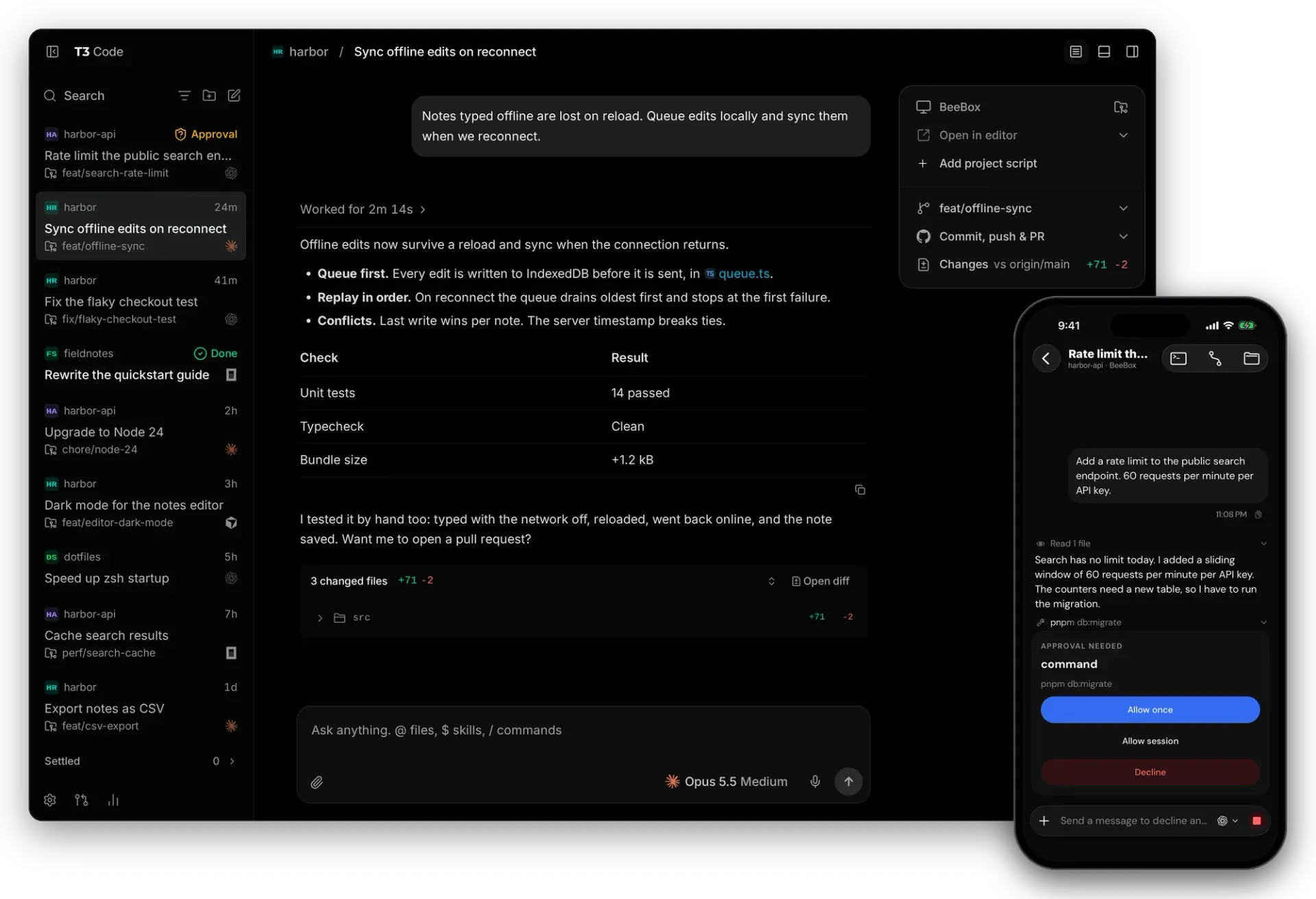
Official README image: the desktop app with a completed thread, diff summary and Git panel, and the mobile app showing an approval request.
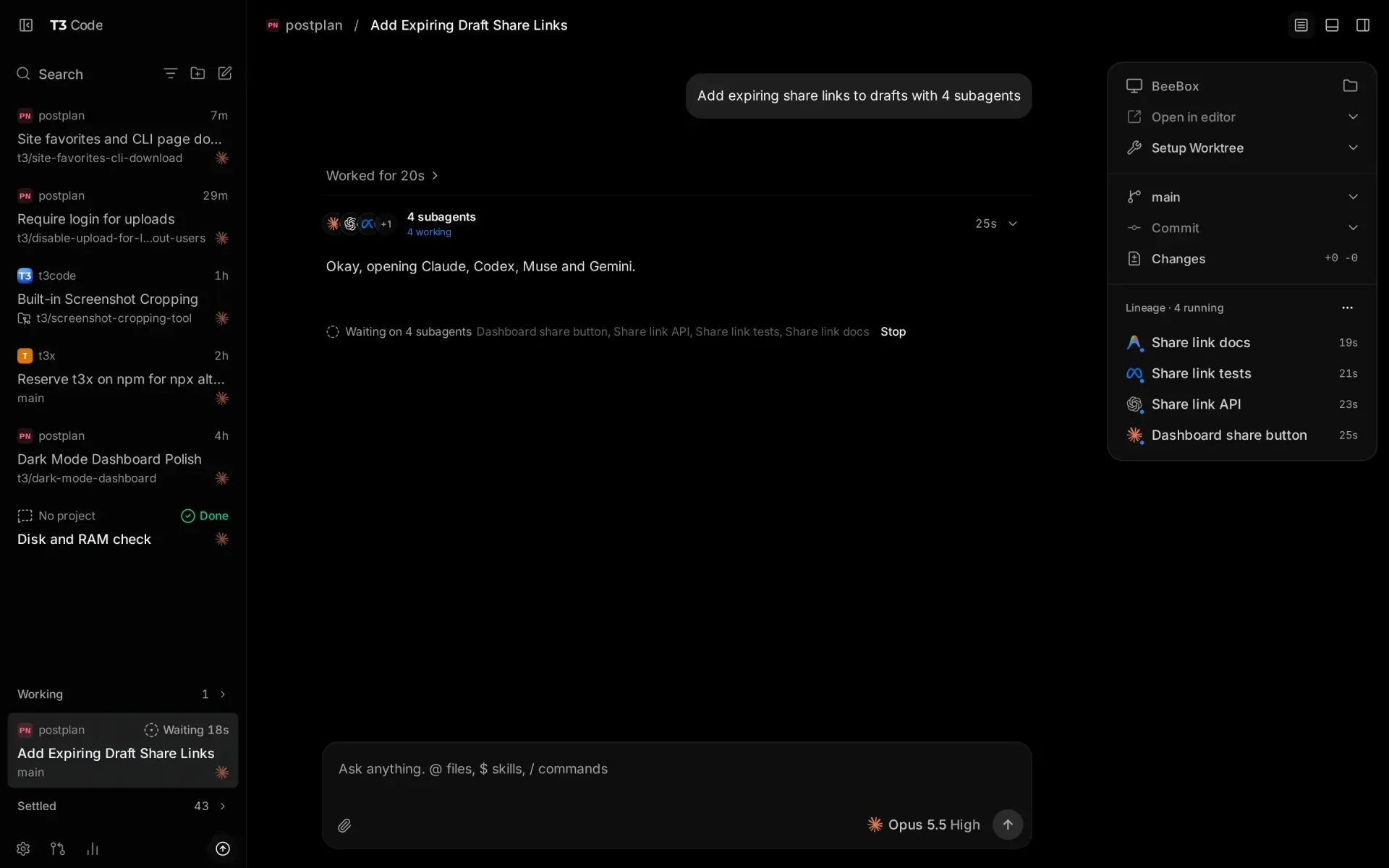
Official website screenshot of the desktop app: a parent thread delegating work to four subagents on different providers.
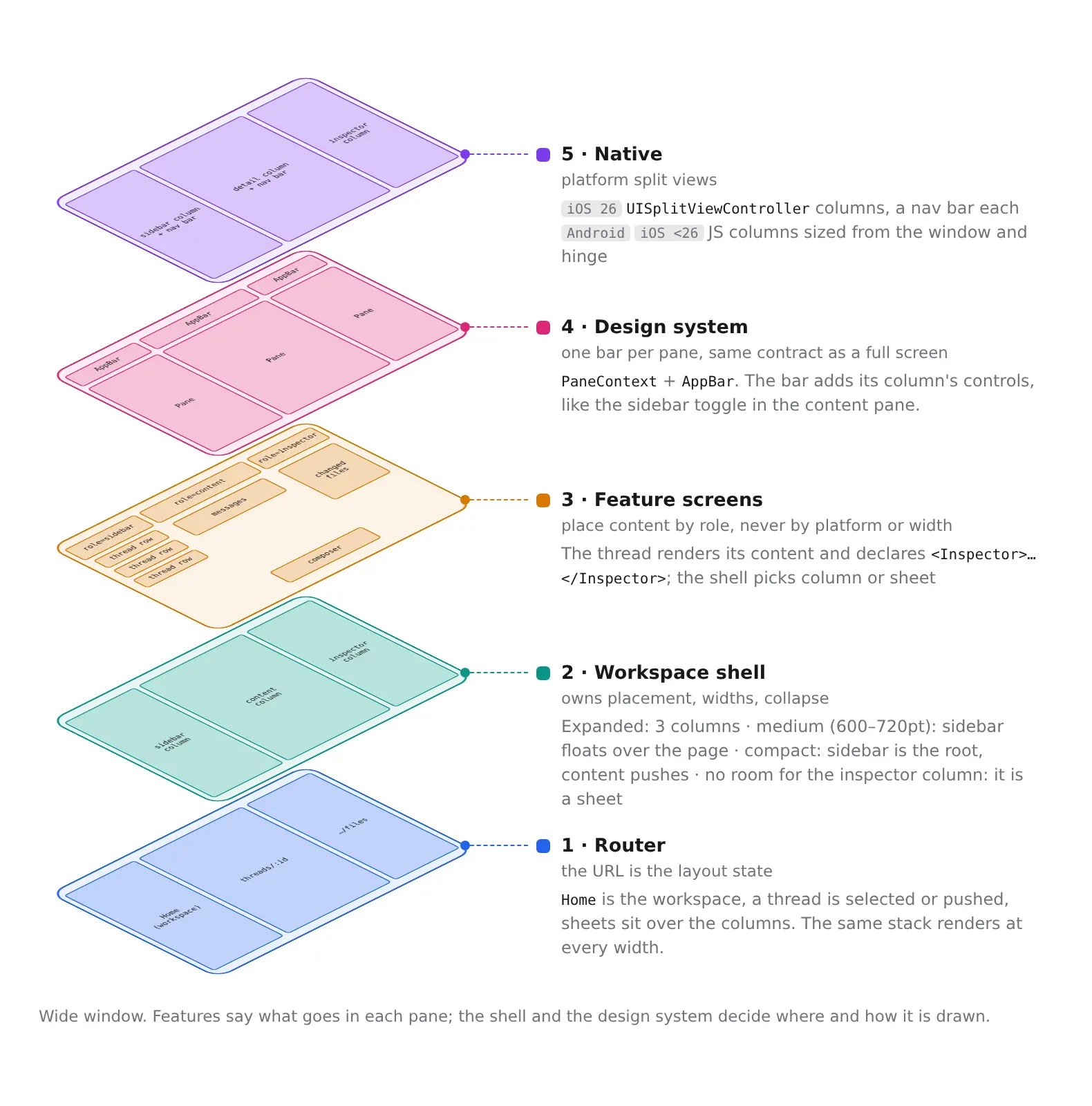
Official documentation figure of the five layers of the mobile app layout on a wide window, from the mobile layout internals page.
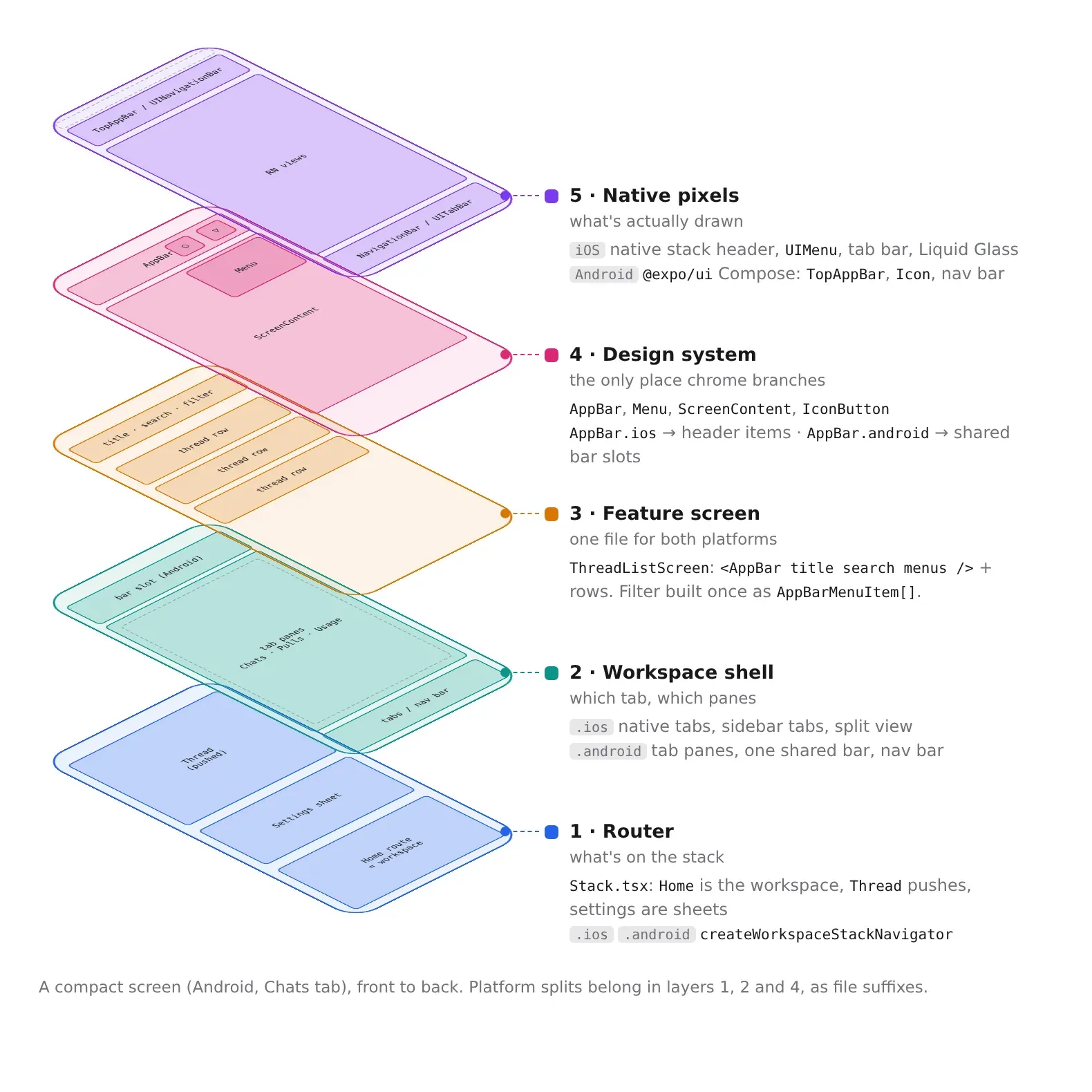
Official documentation figure of the mobile app layers on a compact Android screen with the Chats tab.
Source: official T3 Code project page.
Key capabilities
- Desktop app for macOS, Windows and Linux Release 0.1.9 ships DMG files for Apple Silicon and Intel Macs, .exe installers for Windows x64 and ARM64, and AppImage and .deb packages for Linux on x86_64 and ARM64. The README also lists
brew install --cask t3-code,winget install T3Tools.T3Code,scoop install extras/t3code, the AUR packaget3code-bin(x86_64 only) and a nixpkgs package. The desktop app bundles a server and installs thet3command from Settings > About. - The t3 command and standalone server
curl -fsSL https://t3.codes/install.sh | sh, orirm https://t3.codes/install.ps1 | iexin PowerShell, installst3to~/.local/bin;npx t3@latestruns it once without installing.t3starts the server and opens the web app,t3 serveruns it without a browser, andt3 update,t3 doctorandt3 uninstallcover maintenance. There is not3executable for Intel Macs, where the install guide describes a source build. - Mobile and web clients The iOS and Android apps connect to a server on another machine and work with Stable and Nightly servers; Android test builds are published as APKs and TestFlight is invite-only. The hosted web client at app.t3.codes needs an HTTPS endpoint and connects directly to the server. Voice input on phones transcribes on the device by default.
- Ten built-in providers plus ACP agents Claude Code, Codex, Cursor, Grok Build, Kiro, OpenCode, Antigravity, Pi, Muse Code and fx are enabled in Settings > Providers on the environment that runs them. Provider CLIs must be on the server's
PATHor set as a binary path, and T3 Code warns about provider versions with known compatibility problems. The ACP guide covers adding ACP Registry agents, which install under T3 home with SHA-256 checks when the registry supplies one, or a local ACP command. - Threads, subagents and delegation Each thread can work in its own Git worktree, and a thread can switch model or provider mid-conversation or be forked. Since 0.1.0,
delegate_tasklets an agent start child agents on any provider or model; each child runs as its own thread and reports a result to the parent. Queued messages survive server restarts, interrupted threads can resume after a restart, and scheduled tasks can run once or on a schedule. - Permission modes Supervised asks before commands and file changes, Auto-accept edits approves file edits, Auto uses the provider's automatic review where one exists, and Full access runs without prompts. Full access is the initial default for new threads. The permission guide lists provider differences: Muse Code and Kiro offer only Supervised and Full access, and OpenCode and Antigravity fall back to asking in Auto.
- Source control and pull requests T3 Code works with GitHub, GitLab, Forgejo, Gitea, Bitbucket, Azure DevOps, GitCafe and Cursor Origin to clone, publish and open pull requests. GitHub needs a saved token,
GH_TOKENor GitHub CLI 2.81.0 or newer; GitLab usesglaband Forgejo or Gitea usefjortea(0.16 or later). The diff pane shows each turn's own changes, the branch comparison and individual commits, and the README describes commit, push and pull request creation from one button. - T3 Connect T3 Connect links a machine to an account so other devices can reach it without router forwarding;
t3 upsets it up on a command-line host. Traffic runs through a Cloudflare tunnel started withcloudflaredon the machine, and the FAQ states that the relay sets up the link without proxying HTTP or WebSocket sessions. An optional setting requires approval of each new device by matching a short code, and a pending request expires after 10 minutes. - LAN, Tailscale and SSH routes
t3 up --lanort3 serve --lanaccepts connections from the local network and tailnet, andt3 pairprints a one-time pairing URL and QR code. Tailscale HTTPS needs MagicDNS and HTTPS certificates on the tailnet. Desktop-managed SSH starts or reuses a server on a Linux host or Apple Silicon Mac and downloads it to~/.t3/runtime, as described in the remote access guide. - Several machines from one client A machine can have several routes (LAN, Tailscale, VPN, public URL, SSH or T3 Connect), and T3 Code connects over the first route that answers. Optional load balancing picks a machine for new threads in projects grouped across environments, with Prefer, Normal, Less often and Manual only weights. The sidebar update button updates outdated providers, servers and the desktop app on every connected machine in one step.
- MCP server for outside agents Each environment exposes an MCP endpoint at its address followed by
/mcp. Agents outside T3 Code, such as Claude Code in a terminal or ChatGPT, sign in with OAuth and get Read only, Supervised or broader access to read projects and threads and to start, message and stop threads. The outside agents guide lists the tool names and setup commands per client. - Usage and estimated cost The Usage view combines history from Codex, Claude Code, Grok Build, OpenCode, Antigravity, Pi, Muse Code and Cursor across connected environments. It shows token use, cache savings, model breakdowns and estimated API-equivalent cost, which the usage guide states is not the subscription bill. Custom USD prices per million tokens can be set for any model ID.
- Terminals and browser tabs Each terminal keeps up to 5,000 lines and 8 MiB of scrollback on the environment server. Browser tabs belong to the environment, so users and agents see the same tabs from any device; the first tab downloads a headless Chrome of about 120 MB on the host.
- Managed policy for administrators A JSON policy sets defaults and locks for settings and limits such as the broadest permission mode, allowed clients and telemetry.
t3 policy checkvalidates a file andt3 policy showprints what the server loaded; managed policies arrived in version 0.1.7, including deployment through Windows Group Policy. The server enforces the policy for desktop, browser and mobile clients. - Secrets through 1Password Credential fields can store an
op://reference instead of a value, read through the 1Password CLI on the server machine. Agents can also ask for a secret in a private card rather than in the chat. The Secrets settings page is marked as a preview that is not in every build yet. - SnapShots, voice input and guest links SnapShots, off by default, attach a capture of another window with its app name, title and accessibility data, on macOS, Windows and Linux with Wayland (not X11). On desktop and web, dictation is transcribed on a chosen environment, which can also use OpenAI or Grok Voice Transcribe. Guest links, a beta behind Labs, let one person follow a thread in a browser for 24 hours, with each guest message waiting for the owner to send or dismiss it.
- Background service and updates
t3 service installruns the server as a user service on Linux, macOS and Windows, andt3 service uninstallremoves it while keeping projects and threads. Stable and Nightly tracks can be switched in Settings > About, and a client and server with different orchestration protocols refuse to connect. The setting that continues threads after restarts is on by default. - Product usage data controls The server sends product events (provider, model, permission mode, durations, token counts) with hashed identifiers to ingest.t3.codes, which forwards them to PostHog, and relay connection traces to Axiom. The product usage data page states that events do not include prompts, responses or file contents, and
T3CODE_TELEMETRY_ENABLED=falseturns them off on the server.
Where T3 Code fits
Starting a task at a desk and approving it from a phone
The README describes starting a thread on the computer and approving the next step from the phone. The computer runs the desktop app or t3 up, the phone app signs in to the same T3 Connect account or opens a pairing link, and approval requests for commands or edits appear on the phone. The FAQ notes that the phone is only a remote: the computer does the work and needs to stay on. Mobile notifications rely on the host's Publish agent activity setting, which sends project and thread titles, model names and status to the T3 Connect relay.
Running agents on a remote server or VPS
On a Linux server, the install script provides t3, provider CLIs are installed and signed in there, and t3 up chooses T3 Connect, the local network or both before installing a background service. From a desktop, an SSH alias such as user@example.com can be added as an environment instead, and T3 Code opens the port forward. Projects, provider credentials and agent work stay on the remote machine in both cases, according to the remote access guide.
Combining several providers in one task
Since 0.1.0, an agent can call delegate_task to start child agents on another provider or model, each as its own thread with its own provider-native history; the release notes give Claude planning and Codex implementing as an example. A thread can also switch model or provider mid-conversation, with caveats listed in those notes. Approvals from subagents appear in the parent conversation, and the Usage view shows per-model token use and estimated cost across providers.
Reviewing agent changes and opening pull requests
A thread can run in its own worktree, and the diff pane lists only the files that turn changed, with a separate branch comparison and a per-commit view of the newest 100 commits. After review, changes are committed, pushed and turned into a pull request from the thread, on GitHub or another supported host whose CLI or token is configured on the server. Worktree cleanup in Settings > Worktrees removes old worktrees automatically when enabled.
Letting outside assistants work with an environment
An assistant such as Claude Code in a terminal, ChatGPT or a bot adds the environment's /mcp URL as a remote MCP server and signs in through an OAuth page. Hosted assistants need the T3 Connect address, since a Tailscale address only works inside the tailnet. The approved level decides whether the assistant can only read projects and threads or can also start and message threads, and threads it starts cannot exceed the chosen permission mode.
Configuring T3 Code for a team's machines
An administrator writes a policy JSON with an organization name, setting defaults and locks, and limits such as maxRuntimeMode, allowed clients and telemetry. t3 policy check policy.json prints what the policy will do, the file is deployed with a device management tool, and t3 policy show confirms what the server loaded after a restart. The managed policy guide notes that every user on the machine can read the policy file and says it must not contain credentials.
Install
curl -fsSL https://t3.codes/install.sh | shReviews of T3 Code
Be the first to share your experience with T3 Code.
Write a review
Loading review form…
Alternatives to T3 Code
 PaseoPaseo is an Apache-2.0 agentic development environment. A local daemon runs the agent CLIs you already use, each task in its own Git worktree, with editor, terminals, diffs and a browser, and clients for macOS, Windows, Linux, iOS, Android, web and CLI.
 HappyHappy is an MIT-licensed harness that runs Claude Code, Codex, Grok, Gemini and ACP agents on the subscriptions you already have, with durable local sessions, an OS sandbox, Git worktrees and end-to-end encrypted iOS and Android apps.
 CodyncCodync is a free Apache-2.0 app that turns the coding agents signed in on your computer into persistent bots. A Rust host drives them over ACP; you chat, approve edits and get notified from iPhone, a desktop app or a terminal.