

What is Cline?
Cline is an open-source coding agent published by Cline Bot Inc. It reads a project, plans a change, edits files, runs terminal commands and calls tools, asking for approval before each action unless you allow it to proceed on its own. The same agent core is delivered as a VS Code extension (also installable in Cursor, Windsurf, VSCodium and Antigravity), a JetBrains plugin, a command-line tool, a native desktop app and the @cline/sdk TypeScript package. The cline/cline repository was created in July 2024, and the extension still ships under the package name claude-dev with the Marketplace identifier saoudrizwan.claude-dev.
The repository is a monorepo. The SDK is split into @cline/core (sessions, storage, built-in tools, hub and automation), @cline/agents (the agent loop), @cline/llms (provider handlers and model catalogs), @cline/shared and @cline/ui. The CLI, the VS Code extension and the desktop app are built on it; the desktop app combines a Tauri shell, a Bun sidecar and a Next.js interface. Sessions from several clients can share a local background hub, managed with cline hub. The JetBrains plugin talks to the same core but is not open source. Everything published in the repository is licensed under Apache-2.0.
Each surface has its own release tag. The latest GitHub release is Cline 4.1.26 for the editor extension, published on October 26, 2026 together with CLI 3.0.74, Desktop 0.0.49 and SDK 0.2.0. Version 4.1.26 adds a Local or Cloud model toggle for cloud tasks, lowers model request retries from five to three, sends max_completion_tokens to GPT-6 models on OpenAI and Azure OpenAI-compatible endpoints, stops sending native Google Search with Gemini API keys, and refreshes the model catalog, which changes the default model for many providers when none is pinned. Version 4.1.25, released on October 16, introduced Cline Cloud sessions as a gradual rollout and fixed local Ollama and LM Studio requests that failed after five minutes of silence.
Desktop 0.0.49 adds a Changes pane with per-turn diffs, a project files panel, an integrated terminal, a Local Models settings page for Ollama and LM Studio, configurable keybindings and a startup screen when the hub fails to start. Its release carries a universal macOS DMG, a Windows x64 installer, Linux DEB packages for amd64 and arm64 and RPM packages for x86_64 and aarch64, each with a signature file. The desktop documentation names macOS and Windows as download targets and still labels Windows support as beta.
Cline does not run a model itself. Prompts and code context go to the provider you configure: a direct API key, the Cline usage-billed provider, the ClinePass subscription or a local server. According to the enterprise overview, Cline reads files when a task needs them and does not index or embed repository contents. The deprecations page marks .clineignore as deprecating soon and lists Explain Changes and Focus Chain as deprecated, as part of the move to the SDK-based architecture.
Cline screenshots
Explore the interface. Open a screenshot to view it at full size.
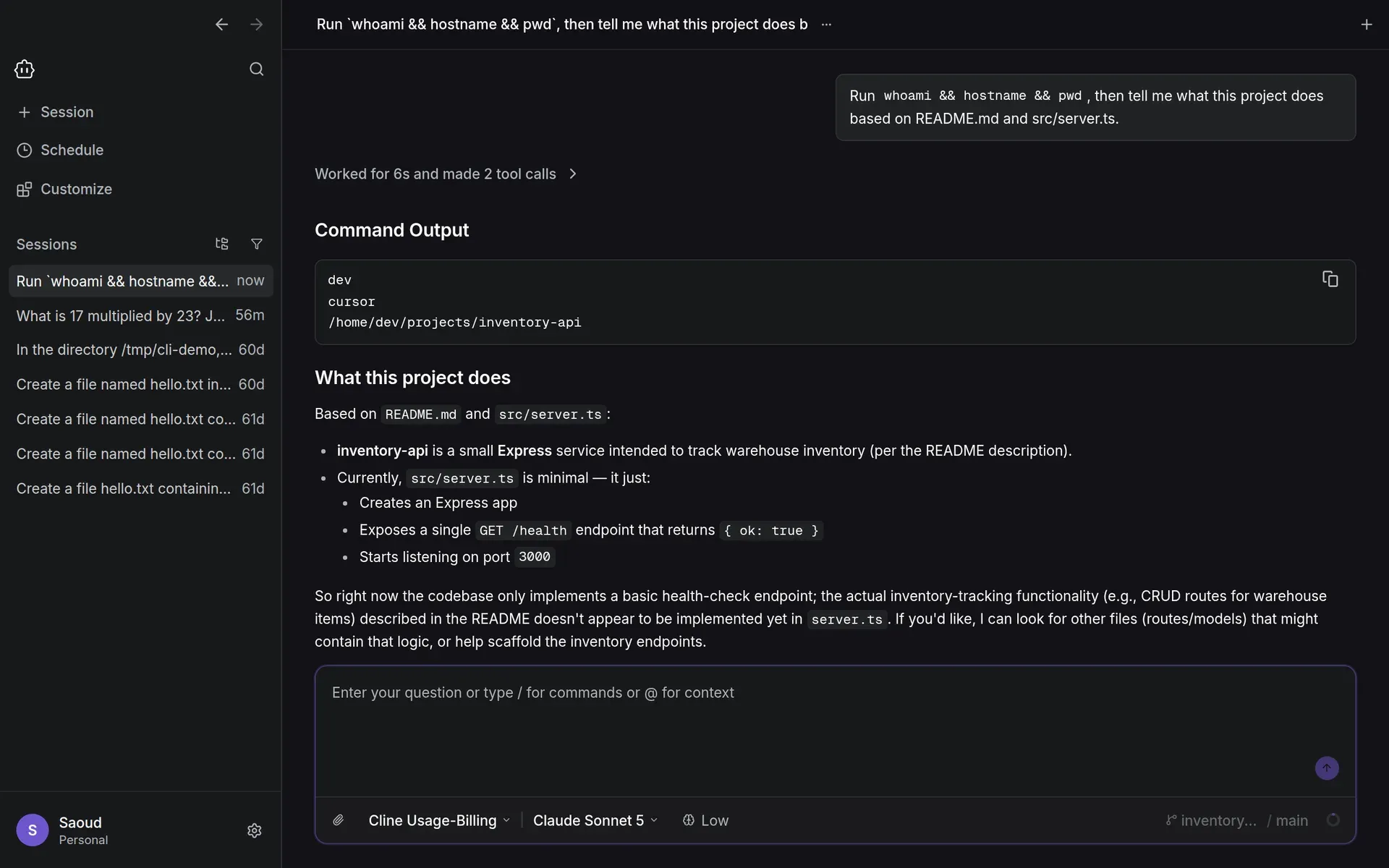
Official documentation screenshot of a Cline Desktop session running on a remote machine over SSH, with the session list and model selector.
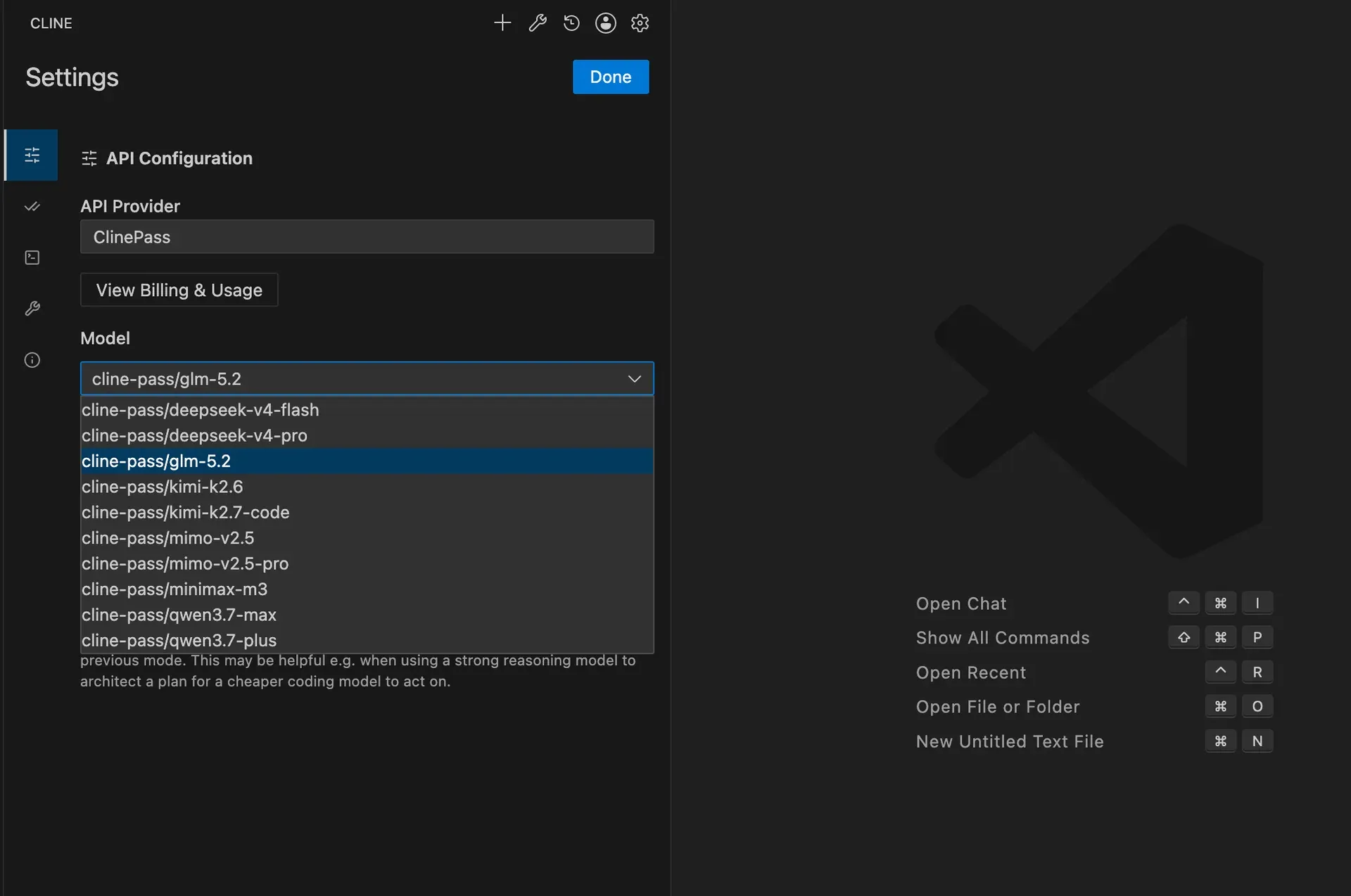
API Configuration in the VS Code extension with ClinePass selected. The model list shown is older than the current ClinePass catalog.
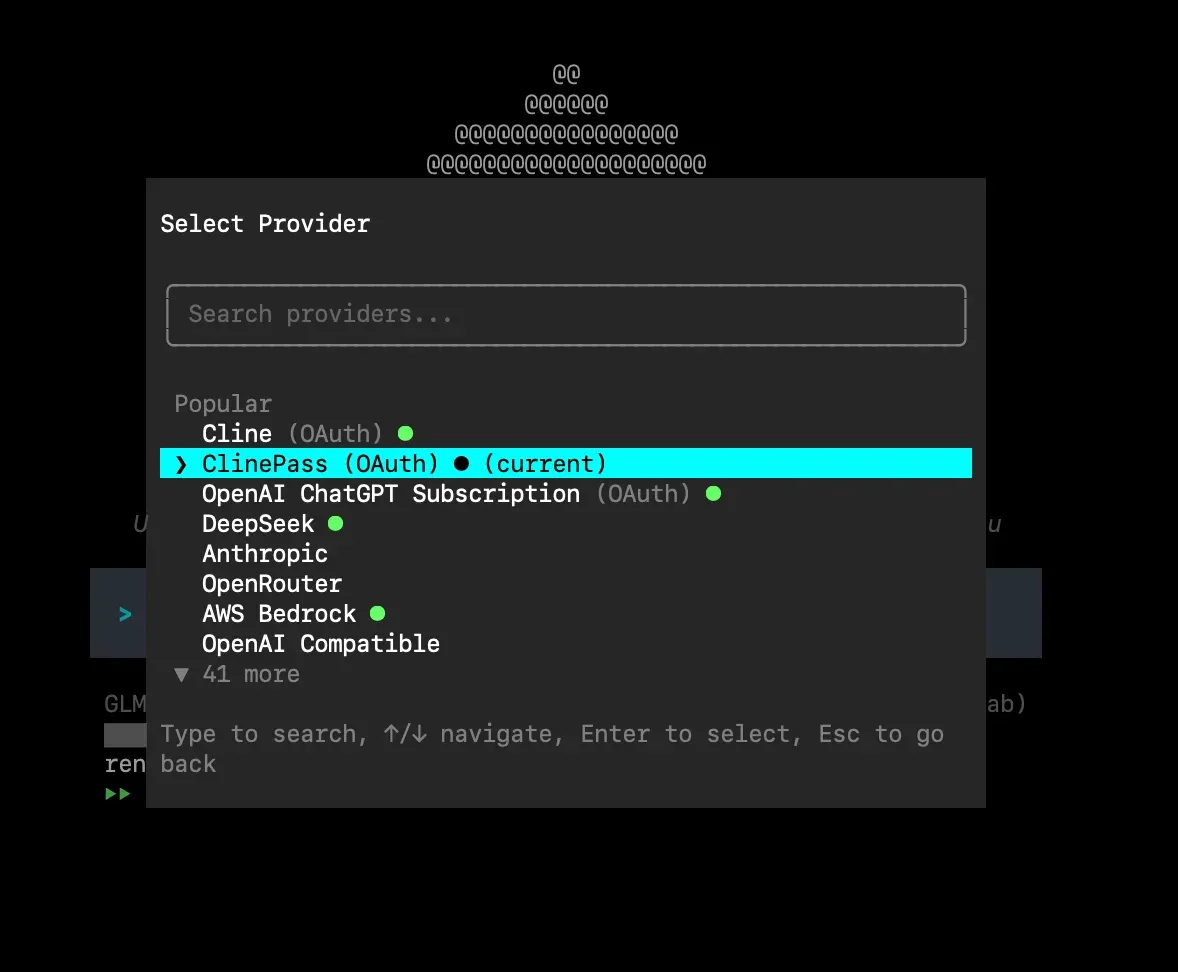
Provider selection in the Cline CLI, with popular providers listed first and 41 more behind a search field. Official documentation image.
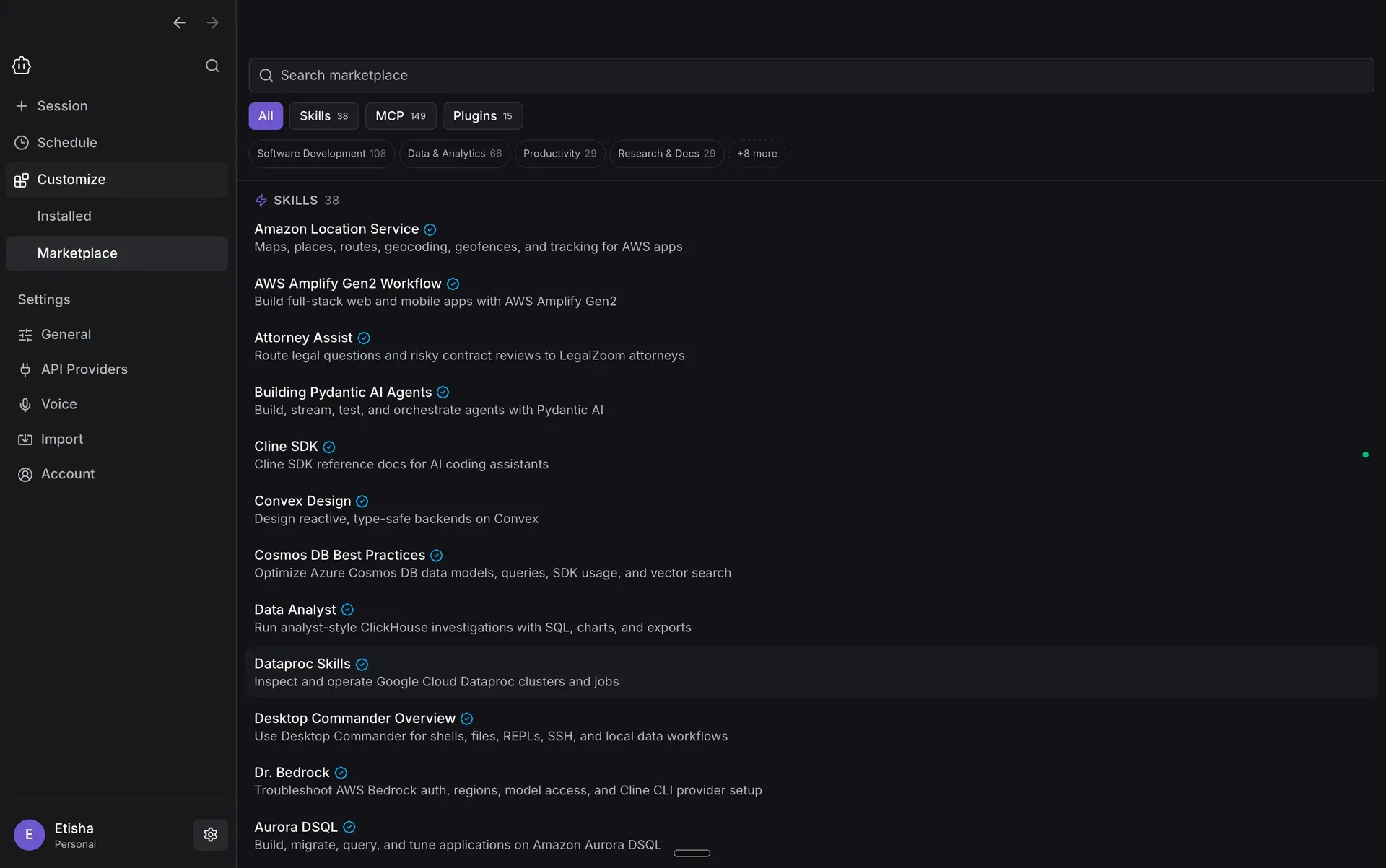
The desktop Marketplace for skills, MCP servers and plugins with category filters. Counts reflect the time the documentation image was taken.
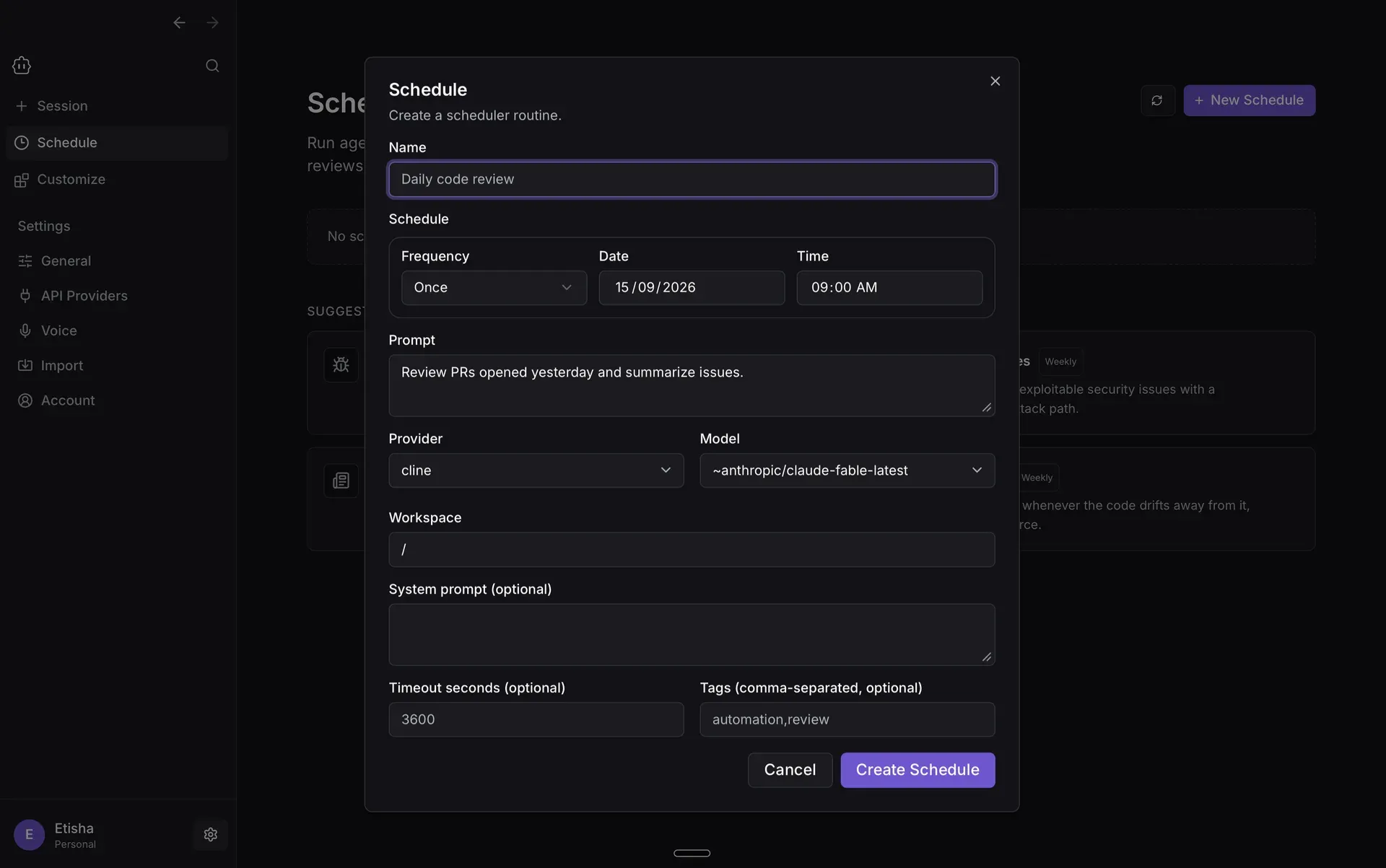
Creating a scheduled routine in Cline Desktop. Official documentation screenshot.
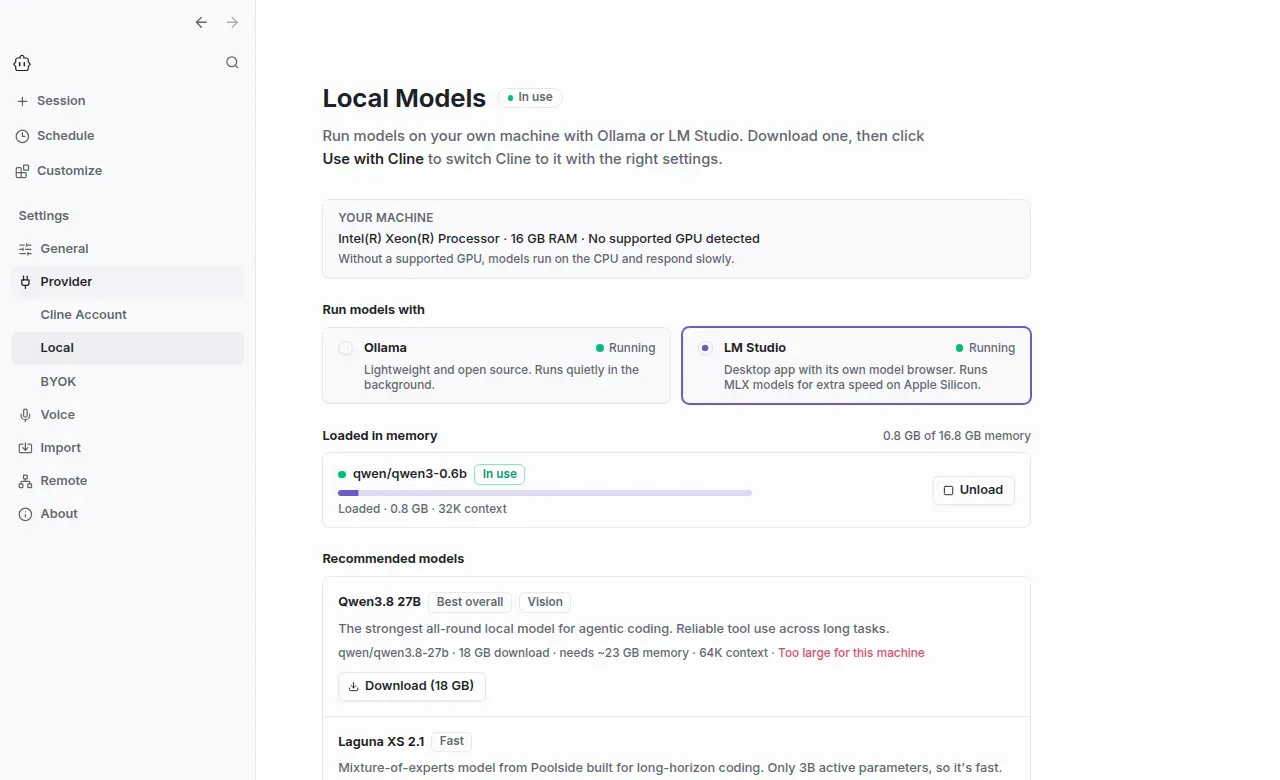
The desktop Local Models page with Ollama and LM Studio, memory use of the loaded model and recommendations sized to the machine.
Source: official Cline project page.
Key capabilities
- VS Code extension and compatible editors Install Cline from the Visual Studio Marketplace, or from Open VSX in Windsurf and VSCodium. The 4.1.26 manifest requires VS Code 1.101 or later, and every GitHub release also attaches a
.vsixfile for offline installation. Edits appear as diffs that you can review, modify or revert before accepting them. - JetBrains plugin The plugin installs from the JetBrains Marketplace into IntelliJ IDEA, PyCharm, WebStorm, GoLand and other JetBrains IDEs, then appears under View, Tool Windows. Its source is not published. The pricing page lists the JetBrains extension in the Enterprise column, while the README and install guide point all users to the Marketplace, so confirm the terms that apply to your organization.
- Command-line interface
npm i -g clineinstalls the CLI;cline authselects a provider and model, andclineorcline "task"starts work. The install guide asks for Node.js 20 or later with 22 recommended, while the CLI package manifest declares Node.js 22 or later. Subcommands includecline config,cline mcp,cline doctor,cline history,cline scheduleandcline hub. - Headless mode with JSON output The CLI switches to headless mode when
--jsonis set, stdin is piped or stdout is redirected. With--json, each line is a JSON object; agent events arrive asagent_eventlines and the final answer as arun_resultline.-pstarts in Plan mode,--timeoutlimits run time and--auto-approve trueallows unattended tool use, as described in the CLI overview. - Desktop app The desktop app runs agent sessions in any folder without an editor, keeps several sessions in parallel and imports conversations from Claude Code and Codex so they can continue with another model. Web search is on by default for new sessions but only works with providers that have built-in search. Voice input needs a separately configured speech-to-text provider, such as ElevenLabs.
- Remote development over SSH Desktop sessions can run on a dev box, build server or cloud VM while the app stays on your computer. On first connect, Cline copies a self-contained helper to
~/.cline/remote/and talks to it through an SSH tunnel, with no root access or open ports. Remote hosts must run Linux (x64 or arm64) or macOS and accept key-based login without prompts; Windows hosts are not supported. The SSH guide covers setup. - Plan and Act modes In Plan mode, Cline explores the codebase, asks clarifying questions and proposes a strategy without changing files. Act mode carries out the plan. The extension can use a different model for each mode, for example a stronger reasoning model for planning and a cheaper model for editing.
- Checkpoints After each tool use, Cline commits the file state to a shadow Git repository that is separate from your project history, including files Git does not track. Compare opens a diff, and Restore offers Restore Files, Restore Task Only or Restore Files and Task. The documentation warns that checkpoints can use significant storage and slow work in very large repositories.
- Auto-approve and YOLO mode Approval is set per category: reading and editing project files, the same outside the workspace, safe commands, all commands, the browser tool and MCP tools. The model marks each command with a
requires_approvalflag; there is no fixed allowlist. YOLO mode approves everything, including file operations anywhere on the system and Plan to Act transitions, as explained in the auto-approve guide. - Rules, skills and hooks Project rules in
.clinerulesfiles are picked up by the CLI, the VS Code extension and the JetBrains plugin. Skills let the model load specific instructions when needed. The CLI has no allow or deny list for shell commands, so the documented way to block commands is aPreToolUsehook that cancelsrun_commandscalls. - MCP servers and Marketplace Model Context Protocol servers connect Cline to databases, APIs and cloud tools; the CLI manages them with
cline mcp. The desktop Customize view lists installed tools, plugins, skills, rules, MCP servers and hooks, and the Marketplace lets you search skills, MCP servers and plugins by category. - Model providers and local models Supported providers include Anthropic, OpenAI, Google Gemini, OpenRouter, Vercel AI Gateway, AWS Bedrock, Azure, GCP Vertex, Cerebras, Groq, Ollama, LM Studio and any OpenAI-compatible endpoint. The desktop Local Models page helps install Ollama or LM Studio, recommends models that fit the machine and shows memory use. Without a supported GPU, local models run on the CPU and respond slowly.
- Cline provider, ClinePass and free models The Cline usage-billing provider uses prepaid Cline credits across more than 100 models after one sign-in with Google, GitHub or email. ClinePass is a separate $9.99 per month subscription for curated open-weight coding models, measured against five-hour, weekly and monthly limits. Rotating free-model promotions require a Cline account, are not available through the Cline API and may be used to improve model quality.
- Multi-agent teams and scheduled agents
cline --team-namestarts a coordinator that splits work into subtasks for specialist agents, with team state that persists across sessions.cline schedule createruns a prompt on a cron expression against a workspace, and schedules survive restarts. The desktop Schedule page creates one-time or recurring routines with a provider, model, timeout and tags. - Messaging connectors
cline connectlinks an agent to Telegram, Slack, Discord, Google Chat, WhatsApp or Linear, with each conversation thread mapped to an agent session. Slack works through a webhook or socket mode. Access control restricts who can talk to the agent, which matters because the agent can run commands on the host. - ACP for other editors
cline --acpmakes the CLI an Agent Client Protocol agent over stdio, so Zed, JetBrains AI Assistant, Neovim through CodeCompanion and Emacs through agent-shell can use it without a dedicated extension. Edits and commands go through the client permission UI, and nothing is auto-approved by default.CLINE_API_KEY,CLINE_PROVIDERandCLINE_MODELpreconfigure the agent. - TypeScript SDK and plugins
npm install @cline/sdkprovides the engine behind the CLI, desktop app and extensions.createToolregisters custom tools, and the plugin system adds tools and lifecycle hooks for logging, auditing or policy checks. SDK 0.2.0 reattaches a new start to a run already in progress instead of replacing its runtime. See the SDK documentation. - Cloud Agents At app.cline.bot, a task on a connected GitHub repository runs in an isolated cloud sandbox that commits to its own
cline/branch and can open a pull request. Sandboxes pause after 15 minutes idle, and an account can run up to 10 sessions at once and start 50 per day. Rules, skills, MCP servers and connectors are not loaded in cloud sessions yet. - Enterprise controls The Enterprise plan adds SSO, role-based access with Member, Admin and Owner roles, remote configuration, model and provider restrictions, OpenTelemetry export and authentication logs. Prompt storage can back up conversation history to AWS S3 or Cloudflare R2. Pricing is by contact with sales.
Where Cline fits
Supervised refactoring inside the editor
Open the repository in VS Code or a JetBrains IDE, start in Plan mode and ask Cline to describe the change, the affected files and the tests it intends to run. Switch to Act mode only when the plan matches your intent. Keep auto-approve limited to reading project files at first, review each diff and use Compare on a checkpoint before committing. If an edit goes wrong, Restore Files reverts the code while keeping the conversation, as described in the checkpoints guide. Commit to Git yourself; checkpoints live in a separate shadow repository.
Reviewing diffs and fixing tests in CI
Install a pinned CLI version on the runner and authenticate with an API key stored as a secret. Pipe context in, for example git diff origin/main | cline --json "Review these changes for issues", and read the run_result line with jq. For tasks that edit files, run on a clean branch, set --timeout, and only add --auto-approve true where unattended changes are acceptable. Check whether a provider default model changed after an upgrade, because catalog refreshes change defaults when no model is pinned.
Working with local models
Install Ollama or LM Studio, or let the desktop Local Models page guide the setup, then pick a model that fits the available memory. In the extension or CLI, select the Ollama or LM Studio provider and the model. Agent work sends large prompts, so confirm the configured context window and expect slow responses without a supported GPU. Test tool calling on a small task before relying on a local model for multi-file edits, and upgrade to 4.1.25 or later to avoid the earlier five-minute timeout on long prompts.
Running sessions on a remote build host
Set up key-based SSH login from a terminal first, confirm that ssh user@host connects with no password or fingerprint prompt, then add the host under Settings, Remote in the desktop app. Pick it from the environment selector; file edits, commands, Git and MCP servers then run on the host while the chat stays local. Check that the host runs Linux x64 or arm64 or macOS, and remove ~/.cline/remote/ when decommissioning access.
Scheduled reports and chat-driven agents
Use cline schedule create with a cron expression, a prompt and a workspace for jobs such as weekday PR summaries or weekly dependency checks, or create the same routine on the desktop Schedule page. To reach an agent from Slack, Telegram or another messenger, run cline connect with the bot credentials and configure access control so only named users can start work. Review the first runs by hand, because scheduled and connected agents act without a person watching.
Rolling Cline out to a team
Decide which providers are allowed, then use Enterprise remote configuration to set them, connect SSO and assign Member, Admin and Owner roles. Distribute the extension or CLI through existing software channels, and send OpenTelemetry data to the team's observability stack. Note that the organization telemetry switch applies to the VS Code and JetBrains extensions, while Cline Desktop and the CLI ignore it, as the telemetry page explains.
Install
npm i -g clineReviews of Cline
Be the first to share your experience with Cline.
Write a review
Loading review form…
Alternatives to Cline
 Codex CLIOpen-source Rust CLI from OpenAI that reads a repository, edits files and runs local commands inside a sandbox with approval prompts. Includes code review, MCP, skills, codex exec for CI, a TypeScript SDK and an app-server.OOpenCodeOpenCode is an open-source AI coding agent available through a command-line interface and a beta desktop app. It provides separate agents for development work and read-only code exploration.
 PiPi is an MIT-licensed coding agent CLI from Earendil that works in your terminal with read, bash, edit and write tools. Extensions, skills and Pi packages add features, and print, JSON, RPC and SDK modes let other programs drive it.