

What is Orca?
Orca is a desktop environment for running several command-line coding agents side by side. Each task gets its own Git worktree with its own branch, files, terminals and agent sessions, so Claude Code, Codex, Grok, OpenCode, Pi, Cursor CLI and other terminal agents can work on the same repository without editing the same checkout. Orca does not ship a model of its own: agents run with the subscriptions, logins and API keys you already have. The project is developed by Stably AI, a Y Combinator-backed company that states on the Orca website that it is built in San Francisco.
Desktop builds are published on GitHub Releases for macOS (Apple Silicon and Intel DMG), Windows (an installer signed through SignPath) and Linux (AppImage, .deb and .rpm for x64 and arm64), with a Homebrew cask and an AUR package as alternatives. The macOS build is signed and notarized. A companion app is available on the iOS App Store and as an Android APK, both marked beta. Stable releases ship almost daily, and RC builds can be pulled from the in-app updater with a Shift+click on Check for Updates.
The current release is v1.4.252, published on November 7, 2026. It adds forking a chat from any finished reply, a persistent Plan mode for Claude and Codex chats, nested workspaces across machines and a faster phone client. It also raises the macOS minimum to 13.4 (previously macOS 12), retires the Zipformer EN dictation model in favor of Parakeet v2, expires unused pairing codes after 10 or 60 minutes and puts the local browser control proxy behind a per-session token. Version 1.4.251 added nested workers, chat resume after a restart and add-to-chat from files and terminals.
Orca is written in TypeScript on Electron 43 with Node.js 24. Besides the local desktop, it can run agents on SSH hosts, on a Remote Orca Server (another Orca desktop or the headless orca serve runtime) and on per-workspace cloud VMs defined by recipes in orca.yaml. The bundled orca CLI (named orca-ide on Linux, because GNOME's screen reader already owns /usr/bin/orca) lets scripts and agents create worktrees, start workers and drive the built-in browser. The ways to run Orca page compares these modes.
The application is free and open source under the MIT license. Orca has no account system for desktop use; sign-in is needed only for Orca Relay, the hosted connection path used to pair phones and remote clients. Orca does not sell managed hosting: SSH hosts, servers and cloud VMs always run on machines and provider accounts you control and pay for. Agent quality, model choice and usage limits come from each agent vendor, not from Orca.
Orca screenshots
Explore the interface. Open a screenshot to view it at full size.
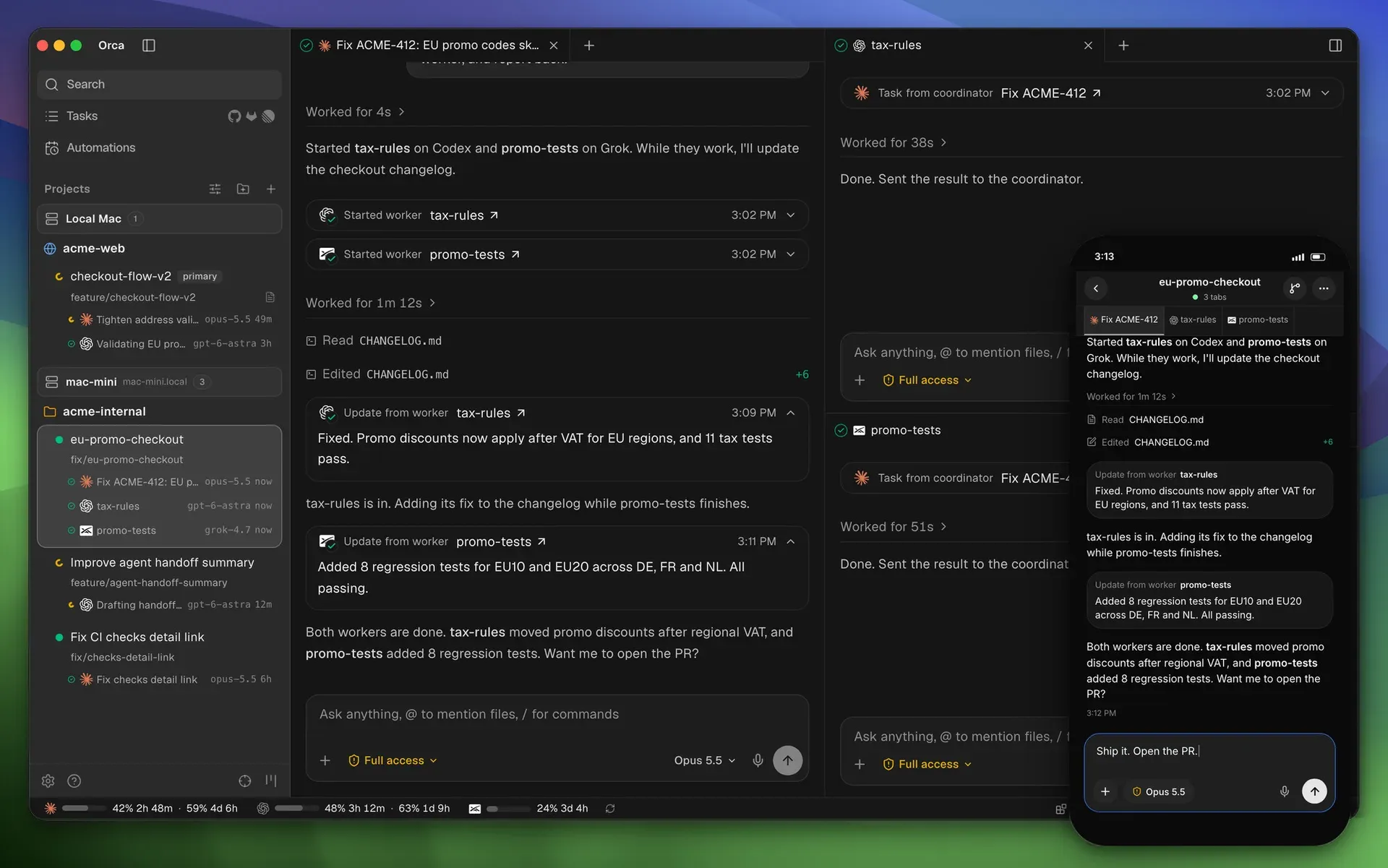
Official README image: a coordinator agent running two workers in parallel workspaces, with the Orca mobile app showing the same session.
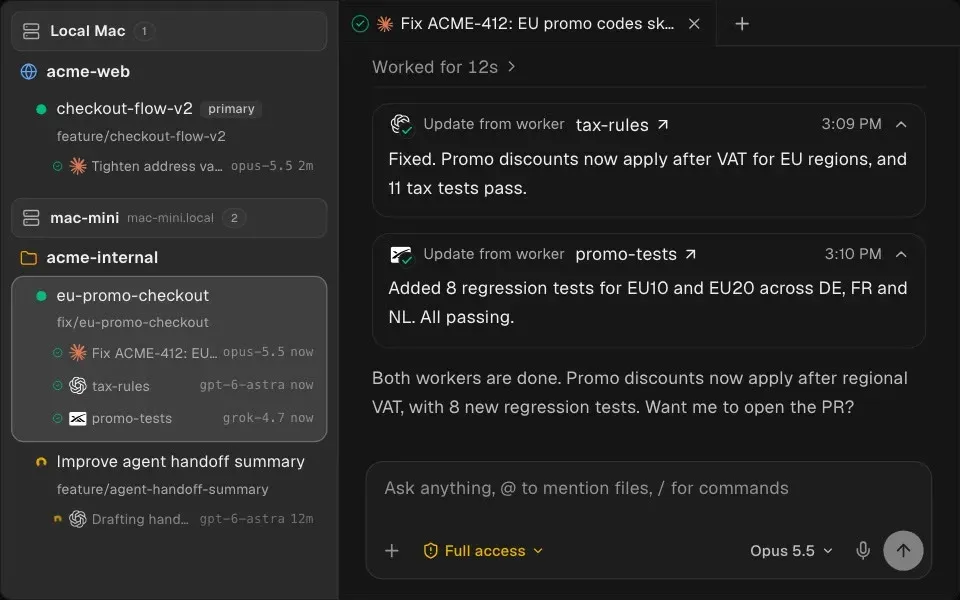
Worker agents report their results back to the coordinator chat. Official feature image from the Orca README.
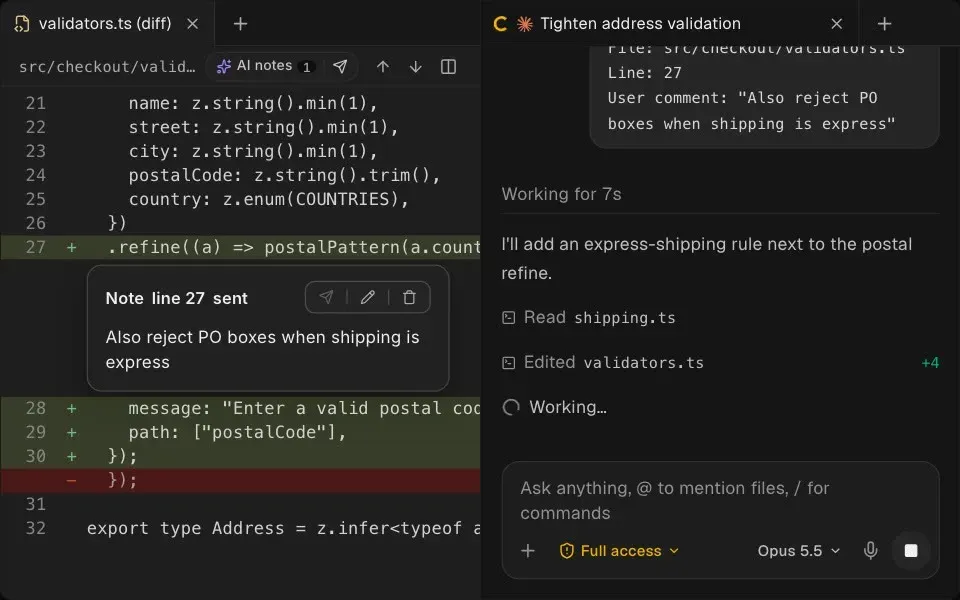
A line note on an AI-generated diff is sent back to the agent, which edits the file in response. Official feature image.
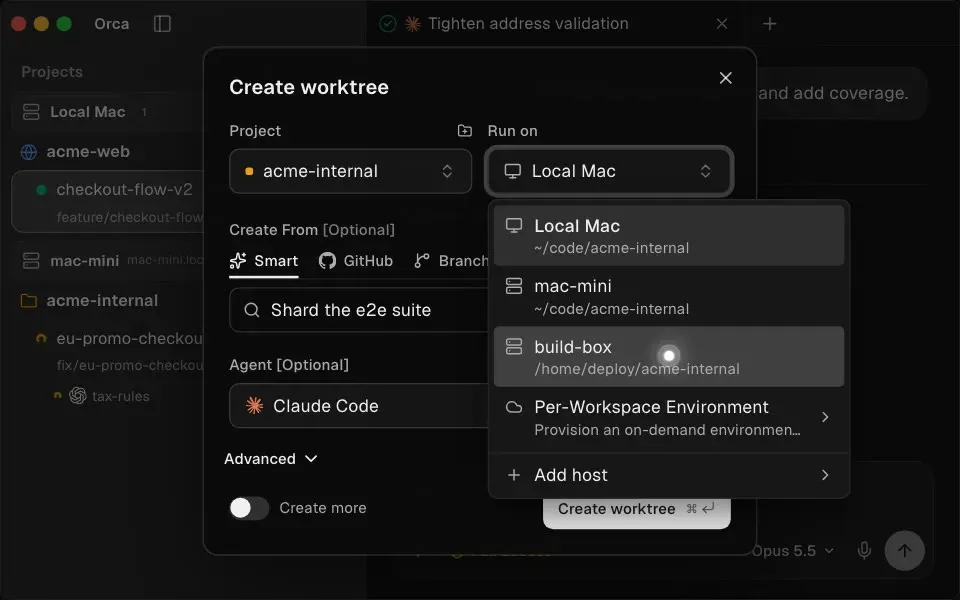
The Create worktree dialog picks a run target: the local machine, an SSH or server host, or a per-workspace environment. Official feature image.
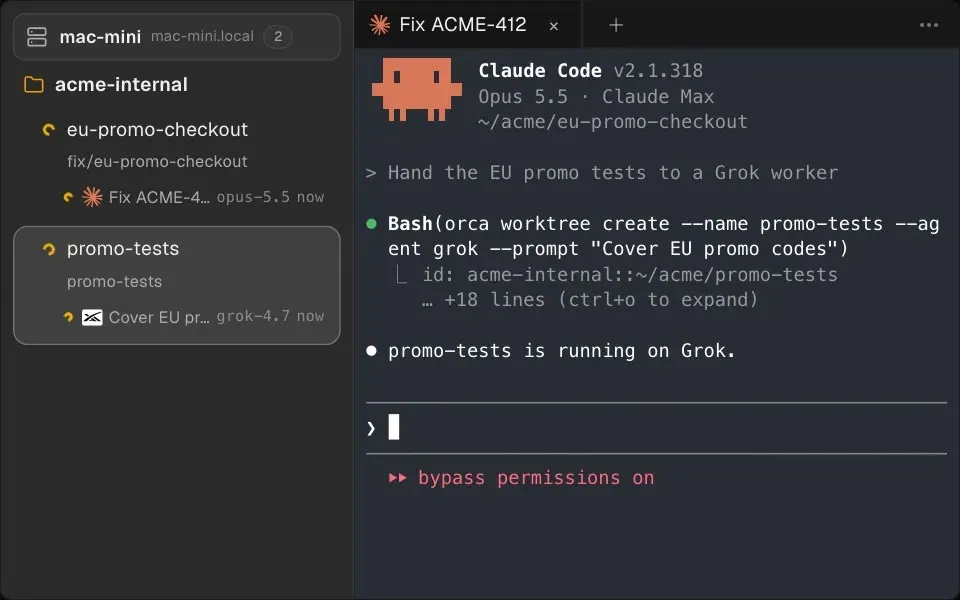
An agent calls the Orca CLI to create a worktree and start another agent in it. Official feature image.
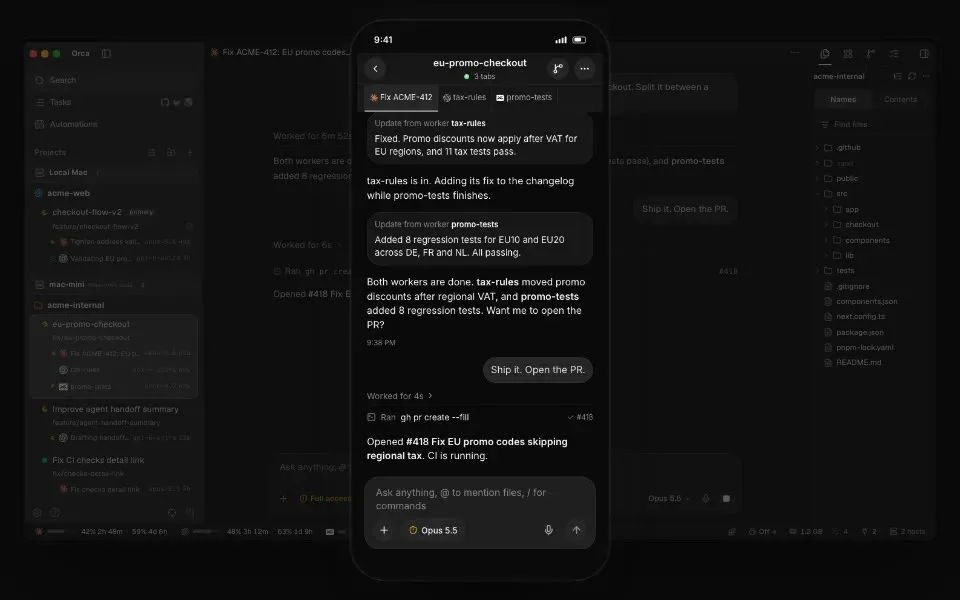
The phone app follows a desktop session and sends replies to the agent. Official feature image; the mobile app is in beta.
Source: official Orca project page.
Key capabilities
- Download for macOS DMG builds for Apple Silicon (
orca-macos-arm64.dmg) and Intel (orca-macos-x64.dmg) are on the latest release page, signed and notarized. Homebrew users runbrew install --cask stablyai/orca/orca; the bare nameorcais an unrelated Plotly cask. Since v1.4.252 Orca needs macOS 13.4 or later, and older Macs stay on their last compatible build. - Download for Windows The
orca-windows-setup.exeinstaller is code-signed with a SignPath Foundation certificate and updates itself through the in-app updater. The default shell inside Orca can be set to PowerShell or CMD under Settings > Terminal. WSL is supported as an execution target for agents and account management. - Download for Linux Each release ships an AppImage, a
.deband an.rpmfor x64 and arm64, containing the same app. Only the AppImage updates itself; for.deband.rpmOrca downloads the package and offers a Copy Install Command button, because it never escalates privileges. Arch users can installstably-orca-binfrom the AUR. The install guide explains which package to pick. - Parallel Git worktrees Every task gets its own on-disk checkout through
git worktree, branched from a base ref, another branch, a commit or a remote branch. Worktree creation runs in the background with a progress row and can be cancelled. Gitignored dependencies such asnode_modulescan be shared by link, and files such as.envcan be copied in through a.worktreeincludelist. - Any CLI agent The README lists more than 30 supported agents, including Claude Code, Codex, Grok, Cursor CLI, GitHub Copilot CLI, OpenCode, Pi, Antigravity, Amp, Goose, Kiro, Qwen Code and Hermes Agent. Any other agent that runs in a terminal can run in an Orca terminal tab. Each agent uses its own login and configuration; on first launch Orca offers to import
~/.claude,~/.codexand Ghostty settings. - Chat UI or raw terminal Supported agents can open in a structured chat view with a transcript, composer, model and effort pills, slash commands and image attachments, or as the plain CLI. A conversation can be resumed in the other form from Agent Session History without changing the original. Fresh installs default to the terminal, and the choice can be set per agent under Settings > Agents.
- Coordinator and worker orchestration An experimental orchestration layer lets one coordinator agent create a Run, split it into Tasks and start supervised workers in the current or a new worktree with
orca orchestration worker-start. Workers report back withworker_donemessages that carry a task and dispatch ID, and decision gates block a task until the coordinator answers. It must be enabled under Settings > Experimental, as described in the orchestration docs. - Diff review with line notes The diff view compares a worktree against its start-from ref. Annotate AI Diff pins comments to exact changed lines, keeps them attached as the diff shifts and sends them to a chosen agent as one batch. Resolved threads collapse, and unresolved ones join the next batch.
- Commits, pull requests and checks Orca drafts commit messages and pull requests from the diff, then shows checks with their run time. Failing checks and PR review comments can be sent back to an agent to fix. Tasks lists GitHub and GitLab items with state and author filters, and worktrees can be linked to GitHub, GitLab, Linear or Jira issues.
- Built-in browser and Design Mode A browser pane runs next to the agent. Design Mode copies the HTML, styles and selector of any clicked element into the agent's chat. Agents can drive the browser through the CLI, and v1.4.250 added an optional Chrome-compatible password manager encrypted with the operating system's secure storage.
- Orca CLI The
orcacommand scripts a running Orca from any shell:orca worktree create,orca terminal send,orca terminal wait,orca file diffand more, most with--jsonoutput. Agents can install a matching skill withnpx skills add https://github.com/stablyai/orca --skill orca-cli. The CLI overview lists the command groups. - Scheduled automations
orca automations createruns a prompt on presets such as hourly, daily, weekdays or weekly, or on cron and RRULE schedules with an IANA timezone. A--precheckcommand can skip a run when its exit code is not zero, and skipped runs are recorded in run history. The docs recommend creating automations with--disabledfirst. - SSH worktrees SSH targets are added under Settings > SSH or imported from
~/.ssh/config, includingIncludefiles andProxyJump. Host keys are checked against your OpenSSHknown_hosts, and changed keys are rejected before any password prompt. On first connect Orca installs its runtime on the host over your SSH session; code stays on the host while the editor and diff stay local. - Remote Orca Servers One machine can keep projects, terminals and agent sessions running while laptops, phones or other clients connect to it, so agents continue when the laptop sleeps. The documented setup uses the Orca desktop app plus Tailscale on both machines, or
orca-ide serve --bind <ip>on a headless Linux host. Each paired client gets its own revocable token. The feature is labeled beta. - Per-workspace cloud VMs A recipe in
orca.yamlplus lifecycle scripts can give each worktree its own sandbox, VM or local Docker container that is created, suspended, resumed and destroyed with the workspace. The docs name Vercel Sandbox, Fly, Modal, SSH hosts and Docker as providers people use. This is an experimental setting, and the provider account and its costs stay with you. - Mobile companion for iOS and Android The beta phone app lists worktrees across connected hosts, opens sessions in chat or terminal view, sends replies, dictation and photos, stages and commits changes and pushes notifications when an agent finishes. It is a remote control for a running desktop or server, not a separate cloud agent. Android is distributed as an APK, documented in the mobile guide.
- Usage and account switching The status bar shows usage and reset times for Claude Code, Codex, Gemini, Grok, Cursor, Kimi Code, MiniMax, OpenCode Go, Antigravity and GLM Coding Plan, with a warning above 80 percent of a limit. Several Claude or Codex accounts can be saved and switched without logging out, from the desktop, the phone or
orca account. - Computer use, emulators and dictation
orca computerlets an agent read accessibility trees, click, type and take screenshots in native desktop apps; it needs Accessibility permission, plus Screen Recording on macOS, and is marked beta. An iOS Simulator or Android emulator can run beside the agent. On-device dictation types speech into the prompt or terminal. - Plugins, panes and previews Themes, editors, language packs and panels install from an official or community plugin catalog, and
orca pluginmanages them from the CLI. Agents, terminals, browsers and diffs can be split into panes, and images, PDFs and Markdown open in the workspace next to the agent that produced them.
Where Orca fits
Running several agents on one repository
Add the repository, then create one worktree per task from the Create Worktree dialog, picking the start-from ref and the agent for each. Agents never share a checkout, so a Claude Code task and a Codex task can change the same files on separate branches. Before relying on it, check that setup scripts and shared directories recreate the dependencies your build needs, because a new worktree is a clean checkout. The worktree guide covers shared paths and .worktreeinclude.
Delegating a large change to a coordinator
Enable orchestration under Settings > Experimental and confirm orca status --json succeeds. Give one agent the objective and let it create tasks and start workers with orca orchestration worker-start, optionally on another agent or model per worker. The coordinator wakes when a worker reports, asks a question or stops. Review each worker's branch separately, since a successful worker_done message is the agent's own report, not a passing build.
Reviewing and shipping agent output
Open the diff for a worktree, leave line notes with Annotate AI Diff and send them back as one batch to the agent that wrote the change. When the result is acceptable, draft the commit and pull request from the diff and watch the checks inside Orca. Send failing checks or reviewer comments back to an agent. Keep branch protection and required reviews on the Git host, because Orca does not replace them. See Annotate AI Diff.
Keeping agents running on a server
For long tasks, move the runtime to a machine that stays on. Pair two Orca desktops over Tailscale from Settings > Remote Orca Servers, or run orca-ide serve on a headless Linux box. Install and sign in to every agent CLI, git and provider tool on the server, because laptop logins do not carry over. Keep the server on a private network path, revoke unused client grants and never forward the Orca port to the public internet, as the Remote Orca Servers guide warns.
Answering agents from a phone
Install the iOS app or Android APK and pair it with a one-time code from the desktop. Orca Relay is the simpler path but requires sign-in and outbound HTTPS and WebSocket access to relay.onorca.dev and its regional cells; LAN or Tailscale pairing uses port 6768 by default. Check that push notifications arrive when an agent waits for input and that replies reach the right worktree before depending on it away from the desk.
Scheduling recurring maintenance prompts
Create an automation with orca automations create, a trigger, a provider and a target repository or workspace, starting with --disabled. Add a --precheck command such as a query for open pull requests so empty runs are skipped. Inspect results with orca automations runs. Pin the agent permissions used by unattended runs, because the prompt executes with the agent's own access to the repository and network. The automations guide lists all trigger formats.
Install
brew install --cask stablyai/orca/orcaReviews of Orca
Be the first to share your experience with Orca.
Write a review
Loading review form…