

What is OpenBot?
OpenBot is a desktop workspace for running persistent AI agents as a small team on your own computer. Each agent has its own name, instructions, avatar, working folder and conversation, and is backed by a provider runtime you already have an account for: the local Codex App Server, Claude Code through the Claude Agent SDK, Grok CLI, OpenCode, Gemini through Google's Antigravity ACP server, Cursor CLI, Cline CLI, Kimi Code CLI, Devin CLI, GitHub Copilot CLI and Hermes Agent, the latter group through the Agent Client Protocol (ACP). Custom OpenAI-compatible endpoints and custom ACP agents are also accepted, and local model servers such as Ollama and LM Studio are detected. OpenBot does not sell or resell model usage: each provider's own sign-in, limits and terms apply.
The project is published in the nightly-labs GitHub organization; the copyright holder is Synthetify Labs sp. z o.o., a Polish limited company. The desktop app is an Electron build distributed through GitHub Releases: a DMG for macOS 13 or newer on Apple silicon and Intel, an x64 installer for Windows 10 or newer, and x64 and arm64 AppImages for Linux. A Nix flake, a headless server installer for Ubuntu 24.04 and 26.04, and a Docker image at ghcr.io/nightly-labs/openbot cover other setups. iPhone and Android apps and a browser client at openbot.run/app connect to a running host. macOS builds are signed and notarized, Windows builds are signed by Synthetify Labs, and the Linux AppImages are unsigned; every release carries SHA256SUMS files and SPDX software bills of materials.
The current release is OpenBot 0.63.0, published on November 6, 2026, and the README states that a new release ships almost every day. Version 0.63.0 lets users choose the provider account when they create an agent, keeps Claude signed in across restarts and updates, refuses the Workspace only mode when the computer cannot confine the selected provider, stops automatic context compaction after two failures in a row, shows tokens and cost per skill on the Usage page and adds an hourly limit for local scripts. Version 0.61.0 added Devin as a built-in provider and Standard Webhooks request support.
Architecturally, the Electron main process starts the provider processes (Codex App Server over stdio JSONL, the Claude Agent SDK over stream JSON), stores an event log and read projections in a local SQLite database, exposes a typed IPC bridge and hosts a sandboxed embedded browser. The SolidJS interface is available in English, French, Japanese, Brazilian Portuguese and Turkish. The optional account service runs on Cloudflare Workers with D1 and R2; host-to-client team traffic uses WebRTC, with a Signal service for setup and a coturn relay as fallback. The architecture guide documents state ownership and module rules.
OpenBot is source-available rather than open source. The code is licensed under the PolyForm Noncommercial License 1.0.0: personal and other noncommercial use is free, while work use requires a commercial license from Synthetify Labs. Versions up to and including 0.1.11 remain available under Apache-2.0, and outside contributors sign a contributor license agreement. Out of scope: OpenBot does not provide models, is not an offline-only tool, and does not add a permission boundary of its own around agents, which run in the providers' unrestricted execution modes after a first-launch consent.
OpenBot screenshots
Explore the interface. Open a screenshot to view it at full size.
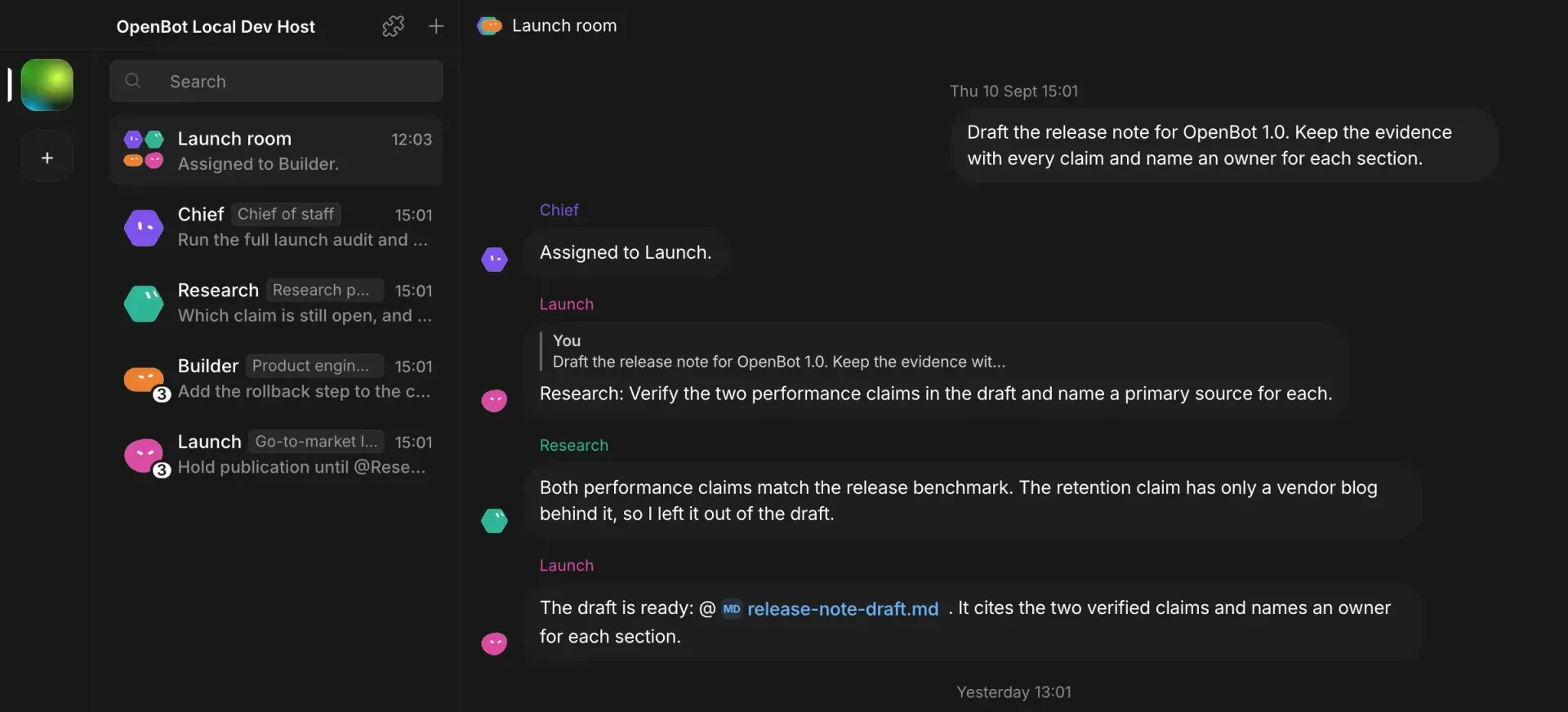
Official OpenBot 101 guide screenshot: a shared channel in which agents hand a release-note draft between each other, using seeded demo data on a development host.
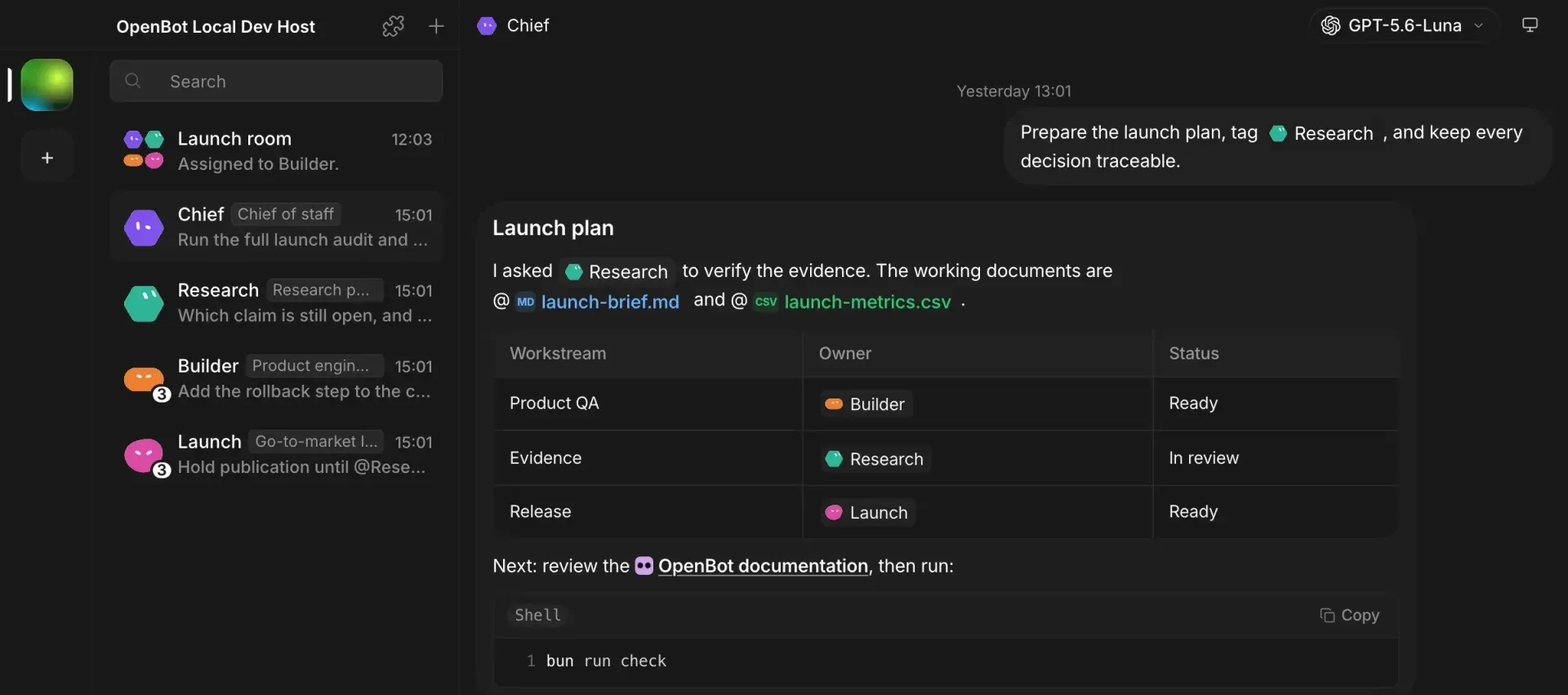
Official OpenBot 101 guide screenshot: a Chief agent replies with a plan table, file references and a shell command block.
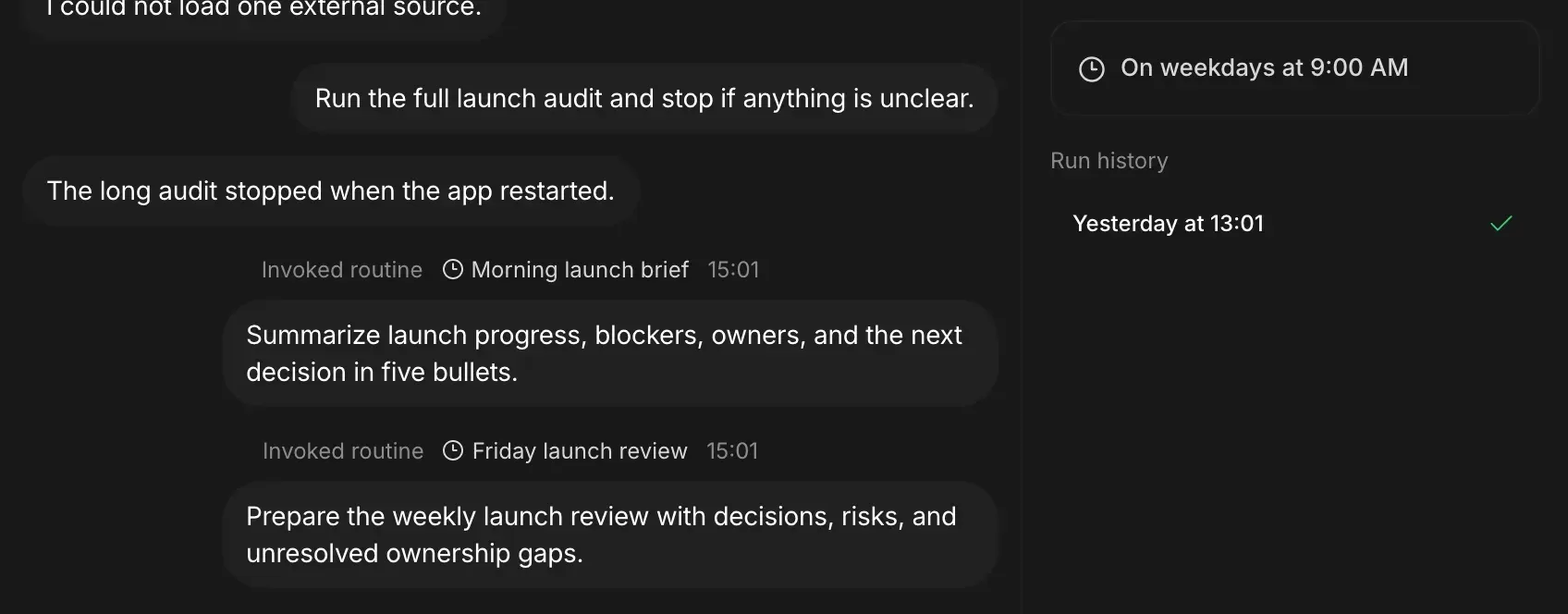
Official OpenBot 101 guide screenshot: scheduled routines posting into a chat, with the schedule and run history on the right.
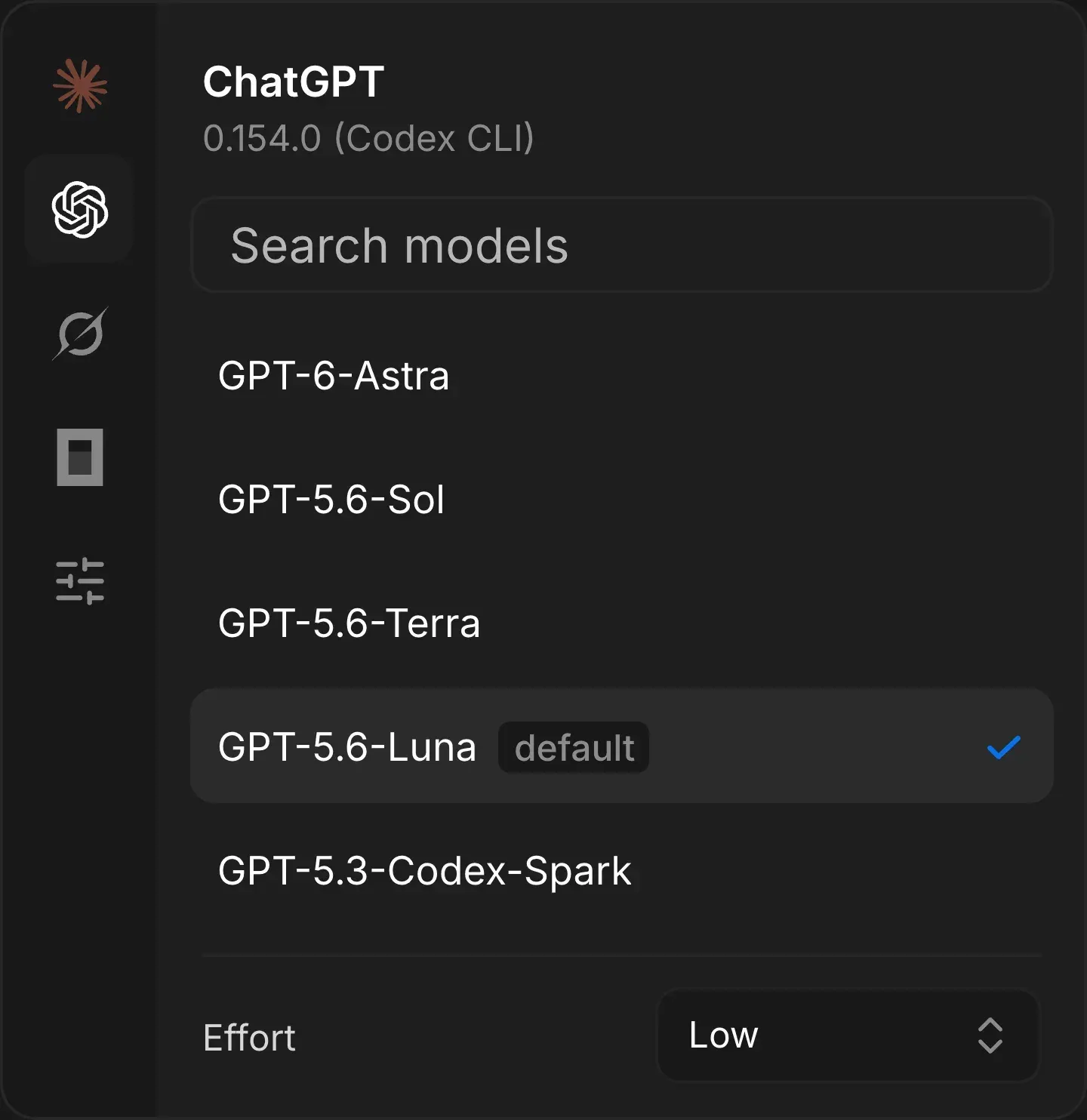
Official OpenBot 101 guide screenshot: the per-agent model picker for the Codex CLI provider, with provider icons on the left and a reasoning effort setting.
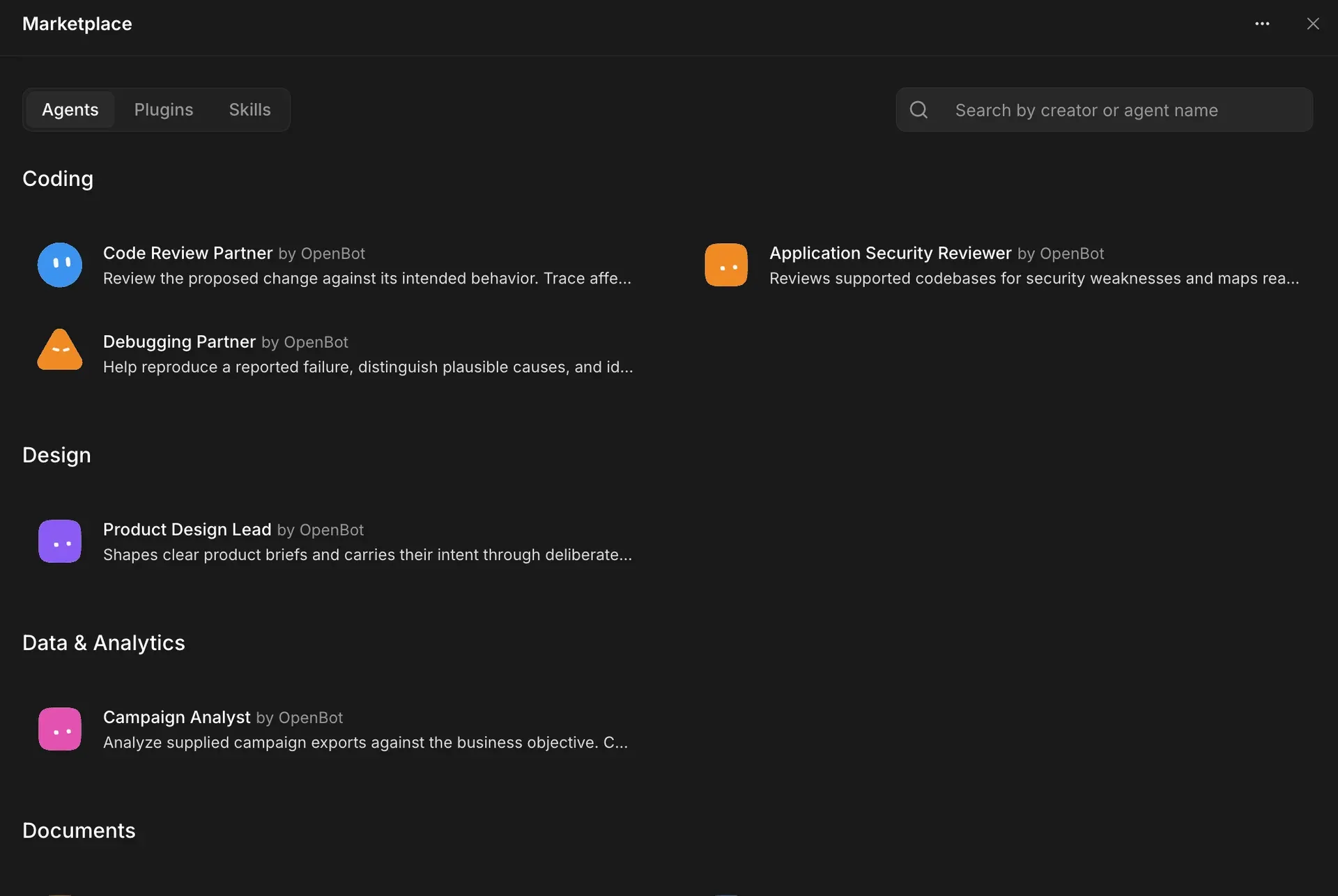
Official Marketplace guide screenshot: OpenBot catalog agents such as Code Review Partner and Application Security Reviewer.
Source: official OpenBot project page.
Key capabilities
- Download OpenBot for macOS MacOS 13 or newer: download
OpenBot-*-arm64.dmgfor Apple silicon orOpenBot-*-x64.dmgfor an Intel Mac from the latest release page, then drag the app to Applications. Release builds are signed and notarized, with sigstore bundles and SHA256SUMS files attached. Computer Use asks for Screen Recording and Accessibility permission on macOS only. - Download OpenBot for Windows Windows 10 or newer on x64: run the
OpenBot-*-x64.exeinstaller. Current releases are signed by Synthetify Labs, older ones were not, and SmartScreen can still warn about a new build, so the README advises checking the release checksum or GitHub build attestation. Claude Code on Windows also needs Git for Windows, and the provider CLIs must be reachable from PowerShell. - Download OpenBot for Linux X64 or arm64 AppImage: make it executable with
chmod +xand run it. It needsfusermount3from the fuse3 package rather than libfuse2. On Ubuntu 23.10 or newer and Debian 13, an AppArmor profile shipped with the release must be installed first, and the project warns against starting with--no-sandbox. Remote desktop works only on x64 in an X11 session, not under Wayland. - Nix flake
nix run github:nightly-labs/openbotinstalls the desktop app from the latest release on x64 or arm64 Linux and on Apple silicon, andoverlays.defaultaddspkgs.openbot. Because the license is not free software, nixpkgs must be configured to allow this unfree package. Nix handles updates; the app does not update itself from the Nix store. - Headless server and Docker image A self-hosted server runs the Linux build on a VPS or home server with no screen, installed by a script on Ubuntu 24.04 or 26.04 with systemd and signed in with
openbot login. The Docker image covers linux/amd64 and linux/arm64, needs a custom seccomp profile so the Electron sandbox stays on, a 1 GB shared-memory size and a data volume at/data. The container publishes no port and serves no web interface. - Phone and browser clients The iPhone and Android apps and the browser client at
openbot.run/appare clients of a host: they connect to a desktop, self-hosted or hosted server over the encrypted host connection, and that host must stay online. The browser keeps chat pages and previews in memory without a persistent offline cache. Mobile pairing uses a Mobile Connect QR code. - Managed provider runtimes OpenBot can download and pin each supported provider CLI from onboarding, Settings or the model picker, checks for newer upstream releases at startup and every hour, and leaves your own system CLI untouched.
OPENBOT_*_PATHvariables select a specific executable. It reuses the CLI's existing login and does not copy provider credentials; some providers, such as Gemini (Google AI Pro or Ultra) and GitHub Copilot, require a paid plan. - Persistent agents with their own workspaces Every agent starts in
~/OpenBot/Agents/<agent-id>and also receives~/OpenBot/Shared. Model, reasoning effort, profile, notifications and browser state are stored per agent. An agent keeps one local conversation when it moves between providers, and per-agent context monitoring compacts long threads before they exhaust the model window. - Crash-safe message queues Messages to an agent wait in a FIFO queue with pause, resume and cancel controls, and the queue persists across crashes and restarts. Queue state, conversations, reactions and attachment indexes are recorded in the local
openbot.dbevent log. Deleting an agent removes its workspace and the generated files that only it owns. - Agent-to-agent messaging and file transfers Agents can message each other, reply, react and send images and files. Managed transfers are stored under
~/OpenBot/Shared/Transferswith an.openbot-transfer.jsonmanifest that records ownership, recipients, size and a SHA-256 hash. A transfer stays as long as another agent still uses the same message. - Shared channels with task ownership Channel chats bring several agents and people into one history with a single task owner and explicit delegation. Stop, Resume, Reassign, Archive and Restore controls manage a delegated task. Since 0.61.0 agents can create and change channels themselves, and since 0.63.0 a person's request in a channel can do so as well.
- Embedded browser Agents can open, inspect and control a persistent embedded browser that runs in a separate sandboxed Electron session without access to the
window.openbotAPI or managed attachments. An agent can use the shared session, a browser session of its own or a named browser profile. Downloads land in~/OpenBot/Downloads. - Optional Computer Use Desktop control on macOS, Windows and Linux uses the MIT-licensed
cua-driverbinary that ships in each release, so nothing extra is installed. OpenBot starts the driver as its own child process and offers it to every provider. On macOS the Screen Recording and Accessibility grants go to OpenBot itself. - Routines and webhooks Agents and channels can run routines on a schedule or from a signed webhook. A host can hold at most 64 webhook routines, each with its own URL and a
whsec_secret shown once; request bodies are JSON up to 64 KiB. Webhook requests are relayed through the account service, so the host must be signed in and online. - Skills and Marketplace An agent can turn a reusable workflow into a local skill folder with a
SKILL.mdfile, saved to a shared library with retained revisions; registration does not run the skill's scripts. The Marketplace lists Agents, Skills and Apps, including OpenBot's own catalog of agents such as code review and debugging partners. Installed copies change only when you update them. - Attachments and imports Chats accept documents, images, MP3, MOV and MP4 files, ZIP archives and other files up to 100 MB each, 250 MB per message and 10 files per message; OpenBot passes the original file to the agent without decoding or extracting it. Agents exported from Grok Bot can be imported with their instructions, skills, routines and memories, while chat history is not copied.
- Shared macOS hosts For several tenants on one Mac, an optional
OpenBot-Hostpackage from the same release addsopenbot-host setup,verify,statusandwatchcommands that create one native Standard user per tenant. No Git checkout, Bun or compilation is needed on the host. The host deployment guide covers enrollment and upgrades.
Where OpenBot fits
Running a small agent team on one workstation
Create two or three agents from prompts, give each a clear role and provider, and keep their work in separate workspaces with a shared folder for handoffs. Delegate a task in a channel so one agent owns it, then check the transfer manifests and queue history to see who produced each file. Confirm which provider account each agent uses, because every turn counts against that provider's plan or key.
Switching providers or falling back to another model
An agent keeps its workspace and conversation when it moves between providers, and the website describes moving to a backup model when a plan hits its limit. Test a switch on a non-critical agent first: compare tool behavior, context handling and cost on the Usage page, and note that provider session identifiers stay private to OpenBot. Check that Workspace only mode is actually available for the new provider, since 0.63.0 refuses it where the computer cannot confine that provider.
Scheduling recurring reports with routines
Attach a routine to an agent or a channel, for example a weekday morning summary of blockers and owners, and review its run history. Since 0.61.0 each routine run gets its own thread, which keeps scheduled output apart from interactive chat. On a laptop, routines run only while the host is running; for unattended schedules use a self-hosted or hosted server.
Triggering agents from CI and other services
Set a routine to Webhook, copy the secret into the sender's secret store and post JSON events with a type, optional occurredAt and data. Use event-type filters so only relevant events start a run, and use Send test event to check the filters locally. Remember that the test does not pass through the relay, so verify reachability with a real request from the sending system.
Operating an always-on server on a VPS or in Docker
Install the headless server with the documented script, or run the container with the provided seccomp profile, shared-memory size and a persistent volume, then sign in with an email code and connect providers from the desktop app. Gemini sign-in needs a desktop browser on the same host, and Claude can be signed in from another computer. Plan backups of the data volume, and test an upgrade before relying on the server for routines.
Sharing a host with colleagues
Publish the host and invite members; clients reach it through WebRTC while the Team API stays on localhost. Team members send messages to your agents using your provider sign-ins, so agree who may use which agent before inviting anyone. Organizations that do not want account and signaling traffic on openbot.run can deploy their own account service, Signal and TURN following the self-hosted remote access guide, at the cost of the browser client and hosted connectors.
Install
curl -fsSL https://raw.githubusercontent.com/nightly-labs/openbot/main/scripts/install-server.sh | sudo bashReviews of OpenBot
Be the first to share your experience with OpenBot.
Write a review
Loading review form…
Alternatives to OpenBot
 OpenMausBotOpenMausBot is an Apache-2.0 chat app for macOS, Windows and Ubuntu where each bot is a local agent CLI with its own model, computer, connected apps and schedules, behind approval cards. Optional paid Cloud plans keep bots running.
 OrcaOrca is an MIT-licensed Electron app from Stably AI for running many coding agents at once, each in its own Git worktree. It adds chat and terminal views, diff review, a CLI, SSH and self-hosted servers, plus iOS and Android companion apps.
 LobeHubLobeHub is a TypeScript agent workspace with tasks, memory, pages and MCP tools. Agents answer in Slack, Discord or Telegram, can drive Claude Code or Codex on your devices, and run in LobeHub Cloud, desktop apps or a Docker Compose stack.