

What is OpenMausBot?
OpenMausBot is an open-source desktop chat application in which every contact in the sidebar is an AI agent. Each bot has its own name, instructions, model, working folder, optional computer and connected apps, and it runs on agent command-line tools already installed and signed in on the host: Claude Code, Codex, the Grok CLI and further engines such as OpenCode, Gemini, Kimi, Cline or Copilot. The project describes itself as an open alternative to xAI's Grok Bot and similar personal-agent products, and states that it is not affiliated with xAI. The website now uses the shorter brand MausBot; installers and the repository keep the OpenMausBot name, and the project was earlier called OpenGrokBot.
The repository was created in August 2026 by Milind Soni; the official website lists Milind Soni and Omkar Satpute as creators, and the names and mascot are trademarks of Supamaus Software Private Limited. Released builds cover macOS (Apple silicon and Intel, signed and notarized DMG), Windows x64 (a per-user installer that is not yet code-signed) and Ubuntu 24.04 x64 (DEB or AppImage, still beta). The same server is published as the openmausbot npm package for Node 24 or newer, and as a container image used by the repository's Docker Compose stack. Android and iOS companion apps exist but are distributed through the project Discord rather than app stores.
The current release is v0.1.146, published November 7, 2026. Version 0.1.146 adds several separate local workspaces on one computer, reopens the place that was open at shutdown and keeps app-installed engines updated to versions tested for the release, only while no bot is using them. Version 0.1.145 fixed phone connection status, outbound email with any provider and OpenCode thread handling, and let rooms display pages and widgets view-only. Version 0.1.144 added two-way file copy of up to 2 GB per file between a bot's cloud computer and its folder, background commands on cloud computers, and the doctor --host, pair --ttl and token create commands for self-hosted servers.
The stack is TypeScript throughout: an Electron shell, a React 19, Vite and Tailwind CSS interface and a harness server bound to 127.0.0.1:8799. The interface sends typed HTTP commands and reads one Server-Sent Events stream. Drivers translate each engine's native protocol (stream-JSON for Claude, JSON-RPC for Codex, the Agent Client Protocol for Grok Build and custom engines) into one event stream that is logged per thread as NDJSON. Transcripts, settings and keys live in ~/.openmausbot. The architecture section of the README shows the full layout.
The code is Apache-2.0, except the enterprise/ folder, which is source-available under its own license and needs a key for production use; LICENSING.md explains the open-core boundary. OpenMausBot does not supply models: model usage is billed by the chosen provider. Cloud computers come from Boat, connected apps from Composio and hosted voices from ElevenLabs, Fish Audio or xAI, each with its own account and terms. The README states that the project has no cryptocurrency token.
OpenMausBot screenshots
Explore the interface. Open a screenshot to view it at full size.
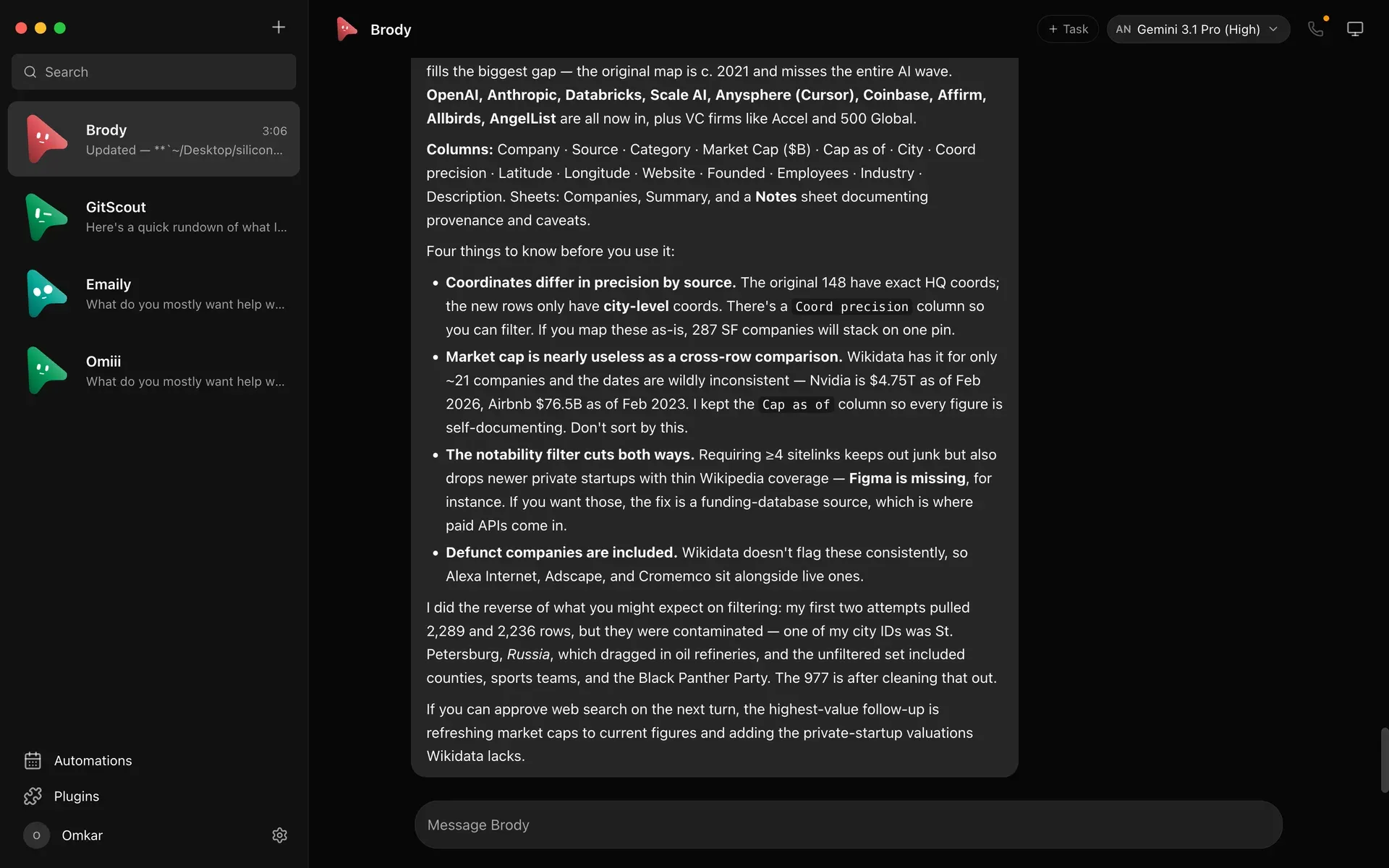
Official README screenshot: the macOS chat window with four bots in the sidebar, a bot reply about a dataset and the model selector set to Gemini 3.1 Pro through the Antigravity engine.
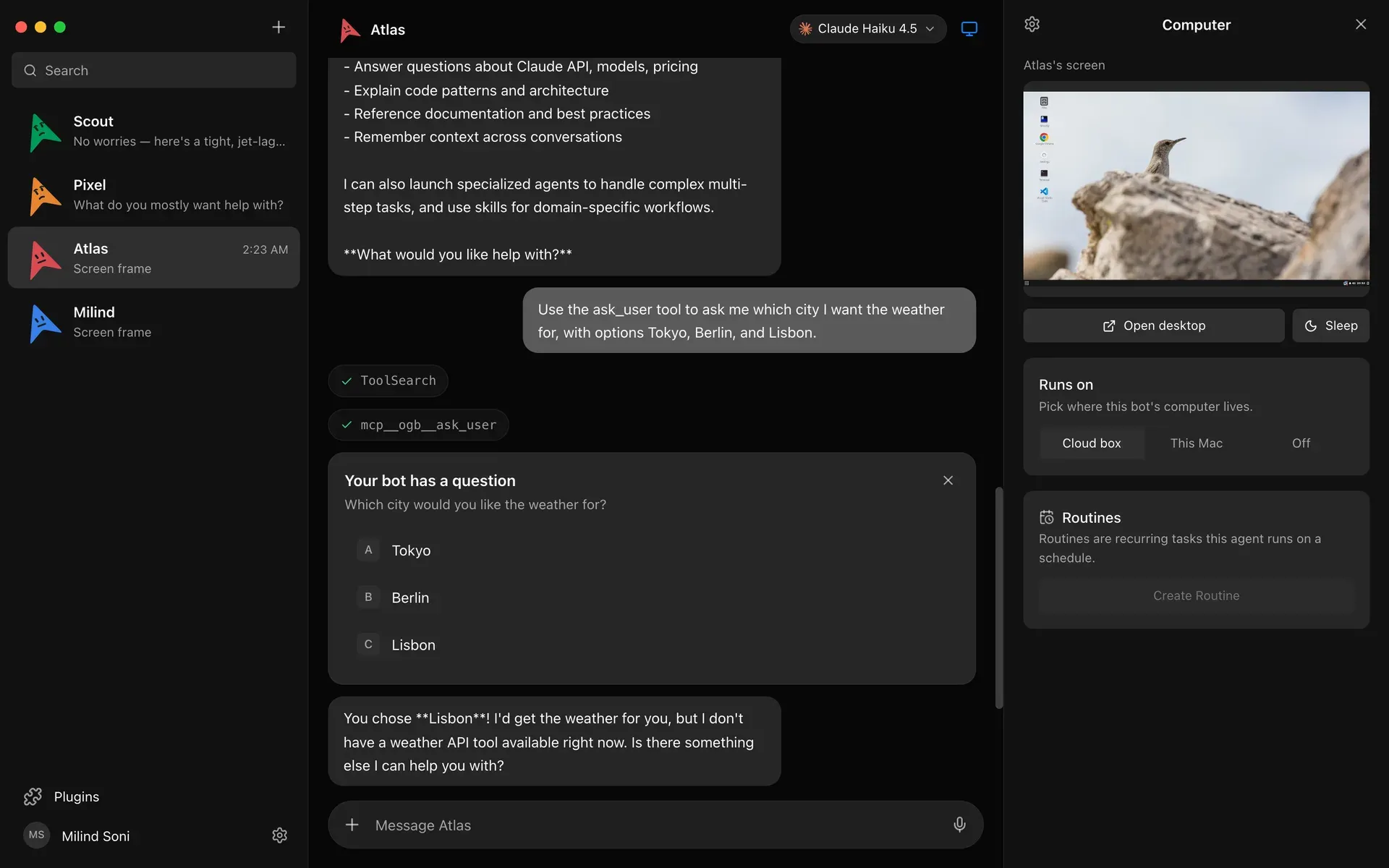
Official screenshot of the Computer panel: a live preview of the bot's cloud desktop, Open desktop and Sleep buttons, the Cloud box, This Mac or Off choice and a multiple-choice question card in the chat.
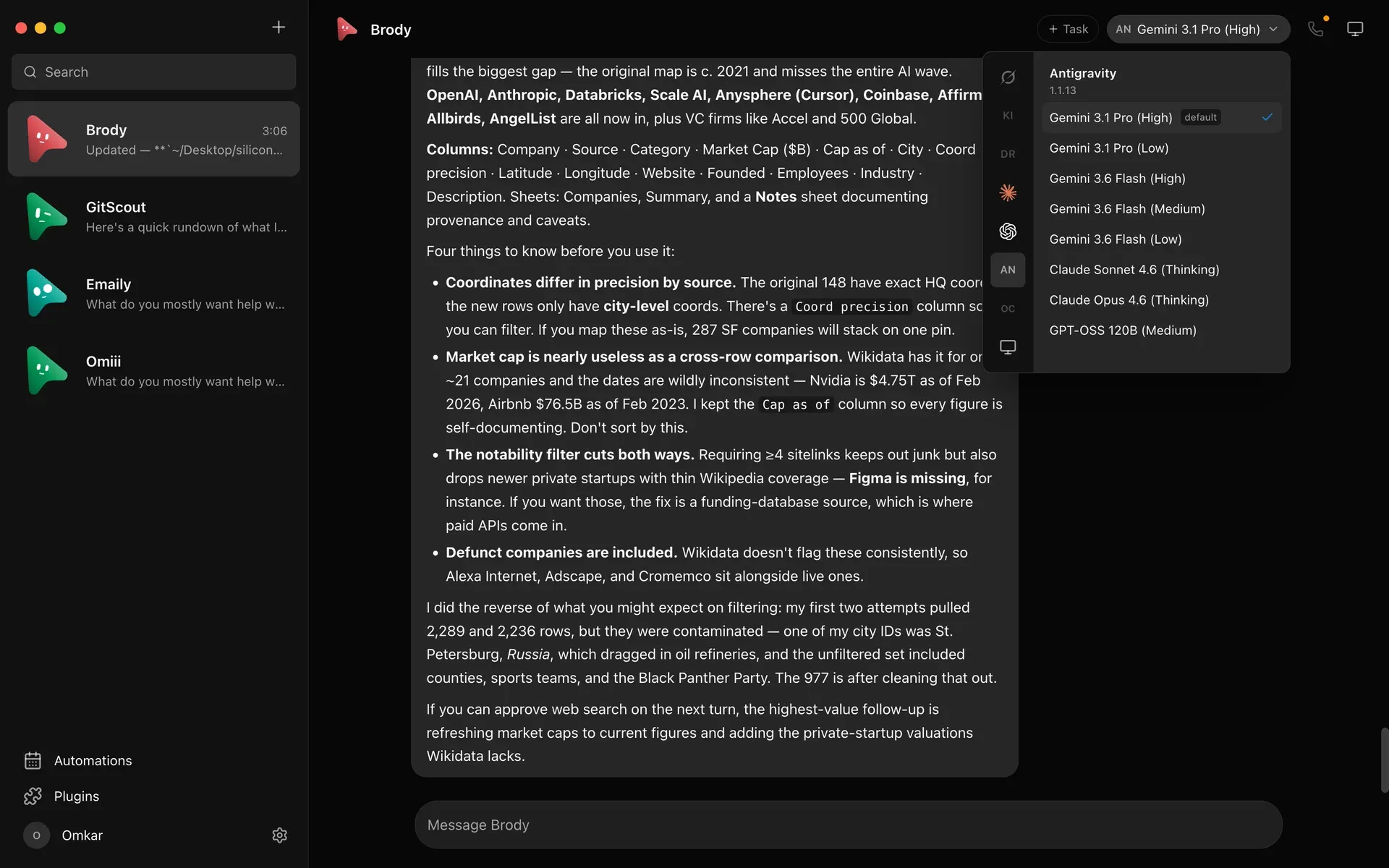
Official screenshot of the per-bot model picker: a provider rail on the left and the models offered by the Antigravity engine, with the default marked.
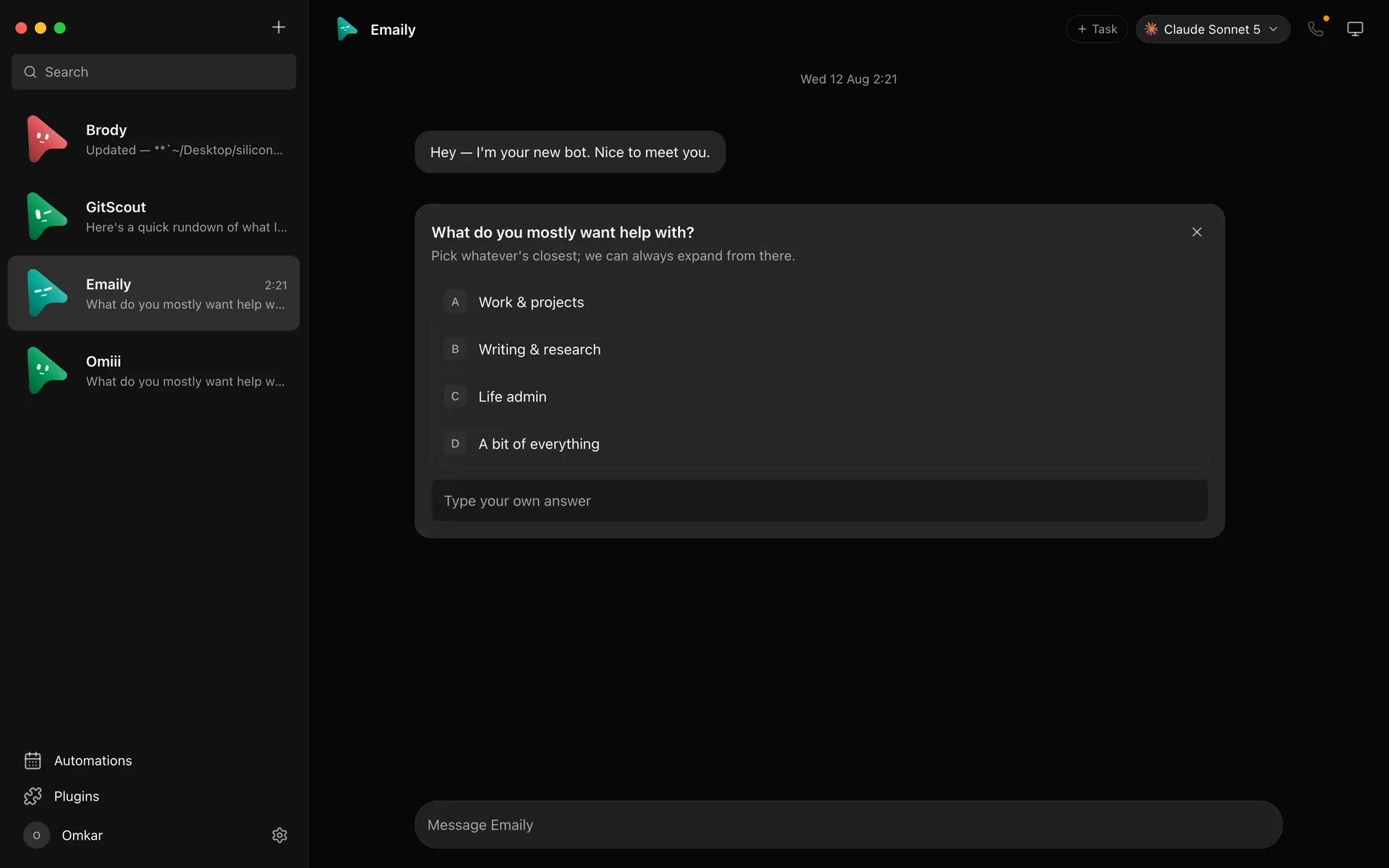
Official screenshot of an in-chat question card from a new bot, with lettered answers and a field for typing a custom answer.
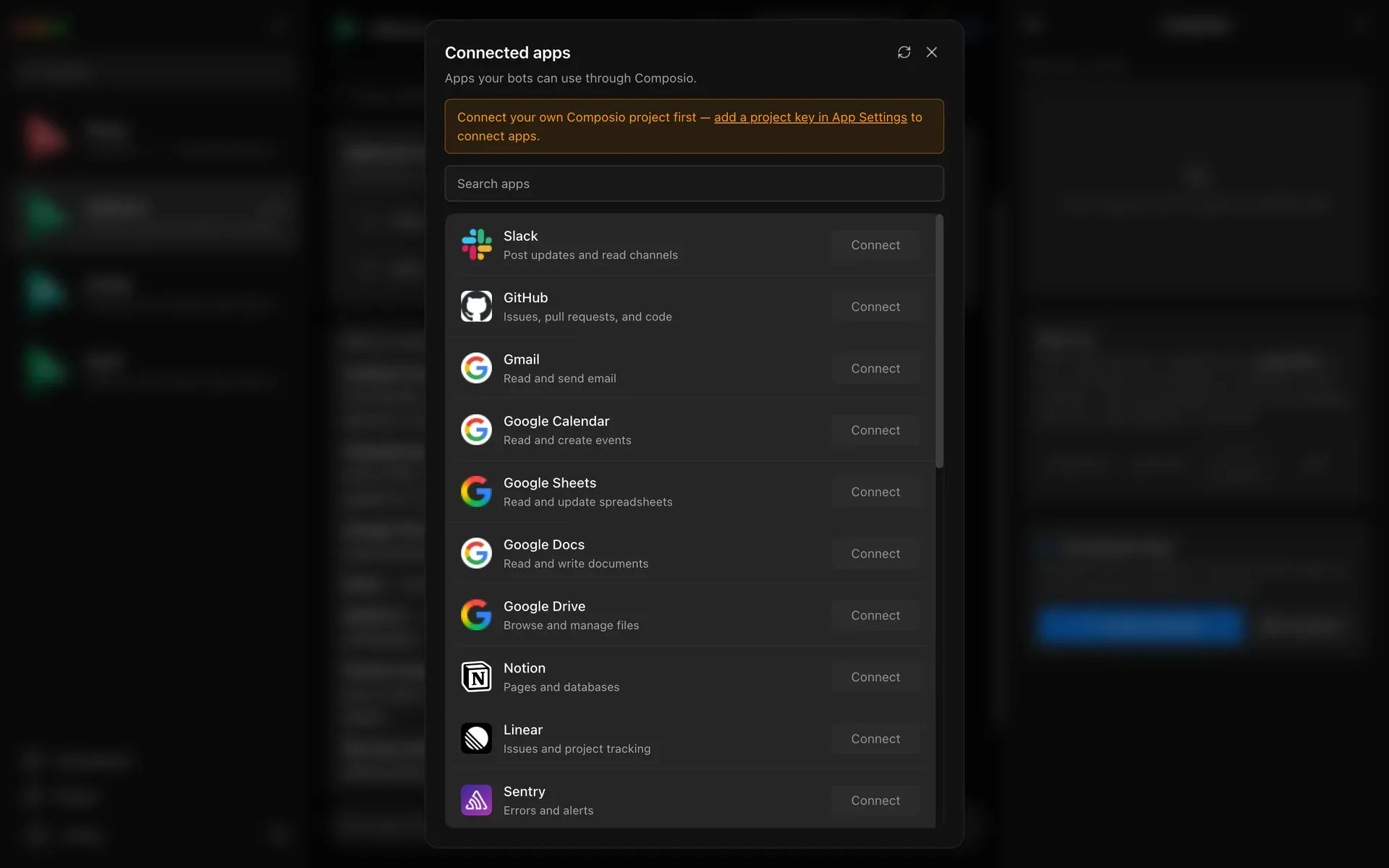
Official screenshot of the Connected apps marketplace over Composio, with a notice asking for a Composio project key before apps can be connected.
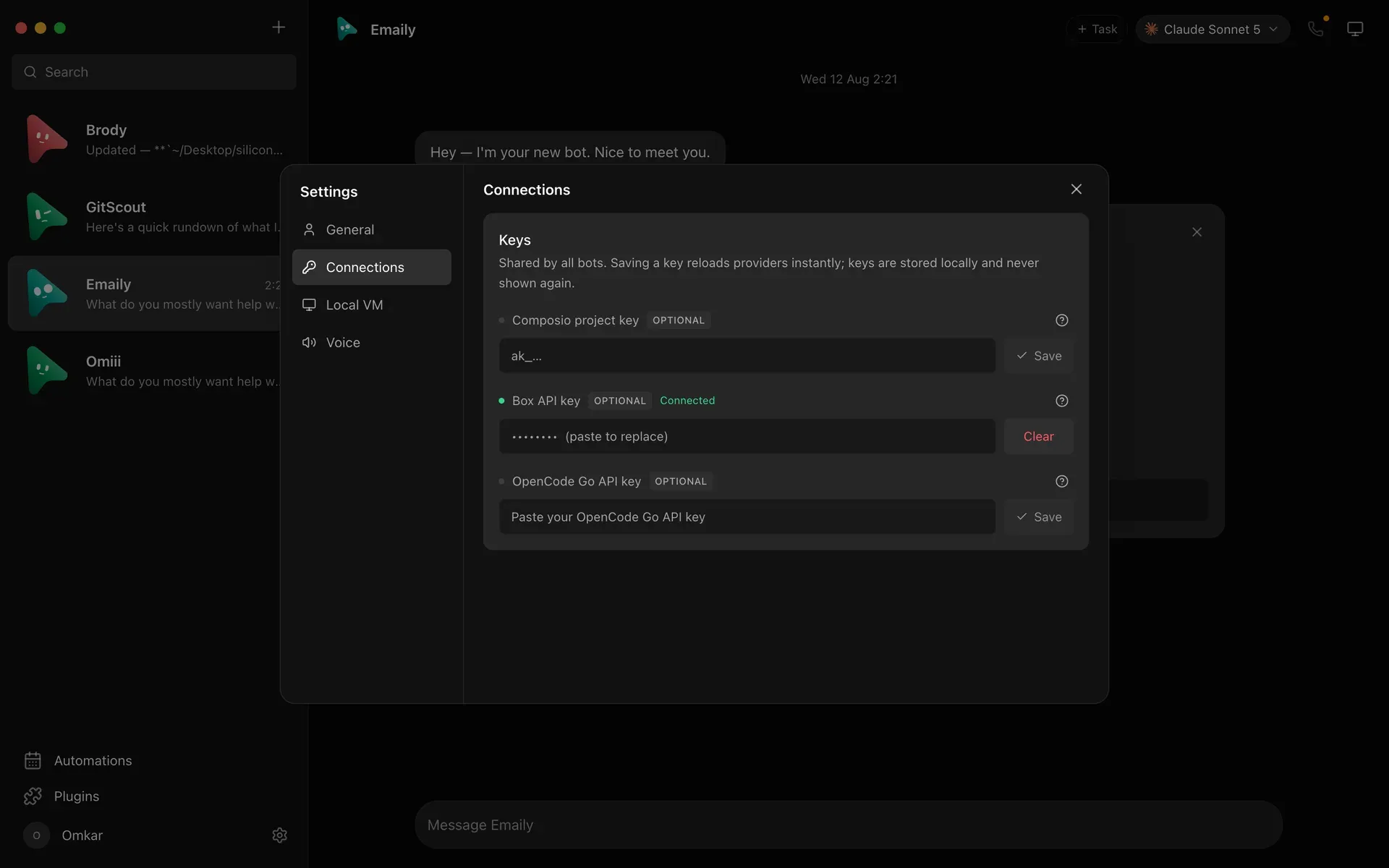
Official screenshot of Settings, Connections: write-only key fields shared by all bots, with one key shown as connected and masked.
Source: official OpenMausBot project page.
Key capabilities
- Download for macOS Apple silicon and Intel builds ship as separate DMG files, both signed and notarized according to the README. Drag the app to Applications and open it; the harness server is embedded, so no separate setup is needed. On-device Apple speech recognition for dictation and host computer control are supported on macOS. Files are on the latest release page.
- Download for Windows Windows x64 uses a one-click, per-user installer that needs no administrator rights. The installer is not code-signed yet, so SmartScreen reports an unknown publisher; check the release source before continuing. Dictation and calls on Windows use Fish Audio speech-to-text and therefore need a Fish Audio key.
- Download for Ubuntu Ubuntu 24.04 x64 receives a DEB package for APT and an AppImage, both marked beta, with GNOME as the supported desktop. Bot control of the local desktop is available on Xorg only after explicit opt-in, through a reviewed Cua Driver 0.19.3 runtime; on Wayland it stays disabled behind a safety gate. A SHA256SUMS file for the Ubuntu assets is attached to each release.
- Terminal, server and Docker installs With Node 24 or newer,
npx openmausbotornpm install -g openmausbotstarts a guided setup that picks AI access, a default model and optional phone pairing.openmausbot serveruns non-interactively for services, and the repository's Compose file runs the server behind Caddy, bound to 127.0.0.1 by default. The self-hosting reference lists what works headless. - Bring-your-own agent engines Bots run on agent CLIs installed and signed in on the host, so existing Claude, ChatGPT or Grok subscriptions are reused and no proxy sits in the middle. Any ACP-speaking CLI or OpenAI-compatible endpoint can be added as an instance in
~/.openmausbot/config.jsonwithout code. Custom engines receive only their own environment; other providers' keys are stripped. API-key connections from the CLI setup currently support chat, not agent tools or computer use. - Per-bot model picker A provider rail shows each engine's models side by side, marks defaults and dims unavailable providers with the reason. The model can be switched in the middle of a conversation, and custom ACP engines can re-detect the models and thinking levels they advertise. Which models appear depends entirely on the engines and accounts installed.
- Approval cards and permission broker Shell commands, file edits and agent questions surface in the chat as cards with Allow, Deny or an answer field. A permission broker handles these requests for cloud and local computers alike. A bot can be set to Full access, which approves provider permission requests as a standing decision; the security policy states it must never answer questions or broaden confirmations for credentials, routines or skills.
- A computer for each bot A bot can use a cloud Linux desktop from Boat with a live preview and an Open desktop takeover, an isolated Local VM, or the host computer where that platform's safety boundary is certified. Boat requires its own API key and is a paid service after its trial. Cloud computers can copy files of up to 2 GB to and from the bot's folder and run long commands in the background.
- Connected apps through Composio A marketplace over Composio Sessions connects Gmail, Slack, GitHub, Notion, Linear and hundreds of other apps through OAuth, after which bots use them as tools. A self-run setup needs a Composio project key. App events can start a bot; a desktop keeps up to 500 events a day, Gmail is checked every 15 minutes and push apps such as Slack and GitHub arrive at once.
- Channels, rooms and automatic routing Channels keep Work, Personal and project contexts apart, each with its own transcript, shared instructions, working folder, responder rules and bot roster. With a Jev or OpenRouter decision-model key, rooms set to Auto pick the bot for each message that mentions nobody, and fall back to the room lead when the decision model is off or unsure.
- Schedules and webhook triggers Bots create schedules that run once, on chosen weekdays or every 5 to 1,440 minutes, and skip a run while the previous one is still active. Webhooks arrive on a separate receiver at
127.0.0.1:8800that exposes only/healthand secret/hookspaths, with bearer authentication recommended. The app must be running to accept a delivery; public delivery needs a relay or a tool such as Tailscale Funnel. - Team packages and sharing Complete teams can be installed from one Markdown file with YAML frontmatter, from the open playbook repository or a public GitHub URL, after a review screen. Imports arrive with connections off and routines paused, and packages never carry credentials, conversations, memory or computer access. Share department exports bots, instructions, skills and routines while leaving out chat history, keys and model choices.
- Voice replies and calls Replies can be read aloud, and a call mode listens, narrates progress and asks for approvals out loud. Voices come from ElevenLabs, Fish Audio, Grok (xAI), built-in Mac voices or a local Chatterbox server; only the hosted ones need a key, and keys stay on the harness. Microphone transcription stays on-device on macOS and uses Fish Audio elsewhere.
- Stdio MCP server An MCP server lets clients such as Claude Desktop or Cursor list bots and channels, read and search bounded transcript pages, create bots, send work, wait for completion, switch models and interrupt turns. It cannot approve requests, delete data, change credentials or control computer lifecycles. Packaged builds require a paired session token for tools that change anything; the MCP server guide describes the pairing steps.
- Headless CLI for scripts and CI The
openmausbotcommand applies a team from YAML, gives a bot a job, waits until it and every teammate it asked are done and exports the result. With--jsonit prints exactly one JSON document and returns exit codes a script can branch on. Access tokens carry a scope and an end date, at most the server's 180-day session limit, and are written only to a file. - Bot API Each bot can accept messages from other applications through a bearer-key HTTP endpoint under
/hooks/api/bots. It is off by default per bot, the key is shown once and stored hashed, and every change is recorded in the activity log. On the hosted Cloud the Bot API is excluded from the Starter plan; desktop and self-hosted servers are not restricted. - Phone companions and remote access Android 8.0 or newer and iOS 17 or newer companions pair with a running computer or server and act as a remote for its bots; the web interface can also be installed as a phone web app. Remote access is opt-in through a managed HTTPS tunnel, an existing Tailscale connection or a reverse proxy of your own. A phone cannot use a localhost link, and the host must stay awake and online.
- Optional MausBot Cloud plans The app is free; paid plans add an always-on cloud workspace. According to the pricing page, Starter costs $15 a month (2 shared CPUs, 2 GB memory, 100 computer-hours), Pro $49 (4 CPUs, 4 GB, 300 hours, $10 of Claude credit) and Max $99 (8 CPUs, 8 GB, 800 hours, $20 of Claude credit). Every plan includes 2,000 app events a day and daily backups kept 14 days; model usage stays billed by your provider.
Where OpenMausBot fits
Running a small team of agents on one workstation
Install the desktop build, sign in to at least one engine such as Claude Code or Codex in a terminal, then use the onboarding engine check to confirm it appears. Create one bot per responsibility, for example research, inbox and code review, with its own instructions, working folder and model. Keep each bot on Ask until you have seen which commands and file edits it requests, and check that its folder does not expose more of the disk than the task needs. The first bot guide walks through the sequence.
Giving a bot a computer to operate
Choose where the bot's computer runs in its Computer panel: a Boat cloud box, a Local VM or this machine. A cloud box isolates the work from the host but needs a Boat key and can incur charges after the trial. Host control should be reserved for macOS or Ubuntu Xorg after explicit opt-in, since Wayland stays disabled. Watch the live preview on the first runs and use Sleep or Off when the bot is idle. The computers documentation describes each option.
Automating inbox and app work
Add a Composio project key, connect the apps a bot needs through OAuth and grant them to that bot only. Ask the bot for a schedule in plain language, or create an app-event trigger such as a new Gmail message from a given sender. Check the trigger card, the run history and the 500-event daily ceiling on a desktop before relying on it. Outbound email and messages at Full access are sent without asking, so keep sending bots on Ask until their drafts are reliable.
Running OpenMausBot on an always-on server
Use npx openmausbot start on a VPS, home server or Mac mini, or the Docker Compose stack for your own domain, and sign each engine in on the server itself. Never bind port 8799 to a public interface: the loopback address is trusted as the owner, including the shell bots can use. Reach the server through an SSH tunnel, Tailscale, the managed tunnel or an authenticated proxy, then pair browsers and phones once. The VPS deployment guide covers updates and backups.
Orchestrating bots from other tools and pipelines
Connect Claude Desktop or Cursor to the stdio MCP server to hand work to OpenMausBot bots, or call openmausbot run from CI with a scoped access token stored in a file. Read the JSON result and exit code before consuming exported files. Approvals deliberately stay in the human-facing app, so an unattended pipeline stalls if a bot asks for one; decide in advance which bots may run at Full access. The headless CLI guide lists the commands and exit codes.
Sharing a team inside an organization
Export a department with Share department, review the file contents the dialog shows and send it to colleagues, who receive new bots on Ask with skills off and routines paused. Recipients must connect their own apps and engines, since credentials and history never travel. Desktops connected to an organization also see a Templates library with the packages its Admin shares. Confirm that instructions and starter notes contain no internal secrets before sharing, even though detected secrets are stripped.
Install
npx openmausbotReviews of OpenMausBot
Be the first to share your experience with OpenMausBot.
Write a review
Loading review form…
Alternatives to OpenMausBot
 OpenClawOpenClaw is an MIT-licensed AI assistant that runs as a Gateway on your own machine or server, connects to Telegram, WhatsApp, Slack, Discord, iMessage and other channels, and keeps memory and credentials on hardware you control.
 Hermes AgentMIT-licensed agent from Nous Research that runs in a terminal, desktop app, browser or chat apps. It keeps curated memory, writes and refines its own skills, schedules jobs and works with OpenRouter, Anthropic, OpenAI, local or Nous Portal models.
 Agent ZeroAgent Zero is an open-source, MIT-licensed AI agent that works in its own Dockerized Linux workspace with a terminal, browser and desktop apps.