

What is Strata?
Strata is a free, open-source application for running large language models on your own computer. It ships a desktop chat app for Windows, Linux and macOS, a terminal app started with strata launch, and a local server that speaks OpenAI-compatible and Anthropic-compatible APIs so that coding tools can use the model on your machine. It needs no account, and the project documents that it sends no telemetry.
The technical idea is to fit mixture-of-experts models that normally need server memory onto consumer hardware. Qwen3.8-Flash-Next has 24,576 small experts, of which each token uses 10. Strata keeps the shared layers and the most-used experts on the graphics card, all experts in system RAM where the CPU computes the rest, and a lookup table on the SSD, as explained in how it works. A small helper drafts several tokens and the main model checks them in one pass, which the project reports as 1.6 to 1.8 times sooner output with the same answer.
Models come from outside providers and are downloaded separately, in the order the project recommends: ISTA-DASLab packs first, then Unsloth, Gyro and others, for Qwen3.8-Flash-Next, Qwen3.6-35B-A3B and DeepSeek V4.1-Flash. The engine is built from C++ with parts of llama.cpp and ggml, with the desktop app built on Tauri. Hardware support covers NVIDIA RTX 20 to 50 series, supported AMD Radeon cards, Intel Arc on Linux, Apple Silicon, Ryzen AI Max (Strix Halo) and NVIDIA DGX Spark.
The reviewed release is Strata 0.2.12, published on November 7, 2026. It adds a tuned DFlash2 drafter, faster prompt reading on 12 GB cards, Strix Halo and Macs, and several tool-call fixes, while the release notes list a few measured regressions on specific cards. Strata is MIT licensed, but each model keeps its own license, and a few bundled parts carry theirs. Everything on this page comes from the repository and release notes.
Strata screenshots
Explore the interface. Open a screenshot to view it at full size.
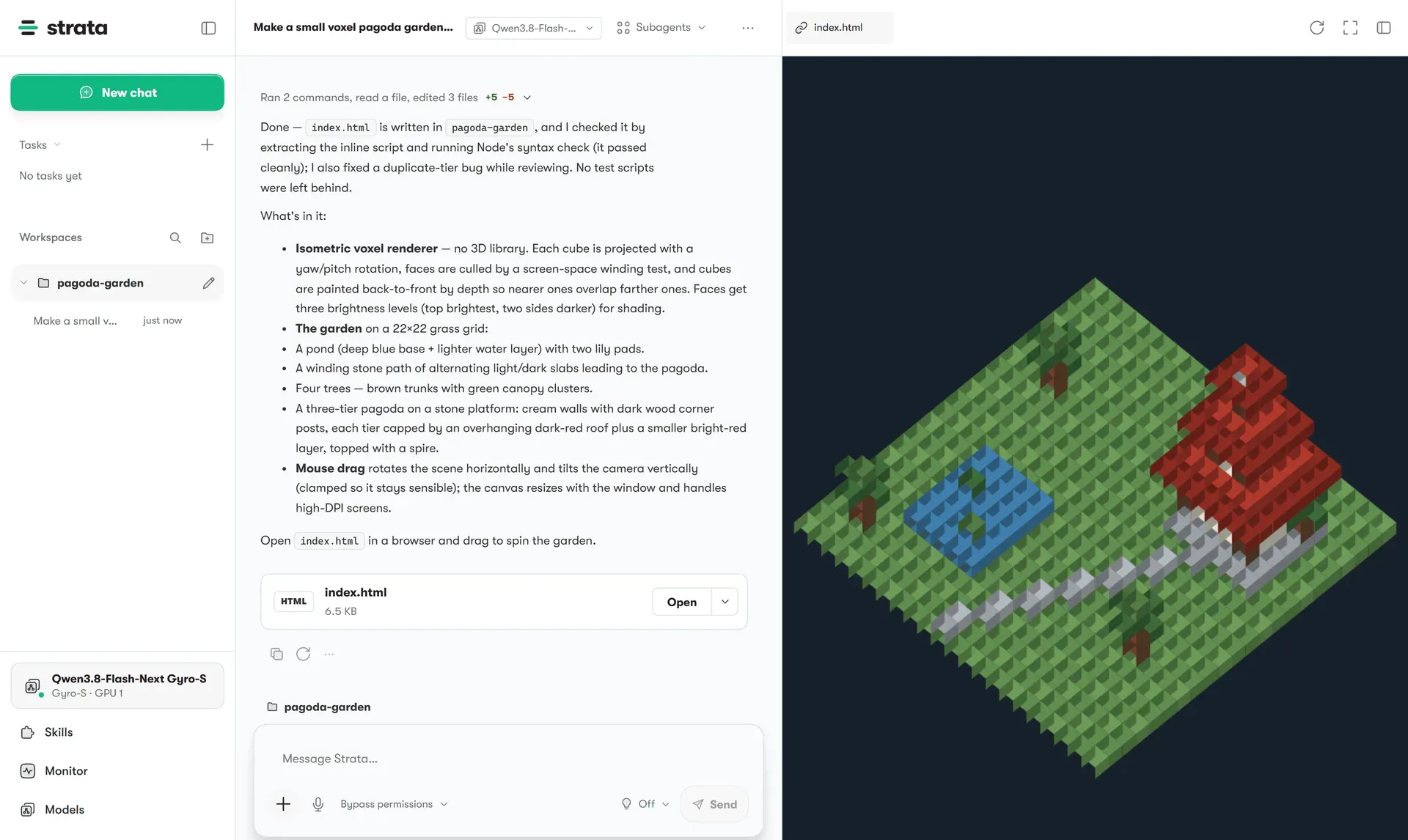
Official screenshot of the desktop app: a chat, workspace list and model selector beside a preview of an HTML page the model wrote.
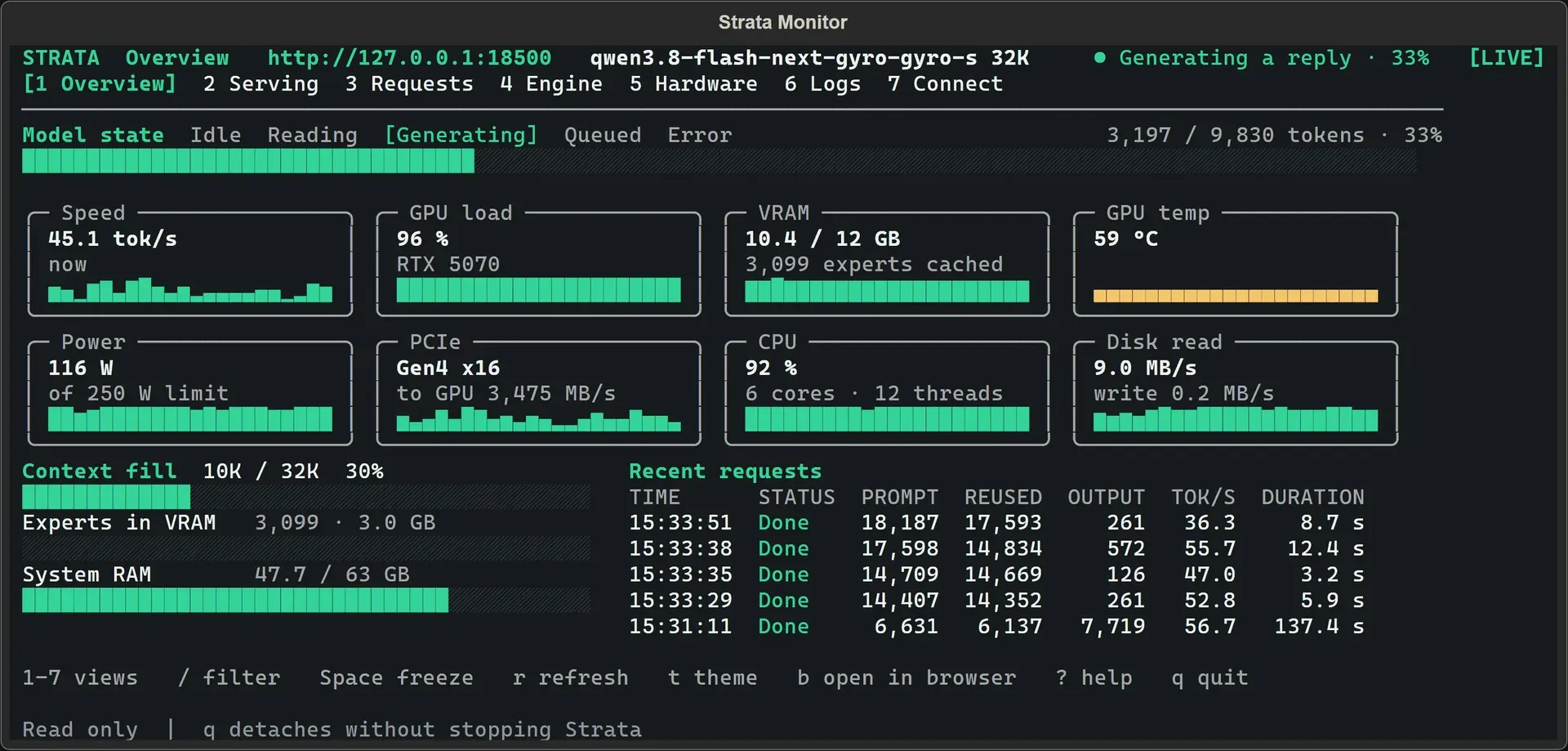
Official screenshot of the terminal monitor while a model generates a reply on an RTX 5070 with 12 GB of VRAM.
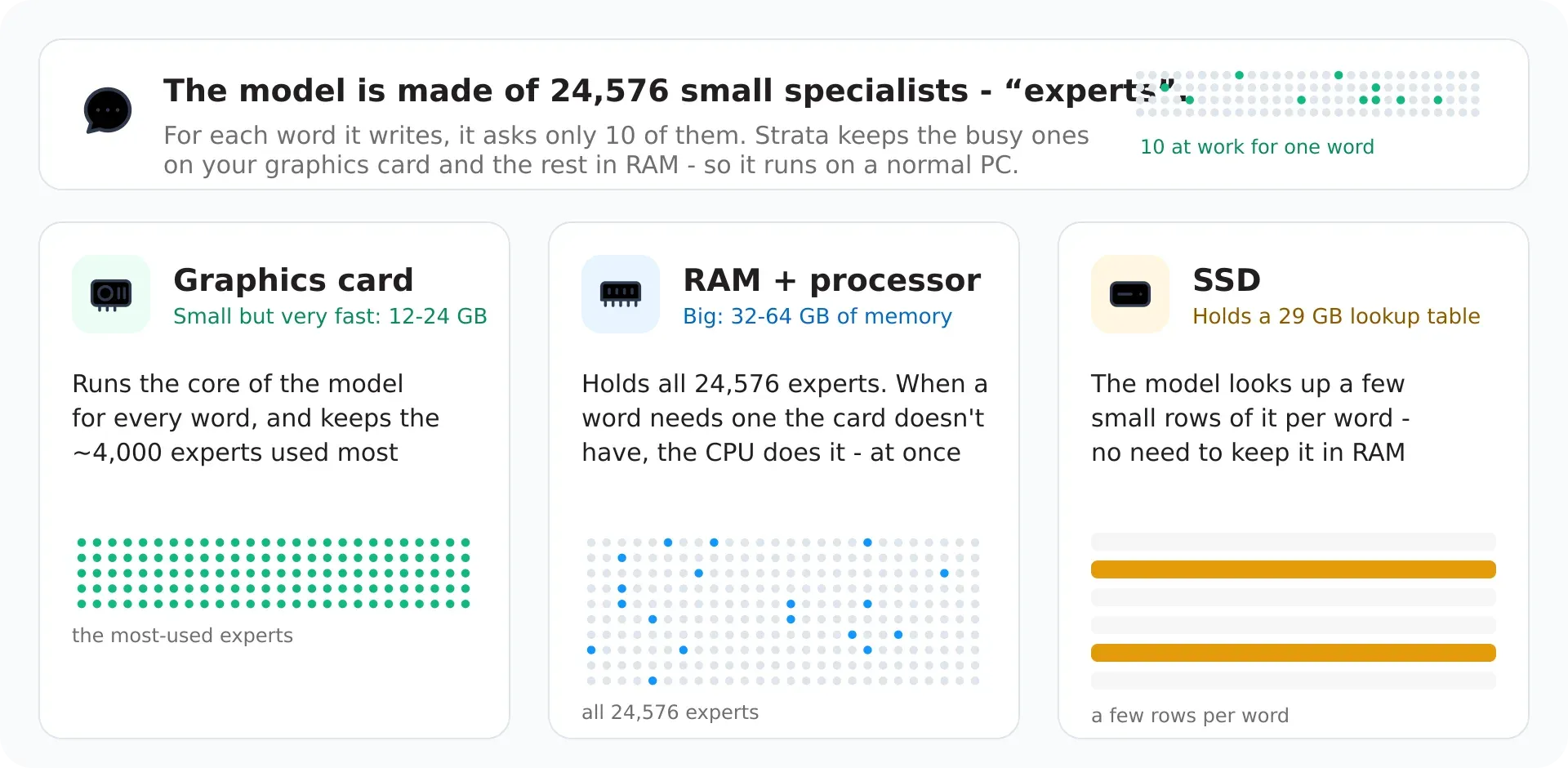
Official figure from the project documentation showing where the model's experts live on the graphics card, in RAM and on the SSD.
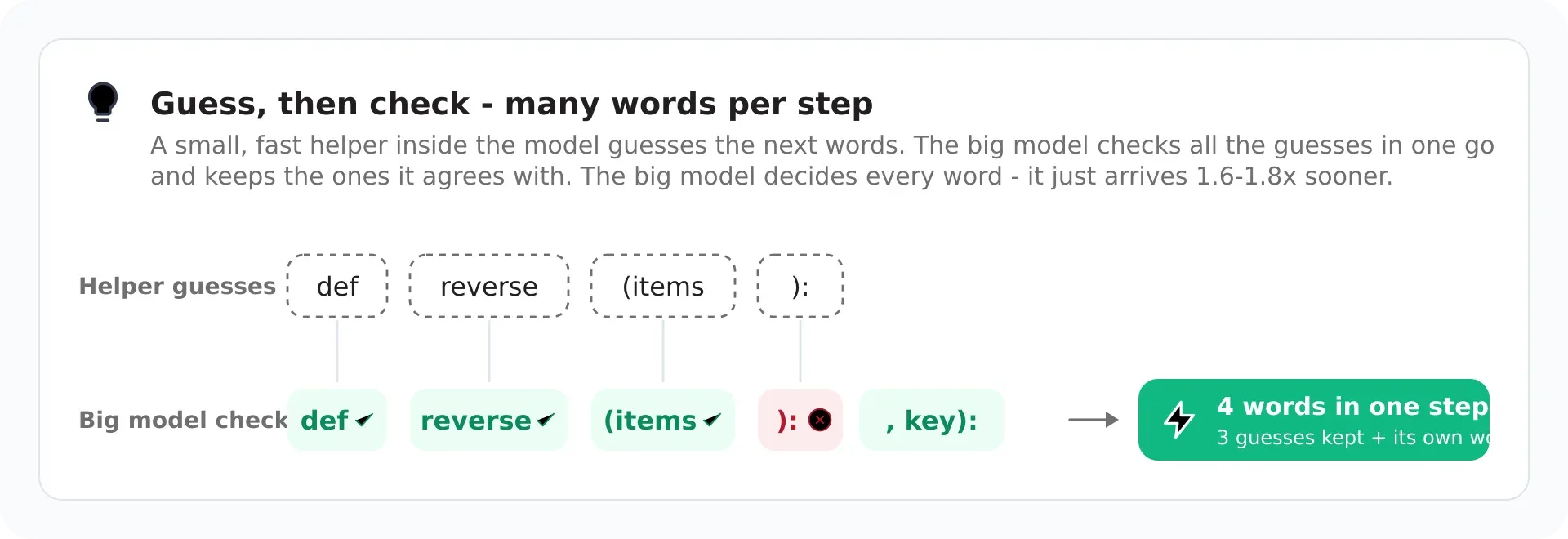
Official figure from the project documentation illustrating the guess-then-check drafting that produces several words per step.
Source: official Strata project page.
Key capabilities
- Desktop app for Windows, Linux and Mac One installer per system: a Windows x64 setup program that installs for the current user without administrator rights, a Linux x86-64 AppImage and a macOS Apple Silicon DMG. On Windows and Linux the installer has no engine inside; first start offers the engine for your graphics card with a single Download button and resume support. Intel Macs and ARM64 Linux have no desktop app.
- Terminal app and installer scripts Install with a one-line
install.shon Linux or macOS, orinstall.ps1in Windows PowerShell, then runstrata launchto choose a model, context size, storage folder and access settings. A monitor opens after start-up.--planprints what would be downloaded, and--yes --no-tuiruns unattended. - OpenAI- and Anthropic-compatible local API The server listens on 127.0.0.1 by default, with port 8080 as the documented default endpoint, and reaching it from other devices needs an API key. Claude Code, Codex CLI, OpenCode, Hermes Agent, OpenClaw and others connect through it, and
strata connectprints setup instructions for each tool. - Chat with a live preview The desktop app combines chat, workspaces, files, subagents, skills and a preview pane in one window. In the project's screenshot, a model builds an HTML page and the result shows beside the conversation. Permission modes control whether the built-in coding agent asks before changing files.
- Qwen3.8-Flash-Next packs ISTA-DASLab sizes Q2_0, IQ2_XS, IQ3_XXS and IQ3_S need roughly 37.6 to 54.8 GB of combined RAM and VRAM, with larger sizes giving better quality and lower speed. A Coder variant at IQ1_M targets coding with about 32 GB of RAM. Unsloth packs run from UD-IQ4_XS to Q8_0 and need 72 to 136 GB with all experts in RAM.
- Gyro, Swift, NVFP4 and OrcaRouter options Gyro-S and Gyro-M from agentionai use the least memory and are slower. Swift 1.5, an NVFP4 route and OrcaRouter are listed as further options. Setup may preselect a different provider at low memory tiers, so read the plan and pass
--familyand--modelwhen you want a particular one. - Qwen3.6-35B-A3B A smaller model with Unsloth packs UD-Q4_K_XL, UD-Q6_K_XL and Q8_0, documented at 32 to 52 GB of RAM. It is the practical choice when the larger Qwen model does not fit.
- DeepSeek V4.1-Flash Available in the desktop app and the terminal on RTX 30, 40 and 50 cards, the Radeon AI PRO R9700 on Linux, Ryzen AI Max on Windows and 64 GB or larger Apple Silicon Macs for text only. Downloads run 191 to 274 GB with matching free-disk needs, because what does not fit in memory is read from the SSD. Published measurements range from about 4 tokens per second on an RTX 5070 to 74 to 77 on four R9700 cards.
- Broad GPU support Supported hardware includes NVIDIA RTX 20, 30, 40 and 50 series, AMD RX 7700 to 7900 and RX 9060 to 9070 plus AI PRO R9700, experimental RX 6800 and 6900, Intel Arc on Linux, Apple Silicon, Strix Halo and DGX Spark. CUDA 13 packages need NVIDIA driver 580 or newer, and older NVIDIA cards use the CUDA 12 engine.
- Speculative drafting Auto mode selects MTP or the tuned DFlash2 drafter per card and model. In 0.2.12 the Radeon gfx1201 cards start with MTP because DFlash2 stopped on the prompt in some earlier runs.
--draftingswitches the choice. - Monitor view The terminal monitor shows model state, speed in tokens per second, GPU load, VRAM, power, PCIe, CPU, context fill, experts held in VRAM and recent requests. It is read-only, and pressing
qdetaches without stopping the server. - Docker images Prebuilt images exist for NVIDIA CUDA 12 and 13, AMD ROCm families and Intel SYCL, with a data volume that keeps downloads and settings. Docker on a Mac has no Metal access, and Docker Desktop on Windows passes NVIDIA cards through but not Radeon or Arc cards. See the Docker guide.
- Multi-GPU and split serving Documentation covers multiple GPUs, split engine and layer split modes and a second GPU. The release notes show results on two RTX A6000 cards and on four Radeon R9700 cards for DeepSeek.
- Image input and image generation Vision input can be enabled with
strata launch --vision onfor supported models and readers. Image generation through the OpenAI images route is optional, needs a source checkout and uses Qwen-Image-2.1-Turbo under the Qwen Research License, which is not Apache 2.0. - Privacy and download verification The project states that chats, prompts, files and models stay on your PC, that nothing is sent as telemetry and that every model file has a pinned SHA-256 and size. Updates come from a signed feed. A download with the wrong checksum is kept as a
.badfile. The full network table is in the safety page. - Updates and rollback
strata update --checkandstrata updatedownload a new engine while the model keeps serving, then ask before stopping it.strata components rollbackreturns to the previous engine. App, Control and engine versions are numbered separately. - Agent-assisted setup and MCP The repository includes an AI setup guide and an optional MCP server,
tools/strata_mcp.py, so an assistant can install, start, stop and check Strata. It is a source-checkout tool and is not needed for the app. The Strata model itself can also call tools from MCP servers you configure. - Cloudflare tunnel and Tailscale access Access modes in
strata launchinclude local, LAN, Tailscale and a Cloudflare tunnel. Strata generates an API key for the tunnel unless you pass--no-api-key, and warns that anyone who finds the address could then use your model.
Where Strata fits
Running a coding assistant on your own machine
Install the terminal app, run strata launch and pick a model sized for your memory, using the coding-focused Coder variant when RAM is limited. Run strata connect for the tool you use, such as Claude Code or Codex CLI, and confirm that it reaches the local endpoint. Check tool-call behavior on a real repository, since the release notes record tool-call fixes and speed differences by task type.
Chatting and prototyping in the desktop app
Install the app for your system, download the engine for your graphics card and choose a model and storage folder. Ask for a small web page and use the preview pane to review it. Leave permission mode on its asking setting until you trust the workspace, because the agent can edit files and run commands.
Sizing a model for your hardware
Add your RAM and VRAM, leave room for the operating system, and compare with the pick-by-memory table. Run strata launch --plan to see the download and what is missing before committing tens of gigabytes. Expect a large speed penalty if experts have to be read from the SSD, and check free disk for DeepSeek, which needs hundreds of gigabytes.
Serving a small team on a local network
Use the LAN or Tailscale access mode with an API key, and save the settings as a named preset. Test from a second device, watch the monitor under concurrent requests and keep the server off the open internet unless a key is set. Review the project's list of network connections before approving it for a managed network.
Working without an internet connection
After the model and engine are downloaded, starting, loading and chatting need no connection. Pre-download engines and model files, verify the checksums and test an offline start. The agent's web search, outside model services and tunnel are the pieces that use the network, so leave them unused when isolation matters.
Comparing engines and quantizations
Pin the same context length, prompt and drafting mode when testing different packs or versions. The release notes compare 0.2.11 and 0.2.12 with alternating run order, while the community benchmark page collects other machines. Treat published numbers as hints for your own card, since speed depends on RAM, PCIe and driver versions.
Install
curl -fsSL https://github.com/Niko1221/Strata/releases/latest/download/install.sh -o install.sh && sh install.shReviews of Strata
Be the first to share your experience with Strata.
Write a review
Loading review form…
Alternatives to Strata
 OllamaOllama is an MIT-licensed tool for downloading and running open models such as Gemma, Qwen, DeepSeek and gpt-oss on your own machine. It ships a desktop app, CLI and local REST API, and offers cloud-hosted models on a pay-as-you-go or subscription basis.Lllama.cppllama.cpp is an MIT-licensed C/C++ library, with CLI tools and an OpenAI-compatible server, for running language and vision-language models on CPU or GPU.
 LocalAILocalAI is an MIT-licensed inference server that runs language, speech, image, video and vision models on CPUs or GPUs and serves them through OpenAI, Anthropic, Ollama and ElevenLabs-compatible APIs, with backends pulled on demand.