

What is LocalAI?
LocalAI is a self-hosted inference server that puts OpenAI-compatible, Anthropic-compatible, Ollama-compatible and ElevenLabs-compatible HTTP APIs in front of models running on your own hardware. One server handles text generation, embeddings, reranking, speech-to-text, text-to-speech, image, video and 3D generation, object detection and voice or face recognition. Ettore Di Giacinto started it in March 2023 as a Go wrapper around llama.cpp and still leads it with maintainer Richard Palethorpe and outside contributors. The official site hosts the documentation.
The core is a Go binary with a React web UI. Inference runs in separate backend processes that the core reaches over gRPC. Since version 3.2.0 every backend lives outside the main binary and is pulled as an OCI image only when a model needs it. The backend gallery lists more than 60 engines, among them llama.cpp, vLLM, SGLang, transformers, diffusers, whisper.cpp, MLX and MLX-VLM. The team also writes its own C/C++ GGML engines, such as parakeet.cpp for speech recognition, moss-tts.cpp for speech synthesis, rf-detr.cpp for object detection and vllm.cpp, an alpha C++ port of vLLM. The architecture page notes that a custom backend is a plain gRPC server and can be written in any language.
Distribution follows several routes. Container images on Docker Hub cover CPU, NVIDIA CUDA 12 and 13, AMD ROCm, Intel oneAPI, Vulkan and NVIDIA Jetson (L4T ARM64), and the installation guide recommends containers first. Each GitHub release also ships Linux amd64 and arm64 server binaries, a macOS arm64 binary, a macOS menu-bar launcher as LocalAI.dmg and, since 4.12.0, an x86_64 launcher AppImage for Ubuntu 22.04 or newer. There is no native Windows build: the binaries page points Windows users to WSL, and container engines also run there.
The latest release is v4.12.1, published October 23, 2026. It is a security-only patch: for user-supplied URLs in chat media and the image and audio endpoints, every redirect hop is now validated, 100.64.0.0/10 and 0.0.0.0/8 count as non-public, and the connection goes to the address that was checked. Version 4.12.0 redesigned the web UI and added streaming Qwen TTS replies, a /v1/decisions routing API, a /v1/images/upscale endpoint, Qdrant-backed vector stores, OAuth2 client credentials for remote MCP servers and prompt-cache slot save and restore. Earlier 4.x releases brought distributed mode on PostgreSQL and NATS (4.1.0), multi-user accounts with OIDC and a drop-in Ollama API (4.2.0), deny-by-default routes once authentication is configured (4.9.0) and the local-ai benchmark command (4.10.0).
LocalAI is MIT licensed, with no paid edition, hosted service or feature gate; the site offers a contact address for business inquiries but publishes no price list. Model weights keep their own licenses, which the release notes point out for entries such as the non-commercial YuE2 weights. The 4.12.0 notes announce that components such as Studio and Talk will move into separately installed add-ons; the master-branch README already describes a signed add-on catalog, which the v4.12.1 release does not yet include.
LocalAI screenshots
Explore the interface. Open a screenshot to view it at full size.
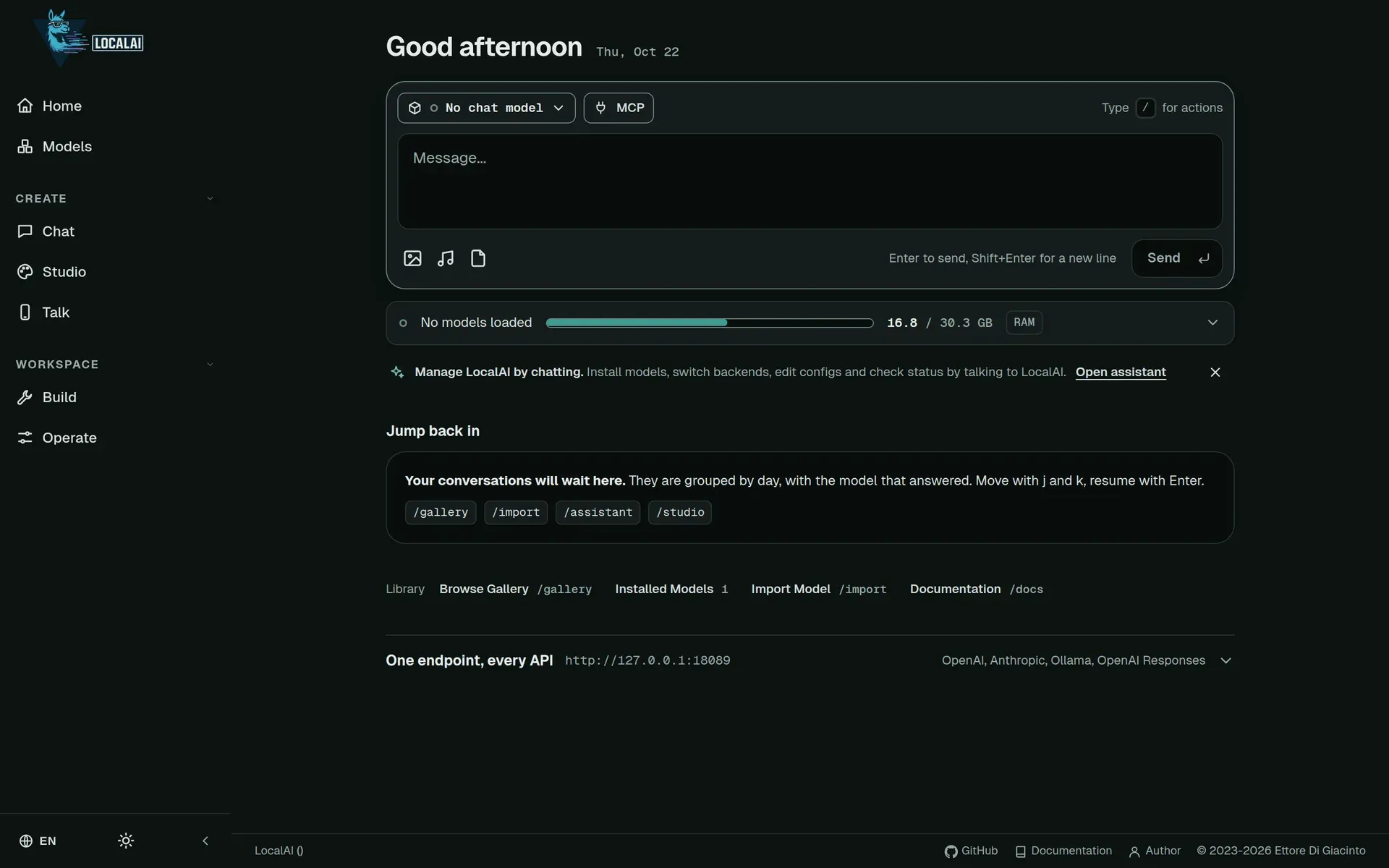
Home page of the redesigned 4.12.0 web UI: model and MCP selectors, memory usage, quick links to the gallery and the endpoint that serves the OpenAI, Anthropic, Ollama and Responses APIs.
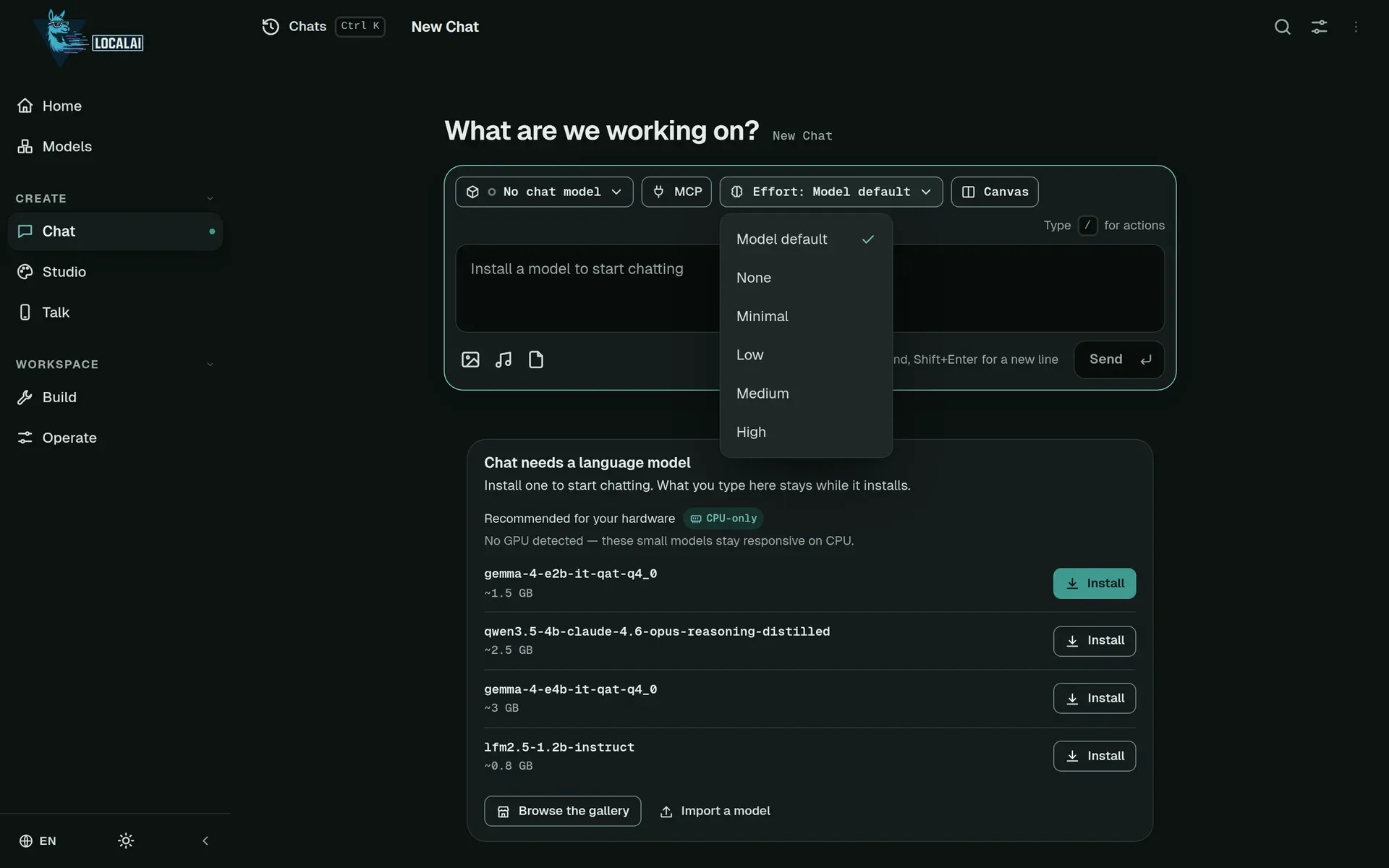
New chat in 4.12.0 with the per-conversation reasoning effort menu open and small models recommended for a CPU-only host.
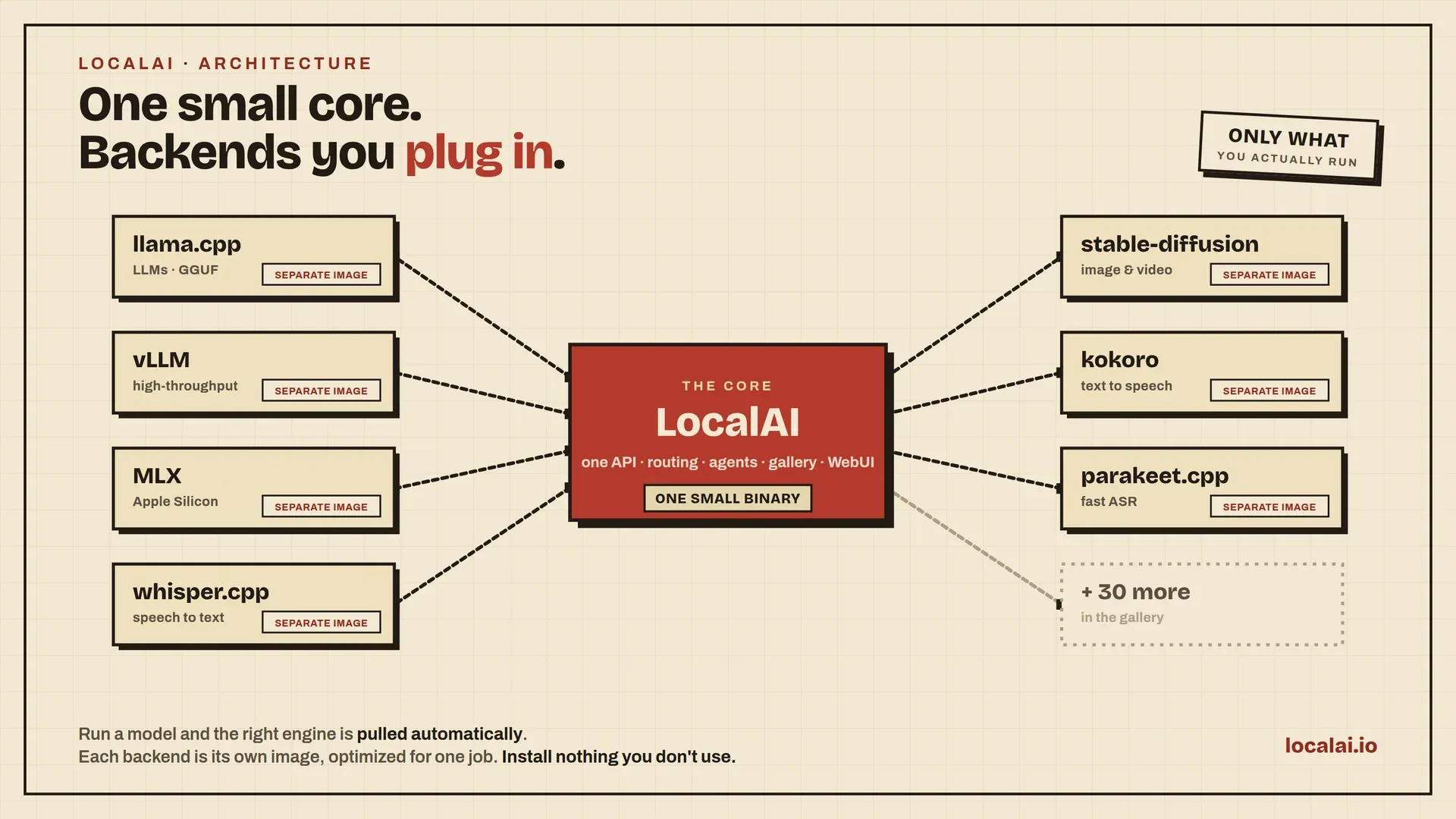
Official diagram: a small LocalAI core with backends installed as separate images only when a model needs them.
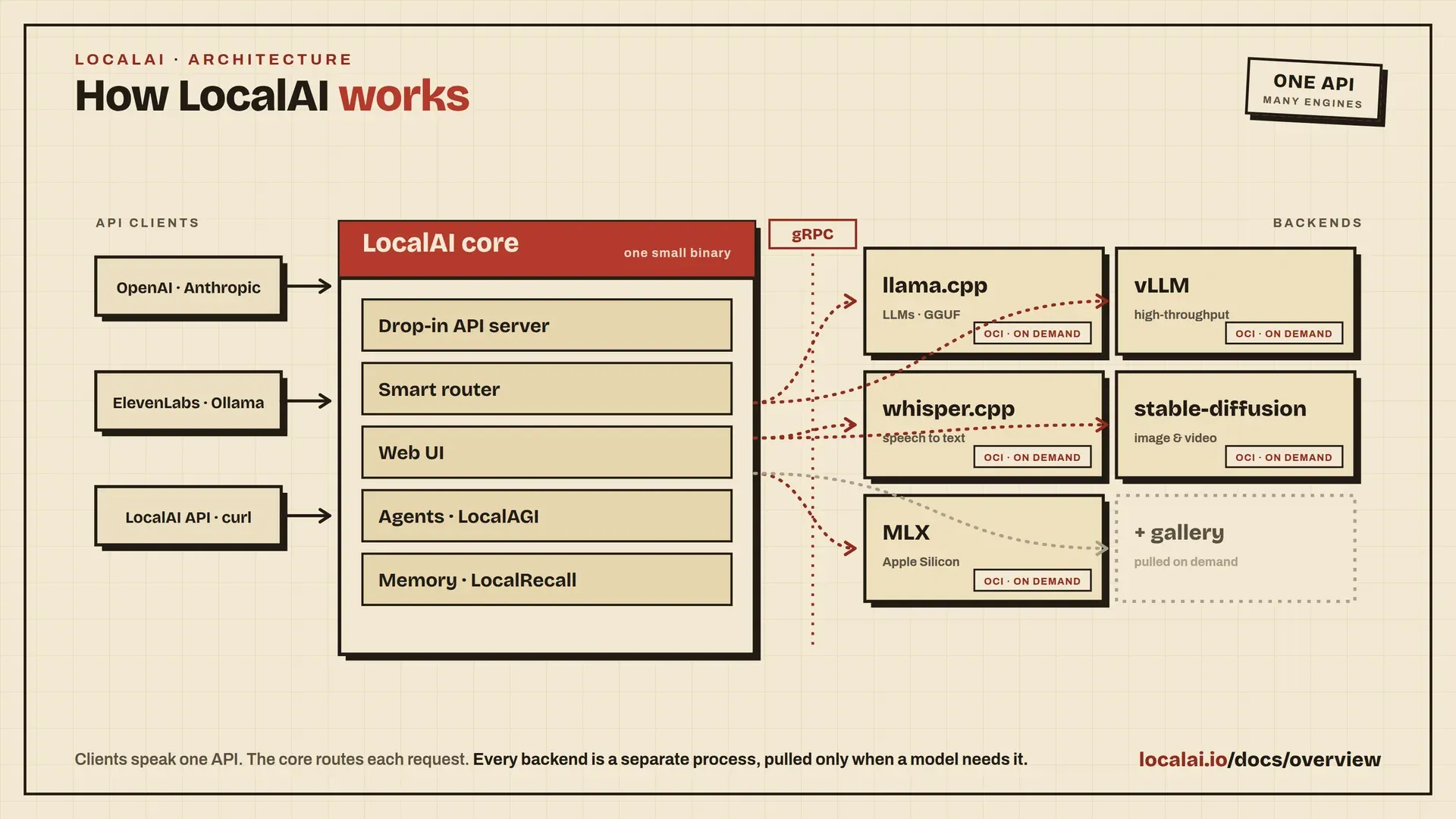
Official architecture diagram: clients speak one API, the core routes each request over gRPC to backend processes pulled as OCI images.
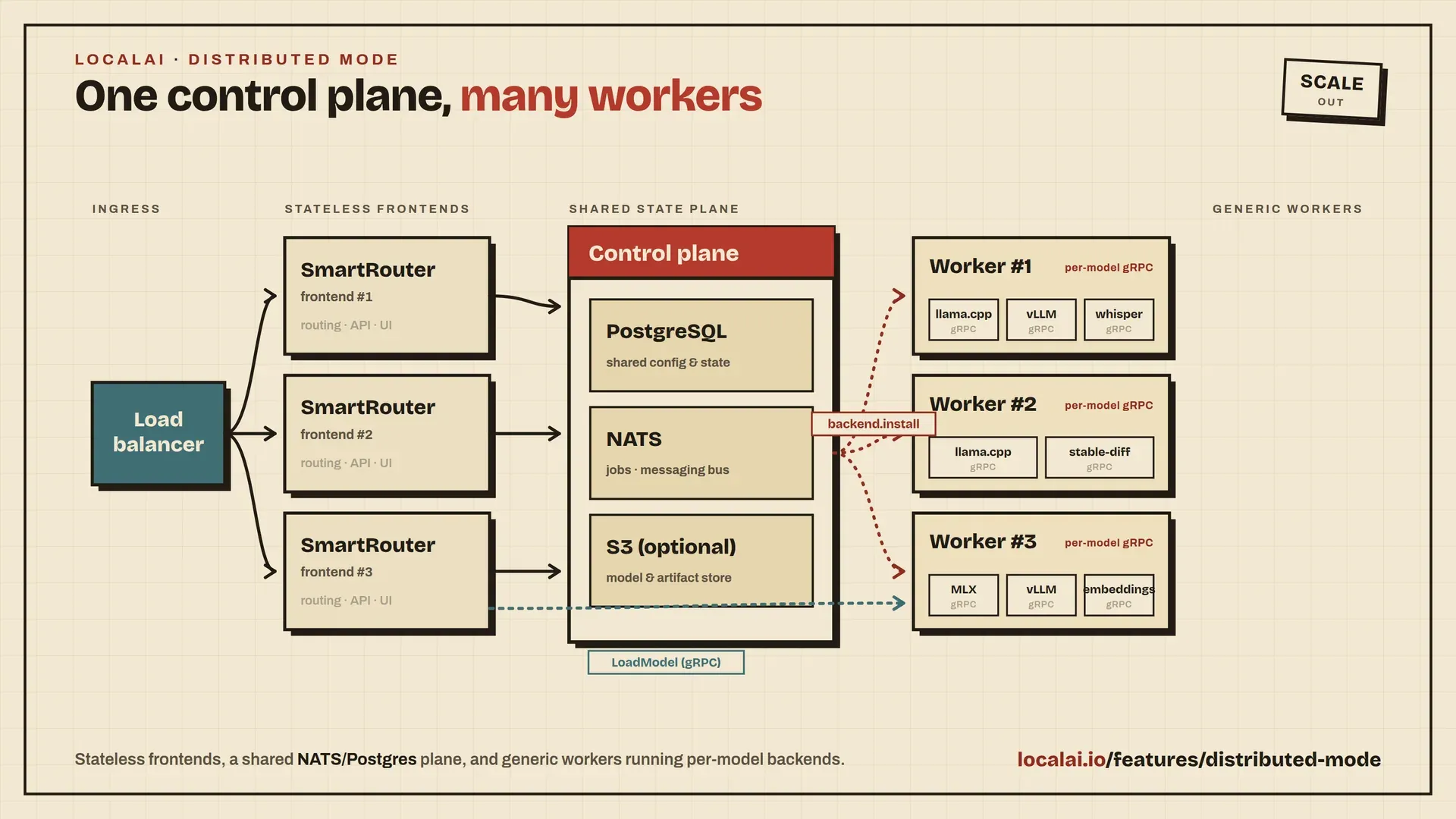
Official distributed mode diagram: stateless frontends share PostgreSQL and NATS state while generic workers run per-model backends.
Source: official LocalAI project page.
Key capabilities
- Container images for each accelerator The CPU image is
localai/localai:latest; GPU tags includelatest-gpu-nvidia-cuda-12,latest-gpu-nvidia-cuda-13,latest-gpu-hipblasfor ROCm,latest-gpu-intel,latest-gpu-vulkanand two Jetson L4T ARM64 tags. Vulkan is the documented fallback when no vendor image matches. Podman needs thedocker.io/prefix, and the container guide lists the device flags for each GPU family. Standard images contain no models. - Download LocalAI for Linux Each release publishes
local-aiserver binaries for amd64 and arm64 with a checksums file. Binaries do not ship the Python-based backends such as diffusers or transformers, so the binaries page recommends containers for the full backend set. A separate x86_64 launcher AppImage targets Ubuntu 22.04 or newer (glibc 2.35+, FUSE or extraction), downloads the server on first use and stores data under~/.localai; it has no self-updater. The Linux guide also documents systemd socket activation. - Download LocalAI for macOS LocalAI.dmg installs a menu-bar launcher for Apple Silicon that downloads the server on first launch, starts and stops it and opens the web UI at port 8080. A bare darwin-arm64 server binary is also published; there is no Intel Mac build. The README still describes an unsigned DMG with a quarantine workaround, while the current macOS install page states that the app and server are Developer ID signed and notarized, so check with
spctlandcodesignbefore deployment. - Kubernetes deployment Example manifests for CPU and NVIDIA nodes live in the LocalAI-examples repository, and the go-skynet Helm chart installs
local-aifrom a values file. Model storage, GPU scheduling and ingress remain cluster decisions. For multi-node routing, distributed mode adds its own frontend and worker roles. - Drop-in API compatibility The server answers OpenAI-style chat completions, embeddings, images, audio and the Responses API, plus the Anthropic Messages, Ollama and ElevenLabs APIs, all on one port. Existing SDKs usually need only a base URL change. OpenAI-style tool calling, constrained grammars and structured output depend on the backend and model in use. Discovery endpoints at
/.well-known/localai.jsonand/api/instructionsdescribe the API to agents and scripts. - Backends pulled on demand Each engine is a separate OCI image installed from the backend gallery when a model needs it, and LocalAI detects the GPU to pick the matching build. Backend images are signed with keyless cosign since 4.3.0. Backend versions move independently of the server, so an old installed image can lack a new feature; 4.12.0 returns an upgrade-oriented 501 in that case rather than failing silently.
- Model gallery and import sources
local-ai runaccepts a gallery name, ahuggingface://path, anollama://reference, anoci://image or a YAML config URL. The 4.12.0 notes count 1,896 top-level gallery entries, including 201 APEX quantizations made by the team. Each model is described by a YAML file that sets backend, parameters and templates. A gallery entry is not proof that a model works on every backend or device. - Text generation and memory controls Llama.cpp, vLLM, SGLang, transformers and MLX serve language models behind the same endpoint, and switching engine is a one-line config change. The llama.cpp prompt cache is on by default since 4.3.0, and llama.cpp models can be fitted across several GPUs automatically. Version 4.12.0 adds opt-in MoE expert caching, lazy tensor reads and slot save and restore, which is POSIX-only and keeps at most 32 saves per model.
- Speech recognition, synthesis and realtime voice Transcription runs on whisper.cpp, parakeet.cpp and other engines, with diarization, voice activity detection and sound-event tagging. Text-to-speech covers Piper (60 voices in 42 languages in the gallery), voice cloning engines and streaming Qwen TTS. The Realtime API carries speech-to-speech conversations with tool calls over WebSocket or WebRTC, and the project states that these speech paths run without a GPU.
- Image, video and 3D generation Diffusers and stable-diffusion GGML backends generate images; video generation and talking avatars arrived in the 4.x series.
/v1/images/upscaleonly scales by the model's native factor. Image-to-3D (TRELLIS.2) exports GLB meshes, and text-to-motion exports animated skeletons. Most of these workloads are far slower on CPU than on a supported GPU. - Vision, detection and recognition A vision API passes images to multimodal models. Native engines handle object detection and segmentation (rf-detr.cpp), open-vocabulary grounding, depth estimation, face recognition with anti-spoofing and speaker recognition. Biometric features process personal data, so their use needs the same review as any other biometric system.
- Embeddings, reranking and vector stores Embedding and reranker endpoints serve retrieval pipelines. The in-tree local-store backend keeps vectors locally, and 4.12.0 adds Qdrant through the same
/storesAPI with TLS and environment-backed keys. Qdrant writes go in chunks of at most 500 points and a failed batch is not rolled back. - Chats, agents, MCP and a terminal agent Chats are server-kept conversations whose agents can use MCP servers, skills, files, triggers and a Telegram connector; saved agents, triggers and connectors are off by default per user. The web UI and API act as MCP clients, and remote MCP servers can authenticate with OAuth2 client credentials.
local-ai chatopens a terminal agent that reads files and runs shell commands, asking for approval before anything that changes state. - Users, API keys and quotas Legacy keys set with
LOCALAI_API_KEYgrant full admin access. The user system adds accounts, admin and user roles, GitHub OAuth, OIDC single sign-on, per-user API keys that can be paused, quotas and token usage per user and key. It stores data in SQLite by default or PostgreSQL. The authentication guide lists the routes that stay anonymous. - PII filtering An NER-based filter, powered by the privacy-filter.cpp engine, can redact names, addresses and card numbers before a request reaches a model. 4.12.0 extends it to Responses input and can reject media the detectors cannot inspect. The release notes name gaps: agent interception and stored Responses history are not filtered, so it is a mitigation rather than a guarantee.
- Distributed mode and P2P federation Distributed mode runs stateless frontends with a SmartRouter, PostgreSQL for state and NATS for events; workers self-register and receive backends on demand, and authentication with PostgreSQL is required. The separate libp2p mode joins nodes with a shared token, either routing whole requests (federated) or sharding weights (worker), and is documented as experimental. Listing a swarm on the public explorer publishes its token.
- Fine-tuning and quantization Since 4.1.0 the web UI can run fine-tuning jobs with TRL and export the result to GGUF, and a quantization backend converts models on the server. These jobs need GPU memory sized for the base model. The fine-tuning guide covers recipes and job states.
- Benchmarking and operations
local-ai benchmarkmeasures latency and throughput for a model, and 4.10.0 added a fleet dashboard./healthzand/readyzserve probes, and opt-in--pprofbinds a profiler to loopback only. Runtime settings, model configs and backends can be changed from the web UI or by talking to the built-in assistant.
Where LocalAI fits
Replacing a hosted OpenAI endpoint in an existing application
Start the CPU or GPU container, install a model with local-ai run or from the web UI, then point the application's OpenAI base URL at http://host:8080/v1 and use the LocalAI model name. Check that tool calls, JSON output and streaming behave as the application expects, because those depend on the chosen backend and chat template. Set an API key before the port is reachable from other machines. The getting started guide shows the first request.
Running a voice assistant on local hardware
Install a transcription model, a VAD model, a chat model and a TTS voice, or one of the streaming assistant presets, which only add pipeline configuration. Connect a client to the Realtime API over WebRTC and test barge-in, tool calls and latency on the real machine. Clause streaming for non-native TTS engines is opt-in. Measure response time with the expected model sizes before promising a conversational experience on CPU-only hosts.
Serving a team with accounts and quotas
Enable user authentication with LOCALAI_AUTH=true, connect OIDC or GitHub OAuth, and move the auth database to PostgreSQL if several frontends will share it. Give each user or integration its own key instead of a shared legacy key, which is always full admin. Confirm that only the documented health, login and discovery routes answer anonymously, and put TLS in front with a reverse proxy as described in the reverse proxy guide.
Scaling across several GPU nodes
Use distributed mode for managed infrastructure: start PostgreSQL and NATS, run one or more frontends behind a load balancer and register workers on the GPU hosts. The SmartRouter places a model on a node that already holds it, then on free VRAM, and evicts the least recently used idle model when no node has room. Test node loss, model reload time and disk headroom per worker. Keep libp2p federation for ad hoc or lab clusters, as its documentation calls it experimental.
Building a private retrieval pipeline
Serve an embedding model and a reranker from the same server as the chat model, and store vectors in local-store or Qdrant through the /stores API. Frameworks such as LangChain and LlamaIndex document LocalAI as a provider. Check that the embedding dimension stays fixed across model updates, re-index after switching models and keep the default cosine metric unless thresholds are recalibrated.
Giving local models tools through MCP and agents
Add MCP servers to a model configuration or to a saved agent, then enable the agent features per user, since saved agents, triggers and connectors start switched off. For shell work, run local-ai chat next to a running server and answer its approval prompts. Review which MCP servers can write files or call external services, and test with a small model before granting broader permissions. The MCP documentation covers server and client roles.
Install
docker run -ti --name local-ai -p 8080:8080 localai/localai:latestReviews of LocalAI
Be the first to share your experience with LocalAI.
Write a review
Loading review form…
Alternatives to LocalAI
 OllamaOllama is an MIT-licensed tool for downloading and running open models such as Gemma, Qwen, DeepSeek and gpt-oss on your own machine. It ships a desktop app, CLI and local REST API, and offers cloud-hosted models on a pay-as-you-go or subscription basis.
 vLLMvLLM is an Apache-2.0 library and OpenAI-compatible server for LLM inference, with PagedAttention, continuous batching and distributed execution.Lllama.cppllama.cpp is an MIT-licensed C/C++ library, with CLI tools and an OpenAI-compatible server, for running language and vision-language models on CPU or GPU.