

What is LiveKit?
LiveKit is an open-source realtime media server for voice, video and data. This repository contains the LiveKit server: a distributed WebRTC SFU, or selective forwarding unit, that receives audio, video and data tracks from participants and forwards them to subscribers in the same room. Browsers, mobile apps, embedded devices, SIP phone calls and AI agents all join rooms as participants. The server is developed by LiveKit, Inc., the company behind the hosted LiveKit Cloud service, and the project describes its origins as an open-source effort for livestreaming and video conferencing over WebRTC.
The server is written in Go and builds on the Pion WebRTC implementation. Building from source requires Go 1.26 or newer and the mage build tool. Official distribution covers a Homebrew formula for macOS, an install script for Linux, prebuilt archives for Linux amd64, arm64 and armv7 and Windows amd64 and arm64, the livekit/livekit-server Docker image and a Helm chart for Kubernetes. A single node runs without dependencies; Redis becomes required as shared state and message bus once several nodes form a cluster.
The current release is v1.13.11, published October 25, 2026. It caps retransmissions per down track, enables upstream FlexFEC-03, adds file-backed credentials for external TURN servers, disables AV1 for Firefox clients and rebuilds the runtime image with Go 1.27.3 after an intermediate certificate authority compromise. Version 1.13.10 restricted the embedded TURN server so it refuses TCP relays and only relays to local media ports. Version 1.13.0 removed the backwards compatibility for TURN credentials without a TTL that 1.12.0 had announced, so older clients or scripts that build TURN credentials by hand need to be checked before upgrading.
The server is one piece of a wider stack. Recording and restreaming (Egress), RTMP, WHIP and SRT ingest (Ingress) and SIP telephony are separate open-source services that a self-hosted deployment runs next to the server. Client SDKs cover the browser, Swift, Android, Flutter, React Native, Unity, Rust, C++ and ESP32, and the LiveKit Agents framework for Python and Node.js runs voice and video AI agents that connect to any LiveKit server. Server APIs are Twirp endpoints with SDKs for Go, Node.js, Python, Ruby, Kotlin and Rust.
The server is licensed under Apache 2.0. LiveKit Cloud adds managed agent hosting, LiveKit Inference, native phone numbers, a global mesh SFU, region pinning and built-in observability; those features are not part of the open-source server. The self-hosting overview lists which capabilities are available in each mode. A self-hosted room has to fit on a single node, which the documentation puts at roughly 3,000 participants.
LiveKit screenshots
Explore the interface. Open a screenshot to view it at full size.
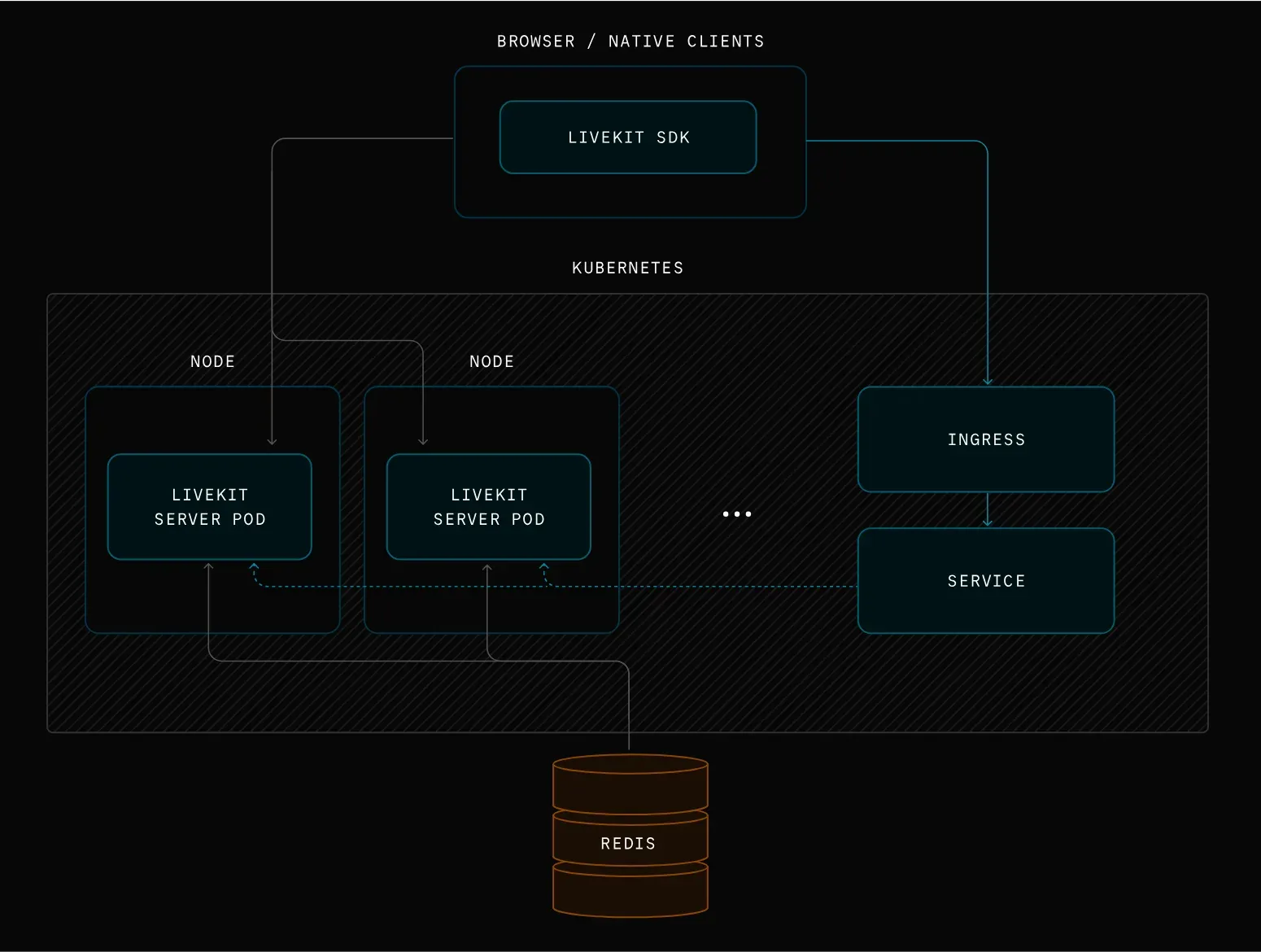
Official deployment diagram: SDK clients reach LiveKit server pods through an Ingress and Service, and the pods share state through Redis.
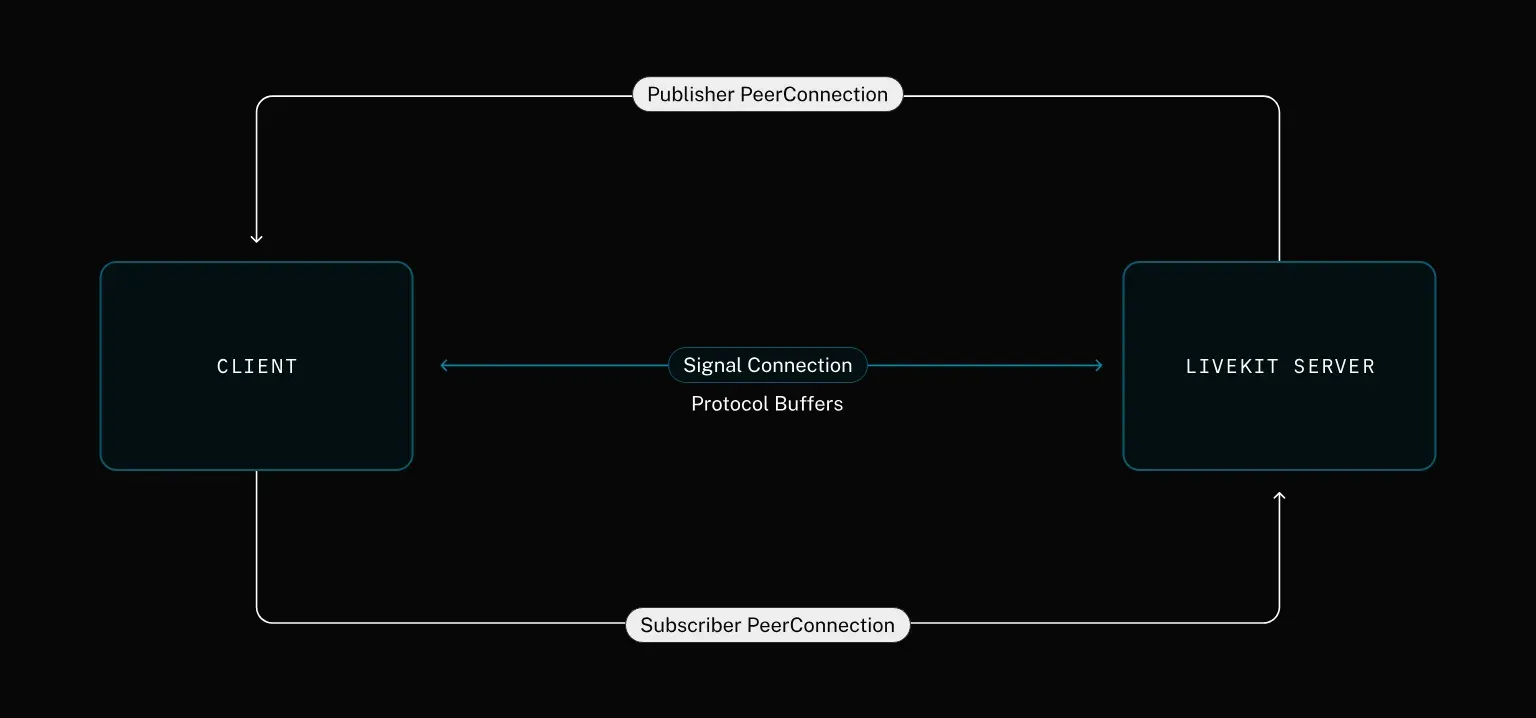
Official protocol diagram: one signal connection using Protocol Buffers plus separate publisher and subscriber WebRTC peer connections.
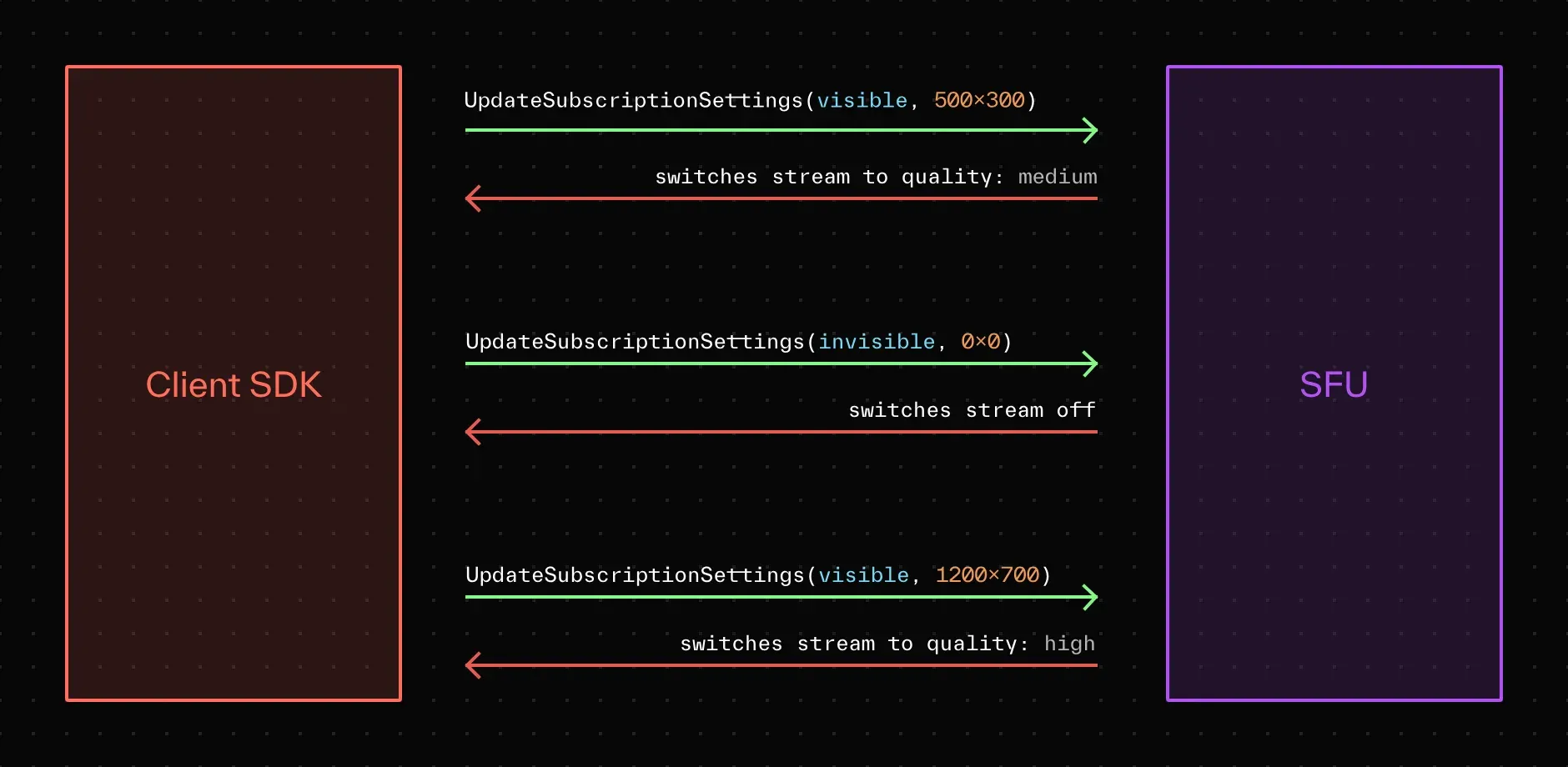
Official diagram of adaptive stream: the SFU switches a subscribed video to medium, off or high quality based on the size the client reports.
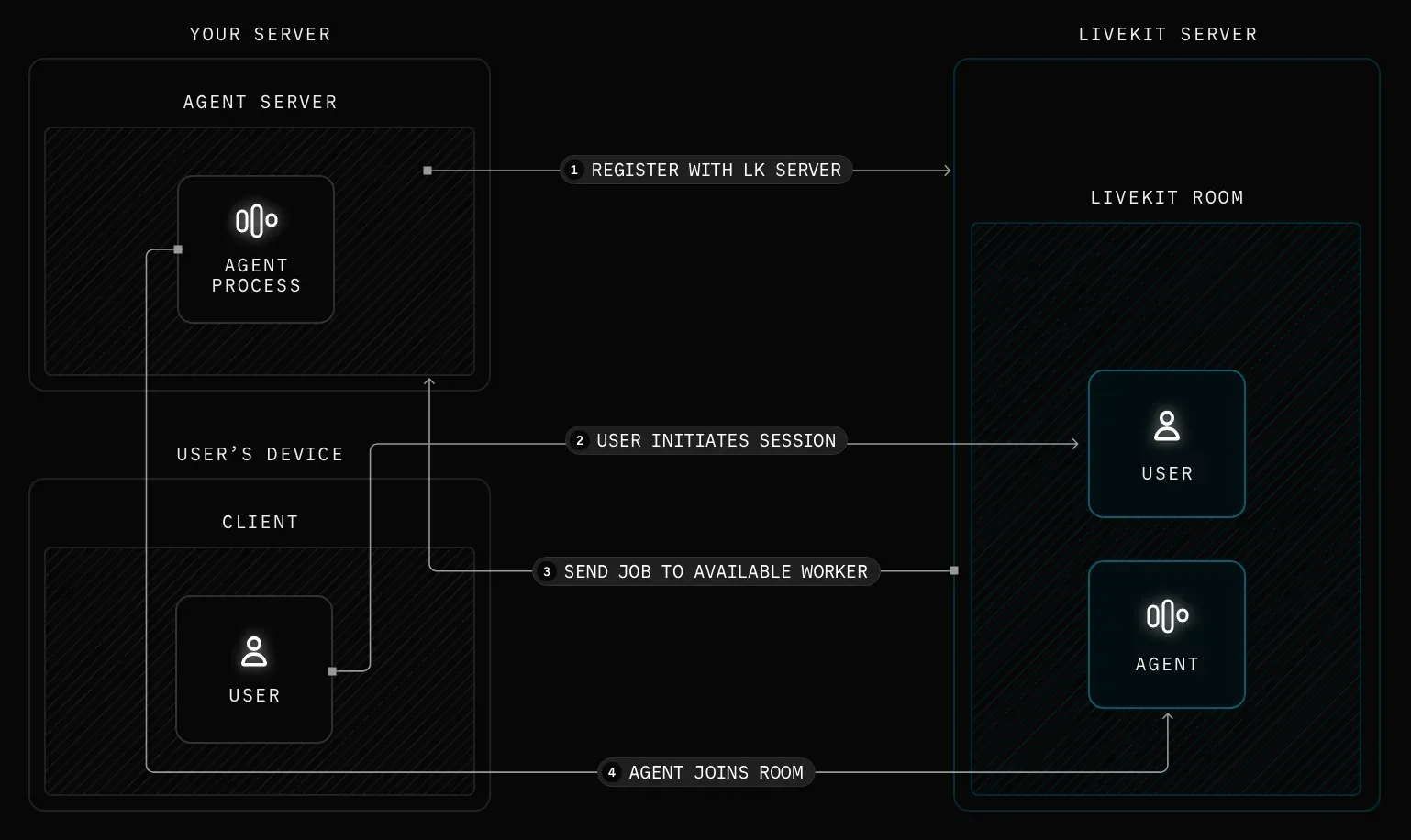
Official LiveKit Agents diagram: the agent server registers, a user starts a session, a job goes to an available worker and the agent joins the room.
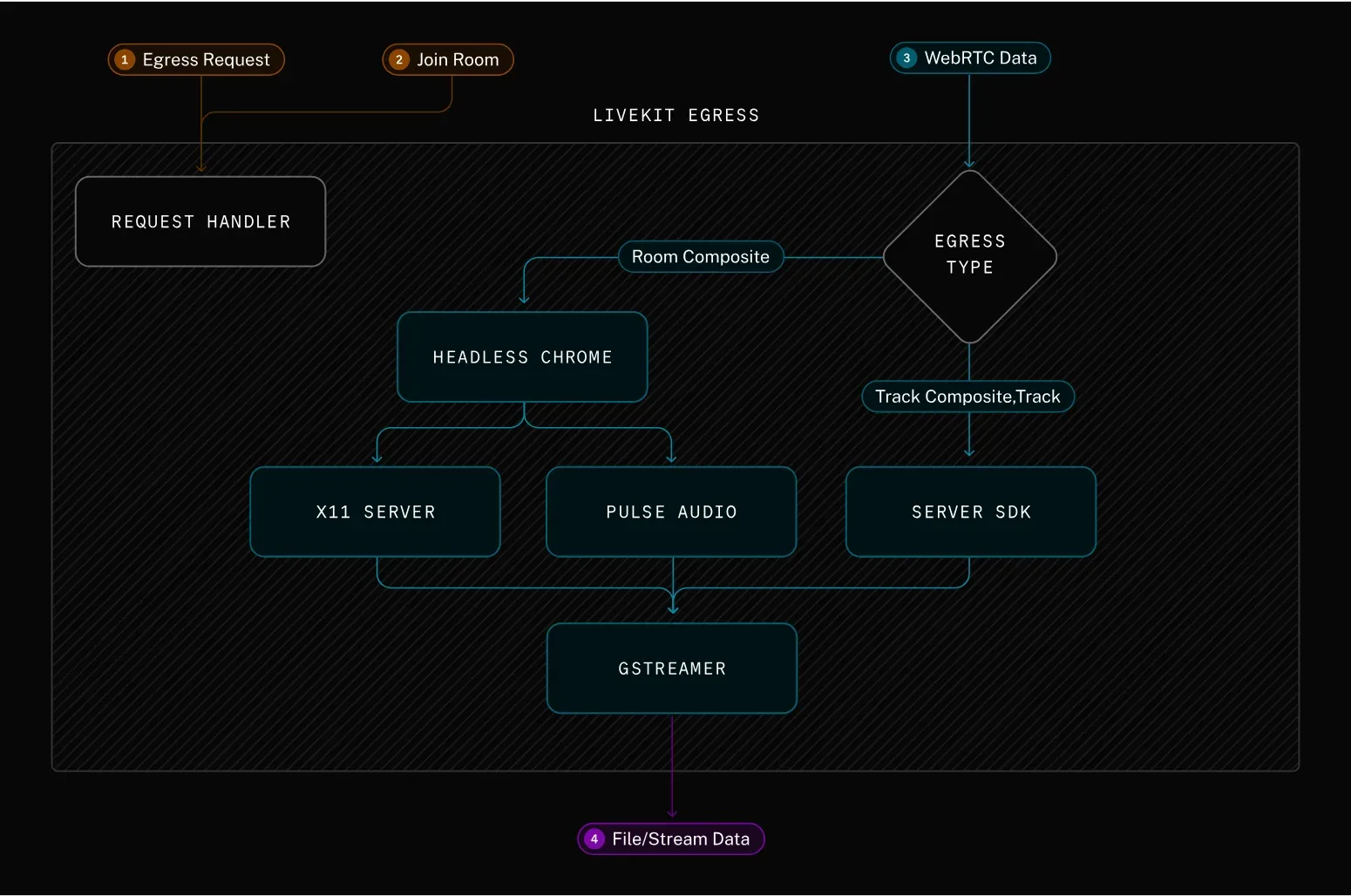
Official Egress diagram: room composites render in headless Chrome with X11 and PulseAudio, track exports use the server SDK, and both encode with GStreamer.
Source: official LiveKit project page.
Key capabilities
- Install on macOS Run
brew update && brew install livekitto get thelivekit-serverbinary. Release archives on GitHub do not include a macOS build, so Homebrew is the documented path for Mac development machines. Start a local instance withlivekit-server --dev, which uses the placeholder key pair devkey/secret and binds to 127.0.0.1:7880 unless--bind 0.0.0.0is passed. - Install on Linux The documented one-liner is
curl -sSL https://get.livekit.io | bash. The releases page also publishes tar.gz archives for amd64, arm64 and armv7 with a checksums.txt file. For production on a VM, LiveKit recommends compute-optimized instances and 10 Gbps networking, because capacity is bound by CPU and bandwidth. - Install on Windows Windows amd64 and arm64 builds are published as ZIP archives on each GitHub release. Windows is documented for local development; the production guides target Linux VMs, Docker with host networking and Kubernetes.
- Docker image and VM generator The
livekit/livekit-serverimage is published on Docker Hub. Thelivekit/generatecontainer produces a Docker Compose setup with Caddy for automatic TLS through Let's Encrypt or ZeroSSL, a Redis config, a livekit.yaml file and either a cloud-init file or an init script. The script installs alivekit-dockersystemd service under /opt/livekit, as described in the VM deployment guide. - Kubernetes with Helm The official Helm chart deploys a distributed cluster with a Service and Ingress and supports GKE, EKS and DigitalOcean DOKS. Pods use host networking, so only one LiveKit pod runs per node. Serverless and private clusters are not supported because the extra NAT layers break WebRTC traffic. The chart sets a five-hour termination grace period so pods can drain.
- Selective forwarding of audio, video and data The SFU receives each published track once and forwards it to every subscriber, without mixing or transcoding. Simulcast, SVC codecs such as VP9 and AV1, speaker detection and selective subscription reduce what each client receives. Adaptive stream lets a client report its visible video size so the server switches layers or pauses a hidden stream, as explained in the subscribe documentation.
- Access tokens and permissions Every client connects with a JWT access token signed by an API key and secret from the server config. The token carries the participant identity, the room name and grants such as join, publish, subscribe or room administration. Tokens can be created with the
lkCLI or any server SDK; token revocation is listed as a LiveKit Cloud feature only. - Embedded TURN server The server includes TURN over TLS (default port 5349, or 443 without a load balancer) and TURN over UDP (default 3478) for clients behind restrictive firewalls. Since 1.12.0, TURN credentials expire after a TTL of 300 seconds by default and relaying to private address ranges is denied unless allowed through
allow_restricted_peer_cidrs. TURN/TLS needs its own domain and a certificate from a trusted authority. - Distributed and multi-region routing With Redis configured, nodes report load to the cluster and a new room is placed on an available node, while signal connections can land on any instance. A region-aware node selector uses
sysload_limitand region coordinates together with geo-aware DNS. Each room still lives on one node. Nodes drain on SIGTERM, SIGINT or SIGQUIT, keeping active rooms open while refusing new ones, per the distributed setup guide. - Room service API and webhooks Backends manage rooms, participants and tracks through Twirp endpoints under
/twirp/livekit.RoomService/, using JSON over HTTP POST with a bearer token. Any node can answer for any room. Webhooks send room, participant and track events to your backend so application state follows what happens in rooms. - End-to-end encryption E2EE covers audio and video tracks as well as text messages and byte streams, so the server forwards content it cannot read. It is enabled per room in each participant's SDK, with either a shared key or a custom key provider for per-participant keys and rotation. LiveKit does not store or distribute keys: your application has to generate and deliver them, as the encryption overview states.
- Data messaging and data tracks Beyond media, participants exchange text streams, byte streams, RPC calls and data packets. Data tracks carry low-latency telemetry and control traffic for robotics and teleoperation. Recent releases changed data channel handling for single peer connection mode, so mixed SDK versions are worth testing together.
- Recording and streaming with Egress The separate Egress service records rooms, participants or single tracks to MP4 or HLS and streams to RTMP destinations such as YouTube Live or Twitch. Room recordings render a web layout in headless Chrome and encode with GStreamer; track exports can skip video transcoding with the passthrough preset. Self-hosted Egress connects to the server through Redis and needs its own capacity planning.
- Ingest with Ingress The Ingress service brings RTMP, WHIP and SRT sources such as OBS Studio into rooms as regular participants, with configurable transcoding presets. The VM generator can include it, opening port 1935 for RTMP and 7885/UDP for WHIP.
- SIP telephony The LiveKit SIP service bridges inbound and outbound phone calls into rooms as SIP participants. Self-hosted setups bring their own SIP trunk provider and open the SIP signaling ports (5060 UDP/TCP, 5061 TLS) and an RTP range of 10000-20000. Native phone numbers and Krisp noise cancellation at the trunk are LiveKit Cloud features.
- AI agents as room participants Agents built with the Apache 2.0 LiveKit Agents framework register with the server, receive a job when a session needs them and join the room like any other participant. On a self-hosted server you supply model provider keys through plugins, because LiveKit Inference is only available on Cloud. The 1.13.8 release added an HTTP endpoints data plane for agents.
- Metrics and load testing Setting
prometheus_portexposes Prometheus metrics, and the repository ships a Grafana dashboard under deploy/grafana. Thelk load-testcommand simulates publishers and subscribers. Published benchmarks on a 16-core c2-standard-16 instance show 10 audio publishers with 3,000 subscribers at 80% CPU and 150 video publishers with 150 subscribers at 85% CPU. - LiveKit Cloud plans For teams that do not want to run the media layer, LiveKit Cloud has a free Build plan with 5,000 WebRTC participant minutes and 1,000 agent session minutes, Ship from $50 per month, Scale from $500 per month and custom Enterprise terms. Overage rates and concurrency limits are listed on the pricing page.
Where LiveKit fits
Self-hosting video calls for an internal application
Start with a single VM generated by livekit/generate, point the primary and TURN domains at it and open 443, 80, 7881, 3478/UDP and 50000-60000/UDP. Issue tokens from your backend with a server SDK and test from a laptop on a corporate network, a phone on mobile data and a client behind a VPN. Check that TURN/TLS is used when UDP is blocked and that the certificates come from a trusted authority, since self-signed certificates are rejected.
Adding a voice AI agent to a product
Run an agent built with LiveKit Agents for Python or Node.js and register it with your server; it is dispatched into a room when a user starts a session. On a self-hosted server, configure STT, LLM and TTS plugins with your own provider keys. Measure end-to-end response time from the user's network, check what audio and transcripts the chosen model providers receive and confirm the agent leaves the room when the session ends.
Recording and restreaming sessions
Deploy Egress beside the server with the same Redis instance, then start recordings from your backend with StartEgress, or configure auto egress for rooms. Decide where MP4 or HLS output is stored and who can read it. Check CPU headroom on Egress hosts, because room composites render in headless Chrome, and test one stream to an RTMP destination before relying on it for an event.
Connecting phone calls through SIP
Deploy the SIP service, configure inbound and outbound trunks with your carrier and add dispatch rules that route calls to rooms or agents. Open 5060/5061 and the RTP range only to your carrier's address ranges where possible. Test DTMF, call transfer and failover with the carrier, since phone numbers and trunk-level noise cancellation are not provided by the self-hosted stack.
Scaling to several nodes and regions
Add Redis and more nodes once one server is not enough, and use the Helm chart on GKE, EKS or DOKS. Configure the region-aware selector with a sysload_limit and region coordinates, then route signal traffic with geo-aware DNS. Plan around the fact that a room cannot span nodes, run lk load-test with your real publisher and subscriber counts and verify that draining during a rolling upgrade does not cut active rooms.
Streaming telemetry and video from robots
Publish camera tracks and data tracks from a device using the Rust, C++ or ESP32 SDKs and subscribe from an operator console in the browser. Data tracks are designed for low-latency control and sensor data. Test behavior on lossy cellular links, set token lifetimes that match how long a device stays online and decide whether E2EE is needed for the media and control channels.
Install
curl -sSL https://get.livekit.io | bashReviews of LiveKit
Be the first to share your experience with LiveKit.
Write a review
Loading review form…
Alternatives to LiveKit
 TwilioTwilio provides APIs for programmatic messaging, voice calls, and verification workflows that developers can integrate into applications.
 ZoomZoom Workplace combines meetings, team chat, phone, whiteboard and contact center products, with APIs, a Meeting SDK and a marketplace for integrations.
 Rocket.ChatRocket.Chat is a TypeScript and MongoDB communication platform for channels, threads, calls, Matrix federation and customer conversations. The core is MIT-licensed and self-hosted with Docker or Kubernetes; enterprise features and add-ons need a paid plan.