
What is Tabby?
Tabby is a self-hosted AI coding assistant made by TabbyML, Inc. and published on GitHub. A single server process, written mainly in Rust, runs a code completion model, an optional chat model and an embedding model, indexes source repositories and documentation, and serves IDE extensions for Visual Studio Code, IntelliJ Platform IDEs and Vim or Neovim through an OpenAPI-described HTTP interface. The README presents it as an open-source, on-premises alternative to GitHub Copilot that needs no external database or cloud service: state is kept in SQLite under ~/.tabby. A web console on the same server adds the Answer Engine, a code browser, user management and usage reports.
Licensing is split by directory. The top-level LICENSE (copyright 2025 TabbyML, Inc.) applies Apache 2.0 to everything outside ee/, while ee/ is covered by the Tabby Enterprise license. That license allows production use only for parties that accept the Tabby Subscription Terms and hold a valid Tabby Enterprise license for the correct number of user seats; copying and modifying for development and testing is allowed without a subscription. The ee/ directory contains the web server, web UI, database, schema and e-mail crates. Because of this mix, GitHub shows no single SPDX license for the repository. The license documentation names three tiers: Community (free), Team and Enterprise (paid), selected by uploading a license key on the Subscription page. The IDE clients in clients/vscode, clients/vim and clients/tabby-agent carry their own Apache 2.0 license files.
The latest stable release is v0.32.0, published on January 25, 2026. It added a generic OAuth sign-in client, a mistral/embedding model kind and indexing of several branches per repository, and puts the e-mail address into invitation links. Release assets cover macOS on Apple Silicon, Linux x86_64 (CPU, CUDA 12.3 and Vulkan builds) and Windows x86_64 (CPU, CUDA 12.4 and Vulkan builds); the tabbyml/tabby Docker image tagged latest and the official Homebrew tap both point to 0.32.0. No stable release has followed. The main branch was set to 0.33.0-dev.0 on January 29, 2026, a next-alpha pre-release from February 9, 2026 is labelled as intended only for internal use, and the last push to the repository was on June 30, 2026, a commit that reverted a newly added model provider.
One change on the main branch affects the feature set of later builds: pull request #4425, merged on January 23, 2026 under the title "sunset knowledge and chat features", disables the chat feature flag, removes Pages and the search pages from the web UI and drops chat statistics from the home page. It is not part of v0.32.0, which still ships chat and the Answer Engine. The README news section links to Pochi, a separate TabbyML coding agent, in an entry dated December 12, 2025. As of November 21, 2026, www.tabbyml.com presents a service for evaluating and improving AI agents and no longer mentions Tabby, the root of tabby.tabbyml.com redirects there, and the pricing page returns HTTP 404. The last copy of that page in the Internet Archive, from November 2, 2026, listed Community at $0 for up to 5 users, Team at $19 per user per month for up to 50 users, and Enterprise at custom, annually billed prices; SSO, authentication domains and an IDE telemetry policy appeared in the Enterprise column only. The documentation and the API reference remain online. The repository is not archived, and neither the README nor the documentation announces an end of maintenance, an archival or an acquisition.
Other open-source coding assistants listed on iThub include Continue, Cline and Kilo Code; local model runtimes such as Ollama and llama.cpp can serve as Tabby model backends.
Key capabilities
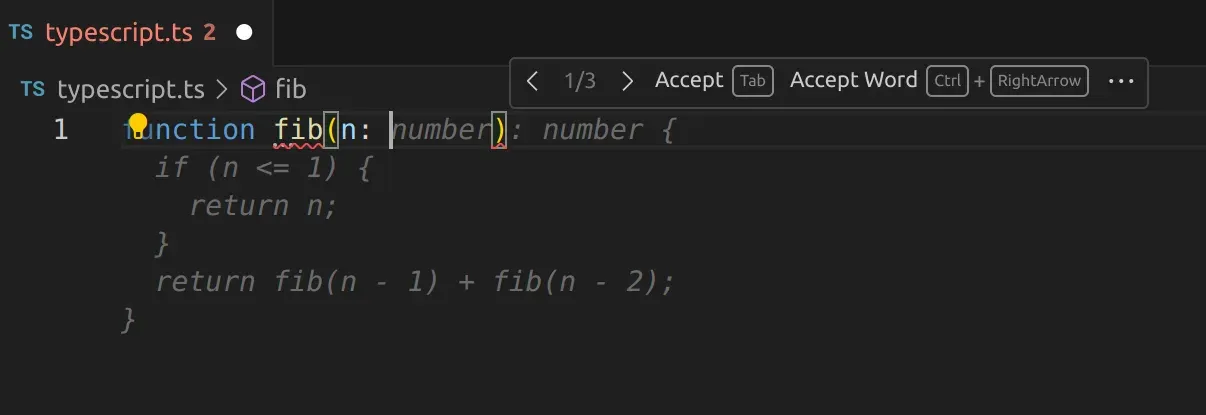
- Inline code completion The completion model works in fill-in-the-middle style and returns single-line or multi-line suggestions as ghost text in the editor. The VS Code extension can cycle through several alternative suggestions and accept a whole suggestion or one word at a time. The
[completion]section ofconfig.tomlsets the prompt size (1,536 characters by default) and the maximum number of decoded tokens (64 by default); the documentation keeps these defaults low for local GPUs and small models. - Repository-aware completion Tabby parses indexed code with tree-sitter queries and retrieves related snippets into the completion prompt, an approach described in its 2023 retrieval-augmented completion release. Built-in language support covers Rust, Python, JavaScript, TypeScript, Go, Ruby, Java, Kotlin, C and C++, PHP, C#, Solidity, R, Dart, Lua, Elixir, OCaml, GDScript and Scala. Further languages can be declared in
config.tomlwith file extensions, comment syntax and top-level keywords. - Context providers for code The context provider system connects Git URLs (HTTPS, SSH or local
file://paths), GitHub and GitLab, including self-hosted instances, using personal access tokens for private repositories. Tabby fetches the code, pull or merge requests, issues and commits, builds an index in a background job and shows the result in a code browser. The open-source edition adds repositories only through[[repositories]]entries inconfig.toml; v0.32.0 added indexing of several branches per repository. - Developer documentation context Documentation sites can be added as a beta context source. Tabby crawls them with Katana, which is preinstalled in the Docker image and must be installed separately for binary installs (version 1.1.2 or later), or reads the pages listed in a site's
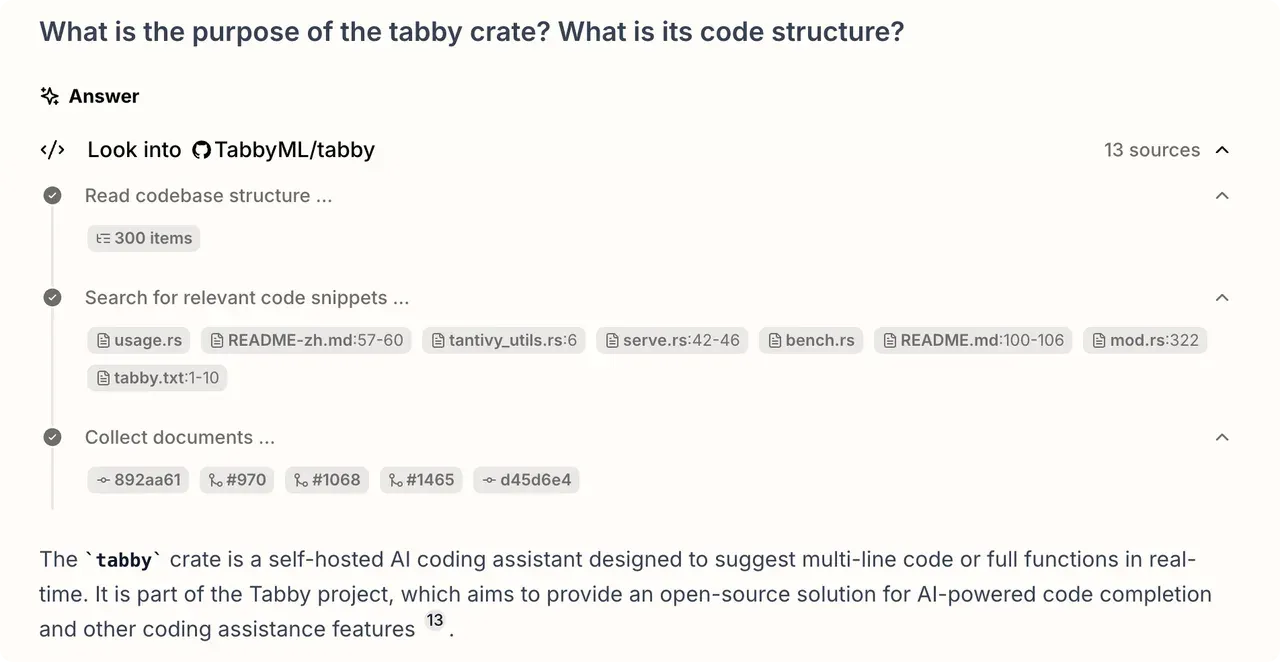
llms.txtfile when one exists. In chat, indexed documents are selected with an@mention. - Answer Engine The Answer Engine on the web home page answers questions with the chat model and selected repositories or documents, and lists the files, pull requests and commits it used. New threads are visible only to their author and administrators and are deleted after a week unless the author shares them, which keeps them and shows them to all team members. A beta web search context is enabled with a Serper API key. Pull request #4425, merged to the main branch on January 23, 2026 and not included in v0.32.0, switches the chat feature flag off in the web UI of later builds.
- Chat and inline editing in the IDE The VS Code extension has a chat panel in the activity bar, commands such as Explain This for selected code, and inline editing started with Ctrl or Cmd+I. Files can be added to a chat with
@mentions. - Model registry Local models are chosen by ID from the model registry. Completion models include StarCoder 1B, 3B and 7B, StarCoder2 3B and 7B, CodeLlama 7B and 13B, DeepSeekCoder, CodeGemma, CodeQwen, Qwen2.5-Coder from 0.5B to 14B, Codestral-22B and DeepSeek-Coder-V2-Lite; chat models include Mistral-7B, Qwen2.5-Coder Instruct up to 32B and Yi-Coder-9B-Chat; Nomic-Embed-Text is the default embedding model. Each model keeps its own license, for example Codestral under the Mistral AI Non-Production License. Custom models can be loaded from a local directory that follows
MODEL_SPEC.md. - Local inference on llama.cpp For local models Tabby starts a llama.cpp server as a subprocess and talks to it over HTTP, as described in the model configuration guide. The registry page asks for at least an NVIDIA T4, 10-series or 20-series GPU or Apple Silicon for 1B to 3B models, and a V100, A100, 30-series or 40-series GPU for 7B to 13B models. The FAQ gives about 8 GB of VRAM for CodeLlama-7B in int8 on CUDA and states that one Tabby instance uses one GPU, so several GPUs mean several instances.
- Remote model connectors Completion, chat and embedding models can instead be HTTP endpoints. Connector kinds include
openai/chat,openai/embedding,ollama/completion,vllm/completionandllama.cpp/completion, and the HTTP API reference has pages for Amazon Bedrock, Anthropic Claude, Azure OpenAI, DeepInfra, DeepSeek, Fireworks, Hugging Face, Jan, llamafile, LM Studio, Mistral AI, Ollama, OpenAI, OpenRouter, Perplexity, vLLM and Voyage AI. Completion endpoints need aprompt_templatethat matches the model's fill-in-the-middle tokens, and asupported_modelslist lets users switch chat models in the UI. - GPU and CPU backends Official builds target NVIDIA CUDA, Vulkan for other GPUs, Apple Metal on M-series Macs and CPU-only operation. ROCm is covered by a 2024 blog guide and FAQ entries on
HIP_VISIBLE_DEVICESandHSA_OVERRIDE_GFX_VERSION; the separatetabbyml/tabby-rocmDocker image was last updated in May 2024 at version 0.11.1, and v0.32.0 ships no ROCm asset. - Docker and Docker Compose The Docker guide runs the image with the NVIDIA Container Toolkit, publishes port 8080 and mounts
$HOME/.tabbyas/data; systems with SELinux need the:Zvolume option. A Docker Compose file with a GPU reservation is documented as well. Upgrades are adocker pulland restart after a database backup, and downgrades are not supported. - Binaries and Homebrew Linux and Windows users download the release archives and run
tabby servewith--device cudaor--device vulkan; the CUDA builds need CUDA 11 or newer. On Apple Silicon the official tap installs withbrew install tabbyml/tabby/tabbyand runs with--device metal; the documentation says this is likely sufficient only for individual use. Further guides cover WSL, SkyPilot, BentoML, Hugging Face Spaces and Modal. - IDE and editor extensions The VS Code extension is published on the Visual Studio Marketplace (version 1.28.0, April 30, 2025) and Open VSX. The IntelliJ Platform plugin (JetBrains Marketplace, version 1.13.0, March 31, 2025) supports IDE builds from 2023.1 and needs Node.js 18 or newer. The Vim and Neovim plugin (2.x) runs the
tabby-agentlanguage server from npm through an LSP client; its README lists the Neovim built-in client with nvim-lspconfig as supported, with other clients in development, and requires Neovim or Vim 9.0 with+textprop. An Eclipse plugin exists in the repository and is marked as under development. - Users, groups and access control The first account on a new server becomes the owner. Members join through e-mail invitations sent via a configured SMTP server, copied invitation links, or self-registration for approved e-mail domains. User groups restrict which indexed repositories and documents a member can query; contexts without assigned groups are open to all members.
- Single sign-on Sign-in options include GitHub, GitLab and Google OAuth, a generic OAuth client added in v0.32.0, and LDAP with StartTLS or LDAPS added in v0.24.0. The SSO and LDAP documentation pages mark these features as part of the Enterprise plans.
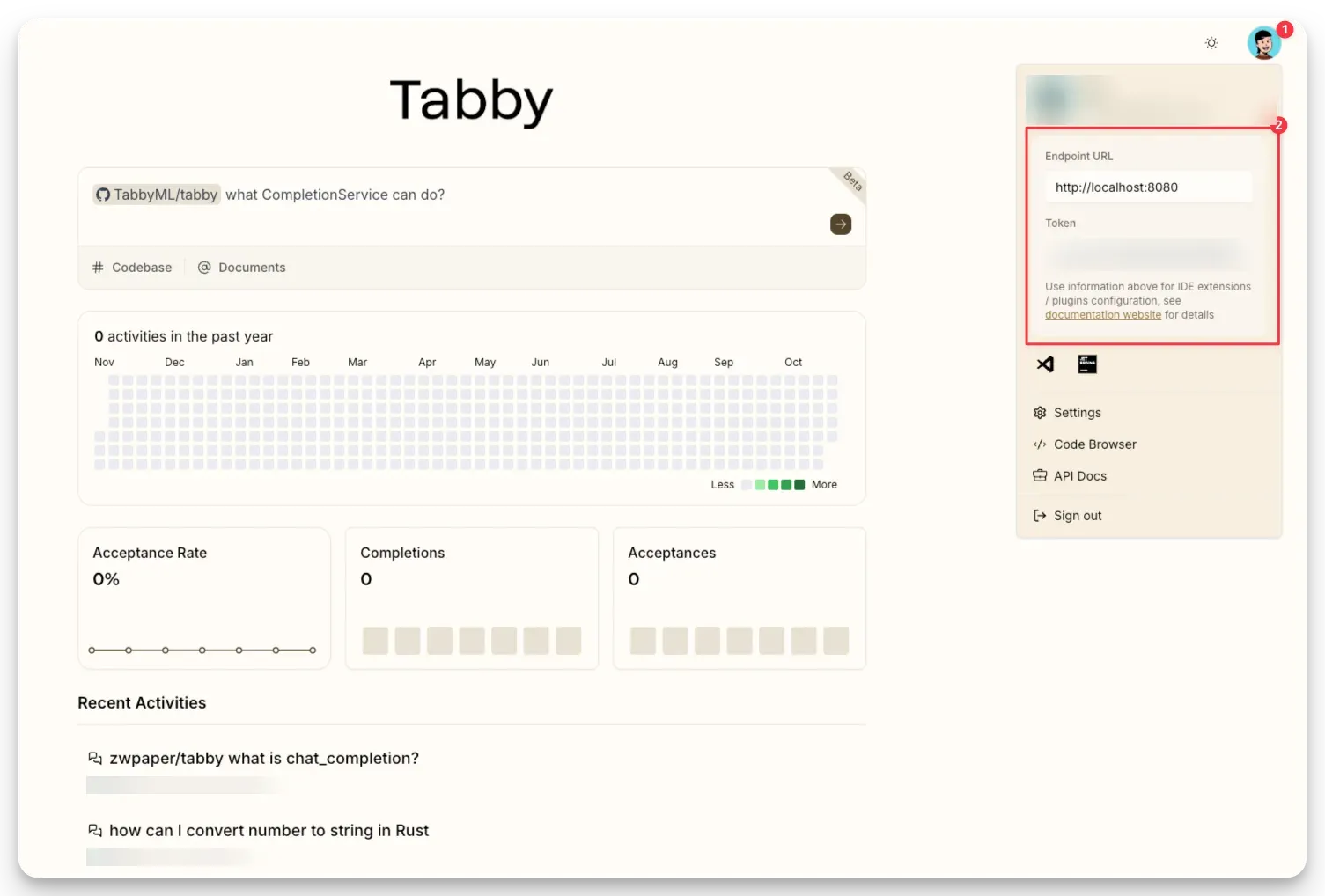
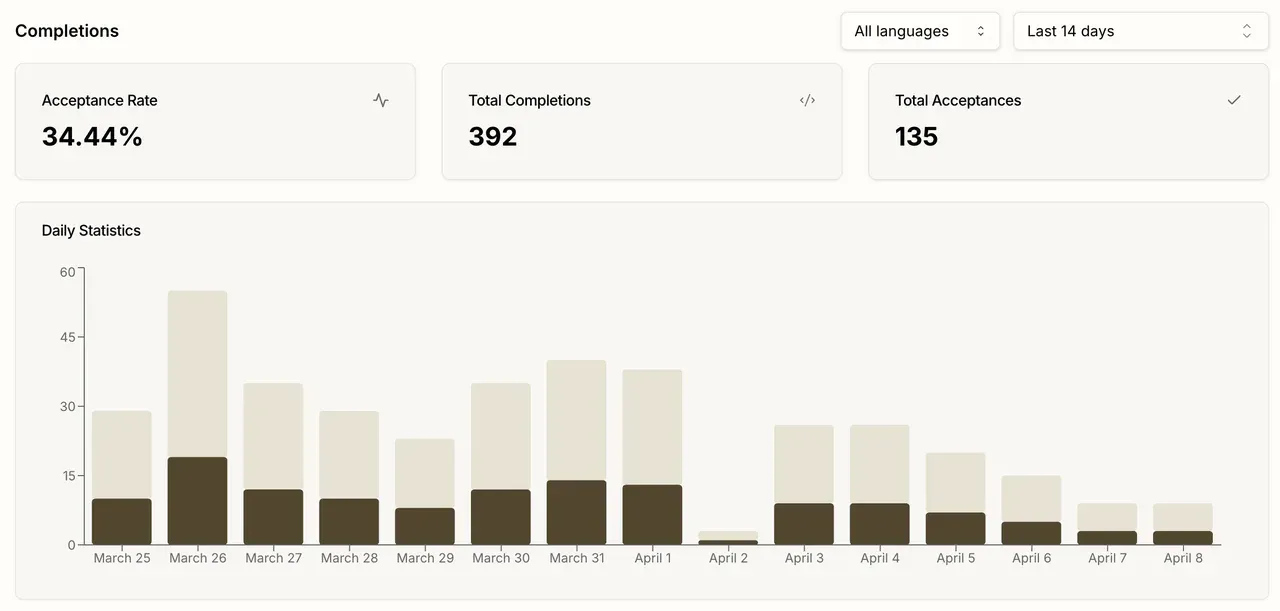
- Usage analytics The Reports page shows code completion acceptance rate, total completions and acceptances, filtered by language, time range and member, plus chat usage in the IDE and the Answer Engine and a yearly activity chart per user.
- HTTP API and document ingestion The server exposes its API as an OpenAPI specification with a Swagger UI, documented at tabby.tabbyml.com/api. Since v0.29 a
/v1beta/ingestionendpoint accepts custom documents with a source, ID, title, body, link and time-to-live, authenticated with the registration token; ingestion and deletion are applied at the next scheduled index run. - Data storage and telemetry All data lives in
$HOME/.tabbyorTABBY_ROOT: the SQLite database atee/db.sqlite, daily JSON event logs and the configuration. The FAQ advises against NFS because of SQLite locking. Tabby sends usage statistics by default, including the model names, device, architecture, CPU information, CUDA devices and version;TABBY_DISABLE_USAGE_COLLECTION=1turns this off.
Where Tabby fits
Running a completion server on one NVIDIA GPU
The documented quick start is a single docker run of tabbyml/tabby with serve --model StarCoder-1B --chat-model Qwen2-1.5B-Instruct --device cuda, port 8080 and a mounted data directory. The first account registered in the web console becomes the owner, and the home page then shows the endpoint URL and personal token that each IDE extension needs to connect.
Code completion on an Apple Silicon Mac
For a single developer, the Homebrew tap installs the macOS build, and tabby serve --device metal runs the completion and chat models on the M-series GPU. The installation guide notes that M1 and M2 compute is likely enough only for individual use and points teams to Docker hosting with CUDA or ROCm.
Indexing internal repositories
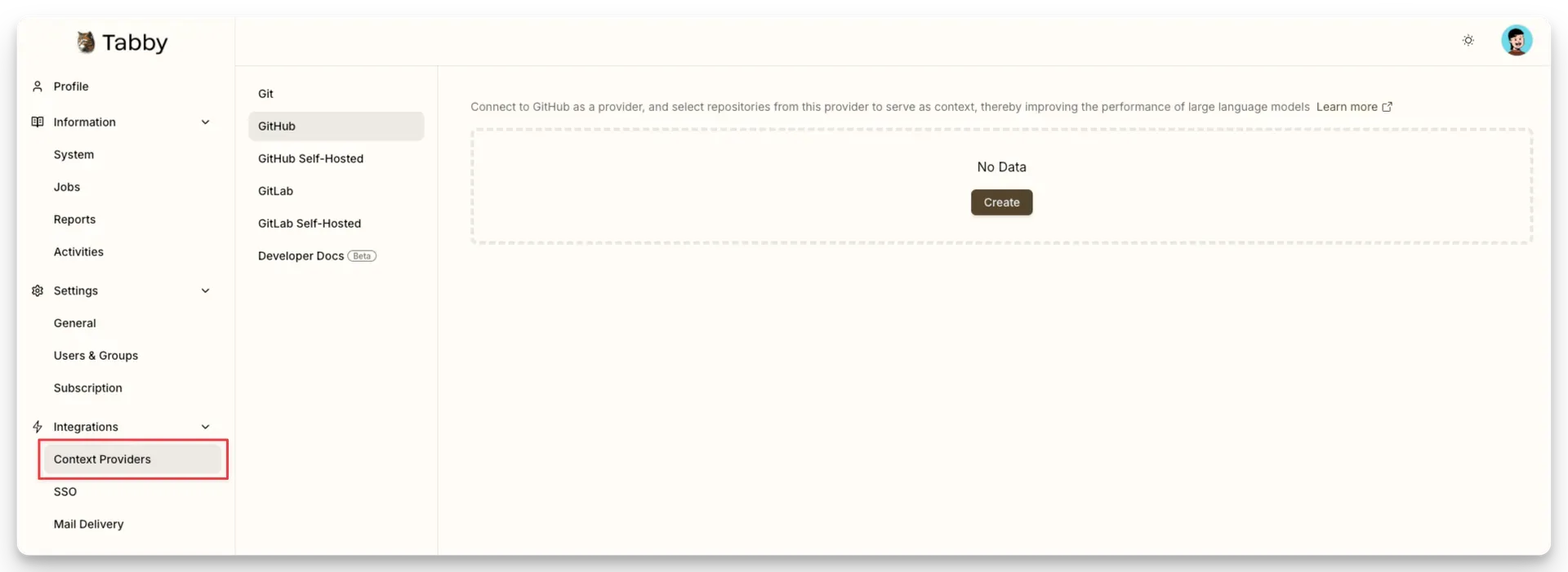
Administrators add repositories in Integrations > Context Providers, or in config.toml for the open-source edition, using Git URLs, GitHub or GitLab tokens, or local paths mounted into the container. A background job clones and indexes each repository; its log appears on the Jobs page and the result in the code browser. Completion prompts and Answer Engine questions then draw on the indexed code, pull requests, issues and commits.
Reusing an existing inference server
Teams that already run Ollama, vLLM, a llama.cpp server or an OpenAI-compatible API point Tabby at it with [model.completion.http], [model.chat.http] and [model.embedding.http] blocks in config.toml. The completion block needs the model's fill-in-the-middle prompt template, and the System page in the console shows whether each model connection is up.
Administering a team instance
With SMTP configured, administrators invite members by e-mail or allow sign-up for company e-mail domains, organise members into groups and limit which repositories each group can query. The documentation lists SSO and LDAP sign-in under the Enterprise plans, and the Reports page tracks completion acceptance and chat usage per member and language.
Adding internal documents through the API
Content from systems other than Git can be pushed with POST /v1beta/ingestion, grouped by a source name and expiring after a set time-to-live. The documents are indexed at the next scheduled run and can be deleted one by one or per source.
Install
docker run -it --gpus all -p 8080:8080 -v $HOME/.tabby:/data tabbyml/tabby serve --model StarCoder-1B --device cuda --chat-model Qwen2-1.5B-InstructReviews of Tabby
Be the first to share your experience with Tabby.
Write a review
Loading review form…
Found Tabby useful? Upvote it todayYour vote helps other IT teams find it in the daily ranking.


