

What is HOL Guard?
HOL Guard is a local-first security layer for AI agents, built by HOL, which describes itself on hol.org/guard as a neutral consortium working on agentic AI standards. It sits in front of supported coding agents and reviews what they are about to do: shell commands, file access, package installs, MCP tool calls, plugins, skills and agent configuration. Each action is allowed, observed, sent for approval or blocked according to a policy you control, and each decision is stored as a local receipt.
Guard is distributed as the Python package hol-guard. The documented install is pipx install hol-guard followed by hol-guard init, which needs Python 3.10 or newer and a matching native runtime. Native wheels exist for macOS ARM64, macOS Intel, Linux x86_64, Linux ARM64 (from 3.58.0) and Windows x64; the get-started guide lists where each wheel is published and notes that Windows ARM64 needs an x64 Python for now. The same repository also ships plugin-scanner, a separate CLI and GitHub Action for plugin maintainers.
The current release is v3.59.0, published November 4, 2026. Its notes summarise 950 commits and 915 merged pull requests since 3.58.0 by category (features, fixes, performance, refactoring) rather than listing them one by one, and point to the full commit history. The release is stable, and a separate note says package publication and Desktop update availability are tracked independently.
Architecture follows the architecture document: adapters discover each harness, shims route launches through Guard, a policy layer resolves allow, review, warn or block, and a SQLite store keeps snapshots, diffs and receipts. The repository language reported by GitHub is Rust, which matches the native runtime. Guard is licensed under Apache-2.0 and works without an account. Guard Cloud is an optional paid service for synchronised history and team features. Guard is not a sandbox and not a guarantee: coverage depends on the events each agent exposes.
HOL Guard screenshots
Explore the interface. Open a screenshot to view it at full size.
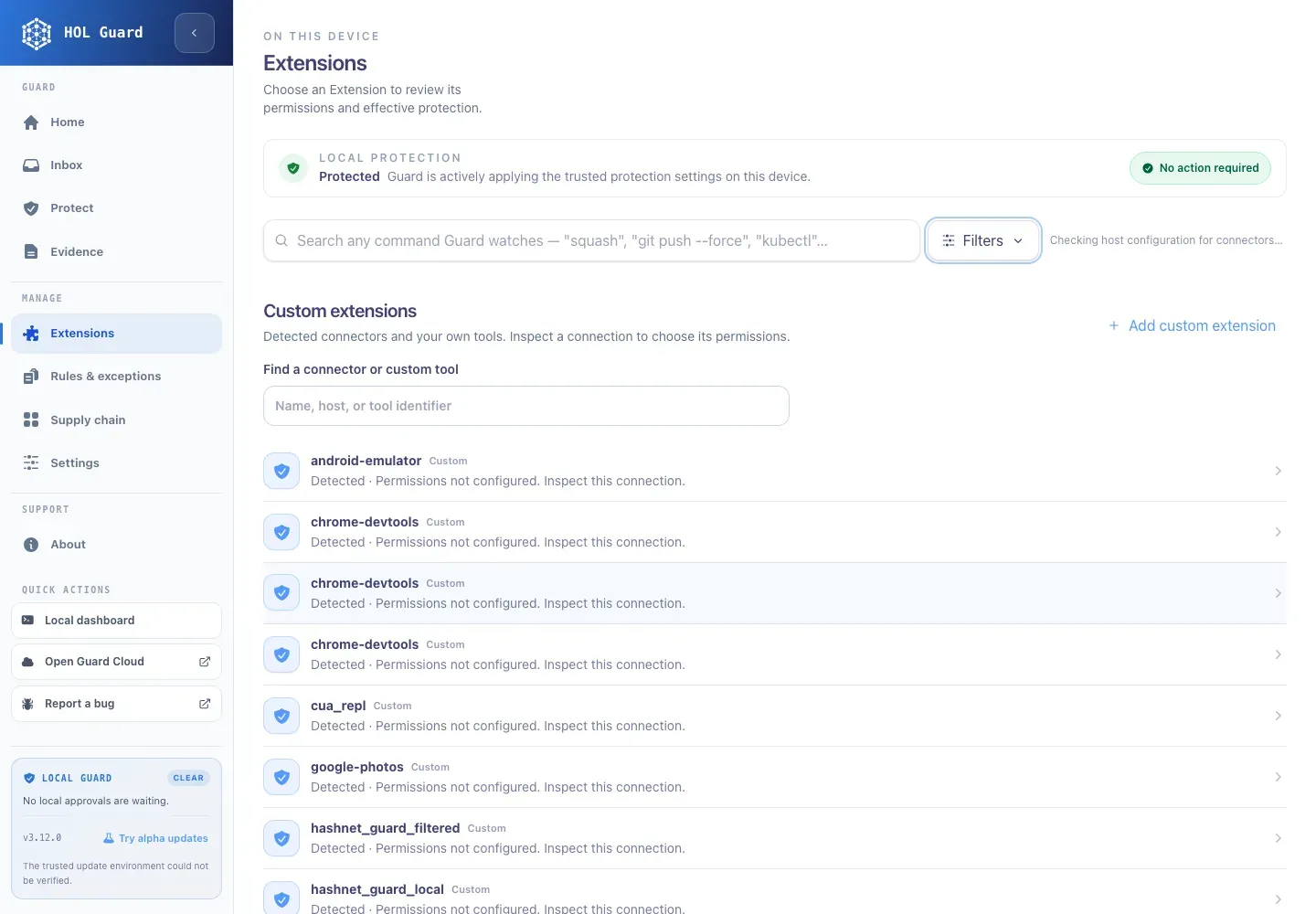
Official project screenshot of the local dashboard Extensions page, with the navigation for Home, Inbox, Protect and Evidence.
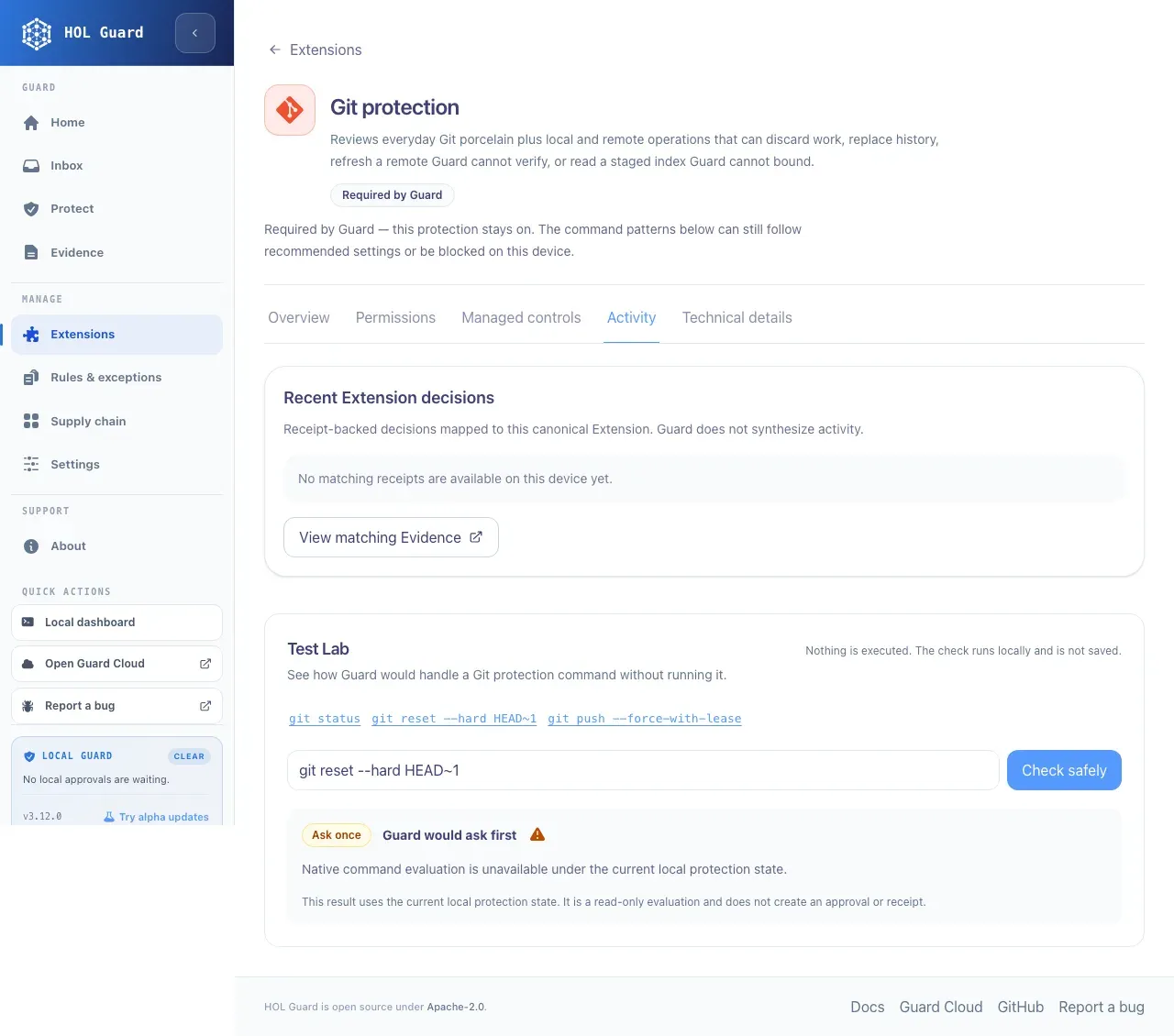
Official project screenshot of the Test Lab, which evaluates a command locally and states that nothing is executed.
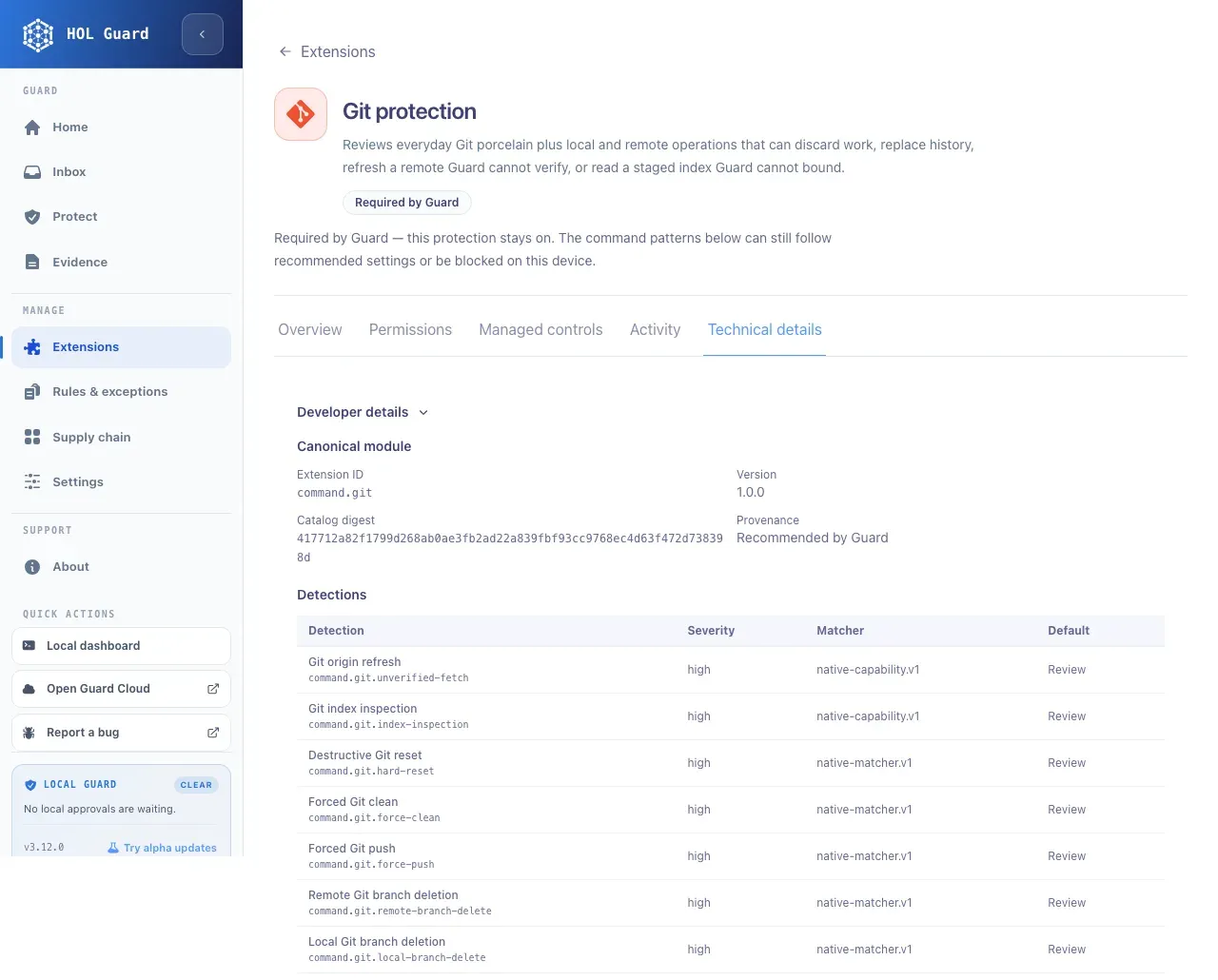
Official project screenshot of technical details for the Git protection Extension, showing detection ids and default Review actions.
Source: official HOL Guard project page.
Key capabilities
- Guided setup and install The first-run wizard started by
hol-guard initdiscovers supported agents and asks before each change, including opening the dashboard, installing agent integrations and connecting optional cloud services. Requirements are Python 3.10 or newer, pipx and a native runtime matching the Python package version.hol-guard updateupgrades an installation and, on platforms where the native wheel is published only on GitHub, downloads and checks it against the release digest. - Supported agents The README lists Codex, Claude Code, GitHub Copilot CLI, Cursor, Cline, Gemini CLI, Grok, Hermes, Kimi Code, Pi, oh-my-pi, OpenClaw, OpenCode, Antigravity, ZCode and Devin, with Paseo covered through its native provider integrations. Depth differs per agent, so read the support matrix for enforcement, approval delivery and failure behaviour before relying on a given integration.
- Pre-action review of commands and file access Guard inspects shell commands and file operations for destructive effects, sensitive file reads, credential exposure and suspicious outbound commands. For Codex it installs native pre-tool hooks and refuses a managed launch if those hooks are missing or disabled. Where an agent exposes no hook, enforcement is weaker, and the matrix documents that.
- Command test and explain
hol-guard command testandhol-guard command explainclassify a command, such asrm -rf ./build, and show the matching rules without running it or creating an approval. This is the quickest way to learn why a command paused and to check a policy change before an agent hits it. - Package install and supply chain checks Supported package-manager operations, including npm and PyPI, are evaluated against supply-chain intelligence before installation through shims and runtime evaluation.
hol-guard supply-chain sync,scanandexplainreport advisory evidence per package and ecosystem. Managers marked monitor-only stay advisory. - MCP server, skill and plugin inventory Guard inventories local plugins, skills, MCP servers and agent configuration and reviews new or changed artifacts before launch. MCP calls are checked through supported hooks and managed proxies.
hol-guard diffshows what changed since the last stored snapshot, andhol-guard inventorylists tracked artifacts. - Prompt injection and sensitive content screening Supported events are screened for prompt injection and sensitive content in prompts and tool results. A Safe Decode layer unwraps bounded base64, hex, gzip, heredoc, Python
-c, Node-eand PowerShell-EncodedCommandlayers, redacts the decoded preview and never executes decoded payloads. - Approvals Decisions can be resolved through native agent prompts, the local approval center served on 127.0.0.1, or
hol-guard approvals approveanddenywith a request id. Remembered allow or deny decisions are checked against Guard integrity key material before they count again, and tooling exists to verify or repair local decision rows. - Receipts and evidence
hol-guard receiptsandhol-guard explainshow what Guard decided and why. Receipts are written locally for first use and for changed artifacts, and the dashboard states that it does not synthesise activity: an extension with no receipts shows none. - Local dashboard and Extensions The local dashboard has Home, Inbox, Protect, Evidence, Extensions, Rules and exceptions, Supply chain and Settings sections. Extensions group command coverage such as Git, cloud CLIs, databases and package managers, each with permissions, managed controls, activity and technical details with detection ids and severities. A Test Lab checks a command without executing it.
- Extension catalog and contribution Command coverage comes from a catalog compiled in Rust and listed in the extension directory. External contributions require explicit opt-in, required core protections stay enabled, and a contribution guide plus an adapter guide describe how to add coverage or support for another agent.
- AI bill of materials export
hol-guard abom --format jsonexports an AI bill of materials for the artifacts Guard tracks. Use it to record which skills, MCP servers and plugins an agent environment relied on at a given time. - plugin-scanner for maintainers The separate
plugin-scannerpackage runs scan, lint, verify, submit and doctor against plugin packages for Codex, Claude Code, DeepSeek Harness, Gemini CLI, Kimi Code and OpenCode. Checks cover manifests, hardcoded secrets, MCP transport and command settings, approval defaults, skills, lockfiles and GitHub Actions permissions. Output formats are text, JSON, Markdown and SARIF, and a GitHub Action can gate CI on a minimum score or severity. - Plugin Kit
hol-guard pluginchecks one plugin source, such as a Claude Code plugin, Codex plugin, Gemini CLI extension, MCP Registryserver.jsonor a folder of skills, and writes a copy for each target runtime. The README says it runs locally, reads only the named folder and makes no network calls. See the Plugin Kit guide. - Optional Cisco analysis Baseline packages work without Cisco dependencies. The
plugin-scanner[cisco]extra adds skill scanning on Python 3.11 through 3.14, and MCP analysis needs the repository Docker image or thecisco-mcpdependency group. Treat these as additions to, not requirements of, the base install. - Guard Cloud Guard Cloud is optional and paid. The local versus cloud page says local interception, extensions, blocking, receipts and approvals keep working when you are signed out, offline or on no plan. Solo adds sync for two devices, 30 days of history and 1 GB storage; Pro adds longer retention, control sets and advanced search, with Team and Enterprise tiers listed on the pricing page.
- Open source and community The source is public on GitHub under Apache-2.0 with discussions enabled and an OpenSSF Scorecard badge. Releases carry annotated notes at hol.org/guard/releases.
Where HOL Guard fits
Protecting a developer machine that runs several agents
Run hol-guard init, let the wizard detect the agents you use and accept only the integrations you want. Then run hol-guard doctor for one agent and a benign action, and confirm a matching entry appears in hol-guard receipts. A successful install alone does not prove an agent is protected, because the native runtime and the agent hooks both have to work.
Gating risky shell commands and secrets
Use hol-guard command test on commands your agents commonly run, such as git clean, rm -rf and cloud CLI deletes. Check whether the result is allow, review or block, then adjust local policy or project overrides. Review remembered approvals regularly, since a broad allow rule weakens the control.
Vetting packages before an agent installs them
Sync the supply-chain data, scan a workspace and use supply-chain explain on a package you doubt. Note which ecosystems are intercepted and which are advisory only, and handle false positives through the remediation guide rather than by disabling the check.
Reviewing MCP servers, skills and plugins before launch
Use hol-guard inventory and hol-guard diff to see what a new agent configuration added, then read the receipt for each changed artifact. Export an AI bill of materials with hol-guard abom when you need a record of the environment for a review.
Checking a plugin before you publish it
Run plugin-scanner scan, lint and verify in the plugin repository, fix findings, and add the GitHub Action with a minimum score and a failing severity. Export SARIF to GitHub code scanning if you want findings in pull requests, and keep repository-owned baselines trusted only on purpose.
Rolling out to a team with Guard Cloud
Start with local Guard on a pilot group, then evaluate Guard Cloud for shared history and team policy. Confirm retention, device limits and what receipt data leaves the machine, since the documentation says only redacted summaries sync when receipt sync is enabled.
Install
pipx install hol-guard && hol-guard initReviews of HOL Guard
Be the first to share your experience with HOL Guard.
Write a review
Loading review form…
Alternatives to HOL Guard
 NVIDIA NemoClawApache 2.0 reference stack from NVIDIA for running OpenClaw, Hermes or LangChain Deep Agents Code inside OpenShell sandboxes, with guided onboarding, provider keys kept outside the sandbox, deny-by-default egress and state-preserving rebuilds.
 OmnigentOpen-source meta-harness for AI agents. It puts Claude Code, Codex, Cursor, Pi and custom YAML agents behind one session layer with policies, sandboxes, a web UI, desktop and mobile apps and a REST API. Marked alpha.
 IronClawIronClaw is a MIT or Apache-2.0 Rust AI assistant from NEAR AI. It keeps credentials out of the model, runs tools in WASM sandboxes, and offers a local WebUI, routines, memory and MCP, or paid hosted instances.