

What is Omnigent?
Omnigent is an open-source meta-harness for AI agents. A harness is the program that runs a model in a loop with tools, such as Claude Code or Codex; Omnigent sits one layer above and gives several harnesses a common session, policy and collaboration layer. Its README lists Claude Code, Codex, Cursor, OpenCode, Goose, Antigravity, GitHub Copilot, Devin, Kiro, Qwen Code, Kimi Code, Grok Build, Jcode, Hermes, Pi and OpenAI Agents or Open Responses, plus custom agents defined in YAML. The omnigent.ai site says it is built by the Databricks AI team, Neon and the Omnigent contributors, and the project is marked alpha.
Distribution is a Python package. The documented installer is a shell script that installs Omnigent and its prerequisites, and manual routes are uv tool install omnigent, pip, a Homebrew tap or a source install; Python 3.12 or newer, git, Node.js 22 LTS and tmux are expected on Linux and macOS, and Linux also needs bubblewrap. The CLI answers to omnigent and omni. A local web UI starts on port 6767, a macOS desktop app wraps it, and the site links iOS and Android apps. Native Windows runs in a degraded mode without the terminal wrappers or filesystem sandboxing. The README is the main reference and the docs live at omnigent.ai/docs.
The release reviewed here is v0.21.0, published on November 5, 2026. It reworks the pull request tab into a compact list with checks and merge actions, shows agent tool calls as plain-language actions with per-file diffs, lets sessions run on any machine over SSH from the desktop app, and gives side chats their own model controls. It also moves omnigent opencode to OpenCode 2.0 and drops OpenCode 1.x, and requires macOS 13 or later for the desktop app. Releases come about weekly, and the project is licensed under Apache-2.0.
Omnigent does not train or host models and is not itself a coding agent with its own reasoning loop. Model access comes from your own API keys, subscriptions or gateways. Because the status is alpha, interfaces and flags change between releases.
Omnigent screenshots
Explore the interface. Open a screenshot to view it at full size.
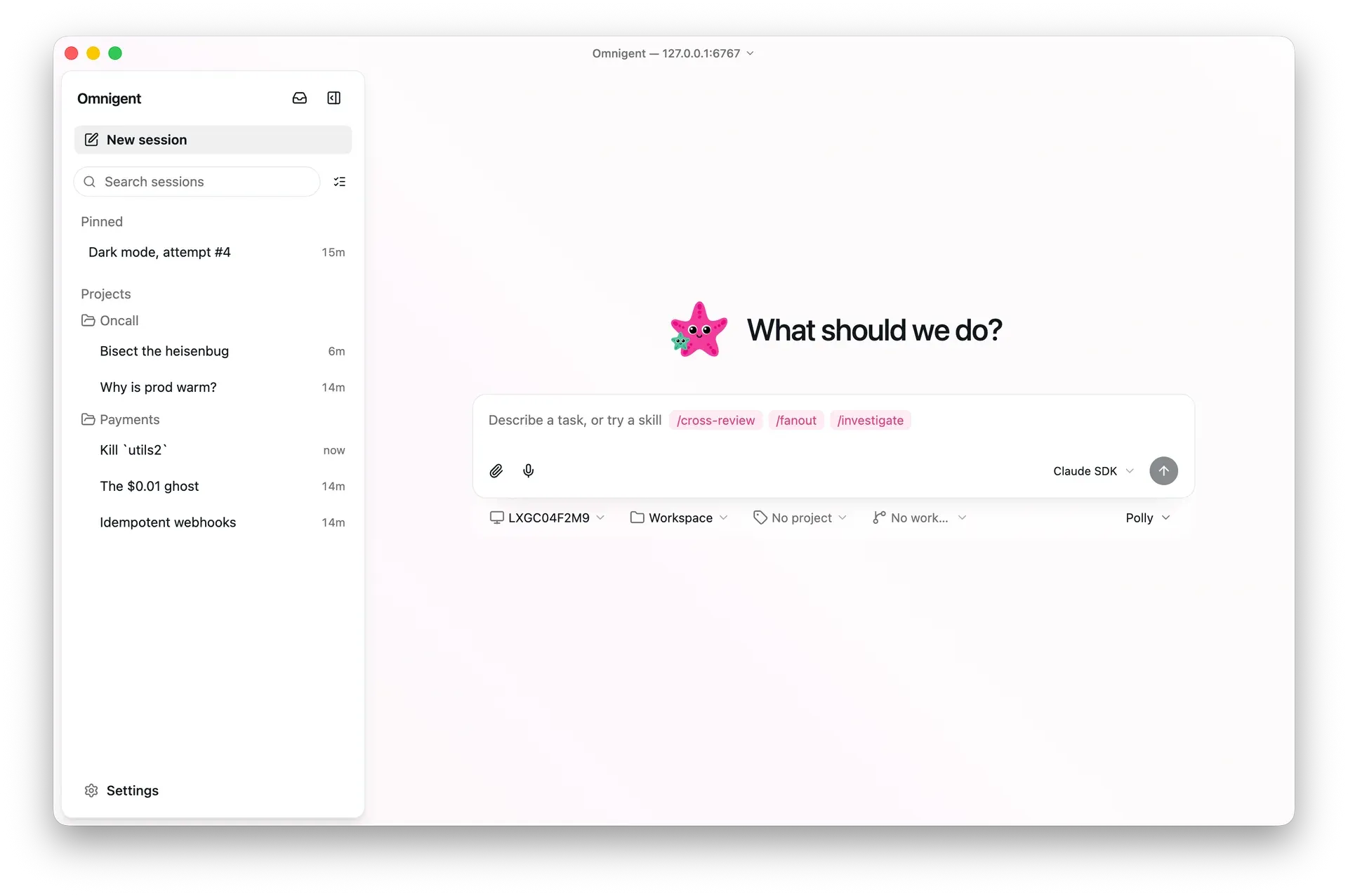
Official desktop app screenshot: a new session with the Polly agent and the Claude SDK harness selected.
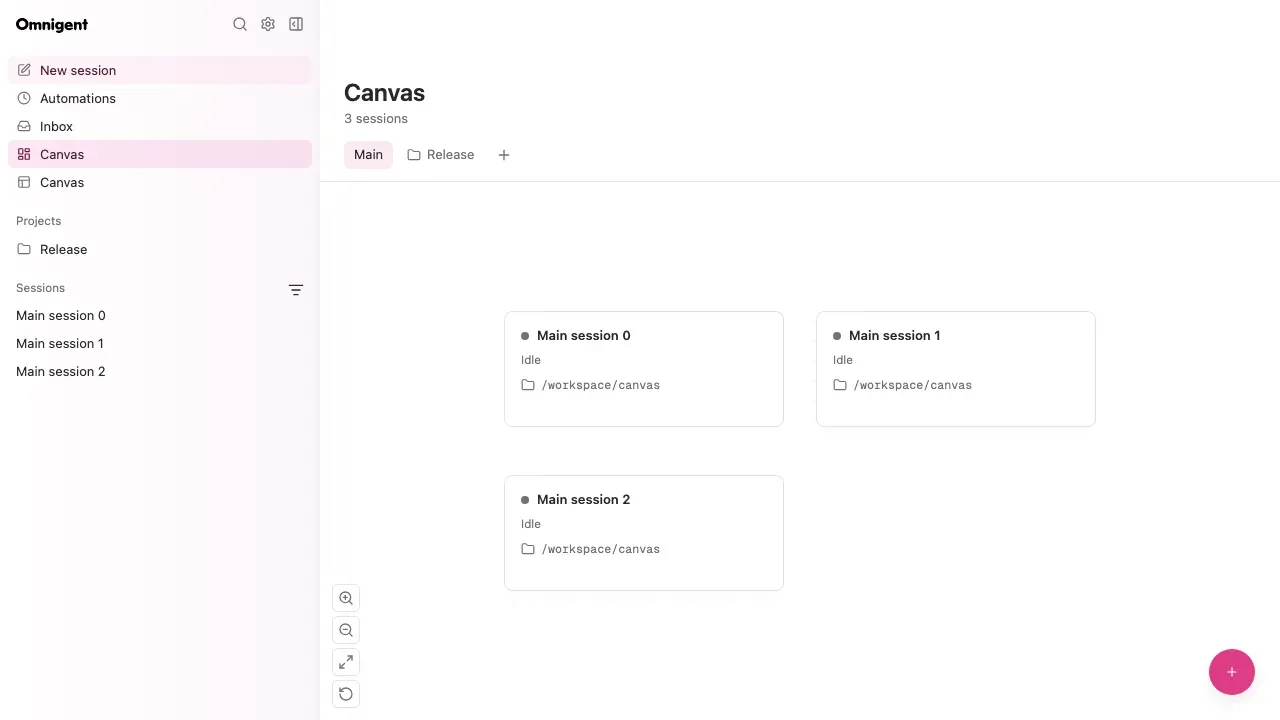
Canvas view from the repository documentation, with sample idle sessions.
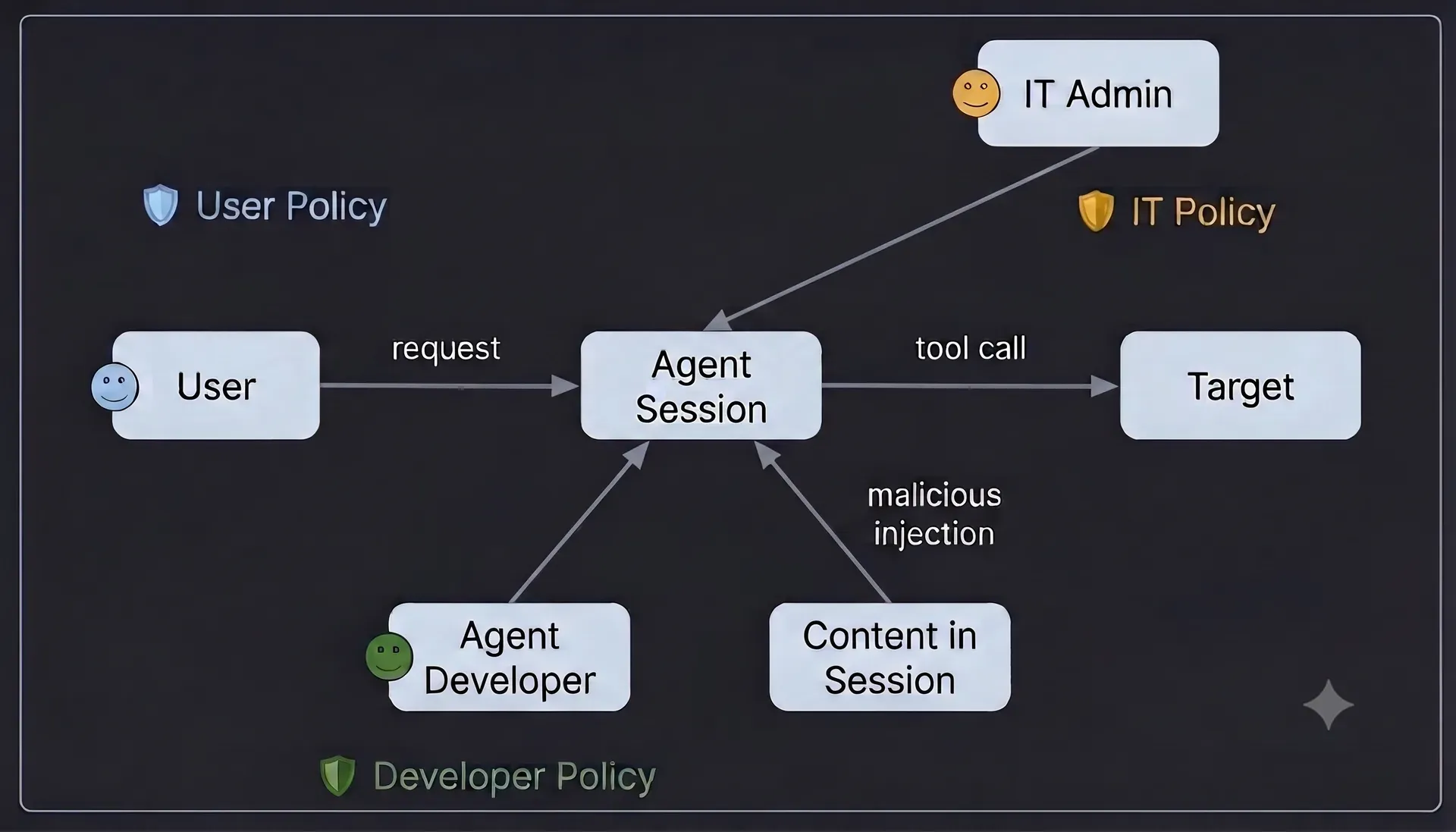
Official policy trust model figure: user, developer and IT policies apply to the agent session and its tool calls.
Source: official Omnigent project page.
Key capabilities
- Harness-agnostic sessions One session can run Claude Code, Codex, Cursor, Pi and other harnesses, selected with a launcher such as omnigent claude or omnigent codex, or with omnigent run and a harness flag. Harness support differs in depth: some are native terminal wrappers, some use SDKs or the Agent Client Protocol. Check the harness page for the one you need.
- Terminal, web, desktop and mobile access Starting omnigent opens a terminal session and a local web UI at port 6767 showing the same session. The macOS desktop app adds notifications and a dock badge, and the web UI is built for mobile browsers. Messages, sub-agents, terminals and files stay in sync across surfaces.
- Multi-agent orchestration Agents can be combined in one session, so one agent reviews another and a task is split across agents with different strengths. The repository ships example agents: Polly, a coding orchestrator that delegates to sub-agents in parallel git worktrees and routes diffs to a reviewer from a different vendor, Debby, a two-model brainstorming pair, and a deep research agent.
- Custom agents in YAML Agents are defined as a directory with YAML configuration, tools and sub-agents, and run with omnigent run. MCP servers are configured per agent, and /mcp in the composer lists the MCP servers of a session and whether each is connected, with sign-in for those that need it.
- Policies and approvals Policies pause for approval before risky actions, cap spend or restrict the tools an agent can reach. They apply to the whole server, to one agent or to a single chat. The policy documentation distinguishes user, developer and IT administrator policies. The built-in approval policy for file and shell operations also covers terminal tools since v0.21.0.
- Local and cloud sandboxes On Linux and macOS, agent terminals run under bubblewrap or the macOS seatbelt sandbox. Remote sandboxes are available from Modal, Daytona, Blaxel, Islo, E2B, Gensee, CoreWeave, Kubernetes, OpenShell, Boxlite, microsandbox and Databricks, launched from the CLI or provisioned by the server per session as managed hosts.
- Any model credential Omnigent setup adds four kinds of credential: a first-party API key, a Claude or ChatGPT subscription used through the official CLIs, a gateway with an OpenAI- or Anthropic-compatible base URL such as OpenRouter, LiteLLM, Ollama, vLLM or Azure, and a Databricks workspace profile. Defaults are set per agent and /model switches mid-session.
- Shared and forkable sessions A session can be shared so teammates chat with the agent and watch it work live, co-drive it on the host machine or fork the conversation. Multi-user accounts turn on with OMNIGENT_AUTH_ENABLED, and admins invite members with single-use links, with no email server needed.
- Server deployment A server gives sessions a stable URL. The deployment guide covers docker compose on a VPS, Render, Railway, Fly.io, Hugging Face Spaces, Modal, Cloudflare and Databricks Apps, with Cloudflare quick tunnels or Tailscale for a laptop. See deploy/README.md.
- Pull requests and Git providers The Pull Requests tab shows linked PRs with checks, lets you merge, edit titles and descriptions, manage labels and reviewers and handle review conversations inline. Git provider setup, including a GitHub App, is documented in the repository. A session keeps its linked PRs visible while its host is offline.
- Automations The Automations page starts an agent on a recurring schedule, with a REST API for managing schedules. Limits and the schedule format are in the automations guide. This turns an interactive agent into a scheduled job, so apply policies to it too.
- Canvas and project views A canvas view shows sessions as cards grouped on boards, and sessions can be grouped into projects and pinned in the sidebar. Open files update when another session edits them, and the Files panel opens files in VS Code or Cursor.
- Session recovery and diagnostics If a host restarts while an agent works, the session recovers on its own, marks the interrupted reply and runs the next message without a manual resume. The docs include notes on harness diagnostics, terminal lifecycle and network resilience.
- REST API and UI integration Every session is exposed through a REST API alongside the terminal, web and native apps, and links can open a new chat with a prefilled prompt through a ?prompt= parameter. The agent UI API notes describe the interface used by the web client.
- Upgrade and uninstall commands Omni upgrade detects how Omnigent was installed, waits for in-flight sessions, stops the local server and runs the matching upgrade, with --check to only report. omnigent uninstall previews cleanup and can remove state under ~/.omnigent with a purge flag, after backing it up.
Where Omnigent fits
Running several coding agents on one task
Start Polly or your own orchestrator, let it hand parts of a task to Claude Code, Codex or Pi in separate git worktrees and have a different vendor's agent review each diff. Compare cost and result with a single-agent run on the same task, and keep the worktrees until you have merged what you want.
Continuing a session from a phone or browser
Start omnigent in a terminal, open the printed URL on another device on the same network or through a Tailscale address, and send a follow-up. Confirm that messages, terminals and files match on both screens before relying on it for long-running jobs.
Putting guardrails on agent actions
Enable the approval policy for file and shell operations, add a spend cap and restrict the tools of a sensitive agent. Then try a deliberately risky command and check that the approval card appears and that a denial is respected. The README policy section explains scope.
Running agents in a disposable sandbox
Choose a sandbox provider such as Modal, Daytona or Kubernetes, install its extra and launch a session there so no laptop has to stay on. Check which credentials reach the sandbox, because the host-to-runner allowlist is deliberately narrow, and review what files the sandbox can see.
Sharing an agent with a team
Deploy the server with Docker, enable accounts, invite teammates with single-use links and share a session so others can watch or co-drive. Decide in advance who may fork conversations, since a fork carries the history, and keep policies on the server rather than in each user's setup.
Building a custom YAML agent
Copy the deep research example, which is one agent plus one MCP server, then change the instructions and tools. Run it with omnigent run on two different harnesses to see how behavior changes. The harness-specific guides in the docs folder explain native versus SDK modes.
Install
curl -fsSL https://raw.githubusercontent.com/omnigent-ai/omnigent/main/scripts/install_oss.sh | shReviews of Omnigent
Be the first to share your experience with Omnigent.
Write a review
Loading review form…
Alternatives to Omnigent
 OpenHandsOpenHands Agent Canvas is an MIT-licensed control center for coding agents. It runs the OpenHands agent or ACP agents such as Claude Code and Codex on local, Docker, VM, Kubernetes or cloud backends, with scheduled and event-driven automations.
 PaseoPaseo is an Apache-2.0 agentic development environment. A local daemon runs the agent CLIs you already use, each task in its own Git worktree, with editor, terminals, diffs and a browser, and clients for macOS, Windows, Linux, iOS, Android, web and CLI.
 OrcaOrca is an MIT-licensed Electron app from Stably AI for running many coding agents at once, each in its own Git worktree. It adds chat and terminal views, diff review, a CLI, SSH and self-hosted servers, plus iOS and Android companion apps.