

What is IronClaw?
IronClaw is a personal AI assistant and agent runtime written in Rust, developed by NEAR AI at nearai/ironclaw and described on ironclaw.com as an open-source agent for busywork whose secrets never touch the model. Its design starts from the risks of running an always-on agent with access to credentials: prompt injection, malicious third-party skills and exposed instances. The README answers with defense in depth: tools run in WebAssembly sandboxes with capability-based permissions, credentials are injected at a host boundary rather than shown to the model, outbound requests go through an endpoint allowlist, and traffic is scanned for secret leaks.
The same codebase is distributed in two ways. You can install it locally on macOS, Linux or Windows (Windows/WSL via shell script, a PowerShell script or an MSI), run ironclaw onboard, and use the WebUI or REPL on your own machine. Alternatively, NEAR AI offers hosted instances through its Agent Hub, which the site says boot inside a Trusted Execution Environment on NEAR AI Cloud, with pricing tiers listed on the website. The local install is the open-source path; the hosted one is a paid service operated by NEAR AI.
The latest release is 1.4.1, published on September 29, 2026. It is described as a stable promotion of 1.4.1-rc.2 and fixes activation of Google extensions such as Gmail and Google Calendar when the OAuth client is supplied through the Web UI instead of environment variables, and includes a Wasmtime security update. Release assets include tarballs and installers for macOS (Apple Silicon and Intel), Linux (glibc and musl, x86_64 and aarch64) and Windows x86_64, each with checksums. Source builds need Rust 1.96 or newer and Node.js 22 with Corepack and pnpm.
The project is dual-licensed MIT or Apache-2.0. It is model-agnostic: the site lists Anthropic, OpenAI, GitHub Copilot, Google Gemini, MiniMax, Mistral, Ollama, OpenRouter, Together AI and Fireworks AI, and the setup wizard also offers NEAR AI, Tinfoil, Groq and OpenAI-compatible endpoints. The README presents IronClaw as a security-focused alternative to OpenClaw. The details come from the repository, documentation and website.
IronClaw screenshots
Explore the interface. Open a screenshot to view it at full size.
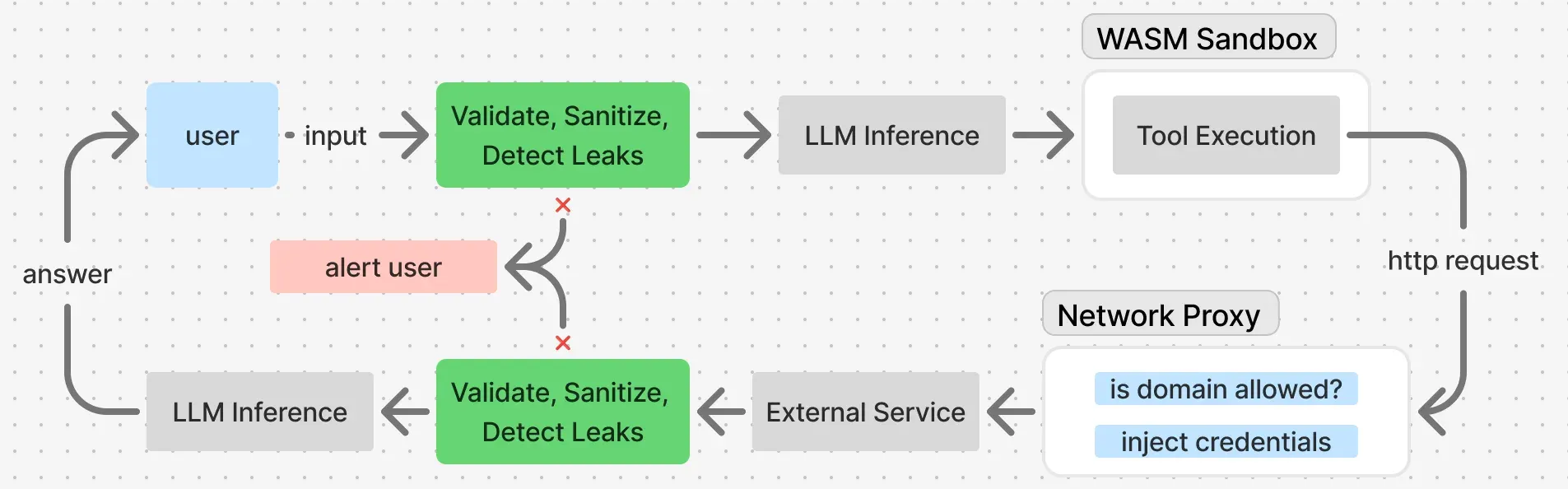
Official data-flow diagram from the IronClaw security documentation.
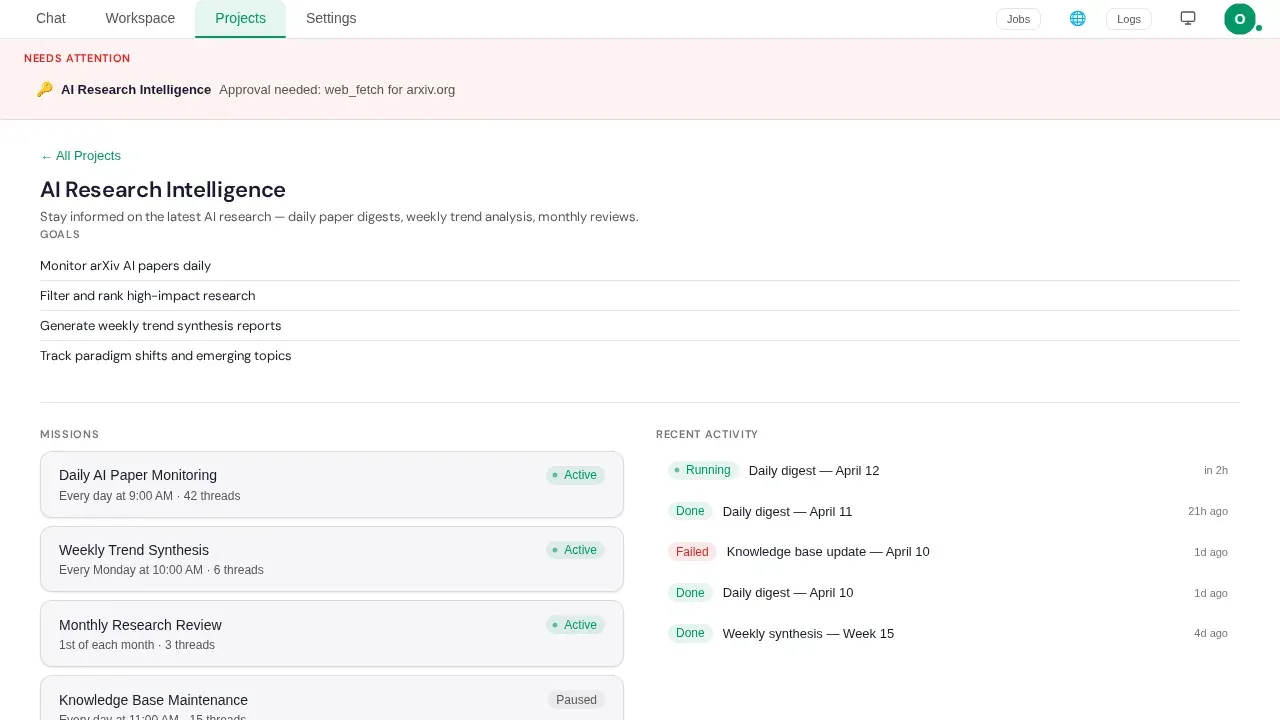
WebUI Projects view with sample data, from the repository's end-to-end test fixtures.
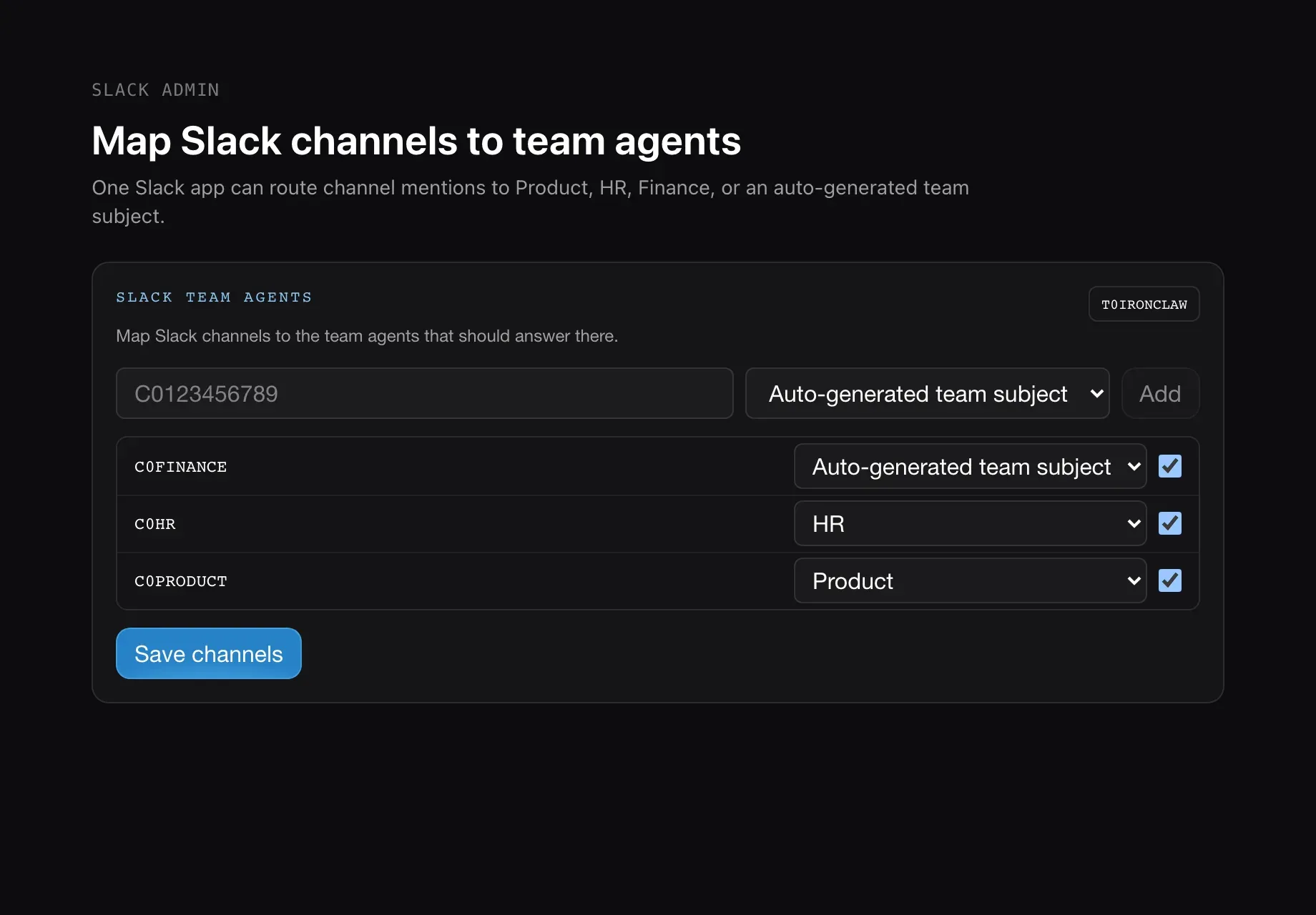
Slack channel to team-agent mapping page in the IronClaw WebUI, from the project documentation images.
Source: official IronClaw project page.
Key capabilities
- Guided onboarding
ironclaw onboardasks you to pick an LLM provider, enter its key at a hidden prompt and accept or change the default model. It creates local configuration, an encrypted credential store and a WebUI login token, and on macOS and Linux installs and starts the background service.ironclaw statusprints the login link again. - Web interface
ironclaw servestarts a browser UI on 127.0.0.1:3000 by default, with chat, memory, jobs, logs, extensions and routines. A bearer token gives full operator access, so treat it like a password, and Google or GitHub single sign-on can be configured for multi-user deployments. - Terminal and webhook channels Besides the WebUI, you can use an interactive REPL (
ironclaw repl), HTTP webhooks and WASM channels. Slack and Telegram are installed as extensions and configured on the WebUI Extensions page rather than in a config file. - WASM sandbox for tools Untrusted tools run inside wasmtime with fuel metering, memory limits (16 MB by default) and rate limits. Network, filesystem and credential access must be declared explicitly in a capability manifest. A compromised tool therefore cannot reach other tools or secrets by default.
- Credential vault and injection Secrets are stored encrypted with AES-256-GCM and injected into outgoing requests at the network proxy, only for approved endpoints. The documentation states they never enter the container or WASM code, which keeps them out of the model context.
- Leak detection Requests and tool output are scanned for secret-like data, with 15 or more patterns documented, and matching traffic is blocked. This reduces exfiltration through a manipulated agent but is pattern-based and not a guarantee.
- Prompt-injection defenses External content passes through input validation, a sanitizer, a policy engine with Block, Warn, Review and Sanitize severities, and XML wrapping of tool output. These layers lower risk and do not remove it, so keep sensitive tools behind approval.
- Endpoint allowlisting HTTP requests go only to hosts and paths you have approved. There is no silent phone-home, and the README states that the software has no telemetry or analytics.
- Docker sandbox and orchestrator Jobs can run in isolated containers with per-job tokens under an orchestrator and worker pattern. When Docker is not installed, the sandbox is disabled and the startup log says so.
- Routines and heartbeat Cron schedules, event triggers and webhook handlers run background jobs through the full agent loop, such as a weekday standup draft. A heartbeat system supports proactive monitoring, and routine jobs count against the parallel job limit.
- Persistent memory A workspace filesystem stores notes, logs and context with hybrid full-text and vector search ranked by Reciprocal Rank Fusion, plus identity files for consistent preferences. The agent is instructed to search memory before answering questions about earlier work.
- Skills Markdown skills with YAML front matter activate by keyword, tag or regex scoring and inject instructions into context under a token budget. Explicit
$nameor/namementions bypass automatic selection. - Extensions and MCP Extensions can be WASM tools, MCP servers or first-party tools, installed with
ironclaw extension install. MCP servers connect over HTTP(S) with JSON-RPC, while the stdio transport is rejected because process egress controls have not landed yet. - Dynamic tool building The README says you can describe a needed tool and IronClaw builds it as a sandboxed WASM tool. Review generated tools and their declared capabilities before enabling them.
- OpenAI-compatible Responses API
POST /api/v1/responsesexposes the full agent loop, with tools, memory and server-side conversation state, behind bearer-token authentication. A separate/v1/chat/completionsendpoint is a raw model proxy without tools or memory. - Background service
ironclaw service installregisters a launchd user agent on macOS or a systemd user unit on Linux that runsironclaw serveand restarts at login. Windows users runironclaw servein the foreground. - Hosted instances and pricing The site lists Starter at $0 per month with $5 credits for one agent, Basic at $20 per month for up to two agent instances and Pro+ at $200 per month for up to five. Model usage may draw on included NEAR AI Inference credits. Check the site for current terms.
Where IronClaw fits
Running a private assistant on your own machine
Install the release for your platform, run ironclaw onboard with one provider key, and open the WebUI link from ironclaw status. Keep the default 127.0.0.1 binding, protect the token file, and confirm with ironclaw config list that no credential appears in plain text.
Connecting email, calendar and chat
Install the Gmail, Google Calendar, Slack or Telegram extension from the WebUI Extensions page and complete its OAuth or bot setup. Start with read-only tasks such as inbox triage, and check what each extension is allowed to reach before letting the agent send messages.
Scheduling recurring work
Describe a routine in chat, such as a morning briefing or a deployment health check, and let the agent create it. Review the routine history after the first runs, check that results land where you expect, and set limits on concurrent routines so background jobs do not crowd out interactive requests.
Building and vetting custom tools
Ask the agent to build a WASM tool for an API you use, then read its capability manifest: allowed hosts, secrets and resource limits. Narrow the allowlist to the specific endpoints needed, and test with throwaway credentials before connecting real accounts.
Adding MCP servers safely
Install the extension that wraps the MCP server, finish its credential setup and treat the server as untrusted. The server gains no ambient filesystem or network authority, but its tool output still enters the model context, so use servers you trust and review what they return.
Using a hosted instance
Create an agent on the NEAR AI Agent Hub, connect through the web link or SSH, and manage lifecycle from the dashboard rather than ironclaw service. Decide which credentials you are willing to place on a third-party cloud, even one that runs inside a Trusted Execution Environment, and keep a local copy of any important memory documents.
Reviews of IronClaw
Be the first to share your experience with IronClaw.
Write a review
Loading review form…
Alternatives to IronClaw
 OpenClawOpenClaw is an MIT-licensed AI assistant that runs as a Gateway on your own machine or server, connects to Telegram, WhatsApp, Slack, Discord, iMessage and other channels, and keeps memory and credentials on hardware you control.
 ZeroClawOpen-source personal AI agent runtime in a single Rust binary. Connects your own model keys or local models to 30+ chat channels, runs tools under supervised approval and OS sandboxes, and is dual-licensed MIT or Apache 2.0.
 NanoClawOpen-source personal AI assistant with a small TypeScript core. Agents run in per-session Docker containers, keys stay in a credential gateway, and channels such as WhatsApp, Telegram, Slack or Discord are added as skills. Claude by default.