

What is NanoClaw?
NanoClaw is an open-source personal AI assistant that you run on your own computer and message from the chat apps you already use. Every active agent session runs in its own Docker container, so the agent's shell, browser and files are separated from the host. It is maintained by NanoCo, the company listed as its maintainer on nanoclaw.dev, under the MIT license. The repository was created in January 2026 as a deliberately small counterpart to OpenClaw: one Node.js host process and a few source files instead of a large framework with dozens of configuration files.
There is no installer package or app store build. You clone the repository and run bash nanoclaw.sh, which checks RAM (4 GB or more), installs Node.js, pnpm and Docker where missing, installs a credential gateway, builds or fetches the agent container image, registers a background service (launchd on macOS, a systemd user unit on Linux) and pairs a first channel. The host needs macOS or Linux; Windows works through WSL2. A maintained helper script also installs NanoClaw into an unprivileged Debian 13 LXC on Proxmox VE 8.0 to 9.2.
The current stable release is NanoClaw 2026.10.0, published October 9, 2026. It is the first release with calendar version numbers, and /update-nanoclaw now follows published releases on a stable, beta or edge channel instead of the tip of main. OneCLI installs must move the gateway to exactly version 1.42.0, which closes a credential-injection bypass. It also adds outbound proxy support and fixes published advisories, including a WhatsApp message-spoofing flaw in Baileys. Version 2.4.0 (September 2026) turned credential gateways into installable skills, and 2.3.0 (August 2026) moved containers behind a session driver interface, made upgrades transactional and raised the host minimum to Node.js 22.
The architecture is short enough to trace. A TypeScript host routes each inbound message through users, messaging groups, agent groups and sessions, writes it to the session's inbound.db and wakes the container. Inside, a Bun agent-runner calls the selected provider, Claude Code through Anthropic's Claude Agent SDK by default, and writes replies to outbound.db, which the host delivers back through the channel adapter. Each SQLite file has exactly one writer. Channel adapters and alternative providers are not in the core: they are installed per fork with /add-<name> skills. The architecture page and security model explain the design in detail.
Some things are intentionally absent. NanoClaw has no configuration files, no monitoring dashboard and no user accounts; behaviour is changed by editing the code, usually by asking Claude Code to do it. Docker is the only shipped sandbox runtime, with no micro-VM option. The only data reported by default is anonymous setup diagnostics, which NANOCLAW_NO_DIAGNOSTICS=1 disables. A free NanoClaw account is needed only for the optional hardened agent image and the managed Slack app. Model requests still go to whichever cloud provider you configure.
NanoClaw screenshots
Explore the interface. Open a screenshot to view it at full size.
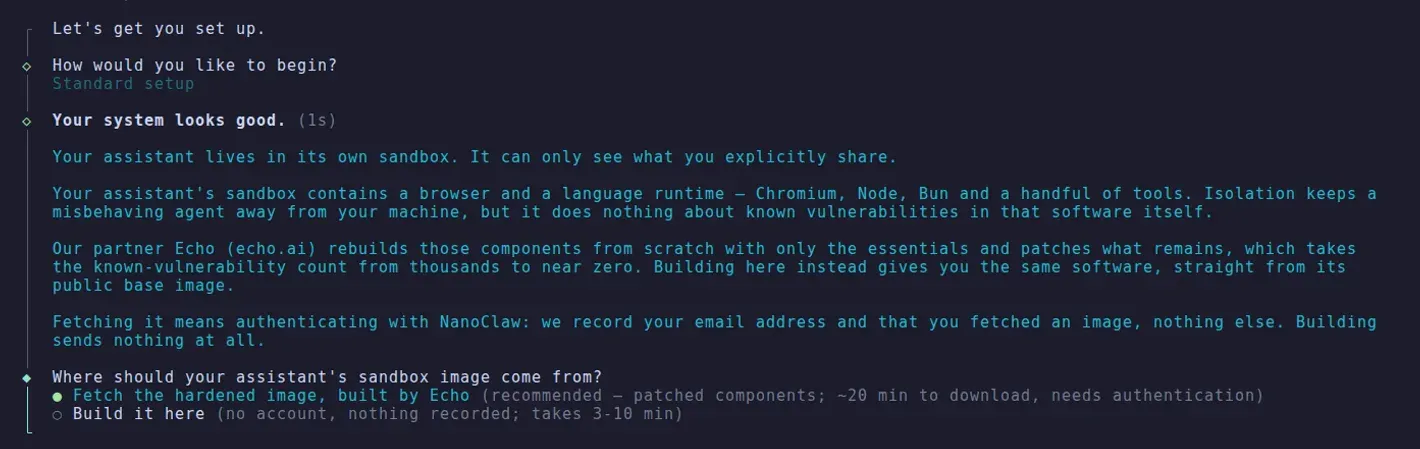
Official documentation screenshot of the setup wizard's sandbox image step: fetch Echo's hardened image (account required) or build locally with no account.
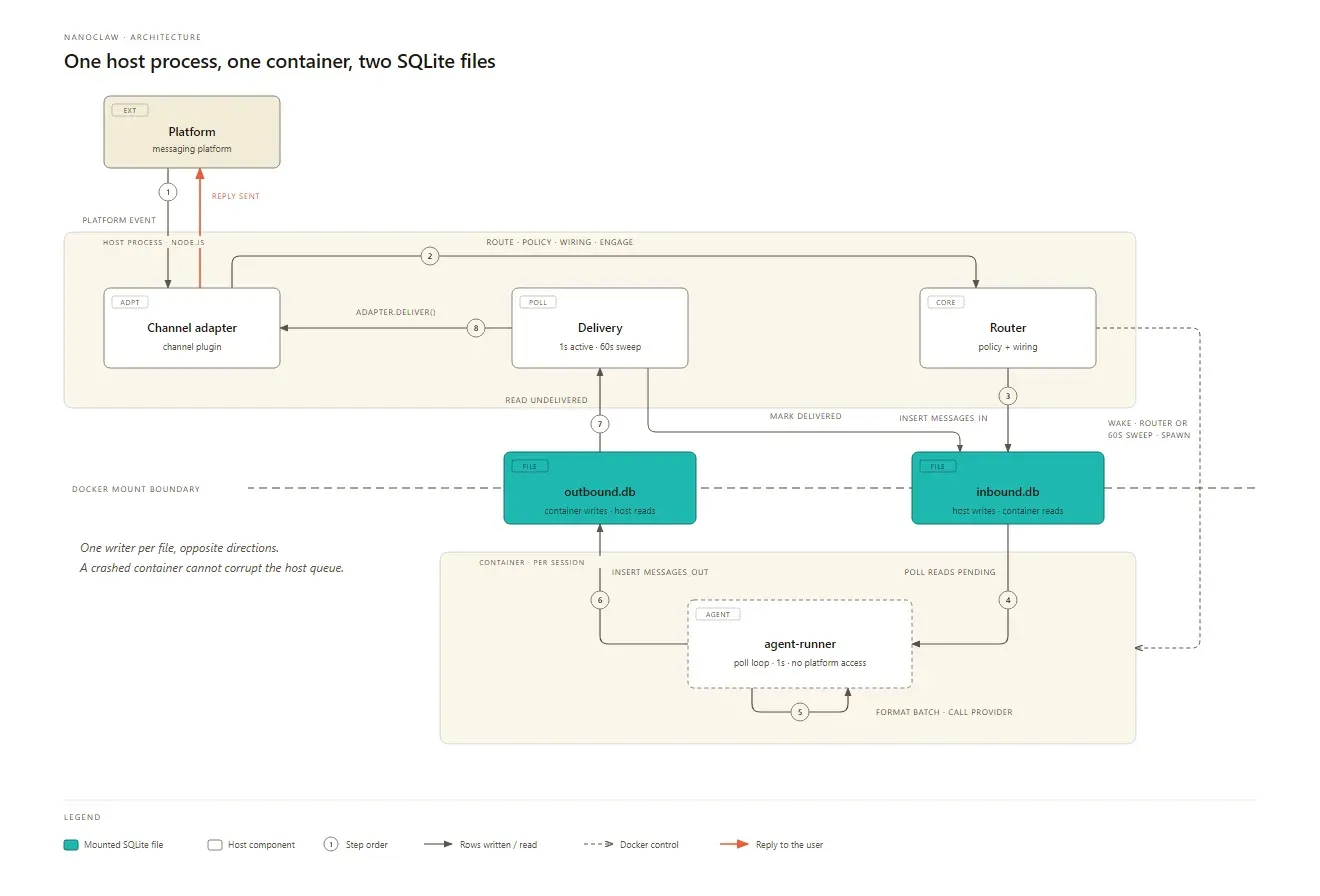
Official architecture diagram from docs.nanoclaw.dev, rendered from its SVG: one host process, one container per session and two SQLite files with one writer each.
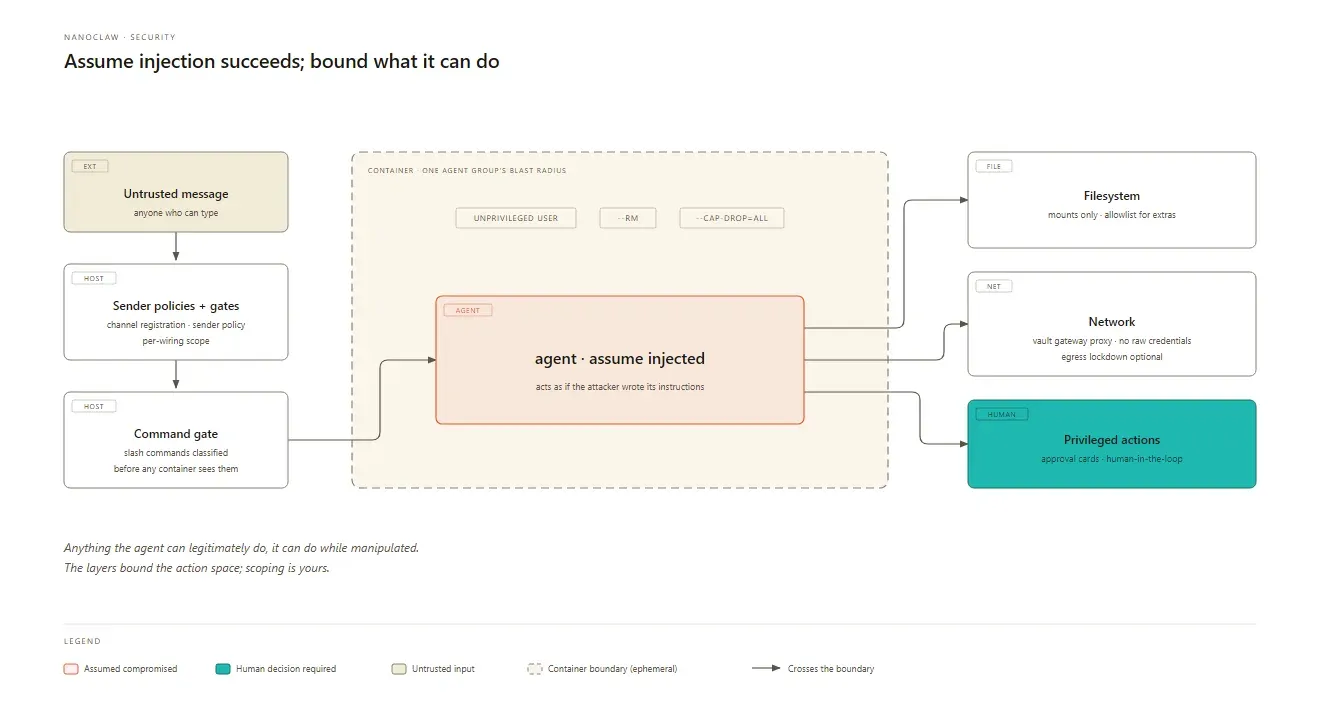
Official security model diagram from docs.nanoclaw.dev, rendered from its SVG: the agent is assumed compromised and each path out of the container is bounded.
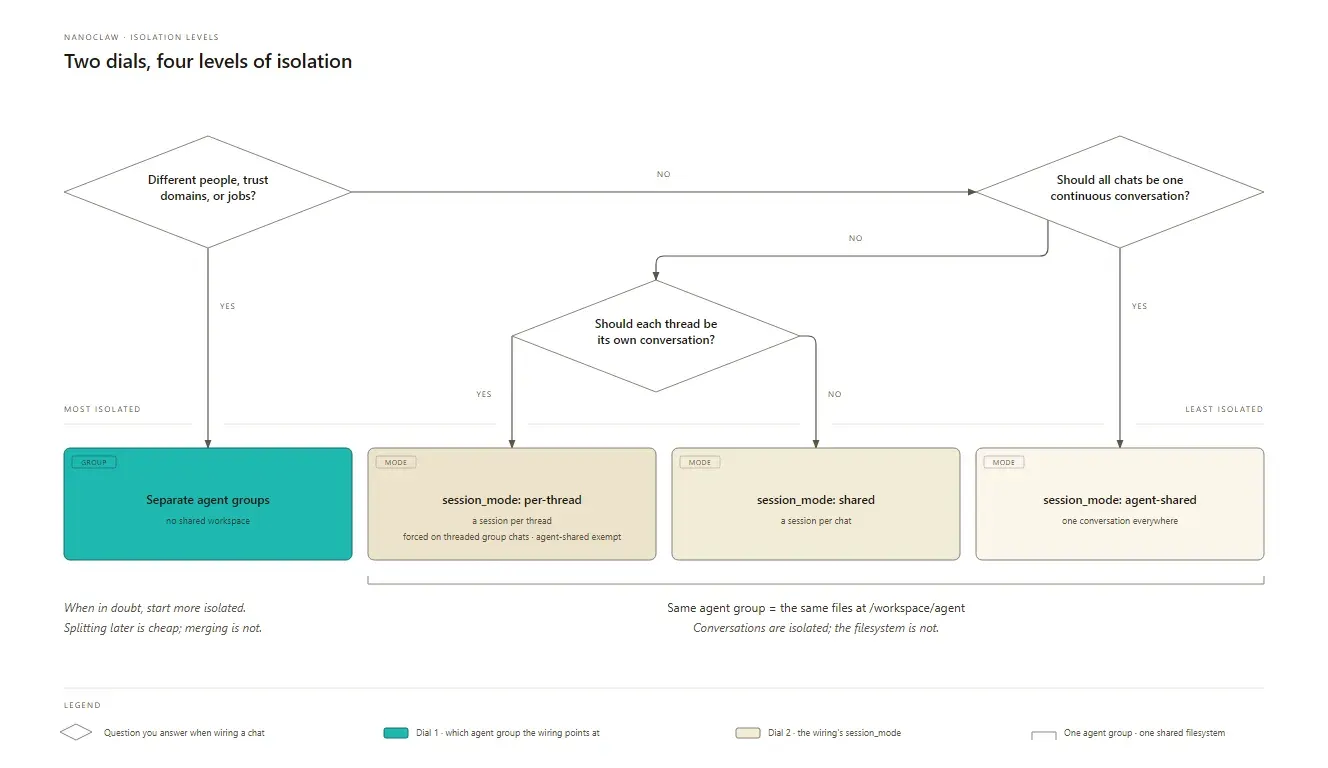
Official isolation levels decision guide from docs.nanoclaw.dev, rendered from its SVG; sessions in one agent group still share the same workspace files.
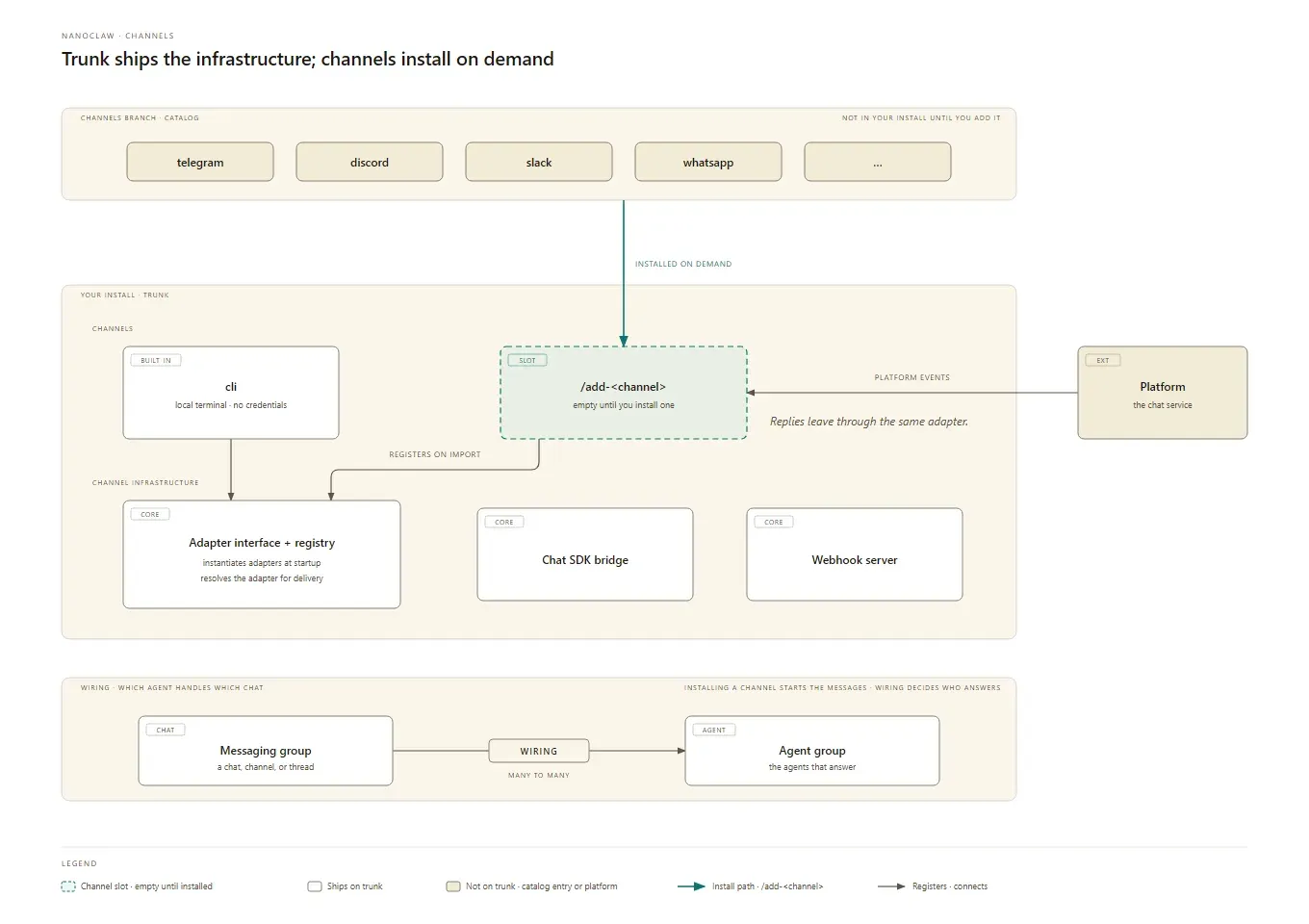
Official channels overview from docs.nanoclaw.dev, rendered from its SVG: only the CLI channel ships in the core, other adapters install through skills.
Source: official NanoClaw project page.
Key capabilities
- Install on macOS Clone the repository and run
bash nanoclaw.sh. On macOS the script offers to install Homebrew (which pulls in the Command Line Tools), then Node.js 22, pnpm 10 and Docker Desktop throughbrew install --cask docker. The service is a LaunchAgent plist withRunAtLoadandKeepAlive, so it starts at login and restarts after a crash. - Install on Linux and Windows WSL2 The same script installs Node.js through NodeSource or nodeenv and Docker Engine through
get.docker.com, adds the user to the docker group and writes a systemd user unit with lingering enabled so it survives SSH logout. Without systemd, as on some WSL setups, it writes astart-nanoclaw.shwrapper instead. Running as root is discouraged, and Google Compute Engine VMs are flagged because they block the sudo calls setup needs. Requirements are in the installation guide. - Proxmox VE helper A helper script maintained by the NanoClaw team creates an unprivileged Debian 13 LXC with 2 cores, 8 GiB RAM and a 40 GiB disk by default, installs Docker, Node.js 22 and pnpm, and checks out the latest release under a dedicated
nanoclawuser. It supports Proxmox VE 8.0 to 8.9 and 9.0 to 9.2. - Messaging channels on demand The core ships only a local CLI channel over a Unix socket. Skills add WhatsApp (Baileys or the Cloud API), Telegram, Discord, Slack, Microsoft Teams, iMessage, Signal, Matrix, Mattermost, Google Chat, Webex, Linear, GitHub, WeChat, Delta Chat, Emacs, email through Resend, and Dial for a real phone number with SMS and voice. Each adapter is copied into your fork only when you run its
/add-<channel>skill. - Slack agents with their own identities The Slack integration can provision one Slack app per agent, including manifest, avatar and workspace install, either through the managed path (signing in with a free NanoClaw account) or with your own
SLACK_MANAGER_TOKEN. Agents get direct messages, shared rooms and a room canvas for shared context. - Per-session container isolation Each active session runs in its own container as an unprivileged user, removed on exit with
--rm. Every spawn carries--cap-drop=ALL,no-new-privileges,--initand a default limit of 2,048 processes, and the image strips setuid bits from Debian binaries. CPU and memory caps are opt-in throughCONTAINER_CPU_LIMITandCONTAINER_MEMORY_LIMIT. Sessions of the same agent group share that group's workspace read-write. - Credential gateway instead of raw keys API keys and OAuth tokens live in a gateway on the host: the OneCLI Agent Vault by default (pinned to 1.42.0; 1.43 and later are not supported yet) or Iron Proxy with its Iron Control web console. The gateway injects credentials into outbound HTTPS requests, so containers only see placeholder stubs. Vault secrets can require per-request approval, with a card showing the method, host, path and body preview. Details are in the credential gateway guide.
- Egress lockdown and mount allowlist Setting
NANOCLAW_EGRESS_LOCKDOWN=trueplaces agent containers on an internal Docker network whose only reachable hop is the gateway, and NanoClaw refuses to spawn rather than run open if that setup fails. It is off by default because non-proxy tools then lose direct internet access. Extra host folders are mounted only if they match~/.config/nanoclaw/mount-allowlist.json; without that file no additional mounts are allowed, and paths such as.ssh,.awsand.envare always blocked. - Sender policies and a command gate Unknown chats do not reach an agent until an admin approves them. Each chat has an unknown-sender policy:
strict,request_approval,decline_notifyorpublic. Slash commands are classified on the host first:/login,/configand similar are dropped, and/clear,/compactor/costrequire an owner or admin role. The hardening guide covers all of these settings. - Isolation levels you choose per chat Wirings connect messaging groups to agent groups. Separate agent groups share nothing; within one group, a chat can get a session per thread, a session per chat or one conversation across every channel. The documentation's rule of thumb is to start more isolated, because splitting later is cheap and merging is not. Conversations can be isolated while the filesystem is still shared, which matters for what one chat can read from another.
- File-based agent memory Each agent group keeps durable memory as plain Markdown under
groups/<folder>/memory/, with no database or embedding store.memory/index.mdand a definition file are injected whenever a fresh context starts, after clearing or after compaction, each capped at 16,000 characters. Concept files follow the Open Knowledge Format with YAML front matter, and you can read or edit them on the host. - Scheduled tasks Ask the agent in chat to run something on a schedule, or use
ncl tasksto list, pause, resume, run once, update or cancel a series. Tasks use cron recurrences and run in an isolated per-task session. Timing is approximate because a host sweep checks for due work about once a minute. Recurrences above four runs a day are refused unless a--scriptgate runs first: a bash check with a 30-second timeout and 1 MB output cap that decides whether to wake the model. - Agent teams An agent can create a helper with the
create_agentMCP tool, which gets its own group, container and memory. Messages between agents only flow along explicitagent_destinationsrows, and the host rejects anything else. An operator can hold every message on a connection for human approval withncl policies set, including a named approver. - Model providers per agent group Claude through the Claude Agent SDK is the default, with model aliases and an effort setting per group, and
ANTHROPIC_BASE_URLpoints it at any Anthropic-compatible endpoint. Skills add OpenAI Codex (ChatGPT subscription or API key), OpenCode for OpenRouter, Google, DeepSeek and others, and Cursor's Agent SDK. The older/add-ollama-providerskill needs porting to the current configuration path, so local models are better added as tools for now. See agent providers. - Templates and MCP tools Templates are Agent Plugins 1.0.0 directories carrying a persona, skills, MCP servers and paused recurring tasks, with no secrets and no provider.
ncl groups create --template <ref>stamps one into a new agent; a public template library is available. MCP servers can be local stdio processes or remote Streamable HTTP endpoints, and an agent asking to add one or to install apt or npm packages triggers an admin approval card. - Transactional upgrades and rollback
/update-nanoclawstages the new code in a separate git worktree, builds and validates it there, snapshots.env,dataandgroups, then cuts over and health-checks the service. A failure rolls back automatically, and a startup check refuses to boot code that was pulled outside this path. The upgrading guide lists the phases and rollback commands. - Optional Echo hardened image Instead of a 3 to 10 minute local build, setup can fetch a prebuilt sandbox image that Echo rebuilds from minimal components and patches on its own CVE schedule. The download is roughly 800 MB from a single US region, needs a free NanoClaw sign-in that records your email address and the fetch, and currently ships for the Claude provider only. Building locally stays the account-free alternative.
- Scoped uninstall
bash nanoclaw.sh --uninstallremoves only what belongs to that checkout: the service, containers and image, app data, logs, agent files and this copy's gateway agents. It asks for confirmation per group, backs up.env, and supports--dry-run. The shared gateway service, stored credentials and other NanoClaw copies are left in place.
Where NanoClaw fits
A personal assistant on your phone
Run bash nanoclaw.sh on a Mac, a Linux box or a small server that stays on, choose Claude or Codex for the first agent, and pair Telegram, WhatsApp or Signal. Talk to it with the trigger word (@Andy by default) for research, reminders and notes it keeps in its memory folder. Check that the service survives a reboot, that ncl status lists the connected adapter, and that only your own account can reach the agent before you share the chat with anyone else.
Scheduled briefings and maintenance jobs
Ask the agent for a weekday morning summary, a weekly review of a repository's git history or a news briefing, and it creates a cron-based series through ncl tasks. For jobs that run often, add a script gate so a cheap check decides whether the model is called at all, since every firing that reaches the agent is a paid model request. Use ncl tasks run to test once without moving the schedule, and ncl tasks get to read failures and run logs.
A team of agents in Slack
With the Slack integration, each agent gets its own Slack app, avatar and container, and agents can spawn teammates from chat into shared rooms with a canvas for plans and decisions. Decide which agents may message each other, because destinations are explicit permission edges. Put agents that serve different audiences in separate agent groups, and confirm that an approval-gated action reaches the right admin before relying on it.
Exposing an agent to people you do not know
Treat every inbound message as a possible prompt injection, as the security model does. Give that agent its own group with no repository or deploy credentials, keep the unknown-sender policy at request_approval or strict, turn on egress lockdown, and grant mounts read-only through the allowlist. Require per-request approval for credentials that can spend money, then test that a stranger cannot run /clear or reach another group's files.
Running on a non-Claude or local model
Pick Codex during setup, or install /add-opencode to route an agent group through OpenRouter, Google, DeepSeek or an OpenAI-compatible server. Credentials still go into the gateway vault, not into .env. Expect differences: the OpenCode and Codex providers do not support native slash commands or mid-turn input, and the hardened image only covers Claude, so a Codex or OpenCode group builds its sandbox locally. With Iron Proxy, a keyless model on the same machine can be reached at http://host.docker.internal:<port>/v1.
Moving from NanoClaw v1 or OpenClaw
Version 2 is a rewrite, so you migrate into a fresh checkout rather than upgrading in place. migrate-v2.sh copies the environment, group folders, sessions, scheduled tasks and channel auth from a v1 install and leaves v1 untouched until you switch the service. OpenClaw users run /migrate-from-openclaw in Claude Code, a guided conversation that reads ~/.openclaw and shows each change before applying it. The migration guide lists what carries over and what does not.
Install
git clone https://github.com/nanocoai/nanoclaw.git nanoclaw-v2 && cd nanoclaw-v2 && bash nanoclaw.shReviews of NanoClaw
Be the first to share your experience with NanoClaw.
Write a review
Loading review form…
Alternatives to NanoClaw
 OpenClawOpenClaw is an MIT-licensed AI assistant that runs as a Gateway on your own machine or server, connects to Telegram, WhatsApp, Slack, Discord, iMessage and other channels, and keeps memory and credentials on hardware you control.
 ZeroClawOpen-source personal AI agent runtime in a single Rust binary. Connects your own model keys or local models to 30+ chat channels, runs tools under supervised approval and OS sandboxes, and is dual-licensed MIT or Apache 2.0.
 nanobotMIT-licensed personal AI agent from HKUDS that runs as a local or server gateway, answers in a browser, terminal or chat apps, works with files, shell, web and MCP tools, keeps long-term memory and runs scheduled automations.