

What is ZeroClaw?
ZeroClaw is an open-source agent runtime for running a personal AI assistant on hardware you control. It ships as a single Rust binary that you configure with one TOML file at ~/.zeroclaw/config.toml, point at a model provider with your own API key or a local model, and then reach through chat channels, a terminal interface, a web dashboard or an editor. There is no hosted ZeroClaw service and no subscription; the only running cost is whatever the chosen model provider charges, or nothing with a local model. The official website and the documentation book are the primary references.
The project is developed in the open under the zeroclaw-labs/zeroclaw repository, which was created in February 2026. The README credits @theonlyhennygod as original creator and @JordanTheJet as project lead, and mentions early incubation in communities at Harvard, MIT and Sundai Club. The code is dual-licensed under MIT or Apache 2.0 at the user's choice; contributors grant rights under both through a CLA, and the ZeroClaw name and logo are trademarks of ZeroClaw Labs.
Distribution covers most server and desktop targets. A shell installer fetches a prebuilt binary on Linux and macOS, Homebrew (brew install zeroclaw) and Scoop are documented, NixOS has a flake and a service module, and Windows users get a prebuilt zip plus MSI and setup.exe installers for the desktop app. Release assets include musl and glibc builds for x86_64 and aarch64 Linux, 32-bit ARM builds for Raspberry Pi class boards, Intel and Apple Silicon macOS archives, a DMG, a Debian package, an AppImage and an experimental aarch64 Android binary for Termux. Official container images are published to ghcr.io/zeroclaw-labs/zeroclaw for linux/amd64 and linux/arm64, as described in the container guide.
The current release is v0.8.7, published on October 27, 2026 as a security and maintenance follow-up to v0.8.6. It moves the WASM plugin host to Wasmtime 48.0.7, updates Rustls certificate verification so the distrusted emSign intermediates are no longer accepted, patches tokio and ctutils advisories, rebuilds container images with refreshed CA bundles and fixes several plugin issues. Precompiled .cwasm plugin components must be rebuilt for the new Wasmtime. The website says the v0.8 line ships roughly monthly, with v1.0 aimed at per-agent sandboxing and enterprise readiness.
Architecturally, a single runtime holds the agent loop, the security policy engine and an SOP (standard operating procedure) engine. Around it sit channel adapters, an HTTP and WebSocket gateway, an Agent Client Protocol endpoint for editors, pluggable model providers, tools such as shell, browser, HTTP and hardware I/O, and a memory layer with SQLite as the default store. The code is split into crates for channels, providers, tools, hardware, gateway and runtime. ZeroClaw does not host models, does not provide a managed cloud, and does not replace a model server: local inference still needs Ollama, llama.cpp, vLLM, LM Studio or a similar runtime alongside it.
ZeroClaw screenshots
Explore the interface. Open a screenshot to view it at full size.
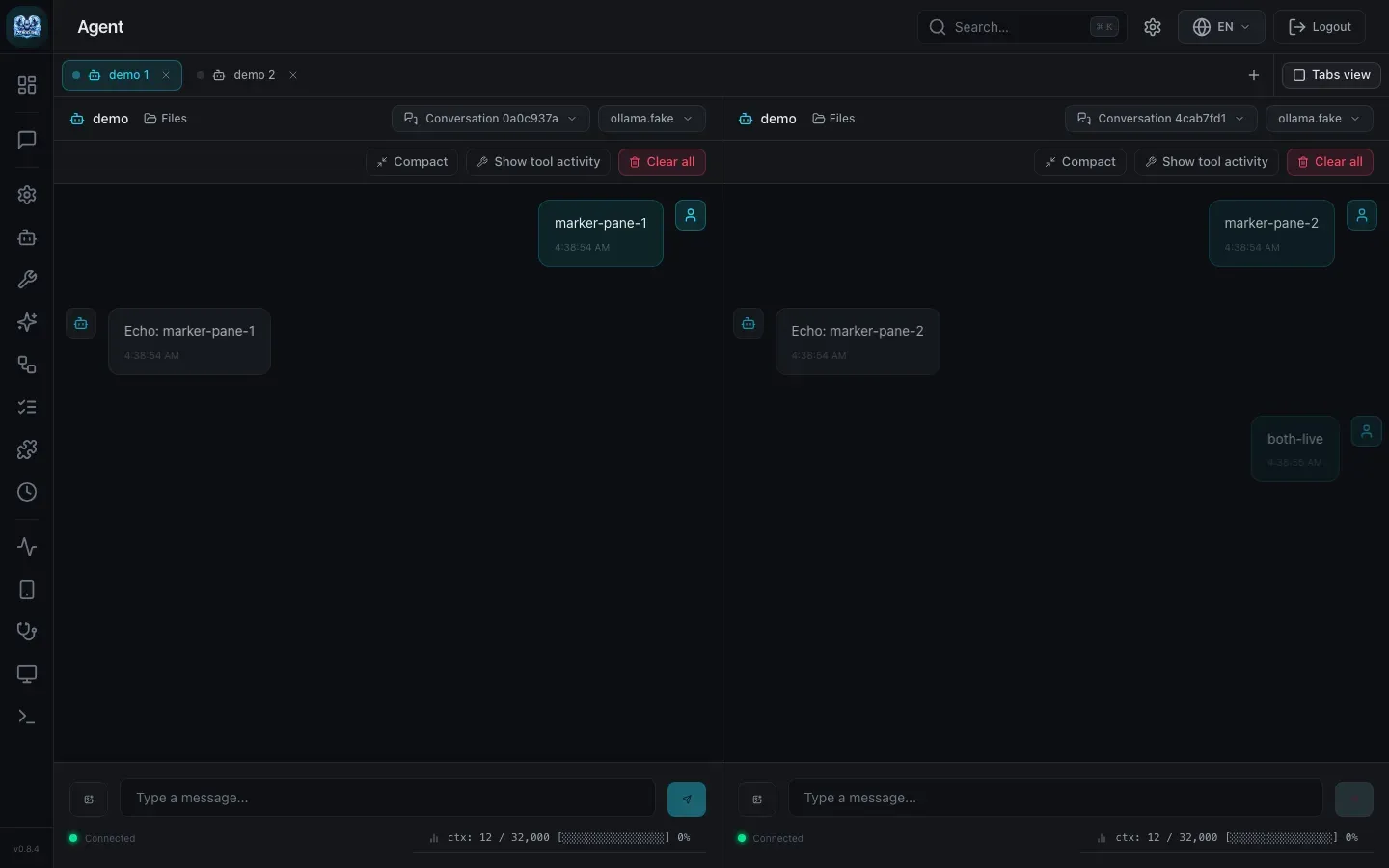
Web dashboard split view with two live conversations for the same agent, showing compact, tool activity and context counters. Screenshot from the project's PR evidence (v0.8.4 build).
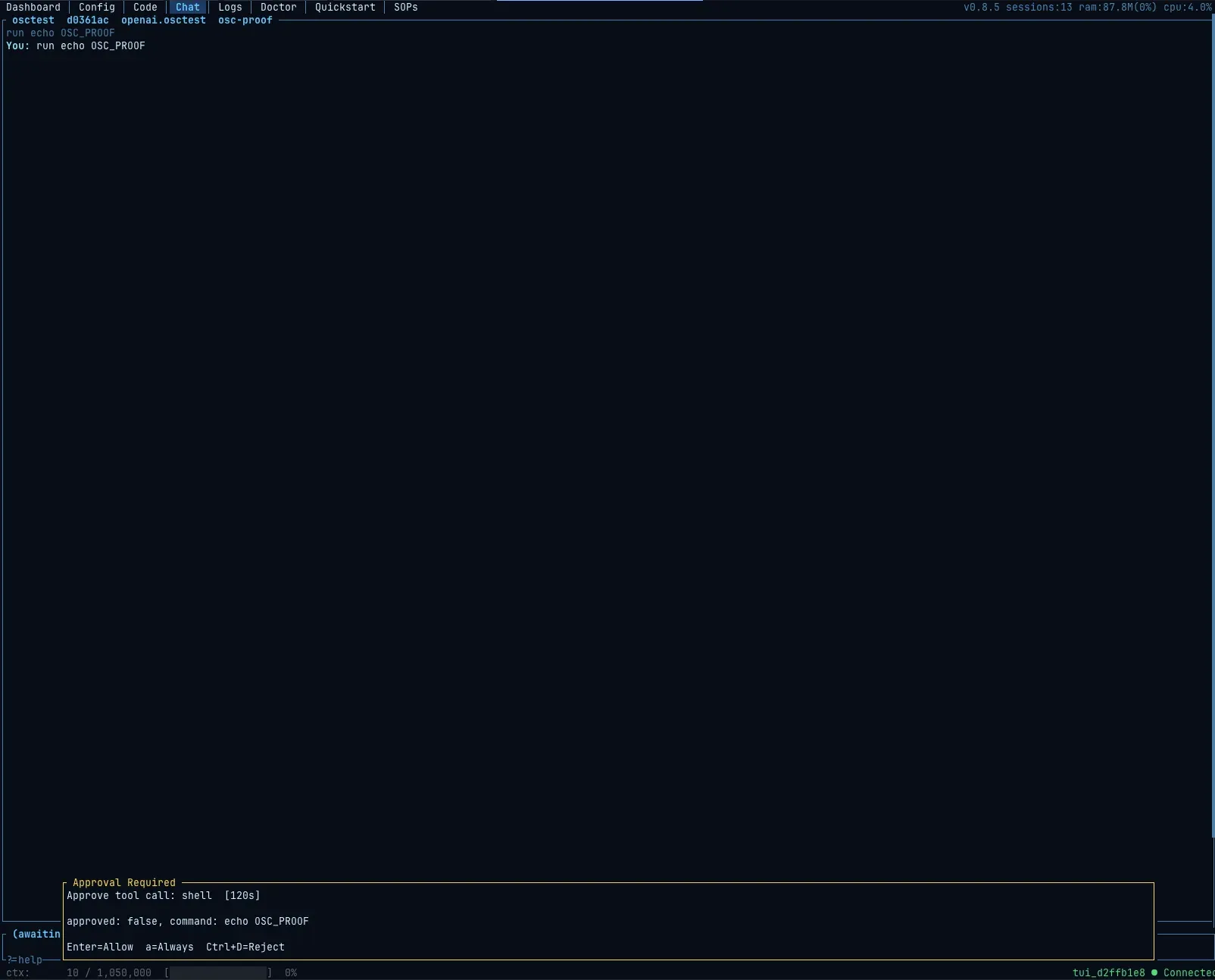
zerocode Chat view holding a shell command for operator approval under the supervised risk profile; the tab bar shows Dashboard, Config, Code, Chat, Logs, Doctor, Quickstart and SOPs.
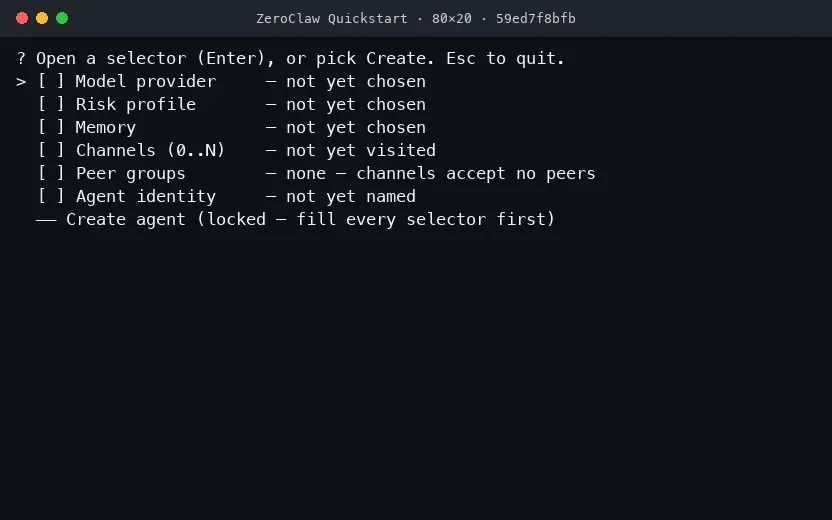
Terminal Quickstart checklist: every selector must be filled before the Create agent step unlocks.
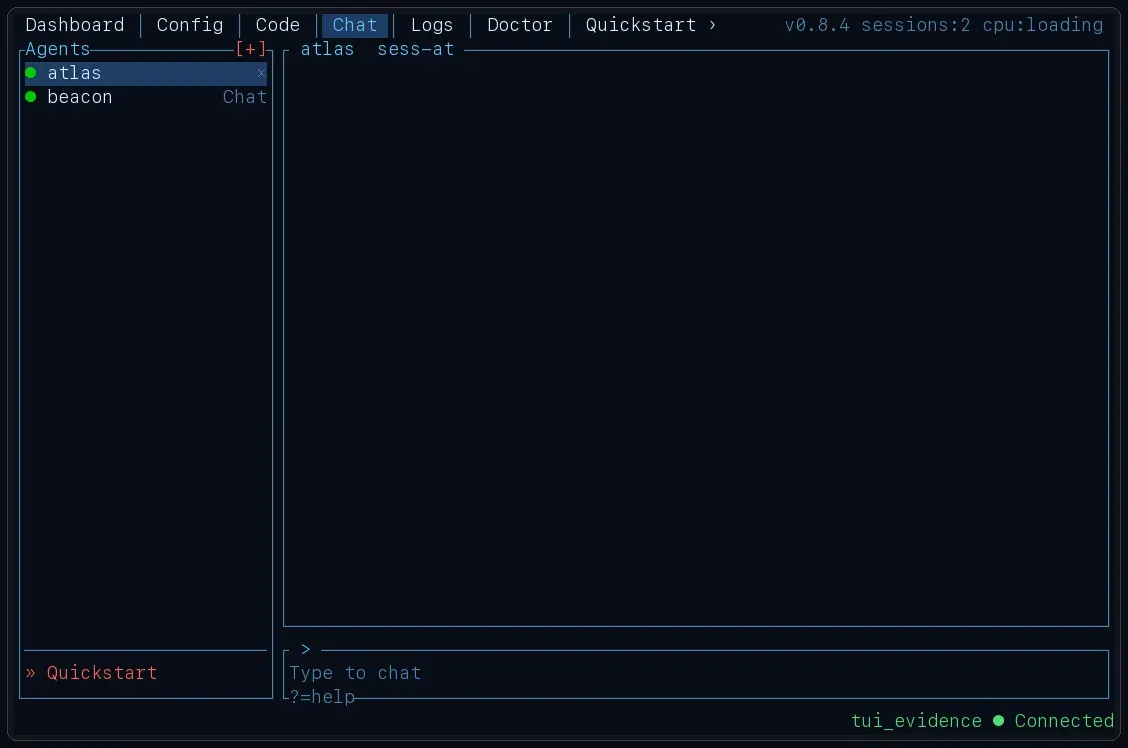
zerocode with two agents running under one daemon, selectable from the Agents sidebar.
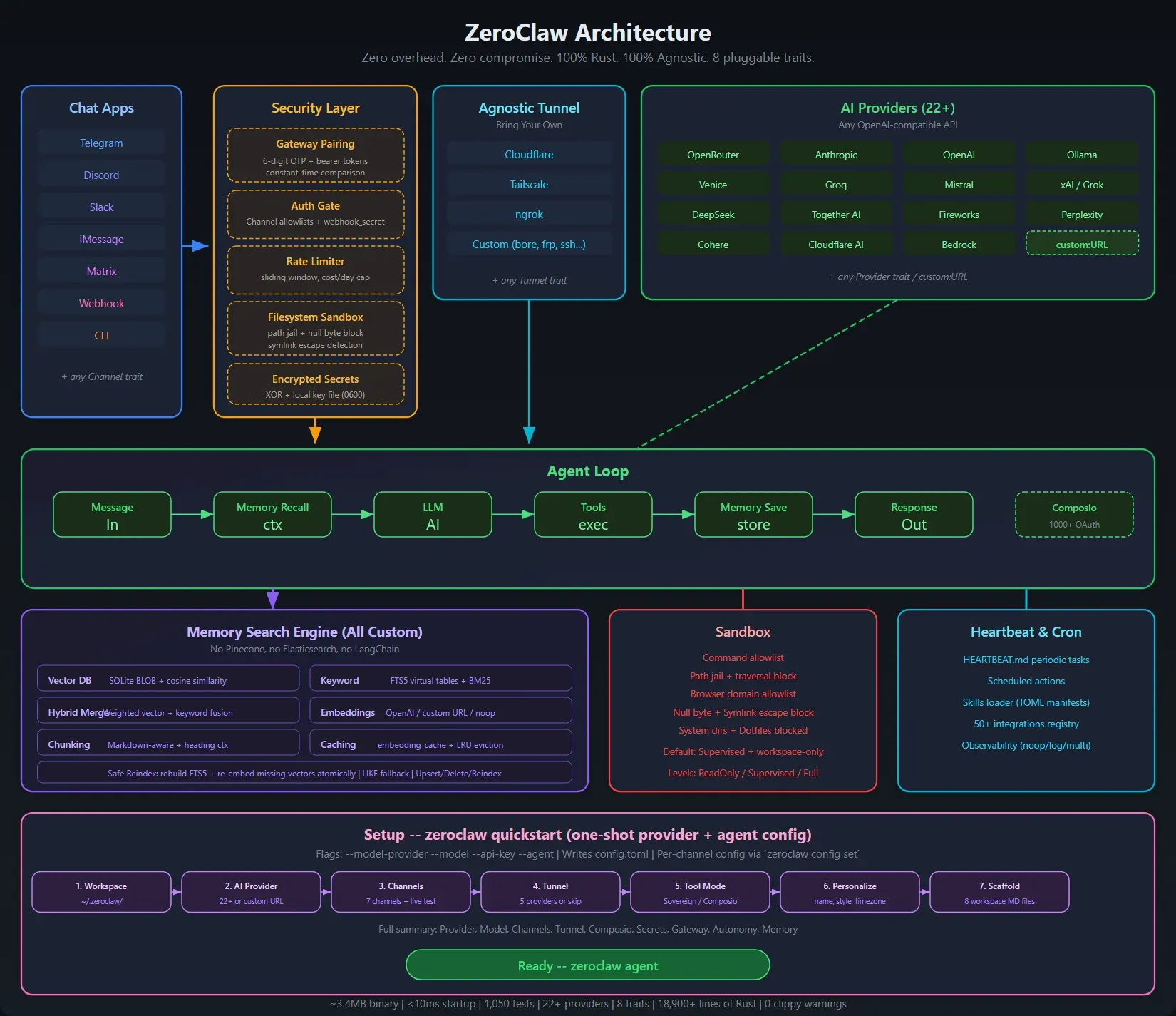
Official architecture figure from the repository docs assets, rendered from SVG. It predates v0.8 and shows older counts, such as 22+ providers and a seven-step setup.
Source: official ZeroClaw project page.
Key capabilities
- Single Rust binary The runtime is one native executable with no Node, JVM or Python dependency. The website quotes a CLI cold start of about 12 ms on Apple Silicon and memory use below a browser tab; those are project figures, not independent measurements.
- Guided quickstart
zeroclaw quickstartwalks through model provider, risk profile, memory, channels, peer groups and agent identity, then writes a working config. The same flow runs from the CLI, from zerocode and from the web gateway, and produces identical configuration. Scripted flags such as--model-provider,--modeland--agentcover unattended setup, as documented in the quickstart guide. - Pluggable model providers Providers are configured as typed aliases under
[providers.models.<type>.<alias>]. The website lists more than 70 providers, including Anthropic, OpenAI and Google Gemini, plus local runtimes such as Ollama, LM Studio, llama.cpp and vLLM, and any OpenAI-compatible endpoint. Fallback chains and routing keep an agent answering when one provider fails. OpenAI Codex subscription auth and Claude setup-token auth are supported through stored auth profiles; see the provider overview. - Thirty-plus chat channels One agent can answer across Telegram, Discord, Slack, WhatsApp, Signal, Matrix, Mattermost, iMessage, email, IRC, Nextcloud Talk, LINE, webhooks, voice and the local CLI, among others listed in the channels overview. Every inbound message lands in the same agent loop. iMessage needs macOS 11 or later, and each channel needs its own bot token or account set up on the platform side.
- Supervised autonomy by default Each agent references a risk profile with one of three levels:
readonly,supervised(the default) orfull. Under supervised mode low-risk tools run, medium-risk actions such as writing inside the workspace or allowed shell commands ask the operator, and high-risk actions are blocked. Approval prompts arrive on the channel that started the conversation, for example inline buttons in Telegram. A YOLO mode removes the gates for trusted development machines only. Details are in the autonomy documentation. - OS-level sandboxing Tool invocations can be wrapped in a sandbox that confines filesystem access to the workspace. On Linux the auto selection tries Landlock (when compiled in) and then Firejail, with Bubblewrap available by explicit choice; macOS uses Seatbelt; Docker can act as the runtime boundary. Windows has no OS-level backend, which matters for Windows deployments. The sandboxing page lists the compile features each backend needs.
- Tool receipts and command policy Command allowlists and workspace scoping sit in front of every tool call. Optional HMAC-SHA256 tool receipts add evidence for successful tool results, passed back with the conversation, so a later reviewer can check what actually ran.
- Gateway, REST API and web dashboard The gateway exposes HTTP and WebSocket endpoints on port 42617 for the dashboard, third-party tooling and the CLI, which all drive the same configuration core. A running gateway serves an OpenAPI explorer at
/api/docs; authenticated calls use a pairing code printed at daemon start and a derived bearer token; the dashboard covers chat, memory, config, cron and tool inspection. The gateway API page notes that the OpenAPI inventory does not yet list every route. - zerocode terminal interface Zerocode is the terminal UI with Dashboard, Config, Code, Chat, Logs, Doctor, Quickstart and SOP views. It connects to the daemon over a Unix socket or Windows named pipe, or over WebSocket Secure for a remote host. See the zerocode docs.
- Memory with selectable backends Conversation and agent memory default to SQLite with hybrid keyword and vector retrieval and no external service. The architecture decision records also list PostgreSQL, Qdrant, Lucid and Markdown stores, plus
noneto disable persistence. - SOP engine for event-driven work Standard Operating Procedures are deterministic runs with trigger matching, approval gates, resumable state and audit records. Authenticated webhooks, MQTT, filesystem events, AMQP and cron are wired triggers today; peripheral and calendar triggers are defined but not yet routed to a live source, according to the SOP documentation.
- MCP client with per-agent scoping ZeroClaw connects to external Model Context Protocol servers and namespaces their tools as
server__tool. Defining a server grants nothing: an agent only reaches servers listed in itsmcp_bundles, and deny entries win. The MCP page covers configuration through the gateway, zerocode orzeroclaw config set. - Skills and multi-agent runtime Skills are reusable instructions with optional tool definitions, loaded from built-in, per-agent workspace and shared bundle locations. Several agents can run under one daemon with their own provider, risk profile and channels, and the website lists A2A discovery as shipped in the v0.8 runtime.
- Hardware peripherals A
Peripheraltrait exposes GPIO, I2C, SPI and USB to the agent on Raspberry Pi, STM32 Nucleo, Arduino and ESP32 boards, with serial, native and probe-rs transports. macOS has no native GPIO, so a USB-attached board is required there. Setup guides are under Hardware. - WASM plugins A plugin host built on Wasmtime runs tool and channel plugins from a registry that publishes sha256 digests and checks manifest signatures against trusted publisher keys. Plugin support needs the
plugins-wasmbuild feature: current release archives are built without it, while a source build with--preset fulland theall-featurescontainer image include it. - Editor integration over ACP The Agent Client Protocol channel speaks JSON-RPC 2.0 over stdio, so editors that support ACP can use a ZeroClaw agent. Permission requests travel to the client as
session/request_permissioncalls, so approvals still apply inside the editor. - Cost tracking and budgets Every token-bearing model call is written to an append-only ledger attributed to the originating agent. Daily and monthly budgets are enforced over the priced portion, and a
warn_at_percentthreshold warns before a budget is exhausted. See cost tracking. - Linux, macOS and Windows installation Linux and macOS:
curl -fsSL https://raw.githubusercontent.com/zeroclaw-labs/zeroclaw/master/install.sh | sh, orbrew install zeroclawon macOS (Homebrew keeps the workspace under$HOMEBREW_PREFIX/var/zeroclaw). Windows: the prebuilt PowerShell path in the Windows guide needs no Rust toolchain; Scoop and the MSI desktop installer are alternatives.zeroclaw service installregisters a systemd (or OpenRC) unit, a launchd agent, or on Windows a Task Scheduler task that starts at logon without automatic restart on failure. - Docker and desktop app
docker run -d -v zeroclaw-data:/zeroclaw-data -p 42617:42617 ghcr.io/zeroclaw-labs/zeroclaw:lateststarts the distroless image; thedebiantag adds a shell. The Tauri desktop app (DMG, MSI, setup.exe, AppImage, deb) adds a tray icon with dashboard and agent chat windows. - Verifiable releases Each release ships
SHA256SUMS, CycloneDX and SPDX SBOM files and a verification bundle that can be checked withgh attestation verify.
Where ZeroClaw fits
Private assistant on a home server or Raspberry Pi
Install with the shell script or the arm64 container, run zeroclaw quickstart, pick a provider and keep the default supervised risk profile, then zeroclaw service install and zeroclaw service start to keep it running. Connect one channel first, typically Telegram following the Telegram guide. Check that approval prompts arrive in the chat and that ~/.zeroclaw is on persistent storage and in your backup set.
Fully local agent with no cloud model
Run Ollama, llama.cpp, vLLM or LM Studio on the same host or LAN and register it as an OpenAI-compatible or Ollama provider alias. Keep SQLite memory local. Verify that tool calling works with the chosen model, because some small local models handle native tools poorly; the native_tools setting can switch to prompt-guided tools. Watch the context window logs, which since v0.8.7 report what filled a request that did not fit.
Team operations bot in Slack or Matrix
Configure the channel, restrict who may talk to the agent with peer groups and channel allowlists, and give the agent a risk profile with a narrow command allowlist and a dedicated workspace. Use per-agent MCP bundles so the bot only reaches the servers it needs. Before rollout, confirm that medium-risk actions produce an approval prompt and that the daily budget and warn_at_percent threshold match what finance expects.
Event-driven runbooks with SOPs
Write an SOP with a webhook, MQTT, AMQP, filesystem or cron trigger and approval gates for any step that changes state. The project's own worked example drives an update bot from an AMQP feed through to a draft pull request. Check where run state and audit entries are stored, test resumption after a daemon restart, and keep in mind that calendar and peripheral triggers are not yet routed to live sources. Start from the SOP section.
Agent-controlled hardware and IoT
On a Raspberry Pi, the native transport gives the agent GPIO access; Arduino, ESP32 and STM32 Nucleo boards connect over USB serial or probe-rs. Expose only the pins and tools a task needs and keep hardware actions in the medium-risk tier so they require approval. Test failure behaviour, such as a board unplugged mid-run, before leaving the agent unattended.
Coding agent in the terminal or editor
Use the Code view in zerocode, or connect an ACP-capable editor to the agent over stdio. Scope the workspace to the repository, keep shell commands on an allowlist and enable an OS sandbox on Linux or macOS. Compare the agent's tool receipts against the actual changes in the working tree during the first sessions.
Install
curl -fsSL https://raw.githubusercontent.com/zeroclaw-labs/zeroclaw/master/install.sh | shReviews of ZeroClaw
Be the first to share your experience with ZeroClaw.
Write a review
Loading review form…
Alternatives to ZeroClaw
 OpenClawOpenClaw is an MIT-licensed AI assistant that runs as a Gateway on your own machine or server, connects to Telegram, WhatsApp, Slack, Discord, iMessage and other channels, and keeps memory and credentials on hardware you control.
 Hermes AgentMIT-licensed agent from Nous Research that runs in a terminal, desktop app, browser or chat apps. It keeps curated memory, writes and refines its own skills, schedules jobs and works with OpenRouter, Anthropic, OpenAI, local or Nous Portal models.
 nanobotMIT-licensed personal AI agent from HKUDS that runs as a local or server gateway, answers in a browser, terminal or chat apps, works with files, shell, web and MCP tools, keeps long-term memory and runs scheduled automations.